

katra


A committed, rich-component dev log you write as you build — for a developer working solo or alongside a coding agent — and the memory that makes spec-driven agentic development work. Markdown entries with embedded interactive components, stamped automatically with the commit and diffstat they describe, served as a live, auto-reloading page.
It exists to make one workflow reliable: chronicle the work as it happens — the why, the dead ends, the screenshots and animations — and never lose a draft to a "promote" step that gets skipped.
The same store is what keeps an agent effective across sessions: designs land as committed specs, tasks point at them, and a session starting cold reads the spec instead of re-deriving intent from a conversation that no longer exists. That loop is the agent workflow below.
katra init --install-hook        # store + portable Git auto-stamp
katra new "Reworked the swing"   # start a draft (a markdown file)
katra capture shot.png           # drop a screenshot into it
katra compare before.png after.png
katra serve                      # live page on the LAN, reloads as you write
git commit -m "…"                # the draft is stamped with this commit
The one idea
A draft is an entry with no commit hash. That is the entire state machine.
It appears in the In Progress panel the moment you create it. There is no scratch file, no separate document, no "publish" toggle. Stamping it — adding the hash and the diffstat — is what drops it into the log.
Everything else follows from that. Nothing can get stranded in a buffer you forgot to promote, because there is no buffer. The log ends up in the order you actually worked, including the parts that did not pan out, which is the half a squashed history always loses.
The viewer
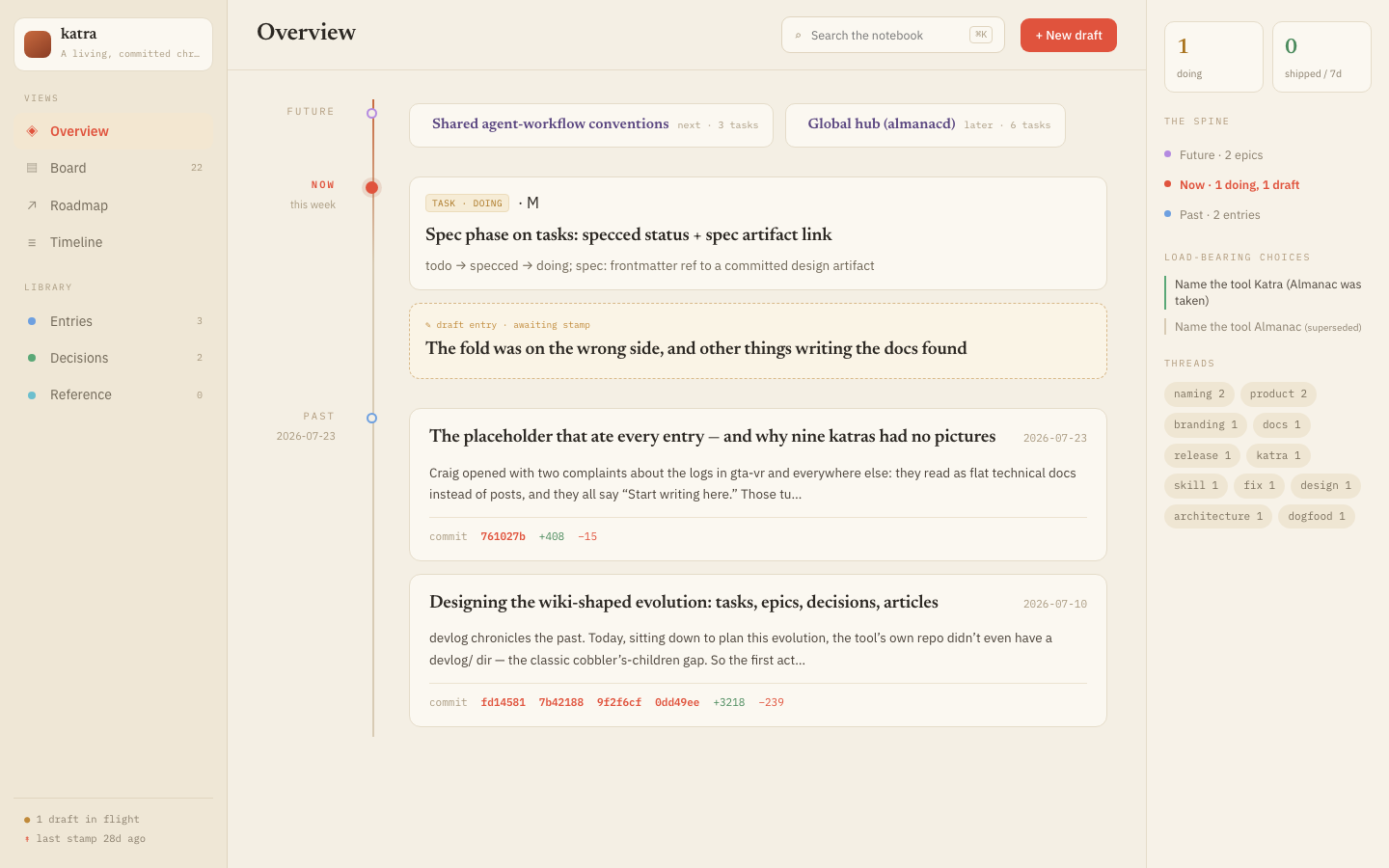
katra serve renders the store as a live page — no build step, no static
site to regenerate while you write. The spine down the middle is the log in
the order it happened: future epics, the entry in flight right now, then the
past. The right rail surfaces what a flat file list buries — decisions that
are still load-bearing, and which tags a stretch of work threads through.
More screenshots
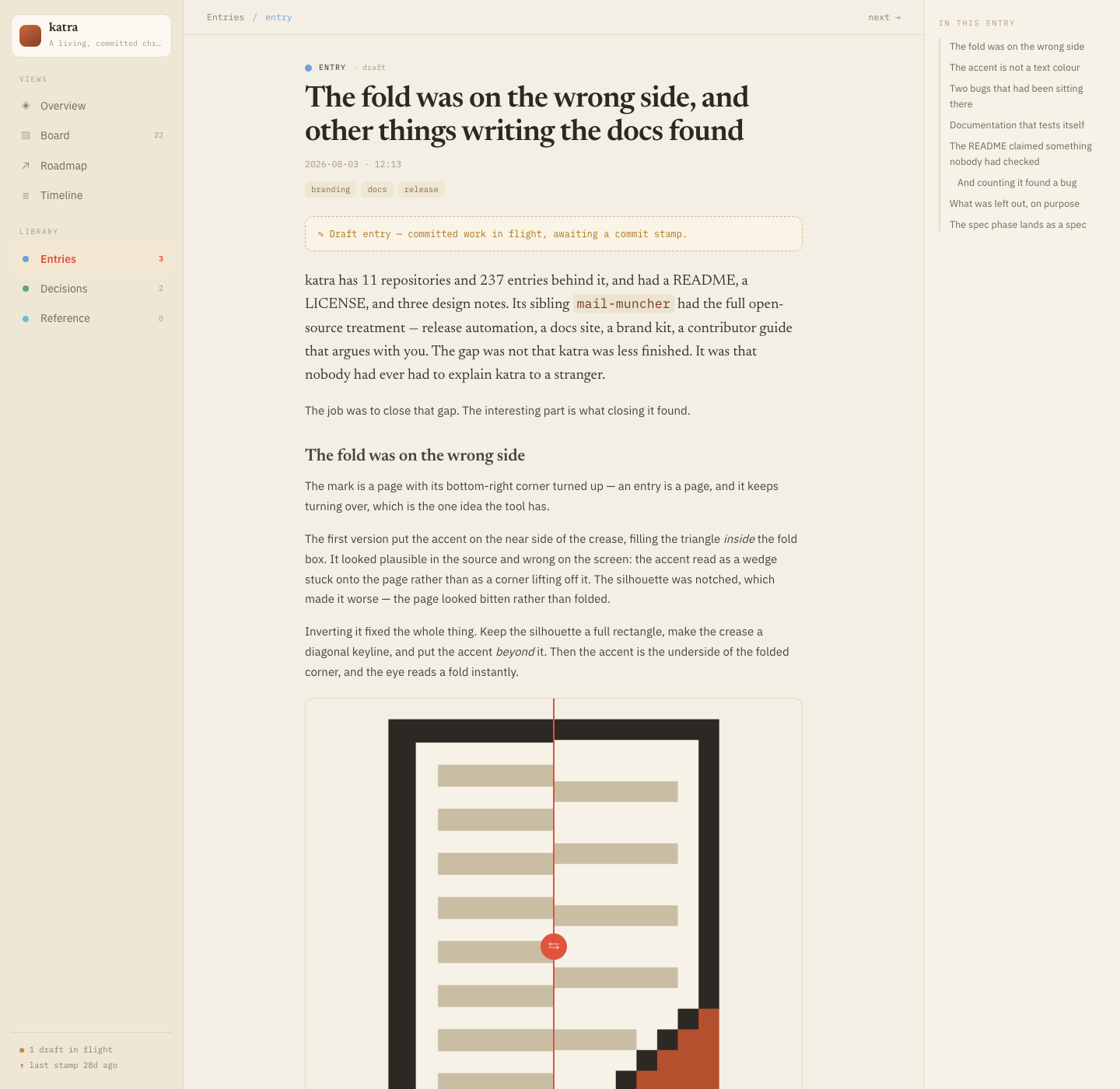
An entry, open — this one shipped mid-draft with a before/after slider
comparing two icon-mark directions, dragged in with katra compare:
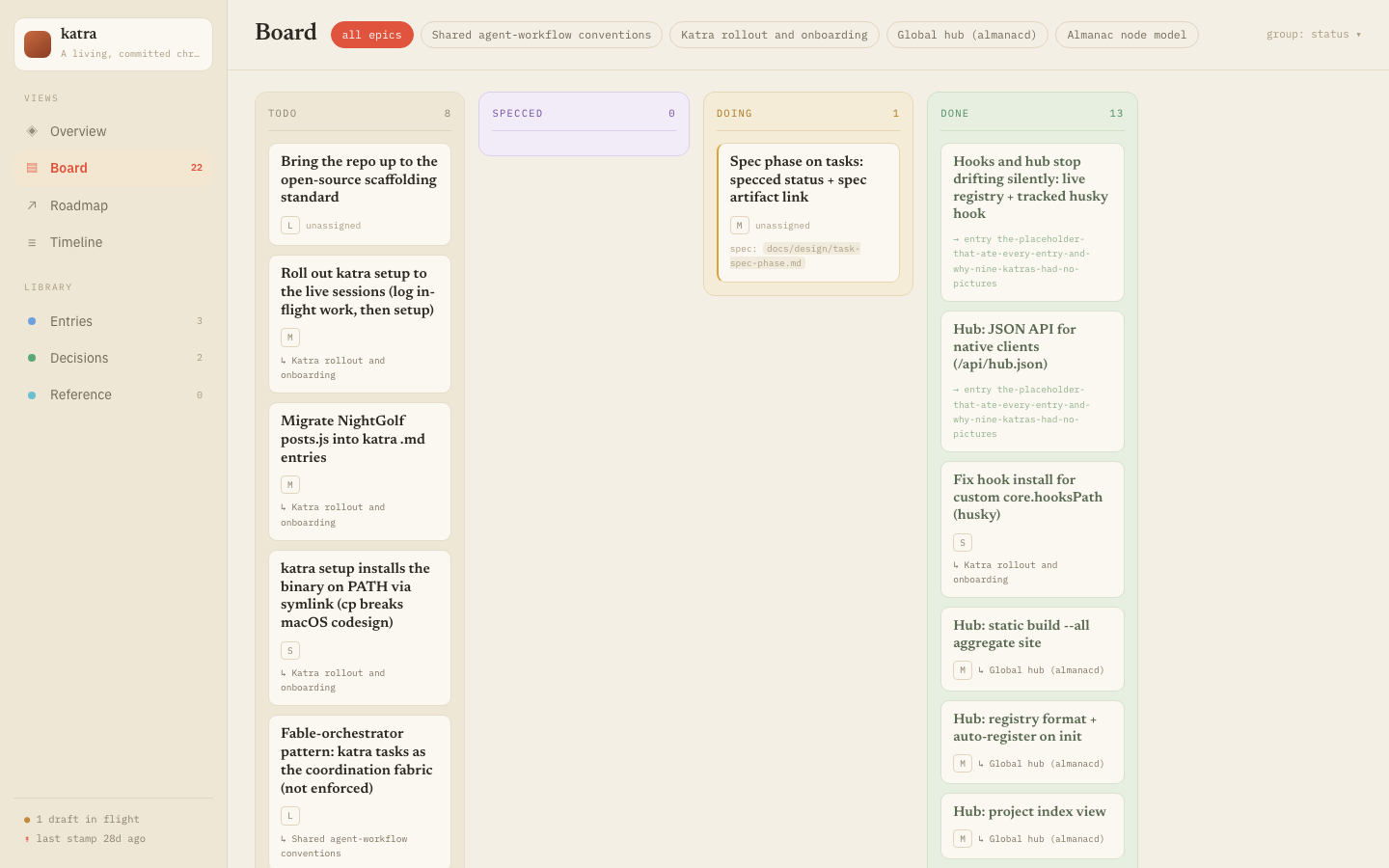
The board, grouped by status — specced is its own column between todo and
doing, for the tasks that have a committed design and nobody building them
yet:
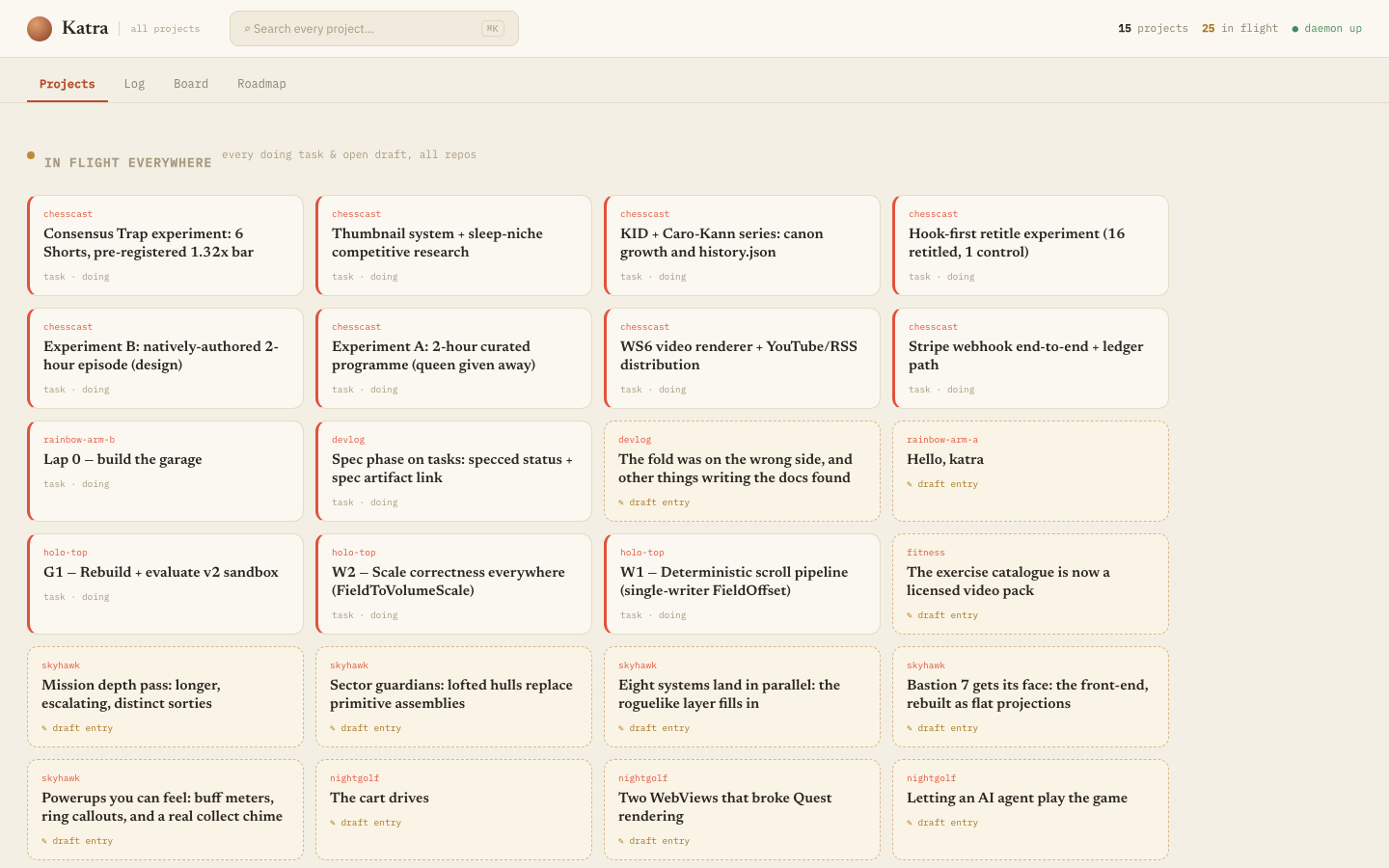
The hub, one page across every registered project on the machine — this is the maintainer's own, 14 projects and 25 things in flight at once, none of them re-typed anywhere:
The problem
You finish a hard week. The commits say fix streaming, wip, actually fix streaming. Six months later you need to know why the spawn budget is
nearest-first, and the answer is not in the diff — it was in your head, and in a
screenshot you no longer have.
The usual answers are all bad in the same way: they are a second job.
- A
CHANGELOG.mdrecords what shipped, not what you learned, and it is written at release time from the diff you are trying to explain. - A wiki or a Notion page is not in the repo, so it drifts from the code immediately and is not there when someone clones.
- A blog post is written afterwards, from memory — which is exactly when the detail you needed is gone.
- Conventional commits give you a machine-readable what and no room for a why, a picture, or an alternative you rejected.
The common failure is that all of them are a step after the work, and any step after the work gets skipped when the work runs long — precisely when the log would have been worth most.
katra's bet is that the log has to be a side effect of working rather than a task that follows it. So the draft is created when you start, it accumulates screenshots and reasoning while you go, and the commit you were going to make anyway is what publishes it.
The agent workflow
This is what katra is built around, and the reason its shape is odd compared to a static-site generator: it exists to keep two things from being lost between agent sessions — the design an agent is meant to build from, and the record of how the build actually went.
An agent that logs at the end writes a summary of a diff — the one thing the diff already tells you. What is lost is everything before the final state: the approach that failed, the measurement that changed the plan, the picture of the bug. So katra pushes the log into the work. The common contract is the CLI sequence in The Katra workflow: declare the epic/task, attach and read a committed spec when one is warranted, open the draft before implementation, record decisions and evidence as you go, then stamp and close. It works from Codex, Claude Code, MCP, or a plain shell.
katra init --install-hook
That creates the Katra and installs the harness-neutral Git post-commit
auto-stamp. Claude Code users can additionally run katra setup, which
installs its skill and seven session hooks. With that optional adapter:
SessionStartreports the active draft, unresolved memory, or in-flight changes that need reconciling.PostToolUserecords every file the agent edits.Stopblocks the turn from ending if authored code changed and nothing declared what it was for.PreToolUseblocks agit commitwhose staged code has no reconciliation receipt.- Your commit fires the post-commit hook, which stamps the draft.
The gate is the part people react to, so it is worth being precise about when it fires. It blocks only when the turn authored code that is still present in the working tree, outside the katra directory, and nothing declared its purpose. A conversational turn never blocks. An edit-then-revert nets to nothing and never blocks. Someone else's pre-existing dirt is not your work and never blocks. A blocked turn never blocks twice for the same unchanged work.
To satisfy it — <task> is a slug from katra task list (or create one with
katra task new):
katra reconcile --advance <task>   # this moves a task forward
katra reconcile --close   <task>   # this finishes one
katra reconcile --no-task --reason "…"
katra reconcile status             # what does the gate want right now?
If you are trying katra out, use katra setup --no-gate. You get the
nudges and the auto-stamp without anything blocking a commit, and you can turn
the gate on later by re-running katra setup. A blocking hook in every
repository is a real change to how committing feels, and it should be a choice
made on purpose.
There is also an MCP server (katra-mcp) for clients that would rather call a
tool than shell out. Its fifteen tools cover entries plus tasks, task specs,
epics, decisions, and articles. Full detail: The Katra workflow
and Agents.
When the first release ships, the official MCP Registry will be able to
discover the same stdio server through a narrow OCI package. That image
contains only katra-mcp and git; it exists because the registry needs an
installable package, not because a container is a better way to use Katra. A
registry client still has to expose the repository working tree to it. For
direct use, install the native binaries above.
Spec-driven, not spec-derived
Current-source feature: the installed v0.1.0 CLI does not yet have
task spec,task new --spec, or thespeccedlist-filter help value. Build current source withmake allfor this phase until the next release; the release checklist now asserts all three against the packaged binary.
A task can carry spec: — a node slug in the katra (a decision, an article, an
entry) or a path relative to the repository root, resolved the same way as a
[[wikilink]]. katra task spec <slug> <ref> attaches it, and moves the task
from todo (or empty) to a new status, specced: a design exists, committed,
and nobody has started building it.
katra task new "Cache swap"                           # todo, slug: cache-swap
katra decide "Cache invalidation: TTL, not events"   # write the design
katra task spec cache-swap cache-invalidation-ttl-not-events   # by node slug
katra task start cache-swap                          # -> doing, implement from it
The benefit is implementation efficiency and it compounds across sessions: an
agent starting cold — new context window, different day — reads the spec
instead of re-deriving intent from a conversation that no longer exists.
katra task list --status specced is the worklist. Nothing requires a spec;
todo → doing is still legal, and most tasks don't warrant one. specced is
just a place to stand between "we should do this" and "someone is doing it,"
for the tasks where a design is worth writing down first — and the entries you
write while implementing become the other half of the record: what the spec
proposed against what actually happened, dead ends included.
Optional Claude Code memory ingest
Claude Code keeps native per-project memory. katra can ingest it into a private
ledger, so the log gets the play-by-play without anyone re-typing it. Only
metadata.type: project memories are admitted by default — not user (who you
are), not feedback (how you like to be worked with), because neither belongs
in a committed log. Anything matching a secret detector, or a term you list in
sensitiveTerms, is quarantined rather than offered.
The ledger itself lives at katra/.state/memory-ledger.json and is
deliberately local and gitignored — raw agent memory is unreviewed text
about you and your machine, and it should never reach a shared branch by
default; only the prose you choose to write from it does. So "review" means the
katra memory scan | status | resolve | ignore queue on the machine that
produced it: a teammate cloning the repo gets your entries, not your ledger.
Alternatives
Read this before adopting. Several tools do part of this, and some of them are a better fit than this one.
| Tool | Use it instead when |
|---|---|
| Keep a Changelog + release-please | You want a release-facing record of what shipped, for users. That is a different document from a working record of why, and most projects should have both. |
| adr-tools / Log4brains | Architecture decisions are the only thing you want to record. ADRs are a tighter, more disciplined format; katra's decide is a deliberately lighter-weight cousin. |
| Obsidian, Logseq, a wiki | The notes are personal and span projects, and being in the repo is not the point. katra is per-repository and committed on purpose. |
| Hugo, Jekyll, Astro | You are writing a public blog. They have themes, feeds, taxonomies and an audience; katra has none of those and does not want them. |
| Notion, Linear, Jira | You need assignees, permissions and a shared team workflow. katra's tasks exist to be linked from entries, not to run a team. |
git log and good commit messages | Honestly, quite often. If your commits already carry the reasoning and you never need a picture, you do not need this. |
What none of them do, and what this tool exists for: keep the log inside the repo, written while the work happens rather than after it, with screenshots and interactive components inline, published by the commit you were making anyway. If you do not need all four, one of the above will serve you better and has years more mileage.
Install
Binaries ship for macOS and Linux, amd64 and arm64. There is no Windows build; Windows is untested and unsupported.
go install
The primary channel, and the only one that works before the first release ships (see Homebrew and Download a binary, below). The right path if you already have Go 1.25 or newer:
go install github.com/craigjmidwinter/katra/cmd/katra@latest
go install github.com/craigjmidwinter/katra/cmd/katra-mcp@latest
Install both. katra-mcp is not optional extra tooling — the skill and every
MCP client wiring assume it sits beside katra on your PATH.
A go install build reports the version you installed —
go install …@v0.1.0 reports v0.1.0, and installing from a working tree
reports a pseudo-version naming the commit. Release binaries and make build
carry a link-time stamp instead, which additionally marks a dirty tree.
Build from source
git clone https://github.com/craigjmidwinter/katra
cd katra
make install        # both binaries into GOBIN, version stamped
make build writes into ./bin/ rather than the repo root, because katra
dogfoods itself and ./katra is the directory its own log lives in.
make snapshot builds the full set of release archives locally (requires
goreleaser) if you want to check what a release would
contain.
Homebrew
No release has shipped yet, so this tap has nothing to install until v0.1.0 does — cutting one is what RELEASING.md walks through, and once it happens this becomes accurate:
brew install craigjmidwinter/tap/katra
That taps craigjmidwinter/homebrew-tap
and installs prebuilt binaries. brew upgrade katra tracks new releases.
Download a binary
Same trigger as Homebrew — these archives are produced by the release
workflow, so they exist starting with v0.1.0, not yet. Every
release, once one
exists, ships archives for macOS and Linux on both amd64 and arm64, each
containing both katra and katra-mcp, plus a checksums.txt and a
signature over it.
The snippet below is for a macOS/Linux shell (bash/zsh) — there is no Windows
build, and the uname mapping it relies on would just produce a garbage URL
on one.
# Latest release, without the leading v. Set this by hand to pin a version.
VERSION=$(curl -fsSL https://api.github.com/repos/craigjmidwinter/katra/releases/latest \
  | sed -n 's/.*"tag_name": *"v\{0,1\}\([^"]*\)".*/\1/p')

OS=$(uname -s | tr '[:upper:]' '[:lower:]')     # darwin | linux
ARCH=$(uname -m | sed 's/x86_64/amd64/;s/aarch64/arm64/')

curl -fsSLO "https://github.com/craigjmidwinter/katra/releases/download/v${VERSION}/katra_${VERSION}_${OS}_${ARCH}.tar.gz"
tar xzf "katra_${VERSION}_${OS}_${ARCH}.tar.gz" katra katra-mcp
sudo install -m 0755 katra katra-mcp /usr/local/bin/
On macOS, a binary you downloaded yourself is quarantined by Gatekeeper. Clear
it with xattr -d com.apple.quarantine /usr/local/bin/katra, or use the
Homebrew install above, which does this for you.
Verify what you downloaded
curl -fsSLO "https://github.com/craigjmidwinter/katra/releases/download/v${VERSION}/checksums.txt"

# Linux
sha256sum --check --ignore-missing checksums.txt
# macOS
shasum -a 256 --check --ignore-missing checksums.txt
Then the signature over checksums.txt. Releases are signed keylessly with
cosign — there
is no public key to fetch and no private key anyone has to guard. The signing
certificate is issued to the release workflow's own GitHub OIDC identity and
recorded in the public Rekor transparency log, so what you are checking is
"this was built by release.yml in this repo, from a tag":
curl -fsSLO "https://github.com/craigjmidwinter/katra/releases/download/v${VERSION}/checksums.txt.sig"
curl -fsSLO "https://github.com/craigjmidwinter/katra/releases/download/v${VERSION}/checksums.txt.pem"

cosign verify-blob \
  --certificate checksums.txt.pem \
  --signature checksums.txt.sig \
  --certificate-identity-regexp '^https://github\.com/craigjmidwinter/katra/\.github/workflows/release\.yml@refs/tags/' \
  --certificate-oidc-issuer https://token.actions.githubusercontent.com \
  checksums.txt
Upgrading
Re-running the go install ...@latest commands above replaces the binaries in
place — verified: the second run relinks both, same as the first. Once a
release exists, brew upgrade katra does the equivalent for the Homebrew
channel.
Uninstalling
katra setup creates five things; each has its own removal.
- The git post-commit hook.
katra hook uninstall. - The hub launchd agent, if you ran
katra hub install.katra hub uninstallreverses it —launchctl unloadplus deleting the plist. - The Claude Code skill.
rm -rf .claude/skills/katra/(it holds one file,SKILL.md). - The hooks block in
.claude/settings.json. Remove thekatra agent-hookentries under theSessionStart,UserPromptSubmit,PostToolUse,Stop,PreCompact,SessionEndkeys, andPreToolUsetoo if you installed the commit gate — then drop any of those keys left empty.katra setuponly ever added entries under those keys; anything else there is yours. - The registry entry, in
~/.config/katra/registry.yml. There is no explicit deregister command, and none of the above removes it — it lives as long askatra/config.ymldoes, which is usually what you want, since uninstalling the automation is not the same as abandoning the log. If you do deletekatra/, the entry self-prunes the next timekatra hub listorkatra hub servereads the registry — including a hub daemon already running.
Nothing above touches katra/ itself — the katra/ directory is your data,
and it stays.
Quickstart
About five minutes, from inside a git repository.
-
Set it up without tying the repository to a coding harness.
katra init --install-hook✓ katra created at katra entries/ — one markdown file per post media/ — images, gifs, video, html embeds config.yml — title, accent, hook behaviour registered with the global katra registry (…) ✓ post-commit hook installed at .git/hooks/post-commitCreates
katra/, a welcome draft, the portable Git auto-stamp hook, and a hub registration. Claude Code users can layer onkatra setup --no-gatefor session nudges orkatra setupfor nudges plus its commit gate. -
Add to the welcome draft, then drop in a screenshot.
katra append --entry hello-katra "The first reason this project needs a chronicle."✓ appended to hello-katraOptional, and worth doing for real once you have something to show: capture any image on your machine (
screencapture -x shot.pnggrabs one on macOS if you don't).katra capture ~/Desktop/swing.png --entry hello-katra --caption "first visible proof" # swap in your own path✓ imported media/swing.png ✓ added to hello-katra -
Serve it.
katra servelocal: http://localhost:8080/ network: http://192.168.1.23:8080/ (one line per LAN interface) watching katra — open tabs reload on change. Ctrl-C to stop.Leave that running; open tabs reload as you write.
-
Commit as usual.
git commit -m "Reworked the swing arc"The post-commit hook stamps the draft with that commit's hash and diffstat. Without the hook:
katra stamp(HEAD), orkatra stamp --hash a1b2c3,d4e5f6for a chapter of several commits. -
Confirm it landed.
katra list2026-08-20 16:06:54 Reworked the swing arc [12acf46] (+261 −0)A stamped entry, off the commit you already made — the guaranteed visible success this quickstart ends on.
To publish a static copy:
katra build --out ./site
A self-contained directory — index.html, data.json, media — with no external
requests. Host it anywhere, or open it from a USB stick.
Rich components
A component is a fenced code block whose language names it. The source stays readable and diffable; the page shows the widget.
```compare
before: media/bunker_before.png
after:  media/bunker_after.png
caption: Bunker reshape
```

```gallery
- src: media/a.png
  cap: tier one
- src: media/b.png
  cap: tier two
```

```video
src: media/horde.mp4
loop: true
```

```embed
src: media/frame-times.html
height: 480
caption: Frame time vs district count
```

```note
A callout. **Markdown** works inside it.
```

```warning
Same, with a warning style.
```
Plain  images get a lightbox for free.
An unregistered language renders as an ordinary code block. That is the compatibility rule for the format, not a fallback: an entry written against a newer katra still renders in an older one, just less prettily.
There is no chart component, deliberately. You author a self-contained HTML
figure and capture it — katra capture recognises .html and emits an embed
block — so any chart you can draw is available rather than a fixed set of types.
examples/media/frame-times.html is a worked
one, and examples/entry.md exercises every component in a
single entry (CI renders it on every push, so it cannot rot).
Adding a component is one ComponentFunc in internal/core/render.go — that is
the whole extension surface. Full reference:
docs/components.md.
On-disk layout
The files katra writes are its public API. They are markdown in your repository, readable without the tool, and they outlive it.
katra/
  config.yml        title, accent, hook behaviour, memory settings
  entries/          one .md per post
  tasks/  epics/  decisions/  articles/
  media/            images, gifs, video, html embeds
  .state/           machine state — ledger, receipts (gitignored)
---
title: Reworked the swing arc
date: "2026-08-03"
tags: [physics, gameplay]
hash: 5ddc0f5          # or  hashes: [a, b]  for a chapter of commits
stat: {f: 12, a: 340, d: 50}
summary: tuned the magnus model      # optional, for the index
featured: true                       # optional → "Deep Dives" zone
cover: media/hero.png                # optional banner image
---

Markdown body. Write the *why*, not a paraphrased diff.
A directory is a katra if and only if it holds config.yml. The conventional
name is katra/; devlog/ is the pre-rename name and is still discovered, so
older repositories keep working without migration.
The compatibility rules a consumer can rely on: an unknown frontmatter key is
ignored, an unknown fence degrades to a code block, and an absent type means
entry. Full contract: docs/format.md.
Commands
| Command | What it does |
|---|---|
katra setup [--no-gate] | Add the Claude Code skill/hooks plus portable Git auto-stamp and hub registration. Idempotent. |
katra init [--title T] [--install-hook] | Scaffold a harness-neutral Katra, with optional Git auto-stamp |
katra new "Title" [--tags a,b] [--featured] | Start a draft entry |
katra append [text] [--entry slug] [--file -] | Append markdown to a draft |
katra capture <file> [--caption C] | Import media into the active draft |
katra compare <before> <after> | Add a before/after slider |
katra stamp [--hash H…] [--closes task] | Stamp the draft with commit + diffstat |
katra list [--drafts] [--json] | List entries |
katra serve [--port N] | Live, auto-reloading page on the LAN |
katra build [--out dir] [--all] | Build a static site |
katra hook install | uninstall | Manage the auto-stamp git hook |
katra doctor | Find dangling media, parse errors, entries with no visual, stale epics |
katra task | epic | decide | article | The node model |
katra task spec <slug> <ref> | Point a task at its committed spec (todo/empty → specced) |
katra reconcile … | Declare what the current work is for |
katra memory scan | status | Claude Code memory ingest |
katra hub serve | list | scan | install | Across every registered katra |
Full reference: docs/cli.md.
Git integration
katra stamp reads git to resolve the hash and compute the diffstat
(--numstat). The optional post-commit hook removes the "forgot to stamp"
failure mode entirely:
katra hook install
After each commit it stamps the active draft with that commit, skipping its own
bookkeeping commits and commits that only touch the katra. By default the stamp
is left as a working-tree change for you to commit; set autoCommit: true in
config.yml to have the hook commit it itself.
The hook honours core.hooksPath. Under husky it installs to the tracked
.husky/post-commit, not the generated .husky/_/, which husky rewrites on
every npm install — and whose shim exits before anything appended to it would
run.
The hub
A katra is per-repository, which is right for the log and wrong for "what have I been doing?".
katra hub serve          # http://localhost:4200 — every registered katra
katra hub install        # run it at login (macOS launchd)
One project index, a cross-project board and roadmap, a merged chronological
log, and every project's own viewer under /p/<id>/. The registry lives at
~/.config/katra/registry.yml and is pruned as a side effect of reading it, so
a project you deleted stops appearing without a cleanup step.
katra build --all produces the same thing as a static directory. There is no
hosted service, no account, and no sync. docs/hub.md;
contrib/ has the launchd agent and a systemd unit.
Contributing
PRs are welcome — CONTRIBUTING.md has the setup, the test and lint commands, and the invariants a change should hold. RELEASING.md covers how a release actually ships, for anyone cutting one.
Status and scope
Pre-1.0, and written by one person for their own projects. The concrete version of that, since "battle-tested" is easy to say and easy to check: 11 repositories, 237 entries, over four months. Usage is lumpy rather than daily — one heavy month (24 of July's 31 days had an entry written) against three sparse ones before it.
Nobody else has used it yet, so every rough edge you hit is probably one nobody has hit.
Two things that argue for it and one that argues against, all checkable:
- The on-disk format is the stable part. It is markdown, and the compatibility rules above are held to deliberately.
- The tool is used to build itself, so
katra/in this repo is a real sample of its output rather than a demo. - Keeping it wired across that many repos turned out to be a real problem.
An audit in August found 40 unstamped drafts, three projects that had never
stamped an entry at all, and the agent hooks broken or missing in 9 of the 11.
Most of that was katra's fault — the hook installer wrote into a directory
husky regenerates, and the hub snapshotted its registry at startup — and both
are fixed. But the honest read is that the automation was quieter about
failing than it should have been, and
katra doctoris worth running.
Command names and flags may still move.
Deliberately out of scope
- A hosted service. Your log is markdown in your repo. There is nothing to sign into and nothing to migrate off, and adding a backend would trade that away for convenience.
- A general-purpose container install. katra operates on your working tree,
your git history and your hooks. Containerising the whole tool means mounting
all three, at which point you have a worse local install. The release workflow
does build a minimal
katra-mcpOCI wrapper solely so the official MCP Registry has a package to index; it is not an alternative to the install paths above. - A theme system. The viewer is one design, with
accentas the knob. The static build is a directory you can restyle yourself if you must. - Feeds, comments, analytics. It is a log for the people in the repo.
- Diff summarization. katra will not write your entry from the diff. The diff is the thing it cannot tell you, and an auto-generated entry would be exactly the paraphrase this tool exists to avoid.
Known limitations
-
The hub's launchd agent is macOS-only as a first-class install.
contrib/systemd/covers Linux, but there is nokatra hub installfor it. -
katra serveandkatra hub servebind all interfaces, so a headset or a phone on the LAN can reach it. There is no auth. Do not run it on a network you do not trust. -
A slug change breaks inbound
[[wikilinks]]. The file path is the identity;katra doctorreports the resulting missing links, but nothing rewrites them for you. -
Media is committed. A log full of gifs is a repository full of gifs. Git LFS works, and nothing in katra knows or cares.
-
The
statdiffstat counts the whole commit, including files unrelated to the entry, and for a chapter it is the sum across commits. It is a sense of scale, not an accounting. -
katra buildoverwrites what it generates, and only that.index.html,app.js,styles.cssanddata.jsonare rewritten on every build; files you add alongside them are left alone. That combination is the trap. A generator that clobbered the whole directory would teach you to be careful with it; this one respects the file you added, which invites the reasonable conclusion that it respects your edits generally — and then discards the one edit that had to live inside a generated file.So anything hand-edited into that page — an analytics snippet, social tags, a favicon link — is silently gone on the next build, and the page still renders perfectly while whatever it powered has stopped. Keep such insertions in a step that runs after the build. Verify by checking that a fresh build plus your step reproduces the file you committed: that the page looks right proves it worked once, not that it is still working.
-
A built site has one URL, so entries have no individual ones. The viewer routes on the fragment (
#/node/<slug>), which the browser never sends to a server. Two consequences, both worth knowing before you publish a katra somewhere that matters:- Every entry shares one social card. A link to any entry unfurls as the site, not as that entry, because there is no per-entry URL for a scraper to fetch. Setting tags on the one page that exists cannot change this.
- Analytics count one pageview per visit, not per entry read. Moving between entries is a fragment change, which emits no navigation. A reader who works through twenty entries registers as one pageview, so per-entry readership is not merely inaccurate — it is absent.
These are one limitation, not two, and neither half can be fixed on its own: both need a URL per entry. Injecting head tags into the built page addresses neither — it cannot vary a card the server never routes, and it cannot emit a navigation that never happens.
Per-entry pages the server can see are planned, and every published
#/node/<slug>link will keep working when they land. Until then, a katra is a chronicle you can publish and link to, not one whose individual entries can be linked, previewed, or counted.
Documentation
Browsable at https://midwinter.io/katra/, or in this repo:
- docs/quickstart.md — install to first stamped entry.
- docs/workflow.md — the complete harness-neutral spec-to-stamp workflow.
- docs/components.md — every component, the exact keys each takes, and the recipe for charts and diagrams.
- docs/cli.md — every command and flag.
- docs/configuration.md — every
config.ymlkey, its default and its failure mode. - docs/format.md — the on-disk contract. Read it before writing a tool that consumes a katra.
- docs/agents.md — CLI, fifteen MCP tools, and the optional Claude skill, hooks, commit gate, and memory ingest.
- docs/hub.md — the registry and the cross-project views.
- docs/architecture.md — the seams, and where your change belongs.
- CONTRIBUTING.md — build, test, and the conventions the codebase holds itself to.
Runnable examples: examples/entry.md (every component in
one entry, rendered by CI), examples/config/ (a minimal
config and a fully-commented one), and
examples/media/frame-times.html (a
self-contained chart).
Acknowledgements
The wordmark is set in Fraunces by Undercase Type (Phaedra Charles and Flavia Zimbardi), used under the SIL Open Font License 1.1. Brand assets, the palette and its measured contrast ratios are in branding/BRAND.md.
License
MIT. See LICENSE.