Listed from the MCP registry; nobody on Odel publishes it.

2native SSH MCP Server
SSH-based MCP server for remote command execution and file transfer. Credentials stay local.
Runs on your machine from its package; the steps are below.
What it does
- Reads
- Writes
- High impact
At most: moves money, runs code or commands, deletes data, or sends messages for you.
What it costs
FreeOdel charges nothing per call. The publisher may charge for its own service.
Runs locally over stdio
This server isn't hosted — your MCP client launches it from a package registry. Use one of the commands below, or drop the config into your client (e.g. Claude Desktop).
Distributed as an MCP bundle (`https://github.com/daidaiJ/2native-ssh-mcp/releases/download/v1.7.0/2native-ssh-mcp-darwin-amd64.mcpb`) — download it and import the bundle in your MCP client.
Distributed as an MCP bundle (`https://github.com/daidaiJ/2native-ssh-mcp/releases/download/v1.7.0/2native-ssh-mcp-darwin-arm64.mcpb`) — download it and import the bundle in your MCP client.
Distributed as an MCP bundle (`https://github.com/daidaiJ/2native-ssh-mcp/releases/download/v1.7.0/2native-ssh-mcp-linux-amd64.mcpb`) — download it and import the bundle in your MCP client.
Distributed as an MCP bundle (`https://github.com/daidaiJ/2native-ssh-mcp/releases/download/v1.7.0/2native-ssh-mcp-linux-arm64.mcpb`) — download it and import the bundle in your MCP client.
Distributed as an MCP bundle (`https://github.com/daidaiJ/2native-ssh-mcp/releases/download/v1.7.0/2native-ssh-mcp-windows-amd64.mcpb`) — download it and import the bundle in your MCP client.
Distributed as an MCP bundle (`https://github.com/daidaiJ/2native-ssh-mcp/releases/download/v1.7.0/2native-ssh-mcp-windows-arm64.mcpb`) — download it and import the bundle in your MCP client.
2native-ssh-mcp




基于 SSH 的 MCP (Model Context Protocol) 服务器,Go 实现。让 AI 助手通过 MCP 协议远程执行命令、传输文件,SSH 凭据完全留在本地,不暴露给模型。
本项目参考了 classfang/ssh-mcp-server(TypeScript 版)的设计与实现,在其基础上用 Go 重写,并将文件操作整合为单个工具、支持进度通知。感谢原作者的开源贡献。
架构
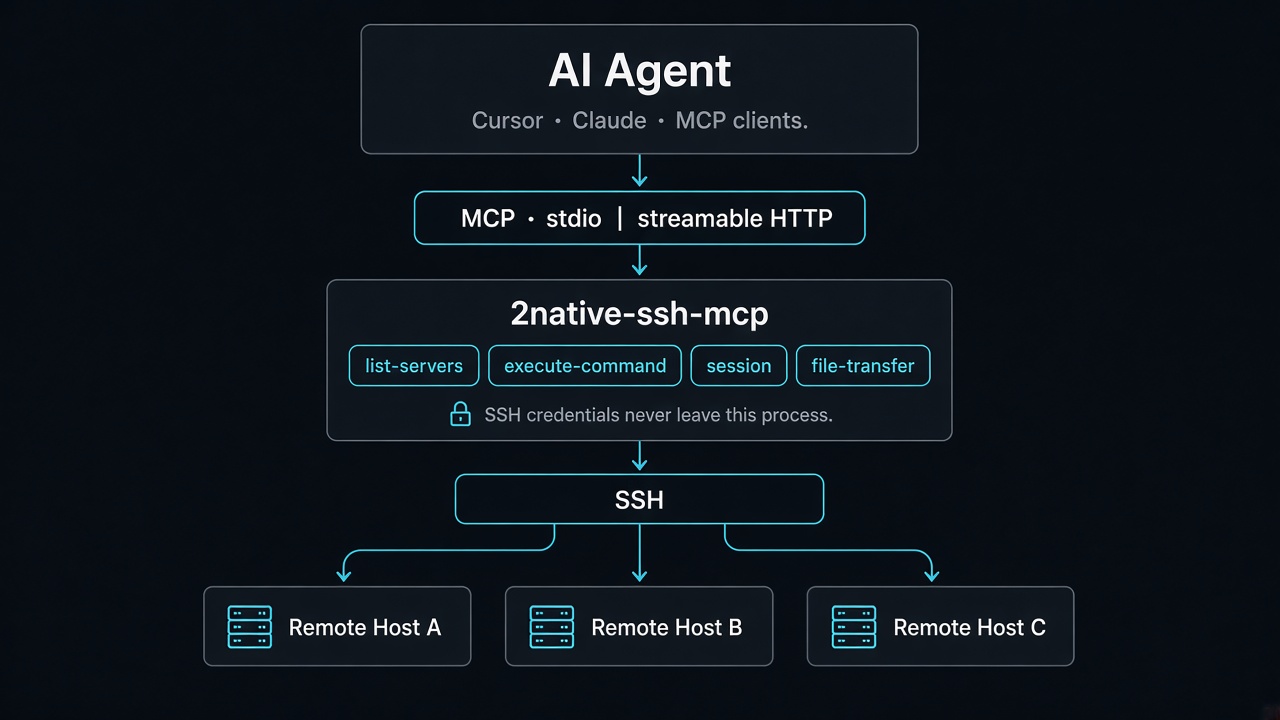
AI 助手只看到四个 MCP 工具;本机进程负责 SSH,凭据不会进入模型上下文。
📖 文档
| 读者 | 文档 | 说明 |
|---|---|---|
| 🤖 AI Agent | docs/AGENT_GUIDE.md | 省 token 版:工具参数、配置、安全模式、部署命令速查 |
| 👤 人类用户 | docs/HUMAN_GUIDE.md | 易读版:安全配置、快速开始、工具说明、参数速查、发布流程 |
| 🔍 特性详情 | docs/FEATURES.md | 完整特性列表与已知限制(英文版 .en.md) |
| 🛠 开发与发布 | docs/DEVELOPMENT.md | 项目结构、构建测试、Release 与 MCP Registry 发布流程 |
| 🔐 安全 | SECURITY.md | 威胁模型、审批闸门、审计落盘策略与分级加固建议 |
各文档均为中文默认,同名 .en.md 为英文版。
✨ 核心特性
- 四个工具:
list-servers/execute-command/session/file-transfer;后台长任务是execute-command的background: true特殊模式,不是第五个工具 - 远程执行:懒连接 + keepalive、超时按远端 PID 杀进程组、默认不分配 PTY、后台任务断连存活可重附着
- 输出处理:ANSI 剥离、大输出落盘到本地(
.ssh-mcp-out/),Agent 用 Read/Grep 查全文,不远程重跑 - 文件传输:原子落盘、去重、断点续传、目录递归、sha256 校验、进度通知
- 破坏性命令审批(可选):
approvalMode: "ask-destructive"经 MCP elicitation 弹窗确认,内置分类器 + 用户扩展/豁免,灰色地带用户自定;客户端不支持时 fail-open - 防篡改审计日志:每条命令追加进 SHA-256 哈希链(JSONL),事后篡改可定位到行(
audit-verify);落盘策略批量/写穿可调 → 审计日志 - 跳板机隧道:
via(OpenSSH ProxyJump)经跳板direct-tcpip连内网,各跳独立认证、不转发 agent,exec/shell/SFTP 行为与直连一致 → 跳板机 - 安全:命令白/黑名单、路径白名单、凭据隔离、配置权限检查
- 双传输:stdio / streamable HTTP daemon(引用计数、健康检查、Windows 一键自启)
- 认证兼容:密码/私钥/ssh-agent/Pageant/键盘交互 2FA(挑战弹窗到 MCP 客户端,无人值守用环境变量兜底)、代理、算法协商(兼容老服务器)→ 认证方式
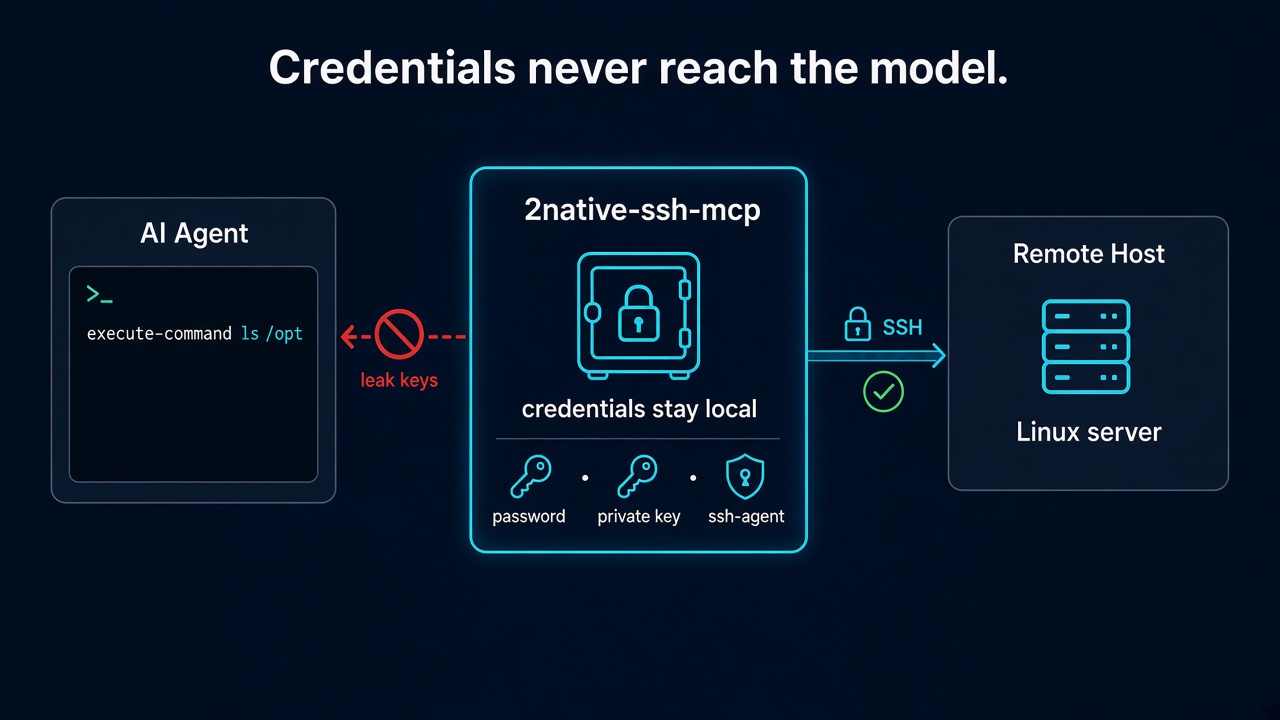
完整特性列表见 docs/FEATURES.md。
🚀 快速上手
从 Releases 下载 2native-ssh-mcp-<os>-<arch>-with-skills.tar.gz(Windows 为 .zip),解压即得二进制与两个 Agent Skill。也可以自行构建:
# 构建
go build -o 2native-ssh-mcp.exe .

# stdio 模式(MCP 客户端拉起,凭据放 config.json 或环境变量)
2native-ssh-mcp.exe --config-file config.json

# HTTP 常驻服务
2native-ssh-mcp.exe start --config-file config.json --http-addr 127.0.0.1:8338
详细配置与部署步骤见上方两份指南。
License
ISC License(与上游一致,保留上游版权声明,见 LICENSE)






