Listed from the MCP registry; nobody on Odel publishes it.
Is this yours? Claim it
DataToRAG
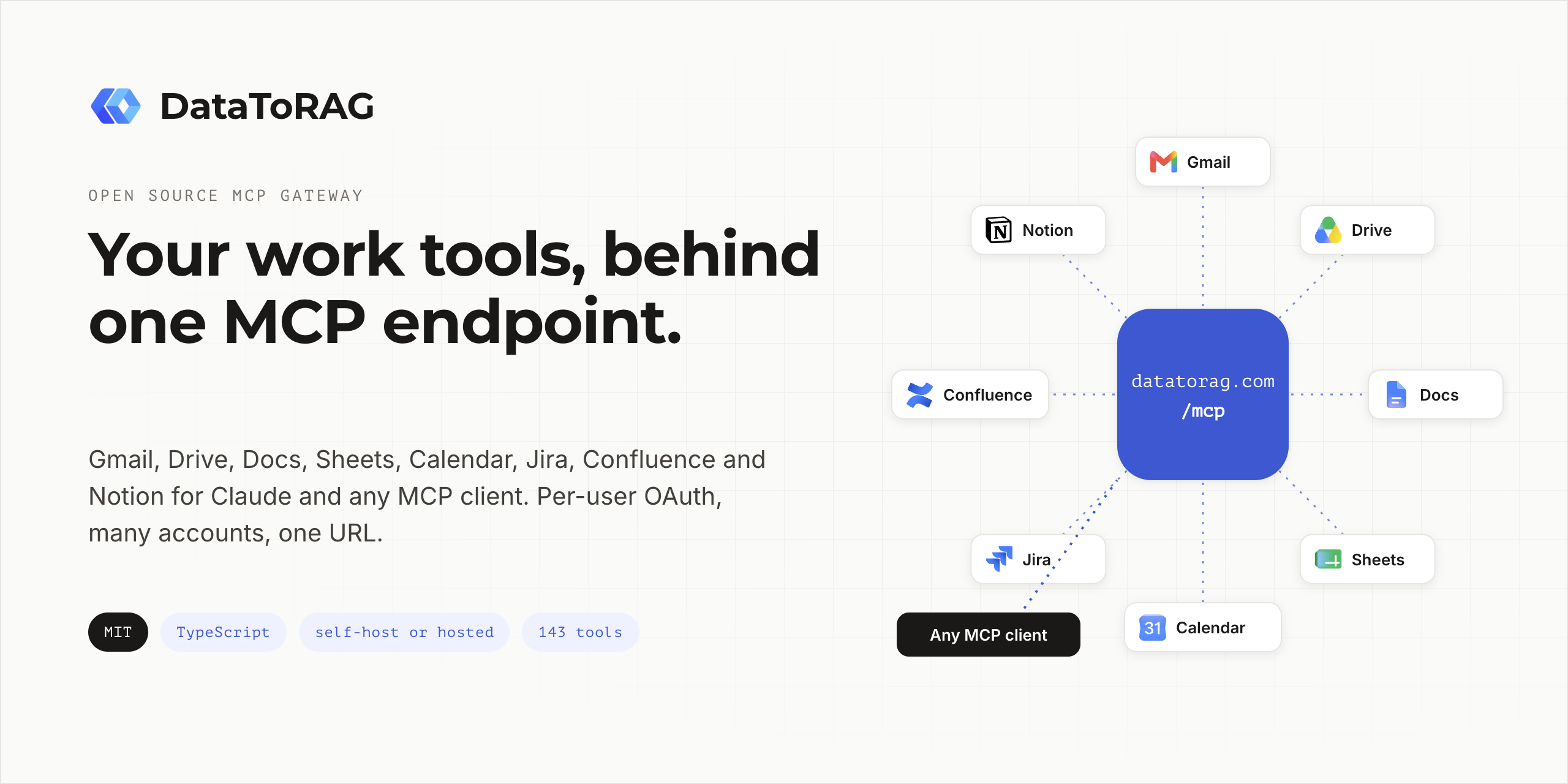
Hosted MCP for Google Workspace, Atlassian and Notion: one OAuth, per-user accounts, write access.
One address for any MCP client. No sign-in needed on this server.
What it does
50 other
Grouped by tool name. At most: moves money, runs code or commands, deletes data, or sends messages for you.
What it costs
FreeOdel charges nothing per call. The publisher may charge for its own service.
Tools
50 · grouped by tool name · checked 14 Nov 2026Other · 50Neither hinted nor named
- atlassian-mcp__confluence_add_comment
- atlassian-mcp__confluence_create_page
- atlassian-mcp__confluence_delete_page
- atlassian-mcp__confluence_edit_page
- atlassian-mcp__confluence_get_attachment
- atlassian-mcp__confluence_get_comments
- atlassian-mcp__confluence_get_page
- atlassian-mcp__confluence_list_pages
- atlassian-mcp__confluence_search
- atlassian-mcp__jira_add_attachment
- atlassian-mcp__jira_add_comment
- atlassian-mcp__jira_add_worklog
- atlassian-mcp__jira_create_issue
- atlassian-mcp__jira_delete_comment
- atlassian-mcp__jira_delete_issue
- atlassian-mcp__jira_edit_comment
- atlassian-mcp__jira_get_attachment
- atlassian-mcp__jira_get_comments
- atlassian-mcp__jira_get_issue
- atlassian-mcp__jira_get_transitions
- atlassian-mcp__jira_link_issues
- atlassian-mcp__jira_list_fields
- atlassian-mcp__jira_list_issue_links
- atlassian-mcp__jira_list_worklogs
- atlassian-mcp__jira_search
- atlassian-mcp__jira_search_users
- atlassian-mcp__jira_transition_issue
- atlassian-mcp__jira_update_issue
- gws-mcp__calendar_create_event
- gws-mcp__calendar_delete_event
- gws-mcp__calendar_freebusy
- gws-mcp__calendar_get_event
- gws-mcp__calendar_list_calendars
- gws-mcp__calendar_list_events
- gws-mcp__calendar_respond_to_event
- gws-mcp__calendar_suggest_time
- gws-mcp__calendar_update_event
- gws-mcp__contacts_create
- gws-mcp__contacts_delete
- gws-mcp__contacts_directory_search
- gws-mcp__contacts_get
- gws-mcp__contacts_list
- gws-mcp__contacts_search
- gws-mcp__contacts_update
- gws-mcp__docs_batch_update
- gws-mcp__docs_create
- gws-mcp__docs_delete
- gws-mcp__docs_get
- gws-mcp__docs_write
- gws-mcp__drive_copy_file
Google Workspace, Jira, Confluence and Notion for Claude and other MCP clients, through one endpoint.





DataToRAG is an open-source Model Context Protocol gateway. You point your AI client at one URL. Each person connects their own Google, Atlassian and Notion accounts, and the gateway hands the client the tools for those accounts, calling the services with the person's own OAuth grant. It runs hosted at datatorag.com, or on your own infrastructure under the MIT license.
Website · Docs · Status · Changelog · Skills
Try it in 60 seconds
Setup is two connections, and both are needed:
- Connect your accounts. Sign in at datatorag.com/dashboard and connect Google, Atlassian or Notion. Google's consent screen arrives with every box unticked: tick "Select all", or the services you want.
- Connect your AI client to
https://datatorag.com/mcp, then sign in with the same email when the client asks.
Claude (web and Desktop). Customize, then Connectors, then Add, then "Add custom connector". Paste the URL and leave the advanced OAuth fields empty.
Claude Code.
claude mcp add --transport http datatorag https://datatorag.com/mcp
Cursor and other clients that take a JSON config.
{
  "mcpServers": {
    "datatorag": {
      "url": "https://datatorag.com/mcp"
    }
  }
}
ChatGPT. Settings, then Connectors, enable Developer mode, then Create, and paste the URL.
The getting started guide has screenshots of each step. Every client connects with OAuth.
The server is listed in the official MCP registry as com.datatorag/mcp-gateway; server.json is the listing.
Screenshots
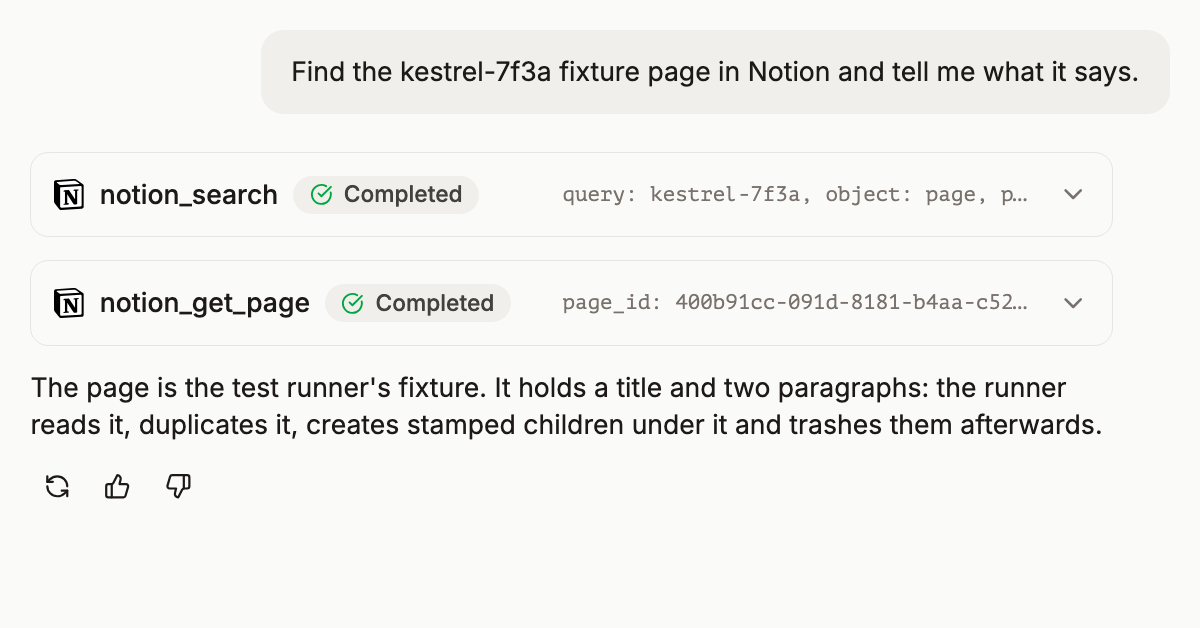
The agent in the dashboard runs the same tools against your connected accounts, with no client setup.
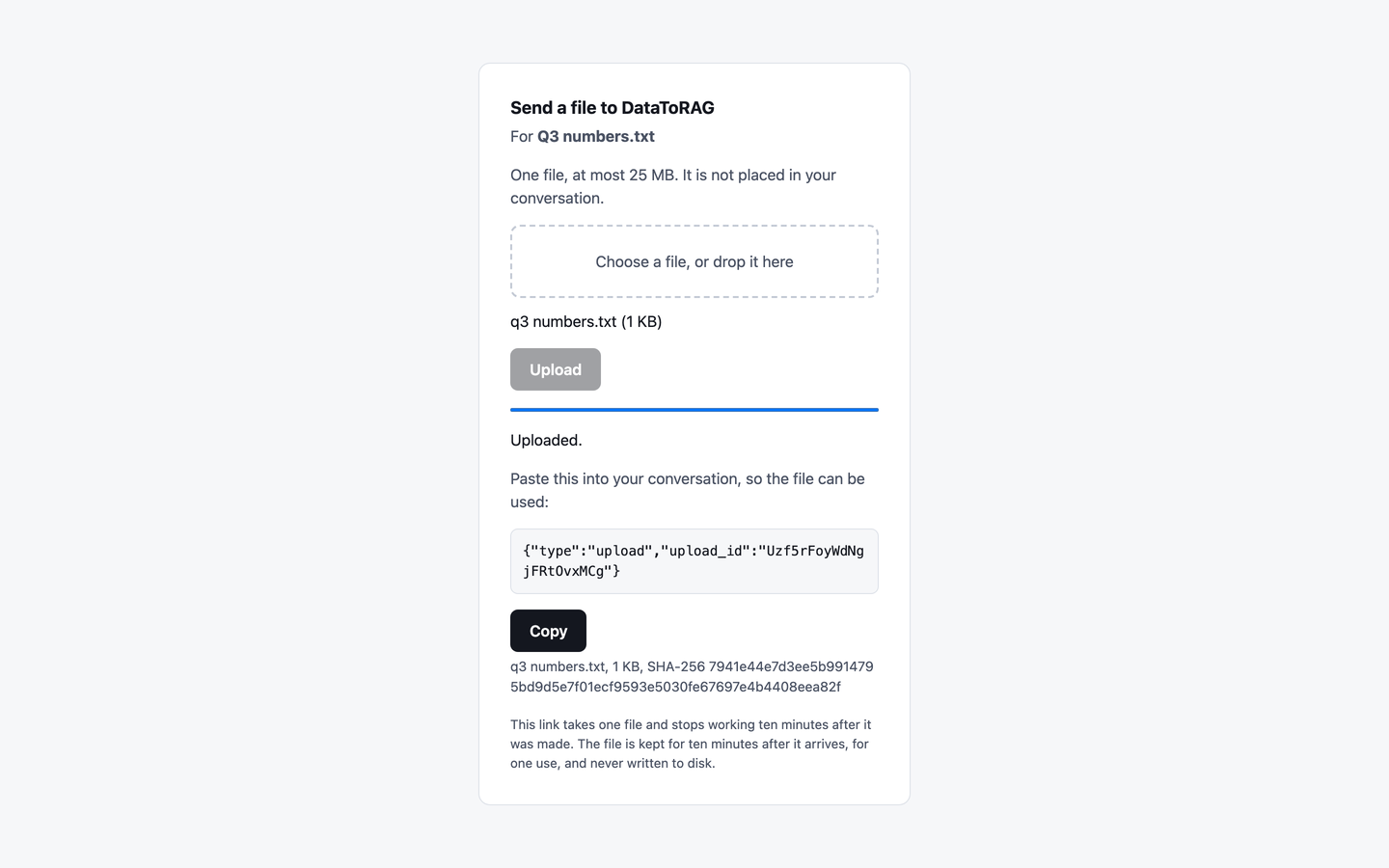
An upload link takes one file from your computer, up to 25 MB, and answers its size and SHA-256.
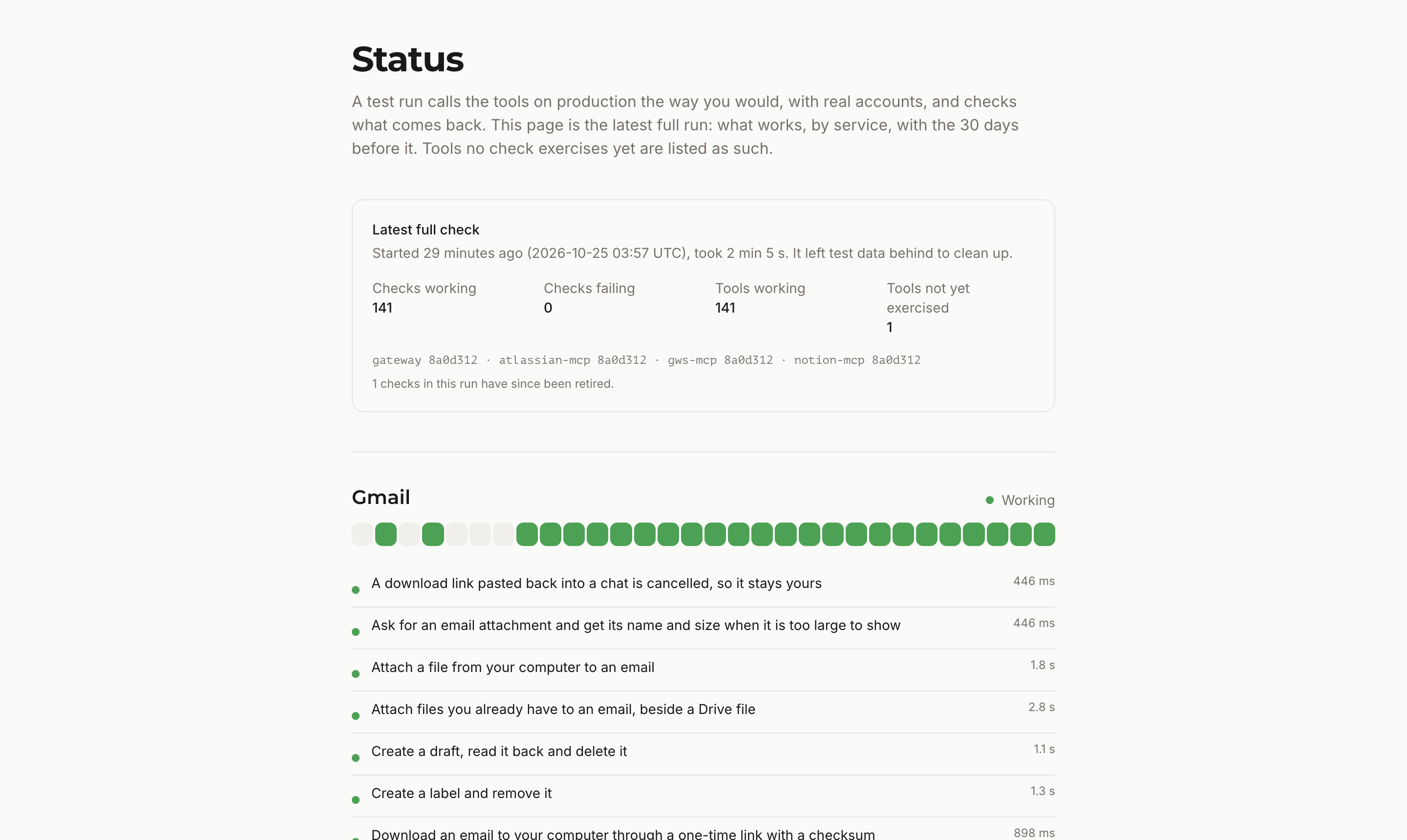
The status page shows the latest end-to-end run against production, by service.
Connectors
Tool counts are from the code as of November 2026: 134 tools in the three connectors, plus the tools built into the gateway.
| Connector | Tools | Services | Docs |
|---|---|---|---|
Google Workspace (plugins/gws-mcp) | 88 | Gmail, Calendar, Drive, Docs, Sheets, Slides, Contacts, Tasks | docs |
Atlassian (plugins/atlassian-mcp) | 28 | Jira, Confluence | docs |
Notion (plugins/notion-mcp) | 18 | Pages, databases, comments | docs |
| Gateway built-ins | 10 | Connected accounts, skills, file upload and download links, a connectivity check | docs |
The three connectors live in this repository under plugins/ and ship inside the gateway's image. A client only sees the tools for services its user has connected.
What makes it different
Several accounts per service. Connect a work and a personal Google account, or two Notion workspaces, under one login, and pick a default. Every connector tool takes an account argument to choose one (how we built it).
Responses sized for a context window. Tools return what the model needs rather than the raw API response. A two-page Google Doc comes back as 2 to 3 KB of text instead of 50 KB or more of JSON (the write-up).
OAuth per user. Each person grants access to their own accounts, and the gateway refreshes the grants. A connector receives only the calling user's access token, never a shared credential.
Files move between services without passing through the chat. A file reference names an email, an attachment or a Drive file, and the gateway carries it to Jira, Drive or an email in one call, answering with its size and SHA-256. Files from your computer arrive through a single-use upload link (file references).
Skills. Ready-made workflows, such as a morning brief or inbox triage, that run in the dashboard, on a schedule, or from any client as MCP prompts (skills, announcement).
A public status page. A test run calls the tools on production the way a user would and publishes what works, by service (status).
Architecture
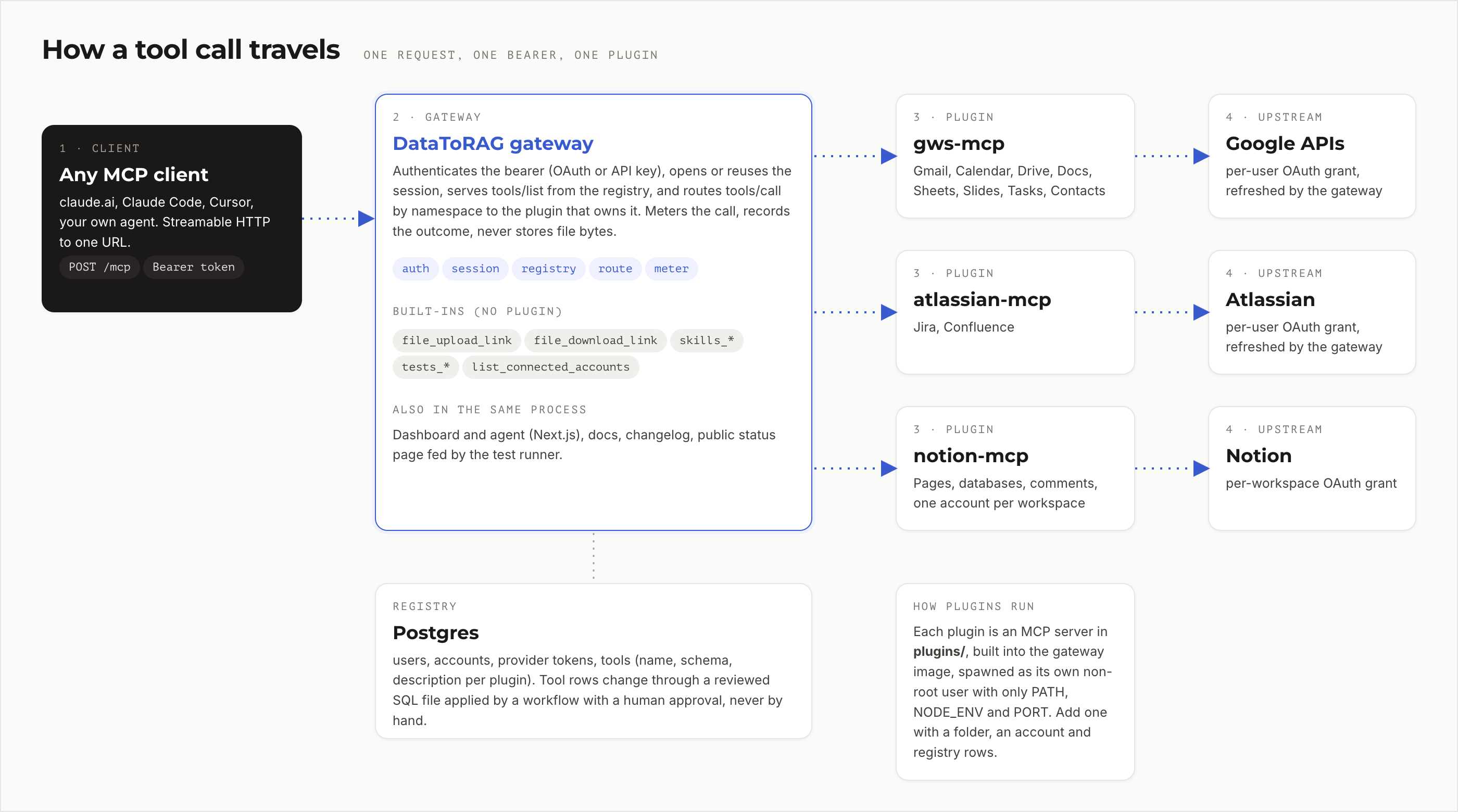
In text:
- Client. Any MCP client sends Streamable HTTP to
POST /mcpwith a bearer token: an OAuth access token from the gateway's own authorization server, the only credential it accepts. - Gateway (
apps/gateway, one Node.js process: Express plus Next.js). It authenticates the bearer, opens or reuses the session, and answerstools/listfrom thetoolstable in Postgres, filtered to the services the user has connected. Atools/callis split on__into the plugin and the tool, the user's token for that service is resolved (and refreshed if expired), and the call is forwarded to the plugin. Every call is metered. The same process serves the dashboard and its agent, the docs, the changelog and the status page. - Built-ins.
list_connected_accounts,skills_*,file_upload_linkandfile_download_linkare answered by the gateway itself, with no plugin and no registry row. - Plugins. Each connector is an MCP server under
plugins/. The gateway starts each one as a child process under its own non-root account, with an environment ofPATH,NODE_ENVandPORTonly, and passes the user's token on each call in theX-User-Tokenheader. A crashing plugin is restarted up to three times a minute, and/healthreports each plugin as up or down. - Registry. Postgres holds users, connected accounts, provider tokens and the tool registry (name, description and input schema for each plugin tool). Changes to the registry in production are SQL files under
registry/, applied by theregistryworkflow after an approval.
Self-hosting
Prerequisites
- Node.js 20 or later and pnpm 9.
- A Postgres database, and its connection string as
DATABASE_URL. Any Postgres works; nothing here starts one for you. - An OAuth client for each provider you want: Google (one client for sign-in, a second for Workspace scopes), Atlassian, Notion.
Run the gateway
pnpm install
pnpm -r --filter "./packages/*" run build    # the gateway reads these packages' built output

cp .env.example .env                          # then fill in DATABASE_URL, CONNECTION_TOKEN_KEYS and the OAuth clients
pnpm --filter @datatorag-mcp/db db:migrate    # schema changes are never applied on start

pnpm dev:gateway
The gateway listens on http://localhost:8285 (set by GATEWAY_PORT):
| Path | What it is |
|---|---|
/mcp | The MCP endpoint |
/dashboard | Sign in, connect accounts, the agent |
/docs/getting-started | The docs |
/health | Liveness, and each plugin's state |
/.well-known/oauth-authorization-server | OAuth metadata for MCP clients |
On a laptop the gateway loads plugins from ~/.datatorag/plugins, or from DATATORAG_PLUGINS_DIR when it is set. Build them with pnpm --filter @datatorag-mcp/gws-mcp run build (and the same for atlassian-mcp and notion-mcp).
Environment variables
The full list, with comments, is in .env.example, and the schema that validates it is packages/config/src/index.ts. The ones a self-host needs:
| Variable | Purpose |
|---|---|
DATABASE_URL | Postgres connection string. Required |
CONNECTION_TOKEN_KEYS | Keys the provider tokens are encrypted with: <id>:<base64 of 32 bytes>, comma separated, the first encrypts and all decrypt. Required; make one with openssl rand -base64 32 |
GATEWAY_PORT, GATEWAY_BASE_URL | Port, and the public URL OAuth redirects are built from |
GOOGLE_CLIENT_ID, GOOGLE_CLIENT_SECRET | Google sign-in for the dashboard |
GOOGLE_GWS_CLIENT_ID, GOOGLE_GWS_CLIENT_SECRET | Google Workspace connections |
ATLASSIAN_CLIENT_ID, ATLASSIAN_CLIENT_SECRET | Jira and Confluence connections |
NOTION_OAUTH_CLIENT_ID, NOTION_OAUTH_CLIENT_SECRET | Notion connections |
SLACK_CONNECTOR_CLIENT_ID, SLACK_CONNECTOR_CLIENT_SECRET, SLACK_CONNECTOR_TEAM_ID | Slack connections, for one workspace and admins only; optional |
ANTHROPIC_API_KEY, PLAYGROUND_MODEL | The dashboard agent; empty turns it off |
STRIPE_* | Billing; optional |
POSTHOG_API_KEY, SLACK_BOT_TOKEN, BREVO_API_KEY | Analytics, notifications and email; each is off when empty |
Production
Production runs the image built from apps/gateway/Dockerfile, which carries the three plugins. A merge to main builds and publishes it (build.yml), and a deploy is dispatched by hand and approved (release.yml), starting it with docker/docker-compose.prod.yml.
Project structure
apps/gateway/          The product: MCP gateway, OAuth server, dashboard, site
  server.ts            Express entry: /mcp, /oauth, /auth, /files, /health
  src/gateway/         Tool routing, auth, plugin manager, file references, metering
  src/app/             Next.js app: dashboard, docs, blog, changelog, status, skills
  src/mastra/          The dashboard agent
  content/             Markdown for the blog, changelog, docs and skills
packages/
  config/              Environment schema (zod)
  db/                  Drizzle schema and migrations
  auth/                Token hashing and constant-time compares
  types/               Shared types, including the plugin manifest
plugins/
  gws-mcp/             Google Workspace connector
  atlassian-mcp/       Jira and Confluence connector
  notion-mcp/          Notion connector
registry/              Reviewed SQL for changes to the tool registry
docker/                Compose files
scripts/               The pre-merge gate, leak scan, deploy and registry helpers
docs/                  Architecture notes and implementation plans
tools/capture/         Product screenshots and recordings (Remotion)
Contributing
Issues and pull requests are welcome. For a substantial change, open an issue first so we can agree on the direction; every pull request runs the gate (typecheck and tests) and a leak scan.
Security
Please report a vulnerability privately to support@datatorag.com rather than in a public issue.






