Listed from the MCP registry; nobody on Odel publishes it.

Connapse
Self-hosted knowledge backend for AI agents with hybrid search and MCP tools
Runs on your machine from its package; the steps are below.

What it does
- Reads
- Writes
- High impact
At most: moves money, runs code or commands, deletes data, or sends messages for you.
What it costs
FreeOdel charges nothing per call. The publisher may charge for its own service.
Runs locally over stdio
This server isn't hosted — your MCP client launches it from a package registry. Use one of the commands below, or drop the config into your client (e.g. Claude Desktop).
Run
docker run -i --rm ghcr.io/destrayon/connapse:v0.3.2
MCP client config
{
  "mcpServers": {
    "connapse": {
      "command": "docker",
      "args": [
        "run",
        "-i",
        "--rm",
        "ghcr.io/destrayon/connapse:v0.3.2"
      ]
    }
  }
}

The self-hosted knowledge base your AI agents search and remember with, over MCP
Your AI agents forget everything between sessions. Connapse fixes that.





Connapse is a self-hosted knowledge base for AI agents. Point it at your files, SFTP servers, S3 buckets, Azure Blob containers, GitHub repositories, Confluence spaces and Jira projects, and agents reach all of it through an MCP server (the Model Context Protocol, the standard way agents call outside tools) or a REST API. It is RAG with hybrid search and reranking, agent memory that keeps dated facts with their sources, and results that can be trimmed to what each person can open in the source system. It is open source, runs on your own machine with Docker, and is built on .NET 10, PostgreSQL and pgvector.
Who it's for: teams and developers who want Claude, Cursor, VS Code or their own agents to work from the company's documents, tickets and code, without sending that data to a hosted service.
Quick start
You need Docker with Compose 2.34 or later, about 8 GB of free memory and port 5001 free.
docker compose -f oci://ghcr.io/destrayon/connapse:compose up -d -y
That's the whole setup: nothing to clone and no file to edit. Connapse makes its own passwords and downloads its embedding model on the first start. Open http://localhost:5001, create the owner account, make a container, upload a document or a whole folder, and search it. You get passages from your documents, each labelled with the file it came from. The Quickstart walks through each step.
The install guide covers other embedding providers, GPUs, the optional reranker and running from a clone.

Connect an agent
In Connapse, open Admin → Agents, create an agent, and give it an API key. Then add Connapse to your MCP client. For Claude Code:
claude mcp add --transport http connapse http://localhost:5001/mcp --header "X-Api-Key: cnp_your_key"
Connect an MCP client has the setup for Claude Code, Claude Desktop, VS Code and Cursor, and Connect Claude to Connapse is a step-by-step tutorial.
What your agent gets
23 named MCP tools, plus 3 generic tools that reach the rest of the REST API. Each key only gets the tools its scopes allow, and deletes over MCP can wait for your approval.
| Group | Tools | What they do |
|---|---|---|
| Search and documents | search_knowledge, get_document, list_files, upload_file, delete_file | Search a container or source, read whole documents, and add or remove files |
| Memory | memory_spaces, memory_remember, memory_recall, memory_correct, memory_timeline, memory_forget | Pick a personal or team memory space, keep dated facts there with their sources, recall them in a later session, and correct them without losing history |
| Code | code_find_symbol, code_references, code_impact, code_repo_map | Find definitions and callers in indexed C#, TypeScript and Python, and see what a change could affect |
| Containers | container_list, container_describe, container_stats, container_create, container_delete | List, inspect, create and delete containers |
| Approvals | approval_status | Learn whether you approved or denied a held call, and why, so the agent carries on by itself |

Every tool and its parameters are in MCP tools.
Features
Hybrid search with reranking
Every search runs vector search and keyword search together and fuses the two rankings, so exact names and paraphrased questions both find their passages. An optional cross-encoder reranker re-scores the top results. See About search and Tune search.
Memory for agents
An agent saves what it learns as a fact: a subject, an attribute and a value, with the dates it was true and the documents it came from. Every fact goes into a memory space the agent names: a personal space only you and your agents see, or a team space everyone sees, and the agent is told who will see it. A later session recalls it. A correction keeps the old value in history, and forgetting deletes every version. A fact is shown only to people who can read every source it cites, and the Memory page shows each space's facts and their history. See About agent memory.

Connect your data
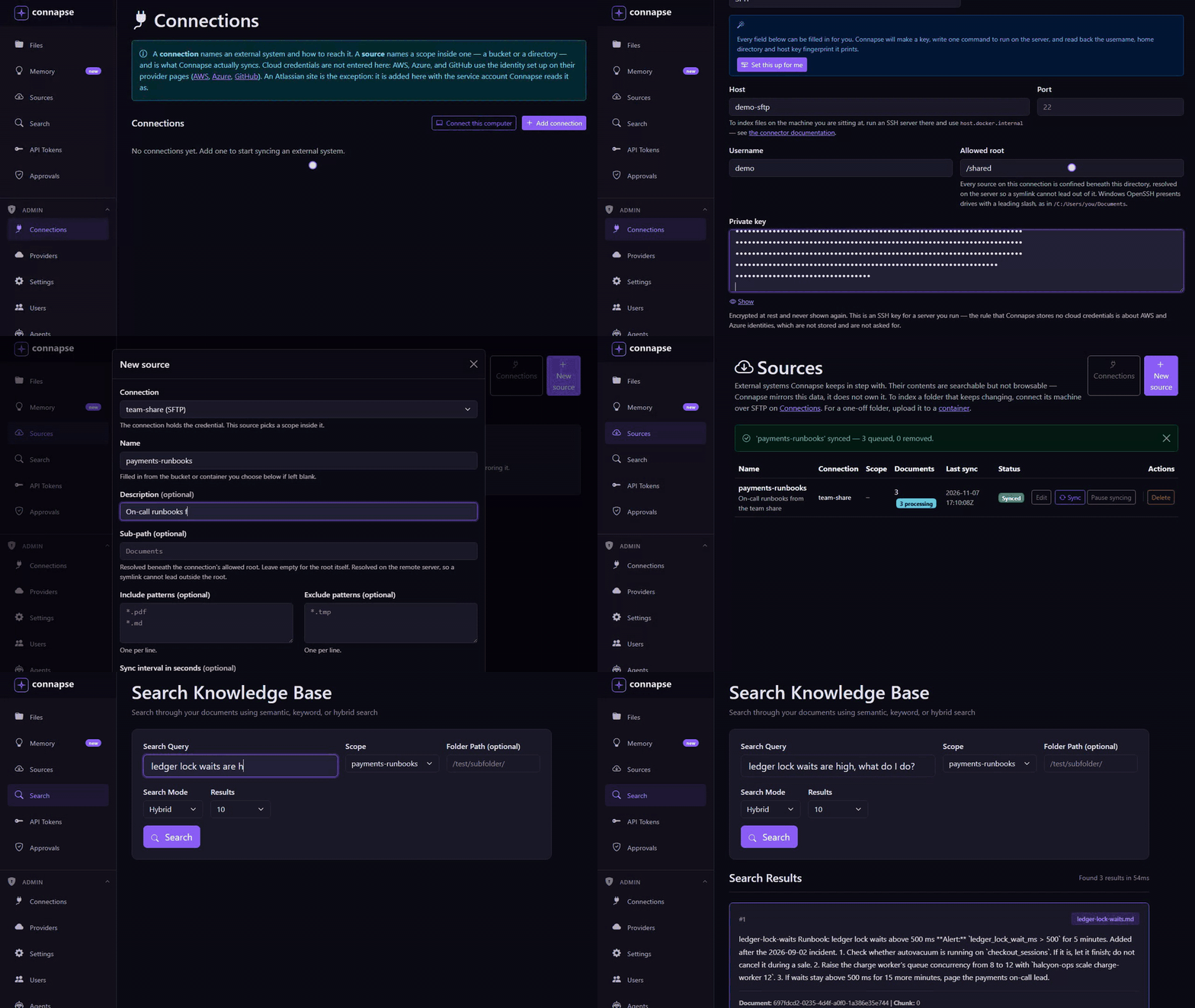
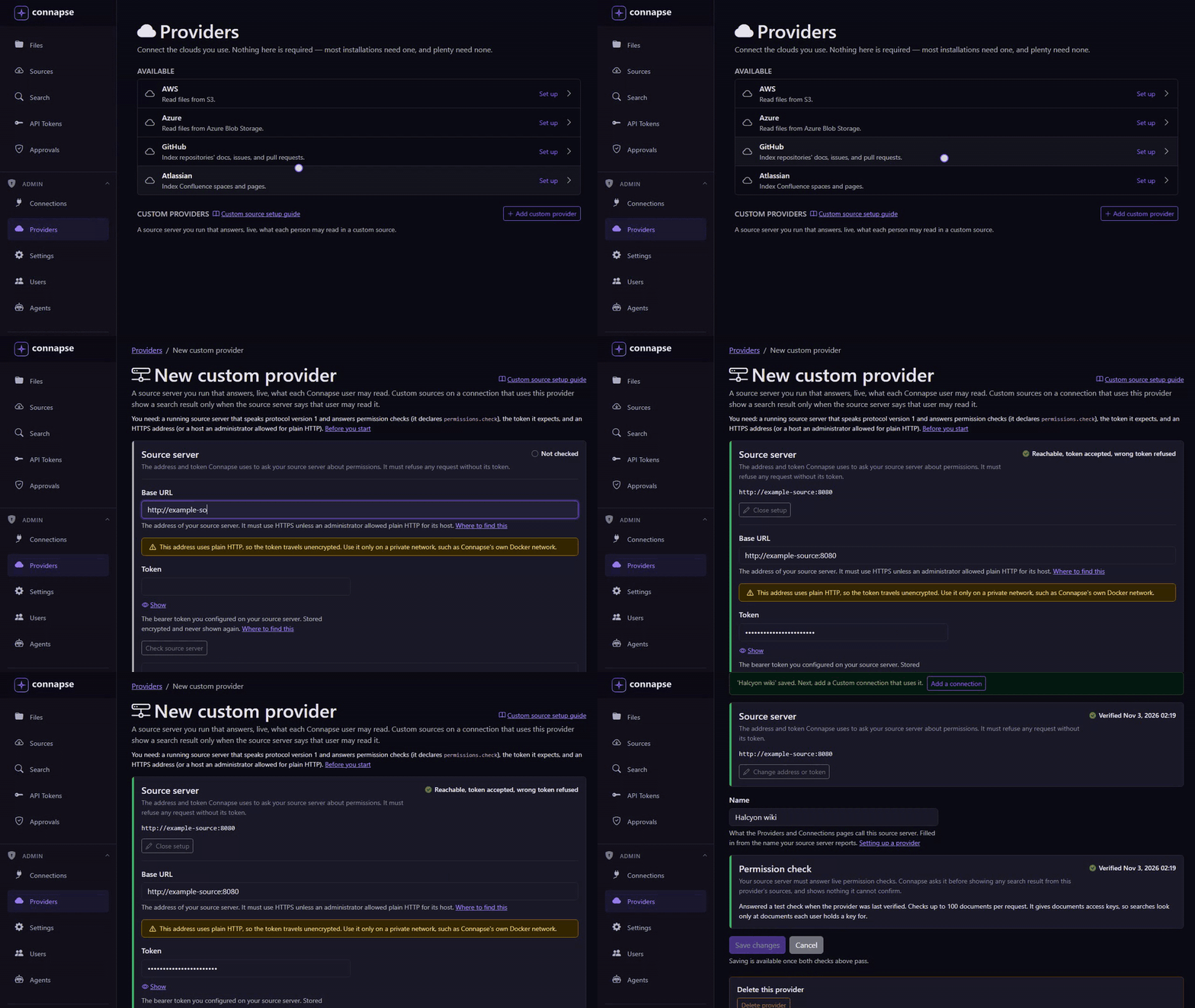
Upload files or whole folders, or index them where they live: SFTP servers (including the folders on your own computer), Amazon S3, Azure Blob Storage, GitHub (Markdown docs, or issues and pull requests), Confluence and Jira. Anything else can connect through a custom source server you write against an open protocol. Each container has its own files, vector index and settings. See Connect your data and file types.
The Providers page lists the built-in providers next to any custom source server you add.
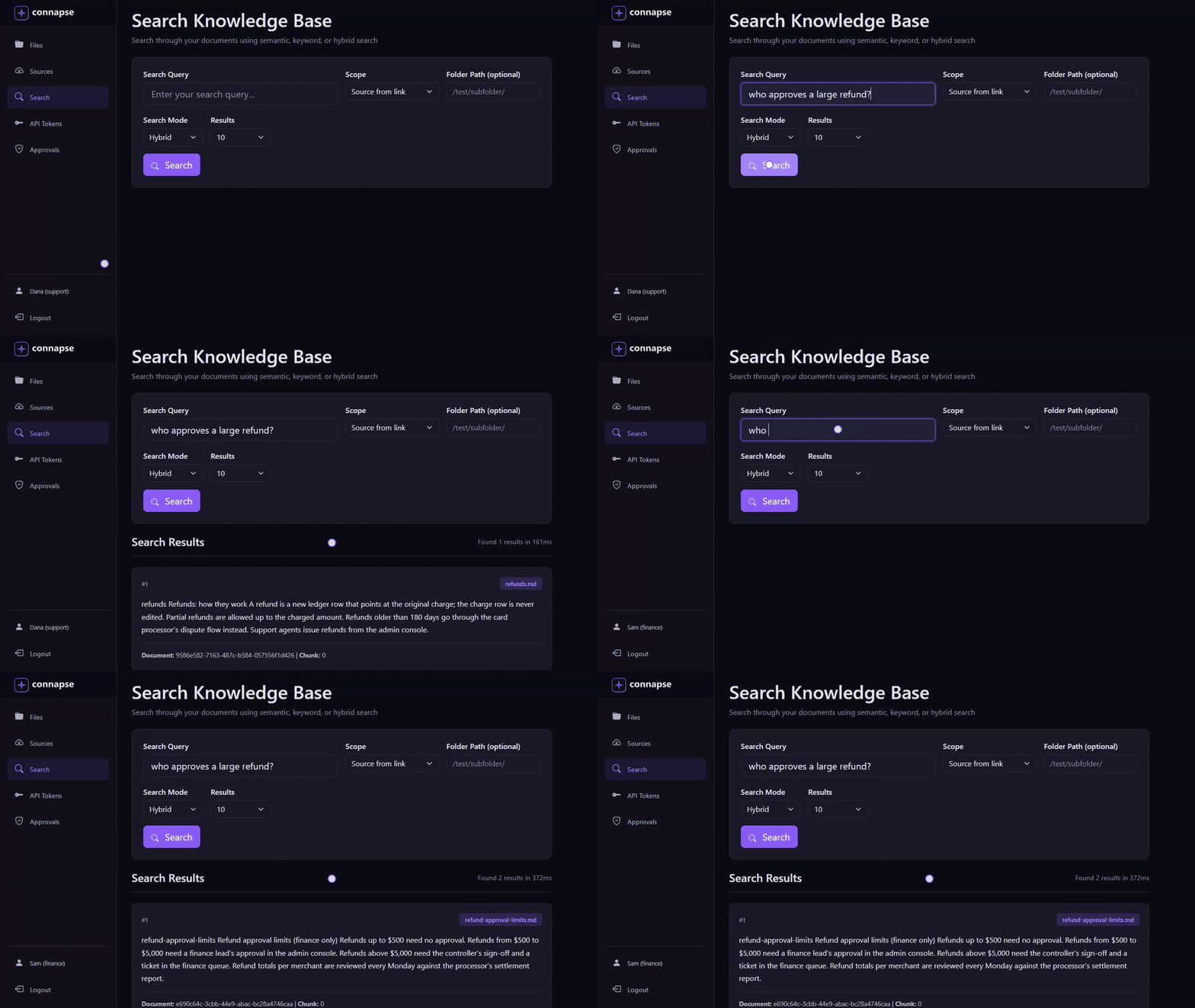
Search trimmed to what each person can open
Results from GitHub, Confluence, Jira and custom sources are checked against each reader's own access in the source system, through their linked account. S3 and Azure Blob get the same check once an admin switches on per-user permissions for that provider; until then, everyone who can search a container sees all of it. When filtering is on, a person, or an agent acting for them, never sees a passage they couldn't open in the original, and when the check can't be made the result is left out. See Permissions, Amazon S3 and Azure Blob Storage.
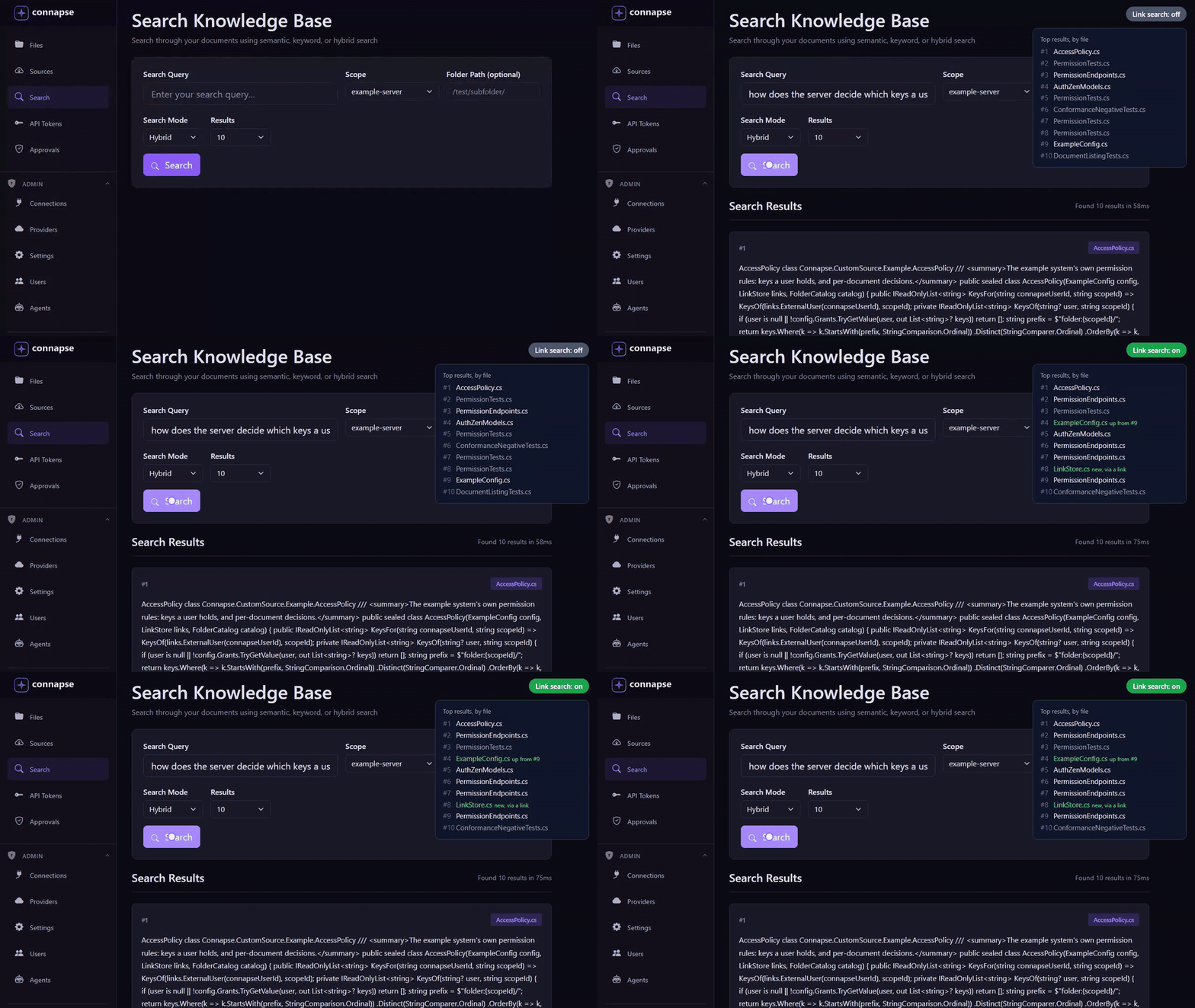
Linked results
Records point at each other, and Connapse stores those links: a GitHub issue with the pull request that closes it, a Jira issue with its epic, parent and the Confluence pages it mentions, and code with its definitions, imports and calls. With link search turned on (it is off by default), a search also brings back what its best results link to, checked against the same permissions. See Following links.
Run fully local with Ollama
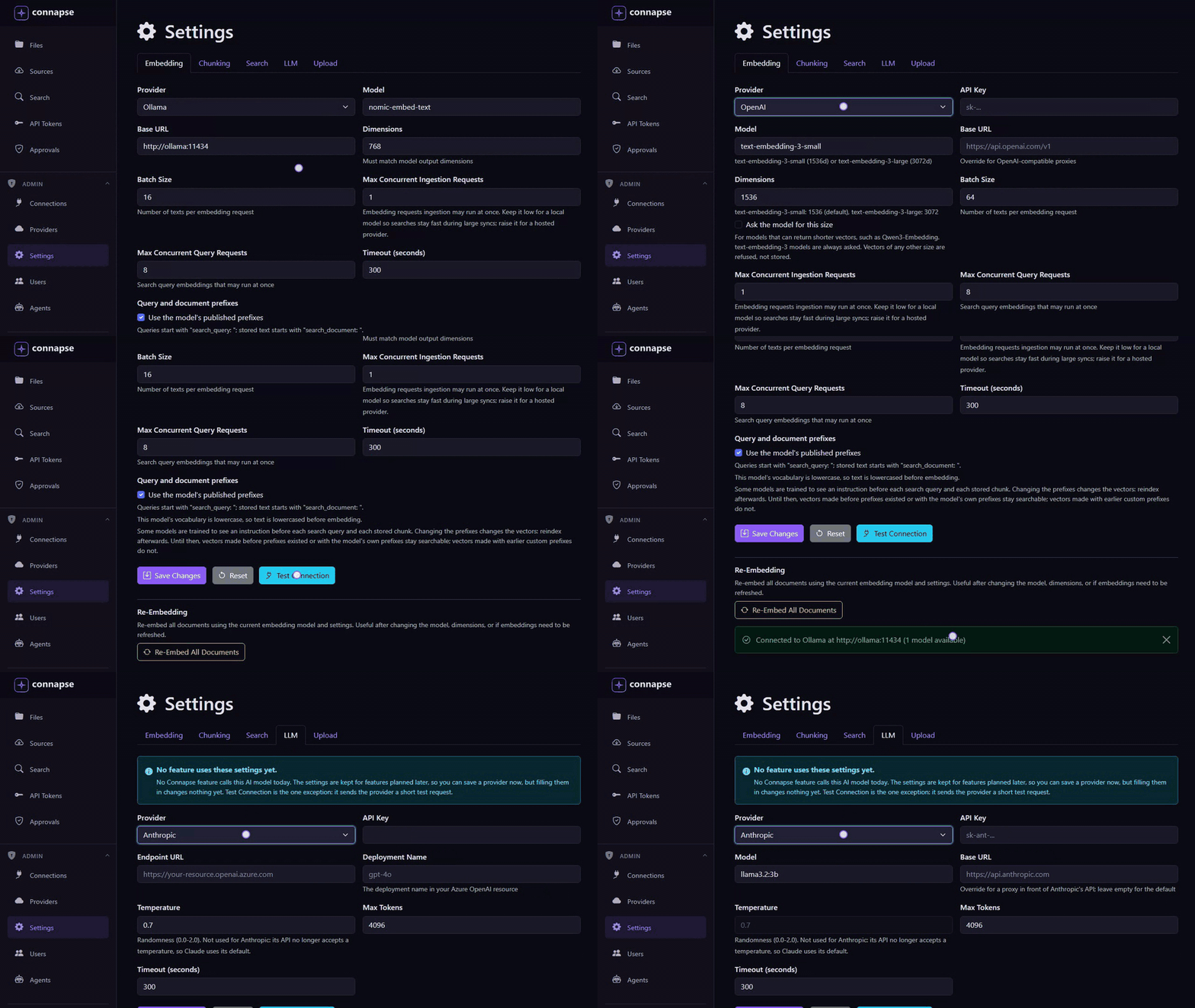
By default, Ollama runs alongside Connapse, so embeddings are computed on your machine and nothing leaves it. OpenAI or Azure OpenAI can be swapped in from Settings at runtime, without a restart. See Change the embedding model.
Built on .NET 10, PostgreSQL and pgvector
A Blazor Server web UI, a REST API, the MCP server and the connapse CLI all sit on one ASP.NET Core app, with PostgreSQL and pgvector for search and MinIO for uploads. See How Connapse works.
Search quality
Measured with Connapse's retrieval eval on enterprise-v1: 50,000 documents from EnterpriseRAG-Bench and 470 questions. nDCG@10 scores how well the top 10 results are ordered, from 0 to 1.
| Configuration | nDCG@10 |
|---|---|
| Hybrid search, fusion weight 0.75, no reranker (the earlier default) | 0.565 |
Adding the gte-reranker-modernbert-base reranker | 0.660 |
| Adding the reranker and today's default fusion weight, 0.65 | 0.677 |
The fusion weight sets how much the vector side counts against the keyword side. The runs are in the fusion research note, a per-slice breakdown is in the retrieval weaknesses note, and the harness is in tests/Connapse.Eval.
Documentation
The full documentation is in docs/.
- Get started: run Connapse and search your first document
- Self-host: install, production, backups, upgrades and troubleshooting
- Connect your data: sources from S3, Azure, GitHub, Atlassian, SFTP and your own systems
- Guides: users, tokens, agents, the API and search tuning
- Concepts: how Connapse, search, ingestion and permissions work
- Reference: REST API, MCP tools, configuration, roles and scopes, file types and error types
- Security policy
Support
- Bugs: GitHub Issues
- Ideas and questions: GitHub Discussions
- Security issues: see SECURITY.md
Contributing
Contributions are welcome. Start with CONTRIBUTING.md and Development, and look for issues labeled good-first-issue.
License
MIT.







