Codebase Memory
Codebase knowledge graph for AI agents — 162 languages, sub-ms queries, 99% fewer tokens.
Runs on your machine from its package; the steps are below.
What it does
- Reads
- Writes
- High impact
At most: only reads or looks up information.
What it costs
FreeOdel charges nothing per call. The publisher may charge for its own service.
Runs locally over stdio
This server isn't hosted — your MCP client launches it from a package registry. Use one of the commands below, or drop the config into your client (e.g. Claude Desktop).
Run
npx -y codebase-memory-mcp
MCP client config
{
  "mcpServers": {
    "codebase-memory": {
      "command": "npx",
      "args": [
        "-y",
        "codebase-memory-mcp"
      ]
    }
  }
}Run
uvx codebase-memory-mcp
MCP client config
{
  "mcpServers": {
    "codebase-memory": {
      "command": "uvx",
      "args": [
        "codebase-memory-mcp"
      ]
    }
  }
}Distributed as an MCP bundle (`https://github.com/DeusData/codebase-memory-mcp/releases/download/v0.12.1/codebase-memory-mcp-darwin-amd64.mcpb`) — download it and import the bundle in your MCP client.
Distributed as an MCP bundle (`https://github.com/DeusData/codebase-memory-mcp/releases/download/v0.12.1/codebase-memory-mcp-darwin-arm64.mcpb`) — download it and import the bundle in your MCP client.
Distributed as an MCP bundle (`https://github.com/DeusData/codebase-memory-mcp/releases/download/v0.12.1/codebase-memory-mcp-linux-amd64-portable.mcpb`) — download it and import the bundle in your MCP client.
Distributed as an MCP bundle (`https://github.com/DeusData/codebase-memory-mcp/releases/download/v0.12.1/codebase-memory-mcp-linux-arm64-portable.mcpb`) — download it and import the bundle in your MCP client.
Distributed as an MCP bundle (`https://github.com/DeusData/codebase-memory-mcp/releases/download/v0.12.1/codebase-memory-mcp-windows-amd64.mcpb`) — download it and import the bundle in your MCP client.
Distributed as an MCP bundle (`https://github.com/DeusData/codebase-memory-mcp/releases/download/v0.12.1/codebase-memory-mcp-windows-arm64.mcpb`) — download it and import the bundle in your MCP client.
codebase-memory-mcp: local code intelligence for AI agents via MCP














Understand your repository, from source code to the systems around it. codebase-memory-mcp is an MCP server that connects code, documentation, configuration, and infrastructure in a persistent local knowledge graph. Use it to find an unfamiliar feature, follow a call across services, trace a deployment back to its source, or assess which parts of a project a change could affect.
Give your coding agent structural context through Model Context Protocol (MCP), or query the graph directly from the CLI. The MCP server is the core of the project. Its optional visual companion, CBM Lens, is in open beta (v0.0.1), with a source reader, architecture maps, the Galaxy graph, coverage diagnostics, architecture decisions, and local code chat.
The native C backend exposes 17 MCP tools, parses languages and file formats with vendored grammars, and adds Hybrid LSP type resolution for supported languages. The installer supports 45 automatic or conditional client integrations, including client configuration, skills, agent profiles, and applicable hooks. Indexing and graph queries need no hosted service or API key. Focused graph queries can reduce repeated file reads and token use; see the measured results.
Quick start · Capabilities · Documentation · Infrastructure · Smart CI · Explore CBM Lens · Agent setup · MCP tools
Local processing: Source analysis and graph storage run on your machine. CBM Lens can optionally download a model for browser AI after you enable it; inference stays on the device. The installer writes agent configuration for the clients you select. See Security for release verification and SECURITY.md for reporting issues.
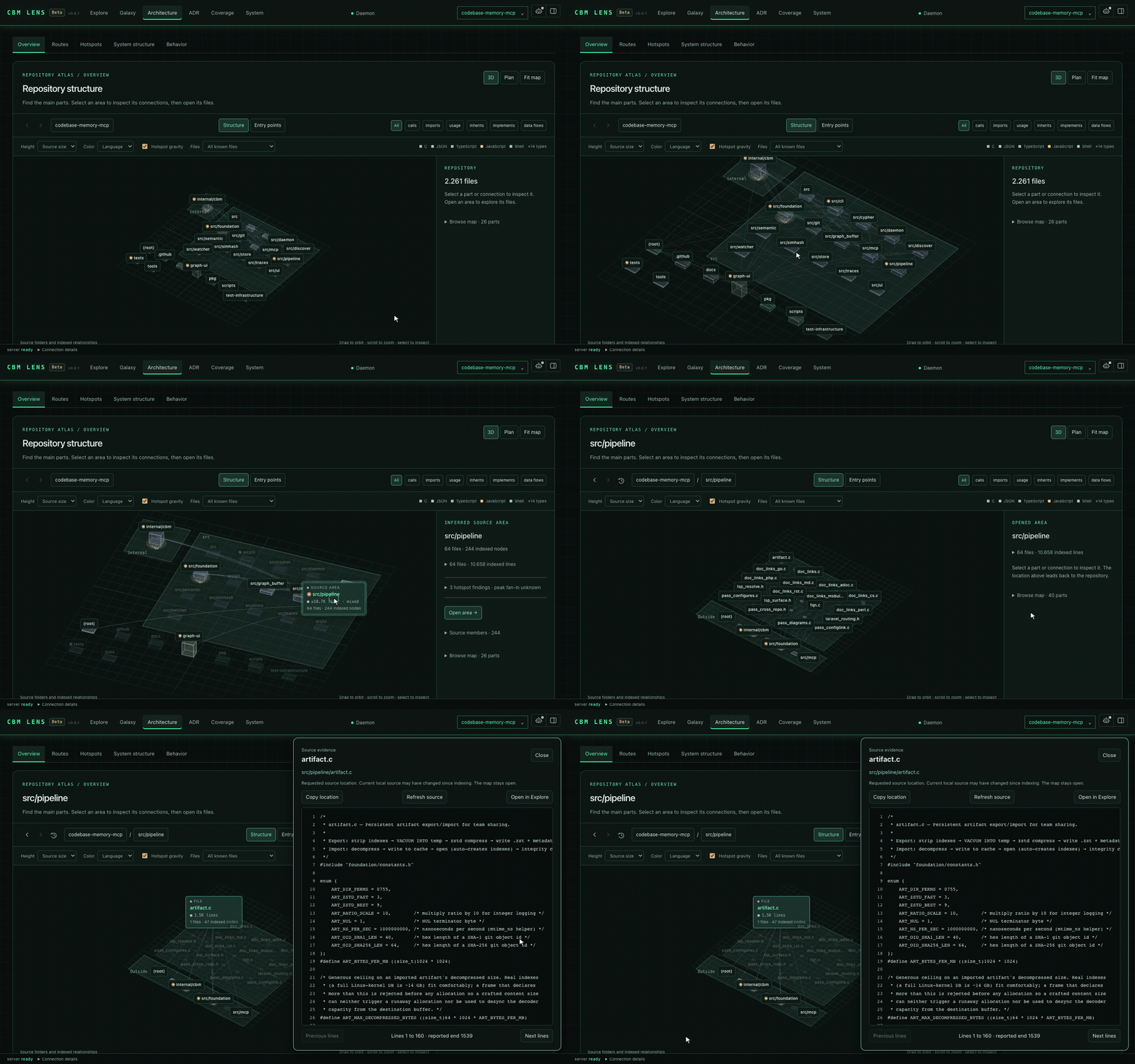
See the graph with CBM Lens (open beta v0.0.1). Folders become nested platforms, files and symbols become selectable blocks, and arrows show indexed relationships. The recording opens src/foundation in the map of this repository, selects arena.c and opens its source. Height can show source size; hotspot gravity reflects static fan-in. Still image.
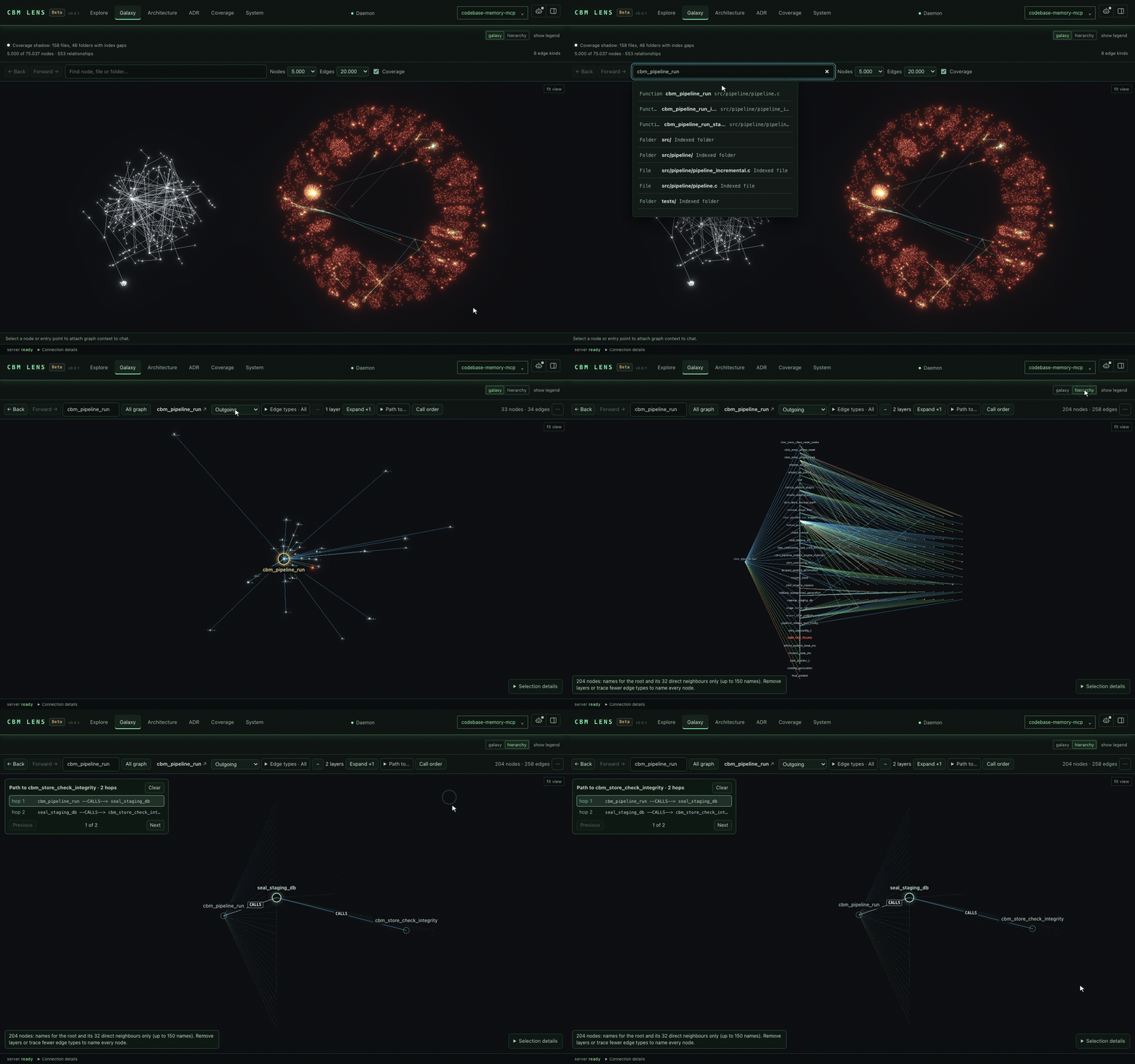
Galaxy. Explore the code knowledge graph in 3D. The recording follows the outgoing relationships of cbm_arena_alloc one layer further, switches to the hierarchy and shows the two-hop call path to cbm_alloc. Edge pulses show relationship direction; they do not represent live execution. Still: two dependency layers around cbm_max_file_bytes.
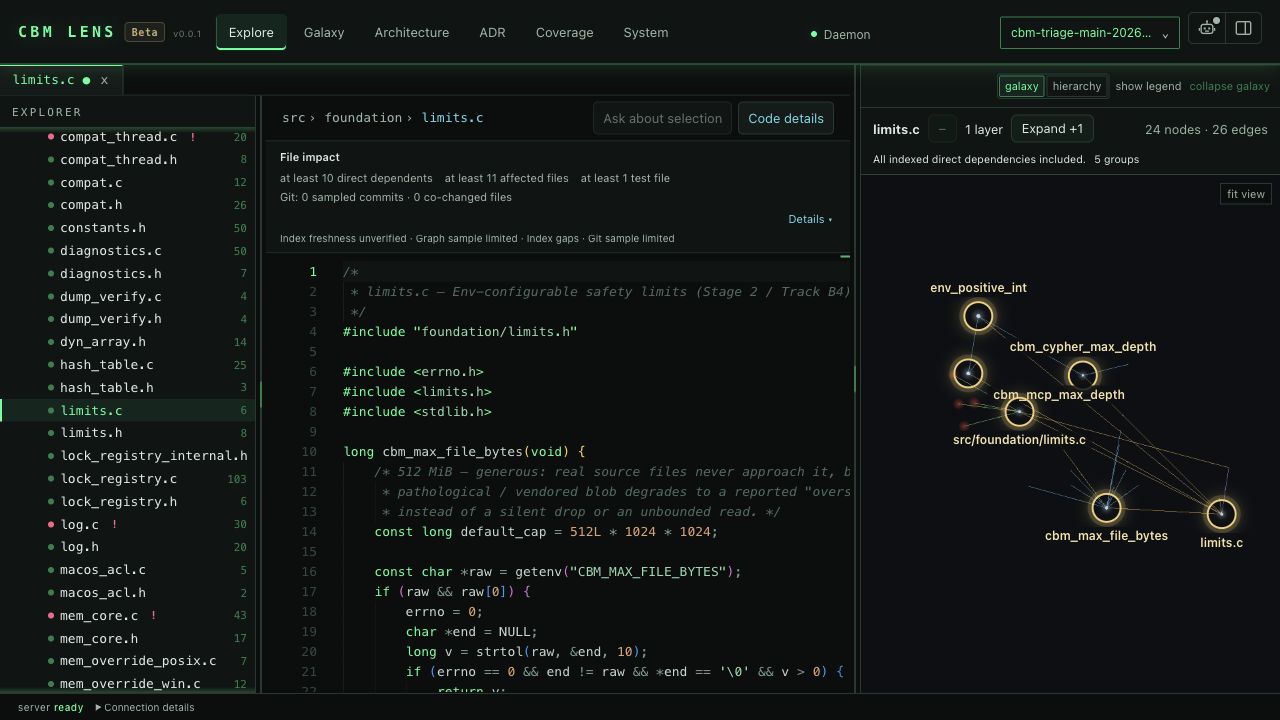
Explore. Browse files in an IDE-style workspace, read syntax-highlighted source in Monaco, and keep the code graph alongside it. File impact shows what depends on the open file, and Code details shows the callers and calls of the symbol under the caret. Select code to ask the local chat about it.
More views: system structure and behavior
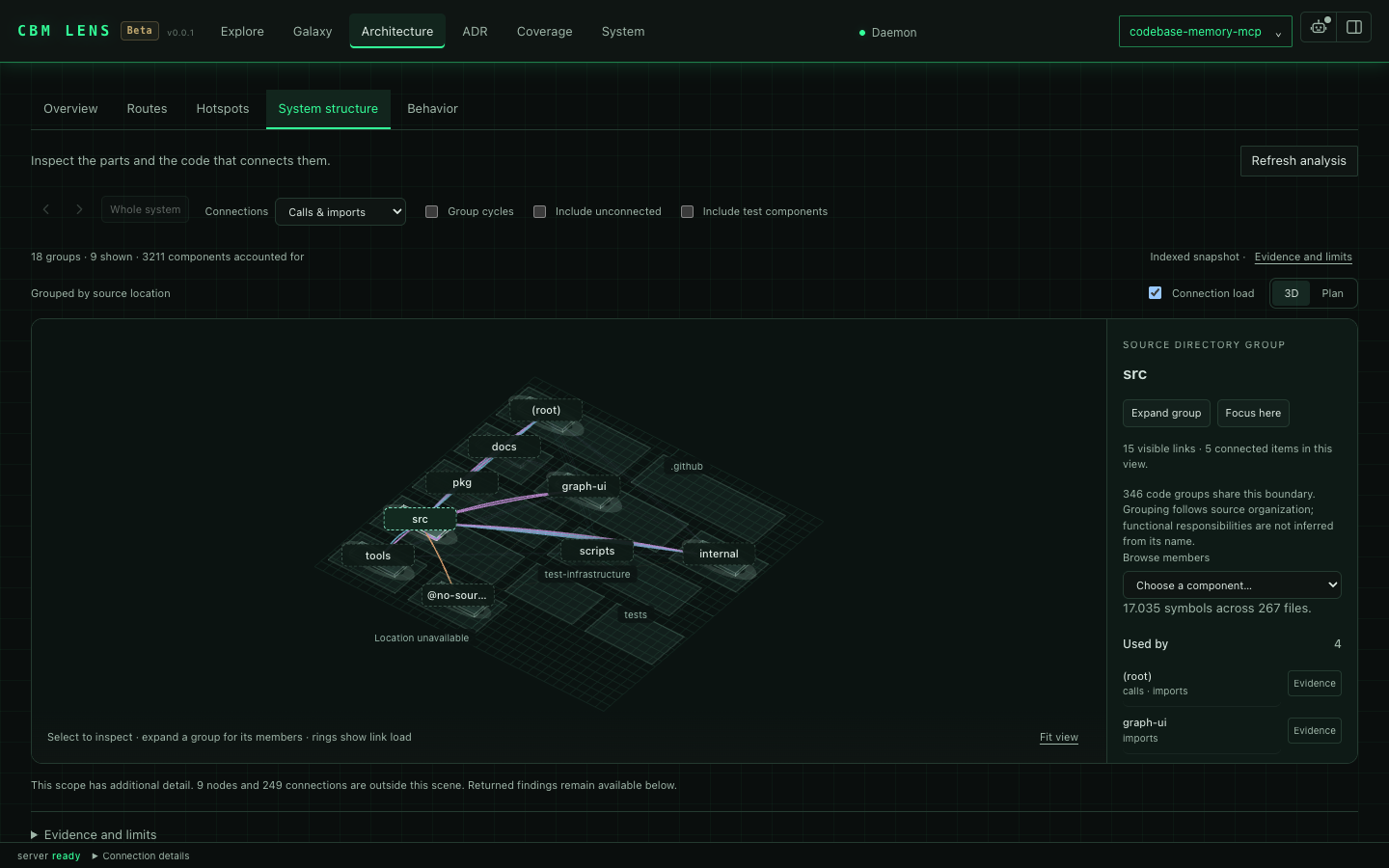
System structure groups symbols into components and lets you inspect their dependencies.
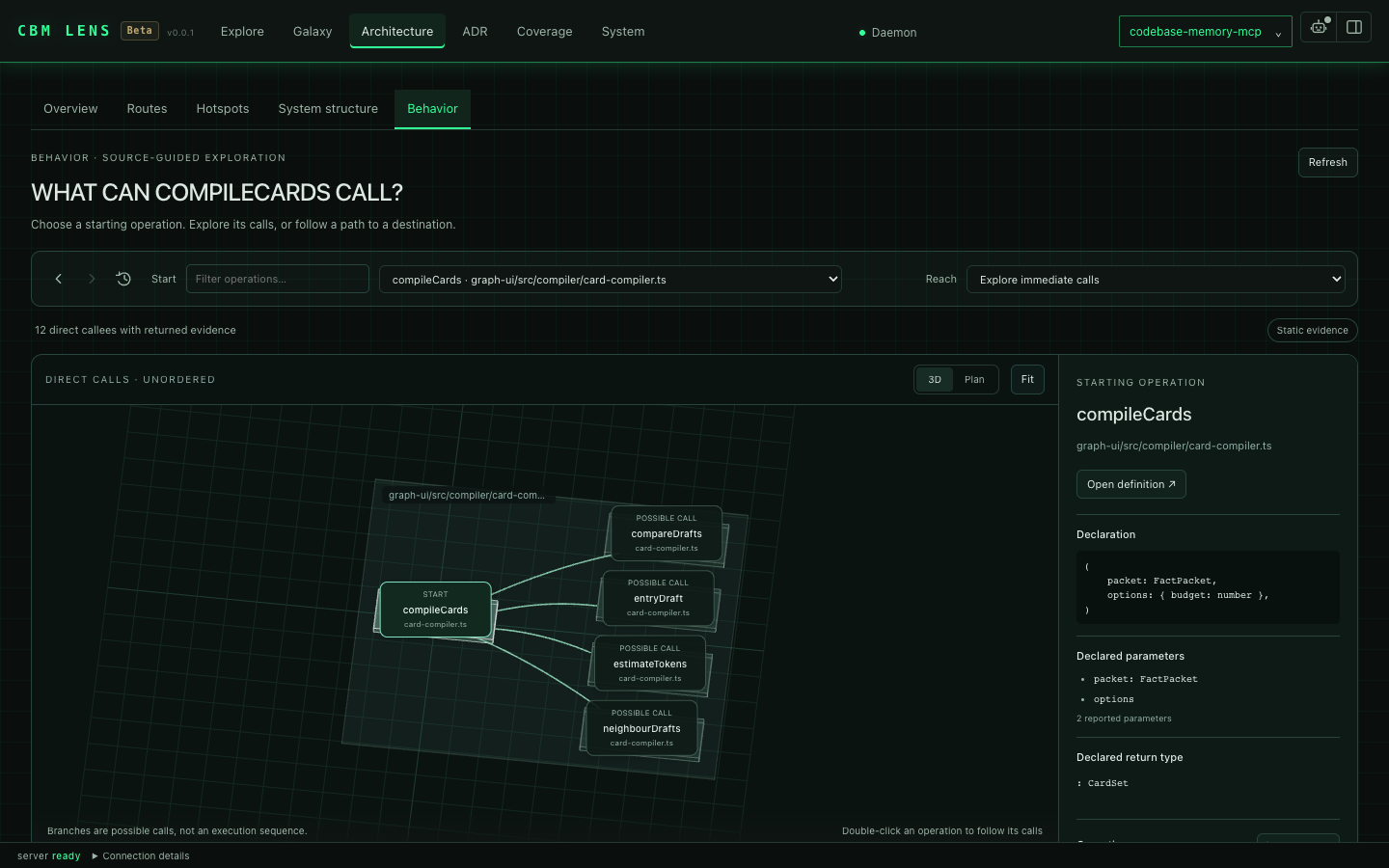
Behavior shows possible calls from a selected operation and the source evidence behind them.
The high-resolution GIFs show CBM Lens Beta on 20 October 2026; the still images were captured on 12–13 October. All show public source from this repository. See capture details for each capture's build, indexed scope and recording setup.
Why codebase-memory-mcp
- Find the right code with context: combine symbol, text, and semantic search with callers, dependencies, source snippets, and file outlines. Targeted queries and compact, paged results can reduce token use and repeated file reads; see Performance for scoped measurements.
- Connect documentation to implementation: index document sections, PDF text pages, architecture decisions, and supported references into code. Find the explanation alongside the symbol.
- Follow the system beyond source files: trace supported relationships through Docker, Kubernetes, Helm, Kustomize, Terraform/OpenTofu, Terragrunt, Ansible, scripts, Make, and CI configuration.
- Understand a change before running it: inspect affected symbols, compare indexed snapshots, and find related tests. Experimental Smart CI combines static relationships and per-test coverage for supported C/C++ test harnesses, falling back to broader runs when evidence is insufficient.
- Explore visually with CBM Lens Beta: read source, follow call paths, inspect architecture and coverage gaps, manage architecture decisions, and ask a local model about selected code.
- Equip your coding agents:
installsets up supported client configuration, durable guidance, skills, Scout/Verify/Auditor profiles, and applicable context hooks. Support varies by client; see the integration matrix. - Keep context local and reusable: indexes persist between sessions, eligible active MCP sessions can keep them synchronized, and optional graph artifacts let a team share a baseline.
- Run a native tool on your machine: standard releases include CBM Lens for macOS, Linux, and Windows. The native runtime needs no Docker or language runtime; parser grammars are included.
Quick Start
Install the latest release (macOS / Linux):
curl -fsSL https://raw.githubusercontent.com/DeusData/codebase-memory-mcp/main/install.sh | bash
The standard native release includes CBM Lens. Start it after installation with codebase-memory-mcp daemon start --open --port=9749. The Nix packages and source builds also offer builds without the UI.
Windows (PowerShell):
# 1. Download the installer
Invoke-WebRequest -Uri https://raw.githubusercontent.com/DeusData/codebase-memory-mcp/main/install.ps1 -OutFile install.ps1

# 2. (Optional but recommended) Inspect the script
notepad install.ps1

# 3. Unblock the downloaded file (removes Mark-of-the-Web restriction added by browsers/Invoke-WebRequest)
Unblock-File .\install.ps1

# 4. Run it
.\install.ps1
Note: If you see a script execution policy error, run
Set-ExecutionPolicy -Scope Process Bypassfirst, or invoke withPowerShell -ExecutionPolicy Bypass -File .\install.ps1.
Options: --skip-config (binary only, no agent setup), --dir=<path> (custom location).
Antivirus note: Microsoft Defender may flag a release binary as
Trojan:Script/Wacatac.B!ml. This is a known false positive; typically 61 of ~62 engines return clean, and the same detection family hitsgh, llama.cpp, Godot and Microsoft's own Go toolchain. See Antivirus False Positives for the evidence, how to verify the artifacts yourself, and how to report it if you think we are wrong.
Restart your coding agent. Say "Index this project": done.
Manual install
-
Download the archive for your platform from the latest release:
codebase-memory-mcp-<os>-<arch>.tar.gz(macOS/Linux) or.zip(Windows)
-
Extract and install (each archive includes
install.shorinstall.ps1):macOS / Linux:
bashtar xzf codebase-memory-mcp-*.tar.gz ./install.shWindows (PowerShell):
powershellExpand-Archive codebase-memory-mcp-windows-amd64.zip -DestinationPath . Unblock-File .\install.ps1 .\install.ps1 -
Restart your coding agent.
The install command automatically strips macOS quarantine attributes and ad-hoc signs the binary; no manual xattr/codesign needed.
Agent setup: skills, profiles, and hooks
Installation also equips supported coding agents to use the graph in daily work. The native install command detects clients and installs the integration pieces their documented formats support:
| Component | What it adds |
|---|---|
| MCP configuration | Connects the client to the local server and its tools. |
| Instructions and skills | Explains graph-first exploration, index freshness, coverage checks, and when to read source. |
| Scout, Verify, and Auditor profiles | Offers fast provisional lookup, task-directed verification, or bounded full verification, where custom agents are supported. |
| Session and compaction hooks | Restores graph context at supported lifecycle events. |
| Search and read hooks | Adds relevant graph context to supported searches and flags recorded coverage gaps after supported file reads. |
Hook augmentation is context-only and fail-open: it does not replace or block the requested tool call. Features vary by client and platform; some clients use durable instructions or a parent-agent handoff instead of hooks or direct subagent MCP access. Codex users review and trust installed hooks through /hooks. See Multi-Agent Support and Sessions, compaction, and subagents for exact support and activation requirements.
Session Coordination Daemon
CBM automatically shares one per-account coordination daemon across Claude Code, Codex, OpenCode, and every other configured client. There is no opt-in setting for MCP servers or hook clients: the first daemon-backed CBM session starts it, each session registers its own work, and a session-managed daemon stops after the final session. A daemon started with daemon start remains running until stopped. The daemon owns long-lived background services such as watchers, shared indexing jobs, and the optional UI. Closing one session cancels work owned only by that session, while work still needed by another session continues.
The detached daemon does not depend on an MCP frontend's stderr. It keeps owner-only durable records under the canonical ${CBM_CACHE_DIR}/logs directory (default ~/.cache/codebase-memory-mcp/logs):
| File | Contents |
|---|---|
cbm-daemon.log | Daemon lifecycle, watcher/indexing, UI, resource, and error events. |
daemon-conflicts.ndjson | Exact-build, coordination-ABI, and cache-root admission conflicts. |
activation-events.ndjson | Install/update/uninstall activation progress and outcomes. |
Thin frontends still write immediate startup and session-specific errors to their own stderr; MCP JSON-RPC stdout remains clean.
All active CBM processes must run the exact same version, executable build, coordination ABI, and canonical cache root. Equivalent CBM_CACHE_DIR aliases resolve to the same root; a genuinely different root is rejected while any CBM process is active. MCP servers, hooks, one-shot CLI commands, temporary index workers, and the daemon share a crash-safe OS admission barrier; starting an ordinary conflicting process fails before doing work and records an explicit conflict in ${CBM_CACHE_DIR}/logs/daemon-conflicts.ndjson.
The native install and uninstall commands are the deliberate exception to that conflict rule. For installation, download, verification, and private same-filesystem staging finish before activation so a bad candidate never disrupts active work. The native update command prints the installer command that performs the update. Activation then publishes account-wide maintenance intent, asks the daemon and every temporary local operation to cancel, and waits to a finite deadline for all coordinated CBM processes to exit. It holds the admission and lifetime barriers exclusively while changing the active binary, configuration, PATH, or indexes. New CBM work cannot enter during this window. Activation progress and results are recorded in ${CBM_CACHE_DIR}/logs/activation-events.ndjson, and a successful command tells you to restart open coding-agent sessions so they launch the activated build.
Package-manager setup (npm, PyPI, or Go) verifies and caches the native executable for that package. It does not replace the active native installation and therefore does not stop running CBM sessions. When that cached binary is executed, it still enters the same exact-build admission barrier. The shell and PowerShell installers invoke the verified candidate's native install command, so they do receive the full account-wide activation guarantee.
The ordinary cli mode runs one command locally, but it is not disconnected from the daemon above: it connects to the shared coordination daemon (starting one if none is already running) for that same admission barrier plus per-project locks on graph mutations. Its connection is a cli_session: it does not register a project watcher or open a browser, and it holds the admission lease only for the command's lifetime. The shared daemon may serve Lens according to its UI configuration and available assets. If the command's own connection is what started the daemon, that daemon exits again once the command closes and no other session is attached; if a daemon was already running, the command simply joins and leaves it exactly as found. While the command is running, a temporary monitor separately lets activation cancel that operation and its supervised worker safely; the monitor exits with the command and never becomes a standing daemon. See CLI Mode for details.
CBM Lens Beta: code visualization and source navigation
CBM Lens is an optional visual companion to the MCP server, currently in open beta (v0.0.1). Standard native releases include its browser interface, so you can launch Lens directly after installation; UI-enabled source builds include it too. It builds on CodeAtlasWeb by Bernhard Jackiewicz (design and tracking in #1964). Lens is served on loopback. Browser AI downloads its optional model only after you enable it; inference stays on-device. Each panel names where its facts come from, and what the index did not record is shown as a gap. Start the local server:
codebase-memory-mcp daemon start --open --port=9749
The browser opens at http://127.0.0.1:9749. A permanent daemon keeps the UI available after the command exits. Use daemon status to inspect it and daemon stop when you are finished. For an MCP session, --ui=true --port=9749 enables the same shared UI. Active clients must use the same executable build and cache directory.
Open your first repository
- Open the project menu and choose Add project index. You can also use
Alt+P. - Choose a local repository folder and name the index. Files stay in place.
- Start indexing and follow its reported status. You can close the dialog while it runs and reopen its activity from the project menu.
- Open the indexed project. Start with Architecture for an overview or Explore to read a file.
To bookmark a view, use ?project=<name>&workspace=architecture. Other workspace values are explore, galaxy, adr, coverage, and system.
| Workspace | What you can do |
|---|---|
| Explore | Navigate the indexed file tree and read source in Monaco. File impact shows what depends on the open file; Code details shows the callers, calls, references and related tests of the symbol under the caret. |
| Galaxy | Search and focus graph nodes, load their neighbors layer by layer, switch to hierarchy, follow a path, and open source. Back and Forward return to earlier views. The coverage shadow marks known gaps around the loaded graph. |
| Architecture | Explore the folder map, entry points, routes, hotspots, system structure, and behavior paths. Select a node or connection to inspect its evidence. |
| ADR | Read and edit the project's architecture decision record. Save explicitly; the document is stored with the index and shared with manage_adr. |
| Coverage | Check indexed, partially parsed, skipped, and excluded paths, together with available freshness information. |
| System | Inspect daemon activity, indexes, and logs. Filter logs by project, severity, or text. |
Architecture views
- Overview: move through source folders and files on a 3D map. Choose source-size or uniform height, language or kind colors, and relationship filters. Switch to Entry points to follow a static call graph from a starting symbol.
- Routes: switch between the service map and endpoint connections. Deployment metadata and indexed route evidence are shown separately; unresolved registrations remain visible.
- Hotspots: inspect symbols using measured signals such as fan-in and complexity. Gravity wells help locate frequently referenced areas. They are not a code-quality score.
- System structure: inspect component dependencies, expand groups, isolate cycles, and follow connections back to source evidence.
- Behavior: choose a source and a reachable destination to inspect static call paths and their source statements. These paths show possible relationships, not a recorded execution order. Runtime observations require separately ingested traces.
Drag a 3D view to orbit, scroll to zoom, and select a node or edge to inspect it. Edge colors distinguish relationships, and pulses indicate their direction. Reduced-motion preferences pause the pulses. Large views show their limits and omitted counts. A missing edge can reflect an indexing or display limit, so check Coverage and the source before drawing conclusions.
Chat with your codebase locally
Open Chat with the panel button at the top right to ask about the code you are looking at. In Explore it uses the open file or the exact text you have selected; in Galaxy it uses the selected node and its loaded neighbors. You can also attach graph evidence through Add context.
- Click the robot icon at the top right to open the agent configuration.
- Choose a local model. The default Qwen2.5 Coder 0.5B downloads about 567 MB; Qwen3 0.6B, LFM2.5 1.2B and Qwen3.5 2B are larger options. All need WebGPU with
shader-f16support. - Click Download & load. Model files come from Hugging Face; inference runs in your browser, with no hosted chat API or API key. A model that is already in the browser cache loads with Load model (cached, no download).
- Ask a question. The composer shows the file or selection that will accompany it. Select a smaller range when you want to focus the answer.
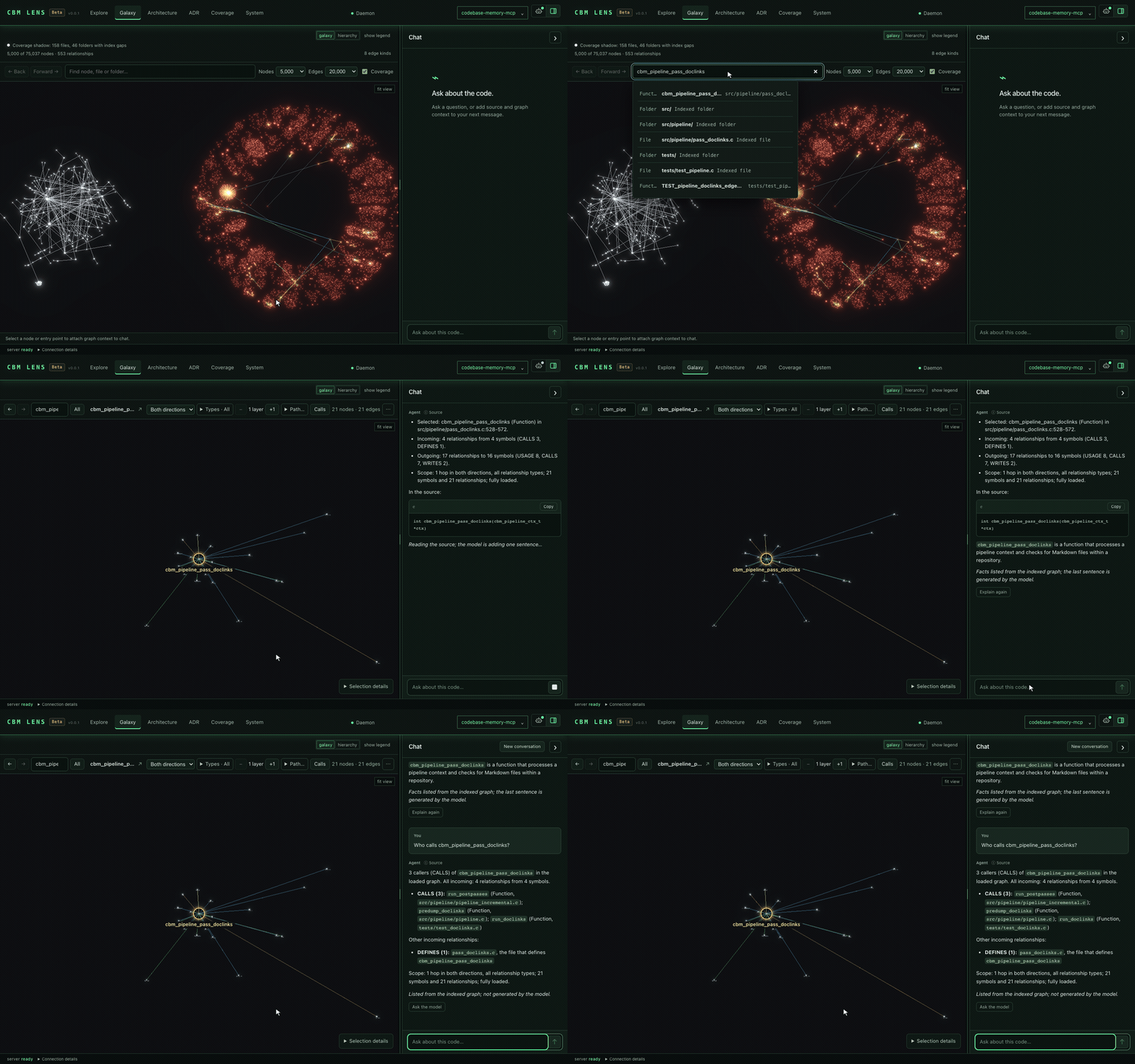
Questions about callers and callees, such as "Who calls cbm_pipeline_run?", are answered from the loaded graph without the model, and the answer says so. When you select a symbol, the chat lists its indexed facts and the lines of its code, and the model adds one sentence; that sentence is left out when it claims something the source does not show. Text written by the model is labelled as such.
The recording asks who calls arena_grow and what it calls, with both answers listed directly from the indexed graph beside the selected symbol. Still image of a model explanation and graph answer.
The chat history is kept for 24 hours in this browser, per project. Each new message uses the source currently open in the reader; earlier source snapshots are not silently accumulated, and messages about another file or selection are not sent along. If a prompt is too long for the model, older messages are left out first; if it still does not fit, CBM Lens asks you to select less code instead of cutting the code. This chat explains the context you give it; it cannot edit files or run tools. Check its answers against the source. The small default model words things loosely, especially in languages other than English.
Search
Cmd+K or Ctrl+K opens the Galaxy search. It finds symbols, files and folders by name or path in the whole index, also nodes that are not loaded yet. For callers and callees, ask in the chat; the answer is listed from the graph.
Architecture decisions
The ADR workspace keeps an unsaved draft per project in this browser tab. It checks whether the stored document changed before saving, but the API does not provide an atomic document lock. The editor accepts up to 8,000 UTF-8 bytes. Saving changes the indexed decision document, not a file in your repository.
Experimental agent activity
The Agents workspace and activity overlays are hidden in normal builds. To include them in a source build:
VITE_EXPERIMENTAL_AGENTS=true scripts/build.sh --with-ui
Activity comes from explicitly configured tool hooks. The bundled adapter supports Claude Code PostToolUse; other clients need their own adapter. Recorded events go to the local daemon, and the reader must enable activity before the browser polls them. This does not automatically observe every agent. See the frontend setup guide.
For troubleshooting, open System logs. Frontend errors and failed requests are recorded locally. GET /api/ui-log reads frontend entries from the daemon's SQLite journal; ${CBM_CACHE_DIR}/logs/ui.log is also retained as a rotating JSONL export. See the frontend README for log scope, model setup, and development details.
Auto-Index
Enable automatic indexing on MCP session start:
codebase-memory-mcp config set auto_index true
auto_index is off by default. When enabled, new projects are indexed automatically on first connection. The configurable file limit is config set auto_index_limit 50000. Previously indexed projects can be watched independently through auto_watch (on by default), subject to the session rules below.
The watcher follows MCP sessions: it watches the project each open MCP session is rooted in (the client's working directory) and stops when the last session for that project closes. A repository indexed with cli index_repository, or indexed from a session rooted somewhere else, is not watched; re-run index_repository after changing it. index_status reports this in its watch object: watched, and either the poll cadence and last scan time or the reason it is not watched.
Watcher registration is controlled separately by auto_watch (default true). Set config set auto_watch false to keep a session from registering its project with the background watcher; useful when working across many projects and you want each session contained to explicit indexing.
To turn the watcher off entirely, set config set watcher_enabled false (default true): the background poll thread never starts and no project is registered, while auto_index and manual index_repository keep working. Unlike auto_watch, which is consulted per session, watcher_enabled is read once when the background daemon starts, so run codebase-memory-mcp daemon stop after changing it; reconnecting your MCP client alone will not restart the daemon. See docs/CONFIGURATION.md.
The watcher follows git projects only by default: a project indexed from a directory that is not a git repository is not watched and stays at its last index until you run index_repository again. To have such roots polled too, set config set watch_non_git true (default false, read when the daemon starts): they are then checked on the same cadence with a file-tree scan that uses the indexer's own ignore rules.
Keeping Up to Date
Updates run from the install script on every platform, not from inside the running binary. codebase-memory-mcp update validates your flags and then prints the exact command to run:
# macOS / Linux
bash "<install-dir>/install.sh"
# Windows
powershell -File "<install-dir>\install.ps1"
The install script is placed next to the binary at install time, so the printed path resolves beside the executable. It is idempotent, so re-running it is the update: it stops the daemon, retires the running binary, installs the new one, and cleans up.
Why it works this way. On Windows it is a hard requirement; a running executable cannot replace its own image, so the swap has to happen from a process that is not the binary being replaced. On macOS and Linux it is a deliberate choice: an in-process updater is structurally a downloader (fetch an archive, verify it, unpack it, mark a file executable, run it), and shipping that composite in every binary to serve a command most people run a handful of times is a poor trade. The release archives now carry no download URLs at all, and cbm makes no network request of its own accord: it does not check for new versions in the background, and nothing phones home. You find out about releases from the install script, your package manager, or GitHub.
If PowerShell refuses to run the script because the file came from the internet, Unblock-File it first.
Installed through npm or pip? Update with your package manager on every platform (npm install -g codebase-memory-mcp@latest / pip install -U codebase-memory-mcp).
Uninstall
codebase-memory-mcp uninstall
Removes owned agent config entries, skills, hooks, instructions, and the installed binary. Existing graph indexes are listed and kept by default. -y/--yes, -n/--no, and noninteractive input keep them unless --delete-indexes is explicitly given. An interactive terminal without that flag is asked separately; the default answer is to keep them.
codebase-memory-mcp uninstall -y --delete-indexes   # also delete every project index
codebase-memory-mcp uninstall --dry-run --delete-indexes   # preview; change nothing
--delete-indexes is explicit consent and takes precedence over --no; --dry-run always preserves the files. When indexes are kept, uninstall prints their cache directory (${CBM_CACHE_DIR:-~/.cache/codebase-memory-mcp}) and how to remove them.
The install script placed beside the binary is reported, not deleted: uninstall prints its path and the rm command for it. It is left alone on purpose: it may be your own copy, a symlink into a checkout, or managed by a package manager, and an uninstaller should not delete a file it cannot prove it owns.
Features
Graph & analysis
- Architecture overview:
get_architecturereturns a compact summary by default. Request specificaspectsfor routes, hotspots, dependencies, clusters, or cycles.system_structureprovides the projection used by CBM Lens and must be requested on its own. - Architecture Decision Records:
manage_adrpersists the project's decision record across sessions; indexing also extracts supported ADR metadata and supersession from documentation files - Louvain community detection: Discovers functional modules by clustering call edges
- Change impact:
detect_changesmaps uncommitted changes to affected symbols with risk classification and can report test impact withscope: "tests";compare_graphscompares indexed snapshots - Runtime observations:
ingest_tracesadds observed call relationships from separately collected traces alongside static analysis; static call paths alone do not show what ran - Call graph: Resolves function calls across files and packages (import-aware, type-inferred)
- Dead code candidates: find functions with no indexed callers, excluding entry points. Check dynamic dispatch, coverage gaps, and framework conventions before removing code.
- Cypher-like queries:
MATCH (f:Function)-[:CALLS]->(g) WHERE f.name = 'main' RETURN g.name
Search
- Semantic search (the
semantic_queryparameter ofsearch_graph, not a separate tool): vector search across the entire graph, powered by bundled Nomicnomic-embed-codeembeddings (40K tokens, 768d int8) compiled into the binary; no API key, no Ollama, no Docker. 11-signal combined scoring (TF-IDF, RRI, API/Type/Decorator signatures, AST profiles, data flow, Halstead-lite, MinHash, module proximity, graph diffusion). - BM25 full-text search via SQLite FTS5 with
cbm_camel_splittokenizer (camelCase / snake_case aware) - Structural search (
search_graph): regex name patterns, label filters, min/max degree, file scoping - Code search (
search_code): graph-augmented grep over indexed files only
Documentation connected to code
Find the explanation behind a symbol and follow supported references back to its implementation. Documentation participates in the graph alongside source files:
- Markdown, reStructuredText, and AsciiDoc become navigable document sections; PDFs with text layers become searchable text pages. PDF extraction does not perform OCR.
- Document-to-code references and supported language doc-comment references create
MENTIONSrelationships when the target can be resolved. - Architecture decision records contribute metadata such as status, deciders, and supersession, so decisions can be explored with the code they describe.
- Supported diagrams and OpenAPI descriptions contribute structured entities. Extraction and reference resolution differ by format; not every textual mention becomes a graph edge.
Use graph and text search to locate the relevant section, follow its recorded relationships, and open the source evidence. Check check_index_coverage before treating a missing result as proof that the repository has no such documentation or reference.
Infrastructure and deployment
Ask "What deploys this service?", "Which image runs it?", or "Where does this configuration reach code?" CBM connects supported infrastructure forms to the source they build, configure, and run:
- Containers and clusters: Dockerfiles, Compose services, Kubernetes resources, Helm charts and releases, and Kustomize overlays and patches.
- Provisioning and configuration: Terraform/OpenTofu resources and modules, tfvars overrides, Terragrunt dependencies, Ansible tasks and handlers, and supported configuration keys and environment-variable access.
- Build and delivery: shell commands, Make targets, and supported CI steps that build images, invoke repository scripts, or deploy resources.
For resolvable inputs, a trace can follow Service → workload → image → Dockerfile → program, or follow deployment and configuration relationships. Use trace_path modes for topology, deployment, and run paths. These are static relationships from supported source forms; dynamic values and unresolved templates can leave gaps. See Edge types for the exact relationship rules and limitations.
Cross-service linking
- HTTP route ↔ call-site matching with confidence scoring
- gRPC, GraphQL, tRPC service detection with protobuf Route extraction
- Channel detection (
EMITS/LISTENS_ON) for Socket.IO, EventEmitter, and generic pub-sub patterns across 8 languages with constant resolution
Cross-repo intelligence
CROSS_*edges link nodes across multiple repos indexed under the same store- Cross-repo architecture summary combining services, routes, and dependencies across the indexed fleet
- Run status:
index_status(and the UI layout next tolinked_projects) carries across_repoobject,{"status":"never_run"}untilindex_repository(mode="cross-repo-intelligence")has run with that project as the source, then"ran"withlast_run_at,outcome,targets,projects_scanned,total_cross_edgesandskipped_projects. That is how you tell "never linked" apart from "linked, nothing matched". The status is stored in the project's own index next to itsCROSS_*edges, so a reindex that rebuilds the index drops both at once and the status goes back tonever_run. - Skipped stores:
target_projects: ["*"]skips an index built before the #768 schema change rather than failing the whole run. The response lists each one asskipped_projects: [{"name", "reason": "pre_768_schema", "hint": "reindex this project"}].
Smart CI and test impact
Use the graph to explain which tests a change reaches, and use that evidence to focus supported CI runs. Smart CI is experimental and has two layers:
| Layer | What it does | What you supply |
|---|---|---|
| CI job selection | Chooses jobs from the changed-file list. | Repository-specific path and job rules; this repository's selector is an example. |
| Test selection | Combines static reachability, changed tests, and admitted per-test coverage to select suites or tests. | A supported C/C++ test harness, configuration, a coverage map, and a runner that accepts named selections. |
codebase-memory-mcp test-impact select produces a selection with reasons; test-impact publish produces the graph-and-coverage bundle used as its baseline. For agent-assisted investigation, detect_changes with scope: "tests" exposes test impact through MCP.
Narrowing currently supports C/C++ family code with this repository's test conventions or declared equivalents. It is not general test selection for every language CBM indexes. Missing, stale, incompatible, or incomplete evidence broadens the selection or returns run_all; static reachability without admitted coverage never omits a suite. Begin with report-only shadow mode and validate your harness before enabling gating.
In this repository, test narrowing is wired to the Linux x86_64 test leg when TEST_IMPACT_MODE=gate; release and dry-run workflows retain full execution. See the Smart CI guide for supported conventions, coverage admission, setup, version requirements, and fallback behavior.
Edge types (selected)
CALLS: a callable is invoked at the source siteCALL_REFERENCE: a callable is used at a supported reference site (for example, a direct value argument) and resolves to one exact targetUSAGE: an identifier is used, but a unique callable target is not proven (including ambiguous or complex expressions)IMPORTS,DEFINES,IMPLEMENTS,INHERITSHTTP_CALLS,ASYNC_CALLS(cross-service); a shell script, Make recipe or CI step runningcurl/wgeton a URL it states (constant words resolved, unknown parts{}) to itsRoutewith the method its flags give: a Kubernetes Service of the repository by the path, as code clients do, any other host (a download, localhost) with the host kept; the edge keepsvia,method,url_path,host, never the user info or the querySPAWNS: the caller starts another program (subprocess.run,exec.Command,posix_spawn,Process.Start, a shell command or Make recipe running a program by path, ...); the target is aProcessnode named after the program, or<dynamic>when the program is not a literal. When a shell script, Make recipe, GitHub Actions step or Prow job runs a script of the repository (./hack/x.sh,bash hack/x.sh), the target is that script'sModule(else itsFile);make TARGET(also$(MAKE),-C,-f) targets the rule of that target, followed through included makefiles; edges from CI carryciandjob. A Dockerfile's last stageENTRYPOINT(elseCMD) spawns what the container runs (api: dockerfile): the repository script or source copied into the image, the Gomainof a binary a stage builds withgo build -o, else aProcessINFRA_MAPS: a Kubernetes Service to each workload whose pod labels carry everykey: valueof the Service's selector, within one namespaceCONNECTS_TO: a Kubernetes workload or compose service to the Service its containers' environment addresses (PRODUCT_CATALOG_SERVICE_ADDR: productcatalogservice:3550, a URL's host,<svc>.<ns>.svc..., a bare name on an*_ADDR/*_HOST/*_URL/ ... key; compose: the project's.envinterpolated): a Kubernetes Service of the same bundle and namespace, or a compose service of the same file. The edge keepsvia: env,keyandcontainer, never the valueUSAGEwithref: image: a Kubernetes workload (any pod template: containers, initContainers, CronJobs, custom resources) or a docker compose service to theImageit runs- Helm templates are rendered for their images: with the chart's values (the
ChartDEPLOYSthem,default_of: the values keys read) and with each release's (a Flux HelmRelease, a kustomizehelmChartsentry, a Terraformhelm_release:override_of). An image the render cannot know is left out, never guessed: after a change of values it does not run exactly, atplor include it cannot look into, a release value it cannot read, or a work budget it runs past. Known limit: each template file renders on its own, while Helm renders a chart's files with one shared.Values(a subchart's is its parent's.Values.<alias>), so a chart that changes.Valuesin one file and reads it in another can still show a wrong image DEPLOYS: what puts manifests, kustomizations or charts on a cluster, to what it puts there: a Flux Kustomization or Argo Application to the kustomizations / manifests / chart of its path, a Flux HelmRelease to its chart (spec.chartorchartRef→ OCIRepository), a shell command or Make recipe (kubectl apply -f/-k,kustomize build | kubectl apply,helm install/upgrade/template), a Go installer loading a chart with the Helm SDK, a Terraformhelm_release, a Terraformkubernetes_*resource the object it declares (aResourcelike a manifest's,ecosystem: terraform, when its name is a literal), a kustomization inflating a chart (helmCharts; its values file anIMPORTS). A chart outside the repository is an externalChart, keyed by its publisher when its repository URL is stated (__chart__<repository>/<name>, the same node in every project, the URL inrepository), else one per project and name; the edge saysvia(flux,argo,helmrelease,kubectl,kustomize,helm,helm-sdk,terraform,helmcharts, ...)DEPENDS_ON: a Helm chart to the charts it declares (the local chart for a resolvablefile://repository, otherwise an externalChart; the edge keepsrepository), and ago.mod/requirements.txtfile to an externalPackage; a Dockerfile to theImages it builds on (via: from,copy-from); anImageto the Dockerfile it is built from (via: build;tool:skaffold,compose,docker-buildfordocker/podman/nerdctl/buildahbuild commands in scripts, Make and CI); a compose service to the services itsdepends_on/linksnameCONFIGURES: code reading an environment variable to the sharedEnvVarof that name (strategy: env_access); a Kubernetes container, compose service or Dockerfile (ENVof the image) setting one to that container's ownEnvVar(strategy: env_set, withsource:value,configMapKeyRef,secretKeyRef,fieldRef, ...,compose,dockerfile; values are never stored); and that container'sEnvVarto the code reading the name inside the files its image is built from (strategy: env_read, withdockerfile): the image's files are the sources its Dockerfile'sCOPY/ADDput into it, less the context's.dockerignoreCONFIGURESwithstrategy: key_symbol: a code symbol to the config key it names (config_key). A YAML, JSON, HCL (Terraform, OpenTofu, tfvars), TOML or INI key links by exact name (maxRetryCount=max_retry_count) and only to code inside the config file's component: its directory, or the one around aconfig/,configs/,conf/,settings/oretc/directory. A.envor.propertieskey also links by substring (confidence 0.75)OVERRIDEwithvia: patch: a Kustomize patch to each object of its kustomization's build it changes (child → base): a patch file's documents to the object of the same kind and name; an inline patch (from the kustomization) or a JSON6902 operation file to what itstargetselects (group, version, kind, name, namespace, label selector); a component's in the build of each kustomization including it. The edge keepskustomization,patchandline; a patch file is anIMPORTS(local_name: patches) of its kustomization, never a member of the buildOVERRIDEwithvia: namePrefix/nameSuffix: an object a kustomization renames, from its variant: aResourcenamed with the deployed name (capi-+controller-manager; the prefixes of nested kustomizations outermost first, suffixes innermost first) in the namespace that build gives it,ecosystem: kustomize, which the kustomization's fileDEFINES. CRDs, Namespaces and API services keep their names, as kustomize does. The edge keepskustomizationandlineUSAGEwithvia: terraform: a Terraform / OpenTofu reference (var.X,local.X,module.X,data.T.N,T.N) from the top-level block holding it to the block of its module (the.tf/.tofufiles of its directory) that declares it (alocalsentry: itslocalsblock); an entry of the block'sdepends_onlist is aDEPENDS_ONinstead. The edge keepsref(var,local,module,data,resource) andline; a name only mentioned in string text is no reference. A module call with a local source (module "net" { source = "./modules/net" })IMPORTS(local_name: the module's name) theFolderof that directory (the root directory: theProject), andmodule.net.id(alsomodule.net[0].id,module.net[*].id)USAGEs (ref: output) theoutput "id"there, besidemodule.netOVERRIDEwithvia: tfvars: a.tfvarsassignment to a variable the module of its own directory declares, from the file'sVariableto thatvariableblock (the edge keepsline); a.tfvarsfile whose own directory declares none of its names sets the nearest ancestor module's that does, the edge markedinferred(such a file is applied by a-var-filethe repository does not state)- Terragrunt (
via: terragrunt): a unit (terragrunt.hcl), evaluated in its own context: anincludeIMPORTS(local_name) the file itspathnames; aread_terragrunt_configIMPORTS(read: the file holding the call) the file it names, from the block holding the call or, for a call in an included file, from the unit'sincludeblock that brings it in; adependencyDEPENDS_ONthe other unit; a localterraformsourceIMPORTSitsFolder. Paths may usefind_in_parent_folders,dirnameandget_terragrunt_dir; anything else is unknown and links nothing - Ansible (
via: ansible): a playbook or task file (a YAML file whose top level is a sequence)IMPORTS(local_name: the directive) what its directives name:import_playbooka playbook,include_tasks/import_tasks/includea task file (from its directory, else its role'stasks/),roles:items andinclude_role/import_rolea role'sFolder(roles/<name>at or above its directory). A templated target links nothing. Each task and handler is aFunction(named by itsname:, else its module;source: ansible,kind,module) that its fileDEFINES: in a playbook's plays, a role'stasks/andhandlers/files, and the files those include; a block's tasks, not the block. AnotifyCALLS(via: notify) each handler of that name orlistentopic in the task's own role (else its file). Akube(kubespray's module) orkubernetes.core.k8staskDEPLOYS(via: ansible,module) the repository file its play rendered the applied manifest from: thetemplate(in the role'stemplates/) orcopy(itsfiles/) task whosedestis the task'sfilename, item by item throughregister/with_items/looplists the play states (a literal list, aset_fact, the role'sdefaults/vars), or ak8stemplate:argument EMITS,LISTENS_ON(channels)DATA_FLOWSwith arg-to-param mapping + field access chainsSIMILAR_TO(MinHash + LSH near-clone detection, Jaccard scored)SEMANTICALLY_RELATED(vocabulary-mismatch, same-language, score ≥ 0.80)
Indexing pipeline
- 162 vendored tree-sitter grammars compiled into the binary
- Generic package / module resolution: bare specifiers like
@myorg/pkg,github.com/foo/bar,use my_crate::fooresolved via manifest scanning (package.json,go.mod,Cargo.toml,pyproject.toml,composer.json,pubspec.yaml,pom.xml,build.gradle,mix.exs,*.gemspec) - Infrastructure-as-code indexing: Dockerfiles (
Dockerfile.*,*.Dockerfile,Containerfile: bases, what the container runs,ENV), container images (Image: the normalised repository, tag and digest on the edges; a repository built from several Dockerfiles, one per component tag, gets anImageper component), docker compose services (Resource), Kubernetes manifests (Resource, withgroup,version,kind,namespace,labelsask=v,k2=v2), Kustomize overlays (IMPORTSto their entries and patch files,OVERRIDEfrom their patches), Helm charts (Chart,DEPENDS_ON), Terraform / OpenTofu (.tf,.tofu,.tfvars) as graph nodes. A Service walks to the code it runs: Service → workload →Image→ Dockerfile →main - Hybrid LSP semantic type resolution for Python, TypeScript / JavaScript / JSX / TSX, PHP, C#, Go, C, C++, Java, Kotlin, Rust, and Perl; a lightweight C implementation of language type-resolution algorithms, structurally inspired by and compatible with major language servers including tsserver / typescript-go, pyright, gopls, Roslyn, Eclipse JDT, and rust-analyzer (parameter binding, return-type inference, generic substitution, JSX component dispatch, JSDoc inference for plain JS files, namespace + trait + late-static-binding resolution for PHP, file-scoped namespaces + records + LINQ method syntax for C#, class-hierarchy + overload + lambda resolution for Java, extension-function + scope-function resolution for Kotlin, trait-method + UFCS resolution for Rust)
- RAM-first pipeline: LZ4 compression, in-memory SQLite, single dump at end. Memory released after.
Distribution & operation
- Native runtime set, zero infrastructure services: SQLite-backed, persists to
~/.cache/codebase-memory-mcp/ - Auto-sync: Background watcher detects file changes in the project an MCP session is working in and re-indexes it automatically (other indexed repos: re-run
index_repository) - Route nodes: REST endpoints are first-class graph entities
- CLI mode:
codebase-memory-mcp cli search_graph --project my-project --name-pattern ".*Handler.*" - Available on: npm, PyPI, Homebrew, Scoop, AUR,
go install
Indexing modes
| Mode | Use it for |
|---|---|
full | Full indexing with semantic analysis. This is the default. |
moderate | A filtered index with semantic analysis. |
fast | A filtered index without semantic analysis. |
cross-repo-intelligence | Link services across indexed projects, optionally limited by target_projects. |
Team-Shared Graph Artifact
Share a compressed graph snapshot so teammates can reuse an indexed baseline.
.codebase-memory/graph.db.zst is a zstd-compressed snapshot of the knowledge graph that lives next to your source. The artifact is opt-in: index_repository writes it only with persistence: true (the default is false), and once it exists later indexes refresh it. Local indexes persist regardless. When a teammate indexes a clone with an existing artifact, CBM imports that baseline and applies their local changes incrementally.
- Format: SQLite database, indexes stripped,
VACUUM INTOcompacted, then zstd 1.5.7 compressed (8 to 13:1 ratio typical) - Two tiers:
- Best (
zstd -9+ index strip +VACUUM INTO); written byindex_repositorywithpersistence: true - Fast (
zstd -3); refreshes an existing artifact on every other index, including the watcher's low-latency incremental updates
- Best (
- Bootstrap: when no local DB exists but the artifact is present,
index_repositoryimports the artifact first, then runs incremental indexing, reusing the shared baseline where possible - Merge policy: the first export creates
.codebase-memory/.gitattributeswithmerge=ours. Check your repository's Git merge-driver setup before relying on it for concurrent artifact updates. - Commit it deliberately: the artifact is rewritten on every index, including the watcher's Fast tier, and git stores each rewrite as a full new blob. Committing every refresh is what turns a 20 MB file into gigabytes of history; one team reached ~6 GB across ~350 commits of this single path. Pick a cadence (a release, a milestone, a nightly job) rather than committing every save.
- Git LFS, if it must move on every commit: track it from the repo-root
.gitattributesand leave the auto-created.codebase-memory/.gitattributesin place; the nearer file goes on supplyingmerge=ours, and onlyfiltercomes from the root:Track only thegitattributes.codebase-memory/graph.db.zst filter=lfs diff=lfs merge=lfs -text.zst;artifact.jsonis small and carries the schema version. The attribute applies to future commits only. Removing existing blobs requires a separate history migration. Two costs to weigh before adopting it: GitHub meters LFS storage and bandwidth, and its objects cannot be pruned without contacting support; and every teammate needsgit lfs install; without it their checkout leaves a pointer file where the artifact should be, the integrity-checked import refuses it, and they fall back to a full reindex. - Optional: shared export is opt-in, and Git commits remain your choice. Add
.codebase-memory/to.gitignoreif you prefer everyone to reindex from scratch.
The artifact provides a shared baseline while each developer keeps a local query database.
How It Works
codebase-memory-mcp is a structural analysis backend: it builds and queries the knowledge graph. The backend does not require a generative model. It relies on your MCP client (Claude Code, or any MCP-compatible agent) to be the intelligence layer.
You: "what calls ProcessOrder?"

Agent calls: trace_path(function_name="ProcessOrder", direction="inbound")

codebase-memory-mcp: executes graph query, returns structured results

Agent: presents the call chain in plain English
With MCP, your coding agent translates a question into tool calls. CBM Lens can also use an optional browser model for explanations; this does not change how the backend indexes or queries code.
Performance
Published backend benchmarks on Apple M3 Pro. These are separate from the CBM Lens checks:
| Operation | Time | Notes |
|---|---|---|
| Linux kernel full index | 3 min | 28M LOC, 75K files → 4.81M nodes, 7.72M edges |
| Linux kernel fast index | 1m 12s | 1.88M nodes |
| Django full index | ~6s | 49K nodes, 196K edges |
| Cypher query | <1ms | Relationship traversal |
| Name search (regex) | <10ms | SQL LIKE pre-filtering |
| Dead code detection | ~150ms | Full graph scan with degree filtering |
| Trace call path (depth=5) | <10ms | BFS traversal |
Memory-aware pipeline: Indexing keeps hot data in memory and can spill extraction results to disk when needed. Memory is released back to the OS after indexing completes.
More focused context, fewer tokens: The project's 31-repository preprint reports 10× lower token use and 2.1× fewer tool calls compared with file-by-file exploration. These March 2026 backend measurements cover the study's workloads and agent setup; the paper documents the full evaluation. An earlier five-query comparison reported ~3,400 versus ~412,000 tokens for structural queries. The study's system-performance measurements include the Linux indexing and Cypher timings above.
Explore the measurement guide to evaluate quality, latency and token use on your own workload.
Troubleshooting & Diagnostics
codebase-memory-mcp indexes and queries locally and collects no telemetry. When you hit something we can't reproduce on our side (a slow memory climb over hours, a performance regression, a leak that only appears after days of real use), we have no diagnostic data unless you choose to send it. Here is how to capture it yourself.
Capture a diagnostics log
Set CBM_DIAGNOSTICS=1 before the first daemon-backed MCP session starts, then reproduce the problem (let it run as long as it takes; a slow leak needs time to show in the trend). The shared daemon captures this setting from the session that starts it. If it is already running, close all daemon-backed sessions so it exits before changing the setting. The daemon creates a fresh owner-private cbm-diagnostics-<pid>-<random> directory below the system temp directory ($TMPDIR or /tmp on macOS/Linux, %TEMP% on Windows). The exact paths are recorded by the diagnostics.start event in ${CBM_CACHE_DIR}/logs/cbm-daemon.log:
| File | What it is |
|---|---|
trajectory.ndjson | The memory trajectory: one JSON line every 5 s with rss, committed (Windows commit charge), peak_*, page_faults, fd, and queries. This is the file we need for memory/leak reports: the trend over time is what pinpoints a leak. It is kept on disk after the server exits (so you can grab it post-mortem) and rotates to trajectory.ndjson.1 past ~8 MB. |
snapshot.json | The latest snapshot only; handy for a quick live check. Removed on clean exit. |
The private randomized directory prevents another local account from pre-placing a link or special file at a predictable diagnostics path. Its <pid> component is the shared daemon's process ID, also recorded by the daemon.start event. Set the variable consistently in the env block of each agent's MCP server config, or export it before launching the first session.
What to share
When you open a memory/performance issue, attach the .ndjson trajectory: it contains no source code or query text, only resource counters. If you'd rather not attach a file, paste it (or an agent's summary of it) into the issue: your assistant can read the NDJSON directly and report whether rss/committed grow monotonically, how fast, and relative to query count; which is exactly what we need to find the cause.
Installation
Pre-built Binaries
| Platform | Archive |
|---|---|
| macOS (Apple Silicon) | codebase-memory-mcp-darwin-arm64.tar.gz |
| macOS (Intel) | codebase-memory-mcp-darwin-amd64.tar.gz |
| Linux (x86_64) | codebase-memory-mcp-linux-amd64.tar.gz |
| Linux (ARM64) | codebase-memory-mcp-linux-arm64.tar.gz |
| Windows (x86_64) | codebase-memory-mcp-windows-amd64.zip |
Every release includes checksums.txt with SHA-256 hashes. The executable is self-contained; no adjacent data file is required. Linux -portable archives contain the fully static builds; ordinary platform archives use their native system ABI.
Windows note: SmartScreen may show a warning for unsigned software. Click "More info" → "Run anyway". Verify integrity with
checksums.txt.
Setup Scripts
Automated download + install
macOS / Linux:
curl -fsSL https://raw.githubusercontent.com/DeusData/codebase-memory-mcp/main/scripts/setup.sh | bash
Windows (PowerShell):
irm https://raw.githubusercontent.com/DeusData/codebase-memory-mcp/main/scripts/setup-windows.ps1 | iex
AUR (Arch Linux)
yay -S codebase-memory-mcp-bin
paru -S codebase-memory-mcp-bin
The codebase-memory-mcp-bin package is available at: https://aur.archlinux.org/packages/codebase-memory-mcp-bin
Nix (flake)
The flake exposes two server packages plus the standalone frontend:
| Package | Contents |
|---|---|
default (codebase-memory-mcp) | Standard server, no UI |
codebase-memory-mcp-ui | Server with CBM Lens embedded (--ui=true works) |
graph-ui | Just the built CBM Lens assets (dist/) |
Run directly without installing:
# Standard server
nix run github:DeusData/codebase-memory-mcp

# Server with CBM Lens embedded
nix run github:DeusData/codebase-memory-mcp#codebase-memory-mcp-ui -- --ui=true --port=9749
# then open http://127.0.0.1:9749
Or build a binary into ./result/bin/codebase-memory-mcp:
nix build github:DeusData/codebase-memory-mcp                          # standard
nix build github:DeusData/codebase-memory-mcp#codebase-memory-mcp-ui   # with UI
Working in a clone? Use . in place of the flake URL, e.g. nix run .#codebase-memory-mcp-ui -- --ui=true, or drop into a shell that puts the binary on PATH with nix shell .#codebase-memory-mcp-ui.
Note: launched by hand (not from an MCP client) the server exits as soon as
stdincloses; that's normal MCP behaviour. Keepstdinopen while testing the UI, e.g.sleep infinity | codebase-memory-mcp --ui=true --port=9749. Thecodebase-memory-mcp-uipackage embeds the UI at build time;nix run'ing the standarddefaultpackage with--ui=truewill refuse to start the HTTP server.
Install via Claude Code
You: "Install this MCP server: https://github.com/DeusData/codebase-memory-mcp"
Build from Source
Prerequisites: C/C++ compiler, zlib, and Node.js for CBM Lens
| Requirement | Check | Install |
|---|---|---|
| C compiler (gcc or clang) | gcc --version or clang --version | macOS: xcode-select --install, Linux: apt install build-essential |
| C++ compiler | g++ --version or clang++ --version | Same as above |
| zlib | n/a | macOS: included, Linux: apt install zlib1g-dev |
| Git | git --version | Pre-installed on most systems |
| Node.js 22+ and npm | node --version and npm --version | Required for --with-ui |
git clone https://github.com/DeusData/codebase-memory-mcp.git
cd codebase-memory-mcp
scripts/build.sh --with-ui          # the shipped composition (CBM Lens embedded, needs Node.js)
scripts/build.sh                    # without the UI (development only)
# Binary at: build/c/codebase-memory-mcp   (codebase-memory-mcp.exe on Windows)
The --with-ui build embeds CBM Lens and the agent integration templates into the native executable. You do not need Node.js to run that executable. Optional browser model weights are downloaded separately after opt-in.
Tests
Counts on main at 4d9592b5, where CBM Lens arrived. Native and Go counts use the macOS configuration; platform-specific registrations differ.
| Suite | Count | Checked for this README |
|---|---|---|
| Native C | 9,388 tests across 189 suites | 9,376 passed, 11 skipped, 1 failed on macOS (regex_compile_refuses_overlong_pattern) |
| UI unit tests (Vitest) | 3,970 tests in 310 files | All passed |
| Go package wrapper | 30 top-level tests | Counted in the source |
| npm package wrapper | 24 tests | Counted in the source |
| Python package wrapper | 43 tests | Counted in the source |
Run the native test suite:
scripts/test.sh                     # full: clean sanitizer build + all suites + guards
scripts/test.sh --suites <name>     # one suite, incremental, seconds
build/c/test-runner --list-suites   # what is available
Frontend development and validation:
cd graph-ui
npm ci
npm run test:unit
npm run build
npm run dev
The dev server listens on port 5173 and proxies /api and /rpc to port 9749. Start the matching CBM backend first.
Package wrappers have their own test commands: go test ./... in pkg/go, npm test in pkg/npm, and python3 -m unittest discover -s tests -p 'test_*.py' in pkg/pypi. The Go wrapper requires Go 1.26.1 or newer.
scripts/test.sh is the C test entry point used by CI. The canonical local artifact-flow check builds both stripped/unstripped candidates, defaults to the stripped candidate for this explicitly unscanned local run, packages those exact bytes, extracts the archive, and smokes it:
scripts/ci/smoke-artifact.sh <linux|darwin|windows> <amd64|arm64>
scripts/package-release.sh is intentionally a lower-level immutable boundary:
it accepts only an already-final --selected-binary plus its
--expected-sha256; it never builds, strips, signs, or relinks the executable.
Manual MCP Configuration
If you prefer not to use the install command
Add to ~/.claude.json (user scope) or project .mcp.json:
{
  "mcpServers": {
    "codebase-memory-mcp": {
      "command": "/path/to/codebase-memory-mcp",
      "args": []
    }
  }
}
Restart your agent. Verify with /mcp; you should see codebase-memory-mcp with 17 tools.
Multi-Agent Support
install configures 45 supported automatic/conditional client surfaces: 39 detected automatically and 6
conditional or explicit. “Conditional” means the installer writes only when the
documented platform or an explicit, already-existing config path proves the
target is active. It never flips experimental feature flags, enables plugins,
YOLO modes, global permission bypasses, or third-party instruction trust.
Where a client has a documented custom-agent format, the installer creates three exact-owned definitions from one canonical contract:
- Scout (Tier 1): about 3 to 4 narrow calls for fast positive, provisional discovery; no absence, exhaustive-impact, or dead-code claims.
- Verify (Tier 2, default): task-directed graph evidence, exact source checks, path coverage for every cited file, and scope coverage before negative claims.
- Auditor (Tier 3): bounded scope, current index generation, complete relevant pagination, broader relationship checks, and explicit unresolved limitations.
Every direct tier batches check_index_coverage for its evidence paths and reads
fl