Listed from the MCP registry; nobody on Odel publishes it.
Omnisnap
Stability-scored test selectors, design tokens and captures from your real, logged-in browser.
Runs on your machine from its package; the steps are below.
What it does
- Reads
- Writes
- High impact
At most: only reads or looks up information.
What it costs
FreeOdel charges nothing per call. The publisher may charge for its own service.
Runs locally over stdio
This server isn't hosted — your MCP client launches it from a package registry. Use one of the commands below, or drop the config into your client (e.g. Claude Desktop).
Run
npx -y omnisnap-mcp
MCP client config
{
  "mcpServers": {
    "omnisnap": {
      "command": "npx",
      "args": [
        "-y",
        "omnisnap-mcp"
      ]
    }
  }
}





The problem this solves
Your agent writes a test. It reads the DOM, picks a selector that looks
reasonable, and the test passes. Three weeks later the bundler runs, a class
called css-1x2y3z becomes css-9f8e7d, and the suite goes red on a change
nobody made to the feature.
The selector was never good. Nothing in the DOM told the agent that.
Here is a real nav bar, read through this server:
 1. home                 84/100  unique   a[aria-label="home"]
 8. Sign In              88/100  unique   #IN
 2. Product tour         44/100  unique   body > div.navbar > nav.menu
                                          > a:nth-of-type(1)
Eight links, two with a handle worth trusting and six with a positional chain four levels deep. They all work today. Six of them break the first time somebody reorders the menu, and the score is what tells you which six.
That is the whole idea. Not "here are some selectors", but "here is which one will still be there next sprint, and why".
Installing
Two pieces. The server you are reading about, and the Chrome extension that does the actual reading.
1. Add the server to your AI client.
{
  "mcpServers": {
    "omnisnap": {
      "command": "npx",
      "args": ["-y", "omnisnap-mcp"]
    }
  }
}
Where that file lives, per client
| Client | |
|---|---|
| Claude Code | claude mcp add omnisnap -- npx -y omnisnap-mcp |
| Claude Desktop | ~/Library/Application Support/Claude/claude_desktop_config.json (macOS)%APPDATA%\Claude\claude_desktop_config.json (Windows) |
| Cursor | ~/.cursor/mcp.json, or .cursor/mcp.json in a project |
| VS Code | .vscode/mcp.json, or:code --add-mcp '{"name":"omnisnap","command":"npx","args":["-y","omnisnap-mcp"]}' |
| Windsurf | ~/.codeium/windsurf/mcp_config.json |
| Cline | cline_mcp_settings.json, through the MCP Servers pane |
| Codex | ~/.codex/config.toml |
| Goose | Settings, Extensions, Add, as a stdio command |
Anything else that speaks MCP over stdio takes the same command and args.
2. Install OmniSnap AI Studio from the Chrome Web Store. Version 1.9 or later. The bridge lives in the extension, so an older build has no Connect to AI switch and nothing will connect.
3. Pair them, once. Click the extension icon and turn on Connect to AI.
Ask your agent to call omnisnap_status; it reports a six-digit code. Type
that code into the extension.
You    → check omnisnap status

Claude → The extension is waiting to be paired.
         Tell the user the code is 482193, and ask them to type it
         into the extension, which is asking for it now.

You    → (type 482193 into the extension)

Claude → OmniSnap is connected.
           extension: omnisnap-extension 1.9.4
           bridge:    127.0.0.1:8787
         Every OmniSnap tool is available.
That is the setup. The pairing survives restarts.
What it looks like in use
You: The checkout button test keeps breaking. Have a look at the page and write me one that holds.
The agent calls annotate_interactive. It gets back a screenshot with every
control numbered, and a table mapping each number to a selector and a score.
It can see the page, so it knows which button you mean. It has the scores, so
it knows which handle survives.
 3. Place order   96/100  unique   [data-testid="place-order"]
 4. Cancel        41/100  2 matches  button.sc-bdVaJa
Claude: Element 3 is the one you want. It has a test hook, which is the only kind of selector nothing about the design can move. Element 4 is worth knowing about separately:
button.sc-bdVaJamatches two elements, so a test using it is already ambiguous.Here is the page object:
export class CheckoutPage {
  constructor(private page: Page) {}
  readonly placeOrder = this.page.getByTestId('place-order');
  readonly emailField = this.page.getByLabel('Email address');
}
No login script. No scripted navigation to reach the checkout. It read the page you already had open, in the session you were already in.
Four more things worth trying
"Why does this page feel slow?" get_diagnostics returns Web Vitals,
failed requests and console errors from your real session, with your
extensions and your network, which a clean automated browser cannot reproduce.
"Check this at phone width." set_viewport holds the page at 375px, and
every tool afterwards answers about that width. Not a screenshot of a phone:
the page is a phone until you hand it back.
"Watch while I click through this." watch_page waits and reports the
console errors, failed requests and layout shifts that happen meanwhile. Every
other tool asks a question and gets an answer as of that instant; most of what
goes wrong does not wait to be asked.
"Which button do you mean?" await_user_selection arms the picker in the
browser. You click the element. The agent gets it back with ranked selectors.
Asking costs one turn. Guessing wrong costs the task.
What you can ask for
Each of these is something you type. The agent picks the tools; you do not have to know their names.
|
"Write me a test for the checkout button." Calls You get a page object built from scored selectors, with any ambiguous one flagged before it reaches your suite. |
Without this, the agent reads the DOM, picks something that looks reasonable, and you find out it was positional three weeks later when the bundler runs. |
|
"This button does nothing when I click it." Calls It asks what a click at that button would actually hit, and names whatever is painted over it. |
Without this, the code looks correct, because it is. The consent banner and the button know nothing about each other; only the layout puts one on the other. |
|
"Check this page at phone width."
You get what breaks at 375 and not at 1440, which is most of what breaks. |
Without this, you resize your own window, squint, and miss the clipped text because it is below the fold at that width. |
|
"Did my CSS change land?"
The changed regions come back outlined on the newer frame. |
Without this, two screenshots and your eyes. Most of the frame is identical, so you hunt. |
|
"Why does this feel slow?"
Measured in your session, with your extensions and your network. |
Without this, a clean automated browser on a fast connection tells you everything is fine. |
|
"Which button do you mean? This one."
The agent gets the element with ranked selectors. |
Without this, three rounds of "the blue one, no, the other blue one". |
Slash commands
| Command | What to type after it |
|---|---|
/write-test | the framework, and the journey to cover |
/file-bug | what you expected and what happened |
/check-responsive | optionally, what to watch for |
/find-flaky-selectors | the selectors you already have, one per line |
/why-is-this-slow | nothing |
/audit-accessibility | nothing |
/extract-design-system | json, css, tailwind, scss or markdown |
/extract-design-system markdown is worth singling out. It returns a dated
DESIGN.md to commit beside the code, with the contrast audit inline, so the
next question about spacing has an answer that does not need the browser
again.
The tools
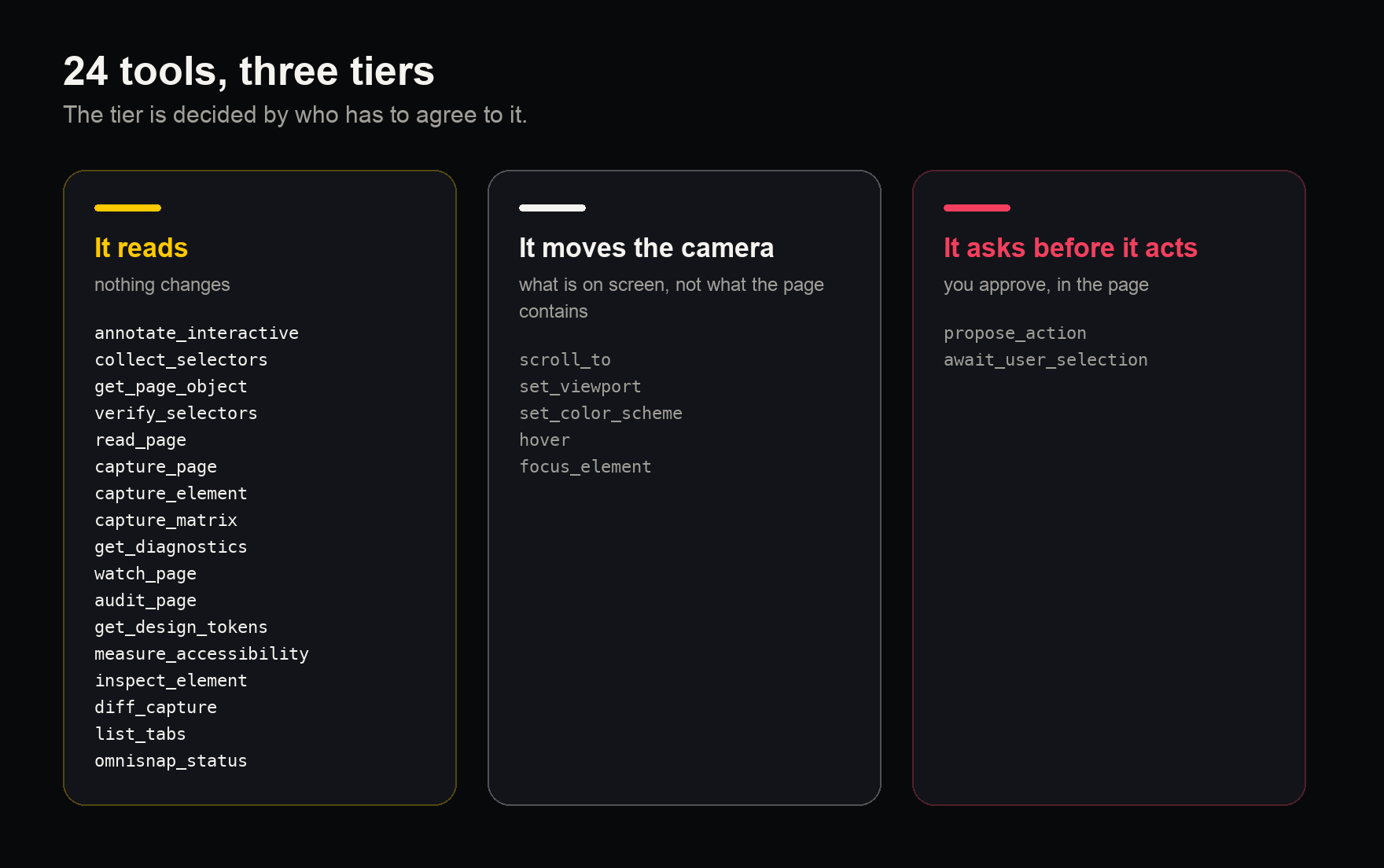
Twenty-four, in three tiers. The tier depends on who has to agree to it.
It reads
Nothing here changes your page.
| Tool | What you get |
|---|---|
annotate_interactive | Numbered screenshot, a selector per number, and how much of the page you are seeing |
collect_selectors | Every selector for one element, ranked and verified |
get_page_object | A page object for Playwright, Selenium, Cypress or WebdriverIO |
verify_selectors | Which of your existing selectors have rotted |
read_page | The page as text, with a heading outline |
capture_page · capture_element · capture_matrix | Screenshots, including three widths side by side |
get_diagnostics | Vitals, failed requests, console errors, storage |
watch_page | Waits, then reports what the page did meanwhile |
audit_page | Problems only a rendered page has: a covered control, clipped text, sideways scroll, a font that never arrived |
diff_capture | What moved since the last time you looked, outlined |
get_design_tokens | Palette with contrast audit, type scale, spacing |
measure_accessibility | WCAG failures, with selectors |
inspect_element | Box model and computed styles |
list_tabs · omnisnap_status | What can be read, and whether the bridge is healthy |
It moves the camera
These change what is on screen, not what the page contains. They are declared as changes rather than reads, so your client can prompt if it wants to.
| Tool | |
|---|---|
scroll_to | See the rest of the page. One capture covers one viewport, which on a long page is a few per cent of it |
set_viewport | Hold the page at 375, 768 or 1440 |
set_color_scheme | Light or dark. Dark is where contrast regressions hide, because it is the theme nobody screenshots |
hover · focus_element | Photograph a dropdown, a tooltip, a focus ring. No ordinary capture reaches these |
It asks before it acts
| Tool | |
|---|---|
propose_action | Proposes a click or a keystroke. The extension outlines the element and asks you, in the page. Nothing happens unless you approve |
await_user_selection | Hands the question back. You click the element you mean |
Once an element has a number from annotate_interactive, every tool above
also takes element: 5 instead of a selector you would otherwise copy out of
a table and retype exactly.
How this is different
Several projects connect an agent to your real Chrome through an extension, so the category is not empty. Tools like Playwright MCP and Chrome DevTools MCP drive a browser: they click, type and navigate.
This one reads your browser, and asks before it touches it. What comes back is not a driven session but the artefacts of a handoff.
| A driven browser | omnisnap-mcp | |
|---|---|---|
| Reaching a page behind SSO | Write a login script | Already in the tab |
| Selector quality | Whatever the DOM suggests | Scored for surviving a redeploy, with the reason |
| Ambiguous selectors | Found when the suite goes flaky | Counted against the live DOM before you see it |
| Acting on your session | The agent decides | You approve, in the page |
| Output | A session that was driven | Page objects, tokens, redlines, diagnostics |
The trade is deliberate. An agent that can click unattended in a session you are signed into will eventually click the wrong thing, and the cost lands on real data rather than a fixture.
Prompts and resources
Four slash commands: /write-test, /file-bug, /audit-accessibility,
/extract-design-system.
| Resource | |
|---|---|
omnisnap://guide/selectors | The ranking and the reasoning: what makes a selector fragile, and how the right choice differs per framework |
omnisnap://guide/diagnostics | What the vitals mean, and the two mistakes that produce confidently wrong bug reports |
omnisnap://capture/latest | The most recent screenshot and its metadata |
omnisnap://help/pairing | Install and pairing steps |
The first two work before you have paired anything. Any server can hand back a list of selectors; knowing which to pick is what decides whether the test passes next sprint, so the reasoning travels with the data.
When something is wrong
npx omnisnap-mcp --doctor
It checks the port, checks whether a token is stored, waits for the extension, then walks you through pairing: it prints the code to type in and waits for it to land.
| What you see | What it means |
|---|---|
| Every tool says "not paired" | The extension is not connected. Run --doctor. |
| No Connect to AI switch in the popup | The installed extension is older than 1.9. Update it. |
omnisnap_status names tools that will refuse | Same cause. It lists exactly which ones. |
| "Port already in use" | Another copy is running, which is usually fine. Close it, or set --port in both the client config and the extension. |
| "Chrome does not allow extensions to read…" | The focused tab is a chrome:// page or the Web Store. Switch to an ordinary site. |
| Tools time out after 30s | The browser is busy, or too many calls were sent at once. At most six run in flight. |
Security
You are pairing a tool that can read any page you are signed in to. That deserves a straight answer.
- Loopback only. The bridge binds
127.0.0.1. Nothing off the machine can reach it. - No web page can connect. The server requires a
chrome-extension://origin. A browser sets that header itself and page JavaScript cannot forge it. - Acting needs a human, every time. The extension outlines the element and
asks you. The Approve control accepts only
event.isTrusted: a page can dispatch a click on that button from script, but it cannot forge a real one. Nothing navigates, and nothing submits a form. - Pairing needs a human. The port is fixed, so another local process could claim it first. The six-digit code therefore travels from this server to you through your AI client, and you type it in. If your client is not showing a code, type nothing: something else is listening.
- The code never crosses the socket. A rogue client would otherwise read it back and pair itself. A test asserts this.
- Rate limited and short lived. Six digits, five attempts, two minutes, single use. Constant-time comparison against a fixed-width buffer, so neither value nor length leaks.
- No telemetry. No account, no remote config. The only state on disk is the
pairing token at
~/.omnisnap/bridge.json, mode0600.
This is not a security boundary. It is deliberate limits with a person in the loop. Anyone who can run processes as you can read that token, and an AI client you pair is a program you have chosen to trust with your browser. Treat it the way you would treat handing that client your terminal.
Full detail in SECURITY.md; the wire format is in PROTOCOL.md.
Configuration
Every option is a flag and an environment variable. A flag wins, because it sits in the client config in front of you, where the environment may have come from a shell profile written months ago.
"args": ["-y", "omnisnap-mcp", "--port", "8787", "--log-level", "debug"]
| Flag | Environment | Default | |
|---|---|---|---|
--port | OMNISNAP_PORT | 8787 | Must match the extension |
--log-level | OMNISNAP_LOG_LEVEL | info | silent, error, warn, info, debug |
--state-dir | OMNISNAP_STATE_DIR | ~/.omnisnap | Where the pairing token lives |
--call-timeout | OMNISNAP_CALL_TIMEOUT_MS | 30000 | Per call |
--capture-timeout | OMNISNAP_CAPTURE_TIMEOUT_MS | 120000 | Captures get longer |
--max-concurrent-calls | OMNISNAP_MAX_CONCURRENT_CALLS | 6 | In flight at once |
--max-image-bytes | OMNISNAP_MAX_IMAGE_BYTES | 8388608 | Past this a capture is refused rather than sent |
--pairing-ttl | OMNISNAP_PAIRING_TTL_MS | 120000 | How long a code lasts |
OMNISNAP_MAX_FRAME_BYTES | 25165824 | Any single message from the extension |
omnisnap-mcp --help prints the same list with defaults resolved on your
machine.
Limits, and why each one is there
There is one browser at the other end, and much of what it does is serialised. Chrome allows two screenshots a second, and a prompt waiting on a person cannot be had twice. A fan-out of twenty calls is therefore refused at six, rather than becoming a queue whose last entries time out having never been reached.
Screenshots come back as JPEG with the long edge at 1536px, roughly 100KB for a viewport. Vision models downscale to about that anyway, so anything larger is paid for and then discarded.
read_page returns 12,000 characters by default and 60,000 on request, which
costs a fortieth of a picture when the question is what the page says.
annotate_interactive numbers at most 60 elements, since a picture with two
hundred badges on it is no longer a map. verify_selectors takes 200 selectors
at a time. watch_page runs up to 120 seconds, records 60 events of each kind,
and only one watch may run on a page at a time.
Logs go to stderr, always. Stdout carries the protocol, and one stray write corrupts the session, so a test spawns the real binary and asserts every line it emits parses as JSON-RPC.
Requirements
- Node.js 18 or newer
- Google Chrome, with OmniSnap AI Studio 1.9 or later
- Any MCP client that speaks stdio
Development
npm install
npm test
40 tests cover pairing and its failure modes, origin rejection, the bridge end to end against a fake extension, the stdio contract, the concurrency limit, and that every option works as a flag, as an environment variable, and in the right order of precedence.
Two things the suite cannot check are whether the extension's service worker registers and whether a tool behaves against a real page:
node scripts/verify-live.mjs
tests/extension.test.js runs the Chrome extension's own bridge module,
unmodified, against a real server, so the two halves cannot drift apart
unnoticed. It skips unless the extension is checked out beside this repository.
Contributing
Bug reports and pull requests are welcome. CONTRIBUTING.md covers the setup and the house style, including the one constraint worth knowing before you write anything: tools that let the agent act without a person in the loop will not be merged.
Security problems should go through private reporting rather than a public issue.
If it saved you an afternoon
There is no paid tier, no account and nothing to upsell. No server to keep up and no API bill to meter, because everything runs on your own machine. It is built by one developer, and every feature stays free.
If it saved you an afternoon, you can buy me a coffee.

Entirely optional, and it opens buymeacoffee.com in a new tab.
Licence
MIT. Playwright, Chrome and any other product named here are trademarks of their respective owners, referred to only for comparison.







