Listed from the MCP registry; nobody on Odel publishes it.

MyGraph
Knowledge graph memory for agents: every fact cites its evidence. Self-hosted, one Rust binary.
Runs on your machine from its package; the steps are below.
What it does
- Reads
- Writes
- High impact
At most: creates or changes data: records, files, settings.
What it costs
FreeOdel charges nothing per call. The publisher may charge for its own service.
Runs locally over stdio
This server isn't hosted — your MCP client launches it from a package registry. Use one of the commands below, or drop the config into your client (e.g. Claude Desktop).
Run
docker run -i --rm ghcr.io/dieron/mygraph:0.3.1
MCP client config
{
  "mcpServers": {
    "mygraph": {
      "command": "docker",
      "args": [
        "run",
        "-i",
        "--rm",
        "ghcr.io/dieron/mygraph:0.3.1"
      ]
    }
  }
}Built by AI, for AI. A knowledge graph that AI agents use as their long-term memory, where every fact points to the source it came from.
MyGraph was designed and written by AI coding agents (Claude, in Claude Code), with a human setting the goals and making the decisions. Its users are agents too: they read and write it through MCP tools shaped for how agents work, not through a query language made for people. Humans install it, connect their agents, and look at what the agents have built (a stats page and a graph viewer).
https://github.com/user-attachments/assets/3b7d85ee-d0f1-41d4-af67-b6ff04e8412a
One agent records two Wikipedia articles; a second agent that never saw them answers from the graph and quotes the sentences; the viewer shows the source behind a link. Also on YouTube.
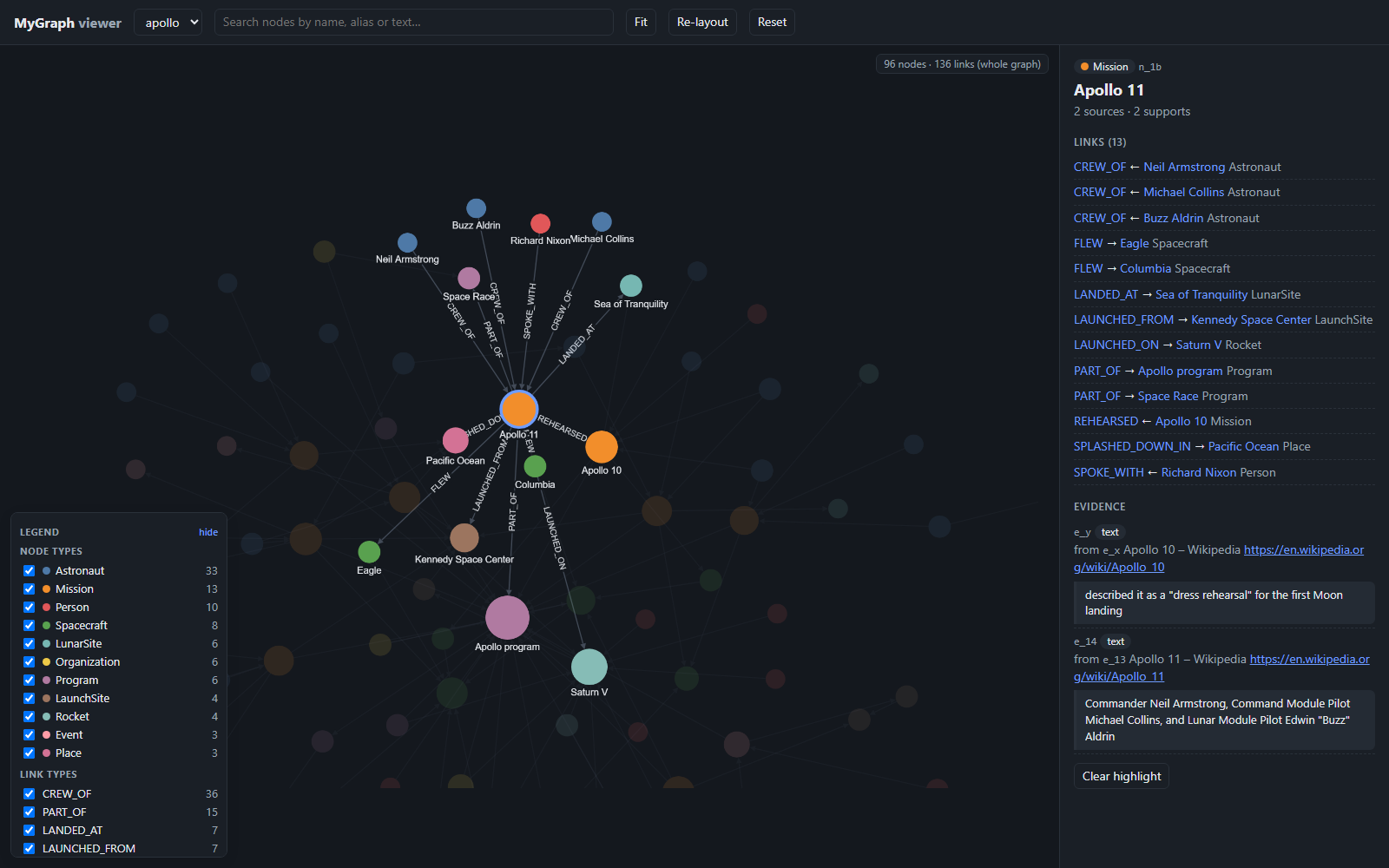
A graph of the Apollo missions, built from 17 Wikipedia articles (examples/apollo). Apollo 11 is selected; the panel lists its links and the sentences they were read from.
Why an agent would want it
- Every fact cites its evidence. A node, a link or a single property is backed by a source: a URL, a verbatim sentence, a document, a file, or the agent's own observation. By default a write without a citation is refused, so an answer can always be traced back and checked.
- Tools made for agents. 13 MCP tools and no query language. One
writerecords a whole source (evidence, nodes, links, citations) atomically;resolvechecks 100 names at once before writing, so agents don't create duplicates; results are compact text that costs few tokens; every error comes with a hint saying what to do next; writes are idempotent, so retrying is safe. - Search by words and by meaning. Full-text search with stemming, plus semantic search with a small multilingual embedding model that runs locally, so a question in Ukrainian finds an English source. No calls to an outside API.
- Nothing is deleted. Wrong facts are retracted (and can be restored), duplicates are merged,
and
historyshows every change, so an agent's mistakes can be undone. - One small server. A single Rust binary keeps the graph and its indexes in memory and stores everything in SQLite. It runs on a laptop or a home server, with several graphs per server.
- Your graphs stay on your machine. Agents on your computer connect to it directly. Cloud AI (claude.ai on the web and phone, the Claude API, the OpenAI API) connects to your server over HTTPS, with a key that you limit to the graphs it may use (Using your graphs from cloud AI).
- Shared by people and their agents. Point several people's agents at one server and what one agent records, the others can read at once, with who wrote it and where it came from (Sharing knowledge without git).
Sharing knowledge without git
Agents often keep what they learn in notes inside a repository. Those notes reach other people only after someone commits, pushes and the others pull, and much of what agents learn (how a system behaves, why something was decided, what an investigation found) doesn't belong in a repository at all, or there is none.
With MyGraph, each person's agent connects to the same server with its own key. A fact written by
one agent is there for every other agent on its next read: no commit, push, pull or merge
conflicts. Each fact keeps its source, and every change records which key made it, so an agent
can tell a colleague's finding from its own and check it. history with since_seq shows an
agent what the others have added since it last looked, and resolve stops two agents from
creating the same thing twice. Mistakes are retracted, not lost, so one person's agent can't
silently erase another's work.
Give each person a key with their own actor name, and use Who may use a graph to decide who may read or write each graph. Git stays the place for code; MyGraph holds the knowledge around it.
Status
A working prototype, used daily. Prebuilt binaries for Linux, Windows and macOS are on the releases page; there is also a Docker image, or build it from source. Used daily on Windows and Linux; on macOS only the release smoke test has run.
Known limits:
- One server per data folder; no replication or clustering.
- About 450–550 writes per second per graph, and reads wait while a write commits (TODO.md, "Concurrency").
- Access is by API key, and per graph (Who may use a graph). Over a network, give the server a certificate so it speaks HTTPS (HTTPS), or put it behind a reverse proxy with TLS. Cloud AI (claude.ai, the Claude API, the OpenAI API) needs the server reachable from the internet (Using your graphs from cloud AI).
- The specification is a draft (0.1.0-draft); storage migrates itself on upgrade, but the API may still change.
Quick start
Install the server and start it, on Linux or macOS (Apple silicon):
curl -fsSL https://raw.githubusercontent.com/dieron/mygraph/main/install.sh | sh
On Windows, in PowerShell:
irm https://raw.githubusercontent.com/dieron/mygraph/main/install.ps1 | iex
The installer downloads the latest release
and the embedding model, checks both against the release's SHA256SUMS, and starts the server at
login on 127.0.0.1:7420, where only this machine can reach it. Running it again upgrades and
keeps your data and server.toml. Options (another version, folder or port, no model, no
autostart) and uninstalling are described at the top of install.sh and
install.ps1.
Then connect Claude Code with the plugin, which adds the MCP connection and the skill:
claude plugin marketplace add dieron/mygraph
claude plugin install mygraph@mygraph
Start a new Claude Code session and ask it to create a graph and remember something. Claude Code
says the plugin's two options are not set; their defaults fit the server the installer started.
For a server elsewhere or one with API keys, set them with /plugin (server address and key).
Other clients: Connecting a client.
Other ways to install
With a prebuilt binary, by hand: download from the latest release
the archive for your platform and the embedding model (mygraph-model-multilingual-e5-small), and
unpack the model into the folder that holds mygraph, so it ends up in
models/multilingual-e5-small next to the binary. Then:
./mygraph serve
| Platform | Archive | Needs |
|---|---|---|
| Linux x64, arm64 | x86_64- / aarch64-unknown-linux-gnu.tar.gz | glibc 2.38+ (Ubuntu 24.04, Debian 13, Fedora 39 or newer) |
| Windows x64 | x86_64-pc-windows-msvc.zip | the Visual C++ runtime, usually already installed |
| macOS (Apple silicon) | aarch64-apple-darwin.tar.gz | macOS may block an unsigned download: xattr -d com.apple.quarantine mygraph |
SHA256SUMS in the release lists every archive's checksum. The binaries are not signed yet.
With Docker (the image includes the embedding model):
git clone https://github.com/dieron/mygraph.git && cd mygraph
cp .env.example .env # then set MYGRAPH_ADMIN_KEY, and MYGRAPH_AGENT_KEY for agents
docker compose up -d --build
Or from source, with Rust installed:
cargo build --release -p mygraph-server
target/release/mygraph serve
Run directly (a binary or from source), the server listens on 127.0.0.1:7420 and, without API
keys, accepts local requests as an admin. From source it matches words only until you download
the embedding model (135 MB, once), or unpack the release's model archive:
deploy/fetch-model.sh <data_dir>/models/multilingual-e5-small
Then connect an agent (next section) and ask it to create a graph and remember something.
With no server at all, an MCP client can run the Docker image over stdio, keeping the graphs in a
volume (this is what the MCP Registry entry
io.github.dieron/mygraph describes; only one client at a time can use the volume):
docker run -i --rm -v mygraph-data:/data ghcr.io/dieron/mygraph:latest mcp --data-dir /data
Using it over MCP
MCP is the main way in. An agent gets these tools:
| Tool | What it does |
|---|---|
graphs | List the graphs on the server, create one, or set who may use it |
overview | What a graph holds: counts, node and link types in use, conventions to follow |
search | Find nodes and evidence by name, alias, words or meaning |
resolve | Check up to 100 names before writing: match, ambiguous, or none (with similar nodes) |
get | One object with its properties, links, citations and sources |
write | Record one source: evidence, nodes, links and citations, all at once |
retract | Mark facts as wrong (restorable), or undo a whole write |
merge | Merge duplicate nodes; the old IDs keep resolving |
neighbors | The subgraph around a node, filtered by link type and direction |
paths | How two nodes are connected (shortest path or several) |
find | Filtered lists, counts, group-by and aggregates |
history | What changed, and since when |
stats | Size, connectivity, growth and how well facts are sourced |
Connecting a client
There are three ways to connect, and all of them use the same tools:
- stdio bridge to a running server (the usual one). The client starts
mygraph mcp --url http://<host>:7420 --graph <default graph>, which forwards every call to the server. Pass the key with--keyor theMYGRAPH_KEYenvironment variable. For a server with HTTPS, use anhttps://URL; when its certificate is self-signed or from a private CA, also pass--ca-cert <file.pem>(or setMYGRAPH_CA_CERT). - Streamable HTTP, for clients that support it:
http://<host>:7420/mcp(orhttps://), with the headerAuthorization: Bearer <key>. - No server.
mygraph mcp --data-dir <folder>opens a data folder in the client's own process. This works only while no other process is using that folder. - OAuth, for claude.ai on the web, desktop and phone: the client signs in on the server's page with an API key (below).
Ways 1 to 3 need nothing beyond your machine or your network. Cloud AI needs more; see Using your graphs from cloud AI.
Claude Code: the plugin (Quick start) connects over HTTP and installs the skill.
Its options are the server address (default http://127.0.0.1:7420) and an API key. To connect
by hand instead, for every project (-s user):
claude mcp add mygraph -s user -e MYGRAPH_KEY=<key> -- mygraph mcp --url http://127.0.0.1:7420 --graph research
Or over HTTP, with no local program:
claude mcp add --transport http mygraph http://<host>:7420/mcp --header "Authorization: Bearer <key>"
Claude Desktop, in claude_desktop_config.json (Settings → Developer → Edit Config). Use the
full path of the mygraph program, then quit and reopen the app:
{ "mcpServers": { "mygraph": { "command": "/path/to/mygraph", "args": ["mcp", "--url", "http://127.0.0.1:7420", "--graph", "research"],
                               "env": { "MYGRAPH_KEY": "<key>" } } } }
Cursor, VS Code with GitHub Copilot and OpenAI Codex use the same command;
skills/mygraph/references/setup.md has the snippet for each.
To check the connection, ask the agent to call graphs.
On Windows, deploy/windows/deploy.ps1 -BridgeOnly installs just the mygraph program, for a
server that runs elsewhere. The bridge lists the tools itself, so update it when the server gains
new ones.
Using your graphs from cloud AI
MyGraph runs where you put it: your laptop, a home server, a NAS. The graphs stay there. An AI that
runs in the cloud can still use them: its provider's servers call your server's /mcp over the
internet, and only what the tools return leaves your machine.
| Where the AI runs | How it reaches your graphs | What your server needs |
|---|---|---|
| Your computer: Claude Code, Claude Desktop (local config), Cursor, VS Code, Codex | stdio bridge or /mcp on your network (Connecting a client) | nothing public |
| claude.ai on the web, Claude Desktop connectors, the Claude phone apps | custom connector, signing in with OAuth (below) | a public HTTPS address and [oauth] |
| Your own app on the Claude API | the Messages API MCP connector, with an API key (below) | a public HTTPS address |
| Your own app on the OpenAI API | the Responses API mcp tool, with an API key (below) | a public HTTPS address |
For each cloud service, configure a key of its own in server.toml, so you can see its writes in
history and remove it without touching the others. Limit it with each graph's access
(Who may use a graph): none on the graphs it must not see, write on
the ones it works on. Add create_graphs = true if it may start new graphs:
[[keys]]
key_sha256 = "…"          # mygraph hash-key <key>
actor = "claude-ai"
role = "agent-write"
create_graphs = true
Connecting claude.ai on the web, desktop and phone
Claude's apps connect to remote MCP servers from Anthropic's cloud and sign in with OAuth, so the server must be reachable from the internet over HTTPS, with a certificate that browsers trust:
-
Give the server a public address. A reverse proxy you already run (nginx, Caddy, Traefik, Nginx Proxy Manager) with a Let's Encrypt certificate works, and so does a tunnel (Cloudflare Tunnel, Tailscale Funnel).
-
Turn on OAuth with that address, and give it a public listener: a second port that serves only
/mcp,/oauth/and/.well-known/, and answers 404 to everything else, the REST and admin APIs, the stats page and/readyincluded. Inserver.toml, or asMYGRAPH_OAUTH_PUBLIC_URLandMYGRAPH_OAUTH_LISTEN:toml[oauth] public_url = "https://mygraph.example.com" # what clients reach, the proxy's address listen = "0.0.0.0:7421" # the public listener, for the proxy # access_token_minutes = 60 # refresh_token_days = 30It uses the same certificate as the main port, if
[tls]is set. -
Point the proxy at the public listener only, so a proxy rule that forwards too much still cannot reach anything else. Your own machines keep using the main port. Claude connects from
160.79.104.0/21, if you want to limit/mcp,/oauth/token,/oauth/registerand/.well-known/to it (/oauth/authorizeopens in your own browser). -
In claude.ai, open Settings → Connectors → Add custom connector, and enter
https://mygraph.example.com/mcp. MyGraph's sign-in page opens: paste an API key, and choose Allow. Tick Read only to let Claude read but not write.
The connector then works in claude.ai, Claude Desktop and the phone apps alike. Claude acts as the
key's actor, with its role and graphs. GET /admin/oauth lists the apps signed in, and
DELETE /admin/oauth/grants/{id} signs one out; removing a key from the configuration signs out
every app that used it. Claude Code can connect the same way with
claude mcp add --transport http mygraph https://mygraph.example.com/mcp, then /mcp to sign in.
The details are in spec/api/oauth.md.
Other apps that sign in to MCP servers with OAuth may work too, but only Claude's callback URLs and
this machine are allowed by default: add an app's callback URL to oauth.redirect_uris. Only
Claude's apps have been tried.
The Claude API and the OpenAI API
Your own programs can give a model your graphs' tools, too. The model provider's servers call
/mcp with the API key you pass, so the server must be reachable over HTTPS as in steps 1 to 3
above (the public listener serves /mcp with API keys too). The key travels with every request
through the provider, so give it a key of its own, limited to the graphs that program needs.
The Claude API (MCP connector):
curl https://api.anthropic.com/v1/messages \
  -H "x-api-key: $ANTHROPIC_API_KEY" -H "anthropic-version: 2026-10-21" \
  -H "anthropic-beta: mcp-client-2025-11-20" -H "content-type: application/json" \
  -d '{
    "model": "claude-opus-5-5",
    "max_tokens": 4000,
    "mcp_servers": [{"type": "url", "url": "https://mygraph.example.com/mcp", "name": "mygraph",
                     "authorization_token": "<MyGraph API key>"}],
    "tools": [{"type": "mcp_toolset", "mcp_server_name": "mygraph"}],
    "messages": [{"role": "user", "content": "Which graphs do you have? Summarize the fishing one."}]
  }'
The OpenAI API (remote MCP):
curl https://api.openai.com/v1/responses \
  -H "Authorization: Bearer $OPENAI_API_KEY" -H "content-type: application/json" \
  -d '{
    "model": "<model>",
    "tools": [{"type": "mcp", "server_label": "mygraph", "server_url": "https://mygraph.example.com/mcp",
               "authorization": "<MyGraph API key>", "require_approval": "never"}],
    "input": "Which graphs do you have? Summarize the fishing one."
  }'
Both follow the providers' documentation; so far only claude.ai has been tried against a real server. Give the model the skill's guidance as well (next section), for example in the system prompt.
The skill: teach the agent to use it well
The tools work on their own, but agents do much better with the skill in skills/mygraph/. It covers:
- picking or creating a graph, and reusing its vocabulary;
- one
writeper source, with each fact's own sentence as its evidence; resolvebefore creating anything;- which tool answers which kind of question;
- citing evidence IDs in answers;
- what to do when searches miss;
- fixing mistakes.
The skill is one folder in the Agent Skills format, which Claude, Codex, Cursor and GitHub Copilot
read. The Claude Code plugin installs it; the installers also leave a copy in the install folder
(skills/mygraph). Otherwise install it in ~/.claude/skills/mygraph/ (Claude Code) or ~/.agents/skills/mygraph/
(Codex, Cursor, Copilot), or upload it zipped in the Claude apps. deploy/install-skill.ps1 does
all three on Windows.
What a session looks like
graphs                                         → research (ready, default)
overview                                       → types in use: Person, Work, Machine…
resolve  [{"type": "Person", "name": "Ada Lovelace"}]   → none
write    { evidence: [the page, the sentence], nodes: [Ada, Analytical Engine],
           links: [WROTE_ABOUT], cite: the sentence }   → refs @ada = n_3kq …
search   "who wrote about early computers"     → n_3kq Person "Ada Lovelace" (semantic)
get      n_3kq with evidence                   → born 1815-12-10 · sources: e_2 "In 1843…"
Results are compact text (spec/api/compact-format.md); any tool
returns JSON with format: "json".
How well agents do with it
Agents were measured on published benchmarks. They answered once from MyGraph, using the tools and the skill, and once by reading the whole source text in their prompt ("direct"). Answers were graded on correctness and on whether they cite the right evidence. All runs used GPT-6.1 Terra. Details and every finding are in docs/11-benchmarks.md.
| Benchmark | Questions | From MyGraph | Direct | Notes |
|---|---|---|---|---|
| HotpotQA (multi-hop, Wikipedia) | 50 | answer F1 0.80, citation F1 0.85 | 0.82, 0.88 | The agent stored the passages itself |
| MuSiQue (2–4 hops) | 50 | answer F1 0.75, supporting paragraphs F1 0.87 | 0.76, 0.88 | |
| LoCoMo (long conversations) | 7 × 20 | 0.85 correct, citation F1 0.77 | 0.84, 0.74 | Half the cost per question |
| LongMemEval (multi-session, temporal) | 50 | 0.90 correct, citation F1 0.87 | 0.86, 0.91 | $0.015 against $0.095 per question |
MyGraph doesn't answer better than an agent that reads everything. It answers about as well while reading a small part of the text, and every answer points to its sources. That matters once the memory no longer fits in a prompt.
The engine was also compared with Neo4j on the LDBC Social Network Benchmark (scale factor 0.1, about
330 000 nodes and 1.5 million links, results derived from the benchmark, not audited). In 3 228 neighbors, paths and find
cases, both returned the same results. Point reads (IS1 and IS4–IS7) took 0.2–0.3 ms at the
median over HTTP, against 0.4–0.5 ms for Neo4j. A 3-hop friend search (IC1-style) is still much
slower: 64 ms against 1.6 ms.
Running it as a service
For a home server or NAS that other machines and agents use, run it with Docker (Quick start):
-
Data lives in the
mygraph-datavolume (/datain the container). The server restarts with the machine and reports its health to Docker (mygraph health). -
The container listens on all interfaces, which MyGraph allows only with API keys. Every request needs
Authorization: Bearer <key>. SetMYGRAPH_BIND=127.0.0.1in.envto keep it on that machine only. -
Settings are
MYGRAPH_*environment variables:- listen address, data folder, default graph and log level;
- the admin, agent and read-only keys, each also as
<NAME>_FILEfor Docker secrets; - semantic search:
MYGRAPH_SEMANTICandMYGRAPH_SEMANTIC_THRESHOLD.
See
Config::apply_envin crates/mygraph-server/src/config.rs. -
To update on the machine, run
git pull && docker compose up -d --build. From your own computer,deploy/docker/deploy.sh <ssh-destination>does it over SSH without a clone on the server. It sends the committedHEAD, snapshots every graph, rebuilds, restarts and waits until the server is healthy..envand the data are left alone. -
.github/workflows/docker.yml publishes a multi-arch image (amd64, arm64) to
ghcr.io/dieron/mygraph.:mainfollows the main branch, and each release adds its version (:0.3.0,:0.3) and:latest. To use it instead of building, setMYGRAPH_IMAGE=ghcr.io/dieron/mygraph:latestin.env, then rundocker compose pull && docker compose up -d.
API keys. Without a configuration file, keys come from the environment. In a server.toml
(mygraph serve --config server.toml), each key gets an actor name, a role and optionally its
graphs:
data_dir = "../mygraph-data"

[[keys]]
key_sha256 = "…"          # `mygraph hash-key <key>` prints it; or `key = "…"`
actor = "claude-research"
role = "agent-write"      # agent-read, agent-write or admin
graphs = ["research"]     # optional; default all graphs
# create_graphs = true    # an agent-write key may create graphs (then leave out graphs)
With Docker, put that file in a folder on the host and set MYGRAPH_CONFIG_DIR (the folder) and
MYGRAPH_CONFIG=/config/server.toml in .env; keys from the environment still apply.
Who may use a graph
Each graph is public and writable until you change it. You can make it private, public and read-only, or give single users their own level. A user is a key's actor. Admins can always do everything, and a read-only key never writes.
With the graphs tool (an admin key), ask the agent, for example, "make the fishing graph private
and let claude-research write to it". Or over REST:
curl -s -X POST localhost:7420/admin/graphs/fishing/access -H "Authorization: Bearer <admin key>" -d '{"everyone": "none", "users": {"claude-research": "write"}}'
everyone | The graph is |
|---|---|
none | private: only the users listed, and admins |
read | public and read-only, except for users listed with write |
write | public and writable (the default), except for users listed with read or none |
A user's own level overrides everyone, and null removes it. GET /v1/graphs and the graphs
tool show each caller only the graphs it may read, marking the read-only ones.
Admins create graphs, and so can an agent-write key with create_graphs = true. Such a key is
written into each graph it creates with write, so it keeps writing there whatever everyone
is. To keep it out of other graphs, give it none on them; a key's graphs list would also keep
it out of the graphs it creates, so the two do not combine.
Semantic search settings, in server.toml or the environment:
[search]
semantic = true            # MYGRAPH_SEMANTIC: also match by meaning (false: words only)
semantic_threshold = 0.80  # MYGRAPH_SEMANTIC_THRESHOLD: lowest similarity for a hit found by meaning
model_dir = "..."          # MYGRAPH_MODEL_DIR: default <data_dir>/models/multilingual-e5-small,
                           #   then models/multilingual-e5-small next to the executable
Each graph's vectors are a cache in <data_dir>/vectors/<graph>/. When the cache is missing, it is
rebuilt in the background, and search matches words only until that finishes. Agents see the
settings in overview. Without semantic search, the tools stop offering it.
HTTPS
Give the server a certificate and it speaks HTTPS instead of HTTP, on the same address:
[tls]
cert = "/etc/mygraph/fullchain.pem"   # MYGRAPH_TLS_CERT: the certificate, then any intermediates
key = "/etc/mygraph/privkey.pem"      # MYGRAPH_TLS_KEY: PKCS#8, PKCS#1 or SEC1
-
The files are checked every minute and read again when they change, so a renewed certificate (from certbot, acme.sh or your NAS) is used without a restart. A renewal that is only half written keeps the old certificate until both files load.
-
With a certificate for a public name (Let's Encrypt, usually with a DNS challenge for a home server), every client trusts it as it is.
-
On a home network, mkcert makes a local CA and certificates that browsers trust. Or make a self-signed certificate valid for two years:
bashopenssl req -x509 -newkey ec -pkeyopt ec_paramgen_curve:prime256v1 -nodes -days 730 -keyout key.pem -out cert.pem -subj /CN=mygraph.lan -addext subjectAltName=DNS:mygraph.lan,IP:192.168.1.10 -addext basicConstraints=critical,CA:FALSEWithout
CA:FALSE, OpenSSL marks the certificate as a CA, and TLS refuses it as a server's certificate. Give clients the certificate file:mygraph mcp --ca-cert cert.pem, orNODE_EXTRA_CA_CERTS=cert.pemfor Node-based clients over streamable HTTP. -
In Docker, mount the files and point the variables at them; they must be readable by the container's user (65532).
.env.exampleandcompose.yamlshow how. -
mygraph healthfollows[tls]and asks over HTTPS on the loopback address, without checking the certificate (it is usually issued for another name). With--url, it checks it. -
Without a certificate, a server that listens beyond loopback logs a warning at start.
On Windows without Docker, cargo build --release -p mygraph-server, then
powershell -ExecutionPolicy Bypass -File deploy/windows/deploy.ps1. This installs the server in
%LOCALAPPDATA%\MyGraph and starts it at logon (data in %USERPROFILE%\mygraph-data). Run both
again to upgrade; -Uninstall removes it and keeps the data.
Watching and backing up
-
/admin/uiis the stats page: graphs with who may use them, request statistics, slow requests, the API keys (their actors and roles, never the keys) with the graphs each may read or write, the apps signed in with OAuth, and per graph its counts, growth, connectivity, evidence and recent batches. -
/admin/ui/graphis the graph viewer. It draws a graph as a network, with search, type filters and the properties, links and evidence of whatever you click.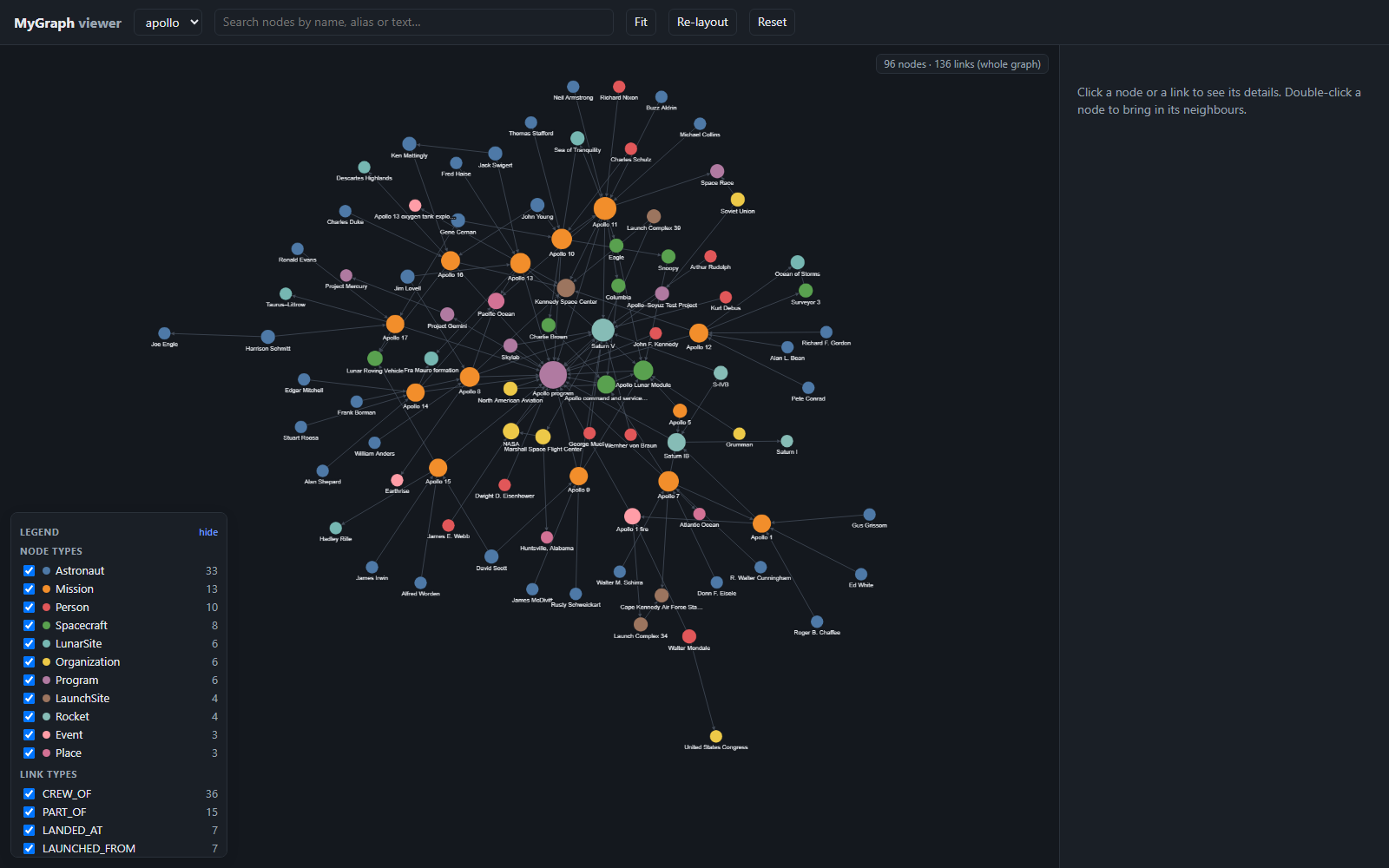
-
GET /metricsserves Prometheus metrics, listed in spec/api/admin.md. -
To back up,
POST /admin/graphs/{g}/snapshotcopies a graph online into<data_dir>/snapshots/.POST /admin/graphs/{g}/restorebrings one back. -
To move a graph,
POST /admin/graphs/{g}/exportwrites it as JSONL (spec/api/export-format.md).POST /admin/graphs/{new}/importreads it back with every ID intact. Copy<data_dir>/blobs/along when moving to another machine.
REST API
Agents with a shell, and programs, can use REST, which has the same operations as the tools. Every
operation is POST /v1/graphs/{graph}/{operation}, with the JSON its spec file describes
(spec/api/operations/). The server serves
spec/api/openapi.yaml at /openapi.yaml. Conventions are in
spec/api/conventions.md and errors in
spec/api/errors.md.
curl -s -X POST localhost:7420/admin/graphs -d '{"name": "research"}'
curl -s -X POST localhost:7420/v1/graphs/research/write -d '{"evidence": [{"ref": "@e", "kind": "text", "content": "Ada Lovelace wrote about the Analytical Engine."}], "nodes": [{"ref": "@ada", "type": "Person", "name": "Ada Lovelace", "cite": ["@e"]}, {"ref": "@ae", "type": "Machine", "name": "Analytical Engine", "cite": ["@e"]}], "links": [{"type": "WROTE_ABOUT", "from": "@ada", "to": "@ae", "cite": ["@e"]}]}'
curl -s "localhost:7420/v1/graphs/research/search?q=lovelace"
Add -H "Authorization: Bearer <key>" when the server has keys.
Building and testing
cargo test --workspace
crates/mygraph-core/tests/vectors.rs runs every shared test vector in conformance/vectors/.
Benchmarks:
crates/mygraph-bench: synthetic data and memory;crates/mygraph-ldbc: LDBC SNB and the Neo4j comparison;crates/mygraph-agentbench: the agent benchmarks.
On Windows, if linking fails with cannot open file 'msvcrt.lib', the newest Visual Studio lacks
the x64 desktop libraries. Build from a developer prompt of an installation that has them, for
example after running vcvars64.bat from VS 2022 Build Tools.
How it is built
MyGraph is written specification-first. spec/ is the normative contract: data
model, operations, ranking, storage format, errors. conformance/ holds
the test vectors that any implementation must pass. The Rust code is one implementation of the
spec, and the goal is that an agent could rewrite it in another language from spec/ and
conformance/ alone.
| Document | What it answers |
|---|---|
| Requirements | What was asked, derived needs, glossary |
| Existing systems | What exists already, what was borrowed, build or reuse |
| Language comparison | Rust, Go or C#, and why Rust |
| Storage and search | Storage engines, search components, the SQLite schema |
| Data model | Nodes, links, evidence, citations, IDs, vocabulary, lifecycle |
| Architecture | Components, write and read paths, memory indexes, concurrency |
| Agent API | The operations with examples, errors, the compact format |
| Admin API | Management, statistics, maintenance, access |
| PoC plan | Milestones, exit criteria, tests, risks |
| Roadmap | What comes after |
| Portability | How the spec and conformance suite keep a rewrite easy |
| Benchmarks | LDBC SNB against Neo4j, and the agent benchmarks |
| Decisions | The architecture decision records |
Open work is in TODO.md. To report a bug or send a change, see CONTRIBUTING.md.
Security
See SECURITY.md: what the server protects, how to run it safely, and how to report a vulnerability.
License
Licensed under either of MIT or Apache-2.0, at your option. Contributions are accepted under the same terms. The bundled Cytoscape.js is MIT-licensed. The embedding model, multilingual-e5-small, is MIT-licensed and is downloaded at build time, not stored in this repository.







