Listed from the MCP registry; nobody on Odel publishes it.

Pointframe MCP Server
Windows screenshots, OCR, and redacted screen recording for AI agents. No desktop app needed.
Runs on your machine from its package; the steps are below.
What it does
- Reads
- Writes
- High impact
At most: moves money, runs code or commands, deletes data, or sends messages for you.
What it costs
FreeOdel charges nothing per call. The publisher may charge for its own service.
Runs locally over stdio
This server isn't hosted — your MCP client launches it from a package registry. Use one of the commands below, or drop the config into your client (e.g. Claude Desktop).
Distributed as an MCP bundle (`https://github.com/dimitar-radenkov/Pointframe/releases/download/v6.7.201/Pointframe.Mcp-6.7.201-win-x64.mcpb`) — download it and import the bundle in your MCP client.

Pointframe
Screen capture, annotation and recording for Windows, and the same desktop eyes and hands for AI agents.
A tray app for people, an MCP server for coding agents, and a CLI for scripts. Free, open source, Windows x64.


Desktop app | MCP server | CLI | Set up your agent | Website
Coding agents: read the complete Windows desktop verification recipe before starting.
One engine, three ways to use it
| Desktop app | MCP server | CLI | |
|---|---|---|---|
| For | People who share screenshots and recordings | AI coding agents (Claude Code, Codex, Cursor, VS Code) | Scripts, CI and agents that prefer a shell |
| Does | Capture, annotate, blur, OCR, pin, record to MP4 and export GIF | Lets an agent see the screen, read text, record, and drive an approved app's UI | The same captures, OCR, recordings and verify run as JSON commands |
| Get it | winget install DimitarRadenkov.Pointframe | Connect your MCP client | Install the CLI |
The CLI and the MCP server are standalone: no tray app, no .NET runtime. They only observe until you approve one app for interaction (pointframe verify setup; see desktop testing).
Desktop app
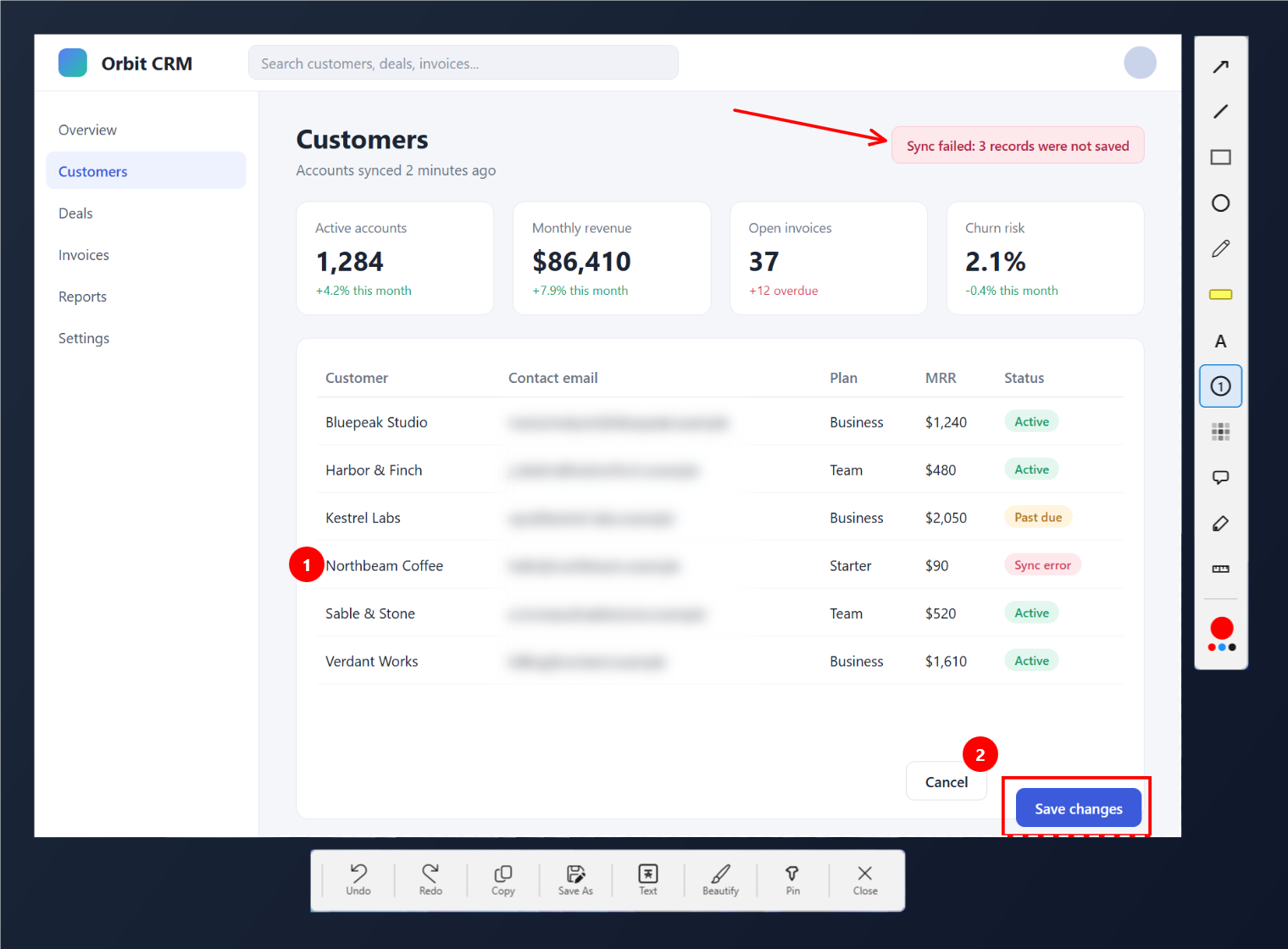
Press Print Screen, draw a region, mark it up and share it. The screen freezes the moment you press the key, so menus and tooltips stay exactly as they were.
- Annotate: arrow, line, rectangle, circle, pen, highlighter, text, numbered steps, callout, color picker and a pixel ruler, with style presets and full undo and redo.
- Hide what is private: drag a blur over emails, passwords or tokens before you share.
- Copy text from anything: lasso text on screen, even inside an image or a video, and Pointframe copies it with OCR.
- Record: a region or the whole screen to MP4, with optional microphone audio and annotations drawn live while you record. Trim it or export it to GIF from the tray.
- Keep and reuse: pin a capture as an always-on-top window, frame it with the Beautifier, search old captures by their text in the Capture Library, or upload and copy a link.
Download the screenshot app
winget install DimitarRadenkov.Pointframe
Or take the installer from Releases. Features, settings and shortcuts: desktop app guide.
MCP server for AI agents
Give your coding agent eyes on the Windows desktop, and, for an app you approve, hands. Eleven always-on tools list displays and windows, capture a monitor or a window, read text with OCR, search past captures and record (capture_window, read_text_from_monitor, start_recording, ...). Captures come back inline as an image plus a PNG on disk with SHA-256, monitor geometry and DPI. The opt-in desktop_* tools launch an approved app, click, type and check its UI, and write a signed report. Details: MCP reference.
An agent checks its UI change in the real app
pointframe verify run runs your build and test gates and, for each scenario in the spec, launches your built app, drives it through its real controls (invoke, type, check), and writes a verdict with a signed evidence bundle: report.json, evidence/ screenshots and an index.html.
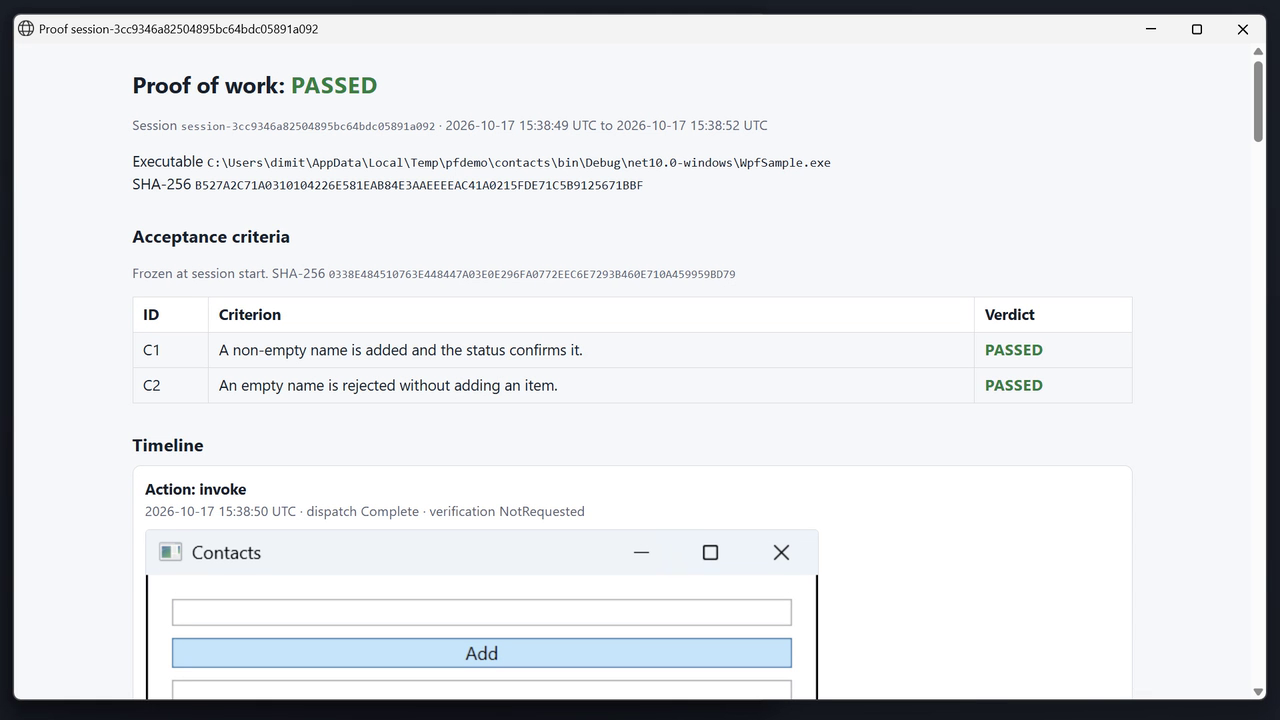
30-second demo on the WPF sample: fail, fix, pass, evidence. Click to watch.
CLI for scripts and CI
pointframe displays
pointframe windows
pointframe capture --monitor '\\.\DISPLAY1' --output .\shot.png
pointframe ocr --monitor '\\.\DISPLAY1'
pointframe record --monitor '\\.\DISPLAY1' --seconds 10 --output .\take1.mp4
pointframe verify run
Discovery, capture, OCR and recording commands print one JSON line on standard output, on success and on failure: exit 0 is success, 1 a runtime failure with a stable Error.Code, 2 invalid arguments (usage on standard error). pointframe mcp serve speaks the MCP stdio protocol; record needs ffmpeg.exe. Every command, flag and output contract: CLI reference and verify docs.
Quick start
Set up your agent
- Claude Code plugin. From a clone,
claude --plugin-dir ./plugin/pointframestarts the MCP server and adds theverify-desktop-workskill (plugin README). The plugin is not yet in the plugin directory. - Other MCP clients (Claude Desktop, Codex, Cursor, VS Code): connect your MCP client.
- CLI. Download
Pointframe.Cli-win-x64.zipfrom the latest release, extract it, and run this from that folder, then open a new terminal (CLI install, verify guide).
.\Pointframe.Cli.exe install
FAQ
Can it run headless? Build and test gates can, including in CI. Checks of the real UI need an unlocked, interactive Windows session; a Windows service in session 0 cannot capture the user desktop.
What does a pass establish? That the gates and scenarios your spec configures passed; UI coverage is only what your scenarios check. Trust a pass only when pointframe verify status reports fresh: true (it covers the Git-visible tree, the spec and the active task). It does not prove your code is correct. Details: verify docs.
Privacy and telemetry
Official release builds of the CLI and the MCP server send anonymous usage counts (command or tool name, outcome, a fixed error_code category when it fails, duration bucket, host, MCP client type, version, a random install ID), never screenshots, text or paths. Opt out with POINTFRAME_TELEMETRY_OPTOUT=1 or DO_NOT_TRACK=1; this applies to the CLI and the MCP server only. The desktop app's official builds send the events listed in PRIVACY.md, which holds the full policy; source builds send nothing.
Links
CLI reference | MCP reference | Desktop app guide | Verify docs | Developer guide | Privacy | Contributing | Releases | Website
If you find Pointframe useful, a star on GitHub helps others discover it.


If Pointframe saves you time, consider buying me a beer:


Moved sections
Older links point to these headings. The content now lives in its own file.
Pointframe MCP Server
Moved to the MCP reference.
Privacy Policy
Moved to PRIVACY.md.
Privacy & Telemetry
Moved to PRIVACY.md.






