Listed from the MCP registry; nobody on Odel publishes it.
Is this yours? Claim it
dompruner-mcp
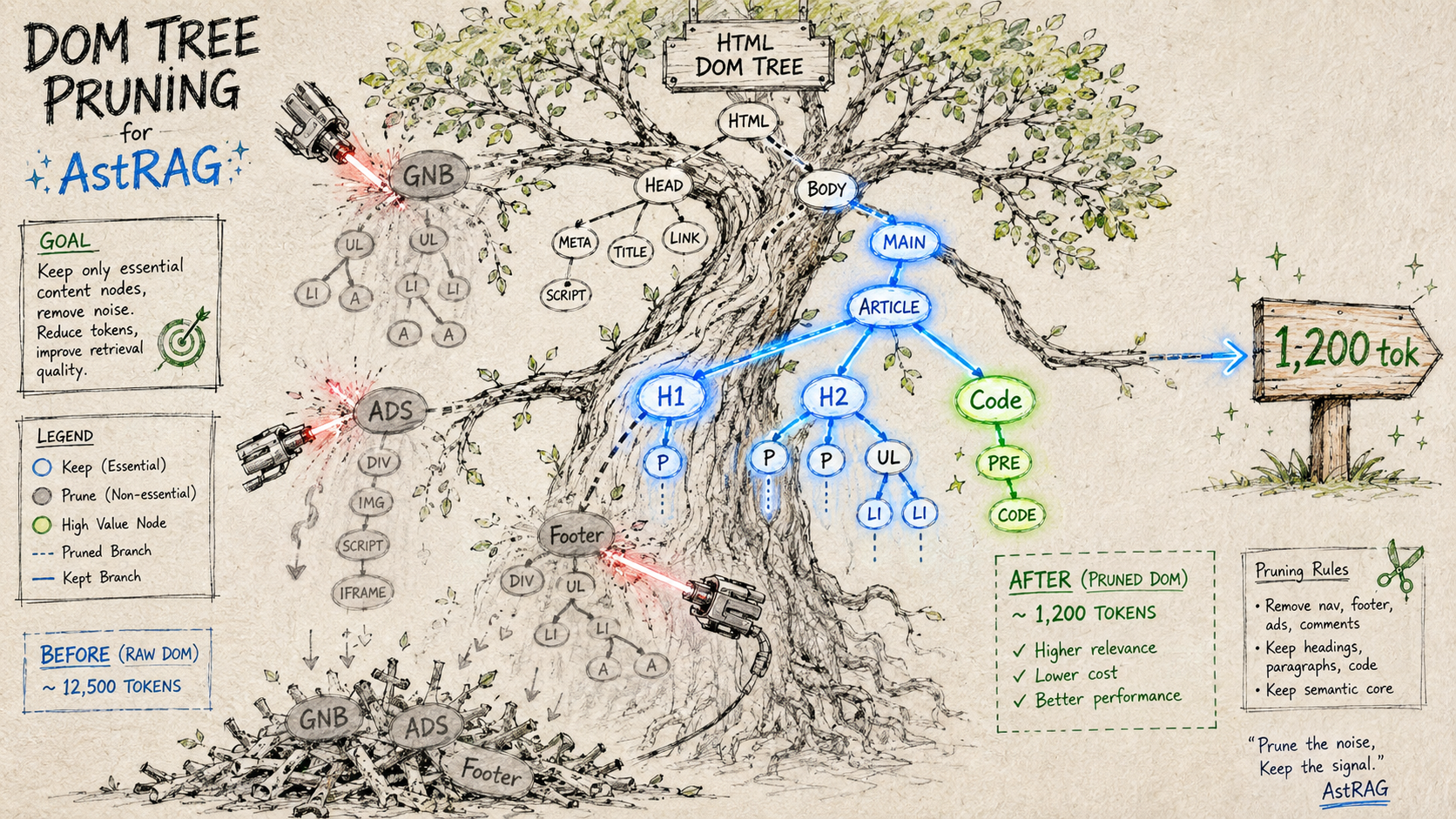
Strips layout noise via DOM AST; with a query, BM25 filters to relevant sections. No model or API.
One address for any MCP client. No sign-in needed on this server.
What it does
2 read
Grouped by tool name. At most: only reads or looks up information.
What it costs
FreeOdel charges nothing per call. The publisher may charge for its own service.
Tools
2 · grouped by tool name · checked 23 Nov 2026Read · 2Look things up
- dompruner_fetch
- dompruner_analyze
한국어 | English
DOM AST middleware for LLM web pipelines — strips layout noise (nav, scripts, sidebars) and passes original text directly. Add a query to filter to relevant sections with BM25.
When an LLM uses a web fetch tool, the raw page HTML is converted to text and passed into the model's context — often tens of thousands of tokens of navigation, sidebars, and boilerplate the model doesn't need. DomPruner strips that at the DOM level and passes only the original content directly to the model.
| Call | Behavior |
|---|---|
dompruner_fetch(url) | Strips layout noise → returns full extracted content |
dompruner_fetch(url, query) | Strips layout noise → BM25 filters to relevant sections (falls back to full content if no match) |
> [DomPruner] docs.python.org
> | Raw HTML  | 44,316 tokens |
> | DomPruner |  1,328 tokens |
> | Reduction |        97.0%  |
> Fetch: 194ms · Parse: 11.2ms
93.5% fewer context tokens than WebFetch on average. 45% faster end-to-end. → Full benchmark
Quick Start
No installation, no API key:
npx -y dompruner-mcp
Claude Code
{
  "mcpServers": {
    "dompruner": {
      "type": "stdio",
      "command": "npx",
      "args": ["-y", "dompruner-mcp"]
    }
  }
}
Add to .mcp.json in your project root, or ~/.claude/.mcp.json for global. Run /mcp to verify.
Claude Desktop
Edit ~/Library/Application Support/Claude/claude_desktop_config.json (macOS) or %APPDATA%\Claude\claude_desktop_config.json (Windows):
{
  "mcpServers": {
    "dompruner": {
      "command": "npx",
      "args": ["-y", "dompruner-mcp"]
    }
  }
}
Cursor / Windsurf / other MCP clients
{
  "mcpServers": {
    "dompruner": {
      "type": "stdio",
      "command": "npx",
      "args": ["-y", "dompruner-mcp"]
    }
  }
}
Remote HTTP (no install, always up to date)
For clients that support HTTP transport — no Node.js install required, always runs the latest version:
{
  "mcpServers": {
    "dompruner": {
      "url": "https://dompruner-mcp.vercel.app/api/mcp"
    }
  }
}
LangChain / LangGraph
langchain-mcp-adapters wraps any MCP stdio server as LangChain tools automatically:
from langchain_mcp_adapters.client import MultiServerMCPClient

client = MultiServerMCPClient({
    "dompruner": {
        "command": "npx",
        "args": ["-y", "dompruner-mcp"],
        "transport": "stdio",
    }
})
tools = await client.get_tools()
Ensuring Your AI Always Uses DomPruner
DomPruner's tool description already tells clients to prefer dompruner_fetch over WebFetch. If your client still falls back, add this to its instruction file:
When retrieving a URL, always use dompruner_fetch instead of WebFetch.
- URL known → dompruner_fetch(url, query?)
- URL unknown → search for the URL first, then dompruner_fetch(url)
| Client | Instruction file |
|---|---|
| Claude Code | CLAUDE.md (project) or ~/.claude/CLAUDE.md (global) |
| Cursor | .cursorrules |
| Windsurf | .windsurfrules |
| Cline | .clinerules |
| GitHub Copilot | .github/copilot-instructions.md |
Tools
| Tool | Description |
|---|---|
dompruner_fetch | Fetch a URL → DOM-refined Markdown. Optional query enables BM25+ section filtering. |
dompruner_sitemap | Fetch all pages in a sitemap.xml → one refined Document per page. |
dompruner_analyze | Token-reduction report for a URL without full content. |
Benchmark Summary
vs WebFetch (live comparison, Claude Haiku)
Measured using Anthropic's web_fetch_20260209 server tool under identical conditions (same model, system prompt, tool definitions). → Full methodology
| Metric | web_fetch tool | DomPruner |
|---|---|---|
| Avg context tokens | ~15,735 | ~1,019 (93.5% less) |
| Answer quality (10 queries) | 9 / 10 | 8 / 10 |
| Avg response time | 5,811 ms | 3,168 ms (45% faster) |
| Content fidelity | Raw page content (full HTML → text) | DOM-extracted original text |
| Extra API key / infra | No | No |
BM25 Section Accuracy (snapshot-based, deterministic)
| Set | Pages | Avg reduction | Section preservation |
|---|---|---|---|
| Tuning (MDN, docs.python.org) | 10 | 98.0% | 98.0% |
| Validation (held-out sites) | 5 | 98.7% | 96.0% |
headingBoost=2.0 was selected by running a parameter sweep (1.0–3.0) on the tuning set. The validation set uses five sites not present in the tuning set (react.dev, typescriptlang.org, expressjs.com, doc.rust-lang.org, nextjs.org) to confirm the result is not overfit. The 2 %p gap is within the known heading-bias limitation.
→ Full benchmark · Architecture
vs Crawl4AI
Crawl4AI is a crawler framework — browser automation, JS rendering, click/scroll interaction, JSON extraction, deep crawl. DomPruner is LLM context middleware — a single-purpose layer that reduces token cost when an agent already knows the URL.
They solve different problems. But both can be used to read a web page inside an MCP agent, so the comparison is real.
Setup
| Crawl4AI | DomPruner | |
|---|---|---|
| Install | pip install crawl4ai && crawl4ai-setup (Chromium ~300 MB) | npx -y dompruner-mcp |
| Browser required | Default install includes Chromium; HTTP-only mode available | No (SSR; Playwright only on CSR detection) |
| MCP server | Requires running the Crawl4AI Docker server | npx -y dompruner-mcp — no server |
| Config to filter tokens | Pass a filter object in code (BM25ContentFilter(user_query=...)) | Zero — just pass query= |
Held-out validation: 5 sites not in DomPruner's tuning set
The most defensible comparison: five sites that were not used to tune DomPruner's parameters (react.dev, typescriptlang.org, expressjs.com, doc.rust-lang.org, nextjs.org). Both tools use the same query.
| Page | C4AI BM25ContentFilter | DomPruner |
|---|---|---|
| React useEffect | 4,275 | 1,257 |
| TypeScript narrowing | 2,782 | 1,214 |
| Express routing | 1,938 | 1,799 |
| Rust ownership | 1,832 | 718 |
| Next.js layouts | 1,505 | 1,379 |
| Total | 12,332 | 6,367 |
| Accuracy | 96% | 96% |
On sites DomPruner was not tuned on: 1.9× fewer tokens with the same accuracy (96%).
Additional reference: 10-page tuning set (MDN, docs.python.org)
On DomPruner's own tuning pages, vs Crawl4AI PruningContentFilter: 13.2× smaller, 8 pp more accurate (90% → 98%). Crawl4AI BM25ContentFilter with the same query returns near-empty output on 5 of 10 pages — a structural issue with <dl>/<dt>/<dd> definition-list pages where a threshold sweep (0.0–0.10) shows a hard cliff at 0.01 with no intermediate optimum.
→ Full comparison with all tables and threshold sweep data
Related
- dompruner-py — Python port.
DomPrunerLoader,DomPrunerSitemapLoader,DomPrunerFetchToolfor LangChain.pip install dompruner. - LangChain integrations — dompruner-py listed as a third-party web loader.
Glama Score

License
MIT







