Listed from the MCP registry; nobody on Odel publishes it.

Druks
Run, approve and inspect durable agent runs on your Druks Cloud instance.
Runs on your machine from its package; the steps are below.

What it does
- Reads
- Writes
- High impact
At most: moves money, runs code or commands, deletes data, or sends messages for you.
What it costs
FreeOdel charges nothing per call. The publisher may charge for its own service.
Runs locally
This server runs on your machine over stdio, but its source registry didn't list a distribution package. Check the source repository for setup instructions.

AI agents work. You make the call.
Druks finds the work, does it on the tools you already use,
and brings the important decisions to you. Self-hosted or Druks Cloud.
Try it now · Install on your AI · Docs




https://github.com/user-attachments/assets/3aca69c1-aeb6-4fcb-82c9-d4149c469f55
Druks is a self-hosted or cloud platform where AI agents such as Claude Code and Codex do a company's recurring engineering work, and a person approves each change.
- It finds the work. A schedule, an alert or a button starts it. Nobody writes a prompt.
- It does the work with your tools. Claude Code or Codex, with your own Claude or OpenAI account, in a sandbox, on your real repositories. You see the cost after every step.
- You make the call. The run stops and asks you: Approve, Change or Stop. You answer in Slack, the dashboard, the Druks chat or Claude Code. It waits up to 14 days and costs nothing while it waits.
Get started
Druks Cloud and self-hosted Druks work the same way. You get the same apps and approve in the same places. The only difference is where Druks runs.
Druks Cloud. Druks runs on our servers. Nothing to install. Try it now.
Self-hosted. Druks runs on your laptop or your own server. You need Docker with Compose. Paste this into Claude Code, Codex or any coding agent on the machine:
Install Druks on this machine with https://druks.ai/install.sh. Read the script, then run it. Then run the steps it prints: build the sandbox images and run druks doctor. If a step fails, stop. Show me the failed step and its output. Do not improvise a fix. When druks doctor passes, open http://127.0.0.1:8001 in my browser.
Or run the installer yourself:
curl -fsSL https://druks.ai/install.sh | bash
Then build the sandbox images, check the install and open the dashboard:
cd ~/druks
docker compose exec web druks sandboxes build
docker compose exec web druks doctor
open http://127.0.0.1:8001   # on Linux: xdg-open
In the dashboard, connect your AI account under Settings → Providers and the GitHub App under Settings → Connections → Services.
Remote installs (exe.dev and other providers)
Name the provider. The installer lists the values only you know, then exits. Set them in ~/druks/druks.toml and ~/druks/.env, and run the same command again.
curl -fsSL https://druks.ai/install.sh | DRUKS_PROVIDER=exe bash
The deployment guide covers access control, upgrades and rollback.
Why Druks
| If you use… | It helps when… | Druks adds… |
|---|---|---|
| A coding assistant (Claude Code, Codex, Copilot) | A developer sits down and asks | Work that starts by itself, every week, with nobody at the keyboard |
| An agent board | You write a ticket and assign it to an agent | Processes that find the work themselves, like a weekly security sweep |
| A workflow builder | You design each step of the flow | Apps that already work. Build your own only when you want to |
Druks does not replace your coding agent. It puts the agent on a schedule, runs it in a sandbox, and brings you its result as one decision.
What a run looks like
The security sweep checks one repository every Monday:
- It reads the open Dependabot alerts and checks which ones touch code you actually call.
- It upgrades the packages in a sandbox and runs your tests.
- It asks you: "Upgrade 3 packages. Closes 7 vulnerabilities, 2 in code you call. Approve?" After your yes, it opens a pull request.
- You get a summary: the pull request, what was fixed, how long it took and what it cost.
The included Ticket to pull request app (software_factory) takes a ticket, writes and checks the change, and opens a pull request for review.
What runs where
When you self-host, this is what happens with your code and your keys:
- Druks runs on your machine. The dashboard, Postgres, Redis and the sandbox service run in Docker on your host.
- By default, each agent call runs in its own Drukbox sandbox, with the tools and credentials of that step.
- Your code goes to the AI provider you choose, through your own Claude or OpenAI account, and back to GitHub as pull requests.
- Connection secrets are encrypted in your own database.
- GitHub access goes through your own GitHub App, on the repositories you pick.
- No telemetry. Druks does not send usage data to us.
- Apps ask before they act. The security sweep opens a pull request only after your yes. Every proposal, decision and cost stays in the run history.
Found a security problem? Follow the security policy. Do not open a public issue.
How it works
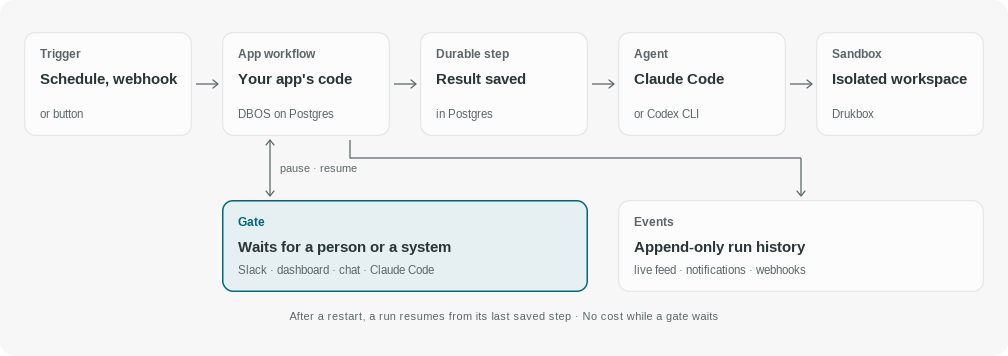
Each process is an app. After a restart or deploy, Druks picks up where it left off and does not repeat finished work. Concepts and guarantees explains the details.
Documentation
| I want to… | Start here |
|---|---|
| Install Druks on my machine | Quickstart |
| Run Druks for my team | Deployment and configuration |
| Automate my own process | Writing an app, then uvx --from druks druks create app my-app |
| Understand restarts and approvals | Concepts |
| Fix a problem | Troubleshooting |
Status
Druks is pre-1.0. Breaking changes can happen. main and latest are edge builds, not stable releases. Run the installer again to upgrade. For a fixed version, see installing an immutable version.
Community
- Bugs, questions and ideas: open an issue
- Contributing: contribution guide
License
Druks is available under the Functional Source License (FSL-1.1-ALv2):
- You can read, run and change all of the code.
- You can self-host Druks for your company's work and build apps on it.
- You cannot sell it as a competing hosted service.
- Each release becomes Apache 2.0 two years after it ships.
The licensing page explains the details.
Why FSL?
Why not an MIT or Apache license? FSL lets everyone read, run and change all of the code, and it stops other companies from selling Druks as a hosted service. Each release still becomes Apache 2.0 after two years.
Can my company self-host Druks? Yes. Run it for your own company's work, on your own infrastructure, and change the code.
Can an agency install Druks for a client? Yes, in the client's own infrastructure. To host Druks for many clients as a paid service, contact us about a partner agreement.
What about older releases? v0.12.0 and earlier releases stay under the MIT License.
Contributors
Thanks goes to these wonderful people:
Paulo Alvarado 💻 |  Krzysztof Socha 💻 |  Pravin 💻 |  Dan Serbanoiu 💻 |  Sīlavāpi Cheesley 💻 |  Stefan Foulis 💻 |  yuripulga 💻 |
 Kakshil Shah 💻 |  Andrzej Jasonek 💻 |
This project follows the all-contributors specification. Contributions of any kind welcome!







