Listed from the MCP registry; nobody on Odel publishes it.

MCP ZAP Server
Crawl, scan and report on authorized web targets with a self-hosted ZAP server.
Runs on your machine from its package; the steps are below.
What it does
- Reads
- Writes
- High impact
At most: moves money, runs code or commands, deletes data, or sends messages for you.
What it costs
FreeOdel charges nothing per call. The publisher may charge for its own service.
Runs locally over stdio
This server isn't hosted — your MCP client launches it from a package registry. Use one of the commands below, or drop the config into your client (e.g. Claude Desktop).
Run
docker run -i --rm ghcr.io/dtkmn/mcp-zap-server:v0.18.0
MCP client config
{
  "mcpServers": {
    "mcp-zap-server": {
      "command": "docker",
      "args": [
        "run",
        "-i",
        "--rm",
        "ghcr.io/dtkmn/mcp-zap-server:v0.18.0"
      ]
    }
  }
}Run
docker run -i --rm docker.io/dtkmn/mcp-zap-server:v0.18.0
MCP client config
{
  "mcpServers": {
    "mcp-zap-server": {
      "command": "docker",
      "args": [
        "run",
        "-i",
        "--rm",
        "docker.io/dtkmn/mcp-zap-server:v0.18.0"
      ]
    }
  }
}

MCP ZAP Server
Use your AI client to crawl a site, scan it with ZAP and read the findings and reports on your own infrastructure.



Note This project is not affiliated with or endorsed by the ZAP project. It is an independent implementation.
mcp-zap-server exposes ZAP through MCP over streamable HTTP so agentic tools can run operator-controlled security workflows without brittle glue scripts or unsafe scanner access.
This checkout targets scanner 0.18.0. New crawls and active scans always use the job
queue, with either in-memory or PostgreSQL storage. A standalone installation
from this checkout selects v0.18.0. Verify that the image is published for
your platform before starting. Read the 0.18.0 upgrade guide
before changing an existing installation.
| Installation | Scanner selected for fresh setup |
|---|---|
Standalone Compose, Helm chart and Claude Desktop connector 0.18.0 | v0.18.0 |
MCP ZAP Connect plugin 0.18.0 for Codex and Claude Code | v0.18.0 checkout and image |
The current-source feature set includes:
- scan tools for crawling, active and passive scanning, API imports, findings and reports
- operator control through API-key or JWT auth, tool scopes, runtime policy bundles, rate limits, and audit events
- self-hosted deployment with Docker Compose for local adoption and Helm for Kubernetes
- scan tracking with queued starts, status and stop controls, and findings baselines
Full documentation: danieltse.org/mcp-zap-server
An experimental headless Apple Silicon package bundles Java and ZAP for HTTP workflows. It is a maintainer-built local preview; public downloads are not available, and supplied previews are unsigned. The private ChatGPT connection guide explains Secure MCP Tunnel prerequisites and access to a local scanner.
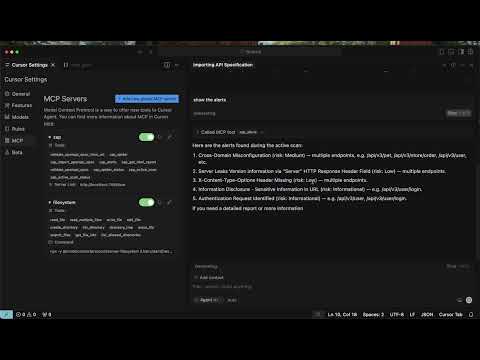
Watch the demo: browser demo or YouTube
Quick Start
Prerequisites:
- Docker 20.10+
- Docker Compose v2 or newer (
docker compose) with--waitand--wait-timeoutsupport - your own MCP client with Streamable HTTP and custom-header support
For scanner 0.18.0, check GitHub Releases
for the tag and verify the Docker Hub image dtkmn/mcp-zap-server:v0.18.0 for your platform.
If the tag or image is unavailable, use the source build instructions
or the published v0.17.1 instructions.
Keep existing settings and image selections until a deliberate upgrade.
Prefer to ask Codex to handle setup? Manually install the optional MCP ZAP Connect plugin, then ask it to check prerequisites, start the Docker stack, configure your private MCP connection and verify status. The skill can help install missing prerequisites with your approval, then recheck and continue setup. Scanning is a separate request. The commands below remain available without the plugin.
For Cursor Desktop Free, follow the Cursor setup instructions. Use a local Agent chat with available Cursor allowance to set up the scanner, check status, then request a demo crawl and report separately.
Claude Code local preview uses the same scanner and setup skill in a local Claude Code session.
For Claude Desktop Free, the Desktop 0.18.0 setup guide
lists the four matching downloads to check for in the v0.18.0 release.
Check the bundle and guide against their companion SHA256 files before installing.
The macOS MCPB preview adds agent-callable setup tools around the Docker scripts
and reuses existing installations. It is separate from the Claude Code plugin.
For a contributor build, use the local bundle instructions.
For a fresh standalone installation, use the checkout below after verifying the tag and image. If you already have an installation, keep its checkout and settings until you are ready to follow its upgrade guide.
git clone --branch v0.18.0 --single-branch https://github.com/dtkmn/mcp-zap-server.git
cd mcp-zap-server

./bin/bootstrap-local.sh --start
This creates missing settings, preserves existing keys and workspace data,
and starts a versioned release image. It reports ready after container health
and authenticated MCP checks pass. The packaged client uses the * grant for scan tools. Run scans only when requested. Existing settings retain their
permissions. See
quick-start permissions
for the default and optional per-client restrictions.
Use Self-Serve First Run for version selection, configuration, stopping/restarting, startup timeouts, and recovery. For source builds, use the contributor setup.
Connect your MCP client:
- MCP endpoint for host-side clients:
http://localhost:7456/mcp - Authentication: send
MCP_API_KEYfrom.envin theX-API-Keyheader - MCP client setup and authentication
The stack runs the MCP server, ZAP, and demo targets. Install and configure your preferred MCP client separately.
After connecting, try this first prompt:
Crawl http://juice-shop:3000 with ZAP. Wait for the crawl
and passive analysis to finish, show a findings summary, generate an HTML
report, and read it back through MCP. Do not run an active scan.
Expect a completed crawl, a findings summary, and a report the client can
read. Use the container URL http://juice-shop:3000 for this scan; the host
preview http://localhost:3001 is for your browser. Finding counts vary;
a connection or scan error is not a clean result.
The default stack binds published ports to loopback. Review Quick Start Security before changing access or scan-target settings. Agent install notes cover setup permissions and standalone OCI use.
Discovery Metadata
This source includes 0.18.0 MCP Registry metadata in
.mcp/server.json. Metadata in source does not publish a
registry version or image. Check the
MCP Registry
and use metadata from the same published version as the image you deploy.
The image includes the MCP server name expected by registry and catalog tooling.
The published 0.16.0 version and its immutable digest remain documented in the
0.16.0 release guide.
Docker Compose remains the easiest installation path because the MCP server is designed to operate with a ZAP sidecar and explicit auth keys. The OCI package metadata is for advanced standalone installs where ZAP is already running and reachable from the MCP container.
What You Get
These capabilities describe scanner 0.18.0. For the older scanner, use the
tagged v0.17.1 feature guide.
- Scan tools for crawling, active and passive scanning, API imports, findings, reports and scan history.
- Scan controls for inspecting policies, setting up authentication and tracking or stopping queued scans.
- Authentication: API key mode by default, optional JWT mode with refresh and revocation support.
- Runtime policy bundles: configured dry-run and enforcement modes for MCP tool calls.
- Scan queue and history: queued active, traditional spider, AJAX Spider, and Client Spider jobs with launch-ownership holds, durable Postgres state, and evidence export.
- Extension contracts: experimental policy, protection, evidence metadata, and extension metadata APIs with sample extension packaging.
- Operational guardrails: request body limits, rate limits, workspace quotas, tool-scope authorization, structured logs, metrics, and audit events.
- Deployment paths: local Docker Compose, published JVM container images, and Helm charts for Kubernetes.
See the Client Spider guide for browser setup, authenticated crawling and reports.
Version 0.18.0
Read the release and upgrade guide for client compatibility, storage migration, and the limits of scan recovery.
Version 0.17.1
The tagged 0.17.1 release and upgrade guide
describes neutral recorded-findings responses, authoritative explicit target
denies, permission-aware next actions, and the local client setup options.
The release, Docker Hub/GHCR images and Desktop 0.1.0 downloads are available.
MCP Registry publication is separate; use the registry check above when relying
on registry discovery. The queued scan starts and V9 changes in current source
are not part of the published v0.17.1 runtime.
The v0.17.0 GitHub release is incomplete: its Desktop assets are absent and
its image-release workflow did not complete. See the upgrade guide for availability checks.
Version 0.16.0
See the 0.16.0 release and upgrade guide for that release's behavior and requirements.
Version 0.15.0
See the 0.15.0 release and upgrade guide for that release's behavior and requirements.
Version 0.14.0
See the 0.14.0 release and upgrade guide for that release's behavior and requirements.
The release notes archive and changelog cover earlier versions. For changes to older MCP integrations, use Migrating older clients. Verify the matching image and distribution in GitHub Releases before deployment.
Security Defaults
The default posture is intentionally conservative:
api-keymode is the base runtime default.nonemode is for explicit local dev/test only.- Docker Compose binds published ports to loopback by default.
- The Java 25 JVM image uses a digest-pinned distroless runtime with no shell or package manager; debug it through logs, metrics, and external diagnostic containers rather than installing tools into the application container.
- URL validation blocks localhost, private networks, and link-local targets by default.
- Target authentication is optional and profiles default to an empty list. When enabled, the server binds an exact server-side credential reference and login settings to one approved origin; callers provide only
profileIdandtargetUrl. - Public auth exchange endpoints are rate-limited.
- MCP request bodies have a hard early size cap.
For a first private AWS deployment without Kubernetes, use AWS EC2 with Docker Compose and its standalone example.
For Kubernetes, use the EKS infrastructure starter to create a dedicated evaluation cluster in an existing VPC, then deploy with the existing Helm chart. Follow the walkthrough for network configuration, JWT authentication, persistent storage and deployment checks.
Production and shared deployments should review:
- Security Modes
- JWT Authentication
- Optional Target Form-Login
- Authenticated Scanning Reference
- Abuse Protection
- Production Readiness Checklist
- Security Policy
Architecture
flowchart LR
  Client["Your MCP Client"] -->|"MCP over Streamable HTTP"| MCP["MCP ZAP Server"]
  MCP -->|"ZAP API"| ZAP["ZAP"]
  ZAP -->|"scan"| Target["Authorized target app"]
  MCP -->|"reports / findings / history"| Evidence["Evidence + reports"]
For current-source multi-replica queueing, durable Postgres state, launch holds and ingress affinity, use these operations guides. Released v0.17.1 deployments should use the tagged Helm guide:
- Queue Coordinator and Worker Claims
- Multi-Replica Deployment Requirements
- Scan History Ledger
- Helm Deployment
Extension Model
The extension API exposes selected contracts for policy, protection, evidence and metadata integrations:
mcp-zap-extension-apipackages selected policy, protection, evidence, and metadata contracts without gateway runtime internals.- How extensions work explains the core versus extension boundary.
- Build your own extension shows the target standalone repository shape.
- Extension API release policy explains publication stages and compatibility gates.
- Standalone sample extension shows how a separate project depends on the API artifact.
Extensions do not add runtime multi-engine support. Additional scanner engines require their own adapters and explicit capability boundaries.
Documentation Map
The links below track current-source guidance and versioned release notes. If you run
v0.17.1, use the v0.17.1 documentation tree.
Start here:
- Full documentation
- Self-Serve First Run
- OSS Extension Model
- MCP Access Authentication
- MCP Client Authentication
- Optional Target Form-Login
- Scan tools
- Migrating older clients
Scanning:
- MCP Client Scan To Evidence
- Scan Execution
- Seeded API Gate Playbook
- API Schema Imports
- AJAX Spider
- Client Spider
- Findings and Reports
Operations:
Open Source Core And Extension Model
mcp-zap-server is the Apache-2.0-licensed open-source core. It is intended to be useful on its own for self-hosted MCP and ZAP workflows.
Private or enterprise capabilities may be built as separate extensions around this core. Those extensions are not required to run the OSS project, and enterprise implementation code is not shipped in this repository.
The boundary is intentional:
- this repository remains the public OSS distribution
- extension points should be documented and kept stable where practical
- private extensions must not weaken the security, licensing, or usability of the OSS core
- security scanning and open-source program entitlements for this repository apply only to this public project
Contributing And Support
If this project saves you time or becomes part of your security workflow, you can sponsor the maintainer to support ongoing maintenance.
Agentic Lab offers optional paid support for teams adopting the public core in production. Commercial support is separate from the Apache-2.0-licensed OSS distribution, and the public core should remain usable without private extensions or paid services.
License
Apache License 2.0. Copyright 2025-2026 Daniel Tse. See LICENSE.