Listed from the MCP registry; nobody on Odel publishes it.

AI News
Collects AI news from many Sources into a local store for Claude to query. No API key.
Runs on your machine from its package; the steps are below.
What it does
- Reads
- Writes
- High impact
At most: creates or changes data: records, files, settings.
What it costs
FreeOdel charges nothing per call. The publisher may charge for its own service.
Runs locally over stdio
This server isn't hosted — your MCP client launches it from a package registry. Use one of the commands below, or drop the config into your client (e.g. Claude Desktop).
Run
uvx ai-news-mcp
MCP client config
{
  "mcpServers": {
    "ai-news": {
      "command": "uvx",
      "args": [
        "ai-news-mcp"
      ]
    }
  }
}AI News MCP

An MCP server that collects AI news from 23 Sources (company blogs, tech news sites, engineering blogs, release pages, Hacker News, Product Hunt, Hugging Face and OpenRouter) into a local store, and lets Claude ask what's new, search it, and read the full text of an Item.
It runs on your machine. It needs no API key, no scheduler and no cloud service, and it never calls an LLM: Claude does the summarising when you ask. It works in any MCP client (Claude Code, Claude Desktop, Cursor, VS Code and others) with the model that client uses; these docs say Claude because Claude is what it is tested with.
Is it for you? Use it if you want Claude to brief you on AI news without you visiting a dozen sites, and you are fine with Claude reading the titles and summaries of Items from public Sources. It is not a news reader with its own interface, it does not summarise Items or merge Items about the same event itself, and it only knows what its Sources publish.
What it does
- What's New: everything collected since you last asked, per Category, that was published in the last 7 days.
- Search: by text, publish time, Category and Source, over everything collected so far (history is kept, so "last week" works).
- Full text: fetches an Item's original page and extracts the main text when the summary is not enough.
- Collection on demand: when the data is over 24 hours old, the server collects by itself when it starts or when you ask what's new. The first collection reaches back 30 days.
- Source health: lists every Source with its last error, and warns when a Source fails 3 collections in a row.
Example
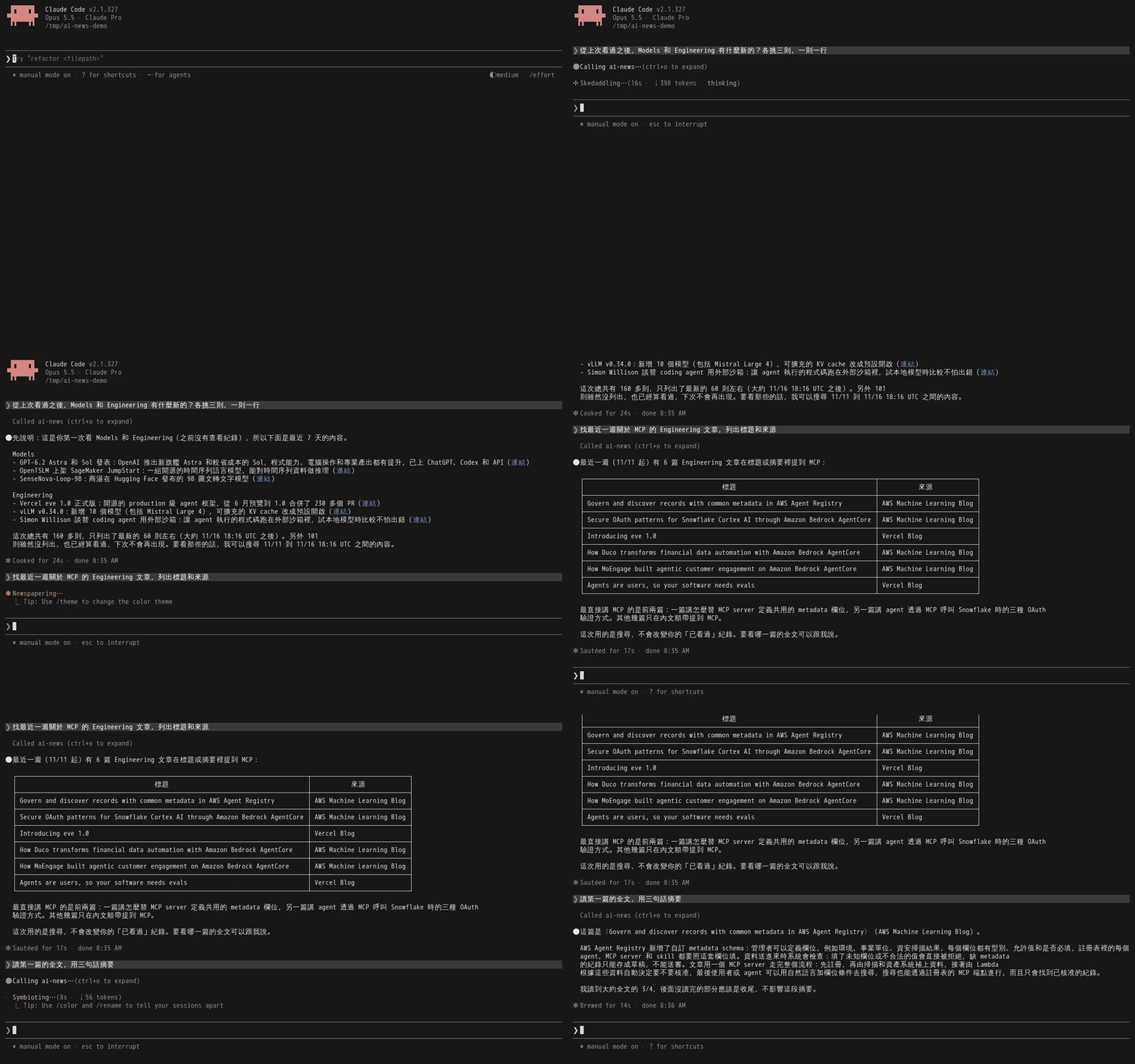
Ask Claude things like:
- "What's new in AI?"
- "Anything new in Models? Group the Items about the same model."
- "Find last week's Engineering Items about MCP."
- "Read the full text of the second one and summarise it."
- "Which news Sources are failing?"
Claude calls whats_new for the first two, search for the third, read_item for the fourth and list_sources for the last, then writes the answer from the Items it gets back.
Install
You need uv and an MCP client. With Claude Code:
claude mcp add --scope user ai-news -- uvx ai-news-mcp
That is all: uvx downloads and runs the package, and --scope user makes it available in every project. Start a new Claude Code session and ask "What's new in AI?". The first answer can take about a minute while the server collects.
To run it from a clone instead:
git clone https://github.com/duncan-wen/ai-news-mcp.git
claude mcp add --scope user ai-news -- uv run --directory /path/to/ai-news-mcp ai-news-mcp
Claude Desktop
Add it to claude_desktop_config.json (Settings > Developer > Edit Config; ~/Library/Application Support/Claude/ on macOS, %APPDATA%\Claude\ on Windows), then restart Claude Desktop:
{
  "mcpServers": {
    "ai-news": {
      "command": "uvx",
      "args": ["ai-news-mcp"]
    }
  }
}
Cursor
Add it to ~/.cursor/mcp.json for every project, or to .cursor/mcp.json in one project:
{
  "mcpServers": {
    "ai-news": {
      "type": "stdio",
      "command": "uvx",
      "args": ["ai-news-mcp"]
    }
  }
}
VS Code
Run MCP: Open User Configuration from the Command Palette and add it under servers (or put it in .vscode/mcp.json for one workspace). Its tools are then available in Chat in agent mode:
{
  "servers": {
    "ai-news": {
      "type": "stdio",
      "command": "uvx",
      "args": ["ai-news-mcp"]
    }
  }
}
Other MCP clients
Every client starts it the same way: the command is uvx ai-news-mcp, over stdio, with no arguments, environment variables or API key; from a clone, it is uv run --directory /path/to/ai-news-mcp ai-news-mcp. If a client cannot find uvx, give its full path as the command (the output of which uvx, or where uvx on Windows). A new release runs the next time the client starts the server: uvx caches PyPI's answer for 10 minutes, then picks up the new version by itself.
Tools
| Tool | What it does |
|---|---|
whats_new | Items collected since the last Checkpoint of each Category asked about (all if none) and published in the last 7 days, about 60 at most. summary_length (default 500) shortens the summaries shown (0: none). Moves those Checkpoints to now. |
search | Items by text, since / until, Categories and Source ids; newest first. summary_length (default 500) shortens the summaries shown (0: none). Never moves a Checkpoint. |
read_item | The main text of an Item's original page, cut to max_length characters (default 10,000); truncated and full_length say whether it was cut and how long the whole text is, so a client can ask again with a larger max_length. |
list_sources | Every Source with its URL, default Categories and collection state. |
collect_now | Collects from every Source now and reports what each added or why it failed. |
Categories
Every Item has one or more Categories. A Source gives its default Categories, and keyword rules on the title and summary add others (for example, an Item from a News Source that names a new model is also in Models).
| Category | Definition |
|---|---|
| News | Events in the AI industry, such as launches, funding, policy, and people changes. |
| Applications | New AI products or tools that you can use right away. |
| Engineering | Content about how to build AI systems, such as technical posts, frameworks, lessons from practice, and releases. |
| Models | Newly released or newly listed AI models, and changes to what they can do and what they cost. Academic papers and theory are not included. |
Each Category has its own Checkpoint, so asking only about Models does not mark the day's News as seen.
What's New shows each Item once: ask again and it is empty until the next collection brings new Items. To see recent Items again, ask by time instead ("What was published this week?"): Claude then calls search, which never moves a Checkpoint. Claude calls whats_new only when you ask what is new since you last looked; a question with a time span ("today", "recently") or a subject goes to search, so it never marks Items as seen by accident. Every client of the server (Claude Code, Claude Desktop, the MCP Inspector) shares one store and one set of Checkpoints, so calling whats_new from the Inspector while testing also marks those Items as seen for Claude.
The terms used here are defined in GLOSSARY.md.
Sources
| Source id | Name | Default Categories |
|---|---|---|
openai-news | OpenAI News | News |
google-deepmind | Google DeepMind Blog | News |
google-ai | Google AI (The Keyword) | News |
anthropic-news | Anthropic News | News |
mistral-news | Mistral News | News |
microsoft-ai | Microsoft Source: AI | News |
techcrunch-ai | TechCrunch AI | News |
the-verge-ai | The Verge AI | News |
mit-technology-review-ai | MIT Technology Review AI | News |
simon-willison | Simon Willison | Engineering |
latent-space | Latent Space | Engineering |
langchain-blog | LangChain Blog | Engineering |
vercel-blog | Vercel Blog | Engineering |
cloudflare-blog | Cloudflare Blog | Engineering |
hugging-face-blog | Hugging Face Blog | Engineering |
nvidia-blog | NVIDIA Blog | Engineering |
aws-machine-learning | AWS Machine Learning Blog | Engineering |
vllm-releases | vLLM releases | Engineering |
transformers-releases | Transformers releases | Engineering |
hacker-news-ai | Hacker News: AI (stories with 100+ points whose title is about AI) | Applications |
product-hunt-ai | Product Hunt: AI | Applications |
hugging-face-models | Hugging Face: trending models | Models |
openrouter-models | OpenRouter: new models | Models |
Source config file
To add your own Sources, disable built-in ones or change their fields, create sources.toml in your config directory. The server runs fine without it.
| Platform | Location |
|---|---|
| Linux, WSL | ~/.config/ai-news-mcp/sources.toml (or $XDG_CONFIG_HOME/ai-news-mcp/) |
| macOS | ~/Library/Application Support/ai-news-mcp/sources.toml |
| Windows | %LOCALAPPDATA%\ai-news-mcp\sources.toml |
disabled = ["techcrunch-ai"]          # built-in Source ids not to collect

[sources.my-blog]                     # a new Source: name, url and default_categories
name = "My Blog"
url = "https://example.com/feed.xml"  # RSS or Atom
default_categories = ["Engineering"]  # any of News, Applications, Engineering, Models

[sources.openai-news]                 # a built-in Source id: only the fields given change
url = "https://openai.com/news/rss.xml"
- A new Source needs
name,urlanddefault_categories. Itskinddefaults torss(RSS or Atom); the other kinds are those of the built-in Sources (anthropic-sitemap,hn-algolia,hf-models,openrouter-models). - A table named after a built-in Source changes only the fields it gives (
name,url,default_categories,kind). - If the file is malformed (an unknown key or Category, a
disabledid that is no built-in Source), the server does not start, and its error says what to fix. Restart the server (start a new Claude Code session) after editing it.
Collected Items are stored in a SQLite file in your data directory (~/.local/share/ai-news-mcp/store.sqlite3 on Linux). Deleting it starts over with a fresh 30-day collection.
Design decisions
Each decision has an Architecture Decision Record in docs/adr/:
- Collection is triggered by queries, not by a scheduler: nothing to install or keep running, and it works on laptops and WSL that are often off.
- The server never calls an LLM; Claude does the reasoning: Categories come from keyword rules, there is no API key, and running it costs nothing.
- One Checkpoint per Category, compared against collection time: asking about one Category never hides another's Items, and a late-dated Item is not skipped.
- Tests go through the MCP tools only.
Terms of use
This project does not run any service: the server on your machine fetches each Source directly, identifying itself with a User-Agent that links to this repository, and spaces out its requests to each host. You are responsible for following each Source's terms of use. The store stays on your machine; Claude sees only the Items its tools return.
Development
uv sync
scripts/check   # lint, format, types, workflows, tests and the package build, as CI runs them
scripts/fix     # apply the formatter and lint autofixes
uv build        # build the sdist and wheel into dist/
How to report issues and propose changes is in CONTRIBUTING.md; changes per release are in CHANGELOG.md. Source URLs, rate limits and quirks are in docs/research/ai-news-sources.md. Coding standards are in CODING_STANDARDS.md.