Listed from the MCP registry; nobody on Odel publishes it.

SlingHook
Inspect, debug and replay captured webhooks (Stripe, GitHub, Shopify) from your AI agent.
Runs on your machine from its package; the steps are below.
What it does
- Reads
- Writes
- High impact
At most: moves money, runs code or commands, deletes data, or sends messages for you.
What it costs
FreeOdel charges nothing per call. The publisher may charge for its own service.
Runs locally over stdio
This server isn't hosted — your MCP client launches it from a package registry. Use one of the commands below, or drop the config into your client (e.g. Claude Desktop).
Run
npx -y slinghook
MCP client config
{
  "mcpServers": {
    "slinghook": {
      "command": "npx",
      "args": [
        "-y",
        "slinghook"
      ]
    }
  }
}slinghook CLI

Forwards webhooks captured by a SlingHook server to a server on your machine,
such as localhost:3000. A hosted SlingHook instance can't reach your localhost,
so the CLI makes the connection outbound, the same way stripe listen does.
Requires Node 20.17+.
npm install -g slinghook

slinghook auth login --server https://slinghook.co.za
slinghook auth status          # who you're logged in as
slinghook endpoints            # list your endpoint UUIDs
slinghook mcp                  # MCP server for AI agents (see below)
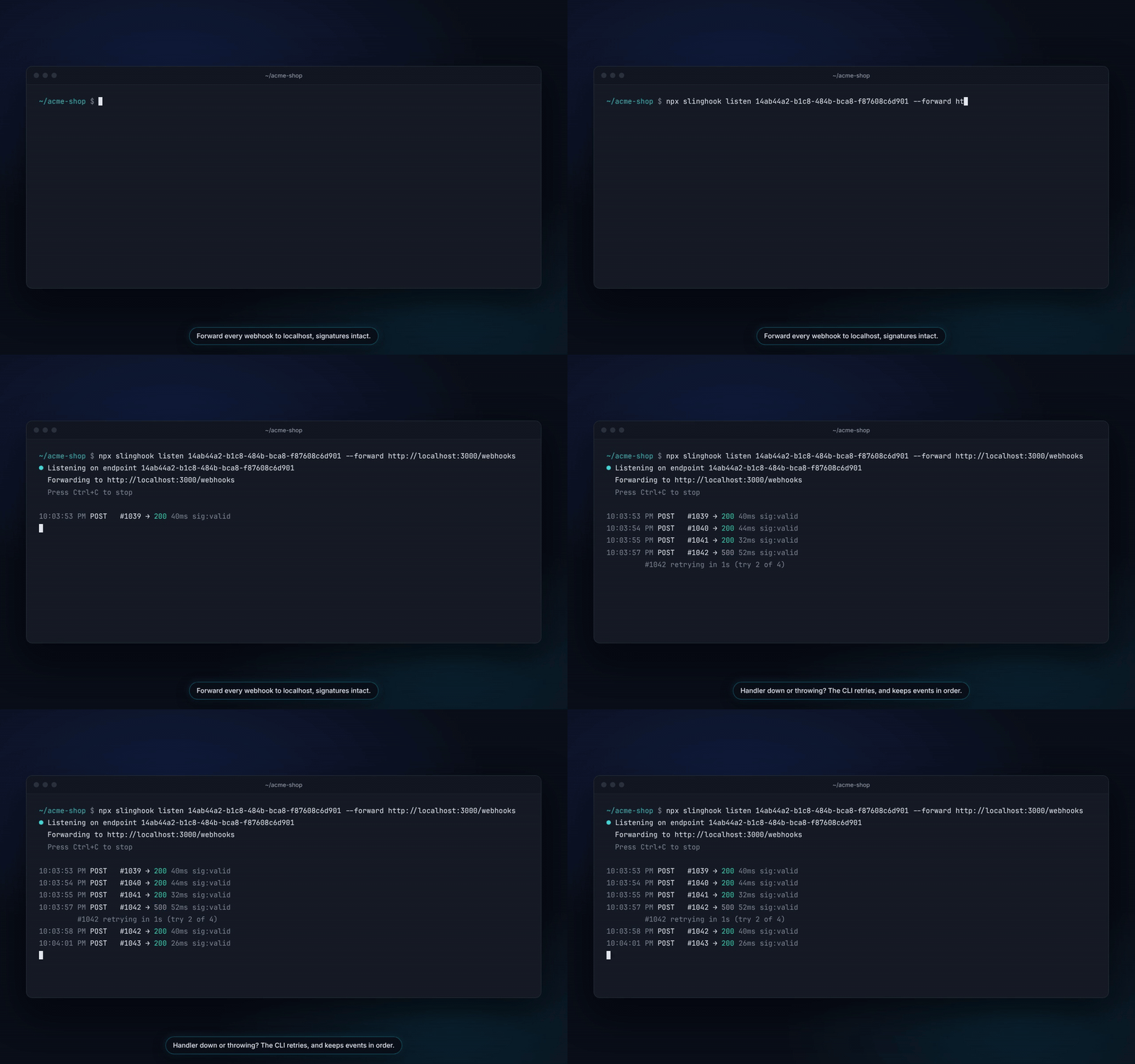
slinghook listen <uuid> --forward http://localhost:3000/webhooks
# <uuid> can also be the catch URL you copied, e.g. https://slinghook.co.za/c/<uuid>
Every command also works with the short name shk, e.g. shk auth login or
shk listen <uuid> --forward …. login, status and logout also work
without auth, as in earlier versions.
● Listening on endpoint 3f1c…
  Forwarding to http://localhost:3000/webhooks

14:02:11 POST   #1234 → 200 37ms sig:valid
14:02:15 POST   #1235 → ✗ Connection refused (is your local server running?) 2ms
How it works
-
Auth.
slinghook loginworks likegh auth login. It asks how you want to log in:- Web browser. The CLI shows a one-time code (like
BCDF-GHJK) and opens the dashboard. Sign in there however you normally do (password, Google, GitHub, SAML, two-factor) and approve the code. The CLI then receives a new API token named after your computer. The token works in the workspace you approved it from.--webskips the question. Codes expire after 15 minutes. - Personal access token. Create one under User Settings → API Tokens
(
/app/?settings=tokens) and paste it. In scripts and CI useslinghook login --with-token < token.txt,--token shk_…, or setSLINGHOOK_TOKEN.
Only the token is saved, in
~/.config/slinghook/config.json(mode 0600). The server stores only a SHA-256 hash of it. You can see and revoke tokens under User Settings → API Tokens. - Web browser. The CLI shows a one-time code (like
-
Stream.
listenopensGET /v1/events/<uuid>withAuthorization: Bearer <token>. This is the same SSE stream the dashboard uses. On first connect the server sends recenthistory, which the CLI skips. It forwards only newlogevents. -
Reconnect. The server closes the stream every ~55s by design. The CLI reconnects with
Last-Event-ID, so webhooks that arrive during the gap are delivered once and in order. Network errors back off from 1s up to 30s. -
Forward. Each webhook is re-sent with its original method, body, query string, and headers. Hop-by-hop headers such as
HostandContent-Lengthare dropped. Signature headers are kept, so your app's verification runs for real. The CLI addsX-Webhook-Replay: trueandX-SlingHook-Log-Id. Deliveries run one at a time with a 15s timeout. Payloads that were truncated at capture are skipped. If your server is down, times out, or answers 408, 425, 429 or 5xx, the CLI retries 3 more times (after 1s, 2s and 4s) before moving on. Later webhooks wait, so they still arrive in order.--retries Nchanges the count (0 to 10). -
Report. Each result is posted to
POST /api/logs/<id>/replays, so it appears in the dashboard's replay history. Use--no-reportto turn this off.
Team routing: one provider URL, many developers
On the Team plan, a whole team can share one endpoint (Stripe and Shopify only
allow a few webhook URLs) and still each get their own events on their own
machine. Claim the events that are yours, then listen with --mine:
# Events whose body has metadata.dev = "alice" go to Alice's localhost
slinghook listen <uuid> --forward http://localhost:3000/webhooks \
  --claim data.object.metadata.dev=alice

# Or claim by a header or query parameter
slinghook listen <uuid> --forward http://localhost:3000/webhooks --claim header:X-Dev=alice
--claim saves your claim on the endpoint (replacing your earlier one) and
implies --mine. Repeat it to require several conditions. You can also edit
claims under Endpoint Settings → Team routing in the dashboard, then run
listen --mine without --claim.
With --mine, the CLI forwards only the events routed to you, and the open
stream counts you as online. Events nobody claims stay in the shared feed for
everyone to see, unless the endpoint is set to give them to whoever is online,
in which case they go round-robin to the people running listen --mine.
Viewers can watch but can't claim events.
Don't run the CLI and the dashboard's Auto-Relay toggle for the same endpoint at the same time, or each webhook will be delivered twice.
Chaos mode: is your handler idempotent?
On Pro and Team, slinghook chaos takes a saved scenario (or one captured
request) and sends it to your handler the way providers really behave:
slinghook chaos <uuid> --forward http://localhost:3000/webhooks --scenario 12 \
  --check http://localhost:3000/debug/orders/count
Each event is first sent once (the baseline). Then, in order:
| Test | What is sent | Pass |
|---|---|---|
| duplicates | every event again | 2xx |
| concurrent | the same event 3 times at the same moment | 2xx for all |
| out_of_order | the events again, newest first | 2xx, or 409/425/429/503 to ask for a retry |
| malformed | the first body cut in half, empty, and garbage | 4xx |
| late_retry | the first event again after --late-delay seconds | 2xx |
Deliveries are sent exactly as captured, signature included, without the
X-Webhook-Replay header, so your handler treats them like the provider's own
redeliveries. Status codes can't show double side effects, so pass --check
with a GET on your app that reflects its state (an order count, a balance). It
is read after the baseline and after each test; any change fails that test.
Pick tests with --only duplicates,concurrent. Run without --scenario to
list the endpoint's scenarios. The report is saved to the dashboard (⌘K →
"Chaos mode"), and the command exits with code 1 when a test fails, so it can
run in CI.
MCP server: let your AI agent debug webhooks
slinghook mcp is a Model Context Protocol
server. AI coding agents such as Claude Code, Cursor and VS Code start it in the
background and call SlingHook as a set of tools, logged in as you. Ask your agent
"my Stripe webhook is failing, find out why and fix it", and it can run the whole
Catch. Debug. Replay loop:
| Tool | What it does | Changes anything? |
|---|---|---|
list_endpoints | Your catch URLs and where each one relays | No |
list_events | Captured webhooks as short summaries (no bodies). The 50 newest on every plan; query and before_id search full history (Pro) | No |
get_event | One webhook in full: headers, query, body (long bodies cut) | No |
debug_signature | Why the signature failed, optionally against a candidate secret | No |
replay_event | Re-sends the webhook from your machine to your handler, records it, and returns the verdict: fixed, regressed, still failing or still passing | Yes: a real delivery |
get_replay_result | Replay history and fix verification verdict (both response bodies on Pro) | No |
list_scenarios | Saved scenarios (ordered sets of events) on an endpoint | No |
run_scenario | Replays every step of a scenario from your machine to your handler and reports each step (back to back, or recorded gaps capped at 5s with keep_timing; 3 runs a minute) | Yes: real deliveries |
generate_handler | Types, a fixture and a test (TypeScript, Python, PHP or Go) from a real event, to build a handler around. Writes no files itself | No |
compare_events | What differs between two webhooks, field by field (defaults to the previous event of the same type) | No |
create_endpoint | A new catch URL (same name returns the existing one; at most 5 per session; no secrets through the chat) | Yes: adds an endpoint |
Every event has a number within your account (#12), shown in the dashboard's
feed. Name events to your agent however is natural: "event 12", "the latest
event", "the latest invoice.paid", or the provider's own id such as Stripe's
evt_1Qx.... The inspector's #12 menu also copies a ready-made prompt.
Add it once, after slinghook login:
# Claude Code (macOS, Linux)
claude mcp add slinghook -- slinghook mcp

# Claude Code on Windows: npm installs slinghook as a .cmd file, which needs cmd /c
claude mcp add slinghook -- cmd /c slinghook mcp
Other clients take the same command in their JSON config:
{ "mcpServers": { "slinghook": { "command": "slinghook", "args": ["mcp"] } } }
In Claude Code, /mcp shows whether it connected. The agent asks before running
replay_event, because the tool is marked as one that changes things.
Safety rails:
- Replays stay local.
replay_eventonly sends to localhost and private networks (10.x, 172.16-31.x, 192.168.x,host.docker.internal). Webhook bodies are written by third parties, and a crafted one could try to talk your agent into sending stored payloads elsewhere. Start the server withslinghook mcp --allow-remote-targetsto lift this. - Rate limits. One MCP session makes at most 60 tool calls and 10 replays a minute, so a looping agent stops quickly.
- Your permissions. Every call uses your token, so the server's rules apply: your workspace, your role (viewers can't replay) and your plan.
The server talks JSON-RPC over stdin and stdout, so it prints nothing to stdout itself; its startup note goes to stderr. To see the protocol, pipe a request in:
echo '{"jsonrpc":"2.0","id":1,"method":"tools/list"}' | slinghook mcp
Known gaps
- Bodies travel through the JSON event stream as text, so binary payloads aren't forwarded byte-for-byte.
- A delivery that still fails after its retries is reported and skipped; you can replay it from the dashboard.
Developing
Clone this repo, then npm install && npm link puts your working copy on
your PATH, and npm test runs the tests.
Publishing
Bump version in package.json, then run npm publish from this folder. The tests run
first (prepublishOnly), and only bin/, src/, this README, LICENSE and package.json are
included in the package.
License
MIT. SlingHook is made by Fulcrum Software, South Africa.