Listed from the MCP registry; nobody on Odel publishes it.

tunnel
Local HTTPS proxy and mock server for app tests: record, replay, mock and break API calls
Runs on your machine from its package; the steps are below.
What it does
- Reads
- Writes
- High impact
At most: moves money, runs code or commands, deletes data, or sends messages for you.
What it costs
FreeOdel charges nothing per call. The publisher may charge for its own service.
Runs locally over stdio
This server isn't hosted — your MCP client launches it from a package registry. Use one of the commands below, or drop the config into your client (e.g. Claude Desktop).
Run
npx -y tunnel-use
MCP client config
{
  "mcpServers": {
    "tunnel": {
      "command": "npx",
      "args": [
        "-y",
        "tunnel-use"
      ]
    }
  }
}An HTTPS debugging proxy for app developers: an open-source alternative to Charles and Proxyman, built for your AI coding agent to drive.
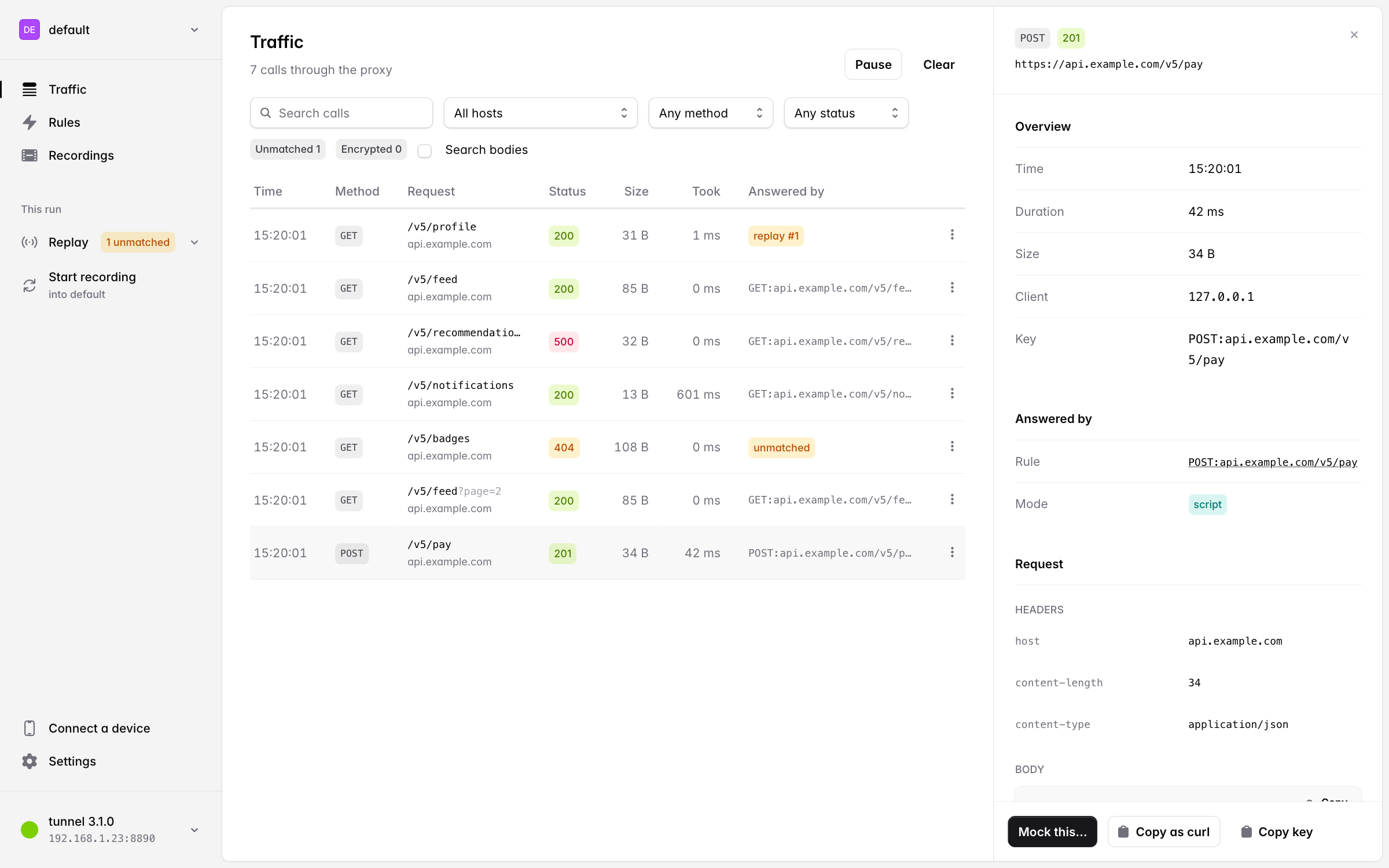
Point a phone, a simulator or any HTTP client at it to see every API call, change what any endpoint answers, and record real answers to replay offline.
📖 中文文档


Quick start
With your coding agent
-
Start tunnel:
bashnpx tunnel-use serve --background # Node 22.18+ -
Add it to your agent:
bashclaude mcp add --scope user tunnel -- npx -y tunnel-use mcp # Claude Code codex mcp add tunnel -- npx -y tunnel-use mcp # CodexOther MCP clients, such as Cursor and Windsurf, take
{"mcpServers": {"tunnel": {"command": "npx", "args": ["-y", "tunnel-use", "mcp"]}}}. -
Open a new agent session and ask. No app is needed yet; the agent can send requests through tunnel itself:
Record https://jsonplaceholder.typicode.com/todos/1, replay it offline, then make it return 503 and show me every call.
Once your app goes through tunnel, as below, ask about its calls:
Make GET api.example.com/v5/feed return an empty list, and show me what the app sent.
On a phone
-
Start tunnel, unless it is already running:
bashnpm install -g tunnel-use tunnel serve --backgroundIt prints the address for the phone, such as
set the device's HTTP proxy to 192.168.1.23 port 8890. -
Set the phone's proxy to that address and port, on the same Wi-Fi:
- iPhone: Settings > Wi-Fi > ⓘ next to the network > Configure Proxy > Manual
- Android: Wi-Fi > the network > Advanced > Proxy > Manual
-
Install the certificate: open http://ca.tunnel/ on the phone and follow the steps there. Two are easy to miss: on iPhone, switch tunnel on under Settings > General > About > Certificate Trust Settings; on Android 7 and later, the app's debug build has to trust user certificates (
<certificates src="user"/>). -
Name the hosts to decrypt. As with Charles's SSL Proxying list, nothing is decrypted until you add it:
bashtunnel ssl add api.example.com -
Go. Use the app and watch its calls at http://127.0.0.1:8000/. Change an answer, and it applies from the next request:
bashtunnel set GET api.example.com/v5/feed -d '{"cards": []}' # Map Local: answer with this JSON tunnel set GET api.example.com/v5/feed --target http://localhost:3000 # Map Remote: send it to your dev server tunnel set GET api.example.com/v5/feed --status 500 -d '{"error": "x"}' # make it fail tunnel rm GET api.example.com/v5/feed # back to the real server
When you are done, run tunnel stop and switch the phone's proxy off.
Simulators and emulators are covered in Point a device at it.
In your test code
Each test case sets its own answers and checks what the app called. A Node or TypeScript suite starts tunnel inside its own process, with nothing to start first and no port to agree on:
import assert from 'node:assert/strict'
import { startTunnel } from 'tunnel-use'

const tunnel = await startTunnel({ proxyHost: '127.0.0.1' })
try {
  await tunnel.setRule({ key: 'GET:api.example.test/v5/feed', mode: 'json', json_response: { cards: [] } })
  // ... drive the app through tunnel.proxyUrl; here one request stands in for it
  const answer = await tunnel.check('GET', 'http://api.example.test/v5/feed')
  assert.equal(answer.status, 200)
  const wait = await tunnel.waitForRequest({ key: 'GET:api.example.test/v5/feed', timeout: 5 })
  assert.equal(wait.timed_out, false)
} finally {
  await tunnel.stop()
}
A Swift or Kotlin test case running inside the app does the same over the admin API.
Why tunnel instead of Charles or Proxyman
For the everyday loop — proxy the phone, install the certificate, decrypt the hosts you name, watch the calls, change an answer — tunnel works the way they do. On top of that:
- Your coding agent drives it. The MCP server comes with tunnel, free, and
every command also takes
--jsonand exits with a code an agent can branch on;tunnel agentsprints the guide for the installed version. Charles has no official MCP server, and Proxyman's needs a paid licence. - Record once, replay offline. Real answers are recorded as JSON files you
can commit next to your tests, and replay answers from them without the
network. A call nothing answers is refused instead of reaching the real
backend, and
tunnel requests --unmatchedlists it, so a CI run cannot pass by quietly calling the server. A JavaScripthandler(ctx)can take a recorded answer and change one field of it. - Your tests drive it too. A Node suite starts it in-process; each case sets its own answers, waits for the app's call instead of sleeping, and checks what arrived.
- Free and open source, under MIT, installed with npm.
Documentation
| Page | What it covers |
|---|---|
| How it works | the two ports, and how each request is answered |
| Point a device at it | phones, simulators and emulators; the CA certificate; which hosts are decrypted; the upstream proxy |
| The panel | the web panel at 127.0.0.1:8000 |
| Rules | rule keys; the json, script, passthrough and replay modes; sessions; faults and delays; scenario files |
| The request log | what the app called, and waiting for a call |
| Record once, replay in CI | recordings, sessions in CI, running in the background, several devices at once |
| Calling tunnel from a test case | Swift and Kotlin test cases over the admin API |
| Using tunnel from TypeScript tests | the tunnel-use library: startTunnel() and function rules |
| Driving tunnel from a coding agent | tunnel agents and the MCP server |
| CLI reference | every command |
| Admin API v1 | the HTTP API the CLI, the panel and MCP are built on |
| Where the files live | the config, state and data directories |
| Testing and development | working on tunnel itself, and releasing it |
License
MIT — see LICENSE.







