Listed from the MCP registry; nobody on Odel publishes it.

FigJam
Query FigJam board context, source-cited answers and snapshot changes through five local MCP tools.
Runs on your machine from its package; the steps are below.
What it does
- Reads
- Writes
- High impact
At most: only reads or looks up information.
What it costs
FreeOdel charges nothing per call. The publisher may charge for its own service.
Runs locally over stdio
This server isn't hosted — your MCP client launches it from a package registry. Use one of the commands below, or drop the config into your client (e.g. Claude Desktop).
Run
npx -y figjam-context-mcp
MCP client config
{
  "mcpServers": {
    "figjam": {
      "command": "npx",
      "args": [
        "-y",
        "figjam-context-mcp"
      ]
    }
  }
}figjam-context-mcp
A local MCP server that turns FigJam boards into source-cited context for LLMs. It reads a board through the Figma REST API, groups stickies, tables, images and arrows into clusters, and answers questions with links back to the original nodes.
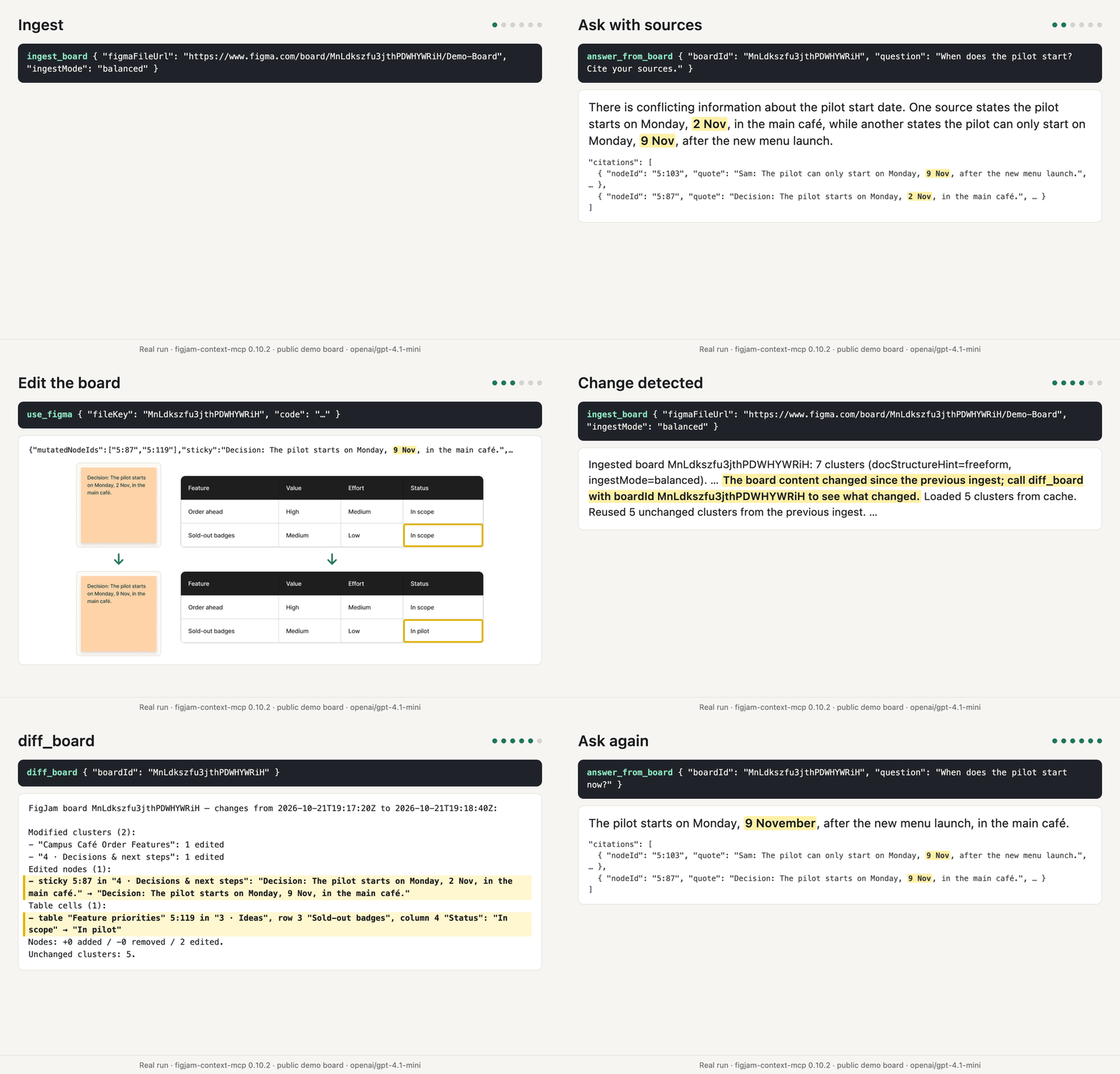
Rendered from the tool calls and outputs of a real run against the public
demo board with
figjam-context-mcp 0.14.0 and openai/gpt-4.1-mini. Figma's MCP server
(use_figma) made the edit.
Why
Workshop boards hold research notes, decisions and open questions, but an LLM cannot read a canvas. Screenshots and PDF exports lose tables, arrow direction and the link to the source. This server keeps the board's structure and cites every answer to the nodes it came from.
Compared with Figma's MCP server
Figma's official MCP server reads a FigJam board or node with its images
(get_figjam) and edits boards (use_figma). This server turns a workshop
board into context an assistant can cite and track:
- large boards read section by section, with an overview, size-limited pages and search
- source IDs in compact overviews, with Figma links in full excerpts and answer citations
- tables read row by row
- local snapshots, and
diff_boardto see what changed - explicit credentials redacted before they reach the cache, the output or a model
- image descriptions from a vision model you configure
The two work together: in the demo above, Figma's server edits the board and this one reports the change.
Tools
| Tool | What it does | LLM call |
|---|---|---|
ingest_board | Reads a board, clusters it and saves a local snapshot. Re-ingests reuse unchanged clusters; focusNodeIds chooses which sections' images are interpreted first. | In balanced (default) and max_quality mode |
get_board_context | Reads saved context, automatically using compact source-ID lines for large section reads; detail: "full" returns complete excerpts and Figma links. Also supports topic search and pagination. | No |
answer_from_board | Answers one specific question (a number, status or decision) from the most relevant excerpts, with node-level citations or an insufficient-evidence result. Not meant for whole-board summaries. | Yes |
diff_board | Compares snapshots with bounded lists and full totals: clusters, nodes (including moves with origin and destination), table cells (0-based), arrows with source IDs and section/frame renames. Notes unchanged re-ingests. | No |
diagnose_llm_config | Tests the configured models with small text and image JSON checks. | Yes |
ingest_board also reads Figma design files (/design/, /file/ and /proto/
URLs), but clustering and reading order are made for FigJam boards.
Quick start
Five steps. Requires Node.js 22.12 or later. Step 4 sets the model provider that
answer_from_board, diagnose_llm_config and image interpretation need; it is optional.
-
Node.js. Check the installed version with
node --version; install Node.js 22.12 or later if it is older. -
Figma token. Create a personal access token under Settings → Security → Personal access tokens with the scope
file_content:read. The token's account must be able to open the board. Everyingest_boardcall is one Figma file download, a Tier 1 request. With a View or Collab seat, plan for 6 ingests a month. The Figma Help Center lists up to 6 Tier 1 requests a month on paid plans and 20 on Starter. The developer docs list up to 20 on all plans, with lower limits possible. -
Add the server with the example for your client below. The examples set only
FIGMA_ACCESS_TOKEN, so the server starts andingest_boardworks iningestMode: "max_speed"without a model provider.@latestwith--prefer-onlinemakes npx check the registry for the latest release on every start, even when package metadata is cached (npm configuration). -
Optional: model provider. Add
LLM_BASE_URLandLLM_API_KEYto the server'senvblock, then restart the client. Both are needed together; without them,balancedingests run text-only and say that the model settings are missing. Example with OpenRouter (create a key):LLM_BASE_URL=https://openrouter.ai/api/v1 LLM_API_KEY=your-openrouter-keyIn Claude Code, remove the entry with
claude mcp remove figjam-context(with the same--scopeas when you added it), then add it again with an--envflag for each variable (Claude Code). A local OpenAI-compatible server without sign-in still needsLLM_API_KEYset to any non-empty value. SetLLM_TEXT_MODELS,LLM_FAST_TEXT_MODELSandLLM_VISION_MODELSto its model names (configuration). Then rundiagnose_llm_configin step 5. -
Check the setup. Ask your assistant to ingest one of your boards with
ingestMode: "max_speed", for example "Ingest https://www.figma.com/board/FILE_KEY/Name with ingestMode max_speed." That makes one Figma request and no model call. A working setup answers with a line that startsIngested board FILE_KEY (snapshot …):and counts theclusters. Clients that show their tools, such as Claude Code with/mcp, list the server there (Claude Code). With a provider from step 4, also rundiagnose_llm_config; it checks the configured models with small synthetic inputs. For error messages, see common errors.
All settings: configuration.
Claude Code
claude mcp add --scope user --env FIGMA_ACCESS_TOKEN=your-figma-token --transport stdio figjam-context -- npx -y --prefer-online figjam-context-mcp@latest
--scope user makes the server available in all your projects. Without it, Claude
Code stores the server for the current project only (scopes).
For longer ingests, set MCP_TOOL_TIMEOUT=300000 in the environment that launches
Claude Code and INGEST_BOARD_VISION_BUDGET_MS=270000 in the server environment,
leaving about 30 seconds for the rest of the ingest (Claude Code environment
variables).
Claude Desktop
Open Settings → Developer → Edit Config in Claude Desktop. This opens
claude_desktop_config.json; the file is at:
- macOS:
~/Library/Application Support/Claude/claude_desktop_config.json - Windows:
%APPDATA%\Claude\claude_desktop_config.json
Add the server under mcpServers, keeping any other entries in the file:
{
  "mcpServers": {
    "figjam-context": {
      "command": "npx",
      "args": ["-y", "--prefer-online", "figjam-context-mcp@latest"],
      "env": {
        "FIGMA_ACCESS_TOKEN": "your-figma-token"
      }
    }
  }
}
Then quit Claude Desktop completely and start it again; the server starts with the app (MCP quickstart). The MCP documentation names no tool timeout setting for Claude Desktop, so keep the default image budget.
Codex CLI and ChatGPT desktop app
Add this to ~/.codex/config.toml; the app, CLI and IDE extension share this
configuration (OpenAI MCP setup):
[mcp_servers.figjam-context-mcp]
enabled = true
command = "npx"
args = ["-y", "--prefer-online", "figjam-context-mcp@latest"]
startup_timeout_sec = 30
default_tools_approval_mode = "approve"

[mcp_servers.figjam-context-mcp.env]
FIGMA_ACCESS_TOKEN = "your-figma-token"
Without default_tools_approval_mode = "approve", ChatGPT may ask for approval
or abort tools with external effects; with it, the client never asks before board
content goes to the model provider, so use max_speed and avoid answer_from_board
for confidential boards.
For longer ingests, set tool_timeout_sec = 300 under
[mcp_servers.figjam-context-mcp] and INGEST_BOARD_VISION_BUDGET_MS = "270000" in its
env table, leaving about 30 seconds for the rest of the ingest (OpenAI timeout
options).
GitHub Copilot CLI
Add this to ~/.copilot/mcp-config.json
(Copilot CLI MCP setup):
{
  "mcpServers": {
    "figjam-context": {
      "type": "local",
      "command": "npx",
      "args": ["-y", "--prefer-online", "figjam-context-mcp@latest"],
      "env": {
        "FIGMA_ACCESS_TOKEN": "your-figma-token"
      },
      "tools": ["*"]
    }
  }
}
For longer ingests, set "timeout": 300000 on the server in
~/.copilot/mcp-config.json and "INGEST_BOARD_VISION_BUDGET_MS": "270000" in its
env, leaving about 30 seconds for the rest of the ingest (tested with a 600000 ms
timeout).
VS Code
In the Copilot harness, add the server under Global → Copilot Global in
Chat: Open Customizations (Command Palette), then MCP Servers. VS Code writes it to
~/.copilot/mcp-config.json, the same file as in the Copilot CLI section, in the portable
mcpServers format (VS Code MCP servers,
configuration reference):
{
  "mcpServers": {
    "figjam-context": {
      "type": "local",
      "command": "npx",
      "args": ["-y", "--prefer-online", "figjam-context-mcp@latest"],
      "env": {
        "FIGMA_ACCESS_TOKEN": "your-figma-token"
      },
      "tools": ["*"]
    }
  }
}
The portable format has no input variables, so the token is stored in this file. Keep that file in your user directory and out of any repository.
Local harness only: to keep the token out of the file, open MCP: Open User
Configuration and use an input marked "password": true. VS Code does not forward
servers that need inputs to Copilot harness sessions, so this works only in the Local
harness (VS Code MCP configuration):
{
  "inputs": [
    {
      "type": "promptString",
      "id": "figma-token",
      "description": "Figma personal access token (file_content:read)",
      "password": true
    }
  ],
  "servers": {
    "figjam-context": {
      "type": "stdio",
      "command": "npx",
      "args": ["-y", "--prefer-online", "figjam-context-mcp@latest"],
      "env": {
        "FIGMA_ACCESS_TOKEN": "${input:figma-token}"
      }
    }
  }
}
Do not put tokens in a .vscode/mcp.json in a repository; VS Code's documentation
says not to commit tokens or passwords.
In the Local harness, "envFile": "${workspaceFolder}/.env" on the server in mcp.json
loads an environment file; the portable format does not support envFile, and the
server does not load a working-directory .env itself.
For longer ingests, use the Local harness with a per-server "timeout": 300000 in
mcp.json and "INGEST_BOARD_VISION_BUDGET_MS": "270000" in its env (about 30
seconds below the timeout); #343135
reports that remote HTTP tool calls in the Copilot harness, the default in 1.142, ignore
that timeout and stop after about 180 seconds, while the Local harness honors it.
Other MCP clients
For clients that accept mcpServers, add this to their MCP configuration:
{
  "mcpServers": {
    "figjam-context": {
      "command": "npx",
      "args": ["-y", "--prefer-online", "figjam-context-mcp@latest"],
      "env": {
        "FIGMA_ACCESS_TOKEN": "your-figma-token"
      }
    }
  }
}
Where the client supports a configurable tool timeout, raise it to about 300 seconds
using its documented setting and set INGEST_BOARD_VISION_BUDGET_MS=270000 in the
server environment, about 30 seconds below it.
Cursor has no configurable timeout: its IDE allows about 60 minutes, while ACP/CLI calls
stop at 60 seconds even with progress, so keep the default image budget on that path
(Cursor
support).
Using the tools
Then ask your assistant to ingest a board URL, for example "Ingest
https://www.figma.com/board/FILE_KEY/Name and list the open questions."
The boardId of every later call is the file key from that URL, or the URL
itself; a URL with a node-id and without nodeIds, topic and
outsideSections makes get_board_context read that node.
Branch URLs use the branch key as the file key; design files can be ingested, but clustering and reading order are designed for FigJam boards.
To summarize a board, the assistant calls ingest_board, then
get_board_context without parameters, whose first page names the largest
sections and includes a bounded page/section overview with IDs within the
page's size limit. The section directory may omit empty sections and counts
unlisted pages. The footer gives one reusable read call for the listed page IDs. Read each
page separately with nodeIds: [pageId], detail: "auto" and maxChars: 24000,
following nextCursor with unchanged arguments. Page reads already include
content outside sections, so outsideSections: true is only needed for a
separate targeted query. Several IDs in one call take turns in request order,
up to 50 per call.
Large nodeIds reads automatically use short source-ID lines, grouped by section,
when the first full page would leave unread excerpts. limit applies only with
the full view; an overview ignores it even when supplied. Read complete text and
its Figma link with the same boardId and snapshotId, the line's ID in
nodeIds, and detail: "full". For a table row, use its table ID.
Everything that lies in no section, such as loose notes and tables, comes with
outsideSections: true.
Compact overviews show the Figma link pattern for their node IDs (URL-encode the ID)
and shorten each text to a shared 50–120-character prefix with …; the host writes
the summary. Topic searches, outsideSections, single leaf, table or cell IDs and
small containers always return the full view.
Inputs are read as hosts and users send them. A node ID in link form (5-87,
5%3A87, I5-87%3B1-2) or a Figma link of the same board with a node-id is
read as the ID it stands for (5:87) in nodeIds and focusNodeIds, and the
text says so once; an ID that exists in the snapshot is never changed, and a
link of another board is an error. A key that differs from a parameter only in
case, _ or - (ingest_mode, node_ids) ends the call with
"did you mean …" before anything is done; any other unknown key is ignored and
named, without its value, in the text and in ignoredArguments of
structuredContent. File keys are case-sensitive: an unknown boardId lists
the stored boards (at most 10, most recent first) and names a key that differs
only in case.
How it works
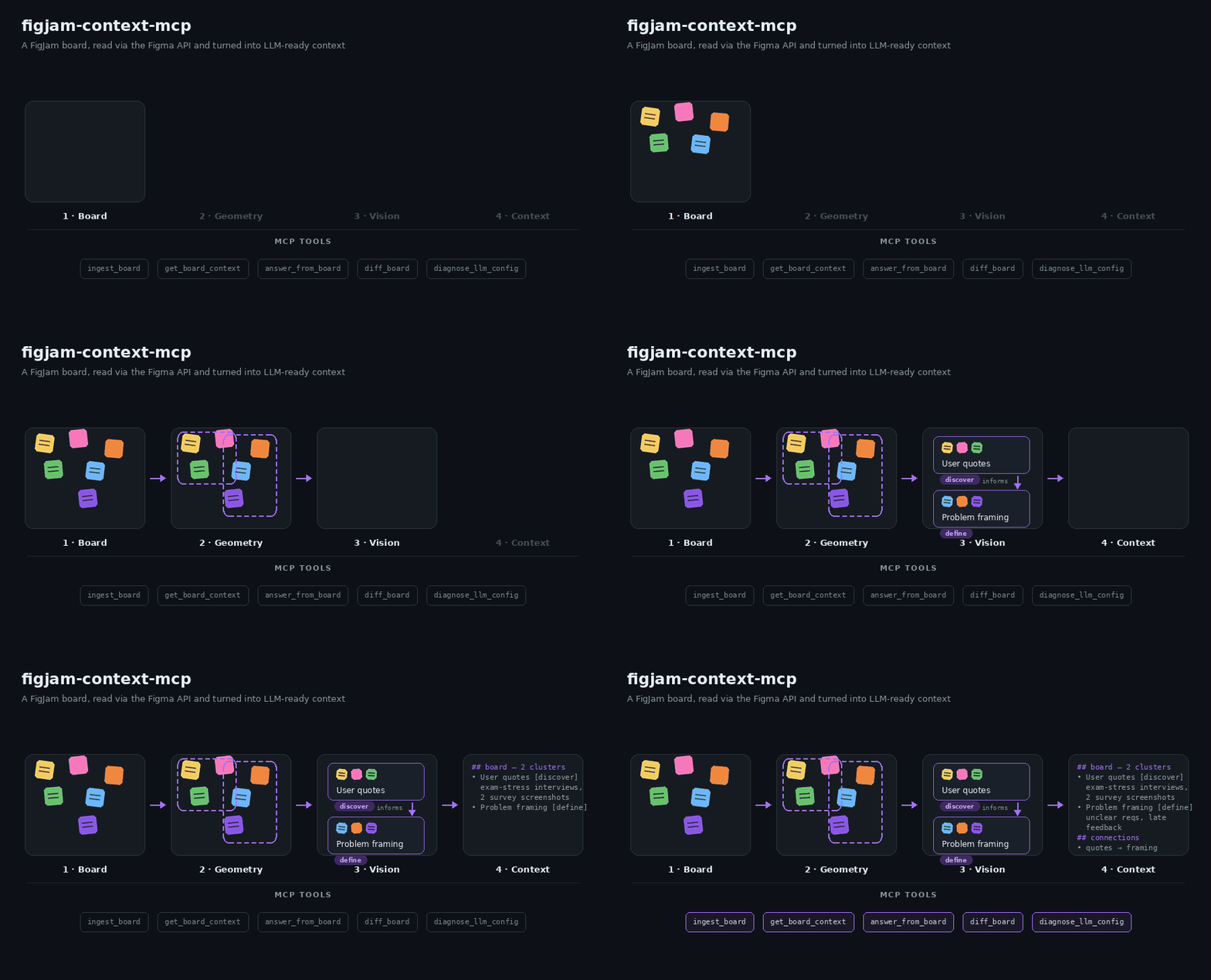
- Read.
ingest_boarddownloads the board through the Figma REST API on every call.get_board_contextandanswer_from_boardread the saved snapshot without a new request. - Normalize. Nodes become text, table cells, images and connectors, with their pages, sections and named enclosing frames and groups. Tables are read row by row: row and column come from the cell IDs, and each row becomes one excerpt.
- Cluster. Nearby nodes are grouped by rotation-aware distance. Arrows between groups become directed relations. Clusters without a model label are named after their section, and an arrow appears in the context once one of its ends, or a section, frame or group around one, is on the page.
- Interpret. In
balancedmode, clusters with an image, or drawings without any text, get a vision-model summary within a 40-second budget; text clusters, however short, keep their extracted text. A cluster starts only when the time left fits it; unfinished clusters continue on the next ingest. WithfocusNodeIds, the images of the given sections, frames or nodes come first. Inmax_quality, one ingest interprets only a few dozen clusters within the 40-second image budget (20–35 on a board with about 300 clusters, measured with 3 parallel requests); the next ingest continues, each costs a Tier 1 file download, andfocusNodeIdssets the order. - Serve. The snapshot is saved to a private local cache. Search gives more
weight to excerpts containing the question’s exact words.
get_board_contextsearches it (BM25 over original text, table rows and names, arrow labels and table headings),answer_from_boardanswers with citations anddiff_boardcompares snapshots. Topic and question searches match whole words ignoring case and accents (words of five or more letters also match some word forms and compounds), but not synonyms or translations. An empty search may suggest similar words from the board; these are not matches. Use the board's words and language; an empty search does not prove the board lacks the topic. Paging, overviews and thedetailsetting are described in Using the tools. Full-view excerpt text is quoted with>on every line, and model-generated cluster labels are marked as model labels. Textcontentis the readable page;structuredContentholds each excerpt once, inoverview.text(with emptyevidenceandclusters) or inevidencefor the full view. Full excerpts inheritsnapshotIdfrom the response; absentchunkIndexmeans 0 and absenttruncatedormodelDerivedmeans false, with no inheritance of these flags from a cluster. Named frames and groups appear inframeNameson clusters and on excerpts whose location differs; their names also participate in search.
Models and cost
The default preset student-free uses free OpenRouter models: text and images go
to openrouter/free, which picks a free model that supports structured outputs
(and images, for images). The free default is best effort: free models change, hit rate limits
and time out. A request to openrouter/free or openrouter/auto that fails with
a provider error is sent once more, since the router may pick another model. Images go to the model with at most 1,024 px on the longest side;
larger ones are scaled down locally.
- OpenRouter allows free models 20 requests per minute and 50 requests per day, or 1,000 per day once you have bought at least 10 credits (limits).
- Figma counts file downloads and image renders as Tier 1 requests. Dev and Full
seats on paid plans get 10–20 per minute. For View and Collab seats, the
Figma Help Center
lists up to 6 per month on paid plans and 20 on Starter. The
developer docs
list up to 20 on all plans, with lower limits possible. With a View or Collab
seat, plan for 6 ingests a month. Every ingest uses one file download, and
renders also count toward the Tier 1 limit. Image fills use one Tier 2 request
per ingest, with up to 5 requests per minute for View and Collab seats. The
server renders drawings without an image and images without a usable original;
renders of several clusters share requests of up to 18 nodes, so 30 image clusters
without image fills need 2 render requests.
max_speedneeds neither. LLM_BASE_URLtakes any OpenAI-compatible endpoint; for paid models, setLLM_TEXT_MODELS,LLM_FAST_TEXT_MODELSandLLM_VISION_MODELS, for example all three toopenai/gpt-4.1-mini(provider charges apply).- Run
diagnose_llm_configafter every model change. It checks JSON replies and image understanding with synthetic inputs.
Privacy
- The server reads from Figma and never changes a board.
- New ingests skip hidden elements and their descendants, including contents hidden inside a FigJam section, before extraction, image loading and provider requests.
- Re-ingest the board after updating, since earlier snapshots still contain and return hidden section contents, including when requested by
snapshotId, until they age out of history or you delete the cache. - URL passwords in userinfo are redacted alongside other explicit credentials.
balancedandmax_qualityingests send board text and images (originals or renders) to the configured LLM provider.answer_from_boardsends the question and selected excerpts.max_speedwithget_board_contextanddiff_boardsends nothing to an LLM provider.- Snapshots stay in a private per-user cache on your machine. Delete the cache directory to remove them.
- Explicit credentials such as
Passwort: …or API keys are redacted before they reach the cache, tool output or an LLM provider (FIGJAM_MCP_REDACT_CREDENTIALS). This is a safety net, not a guarantee: images are not redacted, so keep credentials off the board. - Keep tokens in the client's environment. A token passed as a tool argument can appear in client logs.
- Redaction targets credentials and leaves names and contact details on notes intact.
Limitations
- Figma's REST API omits link preview contents and sticky note authors.
- Image interpretation gets 40 seconds per ingest by default; large boards need several ingests to interpret every image cluster.
- A client that cancels an ingest, for example after a 60-second timeout, gets no partial result.
- Free models are best effort. Citations show where an answer comes from, not that its conclusion is right.
- Search is lexical; some word forms and compounds match, but synonyms and translations do not.
- Suffix matching can include unrelated words such as
transactionforactionorsuitablefortable, with exact matches ranked first. - Local stdio only; no hosted or multi-user mode.
Measured results: evaluation.
Development
git clone https://github.com/ecestnrkl/figjam-mcp.git
cd figjam-mcp
npm ci
cp .env.example .env    # optional: add tokens for local development
npm run check           # typecheck, tests, build, package validation
npm run package:smoke   # install the packed package and exercise all tools
npm run eval:retrieval  # offline retrieval and diff evaluation
npx --prefer-online @modelcontextprotocol/inspector --config inspector.config.json
npm run dev and inspector.config.json explicitly load the repository's .env
with Node's --env-file-if-exists=.env; existing environment values win. For other
launch commands, configure the MCP client's env or set FIGJAM_MCP_ENV_FILE to
the absolute path of the file.
See CONTRIBUTING.md and the changelog.
License
MIT © 2026 ecestnrkl







