Listed from the MCP registry; nobody on Odel publishes it.

Editmamei Desktop
Photoshop and GIMP MCP server for AI photo editing, layer by layer with real tools
Runs on your machine from its package; the steps are below.

What it does
- Reads
- Writes
- High impact
At most: creates or changes data: records, files, settings.
What it costs
FreeOdel charges nothing per call. The publisher may charge for its own service.
Runs locally over stdio
This server isn't hosted — your MCP client launches it from a package registry. Use one of the commands below, or drop the config into your client (e.g. Claude Desktop).
Run
npx -y editmamei
MCP client config
{
  "mcpServers": {
    "editmamei-desktop": {
      "command": "npx",
      "args": [
        "-y",
        "editmamei"
      ]
    }
  }
}

Editmamei
AI photo editing in Photoshop and GIMP.
Let AI do the parts of the edit you don't want to, and keep your favorite parts for yourself. It works in Photoshop or GIMP with real tools, layer by layer, so every step stays editable and the final touches are yours. A desktop MCP server for Claude, ChatGPT, Cursor and other MCP-compatible AI apps.
For photographers, retouchers and designers who want AI to speed up the workflow, not take it over.






Install · Website · Docs · Editmamei Connect · Report a bug
A real run: 73 travel photos graded in Photoshop from one sentence, with no generated pixels.
Independent project, not affiliated with or endorsed by Adobe Inc.
What you can ask
Talk to your assistant the way you'd brief a retoucher. These are three real requests, each in a fresh chat, with the result each one got.
|
"Replace the sky with one of Photoshop's sunset skies. Keep the waterfall, the cliffs and the spray exactly as they are, warm the foreground a little so the light matches the new sky, then check the horizon at full size for halos or leftover patches of the old sky and fix them before you call it done."
About 8 minutes | 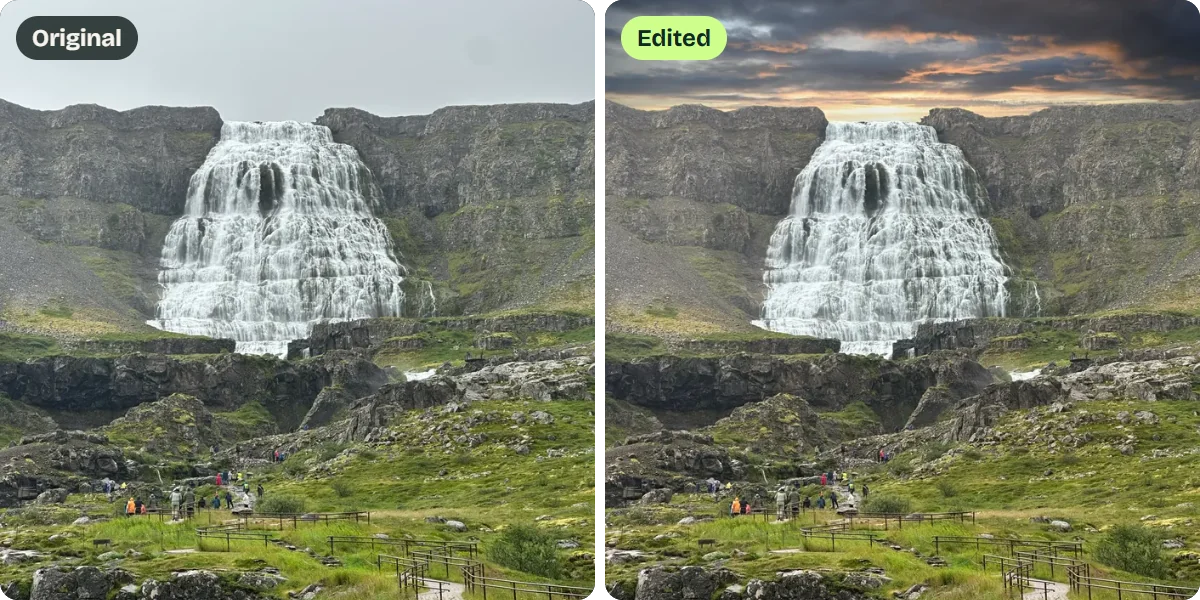 |
|
"Give this beach photo a bright, airy summer-afternoon look. Lift the shadows on the sand so it reads clean and white, deepen the blue in the sky while keeping the clouds bright, and let the umbrella's colors pop without looking fake."
About 6 minutes | 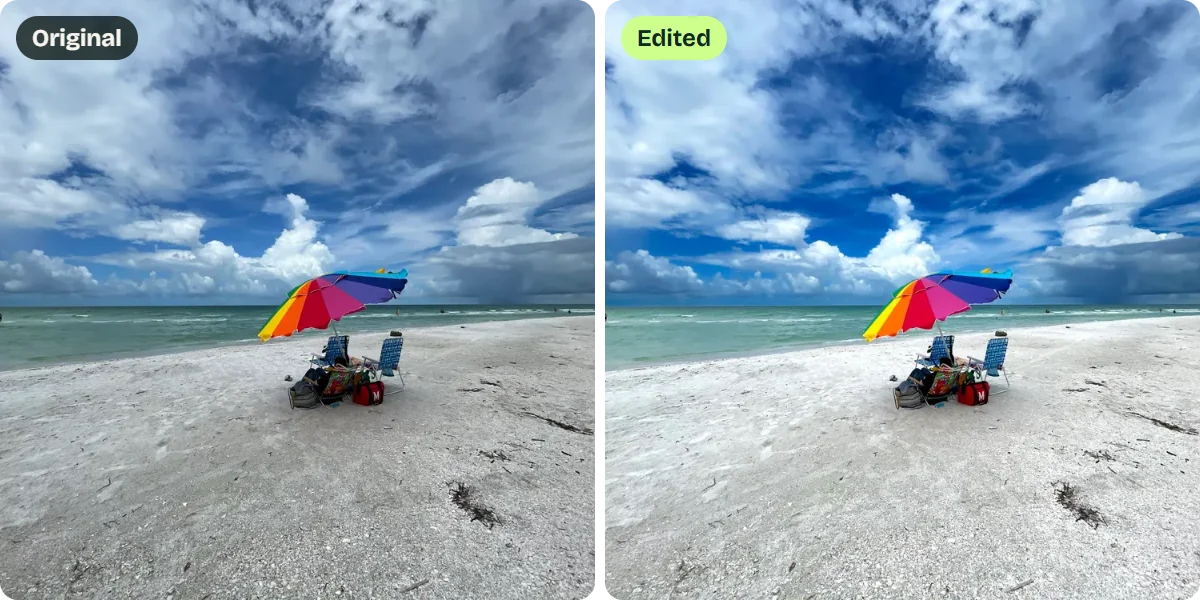 |
|
"Get this ready for three places: an Instagram post, an Instagram story with room at the top and bottom for text, and an 8x10 print for a frame. Keep the puppy's face and both ears in frame in all three."
About 4 minutes | 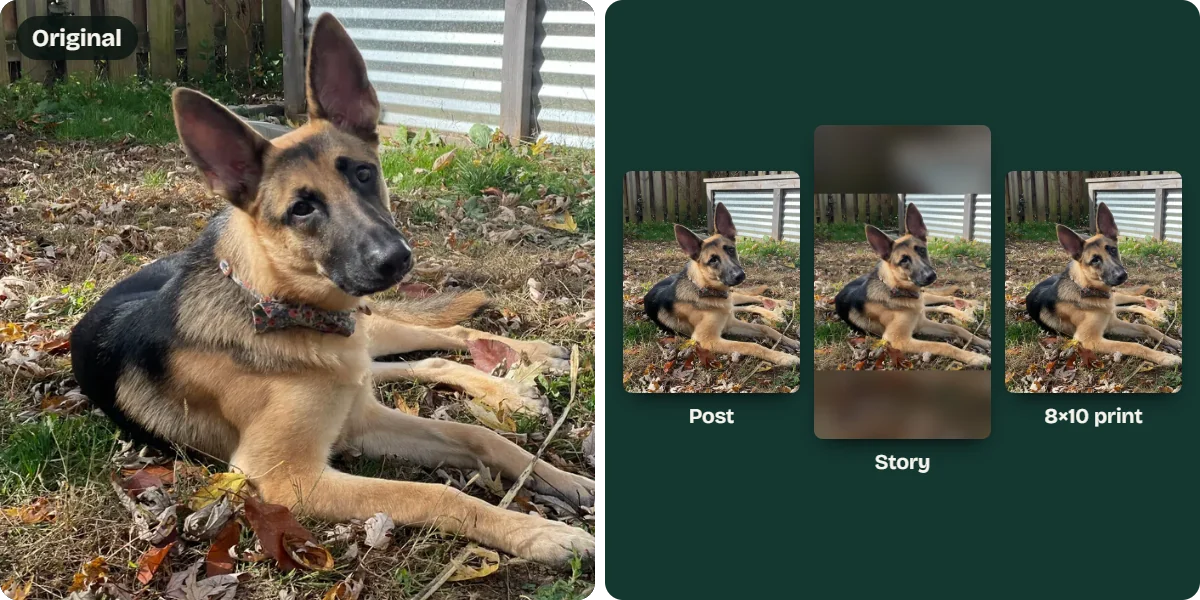 |
Smaller requests work too, like "Isolate the subject onto its own layer with a clean mask" or "Export a 2048px web JPEG."
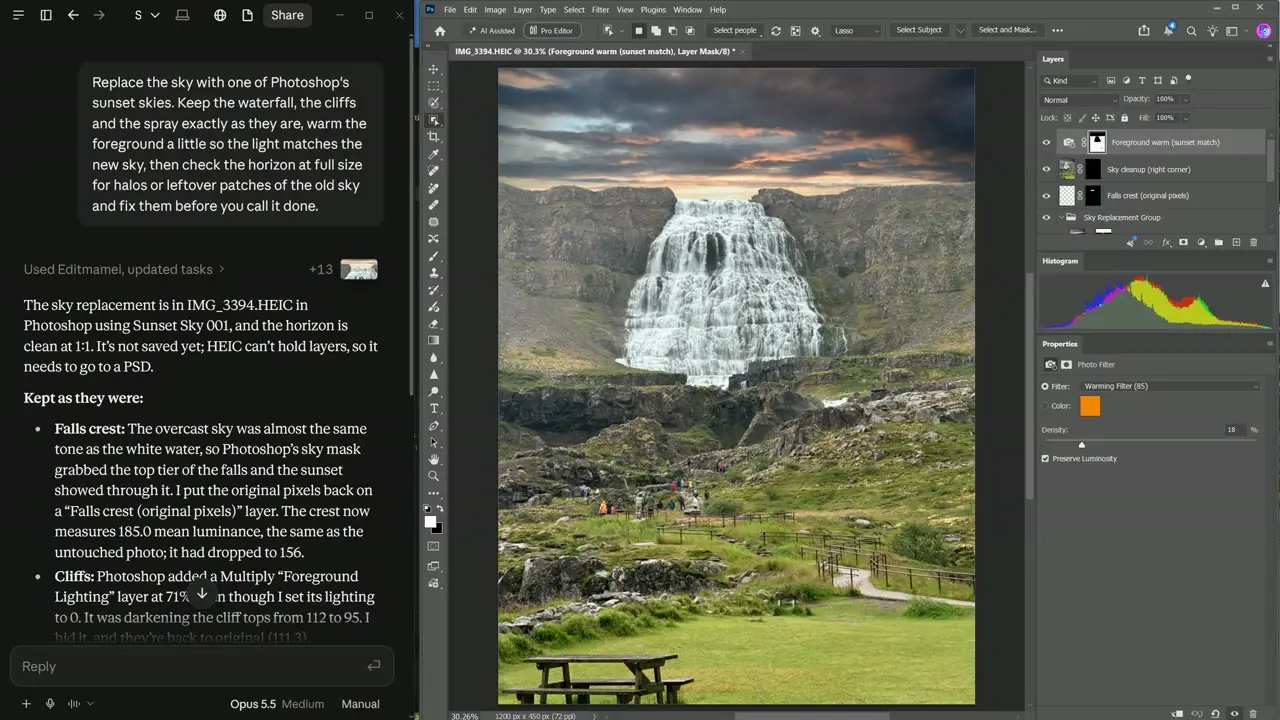
Here's the waterfall edit in its session. Your AI app runs beside your editor, and the result arrives on layers you can open and change yourself.
Install
Claude Desktop, no terminal
- Download
editmamei.mcpb. - In Claude Desktop, go to Settings → Desktop app → Manage (next to Extensions) → Advanced settings → Install Extension… and choose the downloaded file.
- Restart Claude Desktop, then ask it: "Is Photoshop connected?"
This route doesn't need Node.js, because Claude Desktop ships its own runtime. The install guide covers older versions of the app and updates.
Cursor and VS Code, one click


Each button opens the app, which asks before it adds Editmamei. Then ask it: "Is Photoshop connected?"
ChatGPT, Claude Code, Cursor and Codex, one command
npx -y editmamei install   # adds Editmamei to each of these apps it finds
npx -y editmamei status    # shows which AI apps it's registered with
Then restart your AI app and ask it: "Is Photoshop connected?" In the ChatGPT desktop app, Editmamei's tools are in Work mode. In Claude Code alone, claude mcp add --scope user editmamei -- npx -y editmamei does the same.
Other MCP apps
Add a server that runs npx -y editmamei. For one editor's tools only, run npx -y @editmamei/photoshop-mcp or npx -y @editmamei/gimp-mcp instead. docs/clients.md has the config for Windsurf, Gemini CLI, Zed and other apps.
The Editmamei skill, for AI apps that load skills, teaches the assess, plan, edit and check workflow:
npx skills add editmamei/editmamei
Requirements
| Editor | Adobe Photoshop 2026 or later on Windows 10/11 or macOS 13+ (earlier versions back to 2020 may also work), or GIMP 3.2 on Windows, macOS, or Linux |
| AI app | Any app that can run a local MCP server |
| Node.js | 22+, for every route except the Claude Desktop extension |
What to expect
A first edit takes a while. The three requests above took 4 to 8 minutes, because your AI looks, plans, and checks at every step. Editmamei ships no chat model of its own, so every edit spends your AI app's tokens, and we measured what an edit costs.
If it works for you, a ⭐ helps other photographers find it.
Editmamei Connect
Want to edit from a browser or your phone, or don't have Photoshop or GIMP on this computer? Editmamei Connect is the hosted version. Add it to Claude, ChatGPT, or another AI app as a connector, send a photo, and get it back edited. There's nothing to install, and it's free to start.
Connect is a separate product, and its source isn't in this repository. It edits on Editmamei's server instead of on your computer, so your photo is uploaded, and uploads are deleted after 24 hours.
How it works
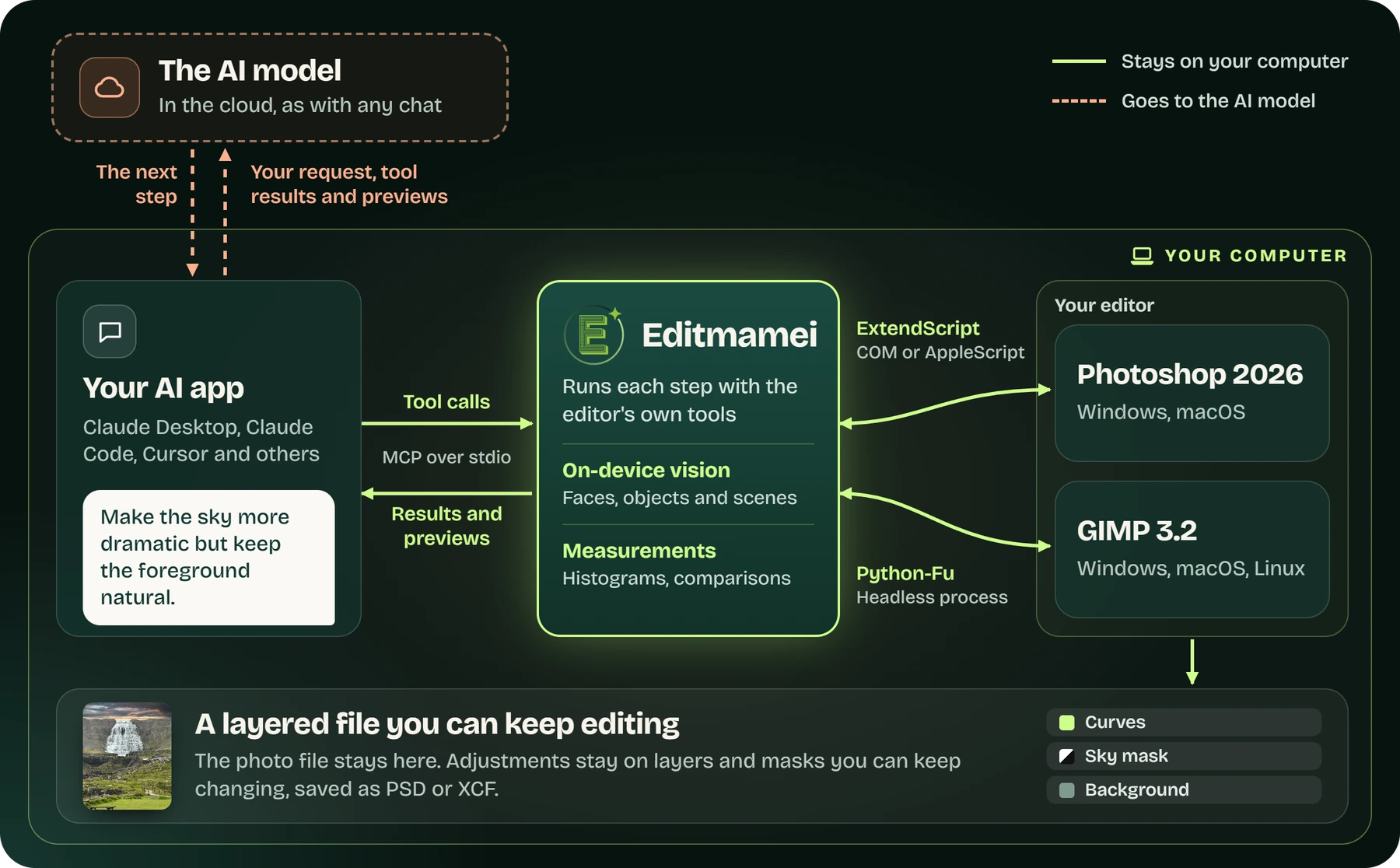
Your AI app decides each step and calls Editmamei's tools. Editmamei carries the step out in your editor and reports back with structured results and, when your AI needs to look, a preview. Your AI reads those and decides what to do next. Editmamei also sends content-free usage telemetry and checks npm for updates; see Privacy.
- Real edits. Photoshop or GIMP does the pixel work with its own engine. Editmamei generates nothing itself; when an edit uses an AI feature built into the editor, like Sky Replacement, that's the editor's own tool at work.
- Reversible. In Photoshop, adjustments land as adjustment layers and destructive pixel operations run on an automatic duplicate. In GIMP, adjustments stay live filters, and checkpoints stand in for undo.
- Checked, not assumed. Histograms, region comparisons, and selection previews let your AI measure its own work.
- On-device vision. In Photoshop, face, object, and scene detection run locally on bundled ONNX models, so your AI can target "the person on the left" without a cloud vision call.
- Only verified tools ship. A new tool stays out of the tool list until it has passed live sessions against real Photoshop or GIMP.
112 tools: 83 for Photoshop (62 Community, 21 Pro) and 29 for GIMP (all Community). The full list is in docs/tools.md.
GIMP
When GIMP 3.2 is detected on your machine, a gimp_* tool set registers next to the ps_* one, for when you ask for GIMP or Photoshop isn't available. Edits happen in a background gimp-console process with no visible window, and you follow along through previews in the conversation. GIMP doesn't yet cover heal/clone or AI subject and sky selection. Details and troubleshooting, including Linux, are in docs/gimp.md.
Free and Pro
| Community (free) | Pro | |
|---|---|---|
| Documents, layers, masks, type, filters, and retouching | ✓ | ✓ |
| Non-destructive adjustments | ✓ | ✓ |
| AI Select Subject and Select Sky | ✓ | ✓ |
| On-device perception | ✓ | ✓ |
| Previews, histograms, and comparisons | ✓ | ✓ |
| GIMP tools | ✓ | ✓ |
| Camera Raw as a re-editable filter, and raw files developed before they open | ✓ | |
| Folder batch | ✓ | |
| Reproducible templates | ✓ | |
| Warp, named-object masks, and precision placement | ✓ | |
| Subject-instance and face-mesh targeting | ✓ | |
| Photoshop Actions and the scripting escape hatch | ✓ |
Pro is a Photoshop-only upgrade and adds nothing to the GIMP tools. The split is detailed in pro-features.md, and pricing is at editmamei.com/desktop/pricing.
This repository holds the Community source. Pro is a separately licensed module and its source is not published here. Community never imports it, so this tree builds and runs on its own.
Privacy
Editmamei runs on your computer and edits in your desktop editor. No image content or file paths are sent to Editmamei's servers.
| What | Where it goes | Setting |
|---|---|---|
| Your photo file | Stays on your computer, apart from the previews below and any Adobe cloud selection | |
| Previews, 1024px on the long edge by default (your AI can ask for up to 8192px) | Your AI app's model provider, the same as dropping a photo into a chat | privacy.send_previews_to_llm (on) |
| Tool results, such as file paths, layer names, measurements, and metadata like GPS if your AI asks for it | Your AI app's model provider | |
| Content-free usage telemetry, with a random install ID | Editmamei | telemetry.usage (on) |
| Names of editing features and tool options used, from fixed lists (tool schemas and a published list), with no install ID | Editmamei | telemetry.features (on for new installs; off for an earlier install until it answers) |
| Sanitized error details | Editmamei, only if you opt in | telemetry.diagnostics (off) |
| Update check, with no identifiers | The npm registry | update_check (on) |
Change these with editmamei config set <setting> false (or true). The Claude Desktop extension has its own switches for telemetry, feature names, diagnostics, and the update check. Pro also sends your license key and a per-device activation ID to a third-party licensing service, and to Editmamei's delivery service to check for module updates, plus a hashed device ID at activation. These have no setting. Photoshop's own Select Subject and Select Sky can use Adobe's cloud, depending on Photoshop's Image Processing preference.
Every field is documented in privacy.md, including your rights, and the legal basis. npm releases are published from this repository with signed provenance, so you can check the package against this source.
For developers
Editmamei is a stdio MCP server. In any MCP client, add a server that runs npx -y editmamei. @editmamei/photoshop-mcp and @editmamei/gimp-mcp are launchers that set EDITMAMEI_EDITOR and depend on the same release; their source is in wrappers/. The MCP reference covers client config, architecture, the MCP surface, settings and environment variables, and each network request the server makes.
The discovery chain is ps_ping (liveness), then ps_overview (the working method and capability map), then tools/list (the full schema-typed inventory). Every tool declares an outputSchema and returns typed JSON.
Build from source
git clone https://github.com/editmamei/editmamei.git
cd editmamei
npm install
npm run build
npm test
You need Node.js 22+ and Go 1.21+. The build compiles the editmamei-core binary that generates Photoshop scripts; it needs Go 1.27, which Go fetches for you from 1.21 on. The build warns instead of failing when Go is missing, so you can still run the test suite. Set EDITMAMEI_CORE_BIN to a prebuilt binary if you would rather not install Go.
The test suite runs without Photoshop. It verifies the ExtendScript Editmamei generates, never that Photoshop accepted it, so live verification against a real Photoshop is a separate step.
Contributions are welcome. CONTRIBUTING.md covers the CLA, the branch and pull-request flow, and what to include in a bug report.
Documentation
| Guide | What's in it |
|---|---|
| Installation | Every install route, updates, and Photoshop detection |
| Getting started | Your first session and how to get good results |
| AI apps | Setup for each client, and known limits |
| Tools | Every tool, by group and edition |
| GIMP | Requirements, coverage, and troubleshooting |
| Pro features | What Pro adds, and how to activate it |
| MCP reference | Architecture, settings, and network requests |
| FAQ | Common questions |
| Troubleshooting | Fixes for common problems |
| Roadmap | What's planned |
Found a bug or want a feature? Use the issue tracker. If something's broken, ask your assistant to "report a problem" (or run editmamei report) to drop an anonymized diagnostic bundle in your Downloads folder, then attach it to the issue. For security issues, see SECURITY.md and don't file them publicly.
License
Editmamei CE is Fair Source software under the Functional Source License, v1.1, MIT Future License (FSL-1.1-MIT).
You can read, run, modify, and redistribute the code for almost anything: commercial photo editing, internal tools, education, research, security review. The one thing the license holds back, for two years per release, is offering the code to others in a commercial product or service that competes with Editmamei CE or Pro. If you redistribute the code, keep the license and copyright notices with it. Two years after each version ships, that version automatically becomes available under plain MIT.
This section is a plain-English summary. The LICENSE file is the license; where they differ, the LICENSE file controls. Editmamei is not open source under the OSI definition, and we don't call it that. It is source-available, with the full CE stack developed in the open.
Editmamei Pro is a separate, commercially licensed module; its source is not published. Third-party dependencies keep their own licenses, listed in NOTICES.md.