Listed from the MCP registry; nobody on Odel publishes it.
DB Mastermind
Explore and query PostgreSQL, SQL Server, Oracle, MySQL, SQLite and more. Read-only by default.
Runs on your machine from its package; the steps are below.
What it does
- Reads
- Writes
- High impact
At most: only reads or looks up information.
What it costs
FreeOdel charges nothing per call. The publisher may charge for its own service.
Runs locally over stdio
This server isn't hosted — your MCP client launches it from a package registry. Use one of the commands below, or drop the config into your client (e.g. Claude Desktop).
Run
npx -y dbmastermind-mcp
MCP client config
{
  "mcpServers": {
    "db-mastermind": {
      "command": "npx",
      "args": [
        "-y",
        "dbmastermind-mcp"
      ]
    }
  }
}
DB Mastermind
Understand your data.
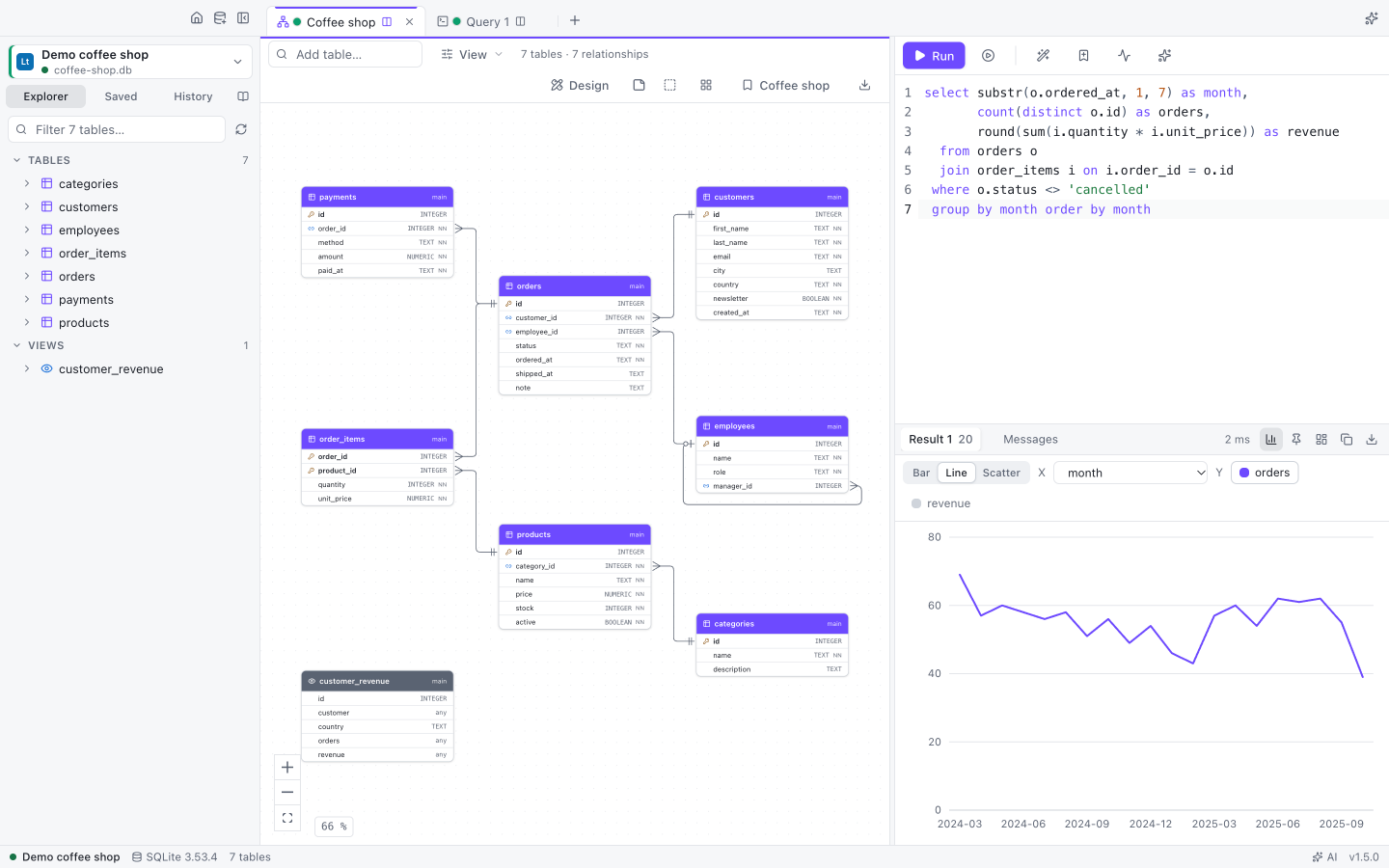
DB Mastermind is a free, open-source database client and data modeler for Windows, macOS and Linux. Design the database, query it, see it in charts: browse and filter data without limits, write SQL with an editor that knows your schema, model a new database or redesign the one you have with migrations that check your data first, and let an AI assistant or your coding agent read it safely over MCP.
Website · Microsoft Store · Download · Roadmap · Report an issue
PostgreSQL · SQL Server · Oracle · MySQL · MariaDB · SQLite · DuckDB · ClickHouse · CockroachDB · BigQuery · Trino — Windows · macOS · Linux — English & čeština — MIT, no feature limits
Works with hosted databases too: Supabase · Neon · Timescale · Amazon RDS and Aurora · Azure Database and Azure SQL · Google Cloud SQL
Highlights
A great everyday client
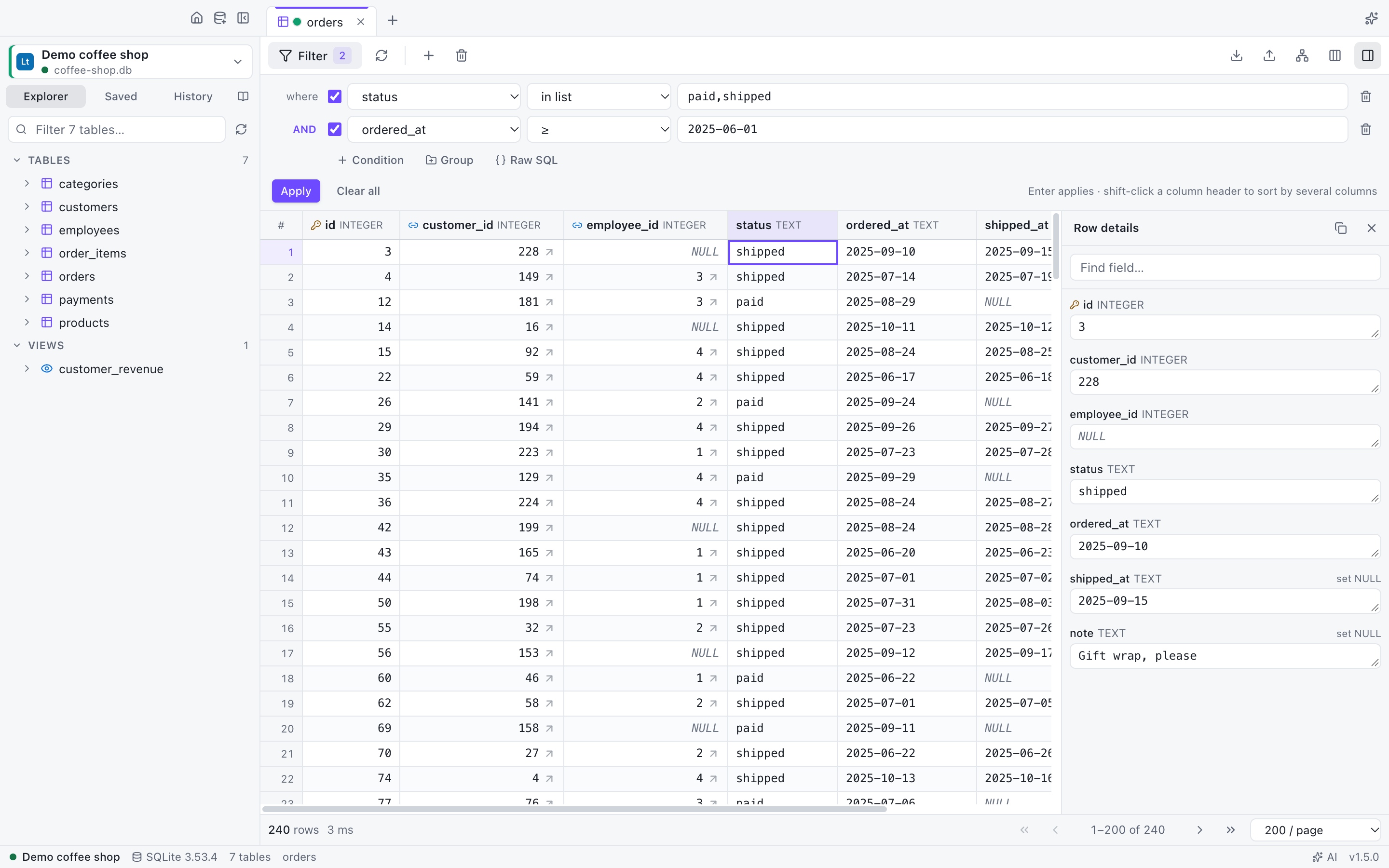
- Virtualized data grid: millions of rows, inline editing with a reviewed change set, copy as TSV / CSV / JSON / Markdown / SQL, row details panel
- Advanced filters: nested AND/OR groups, 25+ operators (contains, in list, between, regex, last N days,
this month…), raw
WHERE, quick filters from any cell - Foreign keys everywhere: click an arrow in a cell to open the referenced row, or jump to rows that reference this one
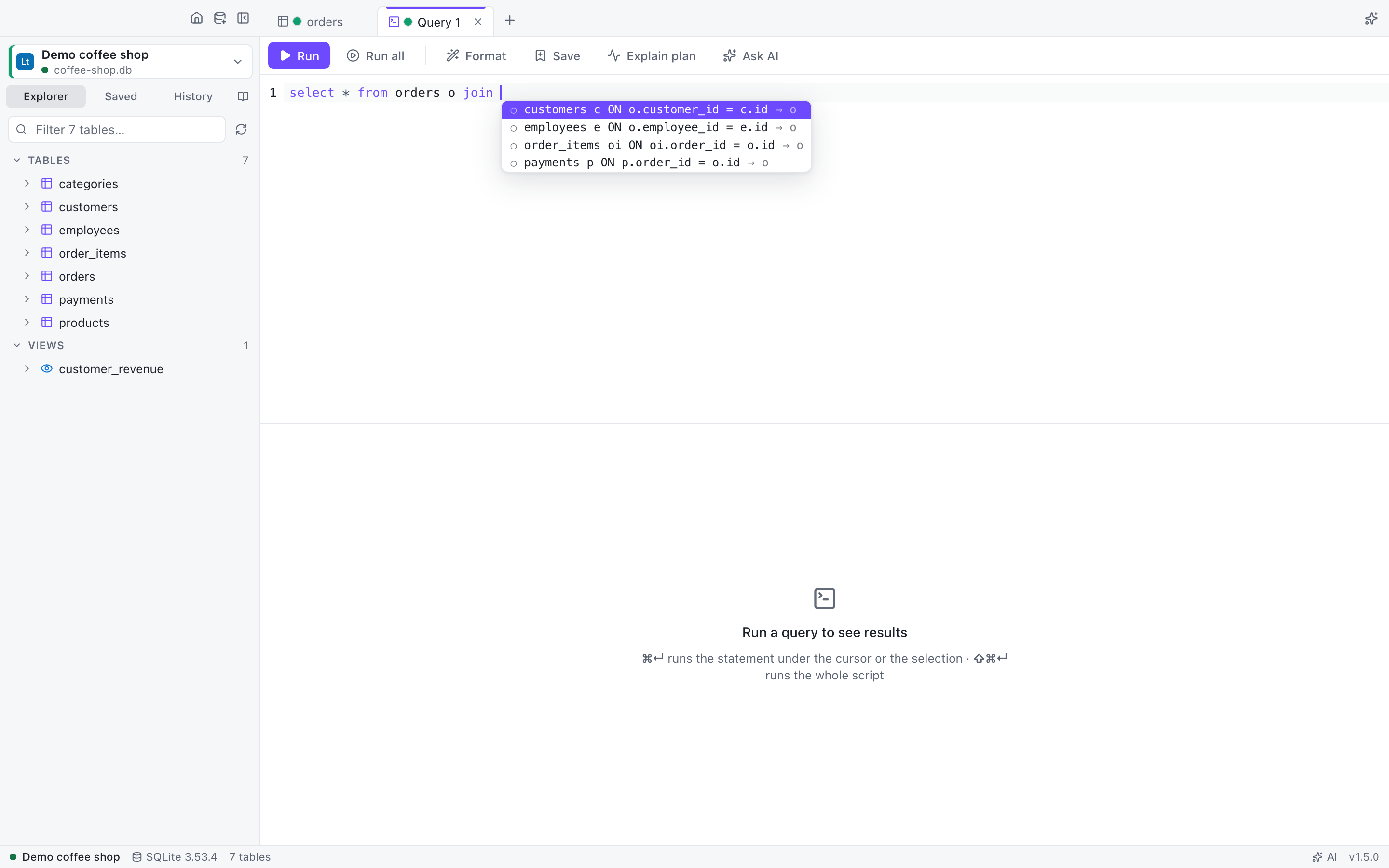
- SQL editor with schema-aware autocomplete (after
JOINit suggests related tables with the wholeONclause), query parameters, execution plans, multiple result sets, cancel, format, history and saved queries - Export a page, the whole (filtered) table or every row of a query to CSV, Excel, JSON, SQL or Markdown, streamed with no row limit
- Command palette (
Ctrl/⌘ K), quick table open (Ctrl/⌘ P), light, dark and high-contrast themes (follow the system or pick one in Settings), English and Czech UI - Enterprise-ready connections: SSH tunnels, SSL, read-only and production safety rails, SQL Server Windows authentication (no password, your domain account), Oracle without Instant Client
- Connections from your project: drop a
.env, a docker-compose file or a project folder on the window and the databases it names become connections (passwords saved encrypted); paste a Supabase, Neon, RDS, Azure or Cloud SQL connection string and the app recognises the service
- Charts from any result: bar, line or scatter in one click, and dashboards of pinned results that refresh themselves
- Paste from Excel into a table, hide/reorder/pin columns, audit log of every statement (with CSV export)
- Value editor (
Shift+Enteron a cell): JSON format/minify/validation, long text, binary as hex with image preview - Import CSV / Excel into a table with column mapping (Windows-1250 exports from Czech Excel included)
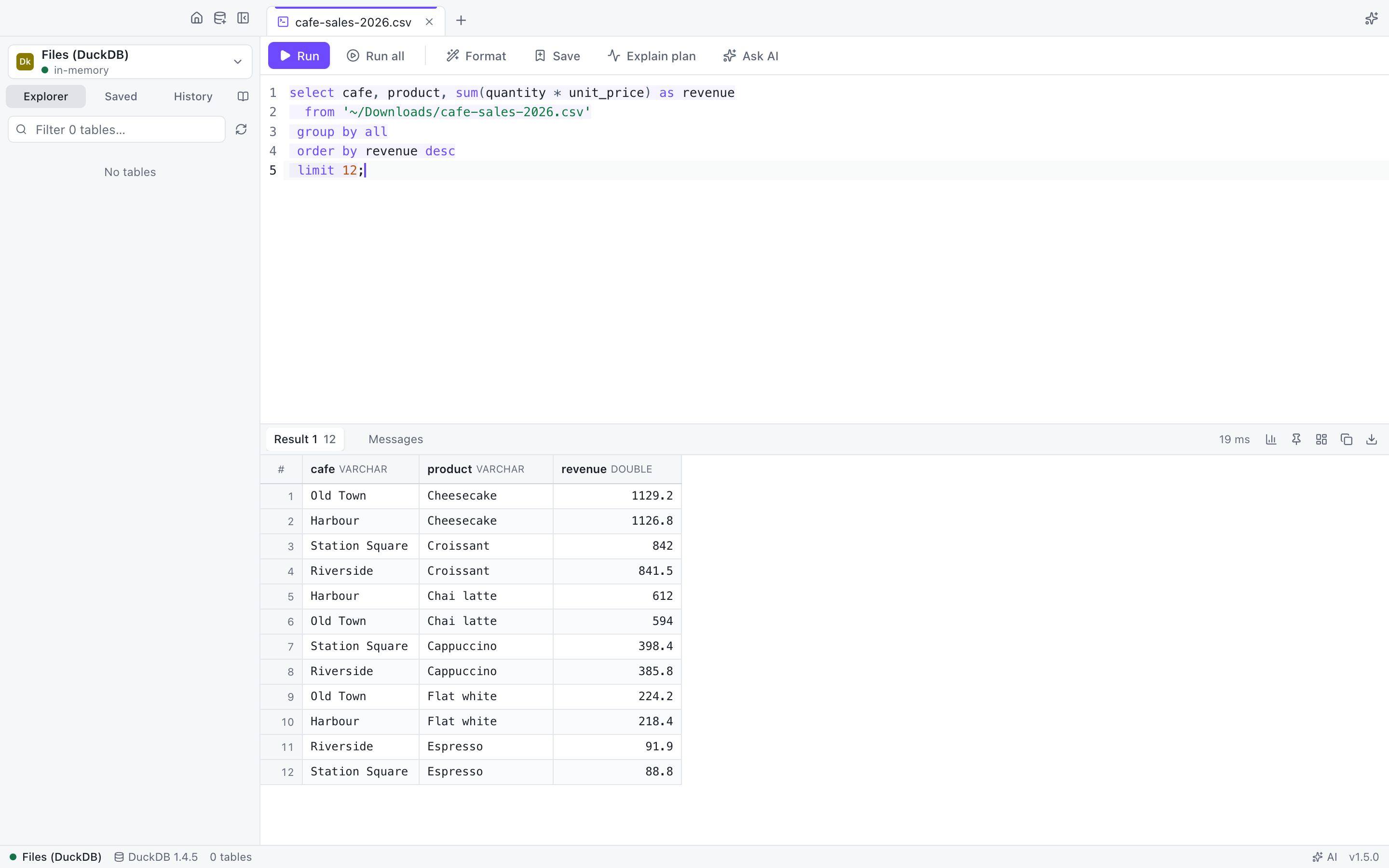
- Query a file with SQL: drop a CSV, Parquet, JSON or Excel file on the window and query it right away
(built-in DuckDB, nothing to install;
;-separated files with decimal commas just work)
- Server activity: running queries, lock waits (who blocks whom), cancel a query or end a session
- Snippets (
sel,dup,orph,tx… or your own) and sharing connections with colleagues (no passwords) - Pin favourite tables, hide schemas you don't use
Understand and redesign the model
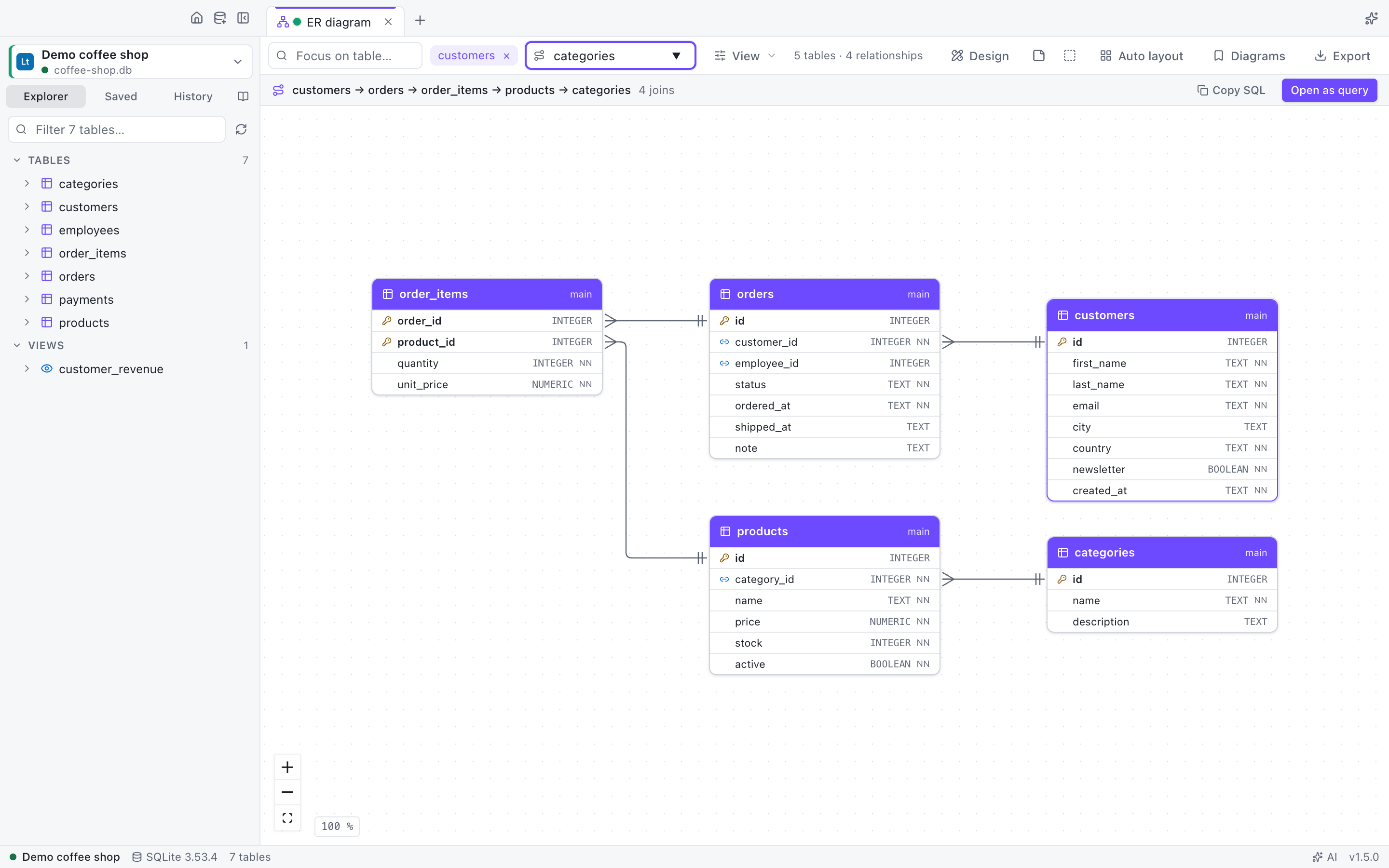
- Interactive ER diagrams with automatic layout, crow's-foot notation, focus on a table and its neighbours, export to PNG / SVG / Mermaid / PlantUML / DBML
- Join path: pick two tables and see how they connect, then open it as a ready
SELECT … JOIN - Saved diagrams: named subject areas ("Sales", "Billing") with their own tables and layout
- Data compare between two tables or environments, with the sync script
- Schema compare between two connections or schemas (dev → prod) with the migration for the target
- Data dictionary: one self-contained HTML page (or Markdown) documenting every table, with your notes
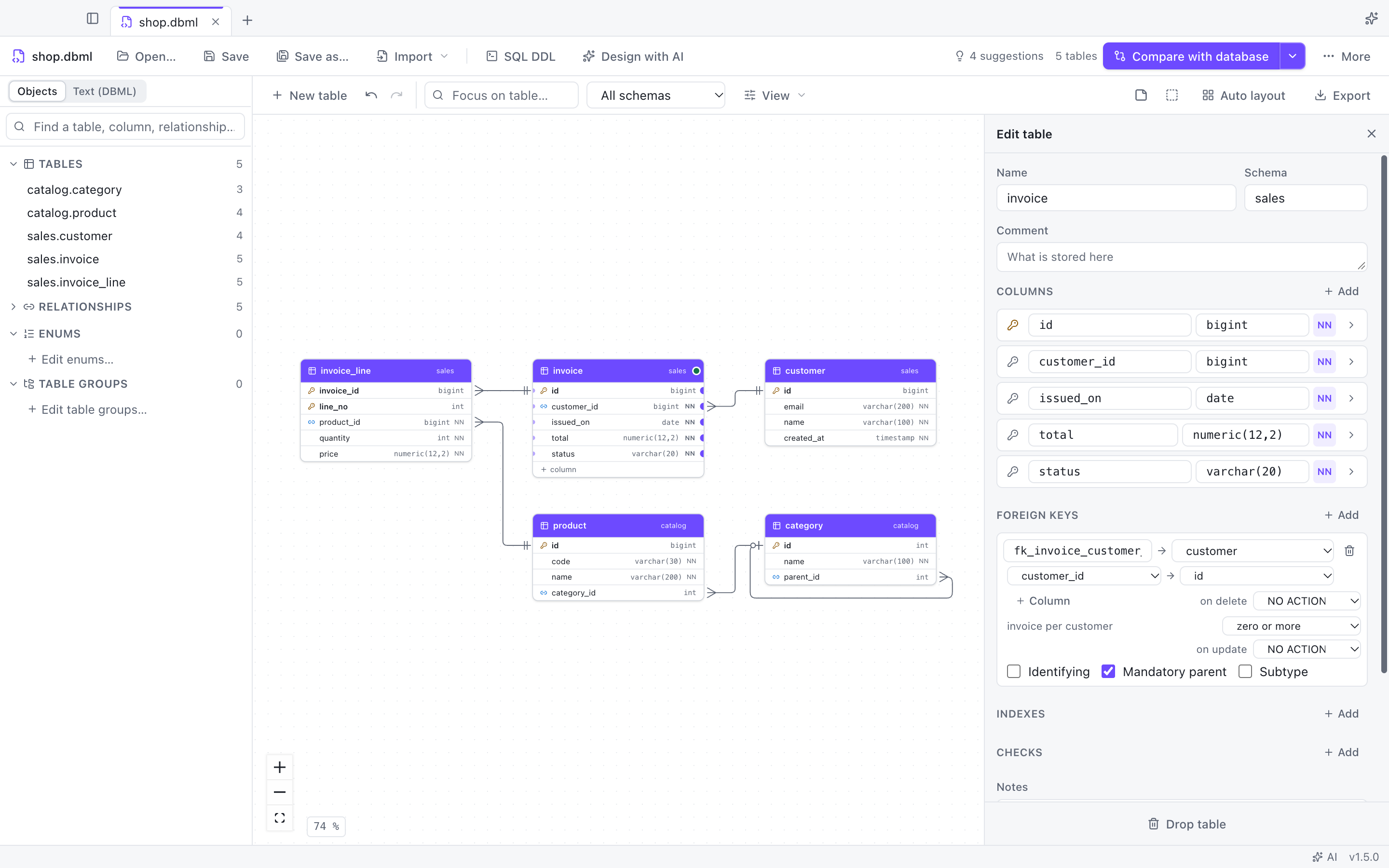
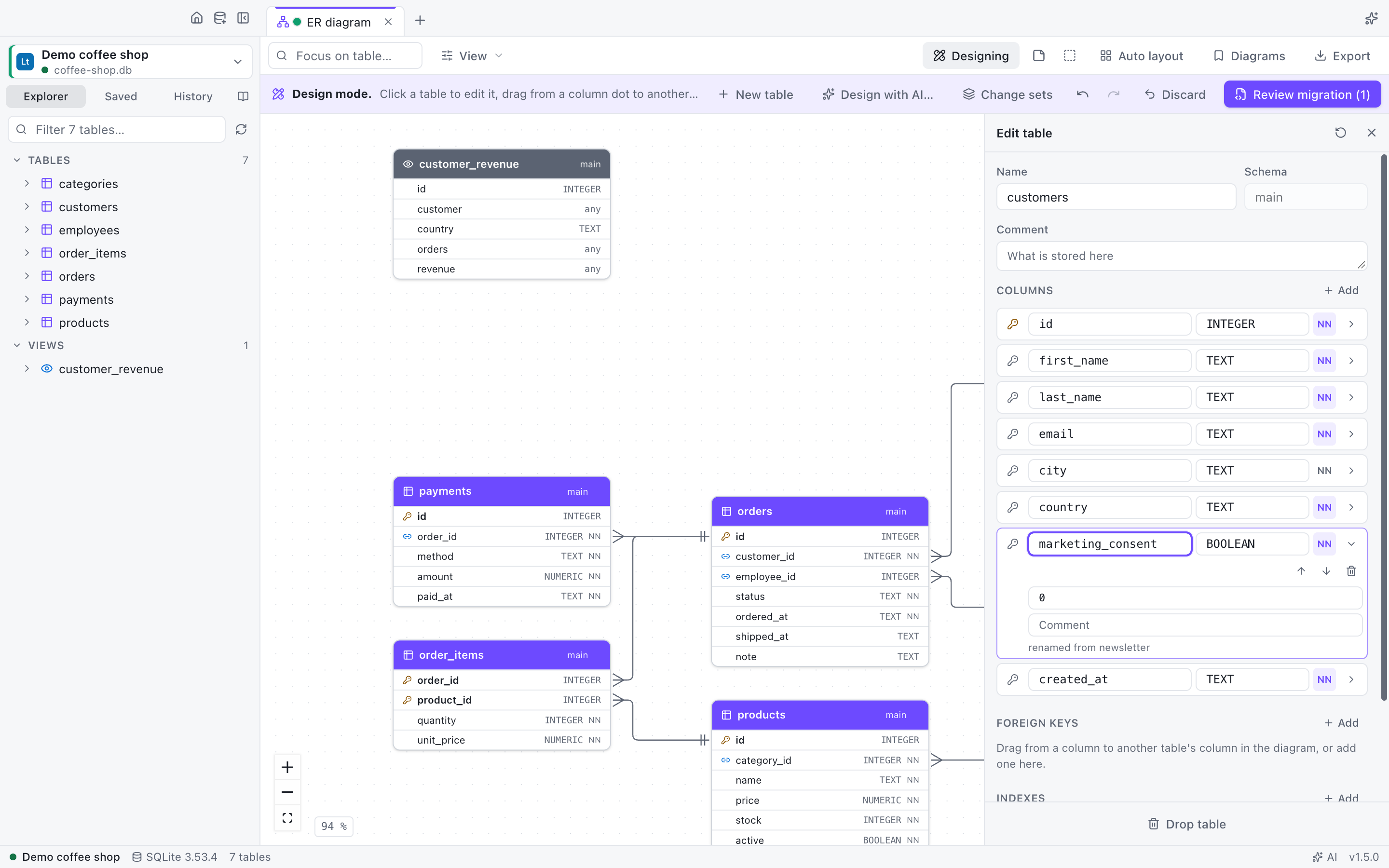
- Data modeling without a database: start a model from the home page and draw it on the canvas: rename a table or a column and change a type right where it is, add columns and relationships by dragging, everything else in one detail panel (docked in a wide window, sliding in on a laptop). Changes are kept as you make them, with undo. The model is a plain DBML text file (reads well in Git); generate DDL for any supported database (types translated) or compare it with a database for the migration
- Models from other tools: open an SQL script, a Prisma schema, a Mermaid
erDiagram, a drawDB file or a MySQL Workbench.mwbas a model (the file itself is never changed) - Code from a model or a live database: a Prisma schema, a Drizzle schema, SQLAlchemy models or TypeScript types,
from the diagram's Export menu or
dbm export - Works with DeZign for Databases projects (more;
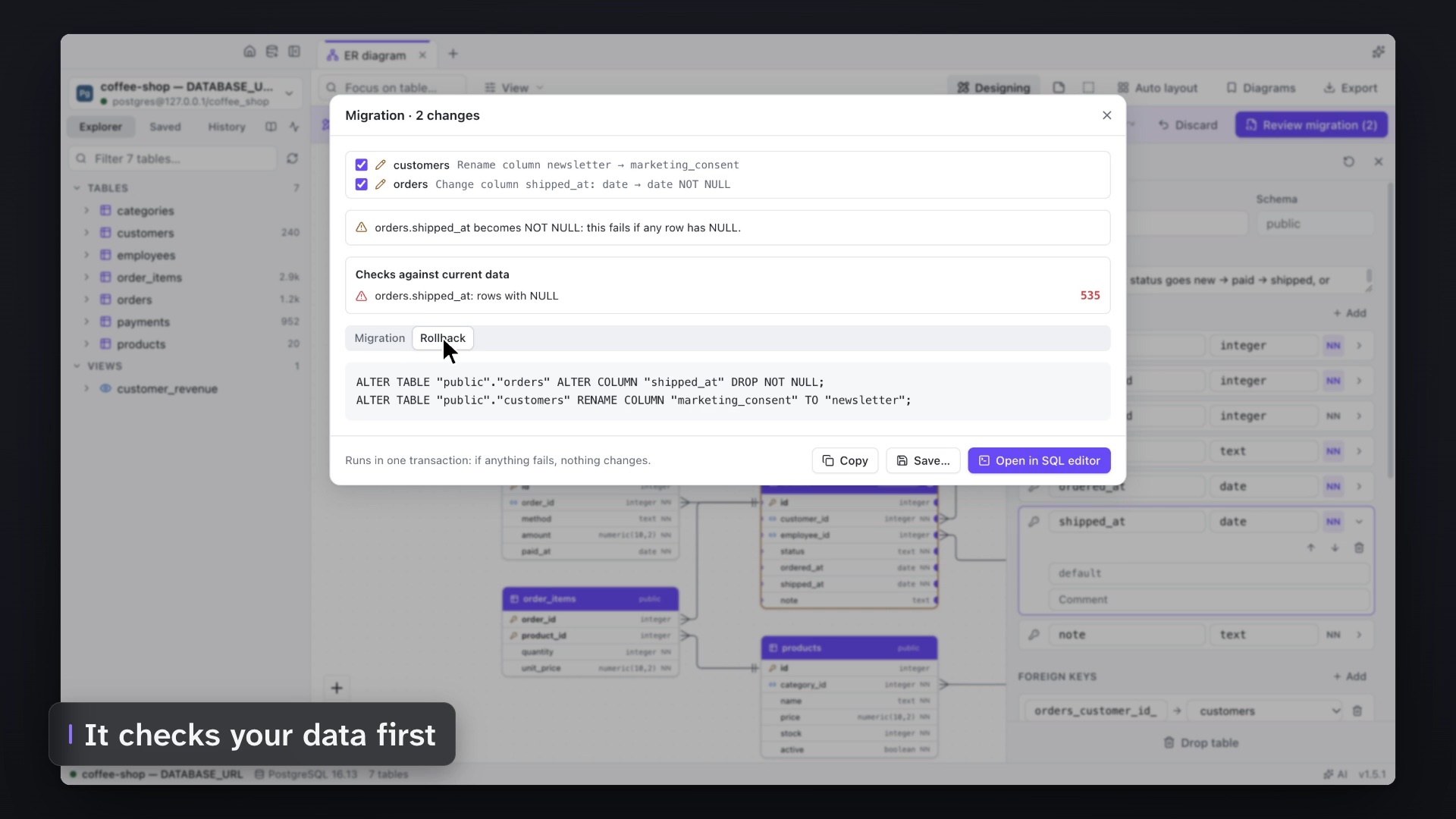
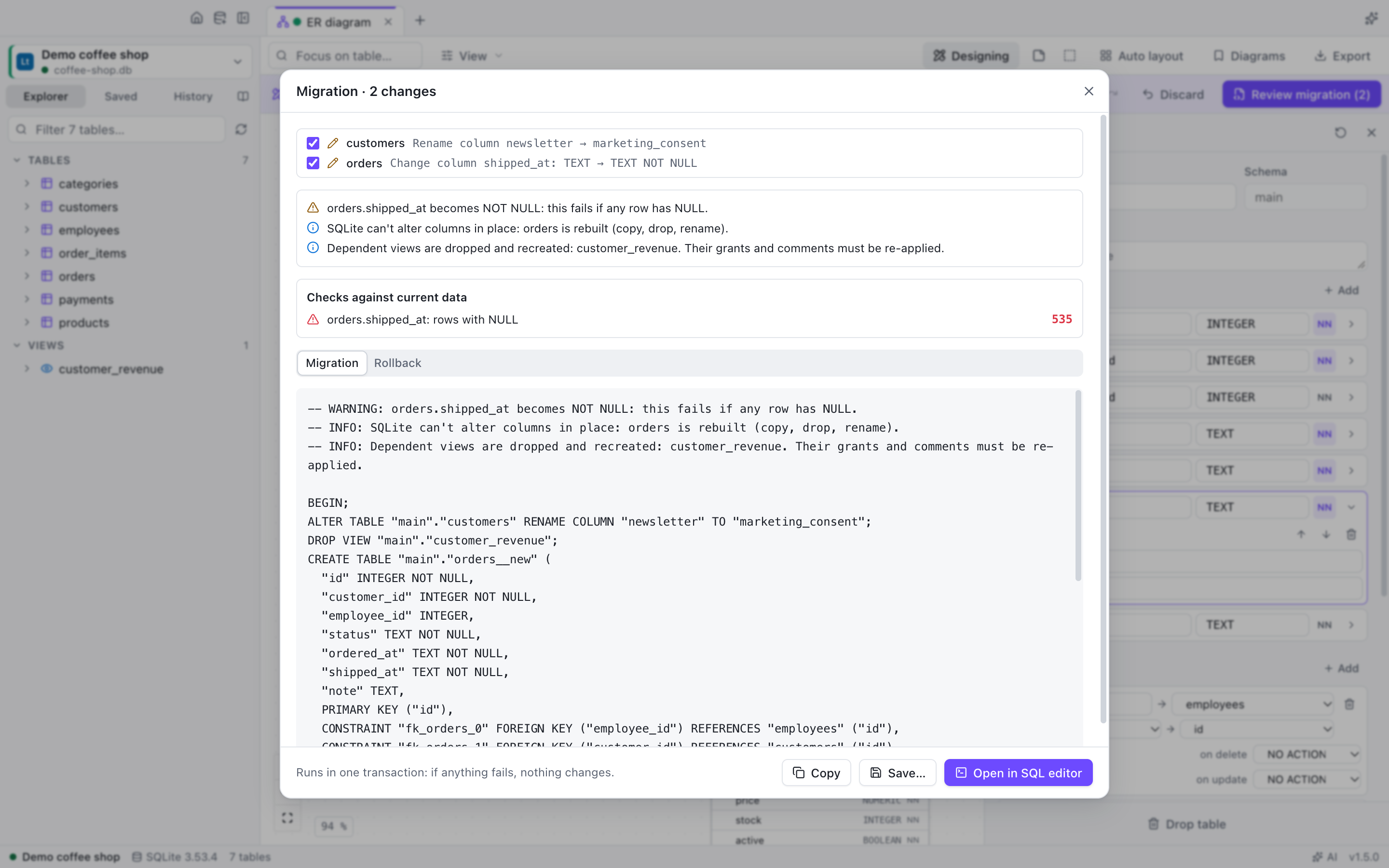
.dezand.dezprojfolder projects, DeZign 4 to 14): open them with their diagrams, edit and save back into the project, or save a model made here as a new DeZign project. Domains, attribute packages, subtypes, labels, custom properties, to-dos, triggers, procedures, sequences, archived versions, reports and switching the target database are kept (changes are listed first, a backup is kept; checked in DeZign 14.9.3, which opens the saved files and saves them again with nothing lost) - Schema designer on the live database: edit tables, columns, keys and indexes right on the diagram. DB Mastermind generates the migration for your database (including SQLite table rebuilds and dependent views), checks the existing data first (NULLs, duplicates, orphans) and writes a rollback script
AI that knows your database
- Bring your own model: Anthropic, OpenAI, OpenRouter, Gemini, Azure OpenAI, Ollama / LM Studio (local)
- …or use your existing Claude Code or Codex subscription, with nothing extra to pay
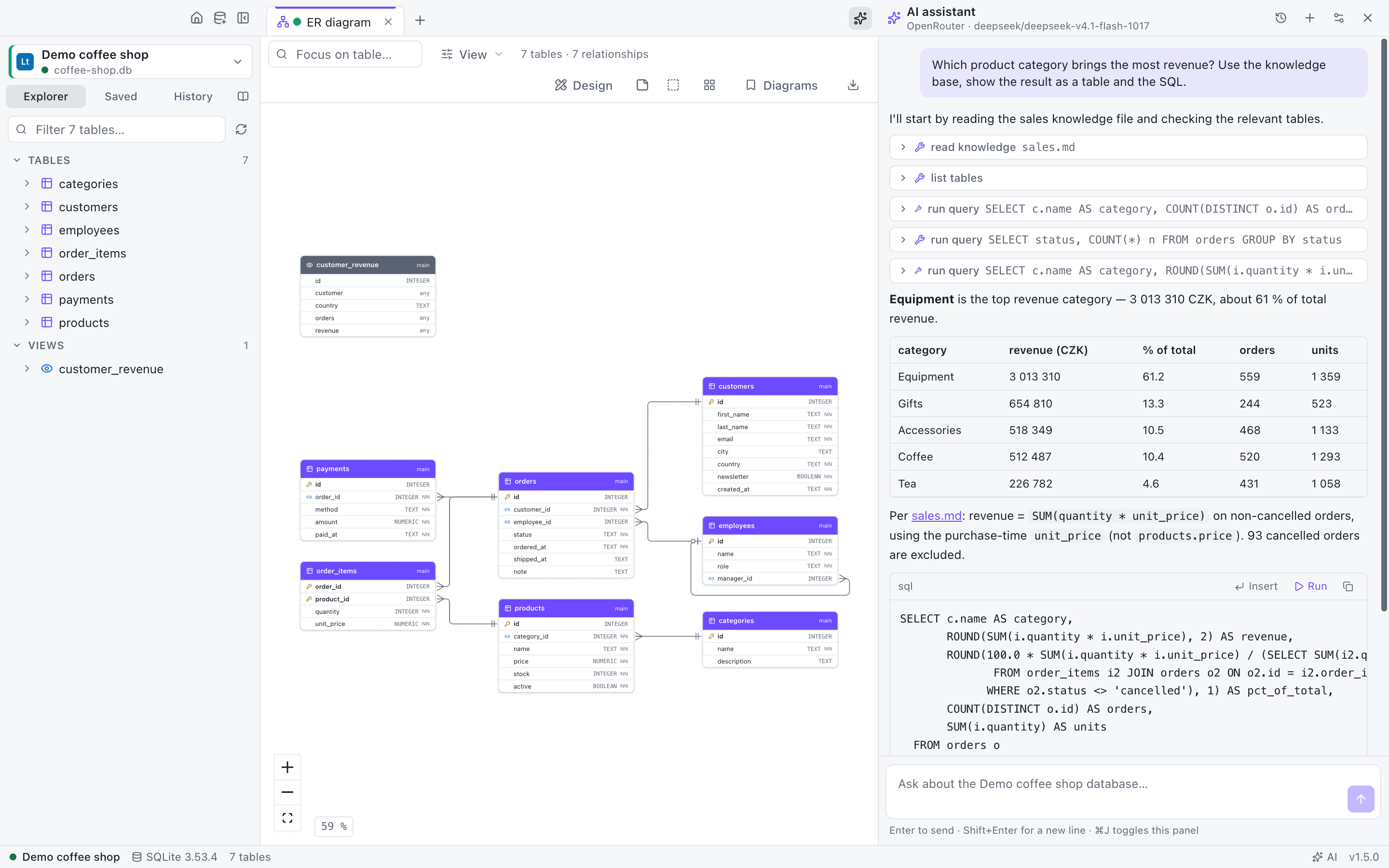
- The assistant explores the schema, runs read-only queries, and asks before any write
- Explain with AI on any table, and filters in plain language ("paid orders over 1000 this month")
- Ctrl/⌘ I in the editor: describe a query (or how to change the selection) and the SQL appears in place; Fix with AI on a failed statement
- Knowledge base: a folder of Markdown notes per database (business meaning, codes, joins, gotchas).
The AI reads it, and can write the first version for you. Relationships documented there
(
relations: ["orders.customer_code -> customers.code"]) show up in diagrams and FK navigation
Install
Windows: get it from the Microsoft Store — signed by Microsoft (no SmartScreen warning), updates through the Store.
Or download from Releases:
| Platform | File |
|---|---|
| Windows, no installation (no admin rights, settings stay in the folder) | DB-Mastermind-<version>-win-x64-portable.zip → unzip → run DB Mastermind.exe |
| Windows installer (per user, no admin) | DB-Mastermind-<version>-win-x64-setup.exe |
| macOS Apple Silicon / Intel | DB-Mastermind-<version>-mac-arm64.dmg / -mac-x64.dmg |
| Linux | DB-Mastermind-linux-x86_64.AppImage or DB-Mastermind-<version>-linux-amd64.deb |
The downloads aren't signed with a certificate Windows trusts or notarized by Apple yet (the Store version is
signed by Microsoft).
macOS: the first time, macOS blocks the app; open System Settings → Privacy & Security and click Open Anyway
(then Open once more), or run
xattr -dr com.apple.quarantine "/Applications/DB Mastermind.app". Windows: if SmartScreen warns, choose
More info → Run anyway.
Linux: the .deb runs inside Chromium's sandbox (its install script adds an AppArmor profile that allows it on
Ubuntu 23.10 and later); on a system that doesn't let users create user namespaces at all, its menu entry starts the
app without the sandbox and the installation says so. The AppImage uses the sandbox where the system lets applications create user namespaces;
where it doesn't (Ubuntu 23.10 and later by default) it starts without it and says so in the terminal, so prefer the
.deb there. On Ubuntu 24.04 the AppImage needs FUSE 2: sudo apt install libfuse2t64.
With Scoop on Windows (portable, updates with scoop update, keeps your data):
scoop install https://github.com/eLh0m3r0/db-mastermind/releases/latest/download/db-mastermind.json
With Homebrew on macOS (updates with brew upgrade):
brew tap elh0m3r0/db-mastermind https://github.com/eLh0m3r0/db-mastermind
brew install --cask db-mastermind
New to the app? Click Try the demo database on the start screen.
For teams and IT
Czech quick guide for colleagues: docs/navod.md.
Team AI tools: SQL files in the knowledge base (tools/*.sql) become tools the AI assistant and MCP agents
can call: read-only, with bound parameters. See docs/ai-tools.md.
Deploy with Intune, SCCM or Group Policy using the per-machine DB-Mastermind-<version>-win-x64.msi
(msiexec /i DB-Mastermind-….msi /qn).
Drop a dbmastermind-managed.json next to the portable app (or in %ProgramData%\DB Mastermind\) to give everyone
the same connections (without passwords), the company's AI endpoint and rules such as "AI off", "only Azure OpenAI"
or "MCP read-only". See docs/managed-config.md.
A team folder (network drive, OneDrive, Git) shares connections, saved queries as .sql files and knowledge
bases, kept in sync while the app runs. See docs/team-folder.md.
Use it from Claude Code, Codex, Cursor, VS Code… (MCP)
DB Mastermind can run as an MCP server, so coding agents can explore your databases safely: read-only by default,
and only connections where you allow AI. Open Settings → MCP server and click Add to Claude Code / Claude Desktop /
Codex / Cursor / VS Code: the app writes their config for you (keeping a .bak copy). Or add it by hand; setup for
Claude Code, Codex, Claude Desktop, Cursor, VS Code / Copilot, Windsurf, Gemini CLI, Zed and JetBrains IDEs is on
dbmastermind.app/#mcp. Claude Code, for example:
claude mcp add --scope user dbmastermind -- "/Applications/DB Mastermind.app/Contents/MacOS/DB Mastermind" --mcp
While the app is running you can also turn on Settings → MCP server → Local HTTP endpoint and connect over HTTP (localhost only, with a token):
claude mcp add --transport http dbmastermind http://127.0.0.1:7337/mcp --header "Authorization: Bearer <token>"
The agent gets list_connections, list_tables, describe_table, search_schema, get_relationships,
find_join_path, sample_rows, run_query, explain_query, search_knowledge, read_knowledge and prompts like
document_database.
On a server without the desktop app, the same MCP server runs from npm with a connection URL
(dbmastermind-mcp; it also installs dbm, the command line
for scripts and CI):
npx -y dbmastermind-mcp --url 'postgres://user:${PGPASSWORD}@host/db' --knowledge ./db-notes
Knowledge base conventions
Any folder of .md files works. Optional front matter links notes to tables and declares relationships that
the schema doesn't:
---
tables: [orders, order_items]
relations:
  - orders.customer_code -> customers.code
  - order_items(order_id) -> orders(id)
---
# Sales
`status` P = paid, S = shipped, X = cancelled (excluded from revenue).
New dashboards and saved queries stay on your computer; Share with the team puts one into the knowledge base:
saved queries as queries/<folder>/<name>.sql (a -- description: line, then the SQL), dashboards as
dashboards/<name>.md: a # title, then per tile a ## heading and one
fenced sql block (one read-only query; tiles run as guarded reads). Options on the block: chart=bar|line|scatter
with x= and y= naming result columns (#2 for a column without a name), wide for the full width; front matter
refresh: <seconds> sets auto-refresh. Text between tiles is kept. The assistant writes them with write_knowledge.
---
dashboard: true
refresh: 60
---
# Sales overview

## Orders per month

```sql chart=line x=month y=orders wide
select date_trunc('month', ordered_at) as month, count(*) as orders from orders group by 1 order by 1
```
Development
npm install
npm run db:up              # PostgreSQL, MySQL, MariaDB, SQL Server, Oracle, ClickHouse, CockroachDB, BigQuery emulator, Trino in Docker
npm run dev                # start the app
npm test                   # unit tests
npm run test:integration   # every driver and migration against real databases
See CLAUDE.md for architecture and conventions, docs/STRATEGY.md for product direction.
Contributing and security
Pull requests and issues are welcome: see CONTRIBUTING.md. Report vulnerabilities privately as described in SECURITY.md.
Coming from Azure Data Studio? What you will find here.
Author
DB Mastermind is created by Václav Mudra, who decides what the product does. The code, tests and releases are written by an AI maintainer (Claude) working for him; see CONTRIBUTING.md.
Support
DB Mastermind is free, open source and has no paid tier. If it saves you time, you can buy me a coffee on Ko-fi.
Privacy
This program will not transfer any information to other networked systems unless specifically requested by the user
or the person installing or operating it. The one exception is the update check, which asks GitHub for the latest
release every few hours; turn it off in Settings → General → Updates (or for everyone with the disableUpdateCheck
policy). AI providers receive data only after you set one up. Full privacy policy:
dbmastermind.app/privacy.html.
License
MIT. Free for personal and commercial use.
DeZign for Databases is a trademark of Datanamic. DB Mastermind is not affiliated with or endorsed by Datanamic.






