Runs on your machine from its package; the steps are below.
What it does
- Reads
- Writes
- High impact
At most: only reads or looks up information.
What it costs
FreeOdel charges nothing per call. The publisher may charge for its own service.
Runs locally over stdio
This server isn't hosted — your MCP client launches it from a package registry. Use one of the commands below, or drop the config into your client (e.g. Claude Desktop).
Run
npx -y pixasso-mcp
MCP client config
{
  "mcpServers": {
    "pixasso": {
      "command": "npx",
      "args": [
        "-y",
        "pixasso-mcp"
      ]
    }
  }
}Pixasso 
The Complete End-to-End Frontend Engineering & Design Orchestrator for AI Agents and Humans.







Live Documentation and Showcase: pixasso.erebuzzz.tech
Overview
Pixasso is a senior design-research, intent-discovery, and full-spectrum frontend engineering orchestrator inspired by Picasso's exploratory breadth. It rejects cookie-cutter AI interfaces, purple gradients, Lucide icon flooding, and superficial templates. Instead, Pixasso guides autonomous coding agents (and human engineers) through a rigorous pipeline:
Intent Discovery -> Design Genome -> Decision Graph -> Capability Graph -> Task DAG -> Specialist Agents -> Automated QA
Pixasso unifies Art Direction, UX Architecture, Typography Direction, Motion Systems, Full-Stack Frontend Implementation, and Automated Multi-Viewport Testing into a single cohesive skill and Model Context Protocol (MCP) server.
Visual Showcase & Themes
Pixasso supports multi-mode aesthetic execution tailored to your product identity:
| Theme | Aesthetic Mode | Key Visual Traits |
|---|---|---|
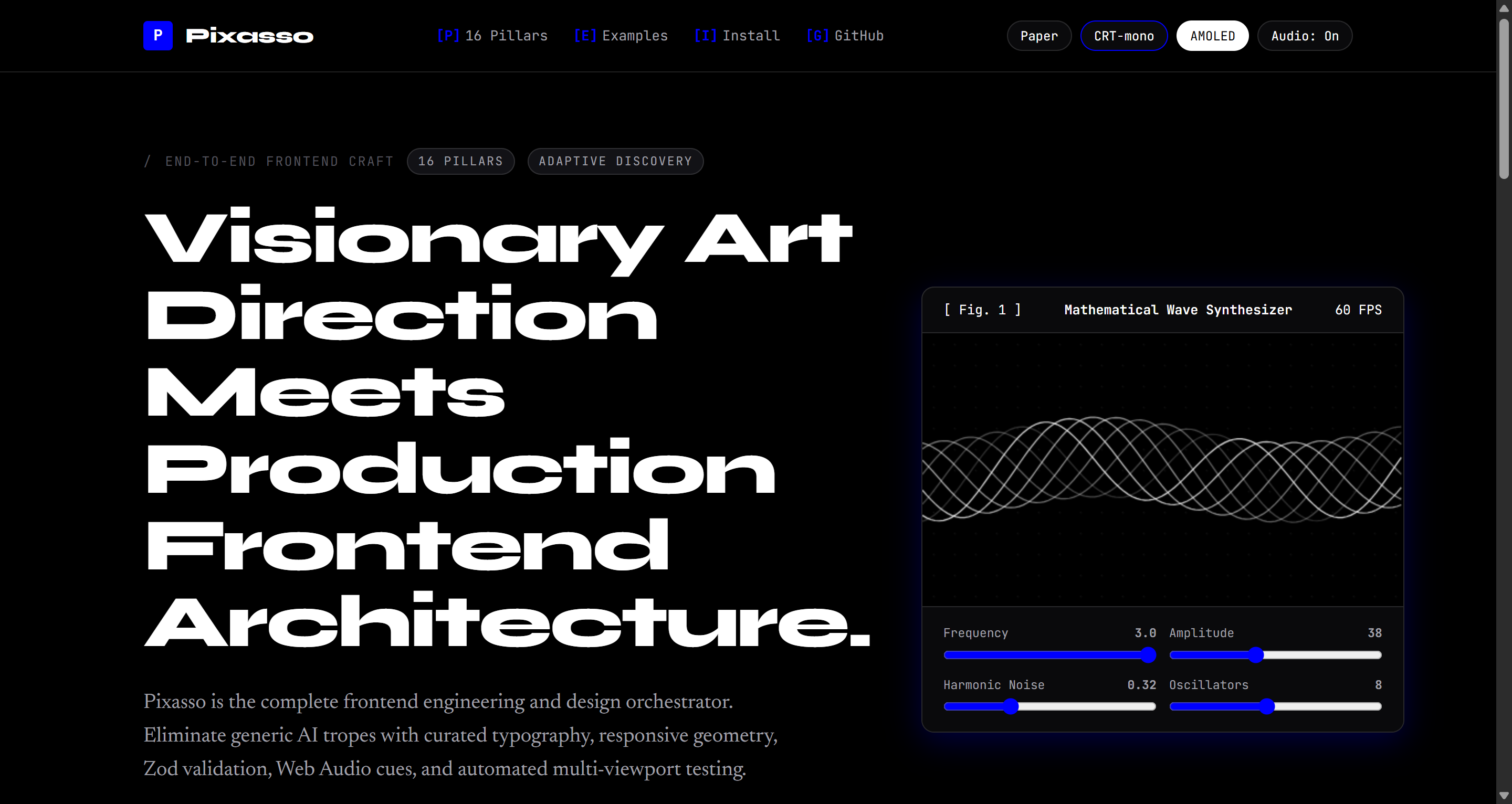
| Paper Light | Architectural Editorial | Warm ivory (#fbfaf7), hairlines, wide grotesque display headlines, Newsreader serif body |
| CRT Terminal | Retro Phosphor Computing | Phosphor emerald (#00ff66), scanlines, cathode vignette, bracket hotkeys [B], monospace telemetry |
| Pitch Black AMOLED | Deep Space Operations | True #000000 ground, cold metallic accents, sharp geometric borders, maximum contrast |
Interface Previews
Figure 1: Architectural Paper Light Theme with wide display headlines and generative wave synthesizer.
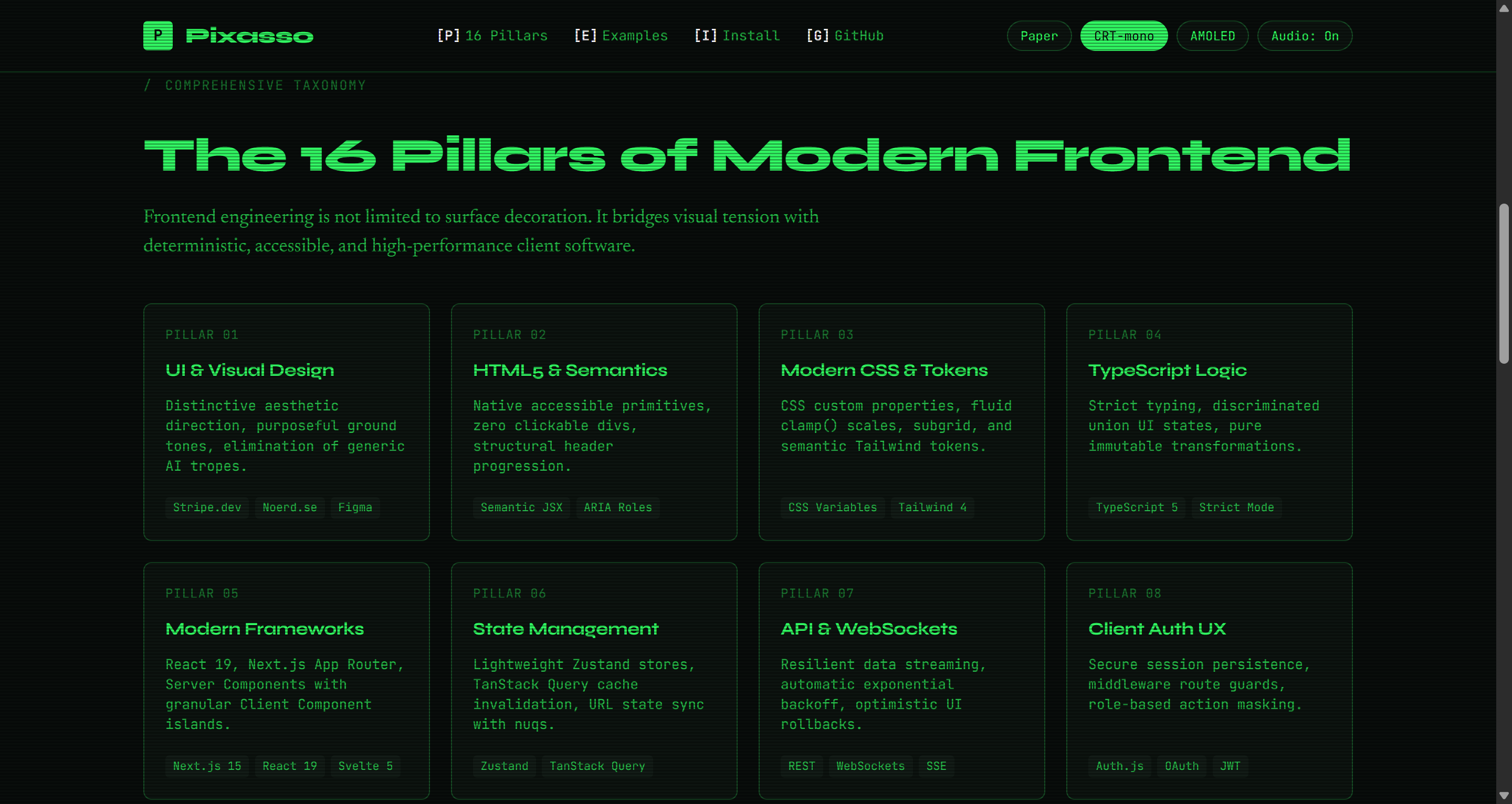 Figure 2: Retro Cathode Ray Terminal Theme with phosphor glow, scanline shader, and telemetry HUD.
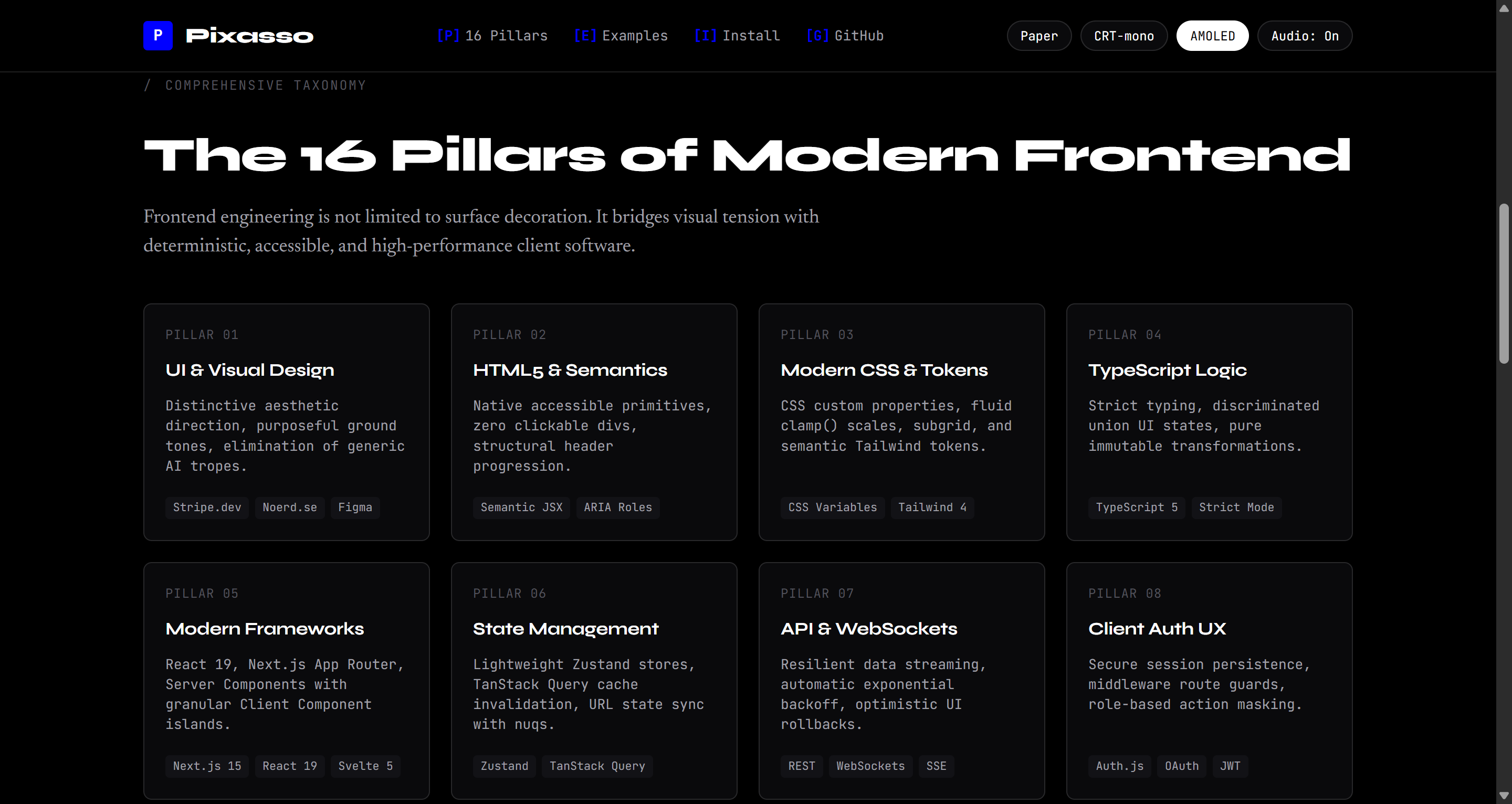 Figure 3: Pitch Black AMOLED Theme optimized for high-contrast, edge-density operational dashboards.
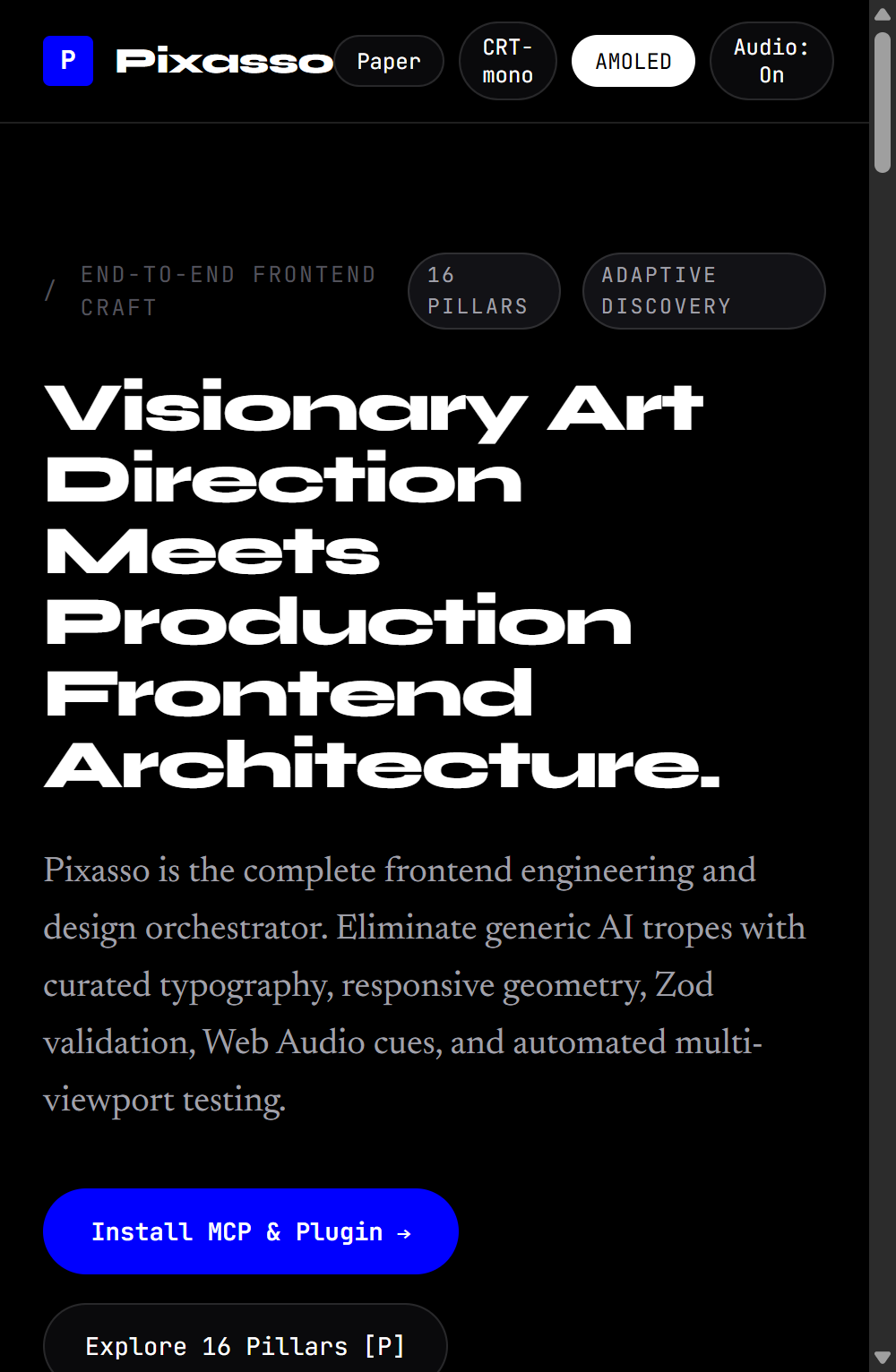 Figure 4: Mobile Viewport (390px) verified with zero horizontal DOM overflow and accessible touch targets.
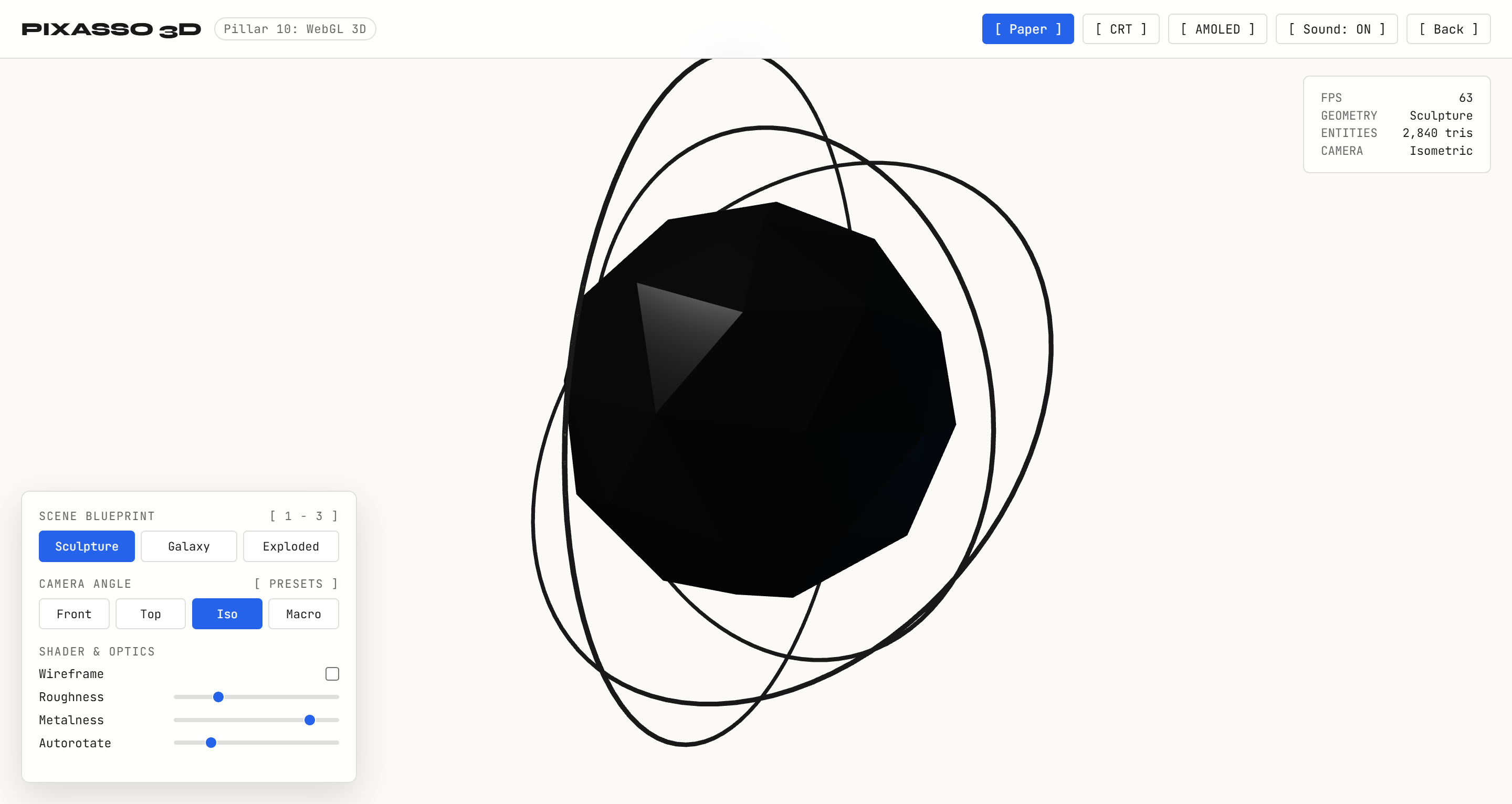 Figure 5: 3D Kinetic Sculpture with procedural faceted cage, PBR metallic core, and orbital gimbal rings.
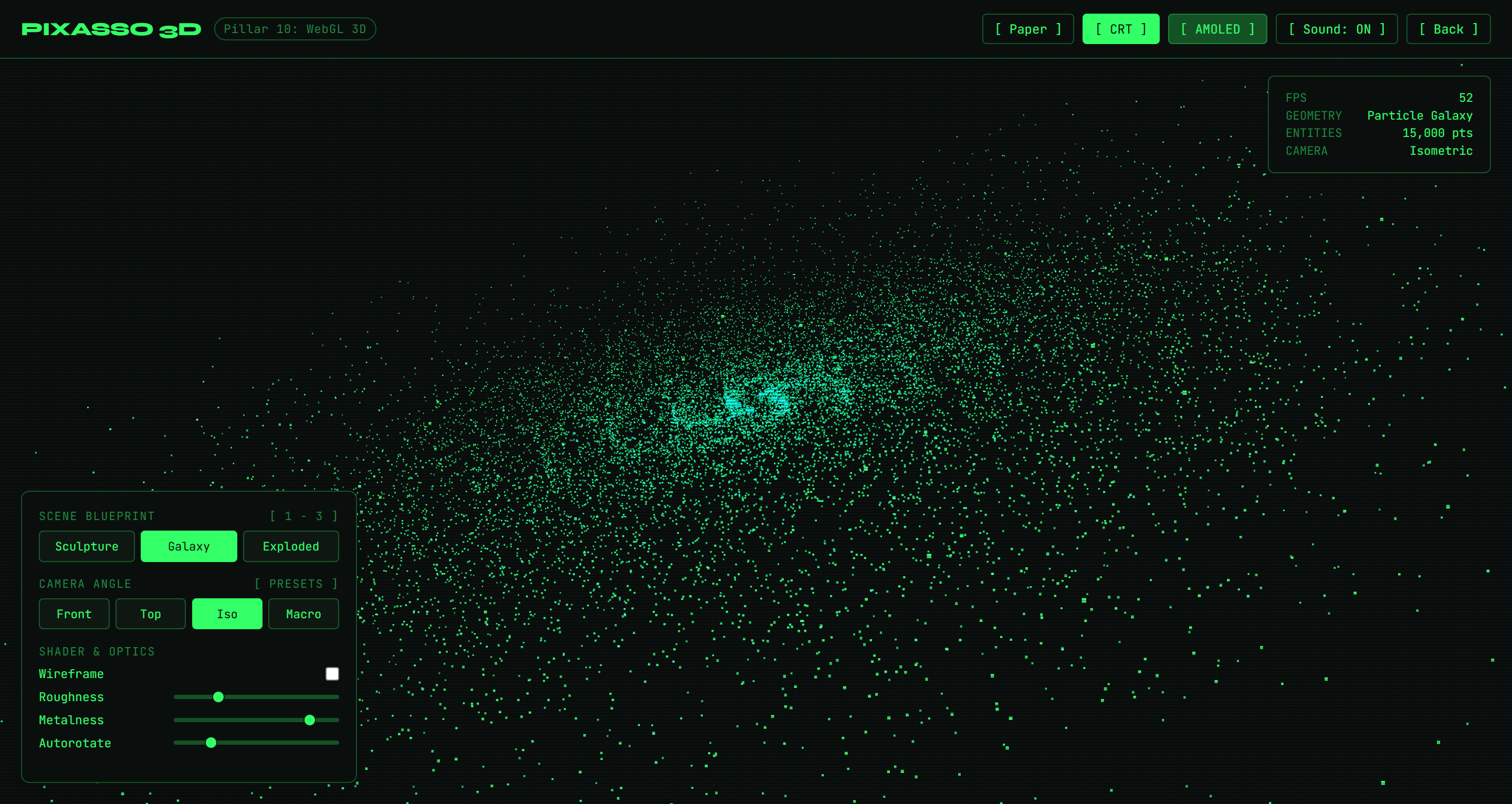 Figure 6: 15,000 GPU particle galaxy in CRT phosphor mode with mouse gravitational attraction vectors.
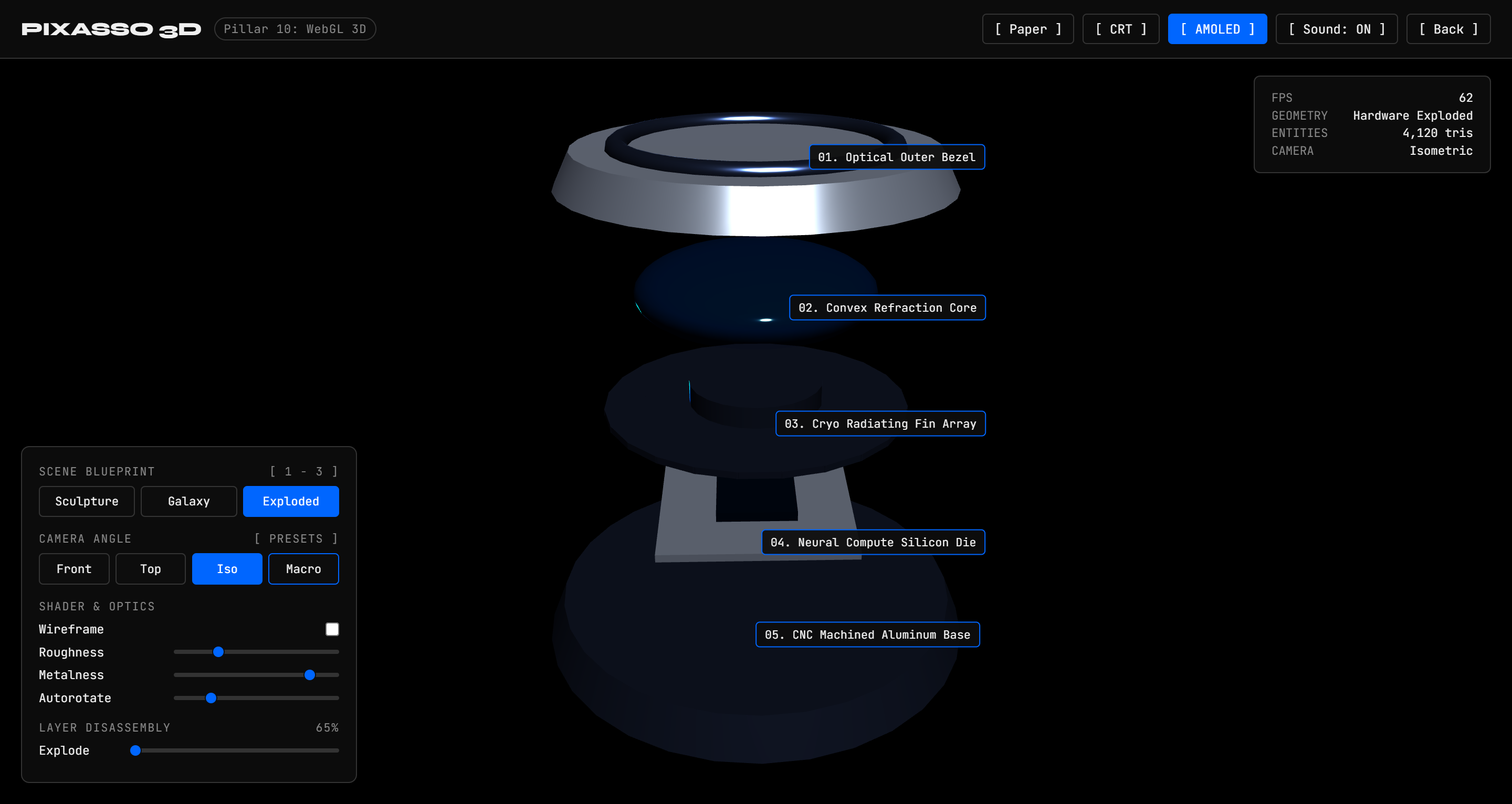 Figure 7: 5-Layer precision hardware assembly with interactive exploded-view disassembly slider and callouts.
The 16 Pillars of Frontend Architecture
Pixasso treats frontend engineering not as shallow visual styling, but as a complete 16-pillar software engineering discipline:
| Pillar | Discipline | Key Technical Responsibilities |
|---|---|---|
| 1. UI & Visual Design | Design Systems & Tokens | Semantic color scales, modular typography scales, surface depth, spacing systems |
| 2. Semantic HTML & JSX | Document Structure | Accessible landmarks (main, nav, article), ARIA roles, microdata, zero div soup |
| 3. Modern CSS Systems | Styling Architecture | CSS custom properties, container queries, Cascade Layers (@layer), subgrid, zero-runtime CSS |
| 4. TypeScript Excellence | Type Safety | Strict mode, discriminated unions for UI state, zero any, typed event handlers |
| 5. Framework Architecture | Component Lifecycle | React 19, Next.js App Router, Svelte 5 runes, Vue 3 Composition, Islands Architecture |
| 6. State Management | Data Flow & Cache | Server state (TanStack Query), client state (Zustand), URL search params as source of truth |
| 7. API & Realtime Data | Network Transport | Type-safe REST, GraphQL, WebSockets, Server-Sent Events, optimistic UI mutations |
| 8. Client Authentication UX | Session Security | Route protection guards, PKCE OAuth flows, token refresh queues, zero credential flicker |
| 9. Forms & Input Validation | Data Integrity | React Hook Form, Zod schema validation, inline error hints, accessible fieldsets |
| 10. Motion & Animation | Kinetic Direction | Motion (motion.dev), GSAP timelines, WebGL canvas shaders, prefers-reduced-motion |
| 11. Responsive Design | Viewport Versatility | Fluid typography (clamp()), container queries, adaptive layouts (390px to 2560px+) |
| 12. Accessibility (WCAG) | Inclusive Design | WCAG 2.2 AA/AAA compliance, screen reader tree, keyboard traps, focus rings, ARIA live |
| 13. Core Web Vitals | Performance Budget | LCP under 1.2s, INP under 100ms, CLS at 0, streaming SSR, image srcset optimization |
| 14. Frontend Testing | Verification Suite | Vitest component unit tests, Playwright end-to-end tests, visual regression checks |
| 15. Tooling & Bundling | Developer Experience | Vite, Turbopack, Biome/ESLint linting, automated dependency updates, Docker images |
| 16. Deployment & CDN | Production Release | Edge runtime, CDN cache headers (stale-while-revalidate), atomic rollbacks, CI/CD |
System Architecture
flowchart TB
    subgraph ClientLayer ["Client & IDE Integration"]
        Cursor["Cursor IDE"]
        Claude["Claude Desktop & Claude Code"]
        Antigravity["Google Antigravity & Gemini"]
        Codex["VS Code / Codex / Custom Agents"]
    end

    subgraph Protocol ["Transport Layer"]
        JSONRPC["Model Context Protocol (JSON-RPC 2.0 over Stdio)"]
        SkillsShim["Native Skills Runtime (SKILL.md)"]
    end

    subgraph PixassoCore ["Pixasso Engine"]
        Discovery["Adaptive Intent Discovery Matrix"]
        Genome["Design Genome Engine (YAML + Brain)"]
        TaskDAG["Dependency-Aware Task DAG"]
        Orchestrator["Specialist Agent Dispatcher"]
    end

    subgraph KnowledgeHub ["Curated Knowledge Catalogs"]
        Pillars["16 Frontend Architecture Pillars"]
        TypeSpec["Typography Systems & Variable Fonts"]
        MotionSpec["Motion Choreography & Spring Physics"]
        SensorySpec["Web Audio API UISFX Engine"]
        QASpec["Multi-Viewport & DOM Overflow Verification"]
    end

    subgraph Specialists ["Specialist Agent Roles"]
        ArtDir["Art Director"]
        UXArch["UX Architect"]
        TypeDir["Typography Director"]
        FrontArch["Frontend Architect"]
        QAEng["Interface QA Engineer"]
    end

    subgraph Delivery ["Shipped Artifacts"]
        Site["pixasso.erebuzzz.tech"]
        CodeProd["Production Component Code"]
        DesignBrain["Graphify Design Brain (.md)"]
        TestPlan["Operational Test Plan (.md)"]
    end

    ClientLayer --> Protocol
    Protocol --> PixassoCore
    PixassoCore <--> KnowledgeHub
    PixassoCore --> Specialists
    Specialists --> Delivery
Operating Principle: Intent to Validation
Pixasso enforces a structured workflow that turns user intent into verified production code:
flowchart LR
    A["Intent Discovery<br/>(ask_question)"] --> B["Design Genome<br/>(Tokens & Modes)"]
    B --> C["Design Brain<br/>(Mermaid Graph)"]
    C --> D["Reference Analysis<br/>(Benchmarks)"]
    D --> E["Task DAG<br/>(Dependencies)"]
    E --> F["Specialist Agents<br/>(Code & Motion)"]
    F --> G["Interface Testing<br/>(Multi-Viewport QA)"]
    G --> H["Final Verification<br/>(Shipped UI)"]
sequenceDiagram
    autonumber
    actor User as Developer / Designer
    participant Pixasso as Pixasso Orchestrator
    participant MCP as Pixasso MCP Server
    participant Genome as Design Genome
    participant Agents as Specialist Agents
    participant QA as Automated Interface QA

    User->>Pixasso: Request interface or application
    Pixasso->>User: Compulsory Popup Questions (ask_question)
    User-->>Pixasso: Theme, typography, dimensionality, conversion goals
    Pixasso->>MCP: pixasso_generate_genome
    MCP-->>Genome: Structured Design Genome (YAML)
    Pixasso->>MCP: pixasso_generate_brain
    MCP-->>Pixasso: Mermaid Decision Tree and Task DAG
    Pixasso->>Agents: Dispatch concurrent implementation tasks
    Agents-->>Pixasso: Production HTML5, Tailwind, TypeScript, Motion code
    Pixasso->>QA: Multi-viewport audit (390px, 768px, 1024px, 1440px)
    QA-->>Pixasso: Zero DOM overflow and accessibility sign-off
    Pixasso->>User: Verified components, live preview, and test report
Compulsory Popup Discovery Gate
Pixasso strictly forbids assuming generic defaults or hiding questions inside plans. Before generating code or planning architectures, agents must call ask_question across key dimensions:
flowchart TD
    Prompt["User Prompts New Project"] --> Popup["Compulsory Interactive Popup Modal (ask_question)"]

    subgraph Matrix ["Adaptive Discovery Matrix"]
        D1["Narrative & Theme<br/>(Paper, CRT-mono, Pitch Black, Brutalist, Editorial)"]
        D2["Typography Hierarchy<br/>(Display sans, warm editorial serif, technical mono)"]
        D3["Dimensionality Mode<br/>(2D Planar, 2.5D Parallax, 3D WebGL / Spline)"]
        D4["Sensory Feedback<br/>(Web Audio UISFX synthesized clicks and snaps)"]
        D5["Pillar Focus<br/>(State management, Zod forms, Auth UX, Realtime feeds)"]
    end

    Popup --> Matrix
    Matrix --> Answers["User Answers & Custom Requirements"]
    Answers --> Synthesize["Synthesize Design Genome & Task DAG"]
Living Taste Brain & Swarm Memory (Daily Edge Sync)
Pixasso features a self-learning exploration layer and decentralized "Taste Swarm" inspired by BitTorrent seeding. Rather than relying on repetitive questions or generic AI tropes, Pixasso continuously explores design movements, synthesizes bespoke aesthetic worlds, and learns high-craft token combinations from consented peer nodes at zero financial cost.
Living Swarm Memory Status
Last Memory Sync:
2026-10-08| Storage: Cloudflare D1 Serverless SQL | Edge Cache: Global KV | Zero-Cost Engine: Active
| Metric | Live Value | Target / Health |
|---|---|---|
| Total Anonymized Seeds | 12 | Growing via Torrent Seeding |
| Active Aesthetic Archetypes | 12 | Curated Movements and Mutations |
| Average Quality Score | 0.94 / 1.0 | Filtered via Anti-Trope and Contrast Gates |
| Consented Peer Nodes | 1 | Strict Opt-In Verified |
| Daily Edge Distribution | Active | Sub-millisecond KV Edge Distribution |
Swarm Memory Topological Map
graph TD
    subgraph SwarmMemoryCore ["Living Taste Brain & Swarm Core"]
        Core["Swarm Memory Nexus<br/>- D1 Relational Engine: 12 Seeds<br/>- Daily Memory Sync"]
    end

    subgraph ActiveClusters ["Top Learned Aesthetic Clusters"]
        C1["Swiss International & Grotesk<br/>- Geometry: Rigid 12-col grid<br/>- Contrast: 18.2:1<br/>- Weight: 14%"]
        C2["Warm Editorial Poise<br/>- Geometry: Split-screen column<br/>- Serif: Newsreader + Mono<br/>- Weight: 12%"]
        C3["Retro-Futurist Monospace HUD<br/>- Ground: CRT Dark (#080b09)<br/>- Display: JetBrains Mono<br/>- Weight: 11%"]
        C4["Neo-Brutalism & High Contrast<br/>- Geometry: Asymmetric Bento<br/>- Borders: 2px Solid Ink<br/>- Weight: 10%"]
        C5["Bio-Digital Solarpunk<br/>- Ground: Earth Stone (#f4f3ef)<br/>- Motion: Organic Spring<br/>- Weight: 9%"]
    end

    subgraph LearningPipeline ["Daily Swarm Convergence"]
        T1["Decentralized Peer Seeds<br/>- Anonymized Design Tokens"] --> AntiTrope["Quality Gate Heuristic<br/>- Anti-Trope & Contrast Filter"]
        AntiTrope --> Core
        Core --> C1
        Core --> C2
        Core --> C3
        Core --> C4
        Core --> C5
        Core --> EdgeKV["Edge KV Distribution Cache<br/>- Sub-millisecond Latency"]
    end
Top Learned Aesthetics of the Day
- Swiss International & High Grotesk: Rigid 12-column grid, mathematical hairlines, pure monochrome contrast (18.2:1).
- Contemporary Editorial & Type Poise: Wide margins, Newsreader serif body, asymmetric quote callouts, archival ivory tone.
- Retro-Futurist Monospace HUD: Emerald raster glow on CRT basalt, bracket hotkeys, fixed telemetry bento grid.
- Neo-Brutalism & High Contrast: Raw 2px ink borders, vibrant cadmium accents, asymmetric card geometry.
- Bio-Digital Solarpunk: Earthen stone ground, organic rounded pill contours, fluid kinetic spring physics.
Memory consolidates automatically once per day at 00:00 UTC via Cloudflare Workers Cron and GitHub Actions.
Daily Memory Lifecycle & Swarm Intelligence Pipeline
The Pixasso Taste Swarm operates like a decentralized peer-to-peer network for visual design tokens:
sequenceDiagram
    autonumber
    actor Dev as Developer / Agent
    participant Discovery as pixasso_discover_intent
    participant Seeder as pixasso_seed_taste
    participant Filter as Anti-Trope & Contrast Gate
    participant D1 as Cloudflare D1 (pixasso-taste-db)
    participant Cron as Cloudflare Cron (00:00 UTC)
    participant KV as Cloudflare Workers KV
    participant GitHub as GitHub Actions (Sync Workflow)
    participant Readme as README.md Living Memory

    Dev->>Discovery: Run intent discovery on new project
    Discovery->>Dev: Bespoke aesthetic worlds + Swarm Opt-In prompt
    Dev->>Seeder: Opt-in and seed validated design tokens
    Seeder->>Filter: Verify WCAG contrast (>= 4.5:1) and anti-trope checks
    Filter-->>D1: Store sanitized, anonymized seed record
    Note over D1,Cron: Continuous peer seed collection
    Cron->>D1: Trigger daily memory harvest at 00:00 UTC
    D1->>KV: Re-index top archetypes & cache swarm bundle (24h TTL)
    GitHub->>KV: Query live memory status from /taste/brain
    GitHub->>Readme: Update topological Mermaid graph and metrics
Zero-Cost Inference Router: Are API Keys Required?
Short answer: No. You do NOT need any API keys to use Pixasso.
Pixasso is built with a tiered fallback architecture designed to remain completely free for developers and agents out of the box:
| Tier | Provider / Engine | API Key Requirement | Purpose & Fallback Behavior |
|---|---|---|---|
| Tier 1 | NVIDIA NIM (nvidia/nemotron-3-ultra-550b) | Optional (Server Secret) | Advanced artistic direction and unconventional palette generation. NVIDIA offers 1,000 free trial credits at build.nvidia.com. If unset, instantly skips to Tier 2. |
| Tier 2 | OpenRouter Free Tier (llama-3.3-70b-instruct:free, gemini-2.0-flash-exp:free) | Optional (Server Secret) | Free multi-model inference. Requires only a free OpenRouter account with $0 balance. If unset, instantly skips to Tier 3. |
| Tier 3 | Cloudflare Workers AI (@cf/meta/llama-3.3-70b-instruct) | None (Built-in) | Runs directly on the Cloudflare edge via the Worker AI binding. Cloudflare provides 10,000 free neurons daily with zero external keys required. |
| Tier 4 | Foundational Design Graph (12 Curated Movements) | None (100% Offline) | Deterministic design pairing across 12 high-taste movements. Operates with zero network calls, zero latency, and zero token costs. |
For Local Users and Agents (npx -y pixasso-mcp)
You do not need to provide any API keys or configuration files. The local stdio server will run the offline foundational graph and local rules with zero cloud dependency.
For Self-Hosters Deploying Their Own Remote Worker
If you deploy your own instance of the Cloudflare Worker and wish to connect NVIDIA NIM or OpenRouter, you can optionally store secrets using Wrangler:
# Optional: Set NVIDIA NIM API key
npx wrangler secret put NVIDIA_API_KEY

# Optional: Set OpenRouter API key
npx wrangler secret put OPENROUTER_API_KEY
If you omit these secrets, your worker will seamlessly use Cloudflare Workers AI and the offline foundational graph with zero errors.
Installation & Setup
Pixasso works across all major AI development environments.
1. Unified Automatic Installer (Recommended)
Run the automated installer script from the root of the repository. It detects your installed platforms and configures them automatically:
# Clone the repository
git clone https://github.com/Erebuzzz/pixasso.git
cd pixasso

# Install dependencies and build MCP server
npm install
npm run build

# Run automated multi-platform installer
node scripts/install.js
The installer automatically configures:
- Google Antigravity: Plugin package (
plugins/pixasso) and active MCP configuration. - Cursor IDE: Global configuration (
~/.cursor/mcp.json) and local project configuration (.cursor/mcp.json). - Claude Desktop: Native MCP server configuration (
claude_desktop_config.json). - Claude Code: CLI tool configuration (
claude mcp add).
2. Connection Transports
Pixasso provides dual transport architectures: a hosted remote edge endpoint (zero local setup) and a local stdio runner via npm.
flowchart TD
    subgraph Clients ["Supported MCP Clients"]
        C1["Cursor IDE"]
        C2["VS Code (Copilot / Cline / Roo)"]
        C3["Claude Desktop"]
        C4["Claude Code CLI"]
        C5["Google Antigravity / Gemini"]
    end

    subgraph RemoteTransport ["Option A: Hosted Remote (Zero Local Runtime)"]
        R_URL["Endpoint: https://mcp.pixasso.erebuzzz.tech/mcp"]
        R_AUTH["GitHub OAuth 2.0 (read:user, user:email)"]
        R_KV["Edge KV Rate Limiter (200 calls/day per user)"]
        R_WORKER["Cloudflare Worker + Durable Objects"]

        R_URL --> R_AUTH --> R_KV --> R_WORKER
    end

    subgraph LocalTransport ["Option B: Local Stdio (Full Offline Execution)"]
        L_NPX["npx -y pixasso-mcp"]
        L_LOCAL["Node.js stdio JSON-RPC process"]

        L_NPX --> L_LOCAL
    end

    subgraph Engine ["Pixasso Design Engine (7 Tools)"]
        T1["pixasso_discover_intent"]
        T2["pixasso_search_references"]
        T3["pixasso_fetch_reference"]
        T4["pixasso_generate_genome"]
        T5["pixasso_generate_brain"]
        T6["pixasso_audit_design"]
        T7["pixasso_generate_test_plan"]
    end

    C1 & C2 & C3 & C4 & C5 -->|Remote HTTP SSE| R_URL
    C1 & C2 & C3 & C4 & C5 -->|Local Subprocess| L_NPX
    R_WORKER --> Engine
    L_LOCAL --> Engine
Option A: Hosted Remote Endpoint (Zero Local Runtime)
Connect any remote-compatible MCP client directly to:
https://mcp.pixasso.erebuzzz.tech/mcp
- Zero dependencies: No Node.js runtime, no local dependencies, and zero background CPU usage.
- Authentication: Secured with GitHub OAuth (
read:user,user:email). On initial tool invocation, your client or browser will present an authorization link to authenticate your GitHub account. - Usage quota: 200 free tool calls per day per authenticated user, reset every 24 hours. Rate limits and sessions are managed ephemerally via Cloudflare KV.
- Transport: Standard HTTP Streamable SSE (Server-Sent Events) adhering to the MCP specifications.
Cursor IDE (Remote)
Add to ~/.cursor/mcp.json or .cursor/mcp.json:
{
  "mcpServers": {
    "pixasso-remote": {
      "url": "https://mcp.pixasso.erebuzzz.tech/mcp"
    }
  }
}
VS Code (Remote)
Add to .vscode/mcp.json (for native VS Code MCP and GitHub Copilot) or your extension settings (Cline, Roo Code, Continue):
{
  "mcpServers": {
    "pixasso-remote": {
      "url": "https://mcp.pixasso.erebuzzz.tech/mcp"
    }
  }
}
Claude Desktop (Remote)
Add to %APPDATA%\Claude\claude_desktop_config.json (Windows) or ~/Library/Application Support/Claude/claude_desktop_config.json (macOS):
{
  "mcpServers": {
    "pixasso-remote": {
      "url": "https://mcp.pixasso.erebuzzz.tech/mcp"
    }
  }
}
Claude Code CLI (Remote)
Run directly from your terminal:
claude mcp add pixasso-remote --transport http https://mcp.pixasso.erebuzzz.tech/mcp
Google Antigravity & Gemini CLI (Remote)
Add to ~/.gemini/antigravity/mcp_config.json or ~/.gemini/config/mcp_config.json:
{
  "mcpServers": {
    "pixasso-remote": {
      "url": "https://mcp.pixasso.erebuzzz.tech/mcp"
    }
  }
}
Option B: Published npm Package (Local Stdio)
You can run Pixasso locally on any machine with Node.js installed using npx -y pixasso-mcp.
Cursor IDE
Add to ~/.cursor/mcp.json or .cursor/mcp.json:
{
  "mcpServers": {
    "pixasso": {
      "command": "npx",
      "args": ["-y", "pixasso-mcp"]
    }
  }
}
Or install via skills.sh:
npx skills add Erebuzzz/pixasso
VS Code (Local Stdio)
Add to .vscode/mcp.json (for native VS Code MCP and GitHub Copilot) or your extension settings (Cline, Roo Code, Continue):
{
  "mcpServers": {
    "pixasso": {
      "command": "npx",
      "args": ["-y", "pixasso-mcp"]
    }
  }
}
Claude Desktop
Add to %APPDATA%\Claude\claude_desktop_config.json (Windows) or ~/Library/Application Support/Claude/claude_desktop_config.json (macOS):
{
  "mcpServers": {
    "pixasso": {
      "command": "npx",
      "args": ["-y", "pixasso-mcp"]
    }
  }
}
Claude Code CLI
claude mcp add pixasso npx -y pixasso-mcp
Or register the marketplace plugin:
/plugin marketplace add Erebuzzz/pixasso
Google Antigravity & Gemini CLI
Add to ~/.gemini/antigravity/mcp_config.json or ~/.gemini/config/mcp_config.json:
{
  "mcpServers": {
    "pixasso": {
      "command": "npx",
      "args": ["-y", "pixasso-mcp"]
    }
  }
}
Or install the skill bundle:
npx skills add Erebuzzz/pixasso
Local Repository Clone (Developers)
If running against your local clone instead of npm, replace "command": "npx" and "args": ["-y", "pixasso-mcp"] with:
{
  "mcpServers": {
    "pixasso": {
      "command": "node",
      "args": ["/path/to/pixasso/mcp-server/build/index.js"]
    }
  }
}
Tip: running node scripts/install.js configures your local clone path automatically across all installed editors.
3. Agent Installation Prompt (Install in Any IDE via AI Assistant)
You can prompt any AI coding assistant in your IDE (Cursor, VS Code, Windsurf, Claude, Copilot, Cline, Roo Code, Antigravity) to configure Pixasso automatically. Simply copy and paste the prompt below into your assistant chat:
Please configure the Pixasso MCP server for my project and editor.

Choose one of the two options:
1. Option A (Hosted Remote, zero local runtime):
   Configure MCP server "pixasso-remote" with URL:
   https://mcp.pixasso.erebuzzz.tech/mcp

2. Option B (Local Stdio):
   Configure MCP server "pixasso" with command "npx" and args ["-y", "pixasso-mcp"]

Add the configuration to the appropriate MCP settings file for this editor (such as .vscode/mcp.json, ~/.cursor/mcp.json, claude_desktop_config.json, or cline_mcp_settings.json) and verify that all 9 Pixasso design and architecture tools are active.
ChatGPT / OpenAI Custom GPTs / Web UIs
For web-based LLMs, import the standalone system prompts located in:
skills/pixasso/prompts/pixasso-system-prompt.mdskills/pixasso/prompts/discovery-interview-prompt.mdskills/pixasso/prompts/design-critique-prompt.md
MCP Server Capabilities
The Pixasso MCP Server (mcp-server/) exposes the full design intelligence engine via standard JSON-RPC 2.0:
Tools
Every tool conforms to the official Model Context Protocol specification and declares all four directory hints (readOnlyHint, destructiveHint, idempotentHint, openWorldHint):
| Tool Name | Purpose | Parameters | Annotations / Hints |
|---|---|---|---|
pixasso_discover_intent | Generates adaptive discovery questions across 16 pillars and brand identity, powered by the Taste Inference Engine | projectArchetype, description, targetAudience, hasBrandIdentity, referenceUrls | readOnly, idempotent |
pixasso_search_references | Searches 31 curated catalogs (20 references, 11 templates) | query, category, tag | readOnly, idempotent |
pixasso_fetch_reference | Fetches live HTML, extracts title/headings/readable text, and flags client SPAs | url, focus | readOnly, openWorld |
pixasso_generate_genome | Compiles tokens into validated design-genome.yaml with reference verification hard gate | projectName, themeMode, groundTone, typography, colorTokens, dimensionality, motionFeel, references | readOnly, idempotent |
pixasso_generate_brain | Generates Graphify-style Mermaid decision map and Task DAG | projectName, decisions, tasks | readOnly, idempotent |
pixasso_audit_design | Audits code against generic AI clichés, accessibility guidelines, and 16 pillars | componentMarkup, contextDescription | readOnly, idempotent |
pixasso_generate_test_plan | Produces automated multi-viewport testing matrix (390px, 768px, 1024px, 1440px) | projectName, testUrl, testedViewports | readOnly, idempotent |
pixasso_explore_taste | Explores the living Design Taste Graph across 12 movements and community-seeded directions | query, movement, archetype, includeSwarm, limit | readOnly, idempotent |
pixasso_seed_taste | Anonymously seeds sanitized high-craft design tokens to the decentralized Taste Swarm with strict opt-in consent | archetype, movement, typographyTokens, paletteTokens, layoutTokens, motionTokens, uisfxTokens, consentGiven | openWorld, idempotent |
Resources
Access 31 curated knowledge resources directly through pixasso:// URIs (20 references and 11 templates):
pixasso://references/frontend-architecture-pillarspixasso://references/typography-systempixasso://references/sound-and-sensory-designpixasso://references/interface-testing-and-qapixasso://references/anti-patterns-and-critiquepixasso://templates/design-genomepixasso://templates/task-graphpixasso://templates/interface-test-plan
Prompts
intent-discovery: Guides the user through adaptive requirement extraction.frontend-architecture: Formulates component architecture across the 16 pillars.design-critique: Provides objective design reviews rejecting AI clichés.typography-direction: Generates hierarchical typography specifications.interface-qa: Generates multi-device QA scripts and DOM assertions.
Showcase Examples
Explore standalone, fully-functional examples in examples/:
- Edge Operations Dashboard: Live reactive metrics dashboard with Zod form validation, theme switcher, telemetry feed, and WCAG AA accessibility.
- Paper Editorial Layout: Archival publication layout featuring wide grotesque headlines, Newsreader serif body, hairlines, and figure plates.
- CRT Phosphor Terminal: Retro computing interface with scanlines, cathode vignette, bracket hotkeys, and simulated serial telemetry.
- Harmonic Wave Synthesizer: Interactive mathematical wave canvas running in
requestAnimationFramewith live audio oscillators. - 3D Spatial Visualization Suite: Interactive Three.js studio inspired by
viettranx/3dviz-pro-max, featuring kinetic geometric sculptures, 15k GPU particle galaxy, and 5-layer exploded hardware assembly with camera presets and real-time shader controls.
3D Spatial Computing & WebGL Architecture (viettranx/3dviz-pro-max Inspiration)
Pixasso integrates proven 3D recipes inspired by viettranx/3dviz-pro-max directly into Pillar 10 (Motion & WebGL 3D):
flowchart TD
    subgraph Suite ["Three.js Spatial Studio (examples/3d-suite/)"]
        Renderer["WebGLRenderer with Antialiasing & Soft Shadows"]
        Orbit["OrbitControls with Damping & Preset Interpolation"]

        subgraph Recipes ["Proven Spatial Recipes"]
            R1["Kinetic Polyhedron Sculpture<br/>(Faceted cage, PBR metallic core, gyro gimbal rings)"]
            R2["Gravitational Particle Galaxy<br/>(15k GPU points, mouse gravity lens, velocity color)"]
            R3["Spatial Hardware Exploded View<br/>(5 mechanical layers, disassembly slider, 3D callouts)"]
        end

        subgraph Adapters ["Adaptive 3-Theme Sync"]
            T1["Paper Ivory Mode (#fbfaf7, ink wireframe, clay shading)"]
            T2["CRT Phosphor Mode (#0a0f0d, emerald wireframe, scanlines)"]
            T3["Pitch Black AMOLED Mode (#000000, chrome, cobalt rim light)"]
        end

        Renderer --> Recipes
        Orbit --> Recipes
        Adapters --> Recipes
    end
Deployment Architecture
Pixasso's showcase site (pixasso.erebuzzz.tech).
Primary: GitHub Pages via GitHub Actions
- Pipeline: Automated build and push via
.github/workflows/deploy-site.yml. - Domain: Root
CNAMEfile mapped topixasso.erebuzzz.tech. - Hosting & Edge: Fastly and GitHub global edge CDN with automatic Let's Encrypt SSL certificates.
Alternative: 1-Click Vercel Deployment
The repository includes a production-grade vercel.json configuration. You can optionally import Erebuzzz/pixasso into Vercel with zero build configuration:
- Instant worldwide edge caching.
- Clean routing for root site, examples, and screenshot assets.
- Automatic preview deployments for pull requests.
flowchart LR
    Commit["git push origin main"] --> Actions["GitHub Actions Runner"]
    Actions --> Pages["GitHub Pages Edge CDN"]
    Pages --> Domain["pixasso.erebuzzz.tech<br/>(Automatic SSL)"]

    Commit -.-> Vercel["Optional: Vercel (vercel.json)"]
    Vercel -.-> Domain
Repository Structure
pixasso/
├── CNAME                              # Custom domain: pixasso.erebuzzz.tech
├── package.json                       # Root scripts and workspace config
├── README.md                          # Full-spectrum documentation and architecture
├── AGENTS.md / CLAUDE.md / GEMINI.md  # Multi-agent rules and behavioral guardrails
├── .cursorrules                       # Cursor IDE rules
├── .cursor/                           # Cursor project configs, rules, and skills
├── .github/workflows/deploy-site.yml  # Automated GitHub Pages CI/CD pipeline
├── assets/screenshots/                # Multi-viewport screenshots and visual proofs
├── examples/                          # Standalone craft demonstrations
│   ├── production-app/                # Edge Operations reactive dashboard
│   ├── paper-editorial/               # Archival editorial publication
│   ├── crt-terminal/                  # Phosphor CRT retro terminal
│   └── generative-wave/               # Mathematical wave synthesizer canvas
├── mcp-server/                        # Standalone TypeScript MCP Server
│   ├── package.json
│   ├── tsconfig.json
│   └── src/index.ts                   # JSON-RPC 2.0 tools, resources, and prompts
├── plugins/pixasso/                   # Antigravity plugin distribution
├── scripts/                           # Tooling, installer, and test suites
│   ├── install.js                     # Unified multi-platform installer
│   ├── test-mcp.js                    # Automated MCP JSON-RPC protocol test suite
│   └── serve.js                       # Local HTTP preview server
├── site/                              # Showcase site (pixasso.erebuzzz.tech)
│   ├── index.html                     # Live website with theme engine and audio
│   └── assets/                        # Web assets and mirrored screenshots
├── skills/pixasso/                    # CANONICAL installable agent skill
│   ├── SKILL.md                       # Main skill definition
│   ├── references/                    # 20 curated design-research catalogs
│   ├── templates/                     # Operational templates (Genome, DAG, QA)
│   └── prompts/                       # Modular agent prompts
└── references/                        # Editable root reference catalogs
Automated Interface Testing & QA
Pixasso treats testing as a core design deliverable:
flowchart TD
    Code["Generated Component Markup"] --> DevServer["Local Dev Server / generative_ui"]
    DevServer --> Resizer["Multi-Viewport Sweep (chrome-devtools-mcp)"]

    subgraph Matrix ["Viewport Matrix"]
        V1["390px Mobile Viewport"]
        V2["768px Tablet Viewport"]
        V3["1024px Laptop Viewport"]
        V4["1440px Desktop Viewport"]
    end

    Resizer --> Matrix
    Matrix --> DOMCheck["DOM Overflow & Layout Audit<br/>(scrollWidth vs innerWidth)"]

    subgraph Gates ["Automated Quality Gates"]
        G1["Zero Horizontal Overflow"]
        G2["Touch Targets >= 44px"]
        G3["Visible Focus Rings & ARIA Roles"]
        G4["Web Audio Latency < 10ms"]
    end

    DOMCheck --> Gates
    Gates --> SignOff["Sign Off in interface-test-plan.md"]
Anti-Pattern Stance
Pixasso actively guards against generic AI aesthetics:
- No Purple Gradients: Replaced with intentional monochrome palettes, warm paper tones, or phosphor glow.
- No Lucide Flooding: Every icon must serve a precise informational function.
- No Blanket Glassmorphism: High-contrast borders, solid surface tokens, and crisp architectural lines replace muddy blurred cards.
- No Decorative-Only Motion: Animations must be communicative, respect
prefers-reduced-motion, and run under 300ms.
License & Privacy
- License: MIT. See LICENSE.
- Privacy Policy: Zero telemetry, zero prompt recording, ephemeral in-memory processing. See PRIVACY.md.
- Contributing: See CONTRIBUTING.md.
- Security: See SECURITY.md.