Listed from the MCP registry; nobody on Odel publishes it.

Godot MCP Runtime
Zero-addon MCP server for Godot 4.5 or later: agents edit, run, and play-test the game.
Runs on your machine from its package; the steps are below.
What it does
- Reads
- Writes
- High impact
At most: moves money, runs code or commands, deletes data, or sends messages for you.
What it costs
FreeOdel charges nothing per call. The publisher may charge for its own service.
Runs locally over stdio
This server isn't hosted — your MCP client launches it from a package registry. Use one of the commands below, or drop the config into your client (e.g. Claude Desktop).
Run
npx -y godot-mcp-runtime
MCP client config
{
  "mcpServers": {
    "godot-mcp-runtime": {
      "command": "npx",
      "args": [
        "-y",
        "godot-mcp-runtime"
      ]
    }
  }
}



A lightweight MCP server that gives AI agents the tools to interact with the Godot game engine. Features comprehensive headless editing and full runtime control over a Godot 4.x project. Scene, node, autoload, and validation ops cover everything short of the most niche corners of the engine; the runtime bridge adds screenshots, input simulation, UI discovery, and live GDScript against the running scene tree.
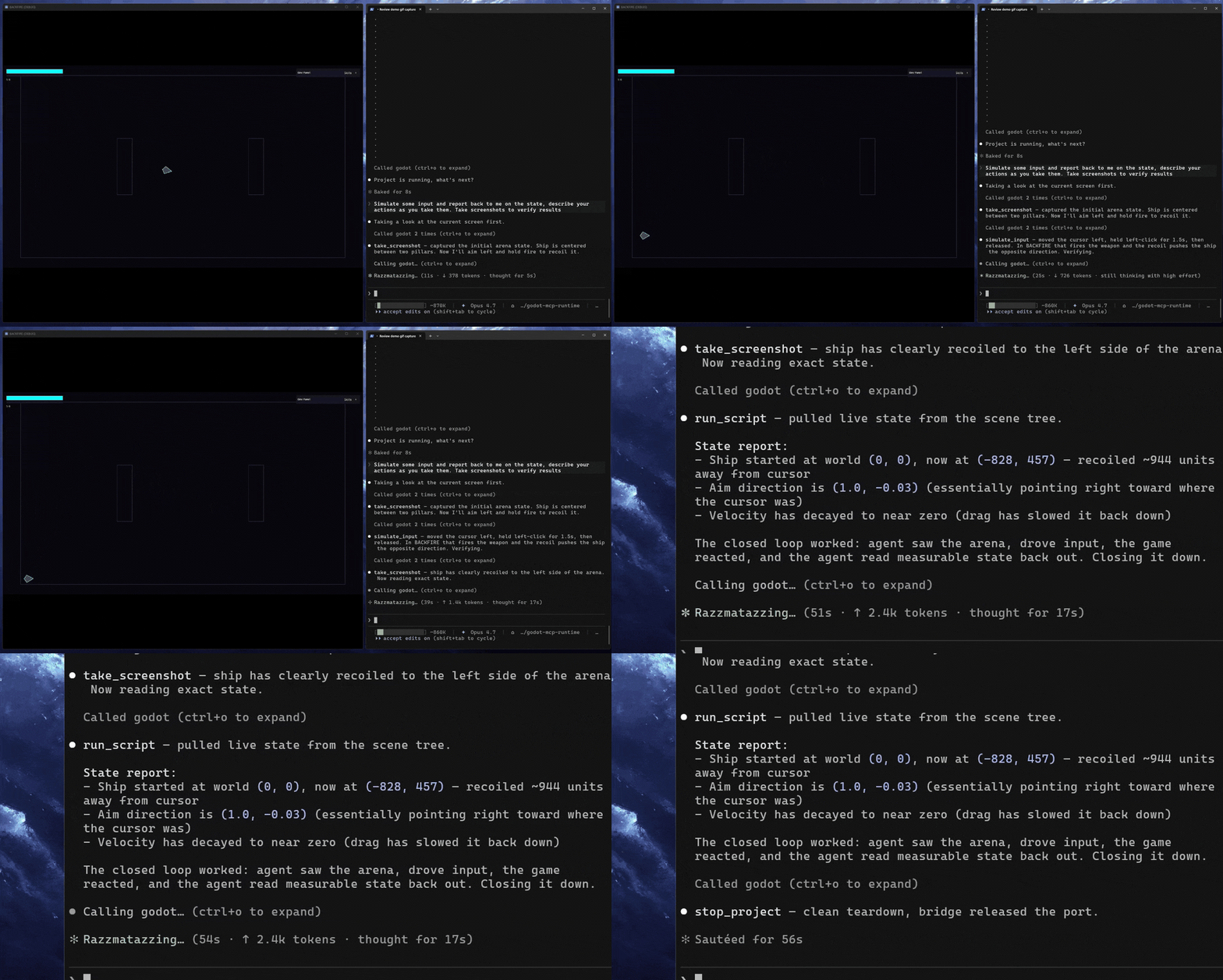
The AI doesn't just write your game, it can check its work.
- Headless editing: scenes, nodes, scripts, signals, validation, no editor window
- Runtime control: screenshots, input simulation, UI discovery, live GDScript, and profiling (functions, FPS, monitors, render stages) against the running game
- Zero footprint: no Godot addon, no project commits, auto-cleanup on shutdown
No addon required. Most Godot MCP servers that offer runtime support ship as a Godot addon, something you install into your project, commit to version control, and manage as a dependency. Use npx and there's no install or setup needed.
Think of it as Playwright MCP, but for Godot. This does the same thing for games: run the project, take a screenshot, simulate input, read what's on screen, execute a script against the live scene tree. The agent closes the loop on its own changes rather than handing off to you to verify.
Note
This is not a playtesting replacement. It doesn't catch the subtle feel issues that only a human notices, and it won't tell you if your game is fun. What it does is let an agent confirm that a scene loads, a button responds, a value updated, a script ran without errors. The ability to check work is crucial for AI driven workflows.
Contents
What It Does
This server is the perfect tool kit for AI assisted game development with Godot. It provides a comprehensive suite of tools that allows agents to create scenes, nodes, scripts, and more. The runtime tool set provides the capabilities to check work by running the game and interacting with it in real time, all without becoming a cumbersome dependency on your project.
Built for agents. Every tool is purpose-built and self-documenting. When something fails, the response tells the agent how to fix it; when something succeeds, it points toward the next step. The result is an AI that stays unstuck and self-corrects without needing you to nudge it along. All 43 tools return one JSON object with a declared output schema, and a value the server could not measure comes back as null with a warning rather than a made-up number.
Headless editing. Create scenes, add nodes, set properties, attach scripts, connect signals, validate GDScript. All the standard operations, no editor window required.
Runtime bridge. When run_project is called, the server injects McpBridge as an autoload. This opens a localhost-only TCP listener (a free port is auto-selected when bridgePort is omitted; pass bridgePort to pin a specific port) and enables:
- Screenshots: Capture the viewport. By default this returns a 960x540 preview inline plus the full PNG on disk, and every call also returns pixel statistics (
stats, with alikelyBlankverdict) measured from the full PNG, so a caller that cannot look at the image can still tell a rendered frame from a blank one - Input simulation: Batched sequences of key presses, mouse clicks, mouse motion, UI element clicks by name or path, Godot action events, text typed into the focused Control, and timed waits. Each action reports what it did: the Control it hit, the signals it fired, and what changed on screen
- UI discovery: Walk the live scene tree and collect every visible Control node with its position, type, text content, and disabled state
- Live script execution: Compile and run arbitrary GDScript with full SceneTree access while the game is running
- Profiling: With
profiling: trueat launch, capture Godot's own profiler and rank the most expensive GDScript functions by own or inclusive time, with source locations and per-frame averages. Every capture also reports FPS, frames over a target frame rate, and engine monitors (draw calls, memory, node counts);visual: trueadds the Visual Profiler's CPU and GPU time per render stage, andtimeline: truethe same over time, with the player position (track) on each interval, to find where a walk through the level drops frames
Background mode. Pass background: true to run_project and the Godot window is never shown on Windows; on other platforms it is moved off-screen (positioned at (-9999, -9999)) after startup. Mouse input passes through the window. It does not guarantee the game never takes keyboard focus. Programmatic input, screenshots, and all runtime tools work exactly the same. Useful for automated agent-driven testing where the window shouldn't be visible or interactive.
Manual attach mode. When something other than MCP launches the game (a CI pipeline, an external debugger, your own shell), call run_project with attach: true first. It injects the bridge and marks the project active without spawning Godot, so when you launch the game manually, runtime tools work against it. Call stop_project when done: it removes the bridge and leaves your Godot process running.
Render check. render_movie renders a fixed number of frames in a separate short Godot run under the engine's movie writer and reports what rendered: blank or not, moving or not. It injects no bridge, simulates no input and starts no session, so it works as a cheap checkpoint before a full run_project. It needs a display, asks for the same launch confirmation as run_project, and is refused while a runtime session is live on the same project.
Several projects at once. run_project on a second project adds a session instead of ending the first, which helps when a game and a small repro project run side by side. The runtime tools act on the current session and name it in every response as projectPath; switch_project moves them to another one. Nothing falls back silently: if the current session ends, the next call errors and lists the sessions still live. The server runs one runtime operation at a time, so calls issued in parallel wait their turn instead of interleaving.
Important
get_debug_output has nothing to return in attached mode. stdout and stderr only flow through processes MCP started itself, so for an externally launched Godot its output, errors and running are null with a warning, never empty lists. Let run_project spawn the game if you need the debug stream.
The bridge cleans itself up automatically - on stop_project, and also without a tool call when the game exits on its own, the bridge connection drops, or the server shuts down (including a client that just closes the connection). A game the server spawned also quits by itself within a few seconds if the server process is killed outright, and removes the autoload entry from project.godot on its way out. Its artifacts live under .mcp/godot-runtime/ in the project, which the server adds to .gitignore. No leftover autoloads, no modified project files.
How It Compares
The Godot MCP space splits on two axes: whether a server can drive a running game (runtime) or only edit files, and what it costs your project to do so. Most servers that offer real runtime control ship as a Godot addon you install and commit to version control, or as a custom engine you download. This one injects a bridge transiently and removes it on shutdown, so you get full live-game control against stock Godot with nothing left in your repo.
| Server | Live-game runtime | Footprint | License | Price |
|---|---|---|---|---|
| Godot MCP Runtime | Full: screenshots, input, live scene tree, script exec | Zero (npx, no committed addon) | MIT | Free |
| Summer Engine | Full | Custom engine download + sign-in | MIT layer / proprietary engine | Free core, paid cloud |
| tugcantopaloglu/godot-mcp | Full | Committed autoload addon | MIT | Free |
| Godot MCP Pro | Full | Committed editor addon | Proprietary | $15 |
| GDAI MCP | Editor-mediated | Committed editor addon | Proprietary | $19 |
| Coding-Solo/godot-mcp | No (launch + debug output) | Zero (npx) | MIT | Free |
Among servers with full live-game control, Godot MCP Runtime pairs a zero-footprint install (no addon committed to version control, no custom engine, no account) with a single npx command, and it has shipped this transient-autoload runtime bridge since February 2026. For the full field of ~20 servers with a source for every claim, see docs/comparison.md.
Quick Start
Prerequisites
That's it. No Godot addon, no project modifications.
Configure Your MCP Client
Add the following to your MCP client config. Works with Claude Code, Claude Desktop, Cursor, or any MCP-compatible client.
Ask your AI assistant to call check_project. If it returns a Godot version string (e.g., 4.5.stable), you're connected and working.
Zero-install via npx (recommended):
{
  "mcpServers": {
    "godot": {
      "command": "npx",
      "args": ["-y", "godot-mcp-runtime"],
      "env": {
        "GODOT_PATH": "<path-to-godot-executable>"
      }
    }
  }
}
Or install globally:
npm install -g godot-mcp-runtime
{
  "mcpServers": {
    "godot": {
      "command": "godot-mcp-runtime",
      "env": {
        "GODOT_PATH": "<path-to-godot-executable>"
      }
    }
  }
}
Or clone from source:
git clone https://github.com/Erodenn/godot-mcp-runtime.git
cd godot-mcp-runtime
npm install
npm run build
{
  "mcpServers": {
    "godot": {
      "command": "node",
      "args": ["<path-to>/godot-mcp-runtime/dist/index.js"],
      "env": {
        "GODOT_PATH": "<path-to-godot-executable>"
      }
    }
  }
}
Tip
Prefer pnpm? All three install paths work with pnpm. Substitute pnpm dlx godot-mcp-runtime for npx -y godot-mcp-runtime, pnpm add -g godot-mcp-runtime for the global install, or pnpm install && pnpm run build for the source build. pnpm ships stronger defaults against npm supply-chain attacks; see pnpm's supply chain security guide.
If Godot is on your PATH, you can omit GODOT_PATH entirely. The server will auto-detect it.
Optional environment variables
All are set in the same env block as GODOT_PATH:
| Variable | Effect |
|---|---|
DEBUG | "true" enables verbose [DEBUG] logging. |
GODOT_MCP_DISABLE_ELICITATION-"true"skips the confirmation prompts for the firstrun_projectlaunch,render_movieandrun_scripton a project. Use this if your client cannot display elicitation prompts (e.g. Claude Desktop, which auto-cancels them). The action proceeds with a warning.
{
  "mcpServers": {
    "godot": {
      "command": "npx",
      "args": ["-y", "godot-mcp-runtime"],
      "env": {
        "GODOT_PATH": "<path-to-godot-executable>",
        "GODOT_MCP_DISABLE_ELICITATION": "true"
      }
    }
  }
}
Important
Windows path gotchas. GODOT_PATH must point at the Godot executable itself, not its install folder. Backslashes in JSON must be escaped or replaced with forward slashes:
"GODOT_PATH": "D:\\Godot\\Godot_v4.5-stable_win64.exe"
// or equivalently
"GODOT_PATH": "D:/Godot/Godot_v4.5-stable_win64.exe"
Setting the variable from a wrapper .bat does not propagate to the MCP server - the path must live in the client's env block above.
Security
The server does not sandbox anything. A launched project and run_script run with your user permissions, and the server asks you to confirm once per project per session before the first of each. SECURITY.md lists what runs code, what the agent can change and how to report a vulnerability.
Docs
docs/tools.md: full tool reference, grouped by categorydocs/tool-authoring.md: standards for adding or modifying toolsdocs/architecture.md: source layout, bridge sequence diagram, lifecycle steps, runtime artifact behaviorSECURITY.md: trust model, what runs code, what the confirmation prompts cover, how to report a vulnerabilitydocs/migration-4.0.md: every breaking change from 3.8.1 to 4.0, with its before and after
Acknowledgments
Built on the foundation laid by Coding-Solo/godot-mcp for headless Godot operations.
Developed with Claude Code.