Listed from the MCP registry; nobody on Odel publishes it.

DevReady
Read-only check that a machine meets a project's declared tool and runtime versions.
Runs on your machine from its package; the steps are below.
What it does
- Reads
- Writes
- High impact
At most: only reads or looks up information.
What it costs
FreeOdel charges nothing per call. The publisher may charge for its own service.
Runs locally over stdio
This server isn't hosted — your MCP client launches it from a package registry. Use one of the commands below, or drop the config into your client (e.g. Claude Desktop).
Run
uvx devready-cli
MCP client config
{
  "mcpServers": {
    "devready": {
      "command": "uvx",
      "args": [
        "devready-cli"
      ]
    }
  }
}
"Works on my machine" - finally answered before it wastes your afternoon.
A zero-dependency, read-only CLI that checks whether your machine actually meets a project's declared requirements, and tells you exactly what to fix. Built for humans, CI, and AI coding agents (Claude Code, Codex, any MCP client).









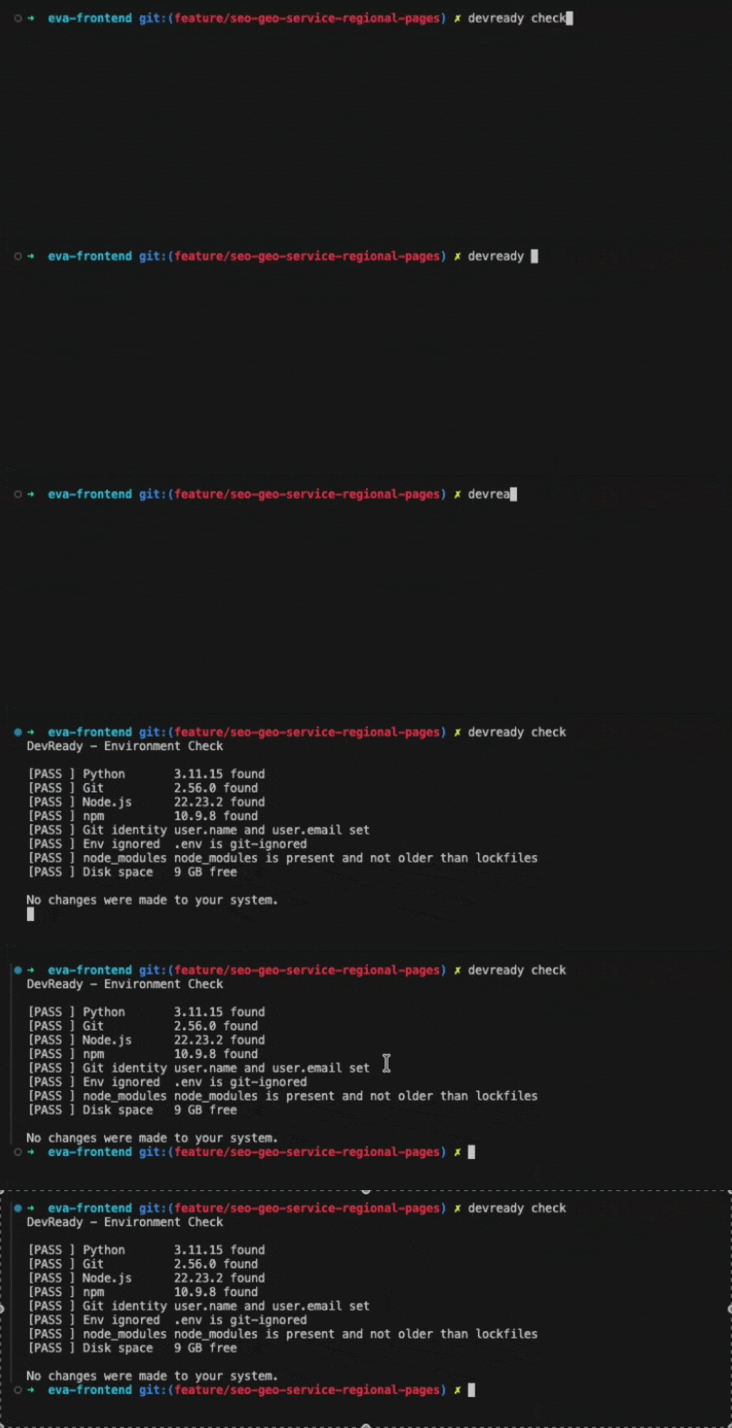
One command, every requirement checked, exact fixes shown.
What is DevReady?
DevReady is a command-line tool that tells you whether your computer is set up to work on a project. Run devready check inside a project folder and it:
- Reads the versions the project says it needs (
.nvmrc,.python-version,package.jsonengines,pyproject.tomlrequires-python). - Compares them with what is actually installed on your machine (Python, Node.js, npm, Git, and so on).
- Reports PASS, WARN or FAIL for each item, with what to fix. The exit code is
1if a requirement is unmet, so it also works in CI.
It only looks. It never installs, changes or deletes anything, makes no network calls and sends no telemetry. Fixing the problem (for example switching Node versions) is up to you.
The problem
You clone a repo. npm install explodes. The README says "Node 20", your machine has 16, and the error message says nothing useful. Multiply by every new hire, student, CI runner and AI agent that burns tokens guessing why a build failed.
The fix
$ devready check

DevReady - Environment Check

[PASS ] Python       3.15.0 found
[PASS ] Git          2.52.0 found
[PASS ] Node.js      23.5.0 found
[PASS ] npm          11.14.1 found
[FAIL ] Node engines 23.5.0 does not satisfy package.json engines (>=99)
[WARN ] Python pin   3.15.0 does not satisfy .python-version (3.99)

4 passed, 1 warning, 1 failed
No changes were made to your system.
Output above is from a real run (pins deliberately set to impossible values to show failures). Exit code
1when a requirement is unmet, so it drops straight into CI.
Why DevReady
| 🎯 Project-aware | Reads what your project declares (.nvmrc, .node-version, .python-version, package.json engines, pyproject.toml requires-python) and compares it to what is installed. Not just "is Node installed?" |
| 🔒 Read-only by design | Never installs, edits or deletes. Never prints env values. No network. No telemetry. |
| 🤖 Agent-ready | Stable, versioned JSON schema, a Claude Code plugin, an MCP server and AGENTS.md. Agents check first instead of guessing. |
| 🛡️ Prompt-injection safe | Output contains only parsed versions and fixed text, never raw file or command output, so a hostile package.json can't smuggle instructions to your agent (tested). |
| 📦 Zero dependencies | Pure Python standard library. Installs in a second, runs anywhere Python 3.10+ does. |
| ⚙️ CI-friendly | Documented exit codes, JSON output, tested on Linux, macOS and Windows in CI. |
Who it's for
- 🧑🎓 Students & bootcamp learners: plain-language results instead of cryptic stack traces.
- 🧑💻 Developers switching projects: one command tells you what's off before you lose an hour.
- 👩🏫 Maintainers & educators: put
devready checkin your README's setup steps and cut "it doesn't work" issues. - 🏗️ CI & platform teams: fail fast with a clear preflight step.
- 🤖 AI-agent users: give Claude Code / Codex a ground-truth environment check.
Install
Install from PyPI:
pipx install devready-cli
# or run without installing:
uvx devready-cli check
From npm (runs the same PyPI release through uvx or pipx, so one of them must be installed):
npx devready-cli check
From Homebrew on macOS and Linux:
brew install evalogical-inc/tap/devready
No Python tooling yet (for example a JavaScript-only machine)? uv installs without Python, and uvx then runs DevReady with no further setup:
# macOS/Linux
curl -LsSf https://astral.sh/uv/install.sh | sh
# Windows (PowerShell)
powershell -ExecutionPolicy ByPass -c "irm https://astral.sh/uv/install.ps1 | iex"

uvx devready-cli check
From a clone (for development):
git clone https://github.com/Evalogical-Inc/devReady && cd devReady
python -m venv .venv
# Windows: .venv\Scripts\Activate.ps1    macOS/Linux: source .venv/bin/activate
python -m pip install -e ".[dev]"
Usage
devready check                    # human-readable report for the current directory
devready check --quiet            # only non-pass results (text format)
devready check --project ../app   # inspect another project's pins
devready check --format json      # machine-readable (see docs/schema.json)
devready check --recursive        # monorepos: the root and every workspace package (see below)
devready explain docker.daemon    # what a check means and how to fix it
devready check --format junit     # or sarif, for CI
devready check --only project --skip project.ports   # filter by id or prefix
devready fix --plan               # suggested steps only; never runs them
devready check --format json > baseline.json   # save a snapshot (commit it for a team baseline)
devready check --baseline baseline.json          # show only what changed; fail only on new/worse failures
devready init > .devready.json    # optional config: skip ids, require node/python, required env names
devready mcp                      # run as an MCP server over stdio
devready --version
| Exit code | Meaning |
|---|---|
0 | No blocking failures |
1 | A project requirement is not met |
2 | Invalid usage (e.g. bad --project path) |
3 | Internal error |
| Status | Meaning |
|---|---|
pass | Requirement met |
warn | Tool missing, or a soft pin (.nvmrc, .python-version) differs |
fail | A hard requirement (engines, requires-python) is not met |
skip | Not evaluated (tool absent, or requirement syntax not understood) |
error | DevReady couldn't run the check |
JSON output
{
  "schema_version": 1,
  "results": [
    {
      "check_id": "project.node.engines",
      "title": "Node engines",
      "status": "fail",
      "summary": "23.5.0 does not satisfy package.json engines (>=99)",
      "suggestion": "Switch versions with your version manager (nvm, pyenv, mise, ...) or update the requirement.",
      "docs_url": ""
    }
  ]
}
Monorepos (--recursive)
devready check --recursive          # the root and every workspace package
devready check --recursive --quiet  # only packages with something to report
-- . (root) --
[PASS ] Python          3.12.1 found
[PASS ] Git             2.52.0 found
...
-- apps/web --
[FAIL ] Node engines    23.5.0 does not satisfy package.json engines (>=99)

7 passed, 1 warning, 1 failed across 4 packages
- Which packages:
package.jsonworkspacesandpnpm-workspace.yamlpackages:(dir,dir/*,dir/**). Without either, folders up to 3 levels deep that hold a pin file (package.json,pyproject.toml,.nvmrc,go.mod, ...).node_modules,.git,.venv,venv,distandbuildare skipped. - What runs where: tool versions, git identity and disk space once; pins,
.envkeys, Docker files and config per package, each with its own.devready.json. A result about the machine (Python on PATH, Docker daemon, ...) is shown once even when several packages trigger it. - Output: a text section per package.
--format jsonfollowsdocs/schema-multi.json:{"schema_version": 1, "projects": [{"path": "apps/web", "results": [...]}]}, where"."is the root and eachresultsitem has the usual shape. SARIF and JUnit name the package;--baselinetakes a saved--recursivereport and compares package by package. - Exit code
1when any package has afail. - Limits: at most 200 packages (stderr says when more were found). Only folder names made of letters, digits and
_ . @ + -count, symlinks are never followed, and negated patterns (!**/test/**) are ignored.
Use it in CI (GitHub Actions)
- uses: Evalogical-Inc/devReady@v1.3.0
  with:
    skip: project.ports                  # optional; also: only, format, project, recursive, version
To show findings in GitHub code scanning, save a SARIF report and upload it. Pin findings point at the file that declares the pin (package.json, .nvmrc, go.mod, ...); tool-only findings have no file.
- uses: Evalogical-Inc/devReady@v1.3.0
  with:
    format: sarif
    output: devready.sarif
  continue-on-error: true               # still upload when a requirement is unmet
- uses: github/codeql-action/upload-sarif@v4
  with:
    sarif_file: devready.sarif
The job fails when a declared requirement is unmet (fail). It installs devready-cli from PyPI, so flags added after your installed release (--only, --skip, junit/sarif, recursive: true) need a release that includes them; set version: to pin one.
Use it with pre-commit
With pre-commit 3.2.0+ and Python 3.10+, add this to your
.pre-commit-config.yaml:
repos:
  - repo: https://github.com/Evalogical-Inc/devReady
    rev: main  # unreleased; replace with a containing release tag or full commit SHA
    hooks:
      - id: devready
        args: [--skip, disk.space]  # optional
The hook is unreleased; v1.3.0 does not contain it. For a reproducible configuration,
pin a full commit SHA or a later release tag that contains .pre-commit-hooks.yaml.
Install the hook for pushes, then try it manually:
pre-commit install --hook-type pre-push
pre-commit run devready --all-files --hook-stage pre-push
It runs devready check from your repository root before a push, even when no files
match, and does not pass filenames to the CLI. Unmet requirements block the push.
Use args for existing options such as --only, --skip and --baseline; relative
paths are resolved from your repository root.
pre-commit installs DevReady in an isolated Python environment. DevReady checks your
project's .venv or venv Python first; without one, it uses Python on PATH, which
pre-commit sets to include the hook environment. To check a specific project Python,
create its virtual environment before running the hook. To run before commits instead, set
stages: [pre-commit] on the hook and install with --hook-type pre-commit.
Add the badge
Tell contributors your project declares its requirements and can be checked with one command. Paste this into your README:
[](https://github.com/Evalogical-Inc/devReady)
Use it with AI coding agents
DevReady ships the same engine three ways, so your agent can verify the environment before it installs, builds or tests.
Claude Code - plugin with a skill, a /devready:doctor command and an MCP server (the MCP server needs uv; the rest works without it once devready-cli is installed):
/plugin marketplace add Evalogical-Inc/devReady
/plugin install devready --marketplace Evalogical-Inc/devReady
Any MCP client (Codex, Cursor, ...) - one read-only tool, check_environment (optional project path, recursive: true for monorepos). Also listed in the MCP Registry as io.github.Evalogical-Inc/devready:
# ~/.codex/config.toml (verify keys against your Codex version)
[mcp_servers.devready]
command = "uvx"
args = ["--from", "devready-cli", "devready", "mcp"]
Anything else - drop AGENTS.md in your repo, or copy skills/devready. Details in docs/agents.md.
Safety & privacy
- Fixed command lists with timeouts; no shell, no user-built commands.
- Project files are read only if regular files ≤ 1 MB (symlinks skipped) and are never executed.
- Environment variable values are never read into output. Nothing leaves your machine.
- A passing report does not guarantee your project builds.
See docs/security.md for the model, docs/versioning.md for what stays stable, docs/checks.md for every check, and SECURITY.md to report a vulnerability.
Limitations
- Checks today: Python, Git (+ identity set), Node.js, npm, project pins (
.nvmrc,.node-version,.python-version,.tool-versions,package.jsonengines,pyproject.tomlrequires-python),.env.examplevs.envkey names, Docker CLI + daemon, compose file validity and image platform (arm64 vs amd64) mismatch (only when the project has a Dockerfile/compose file), free disk space, Windows long paths, PowerShell policy, line endings, WSL version and Docker Desktop engine, macOS/Linux build tools, and (only when the project declares them) Go, Ruby, Java, Rust, .NET, pnpm, Yarn, Bun, Terraform and Deno pins, PHP and Dart requirements,.envnot git-ignored,node_modulesvs lockfile, and declared ports already in use. - The version-range matcher covers common npm/PEP 440 syntax; pre-releases and exotic ranges report
skiprather than guess. - The Python version compared is the project's (
.venv/venv, else the firstpythonon PATH), and the result names the interpreter checked. DevReady does not look at other virtualenv locations (poetry, conda, pyenv shims).
Roadmap
- Docker CLI + daemon reachability,
.tool-versions,.envkey-name diff, disk space, git identity,devready explain - Port-in-use checks, more ecosystems (Go, Rust, Java, Ruby, .NET, pnpm/yarn/bun), JUnit/SARIF output,
fix --plan, GitHub Action -
.devready.jsonconfig,--baselinesnapshots - Platform-specific checks (Windows, macOS/Linux build tools, WSL)
- Docker compose validity, image platform, Docker Desktop engine
- Exact version-switch commands in suggestions (first:
fnm) - Monorepo
--recursive(#43) - Org
--policyfile (#44), VS Code extension (#45) (see ROADMAP.md) - pre-commit hook (#32)
- Homebrew tap (#31)
- Standalone binaries
Have a setup problem DevReady should catch? Open an issue. Early feedback shapes the roadmap.
Contributing
PRs welcome, especially new read-only checks and platform fixes. Start with CONTRIBUTING.md and the technical plan; background research is in docs/research.md. Please follow the Code of Conduct.
ruff check . && ruff format --check . && pytest
About Evalogical
DevReady is built and maintained by Evalogical, a software company offering AI-enabled product engineering, custom software and IT services. Need help with a product or an engineering team? Talk to us.
License
MIT © Evalogical Inc
If DevReady saved you an afternoon, a ⭐ helps others find it.