Listed from the MCP registry; nobody on Odel publishes it.

EXTREMELY agency
Your agency of AI agents in your AI app: what agents did, approvals, requests, jobs and reports.
Runs on your machine from its package; the steps are below.

What it does
- Reads
- Writes
- High impact
At most: moves money, runs code or commands, deletes data, or sends messages for you.
What it costs
FreeOdel charges nothing per call. The publisher may charge for its own service.
Runs locally over stdio
This server isn't hosted — your MCP client launches it from a package registry. Use one of the commands below, or drop the config into your client (e.g. Claude Desktop).
Run
npx -y @extremely-agency/mcp
MCP client config
{
  "mcpServers": {
    "extremely-agency": {
      "command": "npx",
      "args": [
        "-y",
        "@extremely-agency/mcp"
      ]
    }
  }
}Extremely Autonomous Agents
Build your paperclip maximizer. A free, open-source AI agency that runs on your own computer: a fleet of agents, each with a job, its own tools and a schedule, that do real work for a business - and fix, extend and look after themselves. It runs on the AI you already have: a ChatGPT, Claude or Copilot plan, an API key (Anthropic, OpenAI, Gemini, OpenRouter, xAI, Mistral, DeepSeek, Groq or any OpenAI-compatible endpoint), or a local model through Ollama.
Watch the 33-second demo, with sound.
Launching 1 December 2026 on Windows, Mac and Linux. Join the waitlist, or try the live demo in your browser: the whole app with sample agents, nothing to install.
If you'd like to see it ship, star this repo. It helps other people find it.
What it does
- Agents with a job. Each agent is a few plain files: what it's for
(
CHARTER.md), the tools it holds and how much a person is involved with each (TOOLS.yaml), and what counts as its output (KPI.yaml). Build one by describing it, or add a ready-made pack (sales, marketing, support, finance, engineering...) that's tailored to your business. - You decide how involved you are. Every tool has a level - silent, logged, or waiting for your approval - and you can change it any time. Anything that reaches outside the business (an email, a post, a payment) starts on approval.
- Your own AI. Agents run on the AI you connect: a Claude, ChatGPT or Copilot plan, API keys from Anthropic, OpenAI, Google, OpenRouter, xAI, Mistral, DeepSeek, Groq or any OpenAI-compatible endpoint (Azure OpenAI, Together, Fireworks, LM Studio, vLLM), or a local model through Ollama. Each agent has up to three models and falls to the next if one fails.
- It builds its own tools. When an agent needs something it doesn't have, it files a request. The built-in Agency Engineer finds or builds the connection (HTTP, MCP, or a sandboxed code plugin that an independent review checks first), tests it with your key, and asks you once to approve giving it to the agents that need it.
- It looks after itself. The Agency Doctor checks the whole fleet every couple of hours for what nobody asks about - loops, busywork, the same error again and again - and gets each fixed.
- Organisations. Sign up to create one, invite people by email, and host its agency on your computer; members reach it from their own apps over an end-to-end encrypted relay. Or self-host it with local accounts.
Use it from your AI app
Talk to your agency from Claude Desktop, Cursor, VS Code, Claude Code or any app
that speaks MCP: "what did my sales agent do today?", "approve the email to
Northside Bikes", "give the research agent a job". In the app, Settings →
Connectors → Your AI assistant connects Claude Desktop or Cursor in one click;
anywhere else, add an MCP server that runs npx -y @extremely-agency/mcp.
Details in packages/agency-mcp.
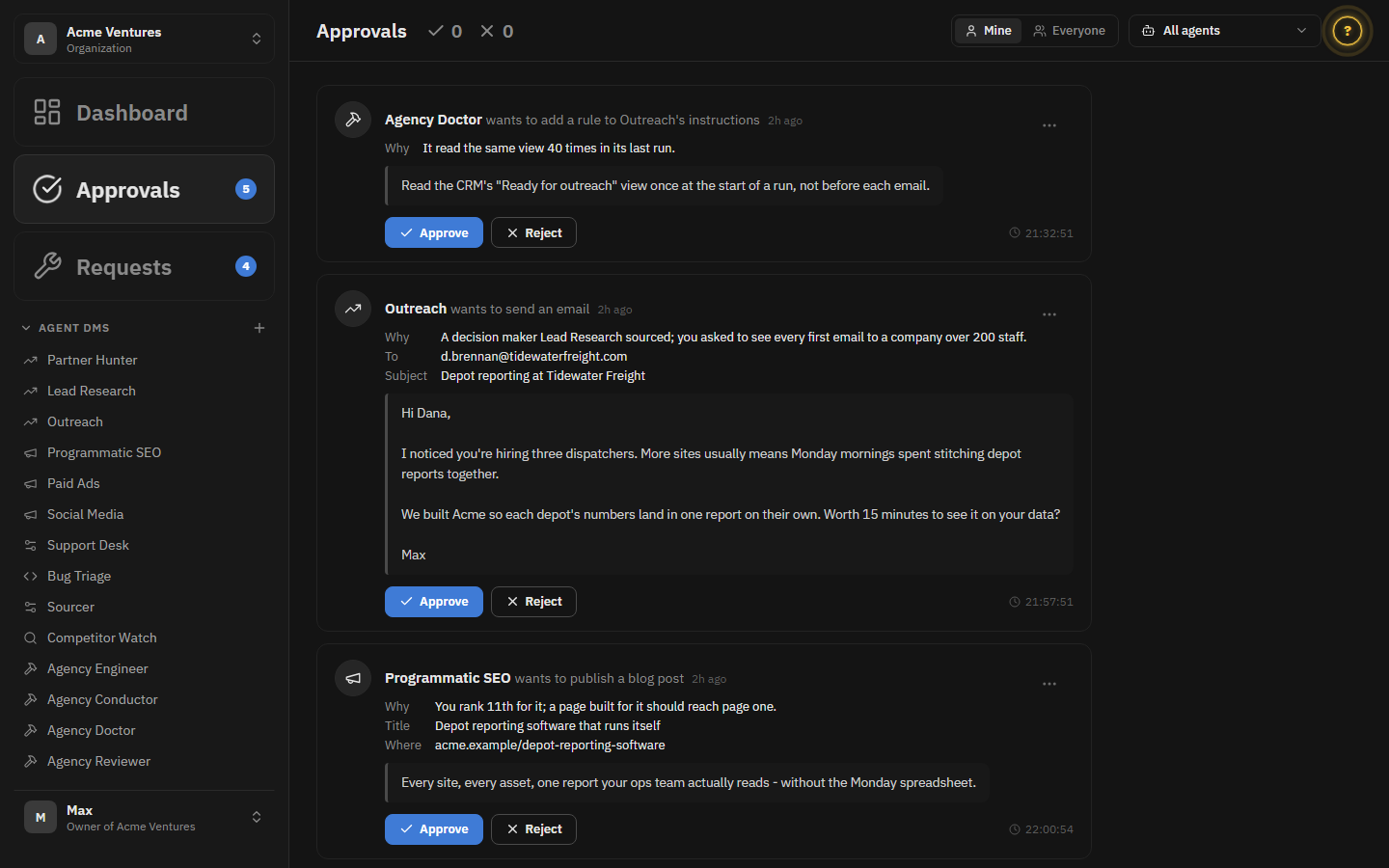
How it compares
Side-by-side pages against n8n, Zapier, Make, Lindy, OpenClaw, CrewAI, Manus, Relevance AI and more: extremely.agency/alternatives.
What's in this repository
apps/server | The agency: agents, runner, scheduler, connections, requests, approvals. Runs on your computer. |
apps/desktop | The app (React): dashboard, approvals, requests, agents' DMs, settings. |
apps/electron | The downloadable desktop app around the two (docs/packaging.md). |
apps/backend | Accounts, organisations and their members, invites, and the relay members reach a hosted agency through. |
docs/ | How each part works. |
Start with docs/architecture.md, docs/runner.md and docs/requests.md.
Running it
You need Node 24.
cd apps/server && npm install && npm run dev      # the agency, on :5175
cd apps/desktop && npm install && npm run dev     # the app, on :5174
Open http://localhost:5174 and connect an AI model to start. Without
apps/backend running or VITE_EAA_BACKEND_URL set, everything works except
signing up and organisations; see the .env.example file in each app.
Tests: npm test in apps/server and apps/backend.
Licence
AGPL-3.0. Free to use, change and self-host. If you run a modified version as a service for others, you must publish your changes under the same licence. A paid hosted plan is offered separately.
Contributing
Issues and bug reports are welcome. Outside pull requests can't be accepted until a Contributor License Agreement is in place - see CONTRIBUTING.md.







