Listed from the MCP registry; nobody on Odel publishes it.
Is this yours? Claim it
Benchline
Open-source developer, PDF, image, SEO and security tools over a stateless HTTP MCP server. No key.
One address for any MCP client. No sign-in needed on this server.
What it does
19 read2 act29 other
Grouped by tool name. At most: creates or changes data: records, files, settings.
What it costs
FreeOdel charges nothing per call. The publisher may charge for its own service.
Tools
50 · grouped by tool name · checked 27 Nov 2026Read · 19Look things up
- list_og_templates
- check_robots_txt
- inspect_meta_tags
- count_tokens
- explain_cron
- convert_data_format
- convert_csv_json
- diff_text
- convert_image
- convert_color
- convert_unix_timestamp
- explain_chmod
- convert_markdown_html
- fetch_page_markdown
- read_barcode
- read_exif
- read_image_text
- count_text
- convert_case
Act · 2Change something
- merge_pdf
- remove_background
Other · 29Neither hinted nor named
- generate_llms_txt
- score_ai_seo
- build_open_graph
- decode_jwt
- build_json_ld
- build_nextjs_dockerfile
- format_json
- base64_codec
- compress_image
- resize_image
- date_difference
- hash_data
- generate_uuid
- url_codec
- generate_password
- split_pdf
- compress_pdf
- images_to_pdf
- generate_qr_code
- extract_pdf_text
- organize_pdf
- render_pdf_pages
- protect_pdf
- optimize_svg
- crop_image
- generate_favicon
- generate_fake_data
- test_regex
- format_sql

Benchline





Benchline is a free directory of browser tools for the small, exact jobs around shipping software: JSON, PDFs, images, tokens, headers, and the files a crawler can cite. Each tool is a pure function with a page on the site and the same function on a stateless MCP server. Tool inputs stay on the device unless a tool's job is to read a public URL. When Postgres is configured, the site can store anonymous usage counts; see Privacy.
Live: https://benchline.fabwaseem.com
Screenshots
|  |
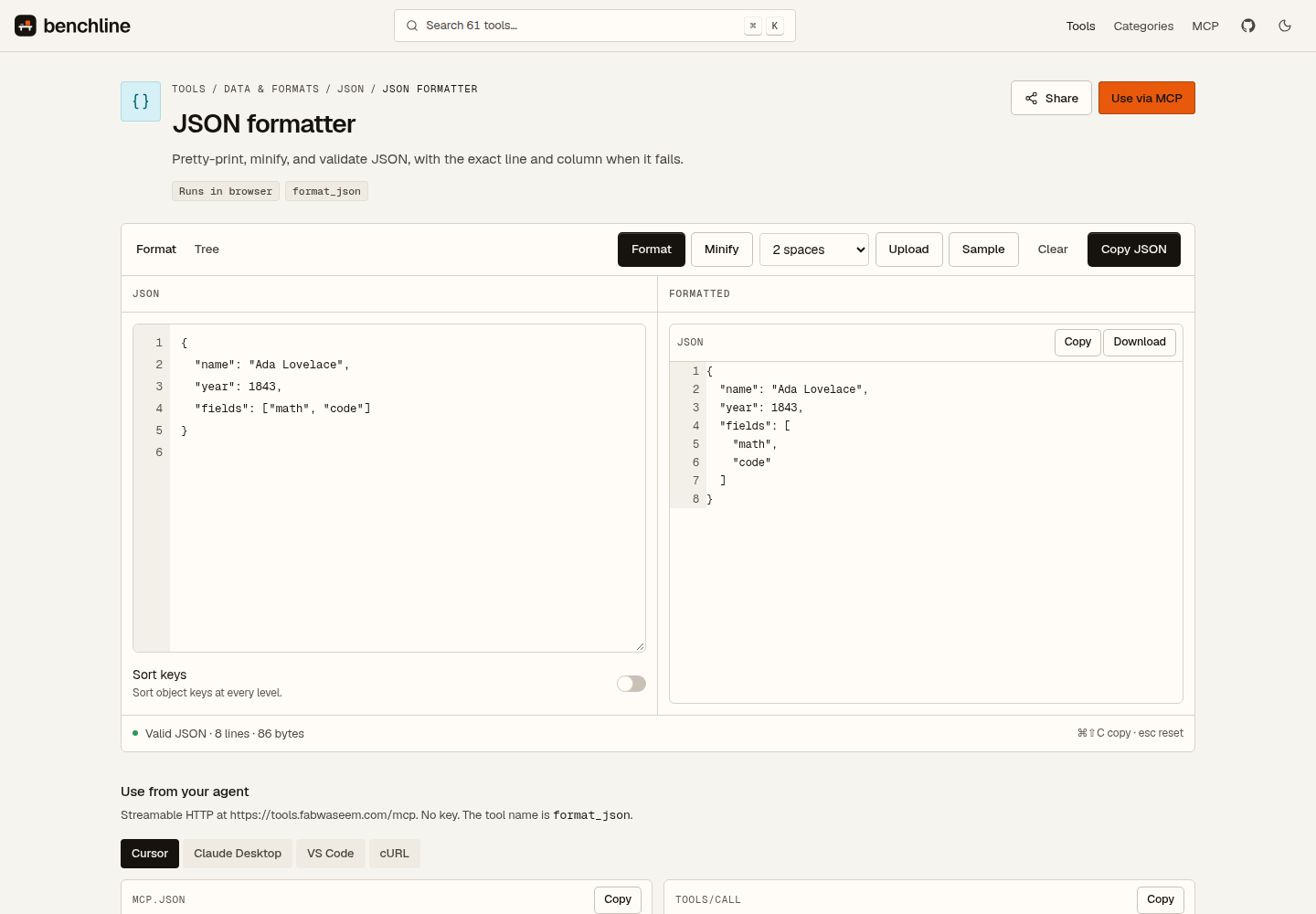 | 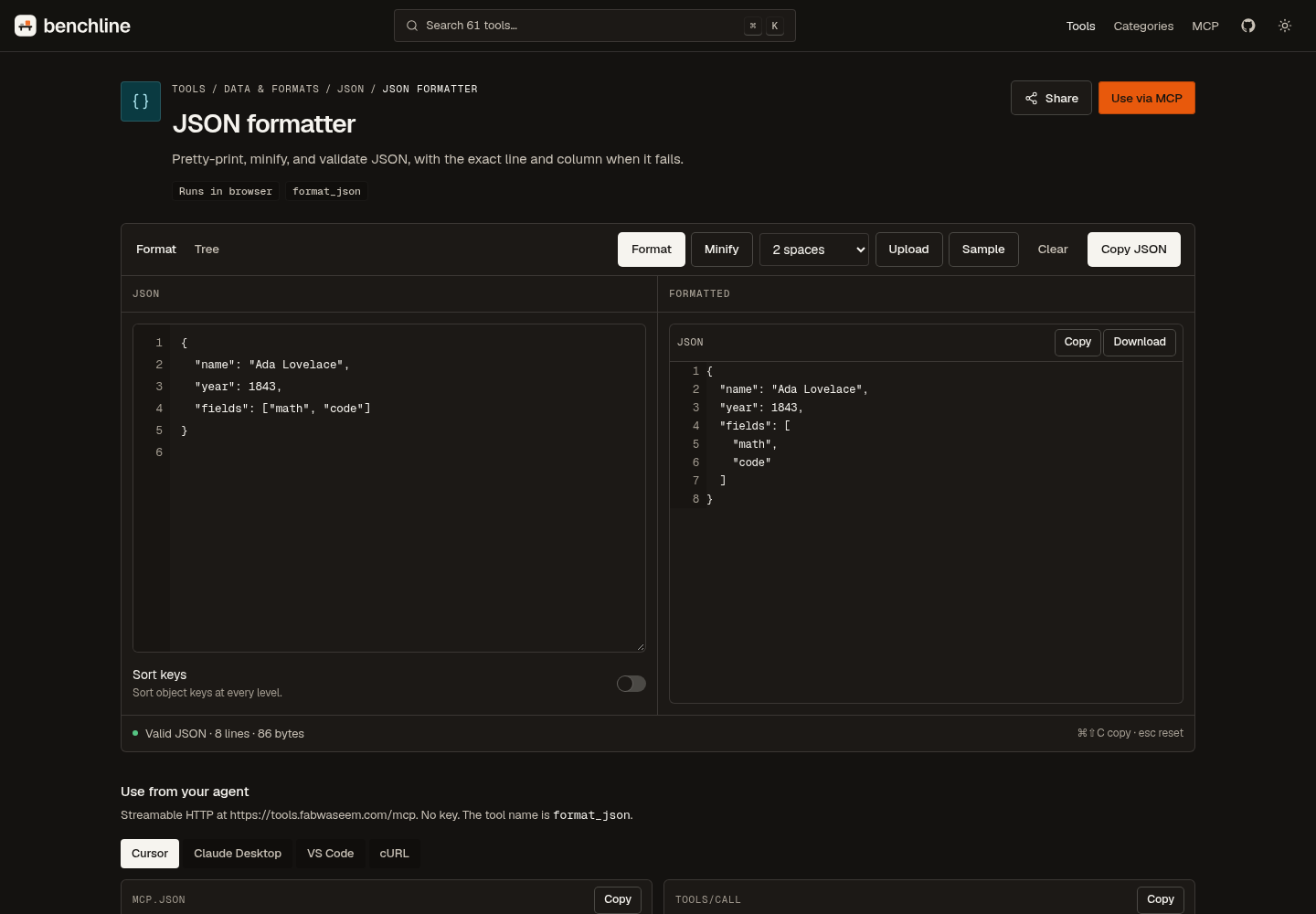 |
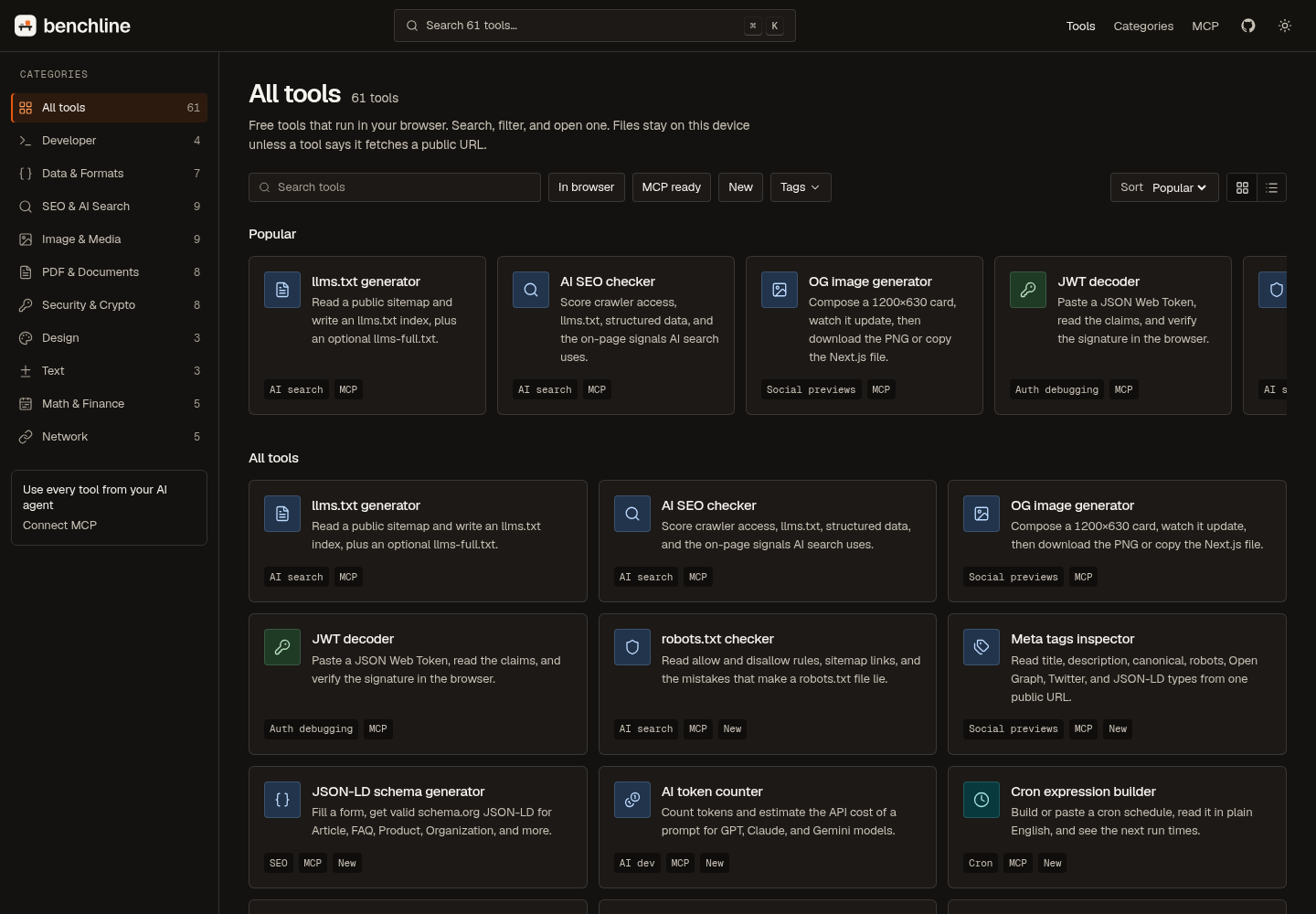
The directory is the home page. The JSON formatter is one tool page (/t/json-formatter).
Features
- A searchable directory, with categories, tags, and a command palette on ⌘K. Filtering runs in the browser.
- One folder per tool: metadata, a client page, and pure
lib/covered by vitest. - A stateless Streamable HTTP MCP server at
/mcp. No API key and no session. - The same functions over HTTP at
POST /api/v1/tools/<slug>, with an OpenAPI document at/openapi.json. /llms.txtand/llms-full.txt, generated from the registry.- Light and dark themes. Corner radii stay on the small token scale.
Tools
Every tool, in toolOrder. Run pnpm gen:readme-tools after adding one.
Developer
Build files, schedules, and the small programs a deploy depends on.
Cron. Build a cron expression and read the next runs.
- Cron expression builder — Build or paste a cron schedule, read it in plain English, and see the next run times.
Next.js. Production files for shipping a Next.js app in a container.
- Next.js Dockerfile generator — Generate a production multi-stage Dockerfile for Next.js, plus .dockerignore and compose.
Fixtures. Placeholder copy and seeded rows for a schema.
- Lorem ipsum — Placeholder copy, or fake rows as JSON, CSV, and SQL, from a seed.
Regex. Test a JavaScript regular expression against a sample.
- Regex tester — Test a JavaScript pattern, read the groups, and preview a replacement.
Code. Minify and convert source code.
- Code Minifier — Minify JavaScript, CSS, and HTML with byte-level savings.
Data & Formats
JSON, tables, and the encodings that move data between systems.
JSON. Format JSON and convert it to YAML.
- JSON formatter — Pretty-print, minify, and validate JSON, with the exact line and column when it fails.
- JSON YAML converter — Convert JSON, YAML, TOML, and XML in the browser, and keep the line number when a document fails.
- JSON Schema — Infer a schema from JSON, validate against one, and export TypeScript and Zod.
- JSONPath tester — Query JSON with JSONPath Plus and inspect every match.
- JSON to Types — Paste JSON, get TypeScript, Zod, Pydantic, dataclass, and Go types.
Tables. Turn CSV into JSON and JSON into rows.
- CSV JSON converter — Convert CSV to JSON and JSON back to CSV, with a delimiter and a header row you choose.
Encoding. Base64 and the bytes a string is hiding.
- Base64 codec — Encode and decode Base64 for text or a file, including the URL-safe alphabet.
- Programmer calculator — Base conversions, bitwise ops, and a clickable bit grid.
- ZIP Tools — Create ZIP archives and extract them, entirely in your browser.
Markup. Markdown and HTML, converted in either direction.
- Markdown HTML — Convert Markdown to HTML, or HTML back to Markdown, with a live preview.
SQL. Format a query without running it.
- SQL formatter — Format SQL for PostgreSQL, MySQL, BigQuery, Snowflake, and other dialects.
SEO & AI Search
Markup, crawlers, and the files an AI search engine can cite.
AI search. Files and checks that decide what an AI crawler can fetch, cite, and skip.
- llms.txt generator — Read a public sitemap and write an llms.txt index, plus an optional llms-full.txt.
- AI SEO checker — Score crawler access, llms.txt, structured data, and the on-page signals AI search uses.
- robots.txt checker — Read allow and disallow rules, sitemap links, and the mistakes that make a robots.txt file lie.
- Page to Markdown — Fetch a public page and turn the article into Markdown.
SEO. Structured data and the markup a crawler can quote without guessing.
- JSON-LD schema generator — Fill a form, get valid schema.org JSON-LD for Article, FAQ, Product, Organization, and more.
- Sitemap validator — Check a sitemap URL or XML, or generate a urlset from a list.
AI dev. Token counts and the cost of a prompt before you send it.
- AI token counter — Count tokens and estimate the API cost of a prompt for GPT, Claude, and Gemini models.
Social previews. Open Graph cards, meta tags, and the picture a shared link unfurls into.
- OG image generator — Pick a template, watch the card update, then download the PNG or copy the Next.js file.
- OG template list — Browse Open Graph template ids, fields, and color presets.
- Meta tags inspector — Read title, description, canonical, robots, Open Graph, Twitter, and JSON-LD types from one public URL.
- Social Image Resizer — Fit any photo to the exact dimensions for Instagram, YouTube, X, LinkedIn, and Facebook — cropped to the subject you pick.
- Meme Generator — Classic top/bottom caption memes from styles or your own images.
Image & Media
Convert, compress, and resize pictures in the browser. The file stays on the device.
Image. Convert, compress, and resize pictures in the browser. The file stays on the device.
- Image format converter — Convert HEIC, WebP, PNG, JPG, and AVIF in the browser. Nothing is uploaded.
- Image compressor — Shrink JPEG, PNG, WebP, and AVIF in the browser, with the real before and after size.
- Image resizer — Resize by pixels or percent, with the aspect ratio locked and a batch ZIP.
- QR and barcode reader — Read QR codes and barcodes from a photo, a paste, or the camera.
- SVG optimizer — Minify an SVG, compare the size, and keep the viewBox unless you turn that off.
- EXIF viewer and remover — Read photo metadata, including GPS, and strip all of it or only the location.
- Image cropper — Crop with a free box or an aspect preset, including a circle.
- Image to text — Read the words in a picture. The OCR model downloads once and runs in this browser.
- Background remover — Cut out a portrait in the browser, or clear a solid backdrop without a download.
- Photo Collage — Arrange photos into grid layouts and export high-res PNGs.
Audio. Trim and shape sound in the browser. The file stays on the device.
- Audio Trimmer — Cut a section out of an audio file. See the waveform, drag the trim region, add fades, and export WAV.
PDF & Documents
Merge, split, compress, and build PDFs in the browser. The files stay on this device.
- Merge PDF — Combine PDFs in the browser. Reorder them, keep a page range from each file, and download one document.
- Split PDF — Extract a page range, or split a PDF into single pages or chunks, then download a PDF or a ZIP.
- Compress PDF — Shrink a PDF in the browser. Pick a preset or a target size and compare the file before and after.
- Image to PDF — Turn JPG, PNG, and WebP images into one PDF. Set the page size, orientation, margin, and order.
- PDF to Text — Read the selectable text of a PDF, with a markdown heading when the type is larger.
- Rotate PDF — Reorder, rotate, or drop pages, then download the PDF.
- PDF to Image — Render PDF pages to PNG or JPEG, then download one image or a ZIP.
- Protect PDF — Add an AES password, or unlock a PDF when you already know the password.
- Resume Builder — Build a polished resume in the browser: profile, experience, education, and skills, exported as a clean PDF.
- PDF Signature — Sign a PDF in the browser. Draw or type your signature, place it on any page, and download the signed file.
- PDF Form Filler — Fill interactive PDF forms in the browser and export.
Security & Crypto
Tokens, hashes, passwords, and the bits a permission is made of.
Auth debugging. Read a JSON Web Token, check the signature, and see why a session expired.
- JWT decoder — Paste a JSON Web Token, read the claims, and verify the signature in the browser.
- TOTP authenticator — Live 2FA codes for your accounts, with otpauth:// import and QR export.
Crypto. Hashes, passwords, UUIDs, and permission bits.
- Hash generator — MD5, SHA-1, SHA-256, and SHA-512 checksums for text or a file, with HMAC.
- UUID generator — Generate UUID v4 or v7 in bulk, and read the time stored in a v7 id.
- Password generator — Cryptographic passwords and passphrases, with an entropy strength meter.
- Chmod calculator — Turn a permission grid into octal and symbolic chmod, and back.
- Bcrypt hash — Hash and verify passwords with bcrypt or argon2id. Nothing is stored.
- Key pair — Generate RSA, EC, and Ed25519 keys, and convert PEM and JWK.
- AES encryption — AES-GCM encrypt and decrypt in the browser, nothing uploaded.
Headers. Content-Security-Policy and the headers a browser enforces.
- CSP builder — Build a Content-Security-Policy and a Next.js headers snippet.
Design
Color values, contrast, and the marks a layout is built from.
- Color converter — Turn any color into HEX, RGB, HSL, OKLCH, and CMYK, and check the contrast ratio.
- QR code generator — Make a static QR code for text, a URL, Wi-Fi, or a vCard. Set the colors and error correction, then download SVG or PNG.
- Favicon generator — Make the ICO, the PNG sizes, the manifest, and the HTML snippet from a picture or letters.
Text
Counts, case, and the lines that changed between two texts.
Diff. Compare two texts and see the lines that changed.
- Diff checker — Compare two texts side by side or inline, and download a unified patch.
Writing. Counts, case, and the limits a title or post has to fit.
- Word counter — Words, graphemes, reading time, and the limits a title or post has to fit.
- Case converter — camelCase, snake_case, and title case, including AP and Chicago rules.
Math & Finance
Loans, percentages, units, and the timestamps a schedule is counted in.
Time. Unix timestamps and the days between two dates.
- Unix timestamp converter — Turn epoch seconds or milliseconds into a date, and a date in any time zone back into epoch time.
- Date difference calculator — Count the days, weeks, and business days between two dates.
Finance. Loan schedules and percentage math with decimal rounding.
- Loan EMI calculator — A monthly installment and the full amortization table, rounded to the cent.
- Percentage calculator — Percent of, percent change, reverse percent, and margin, with the formula shown.
- Invoice Generator — Build invoices and quotes in the browser. Add line items, tax and discounts, then download a clean PDF.
- Currency Converter — Live exchange rates, historical trends, and multi-currency tables.
Units. Convert length, mass, temperature, and data sizes.
- Unit converter — Length, mass, temperature, and data sizes, with decimal and binary units kept apart.
Network
DNS, certificates, response headers, and the URLs a request is built from.
URLs. Encode and decode a URL and its query.
- URL encoder and parser — Encode or decode a URL, then break the query string into parameters.
DNS. Look up public DNS records over HTTPS.
- DNS lookup — Query A, AAAA, MX, TXT, CNAME, and CAA over DNS-over-HTTPS.
IP & subnets. Subnet math for IPv4 and IPv6.
- CIDR calculator — Network, broadcast, host range, and membership for IPv4 and IPv6.
HTTP. Response headers, redirects, and a grade for the security headers.
- HTTP headers — Follow redirects and grade the security headers on a public URL.
- HAR analyzer — Drop a HAR capture, see where the time went.
- cURL Converter — Turn any curl command into fetch, Python, Go, PHP, or Rust.
- GraphQL Client — Query any GraphQL endpoint with variables, headers, and history.
- WebSocket Tester — Connect to any ws/wss endpoint and inspect live frames.
TLS. Certificate expiry, the chain, and the names on a public host.
- SSL checker — Expiry, names, and the chain for a certificate on port 443.
Use from your AI agent
The server is https://benchline.fabwaseem.com/mcp. It speaks JSON-RPC over Streamable HTTP and answers with JSON (enableJsonResponse). There is no session id. POST is the only method. A human-readable setup page is at /mcp/guide.
Open Graph is two calls. list_og_templates returns the template ids, categories, defaults, and field schemas. build_open_graph takes a template id, the fields that template uses, colors, a size, and optional images, and returns a PNG plus the Next.js file. The input schema is in docs/MCP.md.
Cursor
~/.cursor/mcp.json
{
  "mcpServers": {
    "benchline": {
      "url": "https://benchline.fabwaseem.com/mcp"
    }
  }
}
Claude Desktop
Open Claude Desktop, then Customize > Connectors, and add a custom connector. Paste https://benchline.fabwaseem.com/mcp. The server has no sign-in. This is the setup to use.
To bridge that URL as a stdio command, put this in claude_desktop_config.json:
{
  "mcpServers": {
    "benchline": {
      "command": "npx",
      "args": ["-y", "mcp-remote", "https://benchline.fabwaseem.com/mcp"]
    }
  }
}
VS Code
.vscode/mcp.json
{
  "servers": {
    "benchline": {
      "type": "http",
      "url": "https://benchline.fabwaseem.com/mcp"
    }
  }
}
curl
Send content-type: application/json and accept: application/json, text/event-stream. These two calls work against the live server without an initialize first.
tools/list:
curl -sS -X POST https://benchline.fabwaseem.com/mcp \
  -H 'content-type: application/json' \
  -H 'accept: application/json, text/event-stream' \
  -d '{"jsonrpc":"2.0","id":1,"method":"tools/list","params":{}}'
tools/call for format_json:
curl -sS -X POST https://benchline.fabwaseem.com/mcp \
  -H 'content-type: application/json' \
  -H 'accept: application/json, text/event-stream' \
  -d '{"jsonrpc":"2.0","id":2,"method":"tools/call","params":{"name":"format_json","arguments":{"json":"{\"a\":1}"}}}'
A successful call returns result.structuredContent and a text copy of the same JSON. A failure returns result.isError: true and a text message.
Rate limits
/mcp allows 60 requests a minute per address. POST /api/v1/tools/<slug> has its own bucket of 60 a minute. The address is the first x-forwarded-for hop, otherwise x-real-ip. A 429 body is a JSON-RPC error (Too many requests.) and the response sets retry-after.
A request that sends Origin must match the request host, localhost, 127.0.0.1, or https://benchline.fabwaseem.com (the NEXT_PUBLIC_SITE_URL origin). No Origin header is fine, which is what curl does.
File inputs
File arguments accept either url or data, not both.
datais standard or URL-safe base64, or adata:URI. The decoded bytes are capped at 10 MB.urlmust be publichttporhttpson port 80 or 443, with no username or password.localhost,*.local,*.internal, andmetadata.google.internalare refused. The host is resolved and refused when any address is loopback, private, link-local, CGNAT (100.64.0.0/10), multicast, or the IPv6 equivalents. Redirects are followed manually, up to four, and each hop is checked again. The fetch times out after 15 seconds. A declared or streamed body over 10 MB is refused.
The full input list is docs/MCP.md.
Privacy
Tools that run entirely in the browser keep text, files, and results on the device.
The tools below can fetch a public URL through this site. The page posts the URL or hostname you submit, the route fetches that address and does not write it anywhere, and private addresses are refused. Those routes allow 8 requests from one address every 10 minutes.
- llms.txt generator — Read a public sitemap and write an llms.txt index, plus an optional llms-full.txt.
- AI SEO checker — Score crawler access, llms.txt, structured data, and the on-page signals AI search uses.
- robots.txt checker — Read allow and disallow rules, sitemap links, and the mistakes that make a robots.txt file lie.
- Meta tags inspector — Read title, description, canonical, robots, Open Graph, Twitter, and JSON-LD types from one public URL.
- Page to Markdown — Fetch a public page and turn the article into Markdown.
- DNS lookup — Query A, AAAA, MX, TXT, CNAME, and CAA over DNS-over-HTTPS.
- Sitemap validator — Check a sitemap URL or XML, or generate a urlset from a list.
- HTTP headers — Follow redirects and grade the security headers on a public URL.
- SSL checker — Expiry, names, and the chain for a certificate on port 443.
- GraphQL Client — Query any GraphQL endpoint with variables, headers, and history.
- WebSocket Tester — Connect to any ws/wss endpoint and inspect live frames.
- Currency Converter — Live exchange rates, historical trends, and multi-currency tables.
Google Analytics
When NEXT_PUBLIC_GA_ID is set at build time, public pages also load Google Analytics 4. The dataLayer queue is set up inline and gtag.js loads from www.googletagmanager.com after the page has loaded. Besides page views, a browser tool run sends a tool_used event with the tool slug and outcome, never the input or output. /admin does not load the tag. Unset, nothing is rendered and nothing is sent to Google.
Usage counts
When DATABASE_URL is set, the server records anonymous counts: tool runs (MCP, POST /api/v1/tools/<slug>, and the browser), page views, tool opens, directory search text, and copy or download clicks. A run stores the time, tool slug, source, outcome, an error class such as validation or timeout, duration, and byte sizes. It does not store the tool input, the tool output, file bytes, submitted URLs, or the raw IP address.
The client address for these counts comes from X-Real-Ip, then the first X-Forwarded-For hop. Traefik sets both from the TCP connection. The stored address is sha256(ANALYTICS_SALT + UTC date + ip). Country is an ISO code from a server-side lookup of that address in the DB-IP IP to Country Lite database (CC BY 4.0). If that file is missing, country is left empty. A CDN country header (cf-ipcountry and the same idea from other edges) is used only when the lookup has no answer. The user agent is stored as a family (chrome, curl, …), and the referrer as a hostname. Browser visitors get a random first-party id in localStorage and the bl_vid / bl_sid cookies.
POST /api/track accepts the browser beacon. It checks Origin the same way MCP does, ignores known bots and prefetch, caps the body at 4 KB, and allows 30 requests a minute per address. Unknown tool slugs are rejected. Search text that looks like a URL or a token is dropped. Counts are queued in memory and flushed every few seconds; a full buffer or a database error drops the batch and logs a warning. The tool response is not delayed on the database.
GET /api/v1/stats returns totals by tool, source, outcome, and day, plus MCP clients, countries, error rates, and p50/p95 duration. Send Authorization: Bearer <STATS_TOKEN>. A missing or wrong token is a 404. Filters are from, to, slug, and source (at most 366 days; the default window is 30).
/admin is a private panel for the same database. It is a 404 unless both ADMIN_PASSWORD and ADMIN_SESSION_SECRET are set. The password is compared in constant time. A successful login sets an HMAC-signed, httpOnly, Secure, SameSite=Strict cookie for 7 days. Login attempts are rate limited per IP hash. Pages and CSV export run on the server and never send STATS_TOKEN to the browser. Admin paths are noindex, left out of the sitemap and robots allow list, and are not recorded as page views. Queries use raw tables for recent rows and analytics_daily for days that have already been rolled up, with statement_timeout (ADMIN_QUERY_TIMEOUT_MS, default 8s).
Raw rows older than ANALYTICS_RETENTION_DAYS (default 90) are folded into analytics_daily and deleted. That job runs at startup and then once a day, and pnpm db:retain runs it by hand. pnpm db:migrate applies the same SQL the server applies on boot. Startup takes an advisory lock, creates schema_migrations if needed, and applies any version that is not already recorded. If DATABASE_URL is unset, or the database does not answer within a few seconds, tracking stays off and the site still serves tools.
Without the rollup job, the same prune is:
DELETE FROM tool_runs WHERE ts < now() - interval '90 days';
DELETE FROM page_views WHERE ts < now() - interval '90 days';
DELETE FROM tool_opens WHERE ts < now() - interval '90 days';
DELETE FROM search_queries WHERE ts < now() - interval '90 days';
DELETE FROM ui_actions WHERE ts < now() - interval '90 days';
An MCP call is different from the page. The server runs the function. A file sent as base64, or a public URL the server fetches, is read in memory for that call and is not written to disk. Tools whose MCP entry says they fetch the network are marked openWorld in the registry. Image and PDF pages still do the work in the browser; their MCP handlers accept a file because an agent has no local disk on this server.
Tech stack
Next.js 16 (App Router, React Server Components, output: "standalone"), React 19, TypeScript in strict mode, Tailwind CSS v4, shadcn/ui on Base UI (base-nova), zod 4, vitest, and the Model Context Protocol TypeScript SDK. pnpm 10.33.4. Node 22 in CI and in the Docker image. Fonts are Geist Sans and Geist Mono. Themes use next-themes (class on <html>).
Project structure
src/app/                  directory, category, tag, tool, explore, search, about, AI, MCP guide
src/app/mcp/route.ts      POST /mcp
src/app/api/v1/tools/     POST /api/v1/tools/<slug>
src/app/api/v1/stats/     GET /api/v1/stats
src/app/api/track/        POST /api/track
src/app/api/tools/        browser routes for tools that fetch
src/lib/analytics/        usage counts, queue, migrations, country lookup
src/tools/<slug>/         meta.ts, tool.tsx, lib/, mcp.ts
src/registry/             generated index, loaders, MCP registry, search index
src/lib/                  shared helpers, MCP handler, SSRF guard, rate limit
src/components/kit/       tool workspace blocks
src/components/ui/        themed primitives
src/components/shell/     directory
public/tools/<slug>/      cover.png and logo.png
scripts/gen-registry.ts
scripts/db-migrate.ts
scripts/db-retain.ts
scripts/download-geodb.ts
scripts/gen-readme-tools.ts
scripts/gen-mcp-docs.ts
scripts/live-mcp-smoke.mts
pnpm gen:registry scans src/tools/*/meta.ts and mcp.ts, checks them, and writes the registry. The directory imports metadata only. Tool UI is loaded with next/dynamic from the generated host, so opening the directory does not download every tool.
More detail is in docs/ARCHITECTURE.md.
Local development
Node 22 (see .nvmrc) and pnpm 10.33.4 (packageManager in package.json; Corepack will use it).
pnpm install
pnpm dev
pnpm dev starts Next on port 3000.
pnpm test
pnpm lint
pnpm typecheck
pnpm build
pnpm start
pnpm build runs pnpm gen:registry first. Tests are vitest, src/**/*.test.ts.
After a registry change:
pnpm gen:readme-tools
pnpm gen:mcp-docs
Docker
The image is a three-stage build in Dockerfile: install, pnpm geo:download and pnpm build, then a Node 22 Alpine runner that starts node server.js on port 3000. The country database download is allowed to fail; the image still builds and country stays empty until a file is present. The runner copies data/ next to the server.
docker build -t benchline .
docker run --rm -p 3000:3000 benchline
The runner copies pdfjs-dist, zxing-wasm, tesseract.js, tesseract.js-core and its worker dependencies, satori, and @resvg/resvg-js next to the standalone server so the PDF, barcode, OCR, and Open Graph tools can load them.
Environment
| Variable | Used by | Default |
|---|---|---|
NEXT_PUBLIC_SITE_URL | Canonical URLs, Open Graph, and the MCP origin check | https://benchline.fabwaseem.com |
NEXT_PUBLIC_GA_ID | Google Analytics 4 measurement id, read at build time | unset (no GA tag) |
MCP_URL | scripts/live-mcp-smoke.mts only | https://benchline.fabwaseem.com/mcp |
DATABASE_URL | Postgres 17 connection for anonymous usage counts | unset (tracking off) |
ANALYTICS_SALT | Daily IP hash | unset (hash omitted) |
STATS_TOKEN | Bearer token for GET /api/v1/stats | unset (the route is 404) |
ADMIN_PASSWORD | Password for /admin | unset (/admin is 404) |
ADMIN_SESSION_SECRET | HMAC key for the admin session cookie | unset (/admin is 404) |
ADMIN_QUERY_TIMEOUT_MS | Admin SQL statement_timeout | 8000 |
ANALYTICS_RETENTION_DAYS | Raw-event window before rollup | 90 |
GEOIP_DB_PATH | DB-IP country lite mmdb | data/dbip-country-lite.mmdb |
GEOIP_DOWNLOAD | 0 skips the startup download | download when the file is missing |
Copy .env.example if you want a local origin. The app runs with none of these set.
Live MCP smoke test
scripts/live-mcp-smoke.mts connects with the MCP client, calls tools/list, then tools/call for every listed tool. Samples live in that file. It waits 1.2 seconds between calls so a full sweep stays under the 60-a-minute limit, and it retries 429s. Results are written to /tmp/benchline-mcp-live-results.json. The process exits 1 when a call fails or a listed tool has no sample.
MCP_URL=https://benchline.fabwaseem.com/mcp pnpm exec tsx scripts/live-mcp-smoke.mts
Adding a tool
Create src/tools/<slug>/ with meta.ts, tool.tsx, a pure lib/ and its vitest file, and mcp.ts. Add the slug to toolOrder, add the artwork, add a call sample to the endpoint test and to scripts/live-mcp-smoke.mts, then run pnpm gen:registry. The steps, the UI rules, and the MCP contract are in CONTRIBUTING.md.
Roadmap
New tools and changes are tracked as GitHub issues. A tool idea should use the tool request template: what it does, evidence that people need it, the MCP call, and whether it can run in the browser under the license policy. This repository does not keep a second, unpublished feature list.
License
MIT. Copyright (c) 2026 Waseem Anjum.
Acknowledgements
Benchline sits on Next.js, React, Tailwind CSS, shadcn/ui and Base UI, zod, Vitest, the Model Context Protocol TypeScript SDK, Lucide, and Geist (loaded through next/font). Tool implementations use the packages listed in package.json, including pdf-lib and sharp. New dependencies stay on permissive licenses. See CONTRIBUTING.md.
IP geolocation by DB-IP, the free IP to Country Lite database, CC BY 4.0. The image downloads dbip-country-lite-YYYY-MM.mmdb.gz at build time. A missing file leaves country empty.