Listed from the MCP registry; nobody on Odel publishes it.

appdyno
Test, drive and measure iOS and Android apps on simulators, emulators and real phones, from a Mac.
Runs on your machine from its package; the steps are below.
What it does
- Reads
- Writes
- High impact
At most: moves money, runs code or commands, deletes data, or sends messages for you.
What it costs
FreeOdel charges nothing per call. The publisher may charge for its own service.
Runs locally over stdio
This server isn't hosted — your MCP client launches it from a package registry. Use one of the commands below, or drop the config into your client (e.g. Claude Desktop).
Run
npx -y appdyno
MCP client config
{
  "mcpServers": {
    "appdyno": {
      "command": "npx",
      "args": [
        "-y",
        "appdyno"
      ]
    }
  }
}

Reproduce a mobile bug, find its cause with measurements, and turn the same flow into a test that runs again.
appdyno lets an AI agent drive, test and measure your iOS and Android app.
An MCP server, a command line, a TypeScript library and a Mac app, on simulators, emulators and real phones.


A real run, not a mock-up: an MCP client makes the calls in the terminal, with their real times, while the hub shows the phone and reads it.
An agent reads the screen as elements, taps, types and swipes. It sends a push, opens a deep link, and measures how the app starts, scrolls and holds its memory. Every action answers with the screen once it has settled, so the agent sees what it did in the same call. You can watch and touch the same device in a live window. It all runs on your Mac, with no cloud and no telemetry.
Works with any MCP client that starts a local server. How each one stands:
| clients | what was done | |
|---|---|---|
| Tested | Claude Code, Gemini CLI, opencode | each connected and listed the tools on 2026-11-04: Claude Code 2.1.318 over stdio and HTTP, Gemini CLI 0.66.0, opencode 1.19.5. Claude Code 2.1.319 was then run against an iPhone 17 Pro simulator (iOS 27.2) and an API 34 emulator, on 2026-11-08 and 2026-11-09 |
| Set up, not yet connected | Codex, Cline | appdyno install wrote each one's file, and Codex CLI 0.166.0 and Cline CLI 3.0.74 read it and listed appdyno; neither connected, on 2026-11-04 |
| Should work | Claude Desktop, ChatGPT, Cursor, VS Code, Devin Desktop (formerly Windsurf), Antigravity, Zed | not tried: each needs an account, a licence or a window. appdyno install writes each one's file as its own documentation says |
What this was tried on has every run.
Quick start
On a Mac with Node 22 or newer:
npx -y appdyno install # adds appdyno to the MCP clients on this Mac, asking which
Restart the client, start a simulator or an emulator or connect a phone, and ask your agent:
Open my app, go through checkout, and tell me what breaks.
Each step answers with what the device showed. When a tap takes the app down, that same answer says so, with the crash and the app's last log lines. A real one, from this repository's shop example on an iPhone simulator, where three of one product take the order down:
APP_NOT_RUNNING: tapped @7rwa "Place order"; the app died: EXC_BREAKPOINT SIGTRAP Trace/BPT trap: 5 (~/Library/Logs/DiagnosticReports/Shop-….ips)
its last log lines:
2026-11-13 15:04:41.624 Df Shop[46315:14884fe] (libswiftCore.dylib) Swift/ContiguousArrayBuffer.swift:695: Fatal error: Index out of range
  launch_app starts it again; why it died is above, with its last log lines, and read_logs with source crashes has the whole report
read_logs with source: crashes then names the function, discount(forQuantity:), and the same checkout saved as a flow fails in CI until the bug is fixed.
Ask it as well to send your app a push, to open each link your app opens, or to measure its cold launch and keep it as a baseline. npx -y appdyno doctor says what this Mac is missing, and Install covers a phone, the Mac app and any other client.
One call, one answer

There is no second call to look, and no fixed sleep: an answer says settled when the screen came to rest, and changed when it differs from before. A refusal has a code and a hint for the next step.
What an agent can do
| what an agent can do | its tools |
|---|---|
| See and act. Read the screen as elements and act on one by text, id or ref: tap, type, swipe, scroll to it, long press, drag, pinch, press a key. Up to 30 steps in one call. | read_screen tap_screen type_text swipe_screen press_key run_steps check_element |
| Native views. The view tree, headed by the framework that draws it: SwiftUI, UIKit, Compose, Flutter, React Native or a web view, on a simulator and on Android. | read_screen views |
| Push notifications. Send a push of each type the device takes, from a title and a body or from the platform's own JSON. | send_push |
| Links. Open a deep link, a universal link or an App Link. List the links an installed app opens. | open_link |
| Conditions. Dark mode, text size, language, a slow network, airplane mode and biometrics, each put back when the session ends. A location, and the way the screen is turned. A memory warning, a shake, photos into the library, and the app ended in the background, as the system ends one to free memory. | set_device transfer_files manage_app |
| Measure. Launch time, frames, memory, CPU, network bytes and energy, read from the platform's own tools and kept with their raw output. A gate fails a change that made the app slower. | measure_performance compare_performance |
| Evidence. Video, a report of each step, logs, crashes, network traffic, accessibility audits and visual diffs. | record_session read_logs capture_network check_screen |
| Flows. What an agent did once runs again with no model, on another device, and in CI. | run_flow |
| A person, too. A live window you can touch while the agent drives. When only a person can go on, such as at Face ID, the agent asks one and waits until they say done. | show_mirror ask_person |
All 28 tools are in Tools, with the names from before 1.3.0. Each is also a command, and a call in the library.
Push notifications and links
A real run on a simulator, through MCP, with the times it took on a busy Mac.
send_push sends a push by type, and answers with the screen after it. Asked with no type, it says which types this device takes, how each one is delivered, and the payload it would send.
- On a simulator an alert goes by
simctland reaches the app's own code, from fields or from APNs' own payload with a badge, a sound and a category. - On Android a push always goes to the app itself. A debuggable build that includes Firebase Messaging takes alert, rich, background and Live Activity pushes as real FCM messages, handed straight to its Firebase SDK, with no Firebase project or key.
tappedopens the app as a tapped notification does, with the push's data in the intent that launches it. Any other build takestappedonly, and the answer says what the rest need. - With APNs set up by a person, with
appdyno push setup apns, a simulator also takes rich, background, Live Activity, VoIP and widget pushes by APNs' sandbox, and a real iPhone on its cable takes those and an alert. Behind strict controls: the sandbox by default, a token only from the app's own log or typed by a person in a window's Push pane, 4 KB at most (5 for VoIP), 10 pushes a minute, and no key or token in any answer or log. - With FCM set up, with
appdyno push setup fcm, an Android device takes alert, rich, background and Live Activity pushes by FCM, behind the same kind of controls.
Until APNs is set up, a real iPhone takes no push, and the answer says so. FCM's own message was run on an API 34 emulator, and its data pushes on a Samsung phone too. The requests to Apple and Google are tested against recorded ones, and the sending to Apple against a local stand-in server: no push has yet gone through Apple's or Google's own servers in testing.
open_link opens a deep link, a universal link or an App Link and answers with the screen it led to. Given an app's id, it lists the links that app opens: on a simulator its URL schemes and the domains its signature names, on Android each filter as scheme://host/path and each App Link domain with the state Android verified it in.
Push notifications has every type on every device, and what was run on what.
The live window and the hub
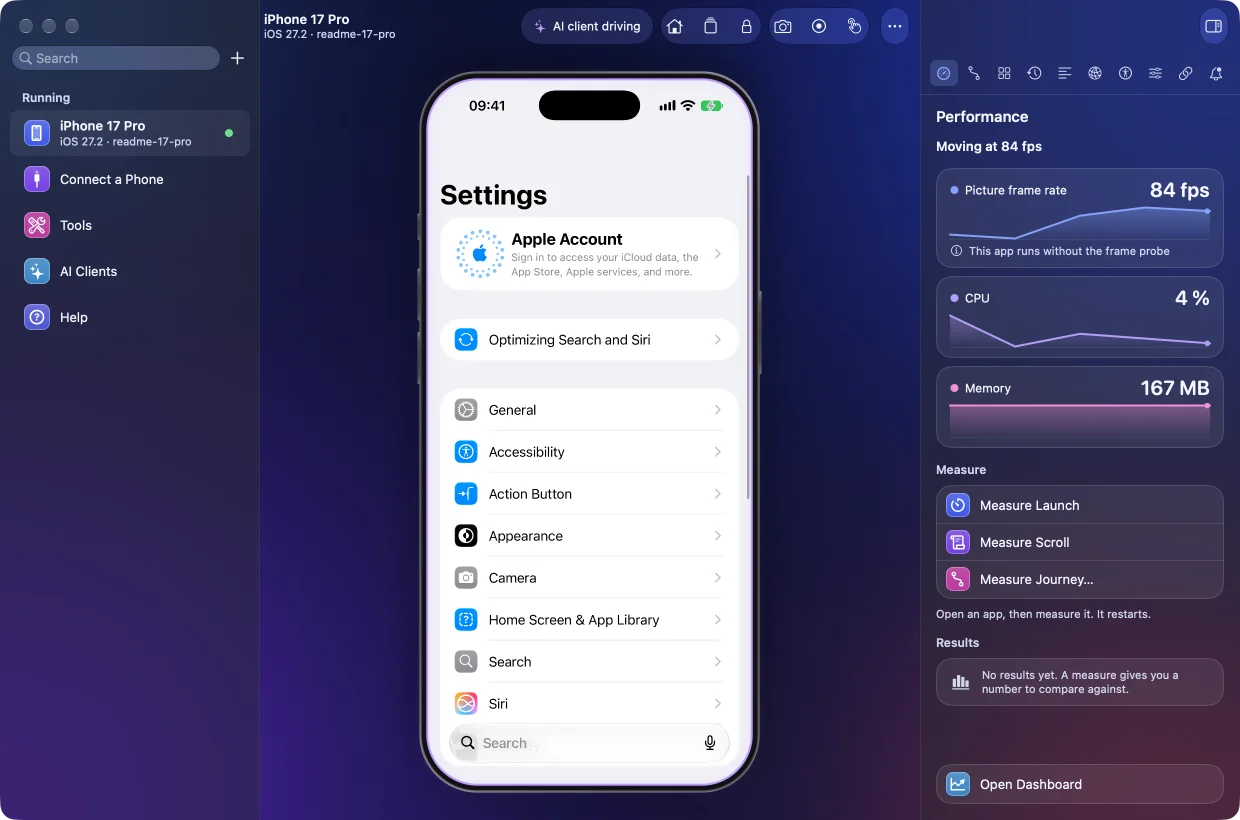
appdyno hub opens every device on this Mac in one window, driven by mouse and keyboard while an agent drives it too. Its Performance pane reads frames, CPU and memory as they happen. AI Clients shows each MCP client on this Mac as it truly stands, and adds appdyno to it. A phone joins by cable, or by Wi-Fi once paired with appdyno pair. See The window and the hub.
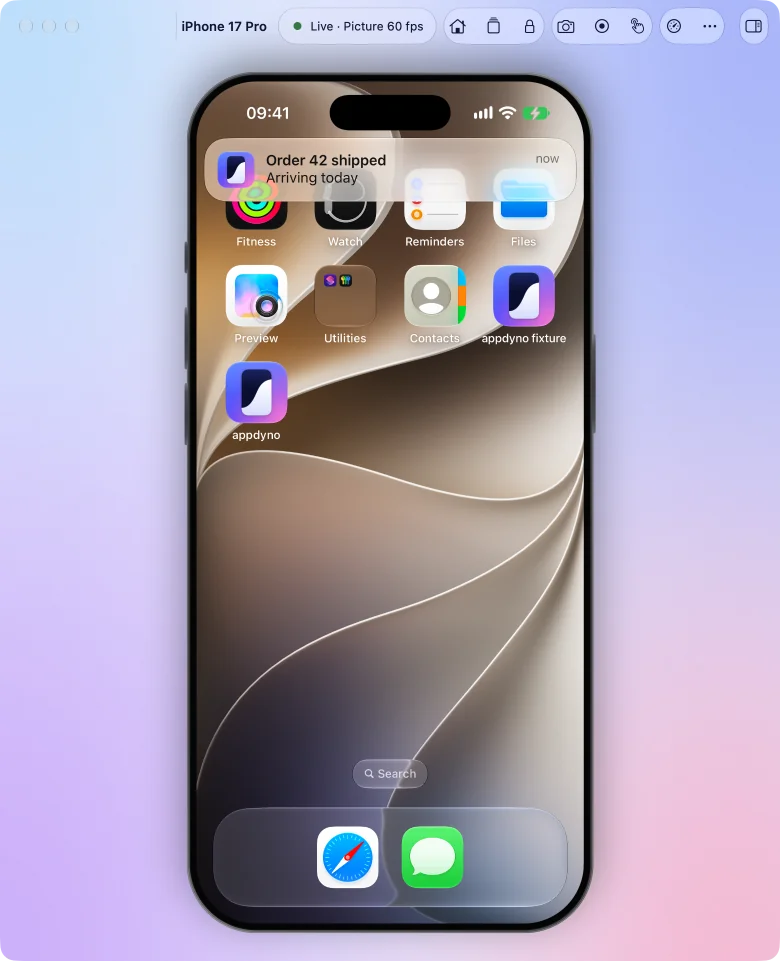
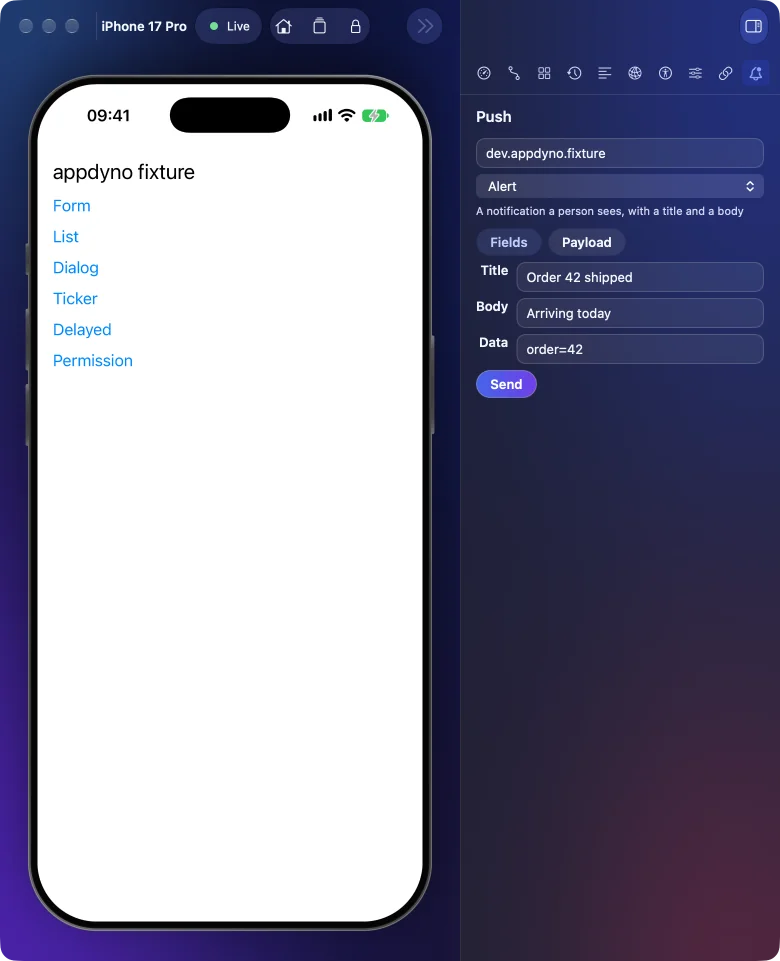
A device's own window, light and dark. Its Push pane sends by send_push, as an agent does, with the types this device takes.
A person approves what loses data

Nothing the agent sends counts as a yes, and no tool erases or resets a device. What asks the person first lists each action, and how a person allows them ahead of time.
On each device

| device | what it needs |
|---|---|
| iOS simulator | Xcode. No account and no signing |
| iPhone | Xcode, Developer Mode, and a development signing identity with a profile for it |
| Android emulator | adb, from Android Studio or Google's platform tools |
| Android phone | adb, and USB debugging. Wi-Fi once paired |
What works where has every measure on every device, and how each was proved. An iPhone's live picture is experimental, and rests on undocumented Apple services that may change.
Install
The shortest path, by how you will use appdyno:
| you want | do this |
|---|---|
| appdyno in your MCP client | npx -y appdyno install, then restart the client. It asks which clients, and --dry-run shows the change first |
| the desktop extension, with no terminal | download appdyno-<version>.mcpb from the latest release and open it in Claude Desktop. scripts/check-mcpb.mjs runs the server the file unpacks to; opening the file in the app has not been tried here |
| the Mac app, with no terminal | download Appdyno-<version>-arm64.dmg from the releases, drag it to Applications, and choose Add to MCP Clients in its menu bar, then restart the client |
| the Mac app, by Homebrew | download appdyno.rb from the latest release and install it from a tap of your own: see The Mac app |
| the library, in a TypeScript project | npm install appdyno, then import { connect } from 'appdyno': see Library |
Each needs a Mac, and a device to drive: step 4 gets one ready. A client that runs npx -y appdyno asks npm for the latest release at every start: steps 2 and 3 install one version and keep it. The steps below are the same paths in full.
1. What you need
| for | you need |
|---|---|
| appdyno | a Mac, and Node 22 or newer. The Mac app carries its own Node; from npm, the hub's window needs Xcode or its Command Line Tools |
| an iOS simulator or an iPhone | Xcode, and iOS 17 or newer |
| an Android emulator or phone | adb, from Android Studio or Google's platform tools, and Android 8.0 (API 26) or newer |
2. Get appdyno
npm install -g appdyno # installs the appdyno command
Or take the Mac app, which needs no terminal: download Appdyno-<version>-arm64.dmg from the releases and drag it to Applications. It runs on Apple silicon with macOS 13.5 or newer. Add to MCP Clients in its menu bar does step 3, and Put appdyno on the PATH there gives your terminal the appdyno command that step 5 runs. See The Mac app. To build appdyno from a checkout instead, see CONTRIBUTING.md.
3. Add it to your MCP client
appdyno install --dry-run  # shows the change for each client it finds, and writes nothing
appdyno install            # asks which clients; --yes takes all of them
It changes only appdyno's own entry, keeps a backup beside the file, and appdyno install --remove takes it out. Restart the client afterwards. For any other client, add this to its server list:
{
  "mcpServers": {
    "appdyno": { "command": "npx", "args": ["-y", "appdyno", "mcp"] }
  }
}
A client opened from the Dock may not find npx: if it says spawn npx ENOENT, see An app cannot find npx or adb.
Claude Desktop installs appdyno from one file, with no terminal: download appdyno-<version>.mcpb from the latest release and open it. See Claude Desktop.
4. Get a device ready
- iOS simulator: nothing more. Start one in Xcode's Simulator, or ask your agent to. The first action that needs appdyno's helper fetches the one its release built, under 1 MB, from the release's page on GitHub, and uses it only if its sha256 is the one the package carries; where it cannot, it builds one, which takes a few minutes.
--no-fetchorAPPDYNO_NO_FETCH=1turns the fetch off.appdyno ios builddoes this ahead of time for a simulator and an iPhone, whose helper is always built. It also deletes builds of older versions, except one that a running process still uses. - Android emulator: create one in Android Studio's Device Manager and start it.
- Android phone: turn on Developer options (Settings, About phone, tap Build number seven times), then USB debugging in them. Connect the cable and answer Allow on the phone. For Wi-Fi, pair once under Wireless debugging, Pair device with pairing code:
appdyno pair <address> <code>. - iPhone: connect the cable and answer Trust, turn on Developer Mode, and give it a development signing identity with a profile: An iPhone or a simulator takes you through it. For Wi-Fi, pair once on the cable:
appdyno pair --device <udid>.
5. Check
appdyno doctor             # what is here, what is missing, and how to fix it
appdyno devices            # what is connected
appdyno read-screen        # what is on the screen
appdyno hub                # every device in one window you can touch
appdyno perf survey --app com.example.app   # every measure on this device, then a page of them
Connecting a client takes each client step by step, and gets a phone ready from nothing, signing included.
On real apps
Wikipedia's own debug build, from its repository, on an Android emulator in the hub: an MCP client searches for Istanbul, opens the article, taps a link that wraps over two lines, reads that article and measures it. Every call is real, with the time it took:
The article and its picture are Wikipedia's, under their own licenses.
Seven builds of five open-source apps, each as its repository builds it, debug builds on an Android emulator (API 34) and an iOS simulator (iOS 27.2), on an M5 Pro, on 2026-11-13:
| app | built with | cold start | memory | scroll |
|---|---|---|---|---|
| Wikipedia, Android | Kotlin, views, articles in a web view | 2,098 ms | 197 MB | 4.4% janky, p95 30 ms |
| Now in Android | Kotlin, Jetpack Compose | 1,912 ms | 179 MB | 3.3% janky, p95 32 ms |
| AntennaPod | Java, views | 1,451 ms | 107 MB | 1% janky, p95 31 ms |
| Wonderous, Android | Flutter | 1,345 ms | 188 MB | its own surface: 60 fps, p95 16.7 ms |
| Wikipedia, iOS | Swift, Objective-C, UIKit, articles in a web view | 3,191 ms | 230 MB | 6.4% janky, p95 32 ms |
| NetNewsWire | Swift, UIKit | 2,492 ms | 57 MB | 2.1% janky, p95 16.7 ms |
| Wonderous, iOS | Flutter | 3,519 ms | 298 MB | 2.1% janky, p95 16.7 ms |
A cold start is the median of 5 after a warm-up: on Android the time to a first frame that the system reports, on the simulator the time to the first frame the frame probe sees. Memory is Android's PSS and iOS's physical footprint, after the scroll. A scroll is the median of 3 rounds of 5 swipes; Wonderous on Android draws on a surface of its own, past the frames the system counts, so that surface's frames are read instead. A simulator's and an emulator's numbers are this Mac's, and a debug build is slower than a release build: they compare one run with the next, and do not say how fast a phone is.
Trying them showed what to fix in appdyno. An app with two launcher activities, as a debug build with LeakCanary has, started the system's chooser and measured a cold start of 0 ms, and a touch on a link over two lines landed between the lines. Each fix is in the changelog.
Speed
Medians of 5 runs, through MCP over stdio, on the fixture app, on an M5 Pro, on 2026-11-10 (the phones on 2026-11-09). The iPhone is a 13 Pro Max, and the Android phone a Samsung SM-A525F:
| call | iOS simulator | Android emulator | iPhone | Android phone |
|---|---|---|---|---|
| read the screen | 18 ms | 11 ms | 308 ms | 49 ms |
| tap by coordinate | 890 ms | 469 ms | 970 ms | 711 ms |
| tap by selector | 1,084 ms | 696 ms | 918 ms | 989 ms |
| type into a field | 1,137 ms | 648 ms | 1,934 ms | 930 ms |
| screenshot | 82 ms | 28 ms | 184 ms | 166 ms |
A tap waits until the screen has been still for 200 ms and answers with what changed, so most of its time is the app's own. In a checkout, after pnpm build and with the fixture app installed on the device, node scripts/speed.mjs <device id> runs the same calls on your Mac. Speed has every call, where the time goes, and what each one proves.
Documentation
| read | to |
|---|---|
| Connecting a client | join appdyno to your MCP client and get a phone ready |
| Flows | record what an agent did, replay it with no model, run it in CI |
| Evidence | leave a video, a report, a network log or a visual diff behind |
| Measuring performance | measure an app, keep a baseline, and fail a change that makes it slower |
| Tools | every tool, and what each platform can and cannot do |
| How it is built | how the parts fit, for someone about to change them |
The documentation has the rest of the reference.
Security
Local only: no network listener by default, no telemetry, and you decide which devices, apps and links it may touch. Use a test device and test accounts. See SECURITY.md.
Contributing
See CONTRIBUTING.md and the Code of Conduct. CHANGELOG.md lists the releases.
License
MIT. See LICENSE.