Listed from the MCP registry; nobody on Odel publishes it.

IMAP Wizard
Local IMAP/SMTP email MCP server: 61 tools, safe Sieve filter rules, read-only mode, multi-account.
Runs on your machine from its package; the steps are below.
What it does
- Reads
- Writes
- High impact
At most: moves money, runs code or commands, deletes data, or sends messages for you.
What it costs
FreeOdel charges nothing per call. The publisher may charge for its own service.
Runs locally over stdio
This server isn't hosted — your MCP client launches it from a package registry. Use one of the commands below, or drop the config into your client (e.g. Claude Desktop).
Run
npx -y imap-wizard
MCP client config
{
  "mcpServers": {
    "imap-wizard": {
      "command": "npx",
      "args": [
        "-y",
        "imap-wizard"
      ]
    }
  }
}IMAP Wizard
Let your AI assistant read, search, send and sort your email over plain IMAP and SMTP.




Quick start · Examples · Safety · Tools · Config · Clients · Troubleshooting
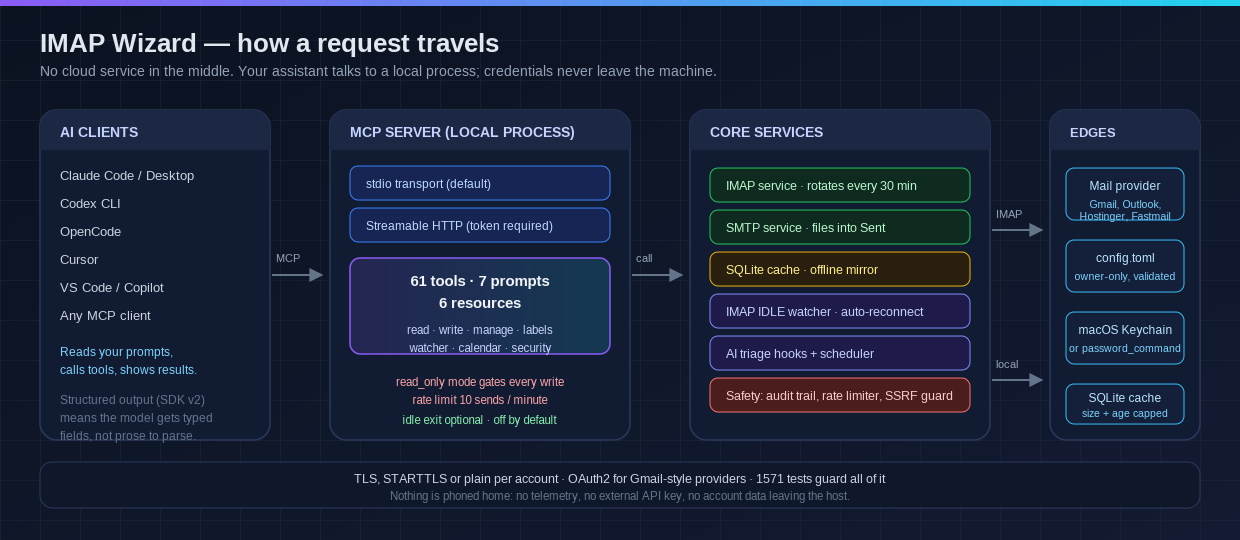
- Local and private. It runs on your machine and talks straight to your mail server. No cloud service in the middle, no telemetry, no account to make.
- Safe by default. Reading never marks mail as read. A read-only mode hides
every tool that changes mail (
export_emailanddownload_attachmentcan still save new files to folders you allow). Retried sends are caught, and email text is marked as untrusted so a message cannot pose as instructions. - Fixes real bugs. It is a fork of codefuturist/email-mcp that fixes bugs upstream still has. See the list.
Works with Claude Code, Claude Desktop, Cursor, VS Code, Windsurf, Codex, OpenCode and any other MCP client. Supports several accounts at once.
Quick start
You need Node.js 22.13 or newer (24 recommended).
1. Add your account. A wizard asks for your address and password. It fills in the server settings for common providers.
npx -y imap-wizard account add
2. Check it works. This logs in to IMAP and SMTP for every account.
npx -y imap-wizard test
3. Connect your AI client.
Claude Code:
claude mcp add email -- npx -y imap-wizard stdio
Claude Desktop, Cursor, Windsurf, VS Code, Codex or OpenCode: run the installer.
It finds those apps (and Claude Code, if claude is on your PATH), asks which
ones to set up and how to launch the server (pick npx), then writes the
config. Your other servers and comments are left alone. Restart the app after.
npx -y imap-wizard install
Any other client takes this JSON (more formats under Other clients):
{
  "mcpServers": {
    "email": {
      "command": "npx",
      "args": ["-y", "imap-wizard", "stdio"]
    }
  }
}
Now ask your assistant: "What's unread in my inbox?"
Other ways to install
-
Global command:
npm i -g imap-wizard, then useimap-wizardin place ofnpx -y imap-wizard(for exampleimap-wizard account add). -
Docker:
ghcr.io/fe2-o3/imap-wizard(a tag per version, andlatest). See Docker. -
MCP Registry: listed as
io.github.Fe2-O3/imap-wizard. -
From source:
bashgit clone https://github.com/Fe2-O3/imap-wizard.git cd imap-wizard pnpm install && pnpm build node dist/main.js account addThen point your client at
node /absolute/path/to/imap-wizard/dist/main.js stdio.
Note
Config is stored in ~/.config/email-mcp/. The folder name is kept from
upstream, so an existing email-mcp setup keeps working unchanged.
What you can ask for
| Say this | What runs |
|---|---|
| "What's unread and older than a week?" | list_emails, sorted by date |
| "Find the Acme invoice from this month and save the PDF to my Downloads folder" | search_emails, get_email, download_attachment with savePath |
| "Reply to that thread: Thursday works, cc billing" | reply_email (uses Reply-To, files the reply in Sent) |
| "Is this sender legit?" | get_email_security (DMARC, SPF and DKIM results from the headers) |
| "Save that message as a file" | export_email (writes a .eml file) |
| "Triage my inbox and skip the newsletters" | triage_inbox prompt |
| "Move last month's receipts into Receipts" | search_emails, then bulk_action |
Why this one
- Bugs fixed that upstream still has. As of upstream v0.6.0: duplicate
sends on retry,
read_onlynot stopping background work, stdio processes that never exit, "Re: RE:" subjects stacking, and Sent copies rejected by strict servers. Full list with upstream status. - Reading never changes your mailbox.
get_emailandexport_emailfetch with IMAPBODY.PEEK. Mail stays unread unless you ask (markRead: true). - A real read-only mode. With
read_only = true, tools that change mail are not registered at all, so the assistant cannot even see them.export_emailanddownload_attachmentstay, and can still save new files to folders you allow. - Handles big mailboxes. Message fetches go out in chunks, so a mailbox with tens of thousands of messages does not overflow the server's command limit.
- Does not hang. Waiting for a mailbox lock stops after 60 seconds. A stuck connection is closed and opened again. A connection is replaced every 30 minutes, but never while a call is still using it.
- No plaintext passwords needed. Use the macOS Keychain, Linux
secret-tool, a password command (1Password, Bitwarden,pass), or OAuth2. - Pick what your AI can do. Setup asks with tick boxes (read, send,
organize, filter rules, calendar, alerts). Change it any time with
imap-wizard tools. A shorter list is handy for local models.
Safety and privacy
| Control | Default | What it does |
|---|---|---|
| Non-destructive reads | always | Reads use BODY.PEEK. Marking read takes an explicit markRead: true |
read_only | off | Hides every tool that changes mail and stops background services. markRead is refused. export_email and download_attachment can still save new files to allowed folders |
| Send rate limit | 10 per minute per account | Set with settings.rate_limit. Counted per running server: each AI window starts its own server with its own count, so two windows can send 20 |
| Duplicate-send guard | on | A retried send is spotted and refused unless you pass allow_duplicate (on send_email, reply_email, forward_email and send_draft). A send whose result is unknown is never retried for you: check Sent first |
| Who can receive mail | your client's approval | send_email, reply_email, forward_email and the other send tools can send to any address; your MCP client's approval prompt is the check. The forwarding allowlist below covers standing forwards (Sieve and local rules) only |
| Audit log | on | Writes are logged, with sensitive fields hidden, to ~/.local/share/email-mcp/audit.log |
| Untrusted-content markers | always | Email text in tool output is wrapped in <<<UNTRUSTED_EXTERNAL_CONTENT>>> markers that tell the model it is data, not instructions |
| Safe file reading | always | Attachments sent by file path must be absolute, regular files; hidden files and folders (~/.ssh, .env), system folders, ~/Library and this app's own folders are refused, symlinks included |
| Preview before writing | opt-in per call | dryRun: true on send, reply, forward, send_draft, move, delete, bulk_action, mailbox and label deletes shows what would happen without doing it |
| One background worker | always | With several AI windows open, only one process runs the watcher, alerts and AI triage; another takes over within 2 minutes if it stops. If the lock file in the state folder cannot be used, none of them runs these until it can |
| Safe file saving | always | download_attachment (with savePath, up to 50 MB) and export_email save only to absolute paths, never overwrite a file, and refuse system folders, hidden folders, the home folder itself, this app's own folders, names that start with a dot and files that run when opened (.command, .app, .sh and similar). Two attachments with one name: pick one with occurrence |
| Alert webhook | off | Set only in config.toml (settings.hooks.alerts.webhook_url). configure_alerts cannot set or change it, and read tools show only its host |
| Protected mailboxes | always | delete_mailbox and rename_mailbox refuse INBOX, Sent, Drafts, Trash, Junk and Archive |
| Encrypted logins | enforced | A config with tls = false and starttls = false to a non-local host is refused when it loads |
| Credential redaction | always | Passwords and tokens in error text become [redacted]. The server's own reason for a failed login is kept |
| Mailbox-lock timeout | 60 s | A stuck connection is recycled instead of freezing later calls. A call that waits behind the background mirror sync just fails and can be retried; the sync keeps going |
| HTTP transport token | required | http mode makes a bearer token, even on localhost |
| Verification-code tool | off | get_verification_code exists only when you turn it on. It never reads your clipboard |
Body cache (read_through) | off | Message bodies are saved to disk only if you turn it on. Details |
What is on disk by default: your config.toml (readable only by you), the
audit log, and a local SQLite copy of message headers and flags for INBOX
over the last 90 days. Turn that copy off with settings.cache.enabled = false.
Message bodies are not stored unless you turn on read_through.
To report a security problem, follow SECURITY.md. Please do not post exploits in public.
Tools
61 tools (31 read, 30 write), plus 1 opt-in tool, 7 prompts and 6 resources. In read-only mode only the 31 read tools are registered.
| Group | Tools |
|---|---|
| Read mail | list_accounts list_mailboxes list_emails search_emails get_email get_emails get_email_status get_thread download_attachment export_email find_email_folder extract_contacts get_email_stats get_email_security check_health list_templates |
| Calendar (read) | extract_calendar analyze_email_for_scheduling list_calendars list_events list_reminders check_calendar_permissions |
| Watcher (read) | get_watcher_status list_presets get_hooks_config check_notification_setup |
| Send (write) | send_email reply_email forward_email save_draft send_draft apply_template |
| Schedule (write) | schedule_email list_scheduled cancel_scheduled |
| Organize (write) | move_email delete_email mark_email bulk_action create_mailbox rename_mailbox delete_mailbox |
| Labels (write) | list_labels add_label remove_label create_label delete_label |
| Calendar and alerts (write) | add_to_calendar create_reminder configure_alerts test_notification |
| Filter rules (read) | sieve_status sieve_list_scripts sieve_get_script sieve_check_script list_local_rules |
| Filter rules (write) | sieve_put_script sieve_activate_script sieve_delete_script add_local_rule remove_local_rule |
| Opt-in | get_verification_code (needs settings.verification.enabled = true) |
Prompts: triage_inbox summarize_thread compose_reply
draft_from_context extract_action_items summarize_meetings cleanup_inbox
Resources: email://accounts email://{account}/mailboxes
email://{account}/unread email://{account}/stats email://templates/{name}
email://scheduled
Choosing tools
Setup shows one screen of tick boxes, sorted by risk. Every feature is on the list, even the rare or risky ones, so you can see what exists. Safe ones start ticked. Press enter to keep them, or tick and untick first. Change the answer any time:
imap-wizard tools                  # tick boxes
imap-wizard tools show             # what is on now
imap-wizard tools set drafts,send  # no prompts (scripts)
imap-wizard tools reset            # back to the toolset preset
| Box | Starts | Tools | What it does |
|---|---|---|---|
read Read and search your mail | always on | 11 | open, search and summarize mail, threads and attachments, check if a sender is fake |
drafts Write drafts for you to review | on | 1 | save a draft in the right thread. You press send yourself |
send Send email as you | off | 7 | send, reply, forward, send a draft, schedule a send. Off because an email the AI reads could trick it into sending |
tidy Tidy up | on | 9 | mark read, flag, move, label, make and rename folders, bulk actions (bulk delete only with delete) |
delete Delete mail | off | 3 | delete mail (to Trash or for good), folders and labels |
calendar Calendar and reminders | on | 8 | add invites and reminders to the Calendar and Reminders apps (Mac) |
rules Filter rules that keep running | off | 10 | Sieve filters on the server, local rules. Off because rules keep running after the chat ends and can forward mail |
reports Reports and exports | off | 3 | mail stats, top contacts, save an email as a .eml file |
templates Templates | off | 2 | fill-in-the-blank messages saved as files in ~/.config/email-mcp/templates/. Ticking it adds an example |
alerts Alerts and troubleshooting | off | 7 | lets the AI check connections and change new-mail alerts. Alerts work without it |
codes Sign-in code catcher | off | 1 | get_verification_code finds the newest login code in your mail. Off because it helps anyone who controls the AI log in as you |
This is saved as settings.tools (env var MCP_EMAIL_TOOLS, comma-separated).
When it is set it wins over toolset, and the codes box wins over
settings.verification.enabled. Restart your AI app after a change.
Toolsets
The older presets still work as shortcuts, via settings.toolset (env var
MCP_EMAIL_TOOLSET):
toolset | Tools (normal / read-only) | What's in it |
|---|---|---|
"full" (default) | 61 / 31 | Everything above, including filter rules |
"core" | 24 / 10 | Minimal, plus get_emails, get_email_status, mark, move, delete, bulk_action, labels, drafts, forward_email, download_attachment, export_email |
"minimal" | 8 / 6 | list_accounts list_mailboxes list_emails search_emails get_email get_thread send_email reply_email |
read_only still hides every tool that changes mail, whatever you picked.
Prompts and resources stay in every toolset.
Also included: Streamable HTTP transport, an IMAP IDLE watcher with optional AI
triage (off by default), provider auto-detection for Gmail, Outlook, Yahoo,
iCloud, Fastmail, Proton Mail Bridge, Zoho and GMX, and a terminal CLI
(list, read, search, send and more).
Configuration
Config lives at ~/.config/email-mcp/config.toml. imap-wizard config path
prints it. The account add wizard writes it for you. A typical file:
[settings]
read_only = false   # true hides every tool that changes mail
toolset = "full"    # "core" or "minimal" for a shorter tool list
rate_limit = 10     # max sends per minute per account, per running server

[[accounts]]
name = "personal"
email = "you@example.com"
full_name = "Your Name"
password = "use_keychain:personal"   # stored in the OS keychain

[accounts.imap]
host = "imap.example.com"
port = 993
tls = true

[accounts.smtp]
host = "smtp.example.com"
port = 465
tls = true
Check any edit with imap-wizard config validate. It names the bad line,
suggests fixes for misspelled keys, and exits 1 on errors, so it also works
in CI. The server also warns about unknown keys every time it starts, so a typo
such as read_onyl = true does not go unnoticed, and it refuses to start when
two accounts share a name.
Password options
- OS keychain:
password = "use_keychain:<name>". macOS uses Keychain, Linux usessecret-tool(libsecret).imap-wizard keychain migratemoves existing plaintext passwords over. If the item cannot be read, that account does not connect at all (it never sends the placeholder as a password) and a warning says why. - Password command:
password_command = "op read 'op://Private/mail/password'"(orbw get password ...,pass show ...). It runs once at startup, must print the password, and is stopped after 10 seconds. It wins overpasswordif both are set. Commands run one account at a time; if one fails, only that account is turned off. - OAuth2: an
[accounts.oauth2]block instead of a password. - Plaintext: allowed. The file is readable only by you, and
config showhides the password.
Other settings worth knowing
| Setting | Default | Meaning |
|---|---|---|
settings.idle_exit | 0 (off) | Seconds without a request before the stdio server exits. A backstop for clients that never close the pipe |
settings.send.max_attachment_mb | 25 | Cap on attachments per message. Known providers may lower it. An account-level max_attachment_mb overrides it |
settings.cache.enabled | true | Local header-and-flags copy (mailboxes = ["INBOX"], window_days = 90, max_size_mb = 500) |
settings.watcher.enabled | false | IMAP IDLE watcher for new mail, with optional hooks and alerts |
settings.verification.enabled | false | Registers get_verification_code |
append_sent (per account) | on, off for Gmail | File a copy of each sent message in Sent. Gmail files sent mail itself, so a second copy would appear there |
Environment variables (one account, no config file)
Set these in your client's MCP config instead of writing a file:
| Variable | Example |
|---|---|
MCP_EMAIL_ADDRESS | you@example.com |
MCP_EMAIL_IMAP_HOST | imap.example.com |
MCP_EMAIL_SMTP_HOST | smtp.example.com |
MCP_EMAIL_PASSWORD or MCP_EMAIL_PASSWORD_COMMAND | your app password, or a command that prints it |
Settings have matching variables too, for example MCP_EMAIL_READ_ONLY=true,
MCP_EMAIL_TOOLSET, MCP_EMAIL_TOOLS, MCP_EMAIL_RATE_LIMIT and MCP_EMAIL_IDLE_EXIT. The
filter-rule lists are MCP_EMAIL_SIEVE_ALLOWED_REDIRECTS and
MCP_EMAIL_SIEVE_ALLOWED_PROGRAMS (comma-separated). Yes/no variables take
true/false, 1/0 or yes/no; anything else stops the server with an
error instead of being read as "no".
If a config.toml exists too, the account comes from the variables but the
[settings] still come from the file, and the server prints one line saying
so. read_only turned on in either place wins.
Docker
The image runs the stdio server. Mount your config folder read-only, and give the state and data folders a volume each. Scheduled emails, local rules and the audit log live there; without the volumes they are lost when the container stops:
docker run --rm -i \
  -v ~/.config/email-mcp:/home/node/.config/email-mcp:ro \
  -v imap-wizard-state:/home/node/.local/state/email-mcp \
  -v imap-wizard-data:/home/node/.local/share/email-mcp \
  ghcr.io/fe2-o3/imap-wizard:latest
As a client config:
{
  "mcpServers": {
    "email": {
      "command": "docker",
      "args": [
        "run", "--rm", "-i",
        "-v", "/absolute/path/to/.config/email-mcp:/home/node/.config/email-mcp:ro",
        "-v", "imap-wizard-state:/home/node/.local/state/email-mcp",
        "-v", "imap-wizard-data:/home/node/.local/share/email-mcp",
        "ghcr.io/fe2-o3/imap-wizard:latest"
      ]
    }
  }
}
The container cannot reach your OS keychain, so use a password in the config
file or the environment variables above. For HTTP mode, see
docker-compose.yml, which sets up the same volumes. HTTP
mode saves its token in the config folder, which is read-only here, so pass
EMAIL_MCP_HTTP_TOKEN yourself.
Filter rules
Two kinds, so every provider gets rules:
- Server rules (Sieve). Saved on your mail server, so they run even when
your computer is off. Needs a provider with ManageSieve: self-hosted Dovecot
or Cyrus, Mailbox.org, Migadu, Purelymail, IONOS and others. Gmail, Outlook,
iCloud, Yahoo, Fastmail and Proton do not offer it.
sieve_statustells you. - Local rules. Work with every provider, but only run while IMAP Wizard is
running with the watcher on. Stored in
local-rules.jsonin the data folder.
Safety:
sieve_put_scriptshows a preview and a diff first; it saves only withapply: true. Replacing or deleting a script saves a backup first, and the active script cannot be deleted.- Forwarding is off unless you allow it. A rule may forward or redirect
only to addresses or domains you list yourself in
config.toml. No tool can change that list, and no tool argument can get around it. Other ways of sending mail out (notify,report,pipe,execute) are blocked the same way. A running server reads the list again every time a forward fires or a script is checked, so removing an address takes effect without a restart. - The list covers standing forwards only. One-off sends (
send_email,reply_email,forward_emailand the other send tools) can go to any address; your MCP client's approval prompt is the check there. - The Sieve
filtercommand (hand mail to a program on the server) is refused unless you name the program in[sieve] allowed_programs. - A local rule cannot move mail into Trash, Junk, Drafts, Sent, Archive or
another special-use folder, or into a folder the watcher watches, and a rule
whose patterns match every message (such as
*) is refused. Use labels or flags instead. A rule made for an account stops running if that account name is later pointed at another server or login.
[sieve]
allowed_redirects = ["me@work.example", "example.org"]   # you edit this, never the AI
allowed_programs = ["my-filter-program"]                 # also only you

[accounts.sieve]        # optional; defaults to the IMAP host, port 4190, STARTTLS
enabled = true
Local body cache (opt-in)
Off by default. With read_through = true, get_email keeps a decoded copy of
each message it reads. A message's body never changes for a given mailbox and
UID, so a repeat read only asks the server for current flags, then answers from
disk. Flags are always live. A message that was moved or deleted is still
reported as not found.
[settings.cache]
read_through = true    # default false
offline_reads = true   # serve cached bodies, with a warning, when the server is unreachable
body_max_mb = 200      # disk budget for cached bodies; oldest used are dropped first
body_messages = 500    # background fill: newest N messages per synced mailbox (0 = off)
Measured with scripts/bench-get-email.ts on one
real account (30 INBOX messages, 60 samples): a cached read took 174 ms at
the median, versus 714 ms for a live read. Your numbers will depend on your
provider and network.
Bodies over 256 KB are never cached. The cache file is
~/.cache/email-mcp/cache.db (readable only by you). Delete it while the
server is stopped to clear it. Read SECURITY.md before turning
this on, and use full-disk encryption.
Other clients
All of these use the npx launch. If you built from source, swap in
node /absolute/path/to/imap-wizard/dist/main.js stdio.
Claude Desktop, Cursor, Windsurf
npx -y imap-wizard install writes this for you (and the VS Code, Codex and
OpenCode files below). By hand, add it to
claude_desktop_config.json, ~/.cursor/mcp.json or
~/.codeium/windsurf/mcp_config.json:
{
  "mcpServers": {
    "email": {
      "command": "npx",
      "args": ["-y", "imap-wizard", "stdio"]
    }
  }
}
VS Code (GitHub Copilot)
install writes this to your user mcp.json (~/Library/Application Support/Code/User/mcp.json
on macOS, ~/.config/Code/User/mcp.json on Linux, %APPDATA%\Code\User\mcp.json on Windows):
{
  "servers": {
    "email": {
      "type": "stdio",
      "command": "npx",
      "args": ["-y", "imap-wizard", "stdio"]
    }
  }
}
If you put it in settings.json instead, nest it as "mcp": { "servers": { ... } }.
Codex (~/.codex/config.toml)
[mcp_servers.email]
command = "npx"
args = ["-y", "imap-wizard", "stdio"]
OpenCode (~/.config/opencode/opencode.json)
Raise the timeout. A full-text search over a very large mailbox can take longer than the 60-second default.
{
  "mcp": {
    "email": {
      "type": "local",
      "command": ["npx", "-y", "imap-wizard", "stdio"],
      "enabled": true,
      "timeout": 180000
    }
  }
}
Streamable HTTP
imap-wizard http --port 8080
On first run it makes a bearer token, prints it once, and saves it to
~/.config/email-mcp/http-token. Send it with every request:
{
  "mcpServers": {
    "email": {
      "type": "streamable-http",
      "url": "http://127.0.0.1:8080/mcp",
      "headers": { "Authorization": "Bearer <your token>" }
    }
  }
}
It refuses to listen on a non-local address without a token.
Troubleshooting
| Problem | Likely cause | Fix |
|---|---|---|
MCP error -32001: Request timed out | Your client stops waiting after 60 s, and a full-text search on a huge mailbox can take longer | Raise the client timeout (180000 in OpenCode) |
| Setup says the config file is invalid | A TOML syntax or key error | imap-wizard config validate names the line and key |
| Login fails | Wrong password, or the provider needs an app password | The error shows the server's own reason. Run imap-wizard test |
| Config refused: "would be unencrypted" | tls and starttls are both off for a remote server | Turn on tls = true (port 993/465) or starttls = true (port 143/587) |
| Search returns nothing on a server you know has mail | Some servers send broken SEARCH replies | This build fails loudly instead of reporting zero results. Check the error |
| A server process keeps running after you quit | Your client never closes the pipe | Set settings.idle_exit = 1800, or close the client cleanly |
Cannot find module .../nodemailer/... after an update | The old server process is still running | Restart your client (in Claude Code: /mcp, then reconnect) |
install says no clients found | It only knows Claude Desktop, Claude Code, Cursor, Windsurf, VS Code, Codex and OpenCode, and finds an app by its config folder (or the claude command) | Use claude mcp add or the config snippets above |
Warning: account "x" cannot log in at start | Its Keychain item or password_command could not be read | Run imap-wizard keychain migrate, or fix the command. The other accounts still work |
| The watcher and alerts never run | The writer lock in ~/.local/state/email-mcp/ cannot be used (read-only folder, full disk) | Make that folder writable. The server tries again every 30 seconds |
Relationship to upstream
This project began as a fork of
codefuturist/email-mcp at commit
7fe8916 (2026-08-21) and started its own version line at
v0.1.0
(2026-09-28). Upstream still ships its own releases. This fork takes upstream
changes one at a time, with credit, rather than merging everything. The review
of upstream's v0.4 and v0.5 features is in
docs/upstream-v0.5-draft.md, and every change is
in the CHANGELOG.
Upstream issues fixed here, with upstream's own status as of v0.6.0 (checked 2026-11-17)
| Issue | Problem | Fix in this fork | Upstream v0.6.0 |
|---|---|---|---|
| #12 | Attachments only returned as base64 | savePath writes to disk and returns path, size and SHA-256 | Partly: a server-wide download folder on main, no per-call path |
| #20 #54 #92 | Sent mail never saved to Sent | IMAP APPEND into Sent after every send, on by default | Partly: opt-in, off by default |
| #45 | forward_email ignores html | Honoured | Fixed |
| #52 | No attachments on send | Attachments on send, forward and draft | Partly: send_draft still drops them |
| #55 | Memory leak in long-running process | Connections rotate every 30 minutes; caches evicted | Open (no rotation found; unverified) |
| #57 | Socket timeout crashes the process | Error and close handlers on every IMAP client | Fixed on main after v0.6.0 |
| #58 | Every call fails on llama.cpp models | Grammar-safe (GBNF) schemas | Fixed (via zod update) |
| #59 | Results ordered by UID | Ordered by date across the whole match set | Partly: only the current page is re-sorted |
| #60 | stdio server never exits | Exits when the client closes stdin; optional idle exit | Open |
| #62 | Retries send duplicates | Retried sends recognized and refused | Open |
| #66 #95 | Raw MIME instead of the body | Decoded bodies; richer multipart part preferred | Fixed |
| #71 #91 | Silent zero results on broken servers | A malformed (non-array) search reply fails loudly | Partly: the imapflow update avoids the Strato case |
| #79 | read_only does not gate background work | Calendar writes and background services gated | Open |
| #96 | Non-ASCII draft subjects not encoded | Drafts built with MailComposer (RFC 2047) | Fixed |
| #102 | Replies stack "Re: RE:" and "Fwd: FW:" | Any case and common locales (AW, SV, WG) recognised | Open |
| #116 | Sent copy rejected by strict servers (bare LF) | Line endings normalised to CRLF before APPEND | Open |
Upstream status was read from upstream's source, not from whether the issue is closed. Most of these issues are still open on GitHub even where the code has been fixed.
Plus fixes with no upstream issue: chunked UID fetches for large mailboxes,
visible login-failure reasons, STARTTLS reaching the IMAP client, OAuth2 in the
watcher, Bcc on send_draft, Reply-To on reply_email, and more. Security
hardening covers SMTP header injection, constant-time token checks, webhook SSRF
blocking, HTTPS-only OAuth endpoints, owner-only config files, and bounded HTTP
request bodies. See the CHANGELOG.
Development
pnpm install
pnpm check             # Biome lint and format
pnpm typecheck
pnpm test              # unit tests (1571 across 130 files)
pnpm test:integration  # against a throwaway GreenMail server (needs Docker)
pnpm smoke             # every tool against a real configured account
Users need Node 22.13+. Development and CI use Node 24 and pnpm. CI runs the unit tests and the GreenMail integration tests. Contributions: see CONTRIBUTING.md and the Code of Conduct.
CLI reference
imap-wizard [command]

  stdio                     Run as MCP server over stdio (default)
  http                      Run as MCP server over Streamable HTTP
  account list|add|edit|delete
  setup                     Alias for 'account add'
  test [account]            Test IMAP and SMTP connections
  install [status|remove]   Register with MCP clients
  config show|edit|validate|path|init
  keychain status|migrate|remove
  scheduler check|list|install|uninstall|status
  list | read <id> | search <query> | mailboxes
  flag <id> | delete <id> | attach <id> <file> | reply <id> | send
  notify                    Test and diagnose desktop notifications
  help
Email commands take --account NAME (default: the first account). Read commands
support --json. delete asks for confirmation unless you pass --yes.
Credits
Built on email-mcp by @codefuturist. This fork also includes work from upstream contributors:
Ported from upstream: the TLS servername repair
and config validate.
Thanks also to everyone who filed the upstream issues listed above.
Adapted from Mailoo by Bitfloo
(LGPL-3.0-or-later): the plain-text login guard, credential redaction in error
text, the tool catalog baseline test, untrusted-content markers, protected
mailboxes, the rules for safe file saving, the mailbox-lock timeout, and the
ideas behind toolsets and export_email. See NOTICE.
License
LGPL-3.0-or-later, the same license as upstream.