Listed from the MCP registry; nobody on Odel publishes it.
Is this yours? Claim it
Feasible Analytics
Ask an assistant about your website traffic. Privacy-first web analytics, no cookies. OAuth.
One address for any MCP client. Your key stays in your Odel vault.
What it does
- Reads
- Writes
- High impact
At most: only reads or looks up information.
What it costs
FreeOdel charges nothing per call. The publisher may charge for its own service.
What it asks for at sign-in
| Access to | Read | Change |
|---|---|---|
| Stats | ||
| Sites | ||
| Webhooks |
From the sign-in at app.feasible.lol, as the endpoint publishes it. You approve it there.
Tools
None listed · checked 16 Nov 2026Odel could not list its tools without signing in.
feasible.lol
Privacy-first web analytics. One Go binary. One SQLite database per account.
No cookies, no consent banner, and visitor IP addresses are never written to disk. Run it yourself for free, or let us host it for $99 a year.
Status
Live in production at app.feasible.lol. The hosted service runs this code, and the self-hosted build is the same binary with every feature in it.
It's ready for real sites, hosted or on your own server. Releases are still numbered 0.0.x and
ship often. Migrations never run on their own, so run feasible db migrate after every upgrade.
Try it
- Live demo, no sign-up: app.feasible.lol/public/stopoverpayingforanalytics.com. The traffic is generated, so click anything.
- Hosted: sign up for a 30-day free trial. No card. After that it's $9.99 a month or $99 a year for unlimited sites, unlimited teammates and 1,000,000 pageviews and events a month across all of them. Going over never stops collection or adds a charge.
- Self-hosted: free, below.
Self-host
Download the archive for your platform from the latest release. There are builds for Linux, macOS and Windows, on amd64 and arm64.
tar -xzf feasible_*_linux_amd64.tar.gz
./feasible --version
Or build it from source with Go 1.26 or newer. The compiled dashboard and tracker are committed, so Node is only needed if you change them.
go build -o feasible ./cmd/feasible
Write the minimum configuration to a file, with your own hostname and email. The salt is generated once here and has to stay the same afterwards, because it's part of how visitors are counted each day.
cat > feasible.env <<EOF
FEASIBLE_ENV=production
FEASIBLE_APP_HOSTED=false
FEASIBLE_APP_BASE_URL=https://stats.example.com
FEASIBLE_APP_LISTEN=127.0.0.1:19301
FEASIBLE_APP_DATA_DIR=./data
FEASIBLE_INGEST_SALT=$(openssl rand -hex 32)
FEASIBLE_INGEST_TRUSTED_PROXIES=127.0.0.1,::1
FEASIBLE_OPERATOR_EMAIL=you@example.com
EOF
FEASIBLE_INGEST_TRUSTED_PROXIES is for the TLS proxy you'll run on the same machine (see below).
Leave it out and every visitor arrives as 127.0.0.1, so locations come out unknown, people on the
same browser count as one visitor, and the bot filters judge your proxy instead of the visitor.
Then create the databases, make your account and start it:
set -a; . ./feasible.env; set +a
./feasible db migrate
./feasible account create --email you@example.com --name "Your Name"
./feasible serve
account create prints a generated password once. Sign in at your base URL, add a site, and paste
the snippet it shows you into your pages' <head>. The heart of it is one tag:
<script defer data-domain="example.com" src="https://stats.example.com/js/script.js"></script>
A few things worth knowing:
-
TLS.
servespeaks plain HTTP. Put any TLS proxy in front of it, Caddy or nginx, and setFEASIBLE_APP_BASE_URLto the publichttps://address. With Caddy on the same machine, this is the whole config:stats.example.com { reverse_proxy 127.0.0.1:19301 { header_up -X-Feasible-IP header_up -CF-Connecting-IP } }Caddy sets
X-Forwarded-Foritself. The twoheader_uplines drop headers Feasible would believe ahead of it, so a visitor can't send their own. With nginx, setproxy_set_header X-Forwarded-For $remote_addr;and set those two headers to"". -
Trusted proxies.
FEASIBLE_INGEST_TRUSTED_PROXIEStakes addresses or CIDR ranges, comma-separated, and bothserveandingestread it. Only connections from that list may say who the visitor is. It's empty by default, which is right only when nothing sits in front of Feasible. Behind a load balancer or CDN, add its ranges too. Leave it out behind a proxy and ten wrong passwords from anyone lock everyone out of sign-in for 15 minutes. -
FEASIBLE_APP_HOSTED=falseturns off billing, trials, usage limits and public sign-up. Every feature stays on. Runaccount createagain for each separate account; teammates join by invitation from inside the app. -
Email. The default
logtransport writes messages totmp/mail/and sends nothing. SetFEASIBLE_APP_MAIL_TRANSPORT=smtpandFEASIBLE_SMTP_HOSTso password resets and reports actually arrive. -
Locations. Drop the free DB-IP Lite country or city
.mmdbfile intodata/geoip/. Without one, locations show as unknown and everything else works. -
Google. Sign-in with Google, the GA4 import and Search Console terms share one OAuth client:
FEASIBLE_GOOGLE_CLIENT_IDandFEASIBLE_GOOGLE_CLIENT_SECRET. Leave them unset and those features hide themselves. -
Backups.
./feasible db backupwrites a consistent snapshot of every database. Don'tcpfiles a running process is writing. -
Source icons. The rows on the Sources card show icons your server fetches from DuckDuckGo's icon service and serves from your own address. The request carries the source's hostname and nothing else. Set
FEASIBLE_APP_SOURCE_ICONS=falseand every source gets a letter tile instead, with no request at all.
Every variable is documented in .env.sample. The full guide is at
feasible.lol/docs/self-hosting.
Docker
You don't need it, but if you run everything in containers there's an image of the same binary for linux/amd64 and linux/arm64. There's no database or queue container to go with it, because there isn't one.
docker pull ghcr.io/feasible-analytics/feasible:latest
Put compose.yaml in a folder with a feasible.env next to it. It's the file above
without the listen address and data directory, which the image sets to :19301 and /data. The
image also sets FEASIBLE_ENV=production and FEASIBLE_APP_HOSTED=false.
cat > feasible.env <<EOF
FEASIBLE_APP_BASE_URL=https://stats.example.com
FEASIBLE_INGEST_SALT=$(openssl rand -hex 32)
FEASIBLE_INGEST_TRUSTED_PROXIES=172.16.0.0/12
FEASIBLE_OPERATOR_EMAIL=you@example.com
EOF

docker compose run --rm feasible db migrate
docker compose run --rm feasible account create --email you@example.com --name "Your Name"
docker compose up -d
The compose file publishes port 19301 on 127.0.0.1 only, for a TLS proxy on the same machine, so
the Caddy config above works unchanged. Inside the container, your proxy's connections arrive from
Docker's network gateway, an address in 172.16.0.0/12, which is why that range is the trusted
proxy. If your Docker hands out other ranges, docker network inspect shows the gateway to use.
All the data is in the feasible-data volume, at /data. The container runs as uid 65532, so if
you bind-mount a folder instead, chown 65532:65532 it first. Every other command runs the same
way, such as docker compose run --rm feasible db backup.
To upgrade, back up with the old image, then migrate with the new one:
docker compose stop
docker compose run --rm feasible db backup
docker compose pull
docker compose run --rm feasible db migrate
docker compose up -d
To choose when you upgrade, swap latest in compose.yaml for a release number. The image tags
match the releases, without the
v.
What's in it
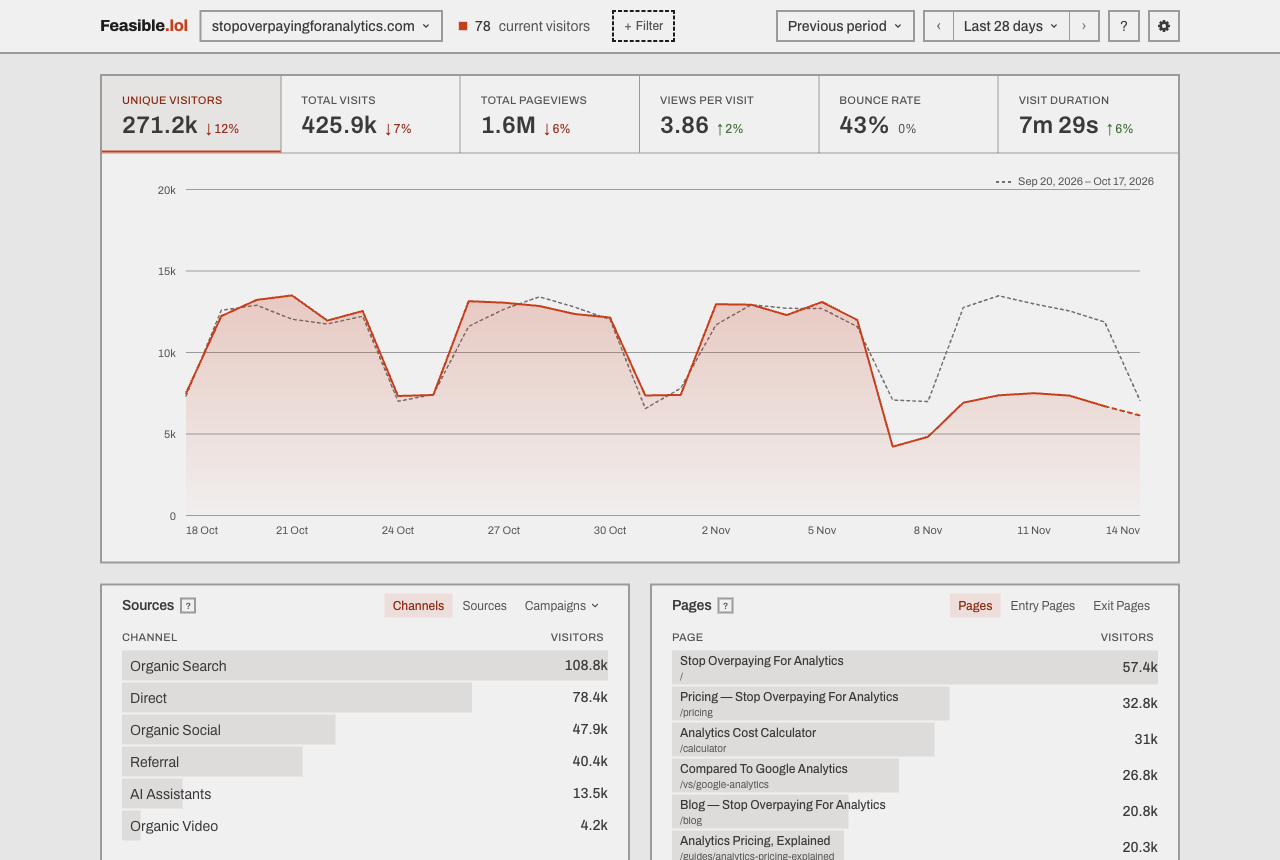
- One-page dashboard. Visitors, visits, pageviews, bounce rate, visit duration, channels, sources and all five UTM tags, pages with entry and exit, countries, regions and cities, devices, browsers, operating systems and languages. Realtime, filters and period comparison.
- Goals and funnels. Custom events and properties, funnels of 2 to 8 steps, revenue by source, scroll depth, outbound links, file downloads and 404s. Core Web Vitals, if you turn them on.
- Search terms people used to find you, from Google Search Console.
- Imports. Google Analytics 4 history by connecting your Google account, or CSV exports from another tool. Export your raw data any time.
- Reports and alerts. Weekly and monthly email and Slack reports, traffic spike and drop alerts, annotations.
- Sharing. Teams with roles, guest access to a single site, public or password-protected dashboards, two-factor login.
- Bot filtering you can inspect. Every dropped event is counted with the reason it was dropped.
- API. One key type for the Stats API, the Sites API and signed webhooks.
- MCP. Connect Claude, ChatGPT, Cursor or VS Code by pasting one URL and approving it, then ask
"why did traffic drop last week?" in plain words.
feasible mcpserves the same tools over stdio. - Integrations in
ecosystem/: a WordPress plugin, a Google Tag Manager template, a Looker Studio connector, an npm package for the tracker, and SDKs for Go, Node, PHP, Python and Ruby. They aren't published to their stores yet, so install them from here.
How it's built
- Go, one binary. The React dashboard, the server-rendered pages, the tracker, email templates,
migrations and the bot lists are all embedded with
go:embed. The release archive is about 8 MB. Nothing to copy alongside it. - SQLite, one database per account. A small
system.dbholds users, teams and sites. Each account's events live in their own file, through a pure Go driver, so there's no cgo. One directory is the whole install. - Ingest. The tracker posts to
/api/event. The IP address is used in memory for geolocation and a daily-salted visitor hash, then dropped before anything is written. Self-hosted, events are batched and committed straight to the account's database. Hosted, separate ingest processes commit each event to a local SQLite outbox, answer202, and forward signed batches to the app server that owns the site. A row leaves the outbox only after that server confirms the commit. - Reports read hourly and daily roll-up tables, so a year of data answers in under a second.
- The tracker is plain JavaScript, about 3.6 KB gzipped. The build fails if it grows past 3.75 KiB. Web Vitals is a separate module that loads only on sites that turn it on.
- Disk. A million pageviews takes about 300 MB once indexed and rolled up. Write and read
numbers, and how they were measured, are in
internal/bench/RESULTS.md.
Why
Privacy-friendly analytics is usually priced per site, per seat or per pageview tier, with funnels, revenue and the API saved for the top plan. Self-hosting it usually means Docker, a separate analytics database and a few gigabytes of RAM before you count a single visit.
Feasible is one price with everything in it. The self-hosted build is the same build, with nothing taken out. If you can run a binary, you can run it.
Developing
You need Go 1.26 or newer. Node is needed to rebuild the dashboard, the stylesheet or the tracker. Caddy is only needed for the three-process mode.
cp .env.sample .env
make build             # compile the front end, then the binary
make dev-solo          # one process, everything in it: the self-hosted shape
For the hosted shape, run each process in its own terminal so its logs stay readable:
make caddy             # :19300, the only port you open in a browser
make app               # :19301, the app and signed internal routes
make ingest            # :19302, events and health
make testsite          # :19303, a real page with the snippet installed
make dev runs all three at once. Every runnable target has a -ts twin (make app-ts,
make dev-ts) that binds to the Tailscale address and moves FEASIBLE_APP_BASE_URL with it, so the
app is reachable from another machine. make on its own lists everything.
You don't need local services to develop. Email is written to tmp/mail/, a missing geolocation
file means "unknown", and Stripe webhooks come through the CLI:
stripe listen --forward-to localhost:19301/webhooks/stripe
FEASIBLE_APP_TRANSPORT picks who owns /api/event: direct writes from the app process, and
http hands it to separate feasible ingest processes. .env.sample covers the
shard and signing settings for the split topology, and
ops/load-balancer.md covers failure and drain behavior. Before the hosted
service takes traffic, feasible billing preflight --checkout-smoke checks its Stripe setup.
Health
Every process serves three endpoints on its one listener:
curl https://app.feasible.lol/health  # public: can customers use the site
curl localhost:19301/health/live      # internal: is this process running
curl localhost:19301/health/ready     # internal: may this process take traffic
Point an uptime monitor at the public /health and check the status code. /health/live checks
nothing on purpose, so a slow database can't turn into a restart loop. /health/ready returns
503 with a JSON body naming every failed dependency. There's no /metrics endpoint.
ops/ holds the runbooks, the load balancer settings and the game day that breaks things
on purpose to prove the runbooks right.
Before you push
make test
make lint
make check-env         # every environment variable is documented in .env.sample
Cutting a release
Releases are a deliberate choice, never automatic. When main is stable, run the Release
workflow from the Actions tab. Leave the version blank to bump the patch number, or give one like
1.2.3. It tags main, creates the GitHub Release and attaches Linux, Windows and macOS builds for
amd64 and arm64 with a SHA-256 checksum file. It also pushes ghcr.io/feasible-analytics/feasible,
tagged with the version and latest, built from the same two Linux binaries.
License
GNU AGPL-3.0-or-later. Run it, change it and self-host it freely. If you offer it to others as a network service, you have to make your source available to those users.





