Listed from the MCP registry; nobody on Odel publishes it.

glass
MCP server giving a coding agent a build→see→interact→debug loop over native GUI apps.
Runs on your machine from its package; the steps are below.
What it does
- Reads
- Writes
- High impact
At most: moves money, runs code or commands, deletes data, or sends messages for you.
What it costs
FreeOdel charges nothing per call. The publisher may charge for its own service.
Runs locally
This server runs on your machine over stdio, but its source registry didn't list a distribution package. Check the source repository for setup instructions.


Give your coding agent hands for the app it's building — launch it, drive it, and verify the result, without burning a screenshot on every step.
A Rust MCP server that gives an AI coding agent a closed build → see → interact → debug loop over external native GUI applications.
Glass lets an agent launch a GUI app, capture what is on screen, inject mouse and keyboard input, read the app's logs, and detect visual changes — so a coding agent can build and debug UI applications independently instead of asking the user "does this look right?".
Glass drives apps as an external black box, so it works with any native GUI app regardless of toolkit
or language. It has two Linux backends (X11 and Wayland), a Windows backend, an
Android backend (an AVD emulator, driven over adb from any host), an iOS backend (native
apps in the Simulator over xcrun simctl, with input and the accessibility tree via idb_companion,
including a two-finger pinch), and a macOS backend, behind a platform-agnostic core.
Default Linux displays and mobile devices keep input separate from your desktop. Windows and macOS
also offer opt-in previews for apps Off your desktop… through Application setup…. Their setup
requirements and limits are in the platform reference.
glass_capabilities with scope: "session" reports actual click, scroll and text support and
whether each can affect your desktop.
See it
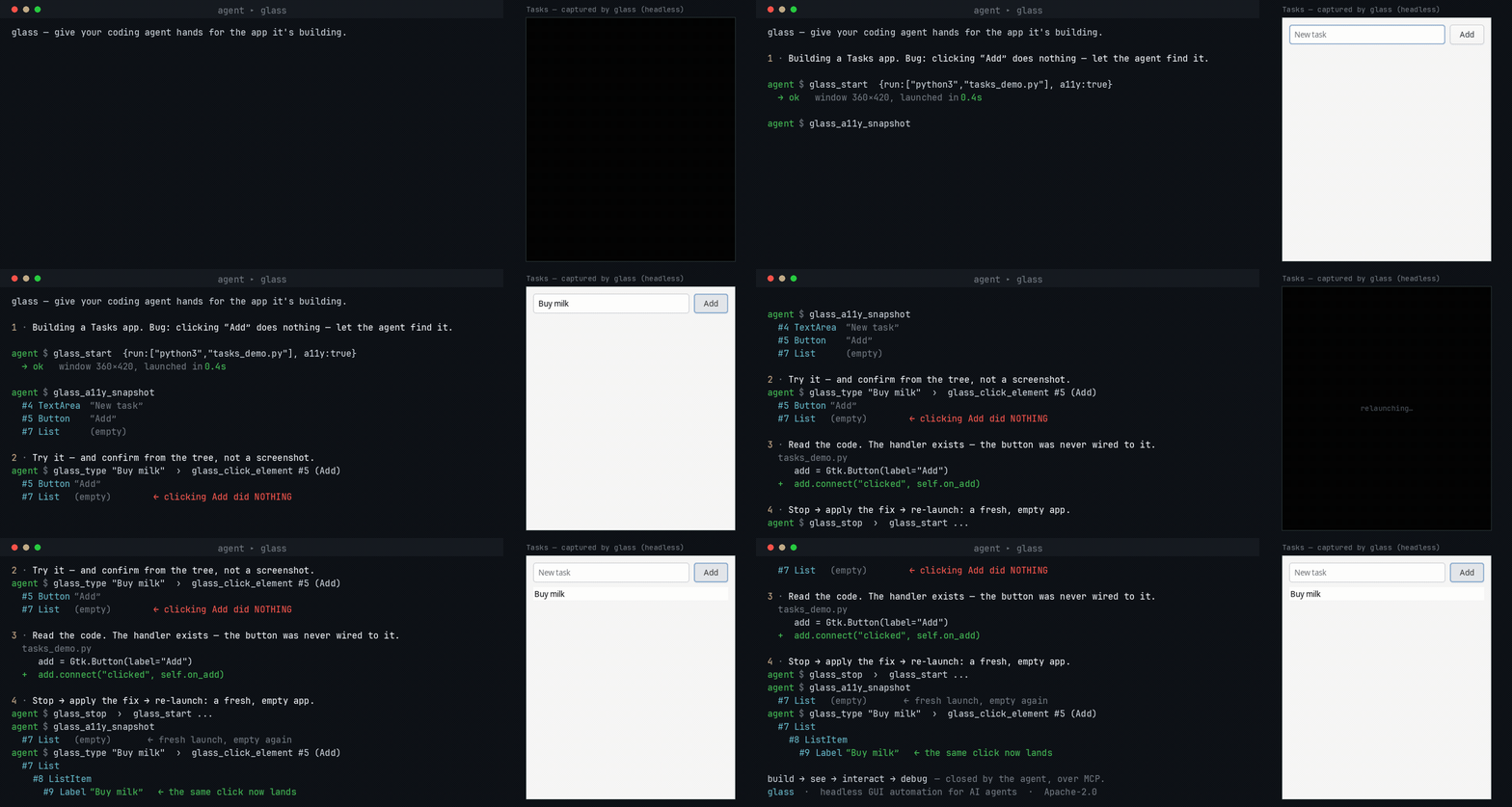
An agent building a GUI app runs it under Glass, reproduces a bug from the accessibility tree (no screenshots), fixes the code, and re-verifies — the loop it otherwise can't close on its own. Try it yourself.
Try the debugging demo (Linux)
-
Clone this repo and run your agent from the checkout. The demo is
examples/tasks-demo/tasks_demo.py; it needssudo apt install python3-gi gir1.2-gtk-4.0. -
Paste this to your agent:
Use Glass to run
examples/tasks-demo/tasks_demo.pywith accessibility on. There's a bug: clicking Add doesn't add the typed task. Reproduce it by driving the UI and checking the accessibility tree (don't just screenshot), then find and fix the bug in the code and verify a task actually appears.
Your agent launches the app, reproduces the bug from the accessibility tree, fixes the one-line
wiring bug, and confirms the task appears — the whole build → see → interact → debug loop, start to
finish. (glass-mcp doctor checks your environment if anything's off.)
The loop in practice
An agent can fill in a form, click Save, and check that the app reports success. When the app exposes an accessibility tree, the agent works with named controls and verifies changes from text:
glass_start { "run": ["python3", "app.py"] }
glass_do { "actions": [
  { "action": "set_value",
    "target": { "query": "account", "role": "TextField", "states": ["enabled"] },
    "text": "hello" },
  { "action": "click_element",
    "target": { "query": "Save", "role": "Button", "states": ["enabled"] },
    "mode": "auto" },
  { "action": "wait_for_element", "name": "Saved" }
] }
glass_logs
Use glass_find_elements to inspect candidates when the intended target is not unique or known well
enough to act on directly. Use glass_a11y_snapshot to explore the app's controls. See the
tool reference for click modes and platform behavior.
For a canvas or custom-rendered app with no accessibility tree, drive it by pixels instead —
glass_screenshot, glass_click {x,y}, and glass_diff, which returns changed_pct + a bbox as
text, so routine checks between screenshots cost no vision tokens. Why the loop is shaped this way:
the build → see → interact → debug loop.
To review a run after the app stops, opt into session evidence recording
with --trace-dir. Glass retains tool inputs and requested results in bounded storage, then
glass-mcp trace inspect and trace export validate the trace and package its evidence in a ZIP.
Recording is off by default; retained app content can contain sensitive data. For a movie of a
selected workflow or recent desktop history, see Record a workflow video.
Install at a glance
Download the latest build for your platform from the Releases page, then set up your host:
- Linux — docs/how-to/setup-linux.md (X11 or Wayland;
Xvfb/sway+ bubblewrap) - Windows — docs/how-to/setup-windows.md (a prebuilt
.exe+ Sandboxie) - macOS — docs/how-to/setup-macos.md (install the notarized
.dmg; no build needed) - Android — docs/how-to/setup-android.md (an AVD emulator, from any host)
- iOS — docs/how-to/setup-ios.md (the Simulator, macOS host only)
Every asset is listed in docs/reference/platforms.md.
Prefer to compile, or on an architecture with no published asset? See
docs/how-to/build-from-source.md — it is a single cargo build.
Then connect Glass to your agent and run glass-mcp doctor to check
the environment. New here? Follow the Linux/X11 tutorial to build,
drive and verify a small test app.
For new agent configurations, use glass-mcp --tool-profile lean for 18 tools, with actions through
glass_do, annotated screenshots and optional log waits. The full toolbox remains the compatible
binary default. Inspect either inventory without
starting a session using glass-mcp tools --json; see tool profiles.
Drive it well — the glass-drive skill
The optional glass-drive Agent Skill teaches semantic targeting, batched actions and verification through text before taking another screenshot. Glass needs no app integration or skill to run.
Platform support
The platform reference is the canonical capability matrix, with system requirements, mobile companion requirements and desktop preview limits. Capture, input, accessibility, clipboard and window management have platform-specific restrictions. Transport is MCP over stdio (the binary default) or Streamable HTTP; resident macOS and Windows apps serve HTTP.
Documentation
The full docs — tutorial, how-to guides, reference, and explanations — are under
docs/. See CHANGELOG.md for release notes, and
Stability and versioning for what a 1.0 release guarantees.
Contributing? CONTRIBUTING.md has the gates a PR has to pass, and
Verify a change covers platform code your own host cannot run.
License
Glass is open source, licensed Apache-2.0 — see LICENSE-APACHE.






