Listed from the MCP registry; nobody on Odel publishes it.

Drizzle MCP
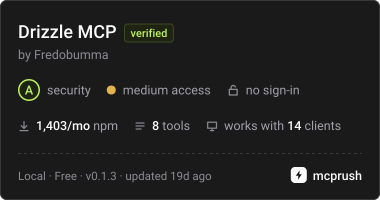
Drizzle Studio for agents: explore your database through your Drizzle schema. Read-only by default.
Runs on your machine from its package; the steps are below.
What it does
- Reads
- Writes
- High impact
At most: creates or changes data: records, files, settings.
What it costs
FreeOdel charges nothing per call. The publisher may charge for its own service.
Runs locally over stdio
This server isn't hosted — your MCP client launches it from a package registry. Use one of the commands below, or drop the config into your client (e.g. Claude Desktop).
Run
npx -y drizzle-mcp
MCP client config
{
  "mcpServers": {
    "drizzle-mcp": {
      "command": "npx",
      "args": [
        "-y",
        "drizzle-mcp"
      ]
    }
  }
}
Drizzle Studio for agents. An MCP server that lets Claude Code, Cursor and other coding agents see your database through your Drizzle schema.
A generic database MCP sees tables and columns. This one reads the schema your code uses: TypeScript names next to SQL names, relations, enums and defaults. An agent can then answer "what's actually in the database?" and write Drizzle code that matches it.
For migrations, use Drizzle's own drizzle-kit mcp (drizzle-kit 1.0): it generates, pushes and checks them. drizzle-mcp reads what's in the database, read-only by default, so the two work side by side.
If it's useful to you, a star on GitHub helps other people find it. Questions, bug reports and ideas are welcome in the issues, and so are pull requests.
Here is what an agent gets back when it asks about a posts table:
## posts

SQL table `posts`, exported as `posts` from `src/db/schema.ts`.

| column (TS key, SQL name) | type                     | nullable | default | notes                          |
| ------------------------- | ------------------------ | -------- | ------- | ------------------------------ |
| id                        | serial                   | no       |         | primary key                    |
| authorId (author_id)      | integer                  | no       |         | → users.id, on delete cascade  |
| published                 | boolean                  | no       | false   |                                |
| createdAt (created_at)    | timestamp with time zone | no       | now()   |                                |

Relations (for `browse` with `with`, or `db.query` in code):
- author: one users on posts.authorId = users.id
- comments: many comments on posts.id = comments.postId
Set up
Run it from the folder with drizzle.config.ts.
Claude Code
claude mcp add drizzle -- npx -y drizzle-mcp
Cursor (.cursor/mcp.json) and VS Code (.vscode/mcp.json, with "servers" instead of "mcpServers"):
{
  "mcpServers": {
    "drizzle": { "command": "npx", "args": ["-y", "drizzle-mcp"] }
  }
}
For clients that don't start servers in your project folder, such as Claude Desktop, add "--config", "/path/to/drizzle.config.ts" to args.
drizzle-mcp loads your config the way drizzle-kit does, including your .env. It connects with the database driver and the drizzle-orm version your project already has installed.
Tools
| Tool | What it does |
|---|---|
schema | Lists the tables. With a table name, it describes the columns (TypeScript key and SQL name, type, nullability, default), the keys, indexes, checks and relations. |
browse | Reads rows the way Drizzle Studio shows them: pick columns, filter, sort and page, and include related rows through your relations(). Rows are keyed by TypeScript property, as db.query returns them. |
count | Counts rows, overall or per value with groupBy, to see how data is distributed. |
query | Runs one SQL statement read-only and returns up to 100 rows. |
explain | Shows the query plan, to check that an index is used. On Postgres, analyze runs the query for real timings. |
drift | Compares the schema with the live database: missing or extra tables and columns, and changed types or nullability. |
migrations | Lists drizzle-kit's migrations as applied or pending. It also flags any migration edited after it was applied. |
execute | Changes data. Only available when the server is started with --allow-writes. |
Filters are JSON, so values are always bound as parameters, never pasted into SQL:
{ "published": true, "createdAt": { "gte": "2026-01-01" }, "or": [{ "title": { "ilike": "%drizzle%" } }, { "rating": { "gte": 4.5 } }] }
If you edit the schema, the server picks up the change on the next call; no restart needed.
Safe by default
An agent shouldn't be able to wreck a database by accident, or because something it read told it to.
- Read-only. Every statement runs in a read-only transaction. SQLite reads use a read-only connection.
- One statement at a time.
select 1; commit; drop table usersis refused before it reaches the database. The Postgres drivers andbetter-sqlite3would refuse it again on their own; libsql would silently drop everything after the first statement. - Bounded. Statements time out after 15 seconds. Results are capped at 100 rows and fetched through a cursor, so a large table is never pulled into memory. Long values are cut short.
- Secrets hidden. Values in columns named like
password,token,secretorapiKeyare shown as[redacted]. - Writes are opt-in.
--allow-writesadds theexecutetool.querystays read-only either way.
Requirements
| Database | Drivers |
|---|---|
| PostgreSQL | pg, postgres (postgres.js), PGlite |
| SQLite | better-sqlite3, @libsql/client (including Turso) |
MySQL isn't supported yet.
drizzle-mcp needs Node.js 22 or newer. It's tested with drizzle-orm 0.45, the current stable release. Drizzle 1.0, now in release candidates, defines relations differently and isn't supported yet.
Options
--config <path>     The Drizzle config (default: drizzle.config.ts in the current folder)
--url <url>         Connect here instead of the config's dbCredentials
--driver <name>     pg, postgres, pglite, better-sqlite3 or libsql (default: the one installed)
--allow-writes      Add the execute tool
--max-rows <n>      The most rows a tool returns (default: 100)
--timeout <ms>      Statement time limit (default: 15000)
--max-text <n>      Cut strings longer than this (default: 500)
--redact <regex>    Hide columns whose names match (default: password, secret, token…)
--show-secrets      Don't hide any columns
How it works
- It loads
drizzle.config.tsand your.env, then imports the schema files the config points to (a file, a folder or a glob). Imports go through jiti, so TypeScript works without a build step. - It reads tables, columns and relations from drizzle-orm's own metadata. This is the same information
drizzle-kitand relational queries use. That's where the TypeScript names and relations come from. - It connects with your project's driver.
browseandcountbuild relational queries with your schema objects.queryruns plain SQL through the safeguards above.
Development
pnpm install
pnpm check   # types, lint and 145 tests
The tests run every tool against every driver. Postgres runs as PGlite, which is real Postgres compiled to WebAssembly. pg and postgres.js reach it over the Postgres wire protocol, so no Docker is needed.
Pull requests are welcome. Run pnpm check before opening one, and for anything large, open an issue first so we can agree on the approach.
License
MIT






