Listed from the MCP registry; nobody on Odel publishes it.

OpenClaw MCP Server
MCP server bridging Claude.ai/Desktop with self-hosted OpenClaw via OAuth 2.1.
Runs on your machine from its package; the steps are below.
What it does
- Reads
- Writes
- High impact
At most: moves money, runs code or commands, deletes data, or sends messages for you.
What it costs
FreeOdel charges nothing per call. The publisher may charge for its own service.
Runs locally over stdio
This server isn't hosted — your MCP client launches it from a package registry. Use one of the commands below, or drop the config into your client (e.g. Claude Desktop).
Run
npx -y openclaw-mcp
MCP client config
{
  "mcpServers": {
    "openclaw-mcp-server": {
      "command": "npx",
      "args": [
        "-y",
        "openclaw-mcp"
      ]
    }
  }
}Run
docker run -i --rm ghcr.io/freema/openclaw-mcp:2.0.0
MCP client config
{
  "mcpServers": {
    "openclaw-mcp-server": {
      "command": "docker",
      "args": [
        "run",
        "-i",
        "--rm",
        "ghcr.io/freema/openclaw-mcp:2.0.0"
      ]
    }
  }
}OpenClaw MCP Server





🦞 Model Context Protocol (MCP) server for OpenClaw AI assistant integration.
2.0 is here: MCP SDK v2, stateless Streamable HTTP, MCP specification 2026-07-28, streamed async tasks. Coming from 1.x? Read Upgrading to 2.0.0 — the legacy SSE transport is gone and async tasks behave differently. To stay on 1.x for now, pin
openclaw-mcp@1.8.1/ghcr.io/freema/openclaw-mcp:1.8.1. Do not run 2.0.0-beta.1: it has known vulnerabilities, see Upgrading from 2.0.0-beta.1.
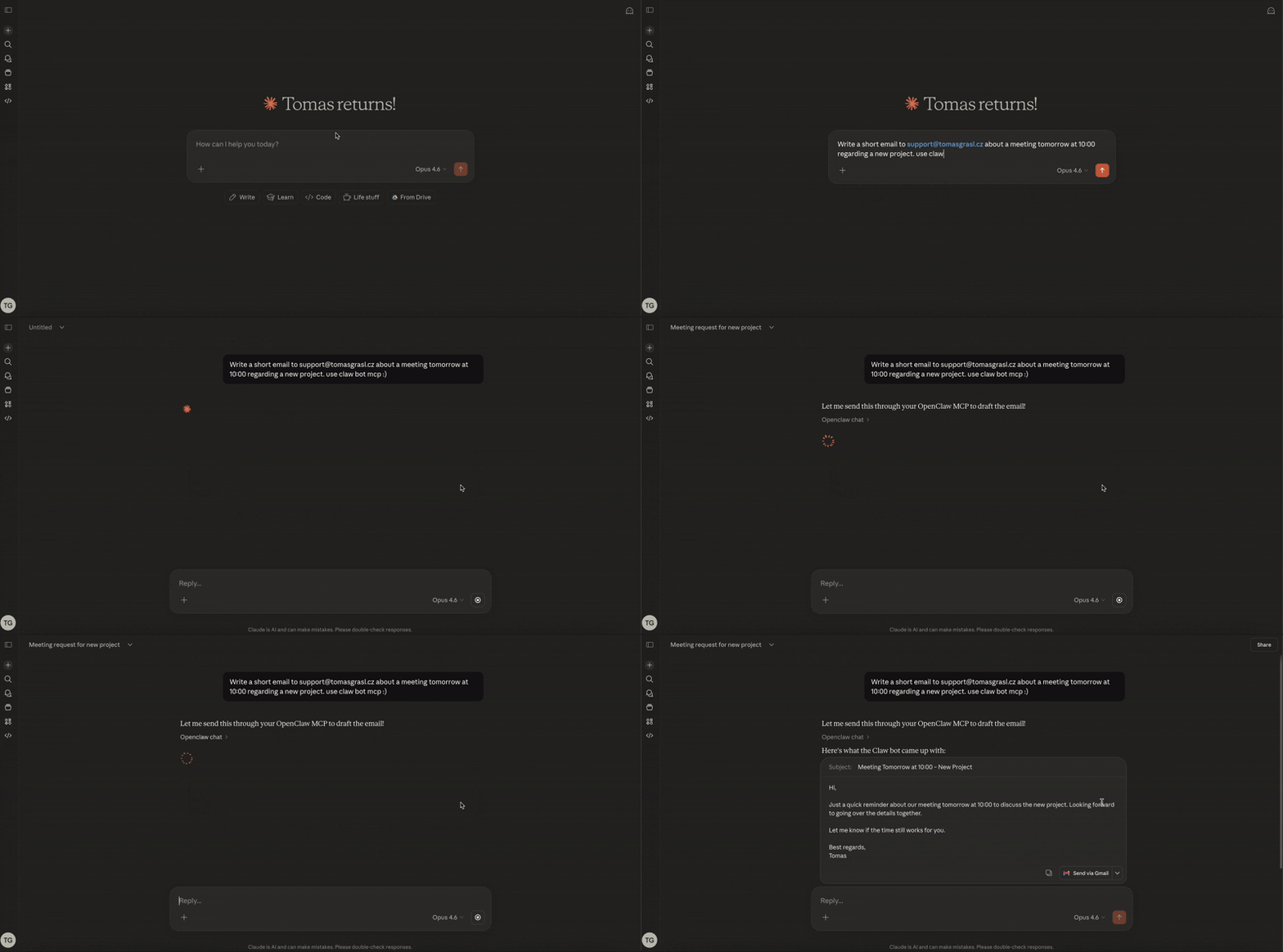
Demo
Why I Built This
Hey! I created this MCP server because I didn't want to rely solely on messaging channels to communicate with OpenClaw. What really excites me is the ability to connect OpenClaw to the Claude web UI. Essentially, my chat can delegate tasks to my Claw bot, which then handles everything else — like spinning up Claude Code to fix issues for me.
Think of it as an AI assistant orchestrating another AI assistant. Pretty cool, right?
Quick Start
Docker (Recommended)
Pre-built images are published to GitHub Container Registry on every release.
docker pull ghcr.io/freema/openclaw-mcp:latest
Create a docker-compose.yml:
services:
  mcp-bridge:
    image: ghcr.io/freema/openclaw-mcp:latest
    container_name: openclaw-mcp
    restart: unless-stopped
    ports:
      - "127.0.0.1:3000:3000"   # loopback only, reached through your reverse proxy
    environment:
      - OPENCLAW_URL=http://host.docker.internal:18789
      - OPENCLAW_GATEWAY_TOKEN=${OPENCLAW_GATEWAY_TOKEN}
      - OPENCLAW_AGENT_ID=${OPENCLAW_AGENT_ID:-}
      - OPENCLAW_MODEL=openclaw
      - MCP_CLIENT_ID=openclaw
      - MCP_CLIENT_SECRET=${MCP_CLIENT_SECRET}
      - MCP_ISSUER_URL=${MCP_ISSUER_URL:-}
      - MCP_REDIRECT_URIS=https://claude.ai/api/mcp/auth_callback,https://claude.com/api/mcp/auth_callback
      - TRUST_PROXY=1
      - CORS_ORIGINS=https://claude.ai
    extra_hosts:
      - "host.docker.internal:host-gateway"
    read_only: true
    cap_drop:
      - ALL
    security_opt:
      - no-new-privileges
The port is published on 127.0.0.1 only: the bridge speaks plain HTTP and is
meant to sit behind a TLS-terminating reverse proxy on the same host (see
Deployment).
Generate secrets and start:
export MCP_CLIENT_SECRET=$(openssl rand -hex 32)
export OPENCLAW_GATEWAY_TOKEN=your-gateway-token
docker compose up -d
Then in Claude.ai add a custom MCP connector pointing to https://your-domain.com/mcp with MCP_CLIENT_ID=openclaw and your MCP_CLIENT_SECRET.
Important: The connector URL must end with
/mcp— that's the Streamable HTTP endpoint. A bare domain (https://your-domain.com) hits the server root and returns 404 after OAuth completes.
Tip: Pin a specific version instead of
latestfor production:ghcr.io/freema/openclaw-mcp:2.0.0
Use a least-privilege agent. Set
OPENCLAW_AGENT_IDto a dedicated OpenClaw agent that only has the tools you want Claude to reach — not your main agent with shell access. See Security.
Local (Claude Desktop)
npx openclaw-mcp
Add to your Claude Desktop config:
{
  "mcpServers": {
    "openclaw": {
      "command": "npx",
      "args": ["openclaw-mcp"],
      "env": {
        "OPENCLAW_URL": "http://127.0.0.1:18789",
        "OPENCLAW_GATEWAY_TOKEN": "your-gateway-token",
        "OPENCLAW_AGENT_ID": "main",
        "OPENCLAW_MODEL": "openclaw",
        "OPENCLAW_TIMEOUT_MS": "300000"
      }
    }
  }
}
Remote (Claude.ai) without Docker
MCP_CLIENT_ID=openclaw MCP_CLIENT_SECRET=your-secret \
  MCP_ISSUER_URL=https://mcp.your-domain.com \
  CORS_ORIGINS=https://claude.ai OPENCLAW_GATEWAY_TOKEN=your-gateway-token \
  npx openclaw-mcp --transport http --port 3000
Important: When running behind a reverse proxy (Caddy, nginx, Traefik, Cloudflare Tunnel, etc.) you must set:
MCP_ISSUER_URL(or--issuer-url) to your public HTTPS URL — otherwise OAuth metadata advertiseshttp://localhost:3000and clients fail to authenticate.TRUST_PROXY=1(or--trust-proxy 1) — otherwiseexpress-rate-limitrejects the proxy'sX-Forwarded-Forheader and/tokencrashes withERR_ERL_UNEXPECTED_X_FORWARDED_FOR.
Recommended: Set
MCP_REDIRECT_URIS=https://claude.ai/api/mcp/auth_callback,https://claude.com/api/mcp/auth_callbackso authorization codes can only be delivered to Claude's callbacks. Note the exact/api/mcp/auth_callbackpath — matching is exact, and getting it wrong fails OAuth withUnregistered redirect_uri(see Troubleshooting).
See Installation Guide for details.
Architecture
┌─────────────────────────────────────────────────────────────────┐
│                         Your Server                             │
│                                                                 │
│  ┌─────────────────┐      ┌─────────────────────────┐          │
│  │   OpenClaw      │      │    OpenClaw MCP         │          │
│  │   Gateway       │◄────►│    Bridge Server        │          │
│  │   :18789        │      │    :3000                │          │
│  │                 │      │                         │          │
│  │  OpenAI-compat  │      │  - OAuth 2.1 auth       │          │
│  │  /v1/chat/...   │      │  - CORS protection      │          │
│  └─────────────────┘      │  - Input validation     │          │
│                           └──────────┬──────────────┘          │
│                                      │                          │
└──────────────────────────────────────┼──────────────────────────┘
                                       │ HTTPS + OAuth 2.1
                                       ▼
                              ┌─────────────────┐
                              │   Claude.ai     │
                              │   (MCP Client)  │
                              └─────────────────┘
Available Tools
Sync Tools
| Tool | Description |
|---|---|
openclaw_chat | Send messages to OpenClaw and get responses |
openclaw_status | Check OpenClaw gateway health |
openclaw_instances | List all configured OpenClaw instances |
Async Tools (for long-running operations)
| Tool | Description |
|---|---|
openclaw_chat_async | Queue a message, get task_id immediately |
openclaw_task_status | Check task progress and get results |
openclaw_task_list | List your tasks with filtering |
openclaw_task_cancel | Cancel a pending or running task |
Async tasks stream from the gateway, so openclaw_task_status shows live
progress (progress_chars, last_activity_at) while a task runs, and
OPENCLAW_TIMEOUT_MS only aborts a task when the stream goes silent. Up to
OPENCLAW_TASK_CONCURRENCY tasks (default 3) run at the same time.
Tasks belong to whoever created them. In HTTP mode that is the authenticated
OAuth client: the transport is stateless, so the client can poll, list and
cancel its tasks from any later request, and another client's task_id reads
as "not found" even if it is known. Without an authenticated client (stdio, or
HTTP with auth explicitly disabled) all tasks of the process share one owner.
Multi-Instance Mode
Orchestrate multiple OpenClaw gateways from a single MCP server. One bridge, many claws — route requests to prod, staging, dev, or whatever you name them (lobster-supreme and the-claw-abides are perfectly valid names).
┌──────────────────────────────────────────────────────────────────────┐
│                        Claude.ai / Claude Desktop                    │
│                              (MCP Client)                            │
└──────────────────────┬───────────────────────────────────────────────┘
                       │
                       ▼
┌──────────────────────────────────────────────────────────────────────┐
│                     OpenClaw MCP Bridge Server                        │
│                                                                      │
│  ┌──────────────┐  ┌──────────────┐  ┌──────────────┐               │
│  │  Instance     │  │  Instance     │  │  Instance     │              │
│  │  Registry     │  │  Resolver     │  │  Validator    │              │
│  └──────┬───────┘  └──────┬───────┘  └──────┬───────┘               │
│         │                 │                  │                        │
│  ┌──────┴─────────────────┴──────────────────┴───────┐               │
│  │              Per-Instance OpenClaw Clients          │              │
│  │     (separate auth, timeout, URL per instance)     │              │
│  └────────┬──────────────┬──────────────┬────────────┘               │
└───────────┼──────────────┼──────────────┼────────────────────────────┘
            │              │              │
            ▼              ▼              ▼
   ┌──────────────┐ ┌──────────────┐ ┌──────────────┐
   │  🦞 prod     │ │  🦞 staging  │ │  🦞 dev      │
   │  (default)   │ │              │ │              │
   │  :18789      │ │  :18789      │ │  :18789      │
   │  OpenClaw GW │ │  OpenClaw GW │ │  OpenClaw GW │
   └──────────────┘ └──────────────┘ └──────────────┘
Setup
OPENCLAW_INSTANCES='[
  {"name": "prod", "url": "http://prod:18789", "token": "tok1", "default": true},
  {"name": "staging", "url": "http://staging:18789", "token": "tok2"},
  {"name": "dev", "url": "http://dev:18789", "token": "tok3"}
]'
Usage
All tools accept an optional instance parameter to target a specific gateway:
# Chat with staging instance
openclaw_chat message="Deploy status?" instance="staging"

# Check health of prod
openclaw_status instance="prod"

# List all configured instances
openclaw_instances

# Async task targeting dev
openclaw_chat_async message="Run tests" instance="dev"
When instance is omitted, the default instance is used. Each instance has its own auth token, timeout, and URL — fully isolated.
Key Features
- Zero-migration upgrade — existing single-instance deployments work without any config change
- Per-instance isolation — separate auth tokens, timeouts, and URLs
- Dynamic routing — Claude picks the right instance per request
- Task tracking — async tasks remember which instance they target
- Security — tokens are never exposed via
openclaw_instances
See Configuration — Multi-Instance Mode for the full reference.
Documentation
- Installation — Setup for Claude Desktop & Claude.ai
- Configuration — Environment variables & options
- Deployment — Docker & production setup
- Threat Model — What Claude can/can't trigger, trust boundaries & attack surfaces
- Logging — What gets logged, where, and what is never logged
- Development — Contributing & adding tools
- Security — Security policy & best practices
Security
⚠️ Always enable authentication in production!
# Generate secure client secret
export MCP_CLIENT_SECRET=$(openssl rand -hex 32)

# Run with auth enabled
MCP_CLIENT_ID=openclaw MCP_CLIENT_SECRET=$MCP_CLIENT_SECRET \
  openclaw-mcp --transport http
CORS is disabled unless you opt in. Set CORS_ORIGINS only when a browser
client needs to reach the server directly:
CORS_ORIGINS=https://claude.ai,https://your-app.com
See Configuration for all security options.
Give the bridge a least-privilege agent
The bridge passes text to an OpenClaw agent and cannot judge what that text
makes the agent do. Anything Claude reads — a web page, an email, a document —
can end up in an openclaw_chat call, so prompt injection into an agent that
can run shell commands is the biggest real-world risk of this setup, and OAuth
does not help against it. Do not point the bridge at your main agent: create a
dedicated OpenClaw agent with only the tools it needs, sandboxed, and select it
with OPENCLAW_AGENT_ID. Details in SECURITY.md
and the Threat Model.
Upgrading to 2.0.0
2.0 moves to MCP SDK v2 and the 2026-07-28 specification. Tool names and inputs are unchanged and Claude.ai / Claude Desktop need no change on their side, but a few things behave differently from 1.8.1:
- The legacy SSE transport is removed.
--transport sseexits with an error (it used to be an alias forhttp), andGET /sse/POST /messagesanswer410 Gone. Use--transport httpand the/mcpendpoint, see Migrating from SSE to HTTP transport. - HTTP is stateless: no
Mcp-Session-Idsessions. Clients that depend on a stateful session must be updated. - Async tasks stream from the gateway (
stream: true). The gateway and any proxy in between must passtext/event-streamresponses through; a gateway that only answers with plain JSON makes async tasks fail. OPENCLAW_TIMEOUT_MSis an idle timeout for async tasks: it resets on every chunk, and a streamed request is capped at 30 minutes. Foropenclaw_chatandopenclaw_statusit is still an absolute timeout.- Async tasks run in parallel, 3 at a time by default. Set
OPENCLAW_TASK_CONCURRENCY=1to keep the 1.x one-at-a-time behaviour. openclaw_task_cancelalso cancels running tasks and aborts their gateway request.- Without authentication (stdio, or
MCP_DANGEROUSLY_DISABLE_AUTH=true) all tasks of the process share one owner; 1.x scoped them to the connection. With OAuth, tasks belong to the OAuth client as before. TRUST_PROXY=truerefuses to start while OAuth is enabled. UseTRUST_PROXY=1(one reverse proxy) or the proxy's address range.- OAuth tokens live in memory, so clients authorize again after the restart.
Steps:
- Replace
--transport ssewith--transport httpwherever you start the server (the Docker image already passes--transport http, do not add it again), andTRUST_PROXY=truewithTRUST_PROXY=1. - If you use the async tools, make sure streamed responses from the gateway
reach the bridge unbuffered, and pick
OPENCLAW_TASK_CONCURRENCY. - Update (
npm install -g openclaw-mcp@latest, orghcr.io/freema/openclaw-mcp:2.0.0) and restart.
The full list is in the changelog.
Upgrading from 2.0.0-beta.1
2.0.0-beta.1 must not be used. It was cut before the 1.7.0, 1.8.0 and
1.8.1 security releases and has none of their fixes: HTTP mode runs without
authentication unless AUTH_ENABLED=true is set, CORS defaults to *, and
any caller can read and cancel any other caller's async tasks (task IDs were
sequential). 2.0.0-beta.2 brings the 2.0 line to parity with 1.8.1 — everything
in the three sections below applies to it, with these differences:
- There is no
/messagesendpoint to limit;/sseand/messagesanswer410 Gone. - The HTTP transport is stateless, so without an authenticated OAuth client
(stdio, or
MCP_DANGEROUSLY_DISABLE_AUTH=true) there is no connection to scope tasks to: all tasks of the process share one owner. - The MCP SDK packages are
@modelcontextprotocol/server2.4,/node2.1.2 and/express2.0.2, which carry the fixes 1.8.1 got from SDK 1.32.2.
If you start 2.0 with AUTH_ENABLED=false or without
MCP_CLIENT_ID / MCP_CLIENT_SECRET, it refuses to start — see
Upgrading to 1.8.0.
Upgrading to 1.8.1
A security and maintenance release; no configuration changes are required.
docker-compose.ymlnow publishes the port on127.0.0.1only. If you use the compose file from this repository and reach port 3000 directly from another machine (no reverse proxy on the same host), it stops being reachable after you update the file. Put a reverse proxy in front, or setBIND_ADDRESS=0.0.0.0to restore the old binding. A compose file you maintain yourself, anddocker run, are not affected. The compose file also drops all Linux capabilities (cap_drop: [ALL]).- MCP SDK 1.32.2 with its security fixes; the Docker image runs on Node.js 24. The npm package still supports Node.js ≥ 20.
- Request bodies on
/mcpand/messagesare limited to 4 MiB and parsed only after authentication. Long non-ASCII messages that used to fail with413under the old implicit 100 kB limit now work; JSON-RPC batches are capped at 100 messages by the SDK.
See the changelog for the full list.
Upgrading to 1.8.0
OAuth is now mandatory for the HTTP transport. Before 1.8.0 HTTP mode ran
without authentication unless AUTH_ENABLED=true was set, so a bare
docker run of the image exposed every tool to anyone who could reach the
port. Now:
- Without
MCP_CLIENT_IDandMCP_CLIENT_SECRETthe server refuses to start.AUTH_ENABLED=truestill works but is no longer needed. AUTH_ENABLED=false/--no-authrefuses to start instead of silently disabling auth. If you really need an unauthenticated server (e.g. a proxy in front already authenticates every request), setMCP_DANGEROUSLY_DISABLE_AUTH=true(--dangerously-disable-auth).- stdio is unchanged.
Async tasks now belong to the OAuth client, not the MCP connection. A client that opens a new MCP session between tool calls can poll the tasks it created (#44). The bridge is single-tenant — whoever holds the client secret already has full access to the same OpenClaw gateway — so the OAuth client is the isolation boundary. Dynamically registered clients each get their own namespace. Without auth, tasks stay scoped to the connection.
New ALLOWED_HOSTS for a loopback bind behind a reverse proxy that
preserves the public Host header (Tailscale Serve, nginx with
proxy_set_header Host $host), which previously failed with 403 Invalid Host
(#41). See
configuration.
Upgrading to 1.7.0
Two defaults changed for security. Both only affect HTTP mode; stdio is unchanged.
- CORS is now off by default. Previously an unset
CORS_ORIGINSsentAccess-Control-Allow-Origin: *. If a browser client depends on that, set the origins explicitly (CORS_ORIGINS=https://your-app.com), orCORS_ORIGINS=*to restore the old behaviour. - Async tasks are scoped to the connection that created them. A client
that used to poll a
task_idqueued by a different connection will now get "not found". (1.8.0 relaxes this to the authenticated OAuth client.)
Migrating from SSE to HTTP transport
The legacy SSE transport was removed in v2.0. --transport sse now exits with an error, and GET /sse / POST /messages answer 410 Gone. Use Streamable HTTP:
| Before (≤ 1.x) | After (2.0) |
|---|---|
--transport sse | --transport http |
Endpoint: GET /sse + POST /messages | Endpoint: ALL /mcp |
Health: "legacySseSupported": true | Health: "legacySseSupported": false |
Migration steps
-
CLI / Docker: Replace
--transport ssewith--transport httpbash# Before openclaw-mcp --transport sse --port 3000 # After openclaw-mcp --transport http --port 3000 -
Claude.ai connector URL: No change needed — Claude.ai already uses
/mcp(Streamable HTTP) -
Legacy clients: Any client that only speaks HTTP+SSE must be upgraded. The MCP specification deprecated that transport in 2025-03-26 and removed it in 2026-07-28.
Note on protocol versions: 2.0 runs on MCP SDK v2 and is stateless — it no longer keeps per-connection sessions. Clients still speaking the 2025-11-25 protocol (including current Claude.ai and Claude Desktop) are served through the SDK's built-in stateless legacy path and need no changes.
What's in 2.0
Version 2.0 targets the MCP 2026-07-28 specification on MCP SDK v2 (@modelcontextprotocol/server):
- Stateless protocol core — no MCP sessions; 2025-era clients (current Claude.ai / Claude Desktop) are served through the SDK's built-in legacy fallback. OAuth tokens and async tasks still live in process memory, so run a single instance (or route each client to the same instance); a round-robin load balancer across several instances would lose tokens and tasks between requests.
- Streaming to the gateway — async tasks use
stream: truewith an idle timeout (resets on every chunk), live progress (progress_chars), configurable concurrency (OPENCLAW_TASK_CONCURRENCY), and cancellation of running tasks (addresses #31) - Own OAuth 2.1 authorization server — SDK v2 is resource-server-only, so
/authorize,/token,/revoke,/registerand RFC 8414 metadata are implemented in-repo (PKCE S256, timing-safe client auth, refresh rotation, rate limiting) - Security parity with 1.8.1 — mandatory OAuth for HTTP, async tasks owned by the OAuth client, CORS off by default,
ALLOWED_HOSTS, request body limits, JSON error responses - zod v4 tool schemas (JSON Schema 2020-12) and tool annotations
- Legacy SSE transport removed —
/sseand/messagesanswer 410 Gone
Roadmap
- Structured tool outputs (
outputSchema+structuredContent) - Client ID Metadata Documents as the successor to Dynamic Client Registration
- Protocol-native Tasks (
io.modelcontextprotocol/tasksextension) — will replace the custom async task tools once the SDK ships a tasks runtime (so far it defines only the wire vocabulary)
Requirements
- Node.js ≥ 20
- OpenClaw gateway running with HTTP API enabled:
json5
// openclaw.json
{ "gateway": { "http": { "endpoints": { "chatCompletions": { "enabled": true } } } } }
License
MIT
Author
Created by Tomáš Grasl
Related Projects
- OpenClaw — The AI assistant this MCP connects to
- MCP Specification — Model Context Protocol docs








