Listed from the MCP registry; nobody on Odel publishes it.
Funes Vault
Personal memory for AI agents from a vault on your Mac, with per-agent scopes and approvals
Runs on your machine from its package; the steps are below.
What it does
- Reads
- Writes
- High impact
At most: creates or changes data: records, files, settings.
What it costs
FreeOdel charges nothing per call. The publisher may charge for its own service.
Runs locally
This server runs on your machine over stdio, but its source registry didn't list a distribution package. Check the source repository for setup instructions.
Give AI agents your memory. Not all of it.
A free, open-source Mac menu bar app that keeps your personal context in a private vault on your Mac, and shares it with Claude, Cursor, Codex and other AI agents only as you allow. Its iPhone app captures thoughts anywhere and answers agents' requests from your pocket.
Download for Mac · iPhone app · Get started · Agent setups · Changelog

- Each agent gets only what you choose. Its own key, and the access you set: read, suggest or save; up to a sensitivity level; in the categories you pick. A new agent can start with nothing.
- You approve the exact text. Before a memory goes to an agent, a small panel shows it, and you can untick what shouldn't go. An approval is used once, within 15 minutes, and is cancelled if anything changes.
- Agents suggest; you decide. What an agent wants to remember waits in your Inbox, where you edit it, apply it or reject it.
- Answer from your iPhone. When an agent asks while you're away from your Mac, your iPhone shows the request, and you share, save or deny it there. Capture a thought anywhere; it reaches your vault when your Mac does.
- Everything stays on your Mac. No account, no server of ours, no cloud copy. Search runs on a small model built into the app. The iPhone app keeps no copy either: it talks to your Mac, end to end encrypted. Cloud agents such as claude.ai and ChatGPT can reach it only through a tunnel you run, with Remote Access (experimental, off by default).
Status: public preview (0.6), with best-effort support. Funes Vault for iPhone (iOS 18 or later, free on the App Store) pairs with it. Works with Claude Code, Claude Desktop, Cursor and Codex, with ready-made setups for VS Code (Copilot), Gemini CLI, Zed, Cline, JetBrains AI Assistant, Devin Desktop and any other MCP client. From the cloud (experimental): claude.ai, ChatGPT, Gemini Enterprise, the Anthropic and OpenAI APIs, and cloud coding agents, through Remote Access.
Get started
-
Install. Download
FunesVault.dmg, open it and drag Funes Vault to Applications. If you open it from the disk image or Downloads instead, it offers to move itself there. Or use Homebrew:shbrew install --cask bereciartua/tap/funes-vaultFunes Vault needs macOS 15 or later, on Apple silicon or Intel.
-
Open the app. It lives in the menu bar: a click on its eye opens a panel with what waits for you, the Agents and Remote Access switches, a field to remember (⏎) or search (⌘⏎) and the last 24 hours; a right click has Open Funes Vault, Settings, Check for Updates and Quit. Its window opens on Home, with a short setup checklist:
- Connect an agent. Add… opens Add Agent, with the agents found on your Mac first. Pick one and a starting access: the default, Read low-sensitivity memories, ask first, lets it read memories up to Low and asks you before each share. For Claude Code, Claude Desktop, Cursor and Codex, Add and Connect… shows exactly what it will change or run first, backs up a settings file before changing it, and never writes the key into the agent's settings. For other agents, copy the setup from the agent's Connect tab.
- Approve its first request. Ask your agent something, for example "Plan a week of dinners for me" or "Set up this TypeScript project the way I like it." The agent asks Funes for context, you see the panel, and you choose what to share. The step is done when the agent's first request arrives.
- Seed your vault. Answer a few optional questions, import your ChatGPT memories or paste Claude's, or import a Markdown file. What you add goes to the Inbox first, and anything that looks like a secret is never imported. The questions end with the categories agents should never see: those get Deny for every agent, including ones you add later.
- Review your Inbox. Apply what's right; edit or reject the rest.
Search shows the part of each memory that matches, with your words in bold. With Search answers on (Settings ▸ AI ▸ Features, off by default), ⌘Return in the Vault's search, or Ask Funes, has the model you chose read the top results and answer in a few short claims, each quoting the memory it came from, with numbers that open that memory; claims it can't quote aren't shown. It can also answer on its own after a short pause, for searches that are questions or for every search. The iPhone has the same Ask Funes, answered by your Mac.
With Facts on (Settings ▸ AI ▸ Features ▸ Facts, off by default), the model you choose learns from your memories who the people they mention are to you and where you've worked and when, so searching for your sister's name finds the memory that only says "my sister", and an answer can say what you did before your current job. Vault ▸ People & History shows what it learned, with how it knows, and lets you correct it or add your own. What Funes learns is used only for your own search and answers, never by agents.
You can also capture a thought at any time with ⌥⌘M, File ▸ Remember… while a window is open, or Services ▸ Remember in Funes in any app, or type it on Home and press Return: it goes to the Inbox either way. ⌘Return on Home searches your vault for what you typed, and the microphone dictates, on your Mac (macOS 26 and later).
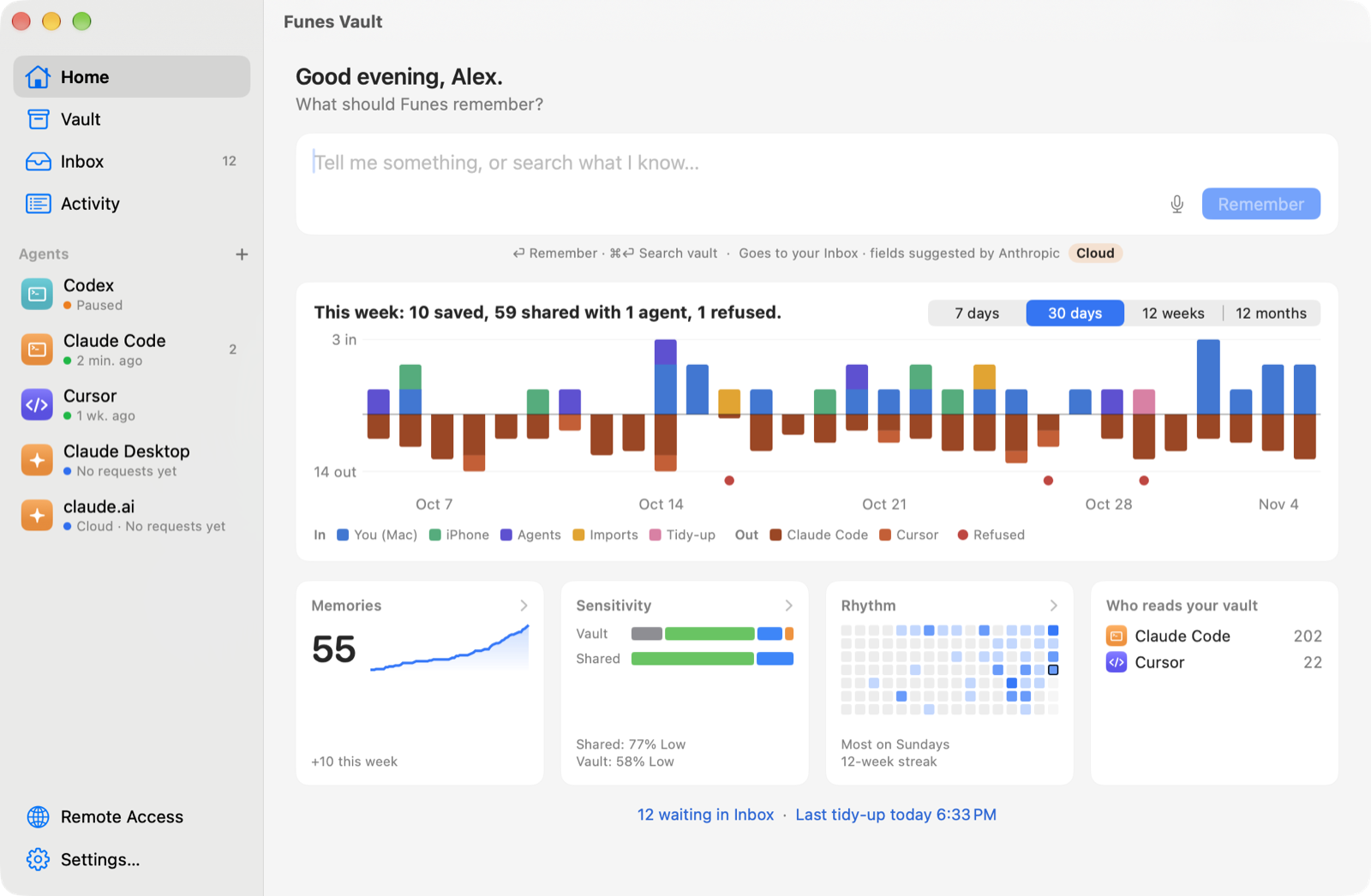
Home also shows your vault's pulse: what came in each day, from you, your iPhone, agents, imports or the tidy-up, and what went out to each agent, with refused requests marked. Hover a day for its numbers and click it to see that day in Activity. Below it: your memories and their growth, their sensitivity next to what was shared, your rhythm (a square for each day you saved memories, as many weeks as fit, today ringed), and who reads your vault. It shows counts only, never a memory's text.
Setups for every agent, the tool reference and troubleshooting are in the MCP guide.
On your iPhone
Get Funes Vault for iPhone, free on the App Store (iOS 18 or later). On the Mac, open Settings ▸ iPhone, turn on Allow iPhone access and click Pair iPhone…; on the iPhone, tap Pair with Mac and scan the code, then click Allow on the Mac. The two reach each other on the same Wi-Fi, through Tailscale, or through your Remote Access tunnel.
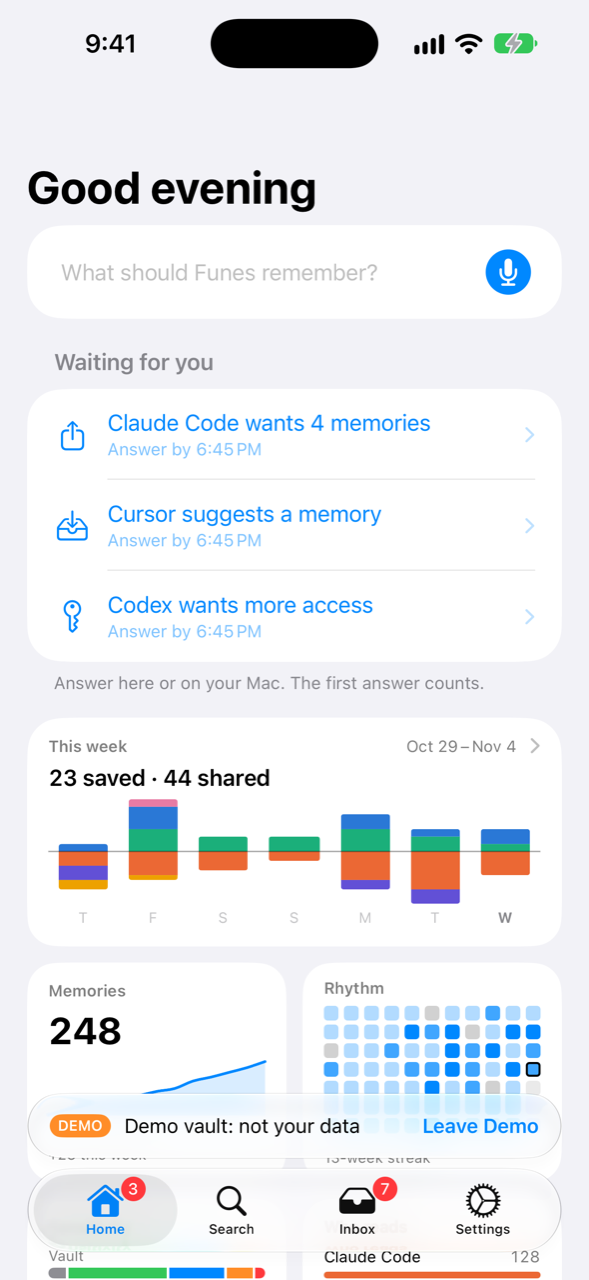
- Home has the box to remember something, typed or dictated, the agents' requests waiting for you, and your vault at a glance in tiles like its widgets: this week across the top, then Memories, Rhythm, Sensitivity and Who reads. Counts only, never a memory's text.
- Capture from Home, the share sheet, Shortcuts and Siri ("Remember in Funes"), a Control or the Remember widget. Captures wait on the iPhone until your Mac has them, even offline.
- Answer agents from a notification, with the same Share, Save and access panels as on the Mac. The notification names the agent and the count, never memory text. It reaches the iPhone through a record holding only a random name and a tag in your own iCloud (ADR-0019); the request itself comes from your Mac, end-to-end encrypted. This needs the same Apple Account on both.
- Search, edit and review the Inbox while your Mac is reachable. Search shows the sentence that matches, and Ask Funes has your Mac answer, with Search answers on. Every Inbox card can be answered on the iPhone, the tidy-up's included. With Facts on, Search's toolbar opens People & History, and results and answers can be corrected from the phone. The iPhone keeps no copy of your vault.
- Widgets for your pulse and rhythm, from the last counts your Mac sent, and one to remember something.
No Mac yet? Try Demo on Home shows every screen with sample data. The app's version is at the bottom of its Settings.
From cloud agents (experimental)
claude.ai, ChatGPT and cloud coding agents run on their vendor's servers, so they can't reach an app on your Mac directly. Remote Access lets them, through a tunnel you run, such as Tailscale Funnel:
- Open Remote Access in the sidebar and follow its four steps: choose a tunnel, turn Remote Access on and start the tunnel, paste its address, test. Funes never starts a tunnel; it shows the command.
- Add the agent on the Cloud · Experimental tab of Add Agent… (claude.ai, ChatGPT, …), or turn on Allow cloud access on an agent's Cloud tab.
- Connect it: apps that sign in (claude.ai, ChatGPT, Gemini Enterprise) use Connect a Cloud App… and a six-digit code you compare on the Mac; the others use the agent's remote token. The agent's Cloud tab shows the steps for each.

A cloud agent gets exactly the access you set for it, and the same panels on your Mac: if you're away, its requests wait and expire as for any agent. While Remote Access is on, the vault is reachable through a public address, and what you share with a cloud agent goes to its vendor's servers. It's off by default, and the Remote Access switch in the menu bar panel turns it off at once, cutting every cloud agent off. The MCP guide has the details.
How you stay in control
Funes is the only thing that holds your memories. Agents talk to it, never to the vault directly, and it checks every request against what you allowed.
You choose what each agent may see
Every agent has its own access: whether it may Read, Suggest or Write; a maximum sensitivity (Public, Low, Internal, Sensitive, Restricted or Secret); the categories it may or may not use (a denied category always wins); whether Funes asks before sharing and asks before saving; and an optional expiry date. Health, Finance and Legal memories are Sensitive by default.

You approve the exact text
When an agent asks for context, Funes finds the memories that match its task and are allowed for that agent. If asking is on, a panel shows each one with a checkbox, what the agent says it's for, how long it keeps what it gets, and how many more matched but can't go to it. Share sends only what you ticked; Deny sends nothing. The agent waits up to 45 seconds. If you don't answer in time, the request waits in Pending requests for up to 15 minutes, and the agent picks up your answer later; More Time moves it there at once. Review Request (⌃⌥⌘R) brings a waiting panel forward from any app.

Nothing an agent writes in its task or purpose changes what it may see. Those words only help find relevant memories.
Agents suggest, you decide
Agents propose memories, and by default each one waits in the Inbox as a card you can edit before Apply (Replace or Keep Both for a correction), Reject or Later. Cards say who proposed what, quote the agent's reasons as reported, point out similar memories, and show a correction as old and new text. Your own captures and imports land there too. With Split into separate memories on (Settings ▸ AI ▸ Features ▸ New memories, with a local server or cloud model), what arrives is split into one suggestion per claim, each marked New, Updates a memory, Already saved or Removes a memory, on one card with Apply All and Keep as One. With the Daily tidy-up on (Settings ▸ AI ▸ Features, off by default), Funes also looks once a day for copies, out-of-date memories, memories to merge or split and contradictions, and proposes them in the Inbox's Tidy-up section; conflicts always ask you which is true. Tidy Up in a memory's detail (or the Vault's right-click menu) checks just that memory against up to 5 related ones, whenever a tidy-up model is chosen; what it finds waits in the Inbox, and it doesn't count as the day's run.

You see everything, and stop anything
Activity lists what each agent asked for and what happened, by day, with filters. Its log stores only ids and reason codes, never text: it shows the memories involved by their current title when you open a row, says what was withheld and why, and links to fix a refusal. Pause an agent to refuse its requests while keeping its setup, Remove… it to cut it off, or turn off the Agents switch in the menu bar panel to pause all agents for an hour, until tomorrow or until you resume. When a memory changes (your edit on the Mac or iPhone, an agent's write, a suggestion you apply, archiving or restoring), Funes keeps the version it replaced for 90 days, at most 50 a memory: a memory's History and Activity show the change as before → after. Earlier versions stay in the vault on your Mac (and so in its backups), never go to agents, exports or your iPhone, and can be forgotten (Forget Earlier Versions… in History) or turned off (Settings ▸ Data & Backups).

Under the hood
- Local by default. The MCP server listens on
127.0.0.1:47625, never on a network interface. No account, no analytics, no server of ours. Remote Access, off by default, opens a second loopback port only a tunnel you run can expose. iPhone access, off by default, opens port 47626 to the iPhones you paired, and every message on it is signed and end-to-end encrypted. - A key per agent. Each agent has its own 256-bit key in a private file; the vault stores only its hash. One-click setups and the launcher read the file instead of putting the key in the agent's config.
- Fail closed. Any doubt about an agent or a request is a refusal. Refusals tell the agent how many memories were withheld and why, never which ones.
- Single use. An approved share is delivered once, within 15 minutes, and only if the memories and the agent's access are unchanged.
- Secrets stay out. A secret scanner checks captures (on the iPhone too), suggestions and imports, and everything sent to a model you chose.
- Signed updates. Updates come from GitHub, signed for Funes Vault and checked before they install. Installing always takes a click.
- Open source. Read the code, the architecture and the test record.
What it doesn't protect against: another program running as your macOS user can read the same vault and key files. Access settings separate the agents you connect; they aren't a defense against malware already on your Mac. Details are in Security boundary.
What agents can do
Agents see four main tools, and only the ones their access allows:
| Tool | What it does | Needs |
|---|---|---|
list_memory_categories | Lists your categories and what this agent may do in each. No memories, no counts. | Always available |
request_memory | Asks for memories relevant to a task, with keywords for the kinds of context that would help. Returns them, asks you first, or refuses with a reason. Each answer also carries the parts of About You you share with that agent (your name, by default). | Read |
get_memory_request | Picks up a request you answered after the agent stopped waiting. Delivered once. | Read |
suggest_memory | Proposes a memory or a correction. It goes to your Inbox, or straight into the vault if you let that agent save without asking. | Suggest or Write |
A fifth, open_in_funes, only brings Funes to the front at one of the agent's own pending requests or suggestions. The MCP guide has every argument and outcome.
FAQ
Is it free?
Yes. Funes Vault is open source under the Apache License 2.0, with no account or trial.
Do my memories leave my Mac?
Only what you share with an agent, which then goes to that agent and its AI provider under their terms. Funes itself has no server. Search, and the proposals for new captures, run on your Mac by default. If you choose a cloud model for new memories, the tidy-up, search answers or Facts, or a provider's embedding model for search, Funes says what it sends, and never sends a cloud model a memory above your cloud limit (Internal by default); your search text is checked only for secrets. Privacy lists every connection the app makes.
Does it always ask before sharing?
By default, yes: every starting access asks before each share. You can turn Ask before sharing off for an agent you trust; it then gets the memories it's allowed to read without a panel, and each share still shows in Activity.
What if I'm not at my Mac when an agent asks?
The agent waits 45 seconds, then is told the request is waiting for your approval. The request stays in Pending requests for 15 minutes, with a Review card at the top of the menu bar panel. If you share it in that time, the agent gets the memories the next time it checks. With the iPhone app paired, your iPhone gets a notification, and you can answer there.
Does it work with claude.ai or ChatGPT?
Yes, through Remote Access (experimental): a tunnel you run, such as Tailscale Funnel, makes Funes reachable at a public address, and claude.ai or ChatGPT signs in after you open pairing and compare a code on your Mac. Each cloud app uses one agent's access, with the same panels as any agent. See From cloud agents.
Can an agent change or delete my memories?
No. Agents can only propose new memories and corrections. An agent you give Write with Ask before saving off can save new memories directly, within its categories and sensitivity limit; its corrections still wait in your Inbox.
Does it need Apple Intelligence?
No. Search uses a small model built into the app (bge-small, on your Mac); you can add a provider's embedding model next to it (Qwen3-Embedding in Ollama or LM Studio, or OpenAI's text-embedding-3), which helps most with other languages. Apple's on-device model, when your Mac has it (macOS 26 or later with Apple Intelligence), proposes titles, categories and sensitivity for captures; otherwise simple rules do. You can also choose Ollama, LM Studio, Anthropic, OpenAI or another OpenAI-compatible server for that in Settings ▸ AI ▸ Features, after adding it in Settings ▸ AI ▸ Models & Accounts, or your Claude or ChatGPT plan through the Claude Code or Codex you already use (no API key), and with one of those, turn on Split into separate memories, which splits captures, agents' suggestions and imports into single memories and links them to what your vault holds, and the Daily tidy-up, which proposes updates, merges, splits and archives of related memories. One account (an API key or a plan) can offer several models, and each feature picks its own account and model, so New memories can use a small model while the tidy-up uses a larger one on the same key. Every proposal waits for you in the Inbox unless you choose Apply changes automatically, which applies only what the chosen model was accurate enough at, with Undo for 30 days.
Is there an iPhone app?
Yes: Funes Vault for iPhone, free on the App Store, which pairs with this Mac over an end-to-end encrypted channel and keeps no copy of your vault. It opens on Home: a box to remember something (typed or dictated, queued on the iPhone until your Mac has it), the agents' requests waiting for you, and your vault's pulse: what came in and what went out to each agent this week, how big and how sensitive the vault is, your rhythm of adding to it, and who reads it, as tiles like its widgets. Home Screen widgets show your pulse and rhythm from the last counts your Mac sent, and open Home ready to type or dictate. It also searches and edits the vault, reviews the Inbox and answers agents' requests while your Mac is reachable. Try Demo shows every screen with sample data, no Mac needed. Its App Store privacy label is "Data Not Collected". See On your iPhone.
Is it made by Apple, Anthropic or OpenAI?
No. Funes Vault is an independent open-source project, not affiliated with or endorsed by any of them.
Something else? Open an issue.
Security boundary
- MCP server. Runs while Settings ▸ Agent Server ▸ Let agents connect is on (the default), and listens only on
127.0.0.1(port 47625 unless you change it in the same pane). Every request needs an agent's own key; the vault stores only its SHA-256 hash. Requests with a foreignHost, anyOrigin(web pages) or tunnel forwarding headers are refused, and repeated failed sign-ins are locked out for a minute. Paused and expired agents are refused; removed agents' keys no longer work. - Agent keys. Each key is a file only you can read (mode 0600, in a 0700 folder) under
~/Library/Application Support/FunesVault/agent-keys/. Thefunes-mcplauncher sends it only after checking that the program on the port is your own Funes Vault. Rotate Key… replaces it at once. - Access decisions. Made inside Funes from the agent's access, each memory's sensitivity and categories, and your answer, never from what the agent writes. An approval is bound to the exact memories and versions you saw.
- Data at rest. The vault is an SQLite file in your Application Support folder, protected by FileVault, not by its own encryption. Backups stay in the same folder.
- Models. Text goes to a model provider only if you added one and chose it, never above your cloud limit for a cloud provider, and never when it looks like a secret.
- iPhone access (off by default). While it's on, a third listener, on port 47626, answers only the iPhones you paired by scanning a QR code and clicking Allow on the Mac: from your local network (Same Wi-Fi), your tailnet (Tailscale), or
127.0.0.1behind a tunnel you run. Every call is signed by a key in the iPhone's Secure Enclave and sealed to the Mac's key, so the network, Tailscale or a tunnel can't read or forge it; replays and stale messages are refused. A paired iPhone acts as you. Remove… cuts one off at once. To wake the iPhone for an approval, the Mac saves a record holding only a random name and a tag in your private iCloud database; the iPhone then fetches the request from the Mac. - Remote Access (experimental, off by default). While it's on, a second listener on
127.0.0.1(port 47627 unless you change it on the Remote Access page) answers what a tunnel you run forwards from the internet. Every route sits under a 128-bit secret path (anything else is 404),Hostmust be your tunnel's address (or the loopback address, for tunnels that rewrite it), and every call needs a credential of an agent you allowed cloud access: its remote token, or an OAuth token from a cloud app you approved with a six-digit code while pairing was open for that agent. Local keys don't work remotely and remote credentials don't work locally. Repeated failed sign-ins from one address are locked out for 5 minutes, and remote calls have a stricter rate limit. The same access, panels and pending list apply as for agents on your Mac. Text you share with a cloud agent goes to its vendor; some tunnels (Cloudflare, ngrok) can read the traffic, while Tailscale Funnel ends TLS on your Mac.
These controls do not isolate another process running as the same macOS user. Such a process can read the vault, the backups and the key files. Funes also can't recall or control text after you've shared it with an agent. An access setting is a boundary between the agents you connect, not a defense against a compromised user account. See the threat model.
Report vulnerabilities privately, as described in SECURITY.md.
Privacy
The app has no analytics, telemetry or crash reporting, and no account. Your memories, agents, keys and Activity stay on your Mac. These are the connections it makes:
| Connection | When |
|---|---|
MCP server, listening on 127.0.0.1:47625 | While Let agents connect is on. Loopback only: other computers can't connect. |
funes-mcp connecting to 127.0.0.1 | When an agent on your Mac starts it, to reach the MCP server. |
One HTTPS request to GitHub for appcast.xml | Once a day while Settings ▸ General ▸ Updates ▸ Check for updates every day is on, and when you choose Check for Updates…. GitHub sees your IP address and the app's version. A copy built from source never checks. |
| Downloading an update from GitHub | Only after you click to install it. |
Remote Access listener, on 127.0.0.1 (port 47627 by default) | Only while Remote Access is on (off by default). Loopback only; a tunnel you run, such as Tailscale Funnel, makes it reachable from the internet at an address you choose. Funes never starts a tunnel. |
| One HTTPS request to your tunnel's address | When you click Test on the Remote Access page (and during its setup): Funes fetches its own health URL through the tunnel. |
| One HTTPS request to a cloud app's metadata document | Only while you have pairing open, when that app starts signing in (claude.ai and ChatGPT publish one). No credential is sent. |
| iPhone listener, on port 47626 by default | Only while Settings ▸ iPhone is on (off by default). With Same Wi-Fi or Tailscale it listens on every interface and accepts only local or tailnet addresses, and advertises itself on your network with Bonjour; macOS asks for Local Network access. It answers only iPhones you paired, end to end encrypted. |
| A "doorbell" record in your private iCloud database | When an agent's request waits for you and a paired iPhone has approvals on. It holds only a random name and a tag, and is deleted once the request is answered or over. |
| Speech recognition assets, from Apple | The first time you dictate in a language your Mac (or iPhone) hasn't downloaded yet, Funes asks macOS (or iOS) to download its speech model; the system does the download, and dictation itself runs on the device. |
| The model provider you added | Only if you add one in Settings ▸ AI ▸ Models & Accounts and choose it: to propose a title, categories and sensitivity for each capture, and for Load Models and Test Connection (which send none of your data). A local server (Ollama, LM Studio) stays on your Mac or local network; a cloud provider gets only captures at or below your cloud limit that passed the secret scanner, plus your category names and descriptions. With Split into separate memories on, it also gets agents' suggestions, your answers and imported items, and each piece with up to 5 related memories, with the Daily tidy-up on (or Tidy Up Now), groups of up to 6 related memories, and with Tidy Up on one memory, that memory and up to 5 related ones, under the same limit and scanner (PRIVACY.md). At most the number of cloud requests a day you set (300 by default). |
| Your Claude Code or Codex | Only if you choose your Claude or ChatGPT plan in Settings ▸ AI ▸ Models & Accounts (under Your plans) and choose it: Funes runs the claude or codex command you installed, which sends the same text as a cloud provider above to Anthropic or OpenAI, under your plan's terms. |
| A provider embedding model | Only if you choose one as the second index in Settings ▸ AI ▸ Features ▸ Search index (none by default): the text of memories up to your cloud limit, your vault searches, and agents' requests unless you turn that off. A local server embeds every memory. |
| The model you chose for Search answers | Only with Settings ▸ AI ▸ Features ▸ Search answers on (off by default) and only when you ask (⌘Return or Ask Funes, on the Mac or a paired iPhone), or on its own after a pause if you chose that: your search and up to 10 of its top results, at or below your cloud limit for a cloud provider, never when the search looks like a secret. Nothing is kept beyond the iPhone holding its last answer in memory. With Facts' Use in search and answers on, also what links a result to your search and, when the search or its results touch your work history, up to 12 jobs and up to 6 more memories, for a cloud model (PRIVACY.md). |
| The model you chose for Facts | Only with Settings ▸ AI ▸ Features ▸ Facts ▸ Learn from memories on (off by default): each new or changed memory at or below your cloud limit for a cloud provider, with the names Funes found in it, every person Funes knows with what it knows about them and the text of up to 4 other memories that name each, and the names of the organizations and places it knows, including other people's names; your own names go as "the user". Reading the memories you already have starts only when you start it. What Funes learns stays in your vault and never goes to agents (PRIVACY.md). |
Notifications, shown by macOS, never include memory text. What an agent receives through Funes goes to that agent and its AI provider, under their privacy terms, so give each agent only what it needs. With Remote Access, that includes the cloud agents you allow, and the tunnel provider if its TLS ends at its edge. The full statement is in PRIVACY.md and at funesvault.com/privacy.
Docs
| Goal | Guide |
|---|---|
| Connect an agent; the tools, limits and troubleshooting | MCP guide |
| How it's built: the request pipeline, new memories and the tidy-up, the iPhone channel, where data lives, the threat model | Architecture |
| What was tested, and how | Testing |
| Everything that leaves the Mac | Privacy |
| Report a vulnerability | Security |
| Contribute, or maintain and release | Contributing, Maintaining |
| The full product definition: requirements, access policy, decisions | spec/ |
Building from source
You need Xcode 27 (which runs on macOS 26.6 or later) with the iOS platform installed, and Python 3.11 (to convert the embedding model once). The app you build runs on macOS 15 or later.
sh scripts/fetch_embedding_model.sh
sh scripts/test.sh
The first command downloads the bundled embedding model (bge-small-en-v1.5) at a pinned revision, checks its checksums and converts it to Core ML in ~/Library/Caches/com.funesvault.dev/; it isn't in git. The second runs the package tests, the MCP harness and the other checks, and builds the Mac and iPhone apps unsigned. To work on the app, open FunesVault.xcodeproj in Xcode and run the FunesMac scheme. Debug builds honour FUNES_DATA_DIR, so a development vault never touches your real one. See Contributing.
Uninstall
- If you used Remote Access, turn your tunnel off: the Remote Access page shows how.
- Quit Funes Vault from its menu.
- Remove Funes from your agents' configs (for example
claude mcp remove --scope user funes). - Delete the app from Applications, and its data:
~/Library/Application Support/FunesVault(the vault, backups, agent keys and Activity). Its settings are in~/Library/Preferences/com.funesvault.mac.plist. If you linked the launcher, delete~/.local/bin/funes-mcp. API keys for model providers you added are in the Keychain undercom.funesvault.provider, and the Mac's iPhone pairing keys undercom.funesvault.companion. If you paired an iPhone, delete Funes Vault there too, or tap Unpair This iPhone… first.
To start over without uninstalling, Settings ▸ Data & Backups ▸ Erase All Data… deletes every memory, suggestion, agent and key, paired iPhone, Activity, backups, provider keys and settings, then relaunches empty. The Mac's iPhone pairing keys stay in the Keychain, so pair your iPhone again afterwards.
Installed with Homebrew, brew uninstall --cask funes-vault removes the app; brew uninstall --zap --cask funes-vault also moves the data folder, caches and preferences to the Trash (provider API keys stay in the Keychain).
License
Funes Vault is licensed under the Apache License 2.0; see NOTICE. The app bundles BridgeKit (Apache License 2.0, by the same author), and GRDB.swift, Sparkle and the bge-small-en-v1.5 model by BAAI, each under the MIT License; their licence texts ship in the app. The license doesn't grant rights to the project's name or icon. Apple, Mac and macOS are trademarks of Apple Inc. This project is not affiliated with or endorsed by Apple, Anthropic, OpenAI or BAAI.
Funes Vault is made by Martin Bereciartua, who also makes EK Bridge.







