Listed from the MCP registry; nobody on Odel publishes it.
Is this yours? Claim it
Building permits
Building permits from 18 US cities (NYC, LA, Chicago, Philadelphia...), Canada, Ireland, France.
One address for any MCP client. Your key stays in your Odel vault.
What it does
- Reads
- Writes
- High impact
At most: only reads or looks up information.
What it costs
FreeOdel charges nothing per call. The publisher may charge for its own service.
What it asks for at sign-in
| Access to | Read | Change |
|---|---|---|
| Full api access | Not stated: full_api_access | |
From the sign-in at console-backend.apify.com, as the endpoint publishes it. You approve it there.
Tools
None listed · checked 18 Nov 2026Odel could not list its tools without signing in.
Keyword research, building permits and AI visibility data for AI agents (MCP)
Three pay-per-use data tools that any MCP client (Claude, Cursor, VS Code, Codex…) can call. They run on Apify and are served through the official Apify MCP server: there is nothing to install or host.
Keyword Research API: search volume, CPC, difficulty, intent
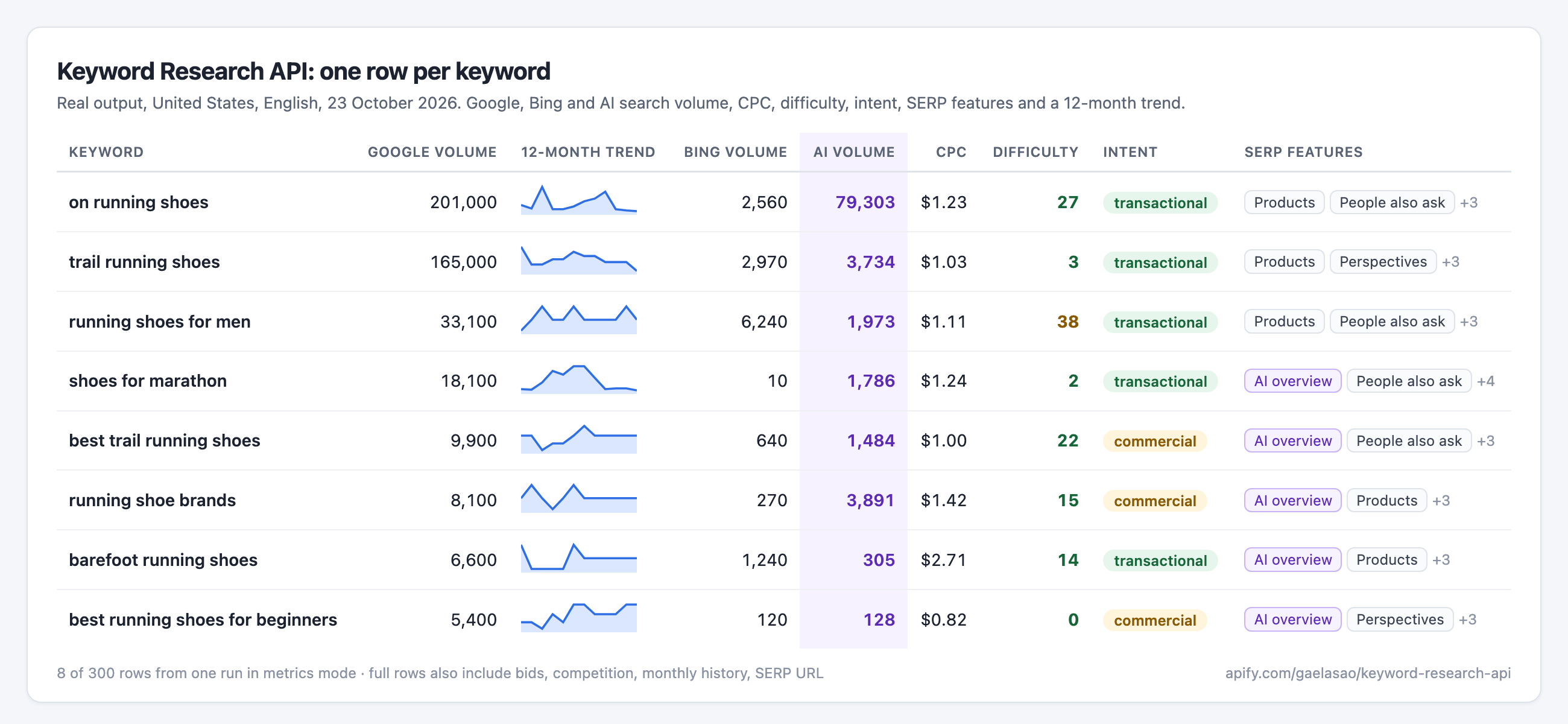
Keyword search volume and the rest of Google's keyword data in bulk, in every country. A Google Keyword Planner alternative for agents, with no Google Ads account needed:
- Metrics for up to 10,000 keywords per run: search volume, 12-month history, CPC, competition, top-of-page bids, keyword difficulty, search intent, trend, AI search volume (how often the keyword comes up in AI assistants) and SERP features (AI Overview, featured snippet, People Also Ask...), plus Bing search volume on runs of 300+ keywords.
- Keyword ideas from 1 to 20 seed keywords: broad ideas, long-tail suggestions that contain the seed, or Google's related searches.
- Competitor keywords: up to 10 websites per run, with position, ranking page and estimated traffic; filter positions 4 to 20 for striking distance keywords.
Price: $3 per 1,000 keywords with data, plus $0.01 per run that returns data. Keywords without data are free. Lower prices on higher Apify plans.
- MCP URL:
https://mcp.apify.com/?tools=gaelasao/keyword-research-api - Store page: https://apify.com/gaelasao/keyword-research-api
- How it was built: Keyword research for AI agents: search volume, CPC and difficulty over MCP (DEV)
- Case studies (DEV): Striking distance keywords: what dev.to ranks 11 to 20 for on Google and AI search volume vs Google search volume: what 600 real keywords show
- Compared with Keyword Planner (DEV): A Google Keyword Planner alternative API: search volume numbers without a Google Ads account
Try asking your agent:
- "Get search volume, CPC and difficulty for these 50 keywords in Germany, sorted by volume."
- "Which keywords bring competitor.com the most traffic in the UK? Show the top 30 with their ranking pages."
- "Find 200 long-tail ideas around 'standing desk' with at least 100 searches a month."
Building Permits API (18 US cities and counties, Canada, Ireland, France, NSW Australia, Far North NZ)
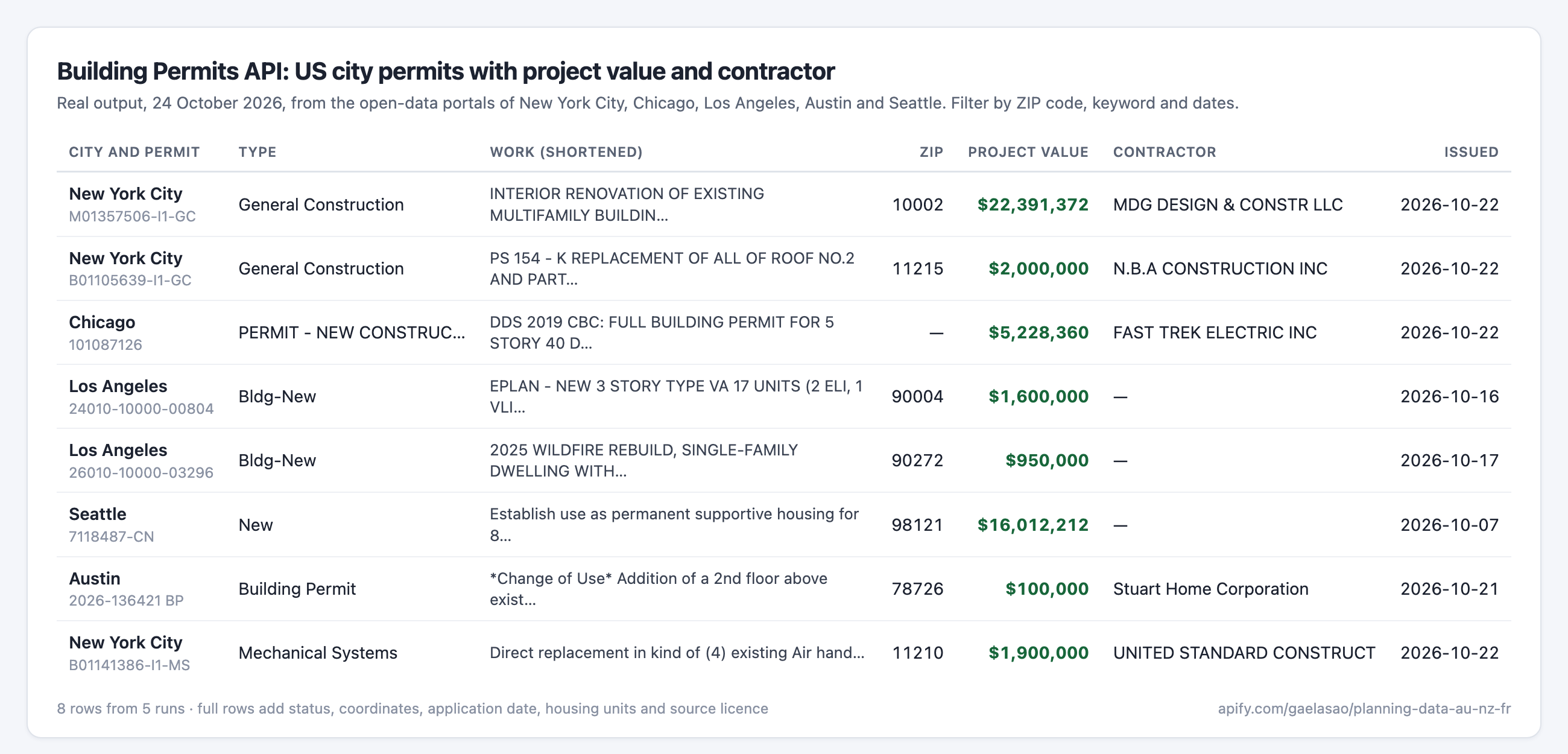
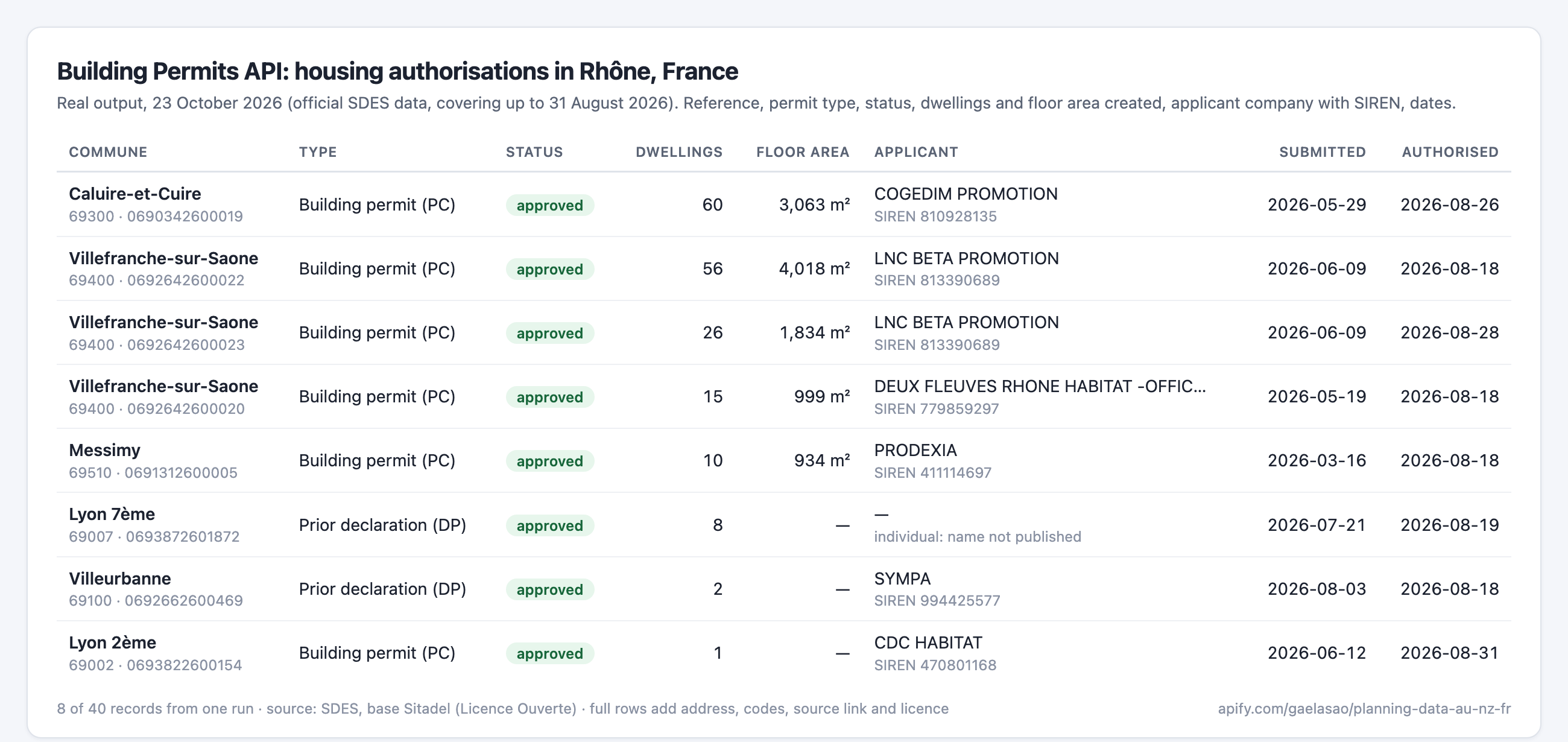
Official building permits and planning applications, normalised into one schema, with source links and licences:
- United States: issued permits from 18 city and county open-data portals (New York City, Los Angeles, Chicago, Philadelphia, Boston, Dallas, Seattle, Austin, Pittsburgh, Orlando, New Orleans, Cincinnati, Mesa, Baton Rouge, Norfolk, Cambridge MA, Montgomery County MD, Collin County TX), with the declared project value and, where published, the contractor's business name. Filter by ZIP code and keywords.
- Canada: building permits from Calgary, Edmonton and Winnipeg, with declared values in Canadian dollars.
- Ireland: planning applications from all 31 planning authorities (national database, CC BY 4.0), filterable by authority.
- France: SDES Sitadel housing, non-residential, development and demolition permits, including the applicant company and its SIREN when it is a legal entity.
- Australia and New Zealand: NSW Planning Portal applications and Far North District building applications.
Price: $5 per 1,000 records (lower on higher Apify plans).
- MCP URL:
https://mcp.apify.com/?tools=gaelasao/planning-data-au-nz-fr - Store page: https://apify.com/gaelasao/planning-data-au-nz-fr
- One week of real US data (DEV): Building permits from 12 US cities in one API: a week of real data
AI Visibility Tracker: brand mentions in ChatGPT, Perplexity, Gemini and Google AI
Ask the AI engines the questions your customers ask and see whether they mention and cite your brand:
- Engines: Google AI Overview, Google AI Mode, ChatGPT (with web search), Gemini and Perplexity, from the country you choose.
- One row per prompt and engine: brand mentioned, rank among the brands named, cited as a source, competitors named or cited, share of voice, top source domains, the searches the engine ran, and the answer.
- A summary by engine and by competitor, plus the most cited domains: the pages to win a mention on.
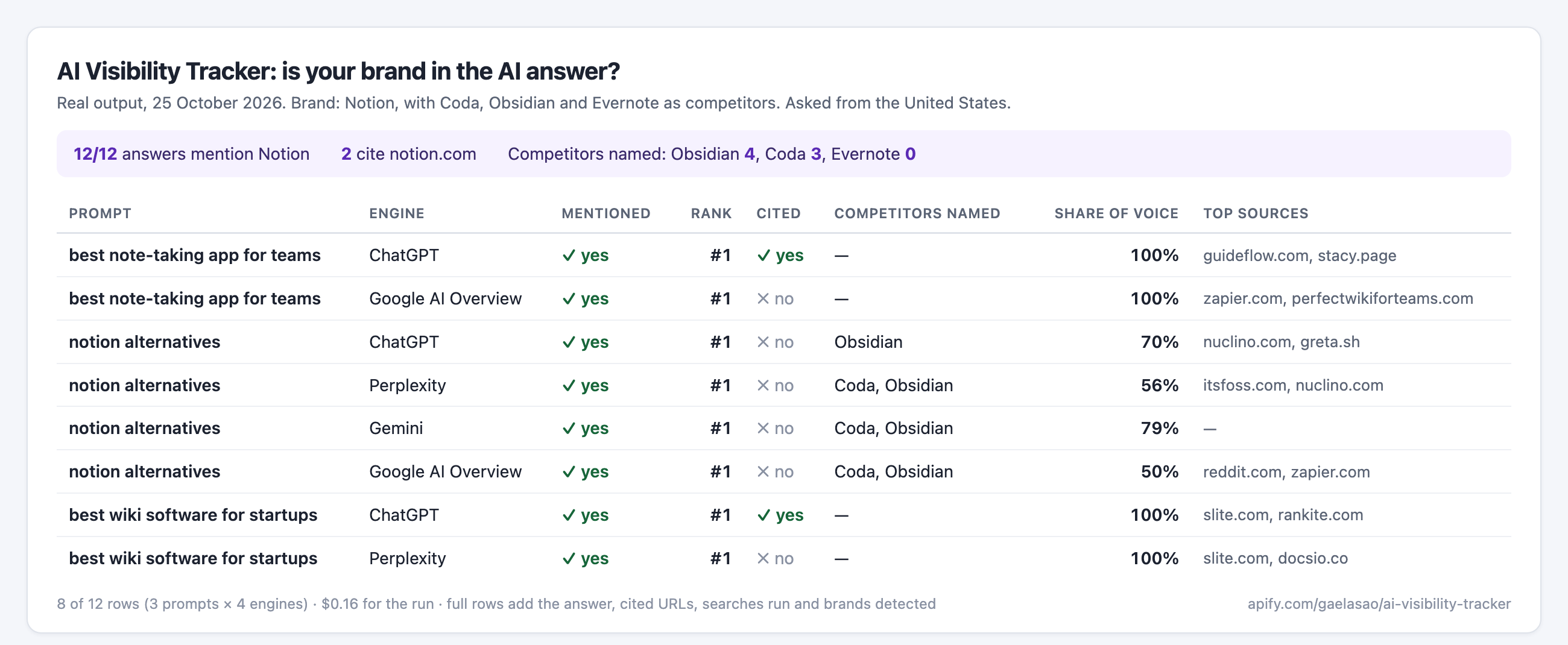
Price: $0.02 per check (one prompt on one engine; Perplexity counts as 2). Failed checks are free.
- MCP URL:
https://mcp.apify.com/?tools=gaelasao/ai-visibility-tracker - Store page: https://apify.com/gaelasao/ai-visibility-tracker
- Study (DEV): Which brands do AI assistants recommend? 200 answers from ChatGPT, Perplexity, Gemini and Google
Try asking your agent:
- "Check whether ChatGPT, Perplexity and Google AI Overviews mention Notion for these 10 prompts in the US, and compare with Coda and Obsidian."
n8n templates
Ready-to-import n8n workflows in n8n/, built on the official Apify node:
keyword-tracking-google-sheets.json: every Monday, one row per keyword in Google Sheets with search volume, CPC, difficulty, intent, AI search volume and AI Overview.building-permits-weekly-digest.json: every Monday, last week's building permits in your US ZIP codes, sent by Gmail and Slack.ai-visibility-weekly-report.json: every Monday, whether ChatGPT, Perplexity, Gemini and Google AI Overviews name and cite your brand, as rows in Google Sheets and a summary in Slack.
In n8n, import the file into a new workflow, then add your Apify, Google, Gmail or Slack credentials. The sticky notes in each workflow explain the setup and the costs.
Connect
You need an Apify account; runs are billed to it. Clients that support OAuth sign you in on first use. Otherwise, pass your Apify API token.
Claude Code
claude mcp add --transport http apify "https://mcp.apify.com/?tools=gaelasao/keyword-research-api" --header "Authorization: Bearer $APIFY_TOKEN"
Claude Desktop, Cursor or VS Code (JSON config)
{
  "mcpServers": {
    "apify-keyword-research": {
      "url": "https://mcp.apify.com/?tools=gaelasao/keyword-research-api",
      "headers": { "Authorization": "Bearer YOUR_APIFY_TOKEN" }
    }
  }
}
Use several tools at once with ?tools=gaelasao/keyword-research-api,gaelasao/planning-data-au-nz-fr,gaelasao/ai-visibility-tracker.
Support
Open an issue on the Actor's Issues tab on Apify, with the run ID and your input. Never post your API token.