Listed from the MCP registry; nobody on Odel publishes it.

WpfLens
Inspect and drive WPF apps: trees, bindings, screenshots, mouse dragging and touch gestures.
Runs on your machine from its package; the steps are below.
What it does
- Reads
- Writes
- High impact
At most: moves money, runs code or commands, deletes data, or sends messages for you.
What it costs
FreeOdel charges nothing per call. The publisher may charge for its own service.
Runs locally over stdio
This server isn't hosted — your MCP client launches it from a package registry. Use one of the commands below, or drop the config into your client (e.g. Claude Desktop).
Published to NuGet as `WpfLens.Mcp` — run it with your .NET MCP host.




Inspect, diagnose, and automate running WPF applications.
WpfLens gives AI agents access to the visual tree, bindings, properties, screenshots and input actions through MCP. It also provides a CLI (wpflens) and a C# SDK (WpfLens.Automation). Automatic injection lets you inspect applications without changing their source.
Based on faze79/WPFVisualTreeMcp, with upstream baseline v0.20.0. The first WpfLens release is 0.21.0.
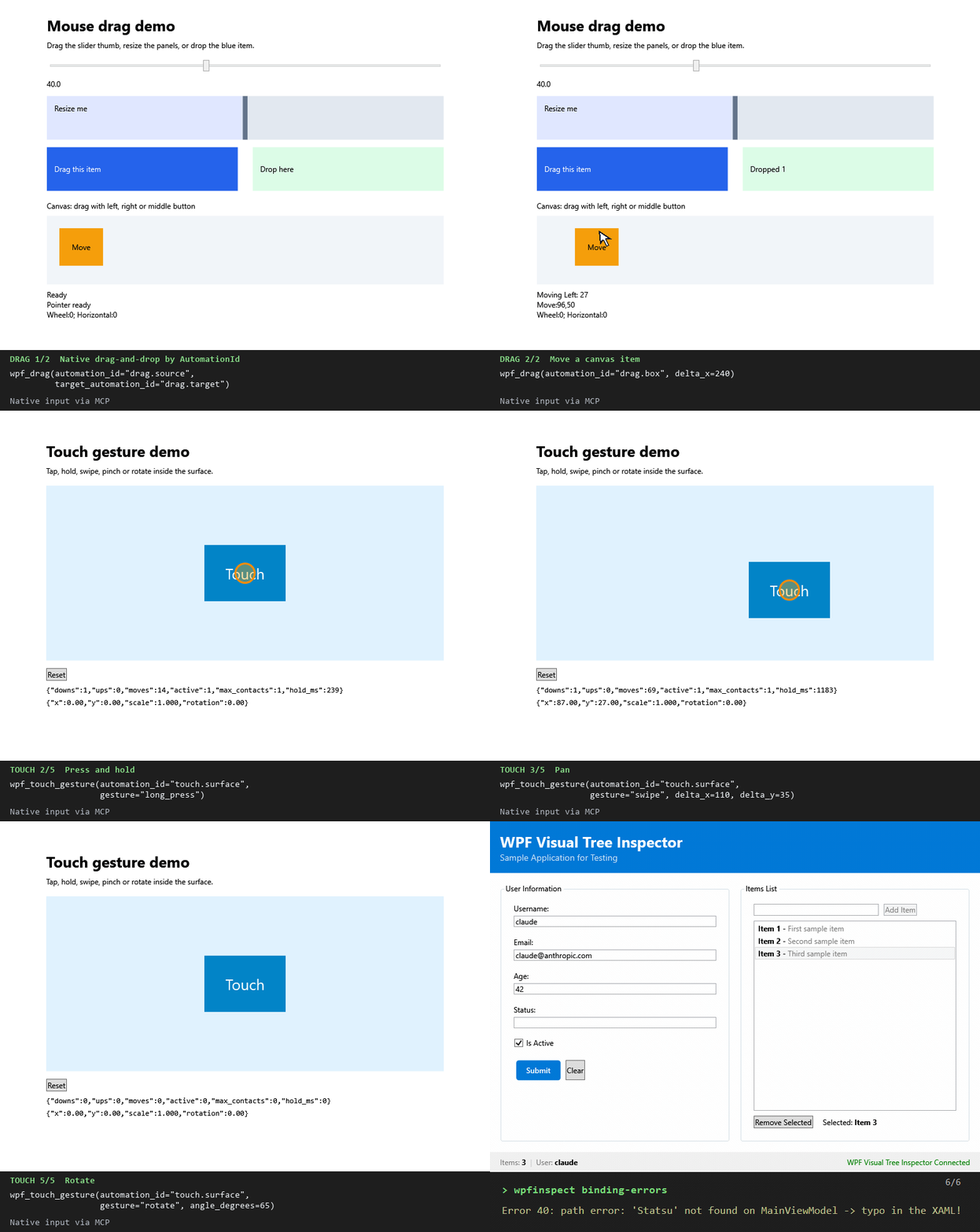
Real WPF input through MCP: drag, tap, pan, pinch and rotate, then fill a form and diagnose binding errors. Open the demo.
Quickstart
On Windows 10/11, choose one setup method below, then start the WPF app you want to inspect.
Claude Code
Install the .NET 8 SDK or later, then run:
dotnet tool install -g WpfLens.Mcp
claude mcp add --scope user wpflens -- wpflens
The first command installs WpfLens; the second registers a user-wide MCP server.
Claude Code must be able to find wpflens on PATH. Use /mcp to check the connection.
Codex
Requirements:
- A plugin-capable Codex client.
- .NET 10 SDK 10.0.300 or a newer stable .NET 10 SDK.
- The .NET 8 runtime. For x86 injection, also install the x86 .NET 8 runtime.
codex plugin marketplace add https://github.com/gaoshang212/WpfLens.git
codex plugin add wpflens@WpfLens
Restart Codex or open a new session. The plugin includes the MCP configuration and $wpflens skill. Check installation with codex plugin list --marketplace WpfLens.
Each MCP launch needs access to nuget.org to resolve the latest stable server; downloaded packages are cached.
Manual configuration
-
Download and extract
WpfLens-vX.Y.Z-win-x64.zipfrom the latest release. Install a .NET 8, 9 or 10 Desktop Runtime. -
Add the following to your Claude Code project's
.mcp.json, or Cursor's.cursor/mcp.json, replacing the path with the actual executable location:json{ "mcpServers": { "wpflens": { "command": "C:/Tools/WpfLens/server/WpfVisualTreeMcp.Server.exe", "args": [] } } }
Clients supporting MCP bundles can instead import the release's .mcpb file; see the MCPB guide.
After setup, restart the client and ask:
- “List my running WPF applications and inspect the main window.”
- “Why is the Save button disabled?”
- “Find binding errors and explain their causes.”
Compatibility
| Component | Supported environments |
|---|---|
| Target WPF application | .NET Framework 4.7.2, 4.8, 4.8.1; .NET 8, 9, 10 |
| C# SDK consumer | .NET 8, 9, 10; not .NET Framework |
| Target architecture | Windows x86 and x64; an x64 server/test process can control either |
The app and SDK test project may use different frameworks. See the tested compatibility matrix and injection requirements.
Core features
| Area | Capabilities |
|---|---|
| Inspection | Process discovery, visual/logical trees, dependency properties, layout, resources and styles; includes adorners and popups |
| Diagnostics | Binding errors, DataContext, binding-path resolution, trigger explanations and aggregate reports |
| Search and verification | Exact AutomationId targeting, text/property filters, condition waits, assertions, property watches and snapshot diffs |
| Interaction | Click, hover, wheel, drag, touch, text, shortcuts and virtualized item selection; reversible property edits |
| Background input | Use MCP, the CLI or the C# SDK to click, hover, scroll, drag, type or send keystrokes within a WPF window even when another window covers it. The target stays in the background and the system pointer stays in place. Usage and supported operations |
| Capture and export | Element/window screenshots, full scrollable-content capture, XAML/JSON tree export |
| Test workflows | Record and replay with stable selectors; export runnable xUnit tests |
The MCP server exposes 39 tools through the same engine as the CLI. Browse the MCP tool index, or see the tool reference for parameters and examples.
- Touch requires application support; physical input needs an interactive desktop.
- In MCP, enable background input with
wpf_set_input_mode(mode="background"). After the final action and verification, callwpf_set_input_mode(mode="foreground")on the same target to release its mouse and keyboard. Run this cleanup even if the workflow fails or is cancelled. Confirm the response reportsforegroundbefore returning control to the user. - Actions and replay change application state, and full-content screenshots may temporarily scroll controls.
- Verify results with waits and assertions; see the verification workflow.
How it compares
| WpfLens | Snoop | FlaUI / WinAppDriver | Screenshot-based computer use | |
|---|---|---|---|---|
| Main interface | MCP, CLI, C# SDK | GUI | Test code | Images and input |
| Inspection view | WPF visual tree and internals | WPF visual tree and internals | UI Automation accessibility tree | Screen pixels |
| Bindings / DataContext | Yes | Yes | Requires an additional in-process probe | Not directly available |
| Automation focus | Inspection, diagnostics and input workflows | Manual inspection | UI testing | Visual interaction |
C# test SDK
dotnet add package WpfLens.Automation --version 0.23.0
using WpfVisualTreeMcp.Automation;

await using var app = await WpfApplication.AttachAsync(processId);
await app.ByAutomationId("LoadButton").ClickAsync();
await app.ByAutomationId("StatusTextBox").WaitForTextAsync(
    "loaded", timeout: TimeSpan.FromSeconds(30));
The SDK attaches directly and includes the injection payload; no MCP server or CLI process is needed. Text waits match the exact value.
Package names use WpfLens, while implementation namespaces and assembly names retain WpfVisualTreeMcp for upstream compatibility.
See the SDK guide for DataGrid/TreeView APIs, gestures, cancellation, session lifetime and property subscriptions.
CLI examples
With no subcommand, wpflens starts the MCP stdio server. A recognized subcommand runs a single CLI operation. Results go to stdout as JSON; diagnostics go to stderr.
wpflens list
wpflens attach --pid 1234 --auto-inject
wpflens find --pid 1234 --type Button
wpflens props --pid 1234 --handle elem_00000052
wpflens screenshot --pid 1234 --out app.png
- Replace the PID and handle with values returned by your queries. Handles expire when the target restarts or the element is collected.
- Input commands also accept
--automation-idfor exact, case-sensitive targeting. - Use
wpflens helporwpflens <command> --helpfor details.
Updating
wpflens update --check
wpflens update
wpflens update --status
- For a portable installation, invoke that copy's
server/WpfVisualTreeMcp.Server.exe update. Only the invoked installation is updated. - Global tools can also use
dotnet tool update -g WpfLens.Mcp.
A scheduled result is not completion: check --status for updated or failed.
Close other MCP instances using the same files before updating; after success, restart the MCP client and previously inspected WPF apps.
The Codex plugin resolves server updates on restart. Plugin configuration and skill updates are separate; wpflens update does not update them.
Source builds and package-manager caches use their own update workflows. See update behavior and recovery for details.
Architecture
flowchart TB
    agent["AI agent"]
    subgraph server["WpfLens server / CLI"]
        tools["MCP tools and command routing"]
        manager["Process discovery and attachment"]
        bridge["IPC bridge"]
    end
    subgraph target["Target WPF application"]
        inspector["Inspector DLL"]
        tree["Visual tree, properties and bindings"]
        actions["Input, screenshots and workflows"]
        inspector --> tree
        inspector --> actions
    end
    agent -->|"MCP / stdio"| tools
    tools --> manager
    tools --> bridge
    bridge -->|"Named pipes"| inspector
The server runs separately from the target app. Inspector is injected at runtime or initialized by the app in self-hosted mode.
WPF tree access runs on the target UI Dispatcher. See the architecture guide for component and threading details.
Development and building
Use Visual Studio Developer PowerShell with the C++ v143 toolset and Windows SDK.
The full compatibility suite also requires .NET 10 SDK, x64/x86 .NET 8/9/10 Desktop runtimes, and .NET Framework 4.8.1.
git clone https://github.com/gaoshang212/WpfLens.git
cd WpfLens
./scripts/Build-NativeBootstrapper.ps1
dotnet build -c Release WpfVisualTreeMcp.sln
dotnet test WpfVisualTreeMcp.sln
dotnet run --project samples/SampleWpfApp
Open WpfVisualTreeMcp.sln in Visual Studio 2022, or use VS Code. Contributions are welcome.
| Source | Responsibility |
|---|---|
src/WpfVisualTreeMcp.Server/ | MCP server and CLI |
src/WpfVisualTreeMcp.Automation/ | C# SDK and shared process/IPC infrastructure |
src/WpfVisualTreeMcp.Inspector/ | Inspection and interaction inside the target app |
src/WpfVisualTreeMcp.Injector/ | Managed injection |
src/WpfVisualTreeMcp.InjectorHelper/ | x86 injection helper |
src/WpfVisualTreeMcp.Bootstrapper/ | Native CLR bootstrapper |
plugins/wpflens/ | Codex plugin and skill |
samples/, tests/, scripts/ | Sample apps, tests and build/verification scripts |
Documentation
| Guide | Contents |
|---|---|
| Getting started | Additional configuration, self-hosting, update recovery and troubleshooting |
| MCP tool index | Names and brief descriptions of all 39 tools |
| Tool reference | All MCP tools, selectors, recording/replay and verification |
| C# SDK | SDK installation, API examples and requirements |
| Architecture | Components, IPC and threading |
| Injection / MCPB | Injection payloads and desktop bundles |
| Roadmap | Planned work and priorities |
| Changelog / Release notes | Version history |
Acknowledgments and license
- Based on faze79/WPFVisualTreeMcp.
- Inspired by Snoop WPF.
- Built on the Model Context Protocol.
- Thanks to the .NET/WPF community and @miloszkukla for the compatibility and screenshot work in PR #22.
Licensed under the MIT License.






