
promoshot
See it work: demo.md — twenty-four prompts, each given to a fresh agent with only the skill and the MCP, its result beside the hand-built reference. The suite is in demos/.
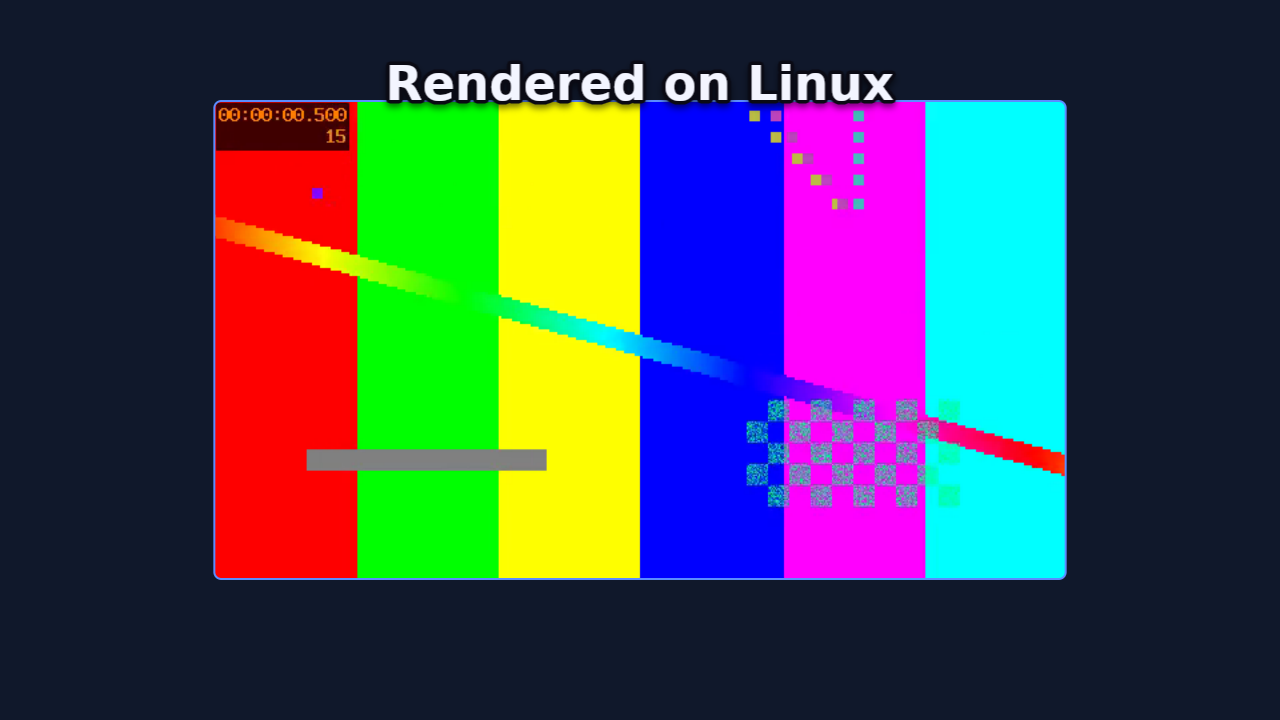
The rendering engine behind PromoShot
(App Store),
and an open implementation of its project format. A .promo project is a
folder — metadata.json plus its media — and this workspace is everything
needed to validate, inspect, and render one to stills, image sequences, or
mp4 with mixed audio: no app attached, byte-for-byte the same compositor the
apps ship.
The design bet is that the format is the interface. An assistant, a
script, or a person writes metadata.json; the engine renders it the same
everywhere — the Mac and iOS apps (Metal + VideoToolbox), this repo's CLI,
or a headless Linux box with no GPU at all (wgpu on lavapipe, ffmpeg as a
subprocess). The format has three faces behind one truth: an authoring
subset with four validated recipes (promo schema), the full document
(--full), and a types-only JSON Schema generated from the parser's own
structs (--types) — and the parser the validator runs is the parser the
renderers use, so "validates" means "renders".
Crates
| Crate | What it owns |
|---|---|
promo-model | The format: wire structs, migrations, palette roles, schema.md |
promo-timeline | Timeline math: keyframes, trims, attachments, waits, validation |
promo-gpu | wgpu compositing: quads, borders, letterbox, vectors, color conversion |
promo-text | Caption shaping and effects (cosmic-text) |
promo-engine | Preview/export orchestration, frame cache, memory governor, PCM mixer |
promo-media | Decoder/encoder trait registry; ffmpeg-subprocess backend + conformance suite |
promo-editor | The document's edit vocabulary: commands with undo, the wizard's arrangement, theme rules — what promo_apply and promo_slideshow are built on |
promo-cli | promo — render a project from the command line |
promoshot-mcp | MCP server over stdio, for agents |
Build and verify
./check-all.sh # fmt, clippy -D warnings, all tests, release build
Rendering video needs ffmpeg (and ffprobe) on PATH — frames are composited
on the GPU and piped to it raw; ffmpeg only decodes and encodes. On a headless
Linux machine, mesa-vulkan-drivers (lavapipe) is enough of a GPU.
The CLI
cargo build --release -p promo-cli     # -> target/release/promo

promo schema                            # authoring subset + recipes; --full, --types
promo validate <project>                # exit 0 == this will render
promo inspect  <project>                # canvas, layers, missing media, undefined colours
promo still    <project> --out f.png --time 2.5
promo frames   <project> --out frames/ --fps 30 --from 0 --to 4
promo video    <project> --out out.mp4 --fps 30
Add --json to any project command for machine output — one object on
stdout, errors included, exit codes unchanged.
promo video mixes the soundtrack the apps would: trims and media cuts,
held frames, speed with pitch preserved, keyframed volume, a focused
narration ducking everything under it, and only the audio tracks the
project keeps.
Headless renders are CLEAN — no watermark, and no license, serial or key will ever be asked for. (The Mac and iOS apps watermark free-tier renders; that is their App Store Pro line, and it stays on their side of the fence.)
The MCP server
promoshot-mcp speaks Model Context Protocol over stdio, so any MCP client
can author, inspect and render projects. It owns no rendering code — every
render shells to promo (found next to the executable, or on PATH, or via
--promo), so the CLI stays the single contract.
Connect an agent
Two pieces: the MCP server (tools) and the skill (workflow). Neither is vendor-specific. Agents do not find this repo by themselves.
1. Build — or don't
cargo build --release -p promo-cli -p promoshot-mcp
# binaries: target/release/promo  target/release/promoshot-mcp
No Rust toolchain? Grab the prebuilt pair from
Releases (linux-x64,
macos-arm64), or pull the image:
docker pull ghcr.io/garalex/promoshot-mcp — both carry promo and
promoshot-mcp together.
Put both on PATH, or pass --promo to the server. Rendering video also
wants ffmpeg/ffprobe on PATH.
2. MCP (required for tools)
Claude Code / Cursor / any mcp.json:
{
  "mcpServers": {
    "promoshot": {
      "command": "/ABS/PATH/target/release/promoshot-mcp",
      "args": ["--workspace", "/ABS/PATH/Promo", "--root", "/ABS/PATH/Promo"]
    }
  }
}
--workspace is where new projects go; --root fences which projects the
server will touch — pointing both at one folder is the tidy setup. Both
optional. --log <file> appends one line per tool call — when,
which tool, how many milliseconds, how it went — for a session's own
accounting; the demo pages are built from it.
Client one-liners:
# Claude Code
claude mcp add promoshot /ABS/PATH/target/release/promoshot-mcp

# Grok Build
grok mcp add promoshot -- /ABS/PATH/target/release/promoshot-mcp \
  --workspace /ABS/PATH/Promo --root /ABS/PATH/Promo
grok inspect   # confirms the server registered

# Docker — the host needs nothing but docker (details below)
docker build -t promoshot-mcp .
# then command: docker, args: ["run","-i","--rm","-v","/ABS/PATH/Promo:/projects","promoshot-mcp"]
3. Skill (the workflow)
Same file everywhere: skill/SKILL.md.
REPO=https://github.com/GarAlex/promoshot
git clone --depth 1 $REPO /tmp/promoshot

# Claude Code (Grok Build also scans this folder)
mkdir -p ~/.claude/skills/promoshot
cp /tmp/promoshot/skill/SKILL.md ~/.claude/skills/promoshot/SKILL.md

# Grok Build explicit path
mkdir -p ~/.grok/skills/promoshot
cp /tmp/promoshot/skill/SKILL.md ~/.grok/skills/promoshot/SKILL.md

# OpenAI Codex / many others
mkdir -p ~/.agents/skills/promoshot
cp /tmp/promoshot/skill/SKILL.md ~/.agents/skills/promoshot/SKILL.md

# Cursor project (in the repo the user is editing, not this engine repo)
mkdir -p .cursor/rules
cp /tmp/promoshot/skill/SKILL.md .cursor/rules/promoshot.md
# or: mkdir -p .agents/skills/promoshot && cp SKILL.md there
Any agent that reads instructions can be handed the file directly; it assumes only these tools (or the CLI).
4. Verify — ask the agent for a render:
Render examples/ProductCard.promo to a still at 3s.
One promo_validate, one promo_render_still, and a device-framed app
demo comes back as a path. From there, "make me a promo for " is
the loop the skill teaches.
The tools
Tools: promo_schema (authoring subset + four validated recipes;
promo_schema_full is the whole format; promo_schema_types is the format
as a generated, types-only JSON Schema — also checked in at
docs/promo.schema.json for $schema editor
autocomplete), promo_validate, promo_inspect (each layer listed with
its id — the handle the editing tools take),
promo_render_still, promo_render_frames, promo_render_video,
promo_render_gif, promo_workspace; the senses — promo_media_probe,
promo_media_filmstrip (a contact sheet of a SOURCE clip, times per cell),
promo_media_silences (silence spans and their inverse) and
promo_media_scenes (scene cuts and the shots between them), so an agent
knows what footage holds before composing with it; the editor trio,
promo_init, promo_upsert_layer and promo_upsert_keyframe: create a
project, add image/video/caption layers with placements, then animate —
a second placement keyframe is a push-in, viewport keyframes a Ken Burns;
your short ids are used verbatim, unnamed ones get canonical UUIDs, pixel
sizes are stamped, and the composition keeps covering its layers. Device
frames bake headless too — the same slab the apps draw. promo_slideshow
is the wizard: pictures and clips in, a complete classic, carousel or
store-listing show out, a caption on any slide becoming a layer that
lives with its picture. promo_voices
lists a provider's voices and promo_speak synthesizes narration with the
person's own provider key, reusing unchanged text by receipt. The authoring tools answer
with an inline thumbnail of the composition, so a misplaced layer is caught
at the moment it happens. The tools write ordinary metadata.json
through the format's own parser — the schema stays the source of truth, and
hand-editing remains first-class. Renders default their output into the
project's Exports/ folder and return the path written, never the bytes.
Flags, all optional: --workspace <dir> (where promo_workspace points;
else $PROMOSHOT_WORKSPACE, else the XDG data dir), --root <dir> (refuse
projects outside this tree), --promo <path>.
Narration keys
Narration spends the person's own provider account, and the key never passes through the agent: no tool takes one, none shows one. Register it once in the OS keyring — macOS Keychain, the Secret Service on Linux (GNOME Keyring, KWallet), the Credential Manager on Windows:
promoshot-mcp key set openai        # reads the key from stdin: paste, then Ctrl-D
promoshot-mcp key status            # where each provider's key comes from, never the key
promoshot-mcp key remove openai
Providers: openai, elevenlabs, google. The key is read from stdin so
it lands in no shell history, no config file and no argument list.
Where there is no keyring — the Docker image, a CI runner — the key is
read from a secrets file, the way Docker, Kubernetes and CI systems
hand secrets over: /run/secrets/OPENAI_API_KEY (likewise
ELEVENLABS_API_KEY, GOOGLE_API_KEY), or the path named by
OPENAI_API_KEY_FILE. A mode-0400 file, never an environment variable
that docker inspect and every same-user process can read:
docker run -i --rm \
  -v "$HOME/.secrets/openai:/run/secrets/OPENAI_API_KEY:ro" \
  -v /path/to/your/projects:/projects promoshot-mcp
An agent can ask before it plans: promo_speak with {"check": true}
spends nothing and reports, per provider, whether a key is present and
what a real call would synthesize. A real call checks every pending
narration's key before buying anything, and writes each receipt back the
moment it is paid for, so a failure part-way never makes the next call
pay twice. Keys travel in request headers, never URLs, and nothing logs
them.
Docker
The image is the whole render environment — server, CLI, ffmpeg, a software Vulkan and the fonts — so a client needs nothing on the host:
docker build -t promoshot-mcp .
{
  "mcpServers": {
    "promoshot": {
      "command": "docker",
      "args": ["run", "-i", "--rm",
               "-v", "/path/to/your/projects:/projects",
               "promoshot-mcp"]
    }
  }
}
Projects live under the mount; promo_workspace answers /projects. All
the examples are baked in, so the image proves itself with no
mount at all — render ProductCard.promo first; the device-framed app
demo is the one that teaches the product-promo path. server.json is the MCP Registry manifest (io.github.GarAlex/promoshot) for the published
image (ghcr.io/garalex/promoshot-mcp). GitHub's MCP Registry consumes that feed after mcp-publisher publish.
mcp-name: io.github.GarAlex/promoshot
The skill is drift-tested: a test pins it to the server's actual tool list, so it cannot teach tools that do not exist.
The Mac app carries its own MCP server (Settings → Automation) sharing the core tool names, plus app-only abilities — opening the editor, speech synthesis. The authoring pair, the senses and the types schema are headless-first.
What a session looks like — three requests in, a validated project and a rendered frame out (the frame at the top of this page was made exactly this way):
{"jsonrpc":"2.0","id":1,"method":"initialize","params":{"protocolVersion":"2025-06-18"}}
{"jsonrpc":"2.0","method":"notifications/initialized"}
{"jsonrpc":"2.0","id":2,"method":"tools/call","params":{"name":"promo_validate","arguments":{"project":"examples/LinuxSmoke.promo"}}}
{"jsonrpc":"2.0","id":3,"method":"tools/call","params":{"name":"promo_render_still","arguments":{"project":"examples/LinuxSmoke.promo","time":5.5}}}
{"id":2,"result":{"content":[{"type":"text","text":"ok — nothing the renderer would quietly correct"}]}}
{"id":3,"result":{"content":[{"type":"text","text":"wrote examples/LinuxSmoke.promo/Exports/still-5.5s.png (1280x720 at 5.50s)"}]}}
One engine, every platform
The same project rendered on macOS (Metal, VideoToolbox) and on a bare Linux container (lavapipe software Vulkan, no GPU; ffmpeg) — SSIM 0.983 over the full 240-frame video. The visible difference is the font: the caption asks the question, the two frames answer it.
Try it yourself — examples/ holds one runnable project per
promo_schema recipe (each metadata.json IS its recipe, pinned by a
test), from the device-framed product card to the 9:16 re-stamp — plus
the kitchen-sink LinuxSmoke.promo:
promo video examples/ProductCard.promo --out card.mp4
Authoring a project
Start with promo schema. The short version: a project folder holds
metadata.json and Resources/; ids are unique strings (short mnemonics
are fine — apps mint UUIDs on adoption); layers place resources
on a timeline with keyframes (hold-then-ease), placement rules, transitions
and palette-named colours (@accent). Validate before rendering — the
validator names what the renderer would silently correct, undefined colour
names included.
mkdir -p Demo.promo/Resources
# write Demo.promo/metadata.json, copy media into Resources/
promo validate Demo.promo && promo still Demo.promo --out look.png --time 1
Or let the MCP server spend the boilerplate (promo_init,
promo_upsert_layer), and give your editor autocomplete by pointing
"$schema" at docs/promo.schema.json.
Invariants and plans
SPECS.md— the invariants the tests pin.
License
Apache-2.0. The PromoShot applications built on this engine are separate, proprietary products.
Proxies for long sources
promo proxy <project> builds a tier-1 proxy (960 px long edge, every
frame a keyframe) for each video resource, in a cache outside the
package ($PROMO_PROXY_DIR, else the platform cache directory under
promoshot/proxies). still, frames, gif and video take
--proxy auto|on|off: auto (default) reads a built proxy when the
output's long edge fits it, on builds missing proxies first, off
reads the source — and a full-size render always does. The MCP tools
take the same proxy argument; promo_proxy builds them.
Markers and chapters
A project may carry markers — named moments on the output timeline.
kind: "chapter" markers are written into an exported mp4's chapter
list (a player's chapter menu); inspect lists them all.
Audio effects
A video or audio resource may carry audioEffects — normalize
(loudness to a target LUFS), compressor and one-band eq entries,
applied in order before the mix in every render the core makes. The
apps' exports take the same mix; their live preview plays the resource
dry.
Chroma key
A video or image layer may carry chromaKey — a colour, a tolerance
and a softness: the plate becomes transparent before the layer's grade,
border and mask, in the compositor, so a green-screen clip composes
over anything on every host alike.
Models
A resource of kind model is a glTF 2.0 binary (.glb) in Resources/;
a layer of kind model draws it through a PBR-lite pass into a texture
at the layer's size, and from there it is a picture like any other:
placement, opacity, transitions, masks, effects and the contact shadow
all apply. Keyframes carry a camera (yaw, pitch, roll, distance in
bounds radii, fov) and a light; materials on the resource bind a
slot name to a colour — a palette name works, so @accent re-skins the
body with the theme — and, in the object form, to a finish: metallic
and roughness (each 0…1) over the file's own, so one body is chrome in
this project and matte in the next (rung 32) — or, better, to a finish
WORD (rung 44): chrome, brushed, anodized, gloss, satin,
matte, rubber, ceramic, lacquer, paper, glass, frosted,
each expanded by the engine into the numbers, the coat, the grain, the
transmission and the refraction it stands for, so nobody levels a
reflection by hand; on a screen the word is the coat over the picture,
and glass on a stage bends the bodies behind it. Lighting defaults come
from the theme; a scene environment (studio, sunset, night; rung
35 — or, rung 46, a resourceID naming a panorama in the project, a
picture of the world the bodies mirror) is what metals mirror; a file's
normal map and metallic-roughness
texture are honoured. Rung 29. Built-in device bodies
(phone, tablet, laptop; promo device) ship as generated .glb files
with Body and Screen slots, so the device shot is a model too. A
model can also be a recipe the engine builds at load instead of a file
— text as a body first: real type in the 3D world with Face and Side
slots, lit and finished like any body (rung 34); a device body; and a
body of PARTS — boxes, spheres, cylinders, tori, a lathe, an extrude,
each under a slot, placed by position, rotation and scale — the 3D
counterpart of a drawing, authored the way an SVG is (rung 37).
Layers naming the same stage draw through one camera into one depth
buffer, models at their depth and pictures as billboards, the first
member's placement carrying the whole scene (rung 30). A stage can also
be one layer of kind stage holding its members, the camera and light
on its own keyframes (rung 33) — the same picture, with the stage's
ownership written down. A stage's floor word (rung 45) — matte,
satin, glossy, mirror — puts a plane under the lowest body that
catches the key light's shadow, the darkening where a body touches, and
the stage mirrored in it, blurred less and less; whatever lies beneath
the stage layer shows through, so the table is the project's own
background. The light's keyframes move the shadow; the floor stays.
A picture worn by a body
A slot's picture is a screen by default: unlit, fitted, what a
screenshot on a phone wants. "mode": "surface" on the binding wears
it instead — the image or video becomes the slot's colour under the
light and the finish, tiled by repeat and shifted by offset, the
slot's own colour showing through where the picture is transparent — so
a label sits on a vase, a print on a box, and a video plays on a glossy
wall that the key light and the environment still shade. Rung 38.
Particles
A resource of kind particles is a recipe, not a file — an emitter, a
rate or a burst, life, speed, gravity, wind, drag, turbulence, size and
colour over life, a shape — played by a drawing layer. Every particle is
a closed-form function of its birth time and the seed, so any frame
renders alone and identically on every host. Rung 36.
A path resource can carry a route in the stage (rung 40): 3D points in
stage radii that a member's or a camera's motionPath follows, fitted
between two keyframes exactly as the 2D motion path is, with a camera
target — the centre, ahead, a member or a point — saying where it
looks on the way. A spiral that keeps looking inward is one route and
one keyframe.
Particles in a stage are a morph (rung 39): the recipe names two bodies,
samples the first's surface, and as a drawing member's progress
keyframe ramps from 0 to 1 the points fly out and gather on the second
body — a cube bursts into points that settle into a word. A parts box
with faces: true has six slots, one picture per side, which is what
such a cube is made of.
Text with a side
Legacy: the caption depth below is the flat compositor's 2.5D. A title
with a real side is a text body (rung 34) standing in a stage; the
validator names the old form. It still renders.
A caption style may carry depth: copies of the words stacked under the
face, each a little further along and darker, so the type reads as
solid letters with a side — the classic extrusion, pure 2D, lit by
choosing the offset. A reveal extrudes each arriving piece the same way.
tiltX / tiltY keyframes on a caption lean it in perspective, on the
same camera the device frames use, and the side leans with the face.
A reveal's flip, tumble and slide modes bring each word in on its
own axes — kinetic type from one rule, no keyframes.
Follow the pointer
A video the Mac recorder made carries pointer, where the pointer went
and where it clicked, in the recording's own time and coordinates. A
layer showing it may say follow: its viewport becomes a window
1/zoom of the source that follows the smoothed pointer, and each click
draws a ring that grows and fades. A rule, not keyframes: re-trim the
recording and it stays true, on every host alike.
Image effects
A layer may carry effects: a blur (round, or directional along a
blurAngle), a glow of its bright parts, a vignette toward its own
corners, film grain and an unsharp sharpen, each on the layer's own
pixels in the compositor. Blur, glow and vignette are keyframe tracks
too, so a focus pull or a glow that pulses ramps like the grade does.
Five transitions ride the same passes — blurDissolve, zoom, flash,
glitch and dip — beside the fade, wipe, slide, push and scale that
were there, at a layer's edges and at a resource swap alike. A video
layer's swap may name a composition (rung 47): the takeover, the next
film arriving through any of those cuts where its sourceTime says, or
where its clock already is. The same keyframes carry the consumer's
transport for anything with a clock — a video, an audio, a composition,
a sprite: sourceTime seeks it, playback pauses and resumes it, and
its sound follows.
Looks from a .cube
A resource of kind lut is a .cube file in Resources/; a layer's
adjustments.lutResourceID (with lutAmount) applies it in the
compositor after the layer's own grade — a trilinear lookup on every
host alike.
ProRes and alpha
promo video … --codec prores422|prores4444 --out x.mov writes ProRes;
--alpha renders the project over nothing and keeps the frames' alpha
in a ProRes 4444 (--alpha on still/frames gives transparent PNGs).
Sources that carry alpha (ProRes 4444, WebM with alpha, PNG sequences)
decode premultiplied and compose with their transparency.