Listed from the MCP registry; nobody on Odel publishes it.

Fire
Run your project's configured commands and share long-running dev servers with agents.
Runs on your machine from its package; the steps are below.
What it does
- Reads
- Writes
- High impact
At most: moves money, runs code or commands, deletes data, or sends messages for you.
What it costs
FreeOdel charges nothing per call. The publisher may charge for its own service.
Runs locally over stdio
This server isn't hosted — your MCP client launches it from a package registry. Use one of the commands below, or drop the config into your client (e.g. Claude Desktop).
Distributed via cargo as `fire-cli`.
Fire CLI 🔥







A config-first task runner for your projects, and for the AI agents working in them.
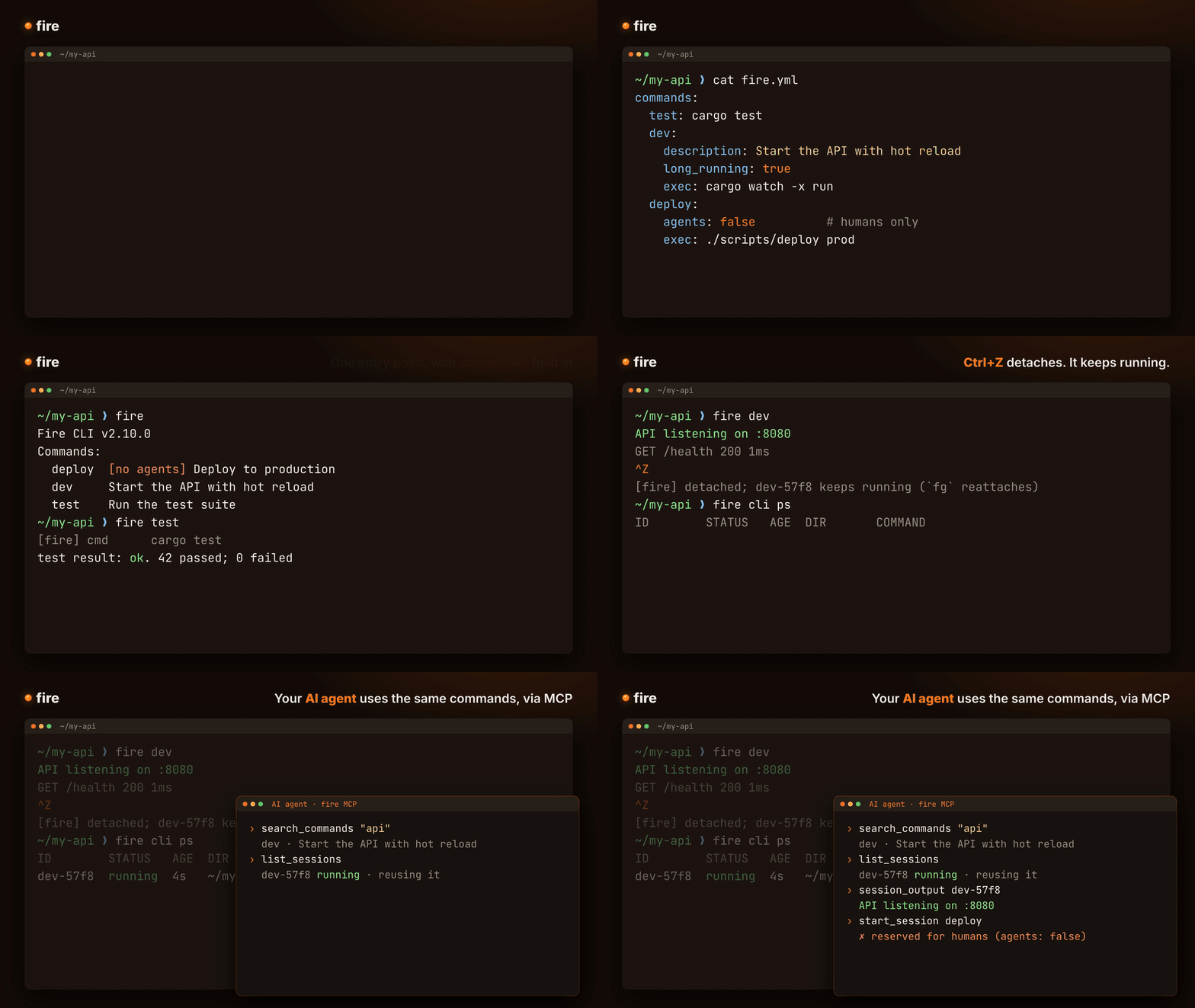
Put your project's commands in a fire.yaml, and get:
- One entry point for build, test, dev servers, containers, and scripts:
fire <command>, with tab completion and descriptions generated from your config. - Agents that use your commands instead of guessing.
fire cli mcpexposes them to Claude Code, Cursor, or any MCP host, and keeps dangerous ones (agents: false) human-only. - Long-running processes you can share. Every command runs on a pty you can detach with Ctrl+Z and reattach from any terminal; you and your agents see the same dev servers and logs.
- Smart runners. Fall back to a container when a tool isn't installed, ensure services are up before running, and compute arguments with JS/TS/Python snippets.
- External CLI drivers. Forward exact arguments to tools such as Compose or package managers and install repository-provided, project-aware completion adapters.
If you've used make, just, Task, or npm run as a command menu, Fire fills the same role and
adds completion, sessions, and an agent interface on top (how they compare).
# fire.yaml
---
commands:
  test: cargo test
  dev:
    description: Start the API with hot reload
    long_running: true
    exec: cargo watch -x run
  npm:
    check: npm -v                                    # not installed locally?
    fallback_runner: docker run --rm -i -v .:/app -w /app node:lts-alpine sh
    exec: npm                                        # ...then run it in a container
  deploy:
    agents: false                                    # agents must ask you first
    exec: ./scripts/deploy prod
fire test               # run it
fire dev                # Ctrl+Z detaches; it keeps running
fire cli ps             # see what's running, from any project
fire cli fg <id>        # attach again from any terminal
Install
Homebrew (macOS, Linux):
brew tap gbenm/labs
brew install fire
Install script (macOS, Linux x86_64/arm64):
curl -fsSL https://raw.githubusercontent.com/gbenm/fire/main/install.sh | sh
Cargo:
cargo install fire-cli
Or download a binary from the latest release.
Windows: use WSL. Inside your WSL distro (Ubuntu, Debian, ...) Fire is a regular Linux install: use the install script or Homebrew above, and run it from the WSL terminal. Native Windows isn't supported, since sessions rely on Unix ptys.
Quick start (5 minutes)
- Run
fire cli initin your project. Fire createsfire.yamland automatically imports commands from package.json, Makefile, justfile, Compose, and Cargo when present:
# yaml-language-server: $schema=https://raw.githubusercontent.com/gbenm/fire/main/schemas/fire.schema.json
---
commands:
  hello: echo "Hello Fire"
For scripts, fire cli init --yes accepts defaults without prompting and still imports detected
commands. Use --empty for only the starter command. Use --file,
--namespace, --namespace-description, and --group to set values; an existing file is only
replaced when --force is explicit. When stdin is not a terminal, defaults are automatic.
Run fire cli import later to add newly discovered commands without replacing any command already
in the generated group files. See automatic imports.
- Run it:
fire hello world
# => Hello Fire world
- Enable completion (bash and zsh, plus detected fish and Nushell installations):
fire cli completion install
- Optional: connect your AI agent (see MCP server for agents):
fire cli mcp install claude
Configuration at a glance
Fire loads, merges, and executes commands defined in YAML (fire.yaml, *.fire.yaml, or the same names with .yml). Commands can:
- run shell
execsteps - evaluate runtime snippets via
eval(node/deno/python) - rewrite arguments with
compute - use runners, fallback runners, and pre-run
beforehooks - expose nested subcommands with greedy resolution
Reserved name: cli cannot be defined under commands.
Completion
Install or refresh completion anytime:
fire cli completion install
- zsh shows values + descriptions
- fish and Nushell show values + descriptions
- bash uses
complete -Cvalues
Details: see docs/completion.md.
Schema & editor support
Associate your YAML with https://raw.githubusercontent.com/gbenm/fire/main/schemas/fire.schema.json for validation (fire cli init does it):
- Add
$schemato the first line:# yaml-language-server: $schema=https://raw.githubusercontent.com/gbenm/fire/main/schemas/fire.schema.json, followed by---to start the document (linters such as yamllint'sdocument-startrule expect it) - Or map file names in
.vscode/settings.json(yaml.schemas).
Run fire cli check to validate every local fire file before execution, including includes,
collisions, placeholders, runtimes, dependencies, and explicit environment-file paths. Use
--strict in CI to promote warnings to errors, --format json for editor/CI integrations, or
--global to include registered directories. See troubleshooting.
MCP server for agents
Let AI agents use the commands you already configured, and launch long-running processes as managed sessions you can inspect, signal, and attach to:
fire cli mcp install <host>
Mark commands agents shouldn't touch (deploys, destructive DB tasks) with agents: false.
Details: see docs/mcp.md.
- Supported hosts: Claude Code, Claude Desktop, Cursor, VS Code, Codex, Gemini CLI, and Windsurf.
- Run
fire cli mcpdirectly only when an MCP host launches it as the configured stdio server. - MCP Registry name:
mcp-name: io.github.gbenm/fire
Sessions
In a terminal, every fire command runs on a pty under a small supervisor. It behaves exactly as if
run directly (colors, prompts, Ctrl+C, exit code), but Ctrl+Z detaches it while it keeps
running: fg brings it back, and fire cli fg <id> attaches to it from any other terminal. You and
your agents can list sessions from any project, read their output, type into them, signal or stop
them:
fire --bg -m "api for auth tests" api dev     # start one detached
fire cli ps                                   # running ones; -a/--failed/--stopped/--exited for the rest
fire cli logs -f <id>                         # follow its output; Ctrl+C stops following, not it
fire cli fg <id>
Mark servers and watchers with long_running: true so they detach on their own when an agent or a
script runs them without a terminal. Flags like --bg, --fg, --dry-run and --no-log go before the command (global flags). Details: see docs/sessions.md.
Documentation map
Run fire cli docs to list the same documentation embedded in your installed version, then
fire cli docs <topic> to read one topic ($PAGER is used in a terminal).
The complete documentation is also available at gbenm.github.io/fire.
- Overview
- Fire compared to make, just, Task, mise and npm scripts
- Commands & arguments
- Runtimes & eval
- Shell completion
- External CLI drivers
- MCP server
- Sessions
- Progressive examples
- Troubleshooting
Contributing
Bug reports, ideas, and pull requests are welcome. See CONTRIBUTING.md, and share your setups or ask questions in Discussions. If Fire saves you time, a ⭐ helps other people find it.
If you enjoyed this and want to buy me a coffee ☕️
- Buy Me a Coffee: https://buymeacoffee.com/gbenm
- Bitcoin (BTC):
bc1q0l8na5gr6jgpnq6r7fj0nl3hqx2dm77l2vearuxx20s5ktes45vsxmksfu - USDC (Ethereum ERC20):
0x26D01f6fBa520D343CDAF309ba04FB9a7B26b4DE






