Fantasy Premier League (FPL)
FPL data, points predictions, and transfer, captain and chip advice for any team.
One address for any MCP client. No sign-in needed on this server.
What it does
6 read8 other
Grouped by tool name. At most: only reads or looks up information.
What it costs
FreeOdel charges nothing per call. The publisher may charge for its own service.
Tools
14 · grouped by tool name · checked 11 Oct 2026Read · 6Look things up
- search_players
- get_player
- compare_players
- get_fixtures
- get_my_team
- suggest_transfers
Other · 8Neither hinted nor named
- gameweek_status
- team_summary
- player_season_history
- predict_points
- model_report
- optimal_squad
- pick_captain
- chip_advice
fpl-mcp


An open-source MCP server for Fantasy Premier League that works with Claude, ChatGPT, Grok, Cursor, VS Code and any other MCP client. It pulls live data from the official FPL API and past seasons (2016-17 onward) from the vaastav dataset, predicts every player's points for the next five gameweeks, and recommends squads, transfers, captains and chips. Data lives in SQLite or Supabase.
Try it without installing anything:
- Remote URL:
https://fpl-mcp-9tiv.onrender.com/mcp(claude.ai, ChatGPT, Grok, Cursor; see Connecting AI clients) - npm:
npx -y fpl-mcp-serverfor apps that run local servers (Claude Desktop, Cursor, VS Code) - Smithery and the official MCP Registry (
io.github.GilbertKamau/fpl-mcp)
The hosted server runs on a free plan, so the first request after a quiet spell can take a minute.
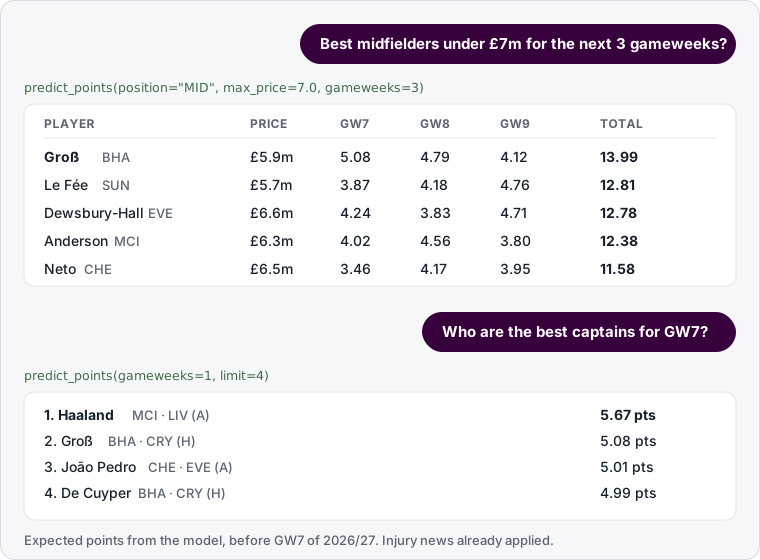
Example questions: "Who are the best midfielders under £7m for the next 3 gameweeks?", "Suggest transfers for team 1234567", "Should I play my Bench Boost this week?"
Setup
Requires Python 3.12+.
git clone https://github.com/GilbertKamau/fpl_mcp.git && cd fpl_mcp
python -m venv .venv
# Windows: .venv\Scripts\activate     macOS/Linux: source .venv/bin/activate
pip install -e ".[supabase,dev]"
fpl-sync all       # load data (~3 min to SQLite; ~15 min to a remote Supabase the first time)
fpl-model all      # train the model and write predictions (~3-6 min the first time)
fpl-sync jobs:
| Job | What it does | Time |
|---|---|---|
live | Players, prices, injuries, teams, gameweeks, fixtures | seconds |
current | This season's per-match stats for every player (FPL API) | ~1 min |
history | Past seasons from vaastav (--seasons 2024-25 to pick some) | minutes, once |
all | All of the above | |
weekly | live + current, then retrain and refresh predictions | ~5 min |
fpl-model jobs: evaluate (test only), compare (feature sets side by side), train, predict, all (train + predict).
Add --refresh-cache after re-loading history, so the local cache of past seasons is rebuilt.
Database
SQLite at data/fpl.db by default. To use Supabase, copy .env.example to .env and paste your
Supabase Session pooler connection string as DATABASE_URL (the direct db.<ref>.supabase.co
host is IPv6-only). Special characters in the password are encoded automatically.
Tables are created automatically.
| Table | Contents |
|---|---|
players, teams, gameweeks, fixtures | Current-season snapshot |
player_gameweeks | One row per player per match, every season. player_code links a player across seasons |
season_teams | Team id → name for each season |
predictions | Expected points per player per upcoming fixture |
prediction_history | Every prediction made, with benchmarks, for live scoring |
model_artifacts | Trained models |
model_runs | Every training run, its test results, and whether it was accepted |
sync_log | When each sync ran |
Data quirks: 2019-20 gameweeks run to 47 (the COVID restart was numbered 39-47);
2024-25 includes AM (assistant manager) rows, which the model ignores; xG/xA exist from 2022-23 onward.
data/ (SQLite backup, cache, logs), models/ and .env are git-ignored, and a local
pre-commit hook refuses to commit them.
Prediction model
LightGBM predicts each player's points per fixture from information available before kick-off:
- Form: rolling averages over the last 1, 3, 6, 12 and 38 matches (points, minutes, starts, xG, xA, bonus, BPS, ICT, defensive contributions...)
- Market: ownership and net transfers that gameweek, as percentiles (the crowd's read on fitness and form)
- Context: price, position, home/away, days since the last match
- Team strength: both clubs' recent goals and xG for and against
A gameweek's expected points is the sum over its fixtures, so double gameweeks count twice. Injury and suspension news scales the next gameweek's prediction by FPL's chance of playing. The trained model is stored in the database, so any machine can make predictions with it.
Testing on past seasons. Walk-forward: for each of the last three complete seasons, the model is trained only on earlier seasons and predicts every fixture. The baseline is the player's average points over their last 6 matches.
| Season | Model MAE | Baseline MAE | Regular starters: model / baseline |
|---|---|---|---|
| 2023-24 | 0.931 | 0.999 | 2.19 / 2.40 |
| 2024-25 | 0.988 | 1.053 | 2.20 / 2.41 |
| 2025-26 | 0.954 | 1.055 | 2.26 / 2.55 |
That is 7.5% better than the baseline overall. Adding last-match form, season-long form and the
market features improved the average MAE from 0.982 to 0.958 and was better in every test season
(fpl-model compare reruns this). A retrained model is only used if it beats the baseline and is
no worse than the current model.
Past-season tests have no injury news (there's no historical record of it), so they understate
live accuracy. They also can't fairly be compared with FPL's own expected points: the historical
xP column includes injury news, and its 2025-26 values are on a different scale.
Live tracking. Every prediction is archived. After each gameweek, the prediction made before
the deadline is scored against actual points, next to two benchmarks recorded at the same moment:
the 6-match baseline and FPL's own expected points (ep_next). It also compares what each method's
top 20 players actually scored. model_report shows the running results.
FPL points are very noisy (a 2-pointer and a 15-pointer can come from the same performance), so treat predictions as estimates.
Optimizer
Integer programs solved with HiGHS (via PuLP) that follow FPL rules: 2 GKP / 5 DEF / 5 MID / 3 FWD, max 3 per club, a valid formation, the budget, and −4 per transfer beyond the free ones. Points for later gameweeks are discounted (×0.85 per week) because predictions further out are less reliable.
For a manager's team it uses public endpoints only (no login). Selling prices are estimated from the manager's transfer history (FPL keeps half of any price rise), and free transfers from their gameweek history (up to 5 banked, kept through Wildcard and Free Hit weeks). Transfers made since the last deadline aren't public yet, so they aren't included.
MCP tools
| Tool | What it does |
|---|---|
gameweek_status | Current/next gameweek and deadline |
search_players | Filter by position, team, price, minutes; sort by any stat |
get_player | Stats, injury news, last 6 matches, next 5 gameweeks' fixtures |
compare_players | 2-6 players side by side with per-90 and value numbers |
get_fixtures | A team's next fixtures, or a whole gameweek |
team_summary | Results, goals, clean sheets, fixture run, top players |
player_season_history | A player's totals for every season since 2016-17 |
get_my_team | Any manager's squad by team id (public, no login) |
predict_points | Expected points for the next 1-5 gameweeks, ranked |
model_report | How accurate the model is versus the baseline |
optimal_squad | Best 15-man squad from scratch for a budget |
suggest_transfers | Best transfers for a team, or advice to roll the transfer |
pick_captain | Captain, vice-captain and the top 5 options |
chip_advice | Which chips are left this half, what each is worth, play or save |
refresh_data | Re-pull the live snapshot |
Connecting AI clients
There are two ways to run the server:
- Local (stdio): your AI app starts the server on your computer. Works with Claude Code, Claude Desktop, Cursor and VS Code. Nothing is exposed to the internet.
- Remote (HTTP): you host the server at a public HTTPS URL (see Deploying). Required for claude.ai, ChatGPT and Grok, which can't start programs on your computer.
In the examples, /path/to/fpl_mcp/.venv/bin/python is the Python inside your virtual
environment (Windows: C:\path\to\fpl_mcp\.venv\Scripts\python.exe), and
https://your-server.example.com/mcp is your deployed URL.
Claude Code
claude mcp add fpl -- /path/to/fpl_mcp/.venv/bin/python -m fpl_mcp.server        # local
claude mcp add --transport http fpl https://your-server.example.com/mcp          # remote
Claude Desktop
Local: Settings > Developer > Edit Config, then add to claude_desktop_config.json:
{
  "mcpServers": {
    "fpl": { "command": "/path/to/fpl_mcp/.venv/bin/python", "args": ["-m", "fpl_mcp.server"] }
  }
}
Remote: use Settings > Connectors > Add custom connector (same as claude.ai below).
claude.ai
Settings > Connectors > Add custom connector, and paste https://your-server.example.com/mcp.
Available on paid plans; on Team/Enterprise an owner adds it for the organization. claude.ai
connects to servers without a login or with OAuth, so leave MCP_AUTH_TOKEN unset.
ChatGPT
Turn on Developer mode (Settings > Apps & Connectors > Advanced), create a connector with the URL
https://your-server.example.com/mcp and authentication None, then pick it from the tools
menu in a chat. Plan availability varies, so check OpenAI's current docs. Like claude.ai, it can't
send a fixed token, so leave MCP_AUTH_TOKEN unset.
Grok (xAI API)
Grok connects to remote MCP servers through the xAI API:
from xai_sdk import Client
from xai_sdk.chat import user
from xai_sdk.tools import mcp

client = Client()  # reads XAI_API_KEY
chat = client.chat.create(
    model="grok-4.7",
    tools=[mcp(server_url="https://your-server.example.com/mcp", server_label="fpl")],
)
chat.append(user("Who should I captain in gameweek 7?"))
print(chat.sample().content)
Or with the Responses API, add this to tools:
{ "type": "mcp", "server_url": "https://your-server.example.com/mcp", "server_label": "fpl" }
If you set MCP_AUTH_TOKEN, also pass "authorization": "<token>".
Cursor
Add to ~/.cursor/mcp.json (all projects) or .cursor/mcp.json (one project):
{
  "mcpServers": {
    "fpl": { "command": "/path/to/fpl_mcp/.venv/bin/python", "args": ["-m", "fpl_mcp.server"] }
  }
}
Remote: "fpl": { "url": "https://your-server.example.com/mcp" }, plus
"headers": { "Authorization": "Bearer <token>" } if you set a token.
VS Code (GitHub Copilot agent mode)
.vscode/mcp.json:
{
  "servers": {
    "fpl": { "type": "stdio", "command": "/path/to/fpl_mcp/.venv/bin/python", "args": ["-m", "fpl_mcp.server"] }
  }
}
Remote: "fpl": { "type": "http", "url": "https://your-server.example.com/mcp" }.
Anything else
Any MCP client that supports stdio or Streamable HTTP works. To try the server interactively:
npx @modelcontextprotocol/inspector /path/to/fpl_mcp/.venv/bin/python -m fpl_mcp.server.
Deploying
The hosted server only reads the database. Data, training and predictions run on your own
machine (or any scheduled job) with fpl-sync weekly, and the hosted server picks up new
predictions within 10 minutes. You therefore need a database both can reach, such as Supabase.
-
Create a read-only database user for the public server: run
scripts/supabase_readonly_role.sqlin Supabase's SQL editor. -
Deploy. On Render: New > Blueprint, pick your fork of this repo, and
render.yamlsets it up. Elsewhere (Fly.io, Railway, Google Cloud Run, a VPS), use theDockerfile. -
Set environment variables:
Variable Required Purpose DATABASE_URLyes Supabase Session pooler URI for the read-only user MCP_AUTH_TOKENno If set, every request needs Authorization: Bearer <token>. Grok, Cursor and VS Code can send it; claude.ai and ChatGPT can'tFPL_MCP_ALLOW_REFRESHno 1exposes therefresh_datatool (off by default when hosted)PORTno Set by most hosts automatically; defaults to 8000 -
Your MCP URL is
https://<your-app>/mcp.https://<your-app>/healthshould return{"status":"ok"}.
To run the HTTP server locally: fpl-mcp --http (serves http://127.0.0.1:8000/mcp).
Without a token, anyone with the URL can call the tools. The data is public FPL data and the server is read-only, but if the URL gets shared widely, set a token or put it behind your host's access controls.
Scheduled updates
GitHub Actions keeps the shared database fresh:
| When (UTC) | Mode | What it does |
|---|---|---|
| Tuesday 06:00 | weekly | Refresh data and results, retrain, predict |
| Friday 06:00 | news | Refresh prices and injury news, predict |
Run it by hand from the Actions tab (Scheduled update > Run workflow). It needs a repository secret
DATABASE_URL with write access, and only runs in the main repository, not in forks. To run your
own copy, add the secret to your fork and change the if: line in the workflow.
Without GitHub Actions, run fpl-sync weekly (or fpl-sync live + fpl-model predict) from cron
or Windows Task Scheduler; scripts\update.ps1 wraps both modes for Windows and logs to data\logs.
Tests
.venv\Scripts\python -m pytest
Roadmap
Data pipeline (FPL API + vaastav → SQLite/Supabase)Read-only MCP toolsPoints prediction: LightGBM with walk-forward validation against a rolling-average baseline(plus live tracking against FPL's own expected points)Optimizer: best squad, transfers, captain, chip adviceScheduled updates (sync → retrain → predict) on GitHub ActionsHTTP hosting for claude.ai, ChatGPT, Grok and other remote clients- Optional: apply changes to your FPL team (preview-only by default)
Contributing
Issues and pull requests are welcome. Please run pytest before opening a PR, and never commit
.env, data/ or models/. By submitting a contribution you agree that it is licensed under
this project's MIT License.
Licence
Copyright (c) 2026 Gilbert Kamau. Released under the MIT License: you may use, copy, modify and distribute the code, including commercially, as long as you keep the copyright and licence notice. Third-party software and data are listed in THIRD_PARTY_NOTICES.md.
Credits and disclaimer
Historical data comes from vaastav/Fantasy-Premier-League (code under the MIT License); live data from the public FPL API. Fantasy Premier League data is the property of the Premier League; the MIT License covers this project's code only, not the data. This project is not affiliated with or endorsed by the Premier League or Fantasy Premier League. Use the FPL API responsibly, and treat predictions as estimates, not guarantees.