Listed from the MCP registry; nobody on Odel publishes it.

Gazzetta
Free, local MCP server to consult and search the Italian Gazzetta Ufficiale. Unofficial.
Runs on your machine from its package; the steps are below.
What it does
- Reads
- Writes
- High impact
At most: only reads or looks up information.
What it costs
FreeOdel charges nothing per call. The publisher may charge for its own service.
Runs locally over stdio
This server isn't hosted — your MCP client launches it from a package registry. Use one of the commands below, or drop the config into your client (e.g. Claude Desktop).
Run
uvx gazzetta-mcp
MCP client config
{
  "mcpServers": {
    "gazzetta": {
      "command": "uvx",
      "args": [
        "gazzetta-mcp"
      ]
    }
  }
}gazzetta-mcp

Unofficial, local MCP server that lets your AI assistant consult the Italian Gazzetta Ufficiale. Free, open source (MIT). No codes or dates needed.
English | Italiano
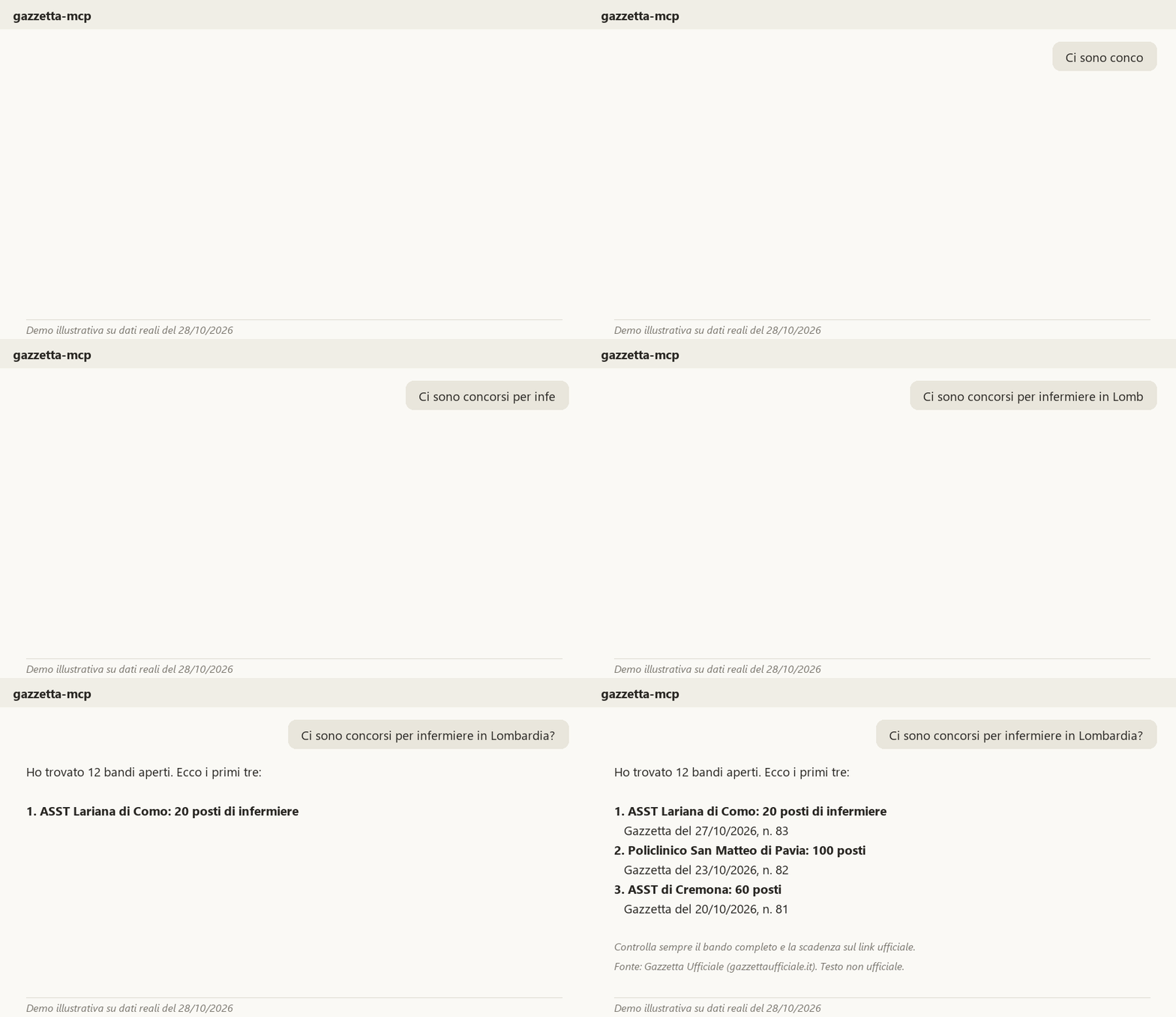
Illustrative demo built from a real result of 28 Oct 2026.
What you can ask your assistant:
- "Are there public competitions for nurses in Lombardy?"
- "What came out in the Gazzetta today?"
- "Give me the text of the decree on ..., summarised in three points."
- "Give me the Normattiva link for law 241/1990."
Results can be partial: the server sees recent publications and what it has already looked up, not the whole archive, and it says so. Ready to try it? Go to Install.
Disclaimer
This project is NOT an official publication and is not affiliated with the Gazzetta Ufficiale or the Istituto Poligrafico e Zecca dello Stato. The texts it returns are not authentic and are provided free of charge. The only definitive text is the one published in the Gazzetta Ufficiale in print, which prevails in case of discrepancy. Every response includes the source and the official link; always check the official text before relying on it.
Reference wording from the source site: "L'unico testo definitivo e' quello pubblicato sulla Gazzetta Ufficiale a mezzo stampa, che prevale in caso di discordanza. La riproduzione dei testi forniti nel formato elettronico e' consentita purche' venga menzionata la fonte, il carattere non autentico e gratuito."
Usage policy
- Requests are made on demand only, when you or your assistant ask for something.
- No bulk download and no mirroring of the site.
- Results are kept in a local cache (SQLite) on your machine.
- Outgoing requests are rate limited (default 1 per second).
- Besides the Gazzetta Ufficiale,
cercaqueries the Normattiva Open Data API (one request per search, cached for 24 hours); it can be switched off (see Configuration). - Requests carry an identifying User-Agent (
gazzetta-mcp/<version> (unofficial open source client)).
These are our own choices for the local server, not rules imposed by the source; the source only requires citing it and stating that texts are non-authentic and free. Please keep these defaults respectful of the source. See docs/fonti.md.
The optional archive is a separate tool, run on purpose by whoever operates it: it fills slowly (1 request per second, never twice the same act) and is not part of the local server's default behaviour.
Tools
| Tool | Parameters | What it does |
|---|---|---|
ultime_pubblicazioni | serie, giorni | Latest publications of a series (SG, S1-S5, P2) over the last N days |
sommario | data, serie | Table of contents of the issue of a given date and series |
leggi_atto | codice, data, serie, offset | Text of an act from its editorial code (e.g. 26A05182) |
cerca_concorsi | parole_chiave, regione, aperti, includi_altri_atti, limite | Search public competitions from a cold start: loads the last ~30 days of the 4th series (a handful of rate-limited requests, then cached), states the coverage |
rimando_normattiva | atto | Builds the permanent Normattiva link for an act (link only, no download) |
cerca | testo, serie, tipo, dal, al, limite, aggiorna, solo_vigenti, periodo | Search titles and issuing bodies of recent issues (SG about 30 days, S4 last 9: refreshed first, bounded), of everything already cached and, for laws and decrees of any year, of the Normattiva Open Data archive (results marked origine: normattiva); repealed acts are left out by default; full act texts only if already read |
scadenze_concorsi | parole_chiave, regione, entro_giorni, limite | Competitions about to expire (default: next 7 days). Reads the text of a limited number of calls (at most 8 per request, then cached) and works out the deadline from the call's own formula or from a written date; if the call gives none it says so. Always indicative: check the official call |
testo_vigente | atto, offset | Text of one article of a law as it stands today, amendments included (unlike leggi_atto, which gives the originally published text). One article at a time, from Normattiva Open Data (CC BY 4.0); for the whole act use the link from rimando_normattiva |
novita_argomento | argomento, serie, segna_come_letto, limite | What came out on a topic since you last asked. The last check is remembered only on your computer; the first time it shows the last 7 days. Searches titles and issuing bodies, not full texts; the words you ask about are also sent to Normattiva for the archive search (switch it off with GAZZETTA_MCP_ARCHIVIO_NORMATTIVA=0) |
Series codes: SG Serie Generale, S1 Corte Costituzionale, S2 Unione Europea, S3 Regioni,
S4 Concorsi ed esami, S5 Contratti pubblici, P2 Parte II.
Ready-made prompts
Five prompts your assistant can show as commands in a menu; pick one and type a few words.
| Prompt | What it asks the assistant to do |
|---|---|
riassumi_atto | Explain an act in 3-5 points, without jargon |
confronta_decreti | What changes and what stays the same between two acts |
concorsi_per_me | Open competitions that fit your profile, with deadline |
cosa_e_uscito | What came out today, this week or in a period you name |
aggiornamenti_su | What is new on a topic since the last time |
They never ask you for codes or dates, they cite the official link and they remind you that the text is unofficial; for legal questions you still need a professional.
Install
The easiest way is uv, a small free
tool that downloads and runs the server for you (it provides the uvx command, and fetches a
suitable Python if you do not have one). On Windows, open PowerShell and run
winget install --id astral-sh.uv, then reopen the terminal. With pip you need Python 3.10+.
uvx gazzetta-mcp
# or
pip install gazzetta-mcp
One-click install (Claude Desktop)
Download gazzetta-mcp-0.2.0.mcpb from the
latest release and
double-click it (or open it from Claude Desktop, Settings > Extensions). No terminal needed.
If double-clicking does nothing (Windows does not always link .mcpb files to Claude Desktop),
open Claude Desktop, go to Settings > Extensions and drag the file onto that page.
The bundle is built from mcpb and installs the same gazzetta-mcp package from PyPI.
Development version (from GitHub)
uvx --from git+https://github.com/GiovannaFilippini/gazzetta-mcp gazzetta-mcp
Configure your MCP client
Claude Code
claude mcp add gazzetta -- uvx gazzetta-mcp
Claude Desktop (claude_desktop_config.json)
{
  "mcpServers": {
    "gazzetta": {
      "command": "uvx",
      "args": ["gazzetta-mcp"]
    }
  }
}
Cursor (~/.cursor/mcp.json) and Windsurf: same mcpServers block as Claude Desktop.
VS Code (.vscode/mcp.json)
{ "servers": { "gazzetta": { "type": "stdio", "command": "uvx", "args": ["gazzetta-mcp"] } } }
Generic stdio client: run the command gazzetta-mcp (or uvx gazzetta-mcp) and speak MCP
over stdin/stdout.
To use the development version, replace the command/args with
uvx --from git+https://github.com/GiovannaFilippini/gazzetta-mcp gazzetta-mcp.
Configuration
All settings are environment variables, read in src/gazzetta_mcp/config.py.
| Variable | Default | Meaning |
|---|---|---|
GAZZETTA_MCP_GU_BASE_URL | https://www.gazzettaufficiale.it | Base URL of the Gazzetta Ufficiale site |
GAZZETTA_MCP_NORMATTIVA_BASE_URL | https://www.normattiva.it | Base URL used for Normattiva links |
GAZZETTA_MCP_NORMATTIVA_API_URL | https://api.normattiva.it/t/normattiva.api/bff-opendata/v1/api/v1 | Normattiva Open Data API used by the archive search |
GAZZETTA_MCP_ARCHIVIO_NORMATTIVA | 1 | Set to 0 to stop cerca from querying the Normattiva archive |
GAZZETTA_MCP_ARCHIVIO_GIORNI | 365 | Period searched in the archive when no dal is given |
GAZZETTA_MCP_ARCHIVIO_TIMEOUT | 90.0 | Timeout in seconds for the archive search (slow with date filters) |
GAZZETTA_MCP_RICERCA_GU | 0 | Set to 1 to enable the Gazzetta Ufficiale advanced search form (off by default: its terms of use do not mention automated use) |
GAZZETTA_MCP_RPS | 1.0 | Maximum requests per second |
GAZZETTA_MCP_TIMEOUT | 20.0 | HTTP timeout in seconds |
GAZZETTA_MCP_CACHE_PATH | <cache dir>/gazzetta-mcp/cache.sqlite3 | SQLite cache file (LOCALAPPDATA, else XDG_CACHE_HOME, else ~/.cache) |
GAZZETTA_MCP_FEED_TTL | 900 | Feed cache lifetime in seconds |
GAZZETTA_MCP_USER_AGENT | gazzetta-mcp/<version> (unofficial open source client) | User-Agent sent with requests |
GAZZETTA_MCP_ARCHIVIO_PATH | <cache dir>/gazzetta-mcp/archivio.sqlite3 | Archive file, read only if it exists (see Archive) |
GAZZETTA_MCP_ARCHIVIO_URL | empty (off) | Address of a remote archive service (https://, or http://localhost); when set, your searches and the codes of the acts you open are sent to that service |
GAZZETTA_MCP_ARCHIVIO_REMOTO_TIMEOUT | 8 | Timeout in seconds for the remote archive (0-60) |
Archive (optional, advanced)
Not needed to use the tools above. The archive is a single SQLite file with copies of already public acts (Gazzetta Ufficiale and Normattiva), searchable offline and filled slowly in the background.
- If the file
archivio.sqlite3exists, the local server reads it after its cache and before the Gazzetta site. If it does not exist, nothing changes. Normattiva data: CC BY 4.0. - Fill and manage it with
python -m gazzetta_mcp.archivio(aggiorna,recupera,controlla,stato,rimuovi,rimossi). The automatic update takes only the Serie Generale by default. rimuovi CODE --motivo richiesta-interessato --sideletes an act for good and keeps it from coming back.- A read-only service for the network is
python -m gazzetta_mcp.archivio.remoto(see deploy/ for a step by step guide to a small Linux server). No public service exists yet; the privacy notice is still a draft (docs/privacy/). - The decisions behind it: docs/decisioni/090-archivio-remoto.md.
Troubleshooting
First run gazzetta-mcp --prova (or uvx gazzetta-mcp --prova): it checks Python, local search,
the cache folder and the connection (one request) and tells you what to fix.
- The assistant does not see the tool: restart the assistant completely after adding the
server, check the command in its configuration (see above), and run
--prova. - Empty results: try other or fewer keywords, or ask what came out recently. Results can be partial (see above); check the official site if something is missing.
- The first search is slow: the first request builds the local cache. Later ones are faster.
- Where is the cache? In
<cache dir>/gazzetta-mcp/cache.sqlite3(seeGAZZETTA_MCP_CACHE_PATHabove; on Windows%LOCALAPPDATA%\gazzetta-mcp). - Clear the cache: close the assistant, then run
gazzetta-mcp --svuota-cache --si(without--siit only shows what would be deleted). It also forgets whatnovita_argomentohad already shown you: the next check of each topic starts again from the last 7 days.
Development
uv sync
uv run pytest            # no network needed
uv run ruff check .
uv run pytest --live     # also runs tests that call the real sites (use sparingly)
See CONTRIBUTING.md, docs/piano.md and docs/decisioni.
License
MIT. The license covers the code only; the texts remain subject to the rules of their sources (see docs/fonti.md).
Sources and attribution. Gazzetta Ufficiale texts may be reproduced if the source is cited and
their non-authentic, free nature is stated: every response does so. Archive search results marked
origine: normattiva come from Normattiva Open Data (dati.normattiva.it), released under
CC BY 4.0: if you reuse them, credit the source.
Italiano
Server MCP locale, non ufficiale, che permette al tuo assistente AI di consultare la Gazzetta Ufficiale. Gratuito e open source (licenza MIT). Non servono codici né date.
Cosa puoi chiedere all'assistente:
- "Ci sono concorsi per infermiere in Lombardia?"
- "Cosa è uscito oggi in Gazzetta?"
- "Dammi il testo del decreto su ..., riassunto in tre punti."
- "Dammi il link Normattiva della legge 241/1990."
I risultati possono essere parziali: il server vede le pubblicazioni recenti e ciò che ha già consultato, non tutto l'archivio, e lo dice. Pronto a provarlo? Vai a Installazione.
Come si usa
- Collega la Gazzetta all'assistente (una volta sola, vedi "Installazione" e "Configurazione del client MCP"), poi riavvia l'assistente.
- Scrivi cosa ti serve con parole tue, senza codici o date: "Ci sono concorsi per infermiere in Lombardia?", "Cosa è uscito oggi in Gazzetta?", "Dammi il link Normattiva della legge 241/1990."
- Apri sempre il link ufficiale riportato nella risposta: i testi non sono ufficiali e i risultati possono essere incompleti.
Altri esempi in docs/uso.md.
Avvertenza
Questo progetto NON è una pubblicazione ufficiale e non è affiliato alla Gazzetta Ufficiale né all'Istituto Poligrafico e Zecca dello Stato. I testi restituiti hanno carattere non autentico e sono forniti gratuitamente. L'unico testo definitivo è quello pubblicato sulla Gazzetta Ufficiale a mezzo stampa, che prevale in caso di discordanza. Ogni risposta riporta la fonte e il link ufficiale: verifica sempre il testo ufficiale prima di farci affidamento.
Regole d'uso
- Le richieste partono solo su richiesta dell'utente.
- Nessun download massivo, nessuna copia del sito.
- I risultati restano in una cache locale (SQLite) sul tuo computer.
- Le richieste in uscita hanno un limite di frequenza (predefinito: 1 al secondo).
- Oltre alla Gazzetta Ufficiale,
cercainterroga l'API Open Data di Normattiva (una richiesta per ricerca, in cache per 24 ore); si può disattivare (vedi la tabella "Configuration"). - Le richieste usano uno user-agent identificativo (
gazzetta-mcp/<versione> (unofficial open source client)).
Sono scelte nostre per il server locale, non regole imposte dalla fonte, che chiede solo di citarla e di dichiarare il carattere non autentico e gratuito dei testi. Vedi docs/fonti.md.
L'archivio è invece uno strumento a parte, che lancia di proposito chi lo gestisce: si riempie lentamente (1 richiesta al secondo, mai due volte lo stesso atto) e non fa parte del comportamento normale del server locale.
Strumenti
| Strumento | Parametri | Cosa fa |
|---|---|---|
ultime_pubblicazioni | serie, giorni | Ultime pubblicazioni di una serie negli ultimi N giorni |
sommario | data, serie | Sommario del numero di una data e serie |
leggi_atto | codice, data, serie, offset | Testo di un atto dal codice redazionale (es. 26A05182) |
cerca_concorsi | parole_chiave, regione, aperti, includi_altri_atti, limite | Cerca bandi (4a serie) anche a cache vuota: carica gli ultimi 30 giorni (poche richieste distanziate, poi in cache) e dichiara la copertura |
rimando_normattiva | atto | Costruisce il link permanente a Normattiva (solo link) |
cerca | testo, serie, tipo, dal, al, limite, aggiorna, solo_vigenti, periodo | Ricerca nei titoli e negli enti dei numeri recenti (SG circa 30 giorni, S4 ultimi 9: aggiornati prima, con tetto), in ciò che è in cache e, per leggi e decreti di qualsiasi anno, nell'archivio Open Data di Normattiva (origine normattiva); gli atti abrogati sono esclusi di default; il testo completo solo per gli atti già letti |
scadenze_concorsi | parole_chiave, regione, entro_giorni, limite | Quali concorsi stanno per scadere (di default nei prossimi 7 giorni). Legge il testo di un numero limitato di bandi (al massimo 8 per richiesta, poi in cache) e ricava la data dalla formula del bando o da una data scritta; se il bando non la indica, lo dice senza inventarla. La data è sempre indicativa: va verificata sul bando ufficiale |
testo_vigente | atto, offset | Testo di un articolo di legge com'è oggi, con le modifiche già applicate (a differenza di leggi_atto, che dà il testo originale). Un articolo per volta, da Normattiva Open Data (CC BY 4.0); per l'atto intero resta il link di rimando_normattiva |
novita_argomento | argomento, serie, segna_come_letto, limite | Cosa è uscito su un argomento dall'ultima volta che lo hai chiesto. Il programma ricorda l'ultimo controllo solo sul tuo computer; la prima volta mostra gli ultimi 7 giorni. Cerca nei titoli e negli enti, non nel testo completo; le parole che chiedi vengono inviate anche a Normattiva per la ricerca nell'archivio (si disattiva con GAZZETTA_MCP_ARCHIVIO_NORMATTIVA=0) |
Sigle delle serie: SG Serie Generale, S1 Corte Costituzionale, S2 Unione Europea,
S3 Regioni, S4 Concorsi ed esami, S5 Contratti pubblici, P2 Parte II.
Richieste già pronte
Cinque comandi che il tuo assistente mostra in un menu: scegline uno e scrivi due parole.
| Comando | Cosa chiede all'assistente |
|---|---|
riassumi_atto | Spiega un atto in 3-5 punti, senza gergo |
confronta_decreti | Cosa cambia e cosa resta uguale tra due atti |
concorsi_per_me | Bandi aperti adatti al tuo profilo, con scadenza |
cosa_e_uscito | Novità di oggi, della settimana o del periodo che indichi |
aggiornamenti_su | Cosa c'è di nuovo su un argomento dall'ultima volta |
Non ti chiedono mai codici o date, riportano il link ufficiale e ricordano che il testo non è ufficiale; per questioni legali serve comunque un professionista.
Esempi di richieste in linguaggio naturale: docs/uso.md.
Installazione
Il modo più semplice è uv, un piccolo
programma gratuito che scarica e avvia il server al posto tuo (fornisce il comando uvx e, se
manca, scarica anche un Python adatto). Su Windows apri PowerShell, scrivi
winget install --id astral-sh.uv, poi chiudi e riapri il terminale. Con pip serve Python 3.10+.
uvx gazzetta-mcp
# oppure
pip install gazzetta-mcp
Installazione con un clic (Claude Desktop): scarica gazzetta-mcp-0.2.0.mcpb dall'ultima
release e aprilo con doppio
clic (oppure da Claude Desktop, Impostazioni > Estensioni). Non serve il terminale. Se il doppio
clic non fa niente (Windows non sempre collega i file .mcpb a Claude Desktop), apri Claude Desktop,
vai su Impostazioni > Estensioni e trascina il file su quella pagina. Il pacchetto
è costruito da mcpb e installa lo stesso pacchetto gazzetta-mcp di PyPI.
Versione di sviluppo (da GitHub):
uvx --from git+https://github.com/GiovannaFilippini/gazzetta-mcp gazzetta-mcp
Configurazione del client MCP
- Claude Code:
claude mcp add gazzetta -- uvx gazzetta-mcp - Claude Desktop: aggiungi a
claude_desktop_config.jsonil bloccomcpServersmostrato sopra. - Altri client: avvia
gazzetta-mcpcome server stdio.
Le variabili d'ambiente GAZZETTA_MCP_* sono descritte nella tabella
Configuration più sopra (in inglese).
Archivio (facoltativo)
Non serve per usare gli strumenti qui sopra. È un unico file SQLite con copie di atti già pubblici (Gazzetta Ufficiale e Normattiva), che si cercano anche senza collegamento e che si riempie lentamente in sottofondo.
- Se il file
archivio.sqlite3esiste, il server locale lo legge dopo la cache e prima del sito della Gazzetta. Se non esiste, non cambia nulla. Dati di Normattiva: CC BY 4.0. - Si riempie e si gestisce con
python -m gazzetta_mcp.archivio(aggiorna,recupera,controlla,stato,rimuovi,rimossi). L'aggiornamento automatico prende per predefinito solo la Serie Generale. rimuovi CODICE --motivo richiesta-interessato --sicancella un atto e impedisce che ritorni.- Il servizio di sola lettura per la rete è
python -m gazzetta_mcp.archivio.remoto(guida passo passo per un piccolo server Linux in deploy/). Un servizio pubblico non esiste ancora e l'informativa privacy è una bozza (docs/privacy/). - Le decisioni: docs/decisioni/090-archivio-remoto.md.
Se qualcosa non funziona
Lancia prima gazzetta-mcp --prova (o uvx gazzetta-mcp --prova): controlla Python, la ricerca
locale, la cartella della cache e il collegamento (una sola richiesta) e dice cosa sistemare.
- L'assistente non vede lo strumento: riavvia del tutto l'assistente dopo aver aggiunto il
server, controlla il comando nella configurazione e lancia
--prova. - Nessun risultato: prova parole chiave diverse o meno numerose, oppure chiedi cosa è uscito di recente. I risultati possono essere parziali; se manca qualcosa controlla il sito ufficiale.
- La prima ricerca è lenta: la prima richiesta costruisce la memoria locale (cache); le successive sono più veloci.
- Dove sta la cache: in
<cartella cache>/gazzetta-mcp/cache.sqlite3(su Windows%LOCALAPPDATA%\gazzetta-mcp), modificabile conGAZZETTA_MCP_CACHE_PATH. - Svuotare la cache: chiudi l'assistente e lancia
gazzetta-mcp --svuota-cache --si(senza--simostra soltanto cosa verrebbe cancellato). Si dimentica anche cosa ti aveva già mostratonovita_argomento: il prossimo controllo di ogni argomento riparte dagli ultimi 7 giorni.
Sviluppo
uv sync
uv run pytest          # senza rete
uv run ruff check .
uv run pytest --live   # include i test sui siti reali
Vedi CONTRIBUTING.md. Licenza: MIT (vale per il codice; i testi restano soggetti alle regole delle fonti, vedi docs/fonti.md).
Fonti e attribuzione. I testi della Gazzetta Ufficiale si possono riprodurre citando la fonte e
dichiarandone il carattere non autentico e gratuito: ogni risposta lo fa. I risultati della ricerca
nell'archivio con origine: normattiva provengono da Normattiva Open Data (dati.normattiva.it),
rilasciati con licenza CC BY 4.0: se li riusi, la
fonte va citata.