Practonaut
Local practice gym for AI agents on real apps: practice Excalidraw tasks, get a reproducible score.
Runs on your machine from its package; the steps are below.
What it does
- Reads
- Writes
- High impact
At most: creates or changes data: records, files, settings.
What it costs
FreeOdel charges nothing per call. The publisher may charge for its own service.
Runs locally over stdio
This server isn't hosted — your MCP client launches it from a package registry. Use one of the commands below, or drop the config into your client (e.g. Claude Desktop).
Run
npx -y practonaut
MCP client config
{
  "mcpServers": {
    "practonaut": {
      "command": "npx",
      "args": [
        "-y",
        "practonaut"
      ]
    }
  }
}A local practice gym for AI agents on real apps. Demonstrate a task once, let any MCP agent
practise it, and get an independent, reproducible score — one npx command, no VM, no Docker.

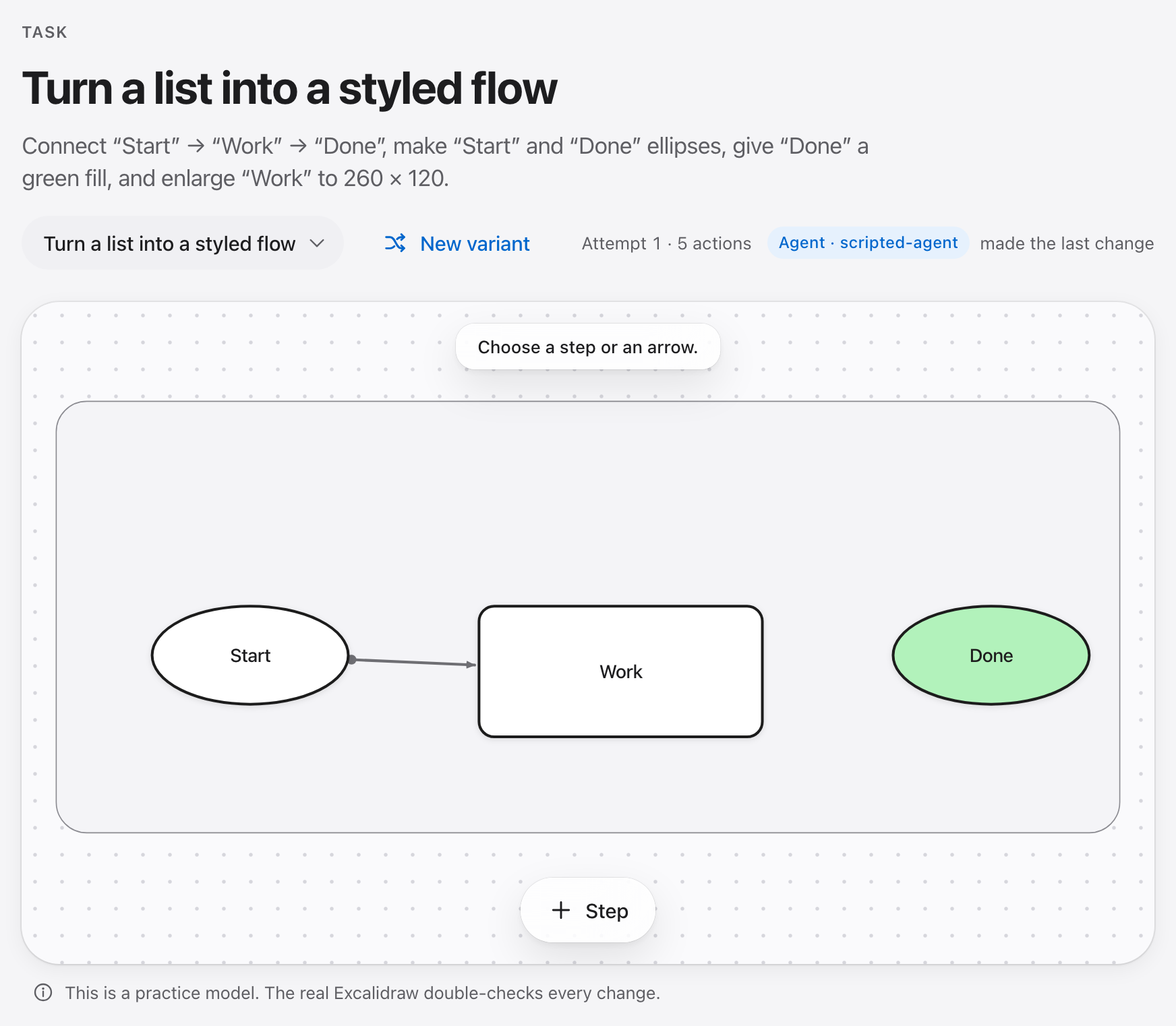
Practonaut turns a real application — today Excalidraw — into a practice environment. A task is a start drawing plus a goal. You, or an agent over MCP, change the diagram one action at a time; each action is applied to a real, pinned Excalidraw engine and read back before it counts. When the attempt ends, a separate checker decides whether the goal is met. People and agents work on the same session at the same time, so you can watch an agent in your browser: the history marks each change as yours or as the agent's (Agent · claude-code).

Quick start in 60 seconds
Requires Node.js 22.18 or newer (macOS, Linux or Windows).
npx practonaut setup           # once: Chromium for the real Excalidraw engine (about 550 MB)
npx practonaut                 # opens the example task in your browser
Without setup everything still works, model-only: actions are not confirmed in the real app, and
Practonaut says so when it starts.
Let an agent practise (Claude Code shown; any MCP client works):
claude mcp add practonaut -- npx -y practonaut mcp --task excalidraw/connect
On native Windows (not WSL) npx is a .cmd file that an MCP client cannot start directly; add
cmd /c in front: claude mcp add practonaut -- cmd /c npx -y practonaut mcp --task excalidraw/connect.
Score it on a task, with a fresh session per run and an independent check:
npx practonaut bench --agent claude-code --tasks excalidraw/connect
More in getting started.
Create your own task
Draw the start and the goal in Excalidraw, then:
npx practonaut tasks from-scenes start.excalidraw goal.excalidraw --out my-task
npx practonaut play my-task/world
The difference becomes the goal (steps, labels, shapes, colours, frames, groups, arrows). Practonaut only writes the task if the goal passes its own check, the start fails, a generated reference solution passes and generated near misses fail. The same works in the Player under Create, where you can also record a demonstration in the real editor and have the rule confirmed by a second recording. See the authoring guide.
Benchmark your agent
npx practonaut bench --agent oracle --tasks all --seeds 2            # reference solutions: the ceiling
npx practonaut bench --agent random --tasks all --max-actions 30       # random actions: the floor
npx practonaut bench --agent claude-code --tasks excalidraw/insert-between --repeats 3
npx practonaut bench --agent "my-agent --mcp {mcp_config} --prompt {prompt}"   # any agent
npx practonaut bench --agent claude-code --world my-task/world --oracle my-task/oracle.json   # your own task
npx practonaut report ~/.practonaut/bench/<id>/report.json --html report.html
npx practonaut report ~/.practonaut/bench/<id>/report.json --verify     # re-judge from the run files
npx practonaut compare before/report.json after/report.json --fail-on-regression   # did a change break an instance?
Each run gets its own session and data folder; the agent reaches the session only through the
Practonaut MCP tools and gets the same public task a person gets. The claude-code preset does not
pass provider keys, tokens or billing switches from your environment to Claude Code (a set
ANTHROPIC_API_KEY would silently switch it to API billing), so Claude Code uses the login it has —
your subscription, if you logged in with one; --keep-env ANTHROPIC_API_KEY passes a key on
purpose. Scores come from the host's history and a
separate checker, never from what the agent says: pass@1, pass^k, actions, efficiency against the
reference solution. The JSON report has a schema. report checks that every pass and every number
follows from the verdicts in the file — consistency, not proof: a file edited consistently still
passes, and report says "consistency-checked, not re-verified". report --verify re-runs the
checker on the session and the real-app export kept in the bench folder, whose SHA-256 the report
records, against the world and reference solutions stored in that folder (so a moved folder still
verifies), re-derives each run's actions and reference length, and refuses any difference by name; host calls and times are marked as reported by the runner. Nothing is
signed: whoever can write the bench folder can replace those files too.
A report says why a run failed, not only that it did: rates as fractions with a 95 % interval, failed
runs first, each unmet goal condition with the action after which it was last lost (judged by the
checker after every action), error classes with their explanation, the trajectory, the final board —
the real Excalidraw's own export, or a schematic labelled as such — beside an example target, the
call log and the tokens, turns and cost the client reports about itself. compare puts two reports
side by side instance by instance: it refuses reports that are not comparable, names instance
regressions (three repeats a side, all passed before, all failed after) and says "not
distinguishable at this n" when an exact McNemar test cannot tell the two apart.

The example report is a real run of Claude Code on three tasks, two repeats each (JSON, HTML) — one seed, six runs: it shows the format, it does not rank a model. Details: benchmarks.
Task library
16 tasks for Excalidraw 0.18.1, each in English and German with three label variants, a reference
solution and near misses. List them with npx practonaut tasks list; open one with
npx practonaut play <task>; address them as excalidraw/<task> in mcp and bench.
| Task | Level | Reference actions | Goal |
|---|---|---|---|
add-step | ●○○ | 1 | Add a step |
connect | ●○○ | 1 | Connect two steps |
disconnect | ●○○ | 1 | Remove a shortcut arrow |
recolor | ●○○ | 1 | Mark the error step |
remove-step | ●○○ | 1 | Remove a step |
rename-frame | ●○○ | 1 | Name the frame |
rename-step | ●○○ | 1 | Fix a label |
align | ●●○ | 3 | Align a row |
close-chain | ●●○ | 1 | Close the gap in a chain |
group | ●●○ | 2 | Group a sub-process |
insert-between | ●●○ | 4 | Insert a step between two others |
reconnect | ●●○ | 1 | Rewire an arrow |
reorder | ●●○ | 4 | Put the steps in order |
decision | ●●● | 6 | Build a decision with two exits |
restyle-flow | ●●● | 6 | Turn a list into a styled flow |
two-frames | ●●● | 4 | Sort two sub-processes into frames |
How scoring works
- The host keeps the history. Every action goes through one session host. It records each action with a state hash and who made it; agents and people cannot write the state any other way.
- The real engine confirms each action. With Chromium installed, each action is applied to a pinned Excalidraw running headless and read back; an action the real app disagrees with is rejected.
- A separate checker decides. After the attempt, another process replays the history with its own interpreter, reads the real Excalidraw export with its own parser, and evaluates the goal. It first makes sure an empty, an unchanged and a wrong submission all fail.
An agent gets the same task and the same public goal conditions as a person in the Player — one sentence per condition plus its formal form, which is the goal predicate written out — and the same Check button. It acts through Practonaut's semantic actions over MCP, not through the GUI. The reference solution, the near misses and held-out checker data never reach it over MCP.
Limits
- One application. Excalidraw 0.18.1 is the only app so far. The adapter contract is meant for more (adapter guide); none exists yet.
- Semantic actions, not pixels. Agents act through Practonaut's actions (add a step, connect, rename, …), not by clicking a screen. This measures whether an agent can reach a goal in the app's model, not whether it can operate the GUI.
- Not sealed. Agents run as your OS user. An agent with its own file or shell tools could read
the task library on disk, reference solutions included. The
claude-codepreset allows only Practonaut's tools; for other agents that is up to you. - Small evidence so far. The example report has two runs per task. Whether practising here makes people better at the real tool has not been studied.
- Without Chromium Practonaut runs model-only: tasks work, but nothing is checked against the real app, and it says so.
- Screen-reader and 200 % zoom checks by a person have not been done (manual checks).
Requirements
- Node.js ≥ 22.18 and npm.
- Optional:
npx practonaut setupdownloads Playwright's Chromium once for the real engine. Nothing is downloaded on install; the package has no install script. - Local data lives in
~/.practonaut(orPRACTONAUT_HOME). No telemetry, no account. Practonaut's own process makes no network calls while practising (npxfetches the package andsetupfetches Chromium, each once); an agent you connect talks to its own model provider.
Documentation
Getting started · Agent guide · Benchmarks · Authoring · World format · Architecture · Adapter guide · Session host · Threat model · Glossary · All documents
Contributing
Issues and pull requests are welcome — new tasks, bug fixes, and especially a second application adapter. Start with CONTRIBUTING.md; setup is three commands. Security reports go through SECURITY.md.
License
Apache License 2.0; see NOTICE. The bundled Excalidraw engine and fonts keep their own licenses (shipped with the package). The example world and the task library are CC0-1.0.