Listed from the MCP registry; nobody on Odel publishes it.

Link
Local personal memory for agents as MCP tools — remember, recall, search, context, graph traversal.
Runs on your machine from its package; the steps are below.
What it does
- Reads
- Writes
- High impact
At most: creates or changes data: records, files, settings.
What it costs
FreeOdel charges nothing per call. The publisher may charge for its own service.
Runs locally over stdio
This server isn't hosted — your MCP client launches it from a package registry. Use one of the commands below, or drop the config into your client (e.g. Claude Desktop).
Run
uvx link-mcp
MCP client config
{
  "mcpServers": {
    "link": {
      "command": "uvx",
      "args": [
        "link-mcp"
      ]
    }
  }
}
Link
Local memory for AI agents.
Link gives Codex, Claude, Cursor, Kiro, VS Code, Copilot, Antigravity, and other local agents the same source-backed memory, stored locally as Markdown.
Website · How it works · Memory · Tools & CLI · Setup · Docs · MCP Registry · PyPI · Homebrew






Quick start
brew install gowtham0992/link/link   # or: pip install link-mcp
lnk setup                            # wires every agent it finds
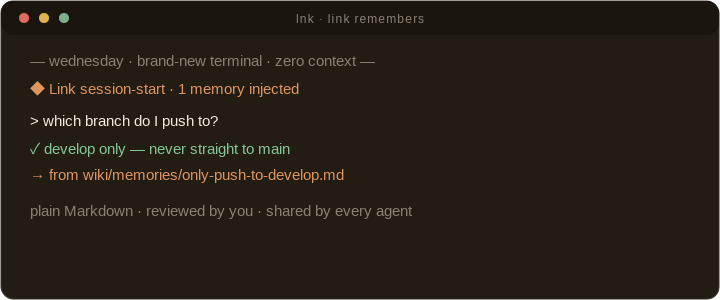
Then work normally. Tell an agent "remember that we deploy on Tuesdays", approve it once, and every other agent recalls it in a new session tomorrow.
What each agent gets depends on what it lets Link plug into:
| Agent | How memory arrives | Session hooks | Rules checked before the tool call | Code reminders |
|---|---|---|---|---|
| Claude Code | hooks, MCP, compiled files | start, end, every prompt | shell, file reads and writes, Grep; asks you | yes |
| Cursor | hooks, MCP, compiled rules | start, end | shell (asks you); file reads and writes (held) | no |
| Codex | start hook, MCP, ~/.codex/AGENTS.md | start | shell commands and patches (held) | no |
| Gemini CLI | start hook, MCP, GEMINI.md | start | shell, file reads and writes; asks you | no |
| Antigravity | start hook, MCP | start | shell, file reads and writes; asks you | no |
| Copilot CLI and VS Code | start hook, MCP (VS Code, per project), compiled files | start | shell, file reads and writes; asks you (a block in autopilot; the cloud agent never sees Link's hooks) | no |
| Windsurf | MCP, global rules file, compiled rules | none (no such event) | shell, file reads and writes (held) | no |
| Devin CLI | Claude Code's hooks, which it runs | start, end | shell and files (held) | no |
| Kiro | start hook, MCP, global steering file | start | shell, file reads and writes (held) | no |
| Zed | MCP, global AGENTS.md | none (no hooks) | shell and file writes, by Zed's own permission rules; not reads | no |
"Asks you": the agent shows you the call and waits. "Held": the agent can
only allow or block, so Link blocks the call and the agent asks you in chat;
lnk approve <id> lets that exact call through once. For agents with no
session-start hook, lnk compile --global writes your reviewed personal
memory into the instruction file they read every session, and keeps it in
step as memories change. Recall, review, stale
checks, receipts, sync and lnk compile work the same for every agent.
On a live Codex session the hook stopped every tempting call the model
tried while all ordinary work went through (one run per task, in
RESULTS.md; those rows are being re-confirmed under the tightened harness).
The offline benchmark decides 51 hand-written Claude Code-shaped calls with
the same matcher, in process; a live Claude Code session has not been
benchmarked yet. On the other agents it follows each vendor's documented
hook schema and is new in 6.0 - report what you see.
Kiro's hooks run in Kiro CLI V3 for every workspace, and on the default
engine through Link's link agent profile (kiro-cli agent set-default link). Zed has no hooks, so lnk compile --global writes your personal
rules into Zed's own tool permissions; Zed decides those calls itself, so
they are not held for lnk approve or counted in receipts.
Devin CLI does not document its file tools' arguments, so its file checks
read the usual path fields and any other argument named for a path or file.
lnk status                                   # is it wired up and being used?
lnk import claude-code                       # bring existing memory in
brew install --cask gowtham0992/link/linkbar # macOS menu bar app
Memory lives in plain Markdown you can open, and nothing becomes durable without your approval.
What Is Link?
Link is an open-source memory layer for local AI agents. Raw sources become an inspectable Markdown wiki. Explicit "remember this" requests become reviewable memories. Agents retrieve compact, source-backed context through the CLI, MCP, official skills, or the local viewer without dumping the whole wiki into a chat window.
The wiki is the storage layer. The product is durable memory that stays on your machine, remains readable in plain files, and can be shared across multiple agents instead of locked inside one vendor profile.
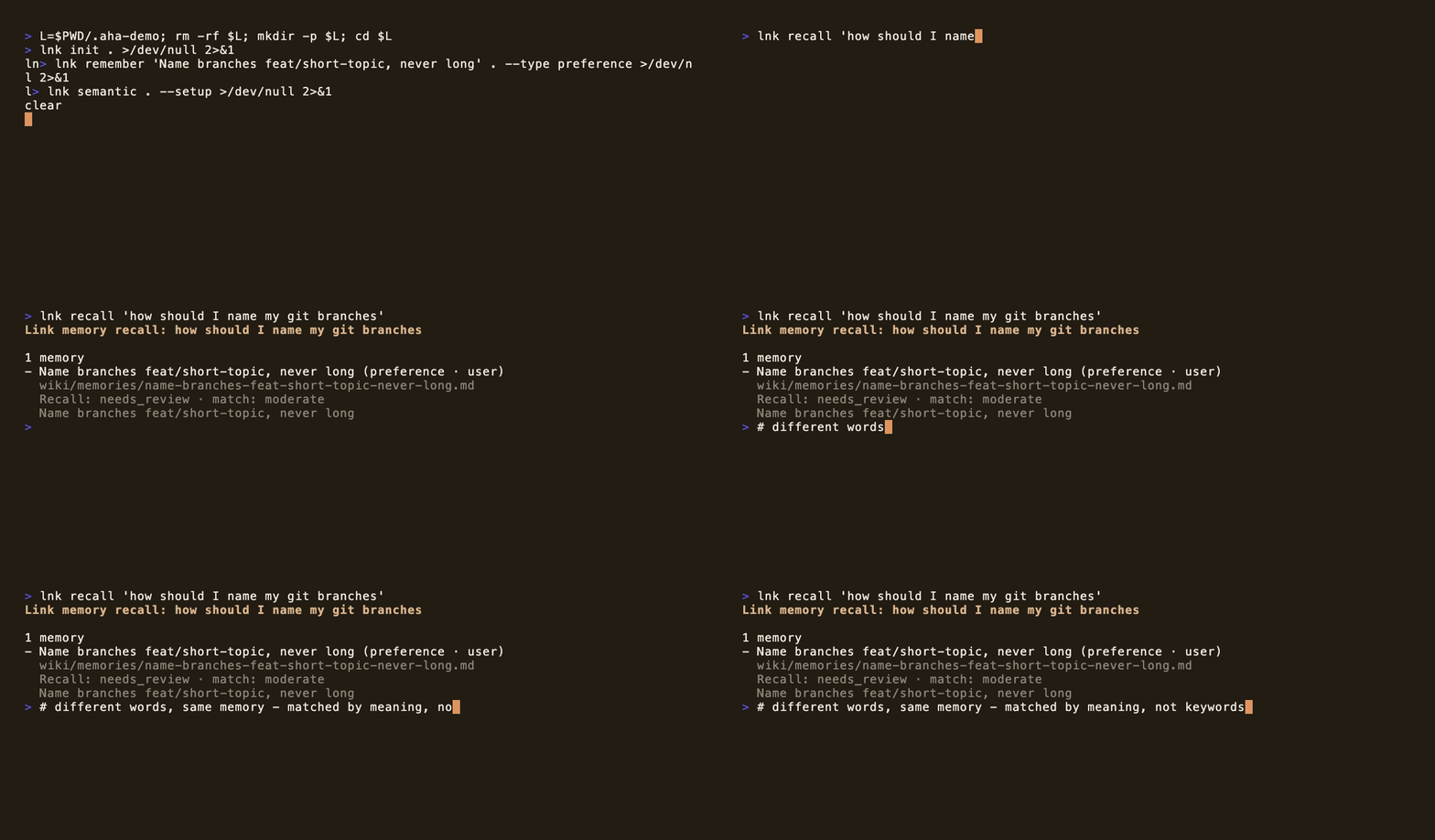
Ask in your own words; Link matches by meaning, not keywords. All local, all plain files.
How It Works
Link gives agents five simple moves:
- Capture notes, transcripts, docs, screenshots, and project context in
raw/. - Structure source-backed pages under
wiki/. - Remember explicit preferences, decisions, facts, and project context as reviewable memory.
- Retrieve compact query packets through the CLI, MCP, official skills, or the local web viewer.
- Hold what you approved: rules are enforced before a tool call, memories about code are checked against the repository, and a receipt shows what each session was given.
Most agent sessions start from zero. You re-explain preferences, repo decisions, project constraints, and why something matters. Link turns that repeated context into local memory agents can query.
| Pain | Link's answer |
|---|---|
| Agents forget you between sessions. | Save reviewed preferences, decisions, facts, and project context. |
| Notes are private or messy. | Keep raw sources local, then turn them into source-backed Markdown. |
| Context windows are expensive. | Return compact query packets with provenance and follow-up actions. |
| Memory needs trust. | Every page and memory can be inspected, reviewed, archived, or forgotten. |
| Agents read a rule and break it anyway. | A reviewed memory can carry a rule that asks for your OK, or blocks the call, before it runs. |
| Memory goes stale as the code moves on. | Memories that name files, scripts, dependencies or functions are checked against the repository and flagged, not believed. |
| You cannot tell what the agent was given. | lnk receipt lists every memory that reached a session and whether it arrived whole. |
Link follows Andrej Karpathy's LLM Wiki pattern: keep knowledge outside the chat window, make claims inspectable, and let context compound over time.
Why Link Is Different
Most agent-memory systems store memory as embeddings in a vector database or as an LLM-extracted graph. Link made five architectural commitments that are hard to add to those designs:
- Memory you can read. Every memory is a plain Markdown file — open it, grep it, git-diff it. If Link disappeared tomorrow, your memory is still yours.
- Review-gated writes. Agents propose; you approve. Even the automatic session hooks capture proposals, never facts.
- No LLM in the memory layer. Saving, deduplicating, contradiction checks and recall are deterministic — nothing can hallucinate a fact into your memory, because there is no model in its write path. (Wiki pages compiled from raw sources are written by your agent, and Link treats them that way.)
- Provably local. CI blocks outbound network code in the runtime, and the optional semantic models load offline-only after one explicit setup.
- Memory that holds when the agent acts. A memory you reviewed can carry a
rule (
ask command: git push --force,deny write: migrations/**) that is checked before the agent's tool call, with no model and under a millisecond. Memories about code are re-read against your repository and flagged when the code moved on. Memories surface when the agent opens the file they describe,lnk compilewrites reviewed memory into the files every agent already reads, and a receipt proves what reached each session.
And the claims are measured, not asserted — see the benchmarks below. Named comparisons against Mem0/OpenMemory, Zep/Graphiti, and Letta: Why Link?
Benchmarks
Plain files with no LLM in the memory layer, measured against the systems that have one everywhere:
| What | Link | For comparison |
|---|---|---|
| LoCoMo end-to-end QA — full 1,540 questions under mem0's own open harness; measured on Link 3.x, not yet re-run on 5.x | 84.8% | mem0's cloud platform: 83.2% under the same judge — with GPT-5 writing their answers and a budget model (claude-haiku-4-5) writing Link's. Confirmed by a second, independent judge (Tencent Hunyuan 3): 85.5% vs 83.6% |
| LongMemEval evidence retrieval — did the memory layer put the gold evidence in context? (deterministic, no LLM judge) | 99.4% of 500 questions | of 102 answer failures, only 3 were retrieval misses — the rest happened with the evidence already retrieved |
| Memory hygiene — junk stored over a simulated multi-month session stream we wrote | 0% (a CI regression floor on our own fixtures) | the same pipeline with governance off: 35.7% |
| Memory poisoning — 18 authored prompt-injection attacks on the capture pipeline (guardrail bypass, exfil conventions, credential planting, spoofed approvals, MemGhost-class untrusted-channel writes) | 0 reach the inbox unlabeled; 0 false positives on benign directives (a CI regression floor on attacks we wrote) | to our knowledge the only published adversarial benchmark on an agent-memory write path |
| Token economics — real recall packets, measured through the query path | 1,697–3,752 tokens per recall (micro→large budget); a 64× larger store grows the packet 1.56×, and the last quadrupling moves it 0.3% | bounded by the budget you ask for, not by how much you have remembered; CI-enforced. Over MCP, the first response of a session also carries a one-time memory brief, bounded to a hard 4,000-character budget (~365 tokens of overhead, measured) — see RESULTS.md |
Enforced rules — 33 forbidden tool calls, including shell disguises (cd x && sudo …, quoting, bash -c, options reordered or bundled, PowerShell), against 53 ordinary coding-agent calls; the same matcher serves every agent with rule checks in the table above | 33 of 33 caught, 0 of 53 stopped, about 0.2 ms per decision | a rule acts only after you review it, and only you approve, clear or retire one; the hook runs as you, so it stops mistaken and disguised calls, not an agent set on escaping it |
| Staleness checks — memories and instruction files (AGENTS.md, CLAUDE.md, Cursor rules…) checked against the repository | 0 false flags: 345 memory references in Link's own docs and 604 instruction-file references across eight public repositories; every planted deletion caught | a reference is reported only when git history shows the thing existed |
| Bundled 1,176-case recall benchmark — deterministic, no network, no LLM | pip default (lexical) hit@1 0.671; lnk setup provisions the fast local tier by default: 0.740; optional quality tier 0.789, plus rerank 0.798 | reproducible with one command; CI runs the suite and gates dataset integrity, not the score |
The zeros are regression floors: CI fails any change that breaks them, on fixtures we wrote, so they say the behaviour cannot silently regress - not that a stranger's data will score the same. Every number ships with its config, judge model, caveats, and the experiments that lost — including LongMemEval end-to-end, where we re-judged both sides under the neutral Hunyuan 3 referee: mem0's GPT-5 answers score 91.0%, Link's budget-model answers 80.6%. Their published number holds up, and the gap tracks the answering model, not the memory layer — that's what the 99.4% evidence-retrieval row above isolates. Full methodology and reproduction steps: benchmarks/RESULTS.md.
Memory You Can Take Anywhere — And Prove Is Working
Three questions every memory system should answer, and how Link answers them with mechanisms instead of promises:
"Is it on all my machines?" lnk sync moves reviewed memory through
a git remote you control — a private GitHub repo, a homelab bare repo —
with no server and no account. Secrets are scanned before anything
leaves, conflicts become review items instead of git markers, and private
captures never sync. lnk team-sync runs a shared team brain on the same
rails.
"What did I believe back then?" Ask in plain language: lnk recall "where does local data live in March" returns what was true then,
reconstructed from the dated files and their supersede lineage — while
the same question without the date returns today's truth. Deterministic:
a regex and a calendar, no model. Point-in-time accuracy from plain
language: 1.00 on the hygiene benchmark's revised facts, identical to
asking with an ISO date.
"Is my agent actually using this?" The question most memory systems
cannot answer about themselves. Link records retrievals locally — session
briefs pushed to agents, recalls they chose to make — and lnk wins
answers with counts, while lnk digest reports the weekly story
including memories that have never been retrieved. The ledger stores
which memory was read and when, never what you asked; it never syncs, and
LINK_USAGE=off disables it. And memory reaches every agent, not just
the hooked ones: the first MCP tool response of a session carries the
brief, whatever tool was called.
First Run, In Detail
The quick start above is the whole install. This is what each step does.
brew install gowtham0992/link/link
lnk proof     # see the promise (~1 second, no setup)
lnk setup     # wire every agent it finds — workspace, MCP, session hooks, one command
Already have memory scattered across tools? Bring it home as reviewable proposals — nothing is auto-accepted:
lnk import claude-code # or: cursor, codex, file --file chatgpt.txt
lnk setup detects the agents installed on your machine — Claude Code,
Codex, Cursor, Windsurf, Zed, Kiro, Gemini CLI — and wires them all at
once; Link is agent-agnostic by design (one MCP server, one workspace,
every agent reads the same memory). It is
idempotent: after any brew upgrade, run it again and everything —
workspace runtime, MCP provisioning, hooks — is refreshed. Prefer to wire
one agent explicitly? lnk onboard --agent claude-code --write --hooks
still does exactly that.
lnk proof creates a throwaway workspace, writes one reviewed memory, and
recalls it through the same path the CLI, skills, and MCP use — the core
promise (one local memory, reusable by different agents, no cloud profile) in
one second:
Cross-agent memory continuity works
Memory: created and reviewed: Cross-agent Link proof
Recall: found through the same bounded recall path used by CLI, skills, and MCP.
Result: proof passed
lnk onboard --agent claude-code --write --hooks creates ~/link, provisions
the MCP runtime, and wires the agent. Swap claude-code for codex,
cursor, kiro, copilot, antigravity, windsurf, zed or vscode.
Session hooks - a brief at session start, proposals captured at session end -
exist for Claude Code and Cursor; Codex, Gemini CLI, Antigravity and Copilot
get the start brief. Rule checks before tool calls are installed for every
agent in the table above except Zed, whose own permission rules carry them. Agents without a start hook get memory through MCP,
where the first tool response of a session carries the same brief. Drop --write to
preview without touching anything, or drop --agent to just create the
workspace. lnk disconnect <agent> --write takes Link back out: its MCP entry
and hooks, nothing else.
The installed command is lnk because link is already a POSIX/macOS system
utility. From a source checkout, use python3 link.py ... instead.
Want the UI, graph, and source pages first? lnk try && lnk serve link-demo.
Windows, source checkout, MCP-only, and skill-first paths are in the
First 10 Minutes guide.
Or seed your current repo as a separate step so the first real recall is not empty:
cd /path/to/your/project
lnk seed . ~/link
lnk query "what is this project about?" ~/link --budget small
lnk seed reads allowlisted project files such as README.md, AGENTS.md,
CLAUDE.md, .cursorrules, and editor rule files, blocks secret-looking
values, writes a source-backed project page, and rebuilds the graph. It does
not create durable memories; agents should still use reviewed memory proposals
for preferences and decisions.
The Homebrew formula is maintained in the public
gowtham0992/homebrew-link tap.
Open:
http://127.0.0.1:3000
http://127.0.0.1:3000/onboard
http://127.0.0.1:3000/graph
http://127.0.0.1:3000/health
Use /onboard when you want the same first-run checklist in the local UI:
readiness, project context seeding, first memory, agent wiring, and starter
prompts. The web viewer is for local use only. It binds to 127.0.0.1, has no user
accounts or authentication, and should not be exposed to the internet unless you
add your own auth layer.
Try the value loop:
lnk start link-demo --task "working on agent memory"
lnk query "why does Link help agents?" link-demo --budget small
lnk brief "working on agent memory" link-demo
lnk benchmark "agent memory" link-demo
lnk health link-demo
lnk benchmark reports both performance and value evidence: cache/search/query
timings, graph payload shape, and an estimate of how much broad wiki context the
bounded Link packet avoided sending to an agent.
The /health page mirrors the readiness loop in the browser: validation state,
interrupted writes, memory review status, and copyable repair commands. The
viewer stays document-first — common paths in the top nav, deeper tools under
more, and a contents outline plus graph-related links on structured pages.
The generated demo is the public proof wiki. Generated content inside wiki/,
raw/, and link-demo/ is ignored by git so personal memory is not published
by accident.
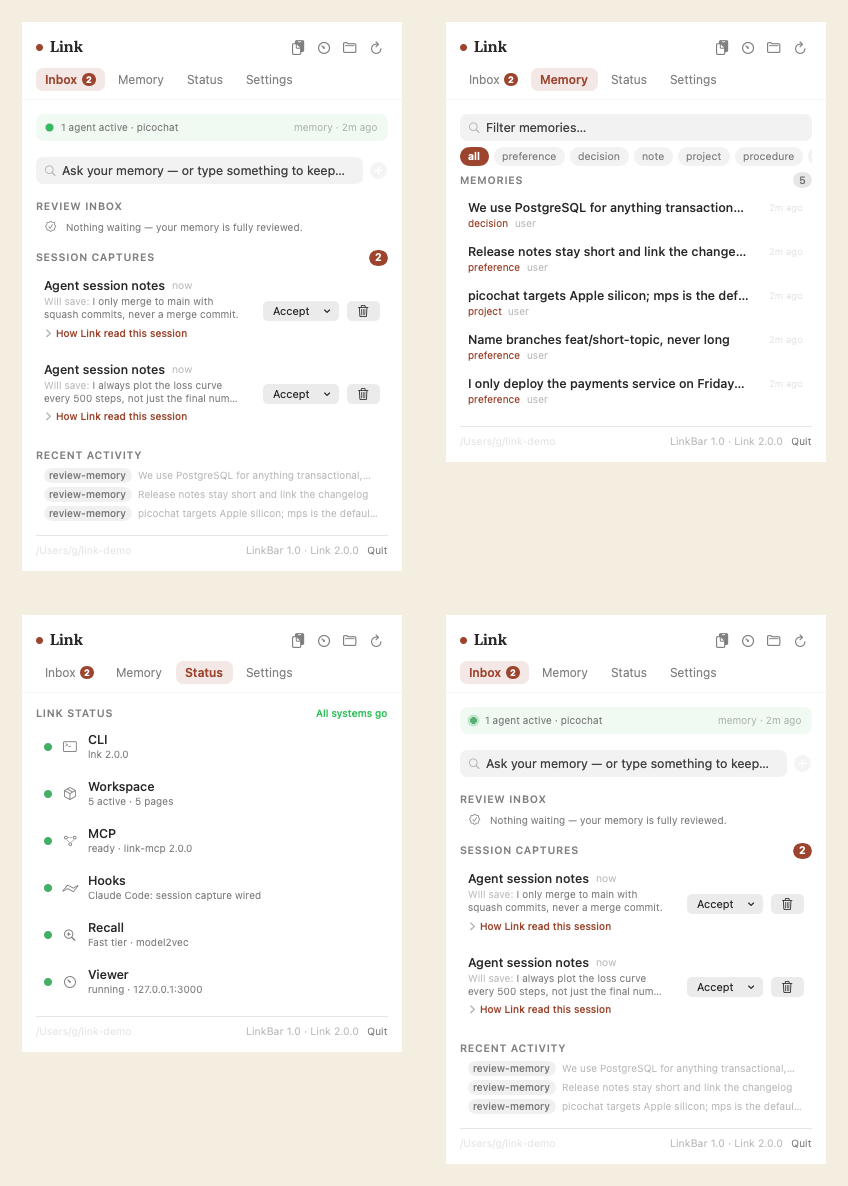
LinkBar — the menu bar app (macOS)
Link's memory, ambient. LinkBar puts the review gate in your menu bar: a
global palette (⌥⌘M) to recall or remember from any app, native
notifications with one-tap Accept when a session capture lands, a live
pulse while agents are writing, a browser over every memory file, and a
status dashboard that flags memories naming files your repository no
longer has — all running on the same reviewed lnk commands as the CLI.
Pick the workspace in Settings; it defaults to ~/link.
brew install --cask gowtham0992/link/linkbar
Unsigned on purpose (no Apple fee inflating anything): the cask strips
the quarantine flag on install, so it opens like any app. Building from
source instead: cd apps/LinkBar && bash Scripts/bundle.sh --install.
Killer Demo: One Memory, Two Agents
This is the moment Link is built for:
-
In one agent, say:
textremember that I prefer local, source-backed memory for AI agents -
In another agent connected to the same
~/linkworkspace, say:textstart with Link before we continue what does Link remember about local agent memory? -
The second agent should recall the reviewed memory from local Markdown instead of asking you to repeat yourself.
For a clean automated version of the same idea, run:
lnk proof
Ways To Use Link
Pick the surface that matches how you work. They all read and write the same local Markdown wiki.
These surfaces are independent. lnk serve / serve.py is only the local web
viewer. CLI commands, official skills, and MCP tools read the same wiki/ files
directly, so Claude, Codex, Kiro, Cursor, or another agent can use Link even
when the web viewer is not running.
|
Web UI Read the local wiki, then review memory, ingest, graph, audits, captures, and explanations. |
CLI Script readiness, query packets, briefs, validation, backup, context-savings benchmark, and repair. |
MCP Let Codex, Claude, Cursor, Kiro, VS Code, Copilot, and other agents recall memory. |
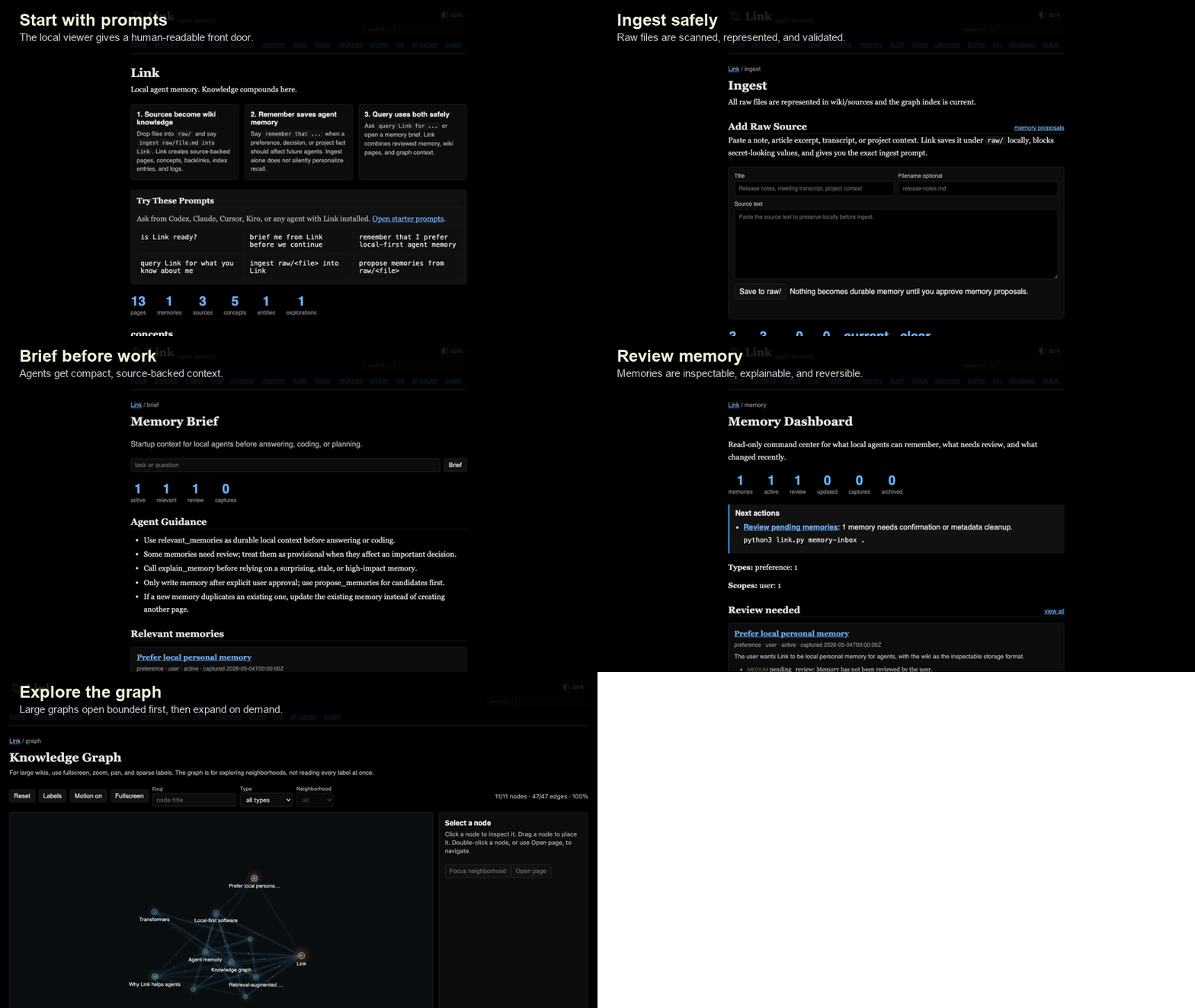
The local web viewer: browse source-backed memory and explore the knowledge graph — all on 127.0.0.1, no accounts, no backend.
Prefer skills instead of MCP? Link ships small, lazy-loadable CLI skills under
skills/. They let an agent use lnk health, lnk query, lnk ingest-status,
lnk session-end, and lnk remember directly, without MCP setup or a running
web viewer.
skills/link-health/SKILL.md
skills/link-retrieve/SKILL.md
skills/link-ingest/SKILL.md
skills/link-memory/SKILL.md
Full guide: Link Skills.
Install For Your Agent
Run one installer from the cloned checkout:
bash integrations/codex/install.sh
bash integrations/kiro/install.sh
bash integrations/claude-code/install.sh
bash integrations/cursor/install.sh
bash integrations/copilot/install.sh
bash integrations/vscode/install.sh
bash integrations/antigravity/install.sh
Installers create or update ~/link, install or upgrade link-mcp, write
lightweight agent instructions, and preserve existing wiki data on reinstall.
A global install also adds the agent's hooks (Copilot's: hooks only, since
its MCP entry is per project); use --project when a repo needs separate
project memory (it leaves your global hooks alone).
On Windows, use the matching PowerShell installer. It registers the MCP
server and writes the instructions; add hooks afterwards with
lnk connect <agent> ~/link --hooks --write.
.\integrations\codex\install.ps1
.\integrations\kiro\install.ps1
.\integrations\claude-code\install.ps1
.\integrations\cursor\install.ps1
.\integrations\copilot\install.ps1
.\integrations\vscode\install.ps1
.\integrations\antigravity\install.ps1
Then ask your agent:
is Link ready?
start with Link before we continue
seed this project into Link
ingest raw/notes.md into Link
remember that I prefer short release notes
query Link for the release process
what does Link remember about local personal memory?
end this session with Link memory proposals
For CLI-first agents or Link skills, use the same startup loop directly:
lnk seed . ~/link
lnk start ~/link --task "working on Link release"
lnk session-end session-notes.md ~/link --limit 3
If you want one guided setup for a real workspace and an agent, use
lnk onboard --agent AGENT. If your agent already has instructions and you only
need MCP wiring, use the lower-level connection helper. Both preview the exact
config first; add --write when you want Link to update the agent config file.
lnk onboard --agent codex
lnk onboard --agent codex --write
lnk connect codex ~/link
lnk connect codex ~/link --write
lnk connect kiro ~/link --write
lnk verify-mcp ~/link
For agents with hook support — Claude Code, Cursor, Codex, Gemini CLI,
Antigravity, Copilot, Windsurf and Kiro — add --hooks (works with lnk onboard
too) to make the memory loop automatic:
the brief is injected at session start where the agent has a start event
(every one listed except Windsurf), and on Claude Code, Cursor and Devin
proposal-only notes are captured at session end, so memory no longer depends
on the agent remembering to call Link. Empty sessions and duplicate end events are skipped, and when the
backlog builds up the brief nudges the agent to offer a read-only
lnk consolidate pass. On Claude Code the hooks also run before shell and
file tool calls: a reviewed memory's enforced rules are checked there, and
memories anchored to the file being read or edited are surfaced at that
moment. The same rule checks run on Cursor, Codex, Gemini CLI, Antigravity,
Copilot, Windsurf and Kiro, each through its own hook. lnk receipt shows what
actually arrived in each session and every rule check. Durable memory still
requires your approval. Hook support beyond Claude Code follows each
vendor's documented schema and is new - report issues.
lnk connect claude-code ~/link --hooks --write
lnk connect codex ~/link --hooks --write        # start brief + rule checks (approve them in Codex's /hooks)
lnk connect cursor ~/link --hooks --write
lnk connect antigravity ~/link --hooks --write  # Antigravity and Gemini CLI (both read ~/.gemini)
lnk connect copilot ~/link --hooks --write      # Copilot CLI and VS Code's Copilot (~/.copilot/hooks)
lnk connect windsurf ~/link --hooks --write     # rule checks only: Windsurf has no session-start event
lnk connect kiro ~/link --hooks --write         # start brief + rule checks (V3 hooks and the `link` agent profile)
lnk approve ~/link                              # calls an agent that cannot ask is holding for your OK
lnk consolidate ~/link                          # read-only backlog plan, apply only with approval
Optional: hybrid semantic recall (still fully local)
Lexical recall is always the default and the fallback. Paraphrase matching is
opt-in: after the two setup commands below, "how should I structure my pull
requests" finds a memory saved about commit style. Until then, recall matches
on shared words, and a miss tells you how to turn paraphrase matching on.
Installing the optional semantic extra adds a small local static-embedding
model. Recall never touches the
network: the model loads offline-only after a one-time explicit setup,
embeddings live in plain JSON under .link-cache/, similarity runs in-process
with no vector database, and semantic-only matches carry capped confidence
labels so agents verify before trusting them.
pip install "link-mcp[semantic]"          # fast tier: tiny static model, instant load
pip install "link-mcp[semantic-quality]"  # quality tier: contextual model, best recall
lnk semantic ~/link --setup   # one-time model fetch, with your approval
lnk semantic ~/link           # status: lexical only vs hybrid, active tier
python3 -m link_mcp --semantic-setup --wiki ~/link/wiki   # MCP-only installs
Measured, not asserted: on the bundled 1,176-case benchmark, the quality tier lifts token-overlap hit@1 from 0.671 to 0.789 and finds half of the pure paraphrases (zero token overlap) in the top 5, where lexical recall finds 6%, at ~11 ms per recall with no service or vector database. On the third-party LoCoMo retrieval track (1,536 evidence-annotated questions over 5,882 conversation turns), hybrid recall lifts any-evidence hit@10 from 0.716 to 0.779, and the opt-in rerank tier to 0.826 with hit@1 0.453. Without the reranker, lexical recall is the stronger top-5 on LoCoMo; RESULTS.md says why. Full methodology, honest limitations, and reproduction steps: benchmarks/RESULTS.md.
MCP-only install
python3 -m pip install --upgrade link-mcp
python3 -m link_mcp --version
{
  "mcpServers": {
    "link": {
      "command": "python3",
      "args": ["-m", "link_mcp", "--wiki", "~/link/wiki", "--surface", "slim"]
    }
  }
}
--surface slim is the recommended MCP surface for agents: six obvious tools
for recall, remember, ingest, review, status, and admin escape hatches. The full
compatibility surface is still available with --surface full.
On macOS/Homebrew Python, if pip reports externally-managed-environment, use a
dedicated venv:
python3 -m venv ~/.link-mcp-venv
~/.link-mcp-venv/bin/python -m pip install --upgrade pip link-mcp
Full setup: MCP guide.
Obsidian users can import an existing vault into raw/ for agent ingest, or
open ~/link/wiki directly as a vault for editing Link pages:
lnk init ~/link
lnk import-obsidian ~/Documents/ObsidianVault ~/link
See the Obsidian guide for the import, edit, and validation loop.
Storage Model
Under the hood, Link separates source-backed knowledge from durable agent memory:
- Drop raw notes, transcripts, articles, and project context into
raw/. - Agents compile those sources into inspectable pages under
wiki/. - Explicit "remember" requests become reviewable memory pages.
- Queries retrieve compact agent context from both the wiki and memory layer.
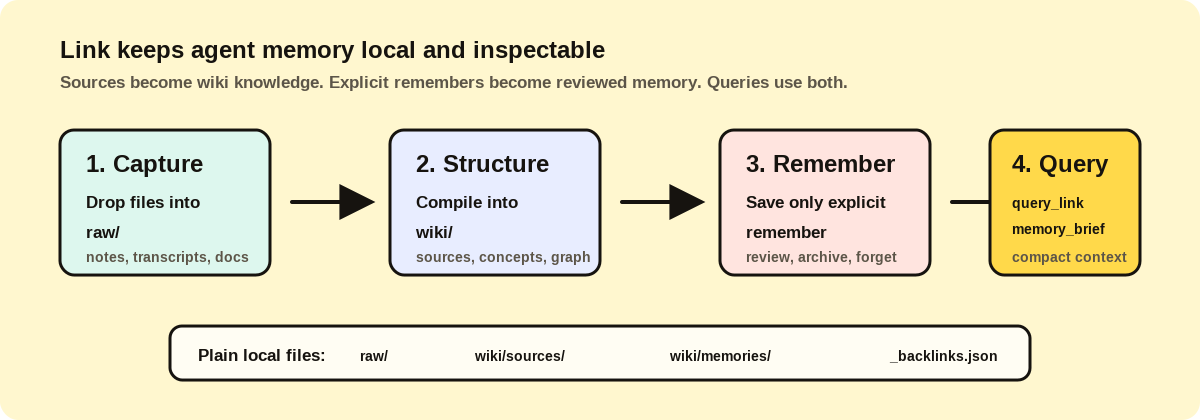
The storage model is plain and inspectable:
| Layer | What lives there |
|---|---|
raw/ | Original notes, transcripts, articles, PDFs, screenshots, and project files. |
wiki/ | Source-backed pages, concepts, entities, explorations, comparisons, and memories. |
| Agent interfaces | CLI, skills, MCP, and local viewer paths that avoid dumping the whole wiki into context. |
If a raw file was already ingested and later edited, lnk ingest-status marks it
as stale and tells your agent to refresh the existing source page instead of
creating a duplicate.
Structured exports with a supported schema can use deterministic ingestion. Planning is read-only; applying stages the complete result, rebuilds the graph, validates it, and records output ownership before changing the live wiki:
lnk ingest raw/chezmoi-docs/export.jsonl ~/link \
  --adapter chezmoi-docs-graph-v1 \
  --exclude "Reference / Release history"

lnk ingest raw/chezmoi-docs/export.jsonl ~/link \
  --adapter chezmoi-docs-graph-v1 \
  --exclude "Reference / Release history" \
  --apply
Later runs update only adapter-owned outputs. Manual edits become conflicts.
--replace-unmanaged is required for a first migration over existing pages,
and --prune is required to retire managed pages no longer in the plan.
Arbitrary notes and articles continue through agent-authored ingest because
their useful structure cannot be inferred safely from a file format alone.
What Agents Get
When an agent uses Link through the recommended MCP surface, it gets six
model-facing tools. CLI and skill workflows call the same core behavior through
lnk.
status: readiness, schema state, validation, interrupted writes, and safe next actions.recall: the one read path for startup briefs, answer-ready query packets, wiki search, graph context, token budgets, and follow-up actions. Every recalled memory carries aconfidencelabel (strong,moderate,weak) and amatchfield (lexical,semantic,hybridwhen the optional local semantic tier is installed), so agents verify weak or paraphrase matches with the user instead of trusting them.remember: durable local memory only after explicit user approval, with duplicate/conflict checks, provenance, review state, visibility, optional enforce rules that act on tool calls once you review the memory, optionalreview_after, and optionalexpires_at.ingest: exact next steps for raw files, source safety, stale ingest detection, validation, and rebuild checks.review: memory inbox, profile, audit, log, explain, archive, restore, forget, and lifecycle review workflows — plusreview(action="consolidate"), a read-only backlog plan applied only with per-action user approval.admin: the escape hatch for backup, migrate, validate, graph export, pages, captures, rebuilds, compatibility actions, and advanced updates.
The stable agent-facing loop is documented at Link Memory Contract: readiness first, bounded recall, explicit memory writes, audit tools, and sharing semantics.
Use review_after for time-sensitive preferences or decisions. When that date
arrives, the memory reappears in Link's review inbox so an agent can ask the
user to confirm, update, archive, or forget it instead of trusting stale context.
Use expires_at for temporary context that should automatically leave default
recall after a date; Link keeps the Markdown page inspectable and asks the user
to update, archive, or delete it.
Use visibility to separate where a memory applies from who should see it:
private stays personal, project is intended for a project workspace, and
team means the user explicitly approved sharing it with a team.
For team handoff or security review, lnk compliance-export --output audit.json
writes a redacted JSON packet with readiness, validation, memory review status,
operation markers, and recent audit log entries. Raw source contents and memory
bodies are not included.
For day-to-day auditability, lnk memory-log ~/link shows what Link recently
remembered, updated, reviewed, archived, restored, forgot, or accepted from raw
captures.
For recovery, lnk backup ~/link creates a local archive and lnk restore-backup <archive> ~/link previews what would be restored. Passing
--confirm replaces local files after creating a safety backup when possible;
raw/ is still excluded unless --include-raw is explicit. If a multi-file
write is interrupted, lnk operations ~/link shows the marker and any rollback
snapshot; lnk operations ~/link --recover <marker> --confirm restores the
snapshot after you review it.
For local proof of value, lnk wins ~/link shows reusable memories, reviewed
memory, provenance, project continuity, freshness guardrails, and copyable
prompts without tracking user behavior.
For Git-backed team memory, lnk team-sync ~/link checks whether the workspace
is ready to share reviewed wiki/ pages while keeping raw/, caches, backups,
local MCP Python markers, and wiki/log.md private by default. The audit log is
local because it has a single-machine hash chain; merging multiple users' logs
would create false tamper alarms. Team sync also blocks "ready" status when the
memory inbox is not clear or active visibility: private memories would be
included by a broad git add wiki.
lnk team-sync ~/link --remote git@example.com:team/link-memory.git
For a teammate, reviewer, or another agent, lnk share resolves a page,
memory, title, alias, or search phrase into a local viewer URL:
lnk share "Prefer local memory" ~/link
For a static, read-only review packet, lnk snapshot exports rendered wiki
HTML without raw/, captures, operation markers, live MCP state, or memory pages
by default. --include-memories exports only non-private memories; use
--include-private-memories only for a personal archive or an explicitly
approved review. It blocks export if wiki pages contain secret-looking values
unless you explicitly override it.
lnk snapshot ~/link --output link-snapshot
lnk snapshot ~/link --output link-snapshot --include-memories --force
lnk snapshot ~/link --output personal-snapshot --include-memories --include-private-memories --force
Agent Contract
For MCP clients, agents should use Link in this order:
statusto check readiness and safe next actions.recallwith an empty query once at the first substantive turn of a session.recall(query, budget="micro"|"small")before broad file reads or asking the user to repeat durable context.ingestbefore touching raw sources and after source edits for validation/rebuild checks.rememberonly when the user explicitly asks Link to remember something or approves a proposed memory.reviewfor memory inbox, profile, audit, log, explain, archive, restore, and forget workflows.adminfor backup, migration, graph export, captures, rebuilds, compatibility actions, and advanced maintenance.
Full MCP tool list: MCP setup.
Privacy And Safety
Link itself is local-first:
- No telemetry in the installed CLI, MCP server, local web UI, or wiki runtime.
- No hosted backend.
- No external API calls from
serve.pyorlink-mcp. - Raw sources and generated wiki pages are ignored by git by default.
lnk backupexcludesraw/unless you explicitly pass--include-raw.- Secret-looking API keys, provider tokens, JWTs, registry credentials, and
private key blocks are detected in raw sources, captures, and release hygiene
checks.
lnk validateandlnk doctoralso fail if secret-looking values are found inside wiki pages before they can be served through the local UI or returned through agent context. - Optional semantic recall stays local: models load offline-only at recall
time (only the explicit
lnk semantic --setupmay fetch a model, once), and embeddings live in plain JSON under.link-cache/. - Automatic session hooks store proposal-only notes; transcript extraction skips tool calls and outputs, and no durable memory is written without review.
- The local web server binds to
127.0.0.1and is not meant to be exposed to the internet without additional auth.
Before sharing a repo, demo, or wiki:
python3 link.py doctor
python3 link.py validate
python3 scripts/check_release_hygiene.py
More detail: Security guide.
Documentation
| Need | Go here |
|---|---|
| Run Link for the first time | First 10 minutes |
| "Does Link read my conversations?" | The three questions everyone asks |
| Decide whether Link fits | Why Link? |
| Use the local viewer | Web UI |
| Understand raw/wiki/memory | Concepts |
| Configure MCP | MCP setup |
| Find a command | CLI reference |
| Use Link without MCP setup | Official skills |
| Use local HTTP endpoints | HTTP API |
| Review security boundaries | Security model |
| Check scale limits and measure your wiki | Link Scale |
| Evaluate Link for a small team | Team security review |
| Fix setup issues | Troubleshooting |
Contributing
Contributions should come through pull requests targeting main. The develop
branch is a maintainer integration branch for larger release work before it is
proposed to main.
Before opening a PR:
python3 -m ruff check .
python3 -m pytest tests
python3 scripts/check_release_hygiene.py
python3 scripts/check_runtime_duplication.py
python3 scripts/check_tool_contract.py
git diff --check
Full contributor guide: Contributing.
Do not include personal wiki data, raw sources, registry tokens, .env files, or
local MCP credentials in a PR.
If Link helps your agents remember better, star it on GitHub so more people can find it.







