Listed from the MCP registry; nobody on Odel publishes it.

AgentBridge
Self-hosted AI agent for office work: run agents, office tools and documents from any MCP client.
Runs on your machine from its package; the steps are below.
What it does
- Reads
- Writes
- High impact
At most: moves money, runs code or commands, deletes data, or sends messages for you.
What it costs
FreeOdel charges nothing per call. The publisher may charge for its own service.
Runs locally over stdio
This server isn't hosted — your MCP client launches it from a package registry. Use one of the commands below, or drop the config into your client (e.g. Claude Desktop).
Distributed as an MCP bundle (`https://github.com/Graphene-Lab/AgentBridge/releases/download/v1.26.11.21/agentbridge-mcp.mcpb`) — download it and import the bundle in your MCP client.
Run
docker run -i --rm ghcr.io/graphene-lab/agentbridge:26.11.21
MCP client config
{
  "mcpServers": {
    "agentbridge": {
      "command": "docker",
      "args": [
        "run",
        "-i",
        "--rm",
        "ghcr.io/graphene-lab/agentbridge:26.11.21"
      ]
    }
  }
}AgentBridge (codename "AGENT") — AI personal assistant that promises to replace humans in office work
Add agentic power to your work! An AI personal assistant that automates tasks and your work without sacrificing privacy. We're happy to put this powerful tool in your hands to automate your business while reducing staff costs, providing you with the most advanced AI technology in the office automation industry.
AgentBridge is a self-hosted server that runs its own AI agents behind two primary interfaces in a single process: a full-screen chat terminal (TUI) and an HTTP API that speaks the standard OpenAI protocol, so any OpenAI-compatible client drives the same agents.
Chat in the terminal while scripts, bots, and apps use the same agents on the same port: same process, same conversations, no bridges, no synchronization.
To be explicit about what the compatibility is and is not: AgentBridge is OpenAI-standard on the outside, not on the inside. It is a standard OpenAI server to any OpenAI client — SDKs, bots and scripts talk plain POST /v1/chat/completions and reach the same agents. It does not run on a standard agent system: the agent core is our own engine (AIOrchestrator/AgentHarness), and its defining concept is that an agent's abilities are compiled .NET assemblies loaded as plugins from the Tools/ folder and driven in-process — no interpreters, no remote tool servers, no standard agent glue between the agent and its actions. That is the Universal Tool System described below, and it is the architectural difference that sets this product apart.
It is the first agentic harness system for next-generation artificial intelligence that introduces significant innovations, raising the bar for all competitors in the industry. The system encapsulates agentic functions in a well-designed sandbox that prevents companies from suffering damage from an AI that is not properly controlled, while at the same time allowing them to entrust real business tasks to the AI, with a very high level of privacy and confidentiality.
AgentBridge stands apart from the harnesses you are familiar with because it is designed to let even people with no technical skills — your grandma, for example — use it without risking damage: file actions are reversible thanks to versioning, the agent is confined to a space bounded by guardrails built in by design, and no code-agent features are provided, precisely to prevent code from being created or executed. It can also be supplied together with our cloud platform, which synchronizes the file area in real time with a private, encrypted cloud located within your own company. In short, it is a product any employer can make available to their employees to support office work and make business processes more efficient. With traditional harnesses, a badly worded prompt could destroy documents, wipe the work drive, or cause other kinds of damage; our focus, by contrast, has been on creating a safe tool for office use.
Why teams choose this architecture AgentBridge is built on the AIOrchestrator library model: one runtime, one agent core, and one consistent operational flow across terminal and API. The result is faster execution, lower integration overhead, and stronger control than traditional multi-server MCP setups. Read the white paper: Why the AIOrchestrator Library Model Outperforms Traditional MCP Deployments.
The architecture: one solution, and everything in it is a plugin
AgentBridge is not a single project. It is a solution — a set of .NET projects that form one whole — and the repository you are reading is only the host that assembles it. The other pieces live in repositories of their own, and each one is a plugin: a library that gives the agent one family of abilities.
| Layer | What it does | Where it lives |
|---|---|---|
| AgentBridge — the host | Terminal UI, OpenAI-compatible API, sessions, voice, TTS, Telegram and SIP bridges, OfficeManager | this repository |
| AIOrchestrator / AgentHarness — the core | The agent loop, the deterministic memory, and the tool contract every plugin implements | Graphene-Lab/AIOffice |
| The plugins — the abilities | One compiled library per domain: Word, Excel, PowerPoint, PDF, podcasts, CAD, maps, ERP, Odoo, Power BI, Markdown | one repository each — list below |
| The support libraries | Deterministic code intelligence that reads a compiled assembly and derives its tool interface from it | UISupportGeneric · GiraffeAI |
flowchart TB
    subgraph Host["AgentBridge — the host (this repository)"]
        TUI["Terminal UI · Web GUI · API"]
        LOOP["Agent loop<br/>(AgentHarness)"]
    end
    subgraph Plugins["Tools/ — the plugins folder"]
        DOC["OfficeTool → .docx .xlsx .pptx .pdf"]
        WORD["DocumentTool → Word"]
        SHEET["SpreadsheetTool → Excel"]
        DECK["PresentationTool → PowerPoint"]
        MORE["PodcastTool · MapTool · FreeCADTool<br/>ErpTool · OdooTool · PowerBITool …"]
    end
    TUI --> LOOP
    LOOP -- "direct method call<br/>in-process, no protocol" --> DOC
    LOOP --> WORD
    LOOP --> SHEET
    LOOP --> DECK
    LOOP --> MORE
No project references a plugin at compile time. The host hands the agent tool names; the
plugin host scans the plugins folder (Tools/, next to the executable) at startup, loads the
assemblies and resolves those names to real types at runtime — then hot-adds any plugin that
appears later, 30 seconds after it lands. Adding an ability means dropping a folder in: no
rebuild, no registration, no service to start, no schema to keep in sync.
The idea: the agent calls software, not a protocol
The mainstream way to make an agent agentic is MCP: the model speaks JSON-RPC to a separate process, which does the work and answers. AgentBridge does the opposite, and that is why this product is a solution of libraries instead of a bundle of servers.
The agent uses the library directly. It has to create or modify a Word document? It calls the library that edits Word documents — exactly the way any application calls a low-level library — and gets the result back as a value, in the same process, as a native method call.
Concretely, what changes:
- No protocol hop. No second process, no HTTP round-trip, no serialization between the agent and its action: a tool call is a method call. The failure modes of a protocol — timeouts, transport errors, version skew between client and server — simply do not exist.
- Granular control, not a reduced surface. The agent drives the real API of the library, not the handful of endpoints someone decided to expose: it can style a run of text, set a page break, keep a template's numbering — every parameter the library accepts.
- Deterministic interfaces. The tool interface is derived from the compiled code, so the model is offered the methods that exist and only those: no invented endpoints, no drifting schema.
- Type-safe errors. A failure arrives as a .NET exception that the harness catches and reports back in words the model can act on — not as an opaque protocol error.
- Context economy. Only the plugins that are enabled exist for the agent. A disabled
plugin is absent from the catalog entirely: it costs zero context tokens and cannot be
hallucinated, because for the agent it does not exist. Abilities are not paid for twice — once
in the prompt prefix on every turn, and again when they are unused. The agent cannot switch one
on either: nothing in the tool set writes the tool policy, so what an agent is allowed to do
stays your decision — taken from
/tools, fromtools.json, or from thetoolsfield of an API request. - One artifact, no drift. The tool and the code it calls are the same assembly, built and shipped together.
- A sandbox around every call. Every tool call passes through the harness, which enforces the action perimeter structurally — no plugin method can step outside it.
MCP solved a real problem: reaching software you cannot link against, written by someone else, running somewhere else. As the general architecture of a system you build yourself, though, it puts a protocol where a function call belongs, and pays for that in latency, in configuration and in context window. Here the software is ours, it is compiled, and it sits on disk — so the agent gets the libraries themselves, and the architecture the agent follows is the one programmers already use.
MCP stays in the product as an interoperability channel, not as an internal one: outside clients can drive these agents over MCP (Use AgentBridge as an MCP server), and the agent can reach third-party MCP servers it is given. What it never does is speak MCP to its own abilities — those are assemblies, called directly.
The plugins — each a repository of its own, each a compiled library:
- Documents — OfficeTool (real DOCX/XLSX/PPTX/PDF from a prompt), DocumentTool (Word: paragraphs, tables, headers, charts, images), SpreadsheetTool (Excel: cells, ranges, styles, charts, tables), PresentationTool (slide decks PPTX and HTML), OfficeSupportTool (document workflows from HTML content)
- Media and research — PodcastTool (script, TTS, mixing, RSS), MapTool, AllToMarkdown (any document format → Markdown)
- Engineering and business — FreeCADTool (parametric 3D CAD), ErpTool, OdooTool, PowerBITool
- Always in the front line — WebTool, FileTool, GitTool, TaskSchedulerTool and MalfunctionReporterTool ship inside the host, because every agent needs them on its first turn.
Writing one yourself is the whole integration: derive from BaseAgentTool, build, drop the folder
into Tools/, and the agent can use it. How the pieces fit together — the system tools inside the
engine, the plugins loaded from Tools/, and how a name becomes a type — is described in
AgentBridge → AIOrchestrator → tools.
Install & download



The Download for your OS button detects your platform and starts the right archive (~460 MB, self-contained — no .NET installation needed, Kokoro TTS voices included). Prefer the terminal? One line is enough:
| Platform | One-line install |
|---|---|
| Windows (PowerShell) | irm https://graphenelab.it/AgentBridge/install.ps1 | iex |
| Linux / macOS | curl -fsSL https://graphenelab.it/AgentBridge/install.sh | bash |
The one-liners download the latest release for your platform into ~/.agentbridge
(%LOCALAPPDATA%\AgentBridge on Windows) and print how to start it. Direct links:



Linux also as a desktop app (Flatpak)
AgentBridge is published for Linux as a Flatpak desktop application — the engine plus the bundled Giraffe AI web client in its own window (WebKitGTK), with an application icon in the launcher. Builds are automatic at every release (x86_64 & aarch64):


# one time: add the Flathub remote (shared runtime)
flatpak remote-add --user --if-not-exists flathub https://dl.flathub.org/repo/flathub.flatpakrepo
# install the latest desktop bundle (x86_64; use the -aarch64 asset on ARM64)
flatpak install --user -y \
  https://github.com/Graphene-Lab/AgentBridge-Linux/releases/latest/download/agentbridge-linux-x86_64.flatpak
Launcher entries: AgentBridge (desktop chat window, engine auto-started headless) and AgentBridge (Terminal) (classic TUI). Releases are published automatically in Graphene-Lab/AgentBridge-Linux (dual-arch bundles for x86_64 & ARM64). A listing on the Flathub store is under evaluation.
Built on the AIOffice agent orchestrator
(AIOrchestrator), AgentBridge brings the agents to everything:
- You, in the terminal — a modern chat UI (Terminal.Gui) with streaming replies, a
/command palette, file attachments, voice dictation and in-process neural text-to-speech. - Any OpenAI-compatible client — SDKs, bots and scripts talk plain
POST /v1/chat/completionsto the same agents. No plugin, no custom SDK, no lock-in.
OfficeManager — watch your AI team work (and give the lazy ones a nudge)
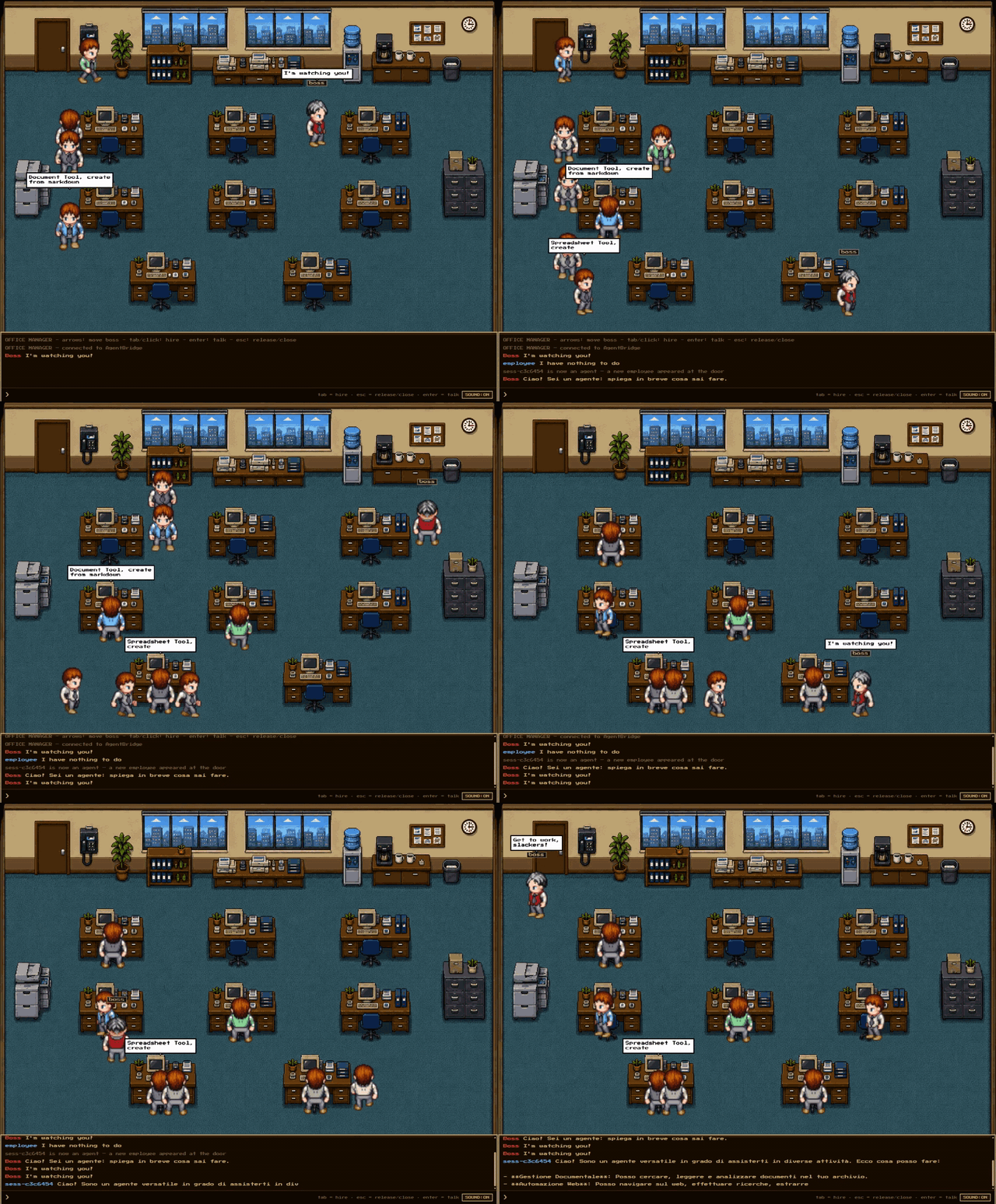
Every agent becomes a little person in a 16-bit office, so you can actually see what your AI team is doing instead of reading logs: they walk in through the door, sit at a desk and get to work — the tool they are using appears in a speech bubble over their head (a web search, a file lookup, a document…). Talk to an agent from the chat to give it a new task or ask how it is going, and when it finishes it gets up and leaves through the door. A roaming employee with "nothing to do" is always available: give it a task and it becomes a brand-new agent on the spot. Great for keeping an eye on many agents at once — and for spotting anyone who seems to be working very hard… at pretending. 😉
Demo gallery
A visual showcase — new demos are added here as they are produced.
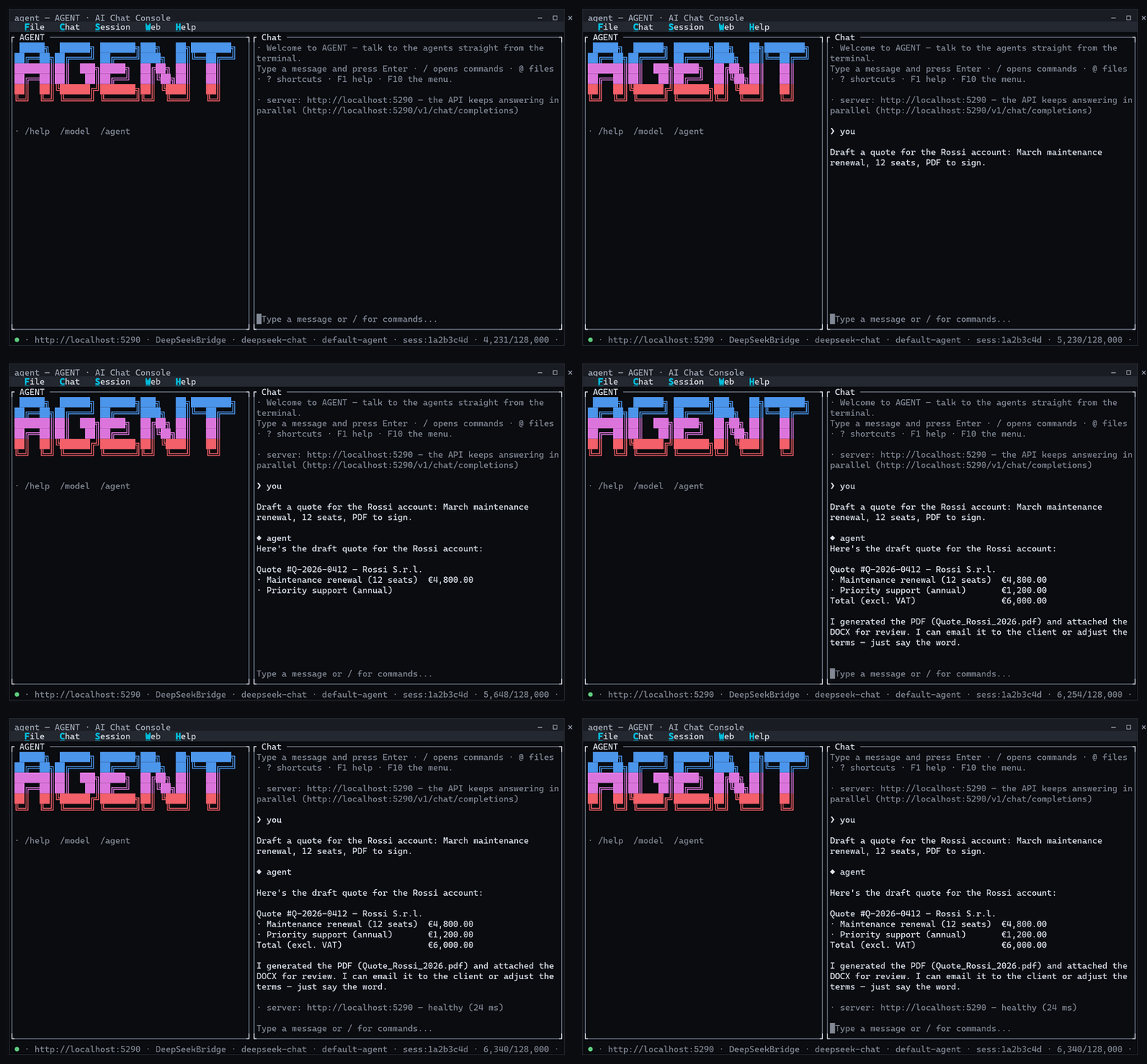
Terminal UI — streaming agent replies, the / command palette with live filtering, and
the status bar that follows the server, model, session and context window:
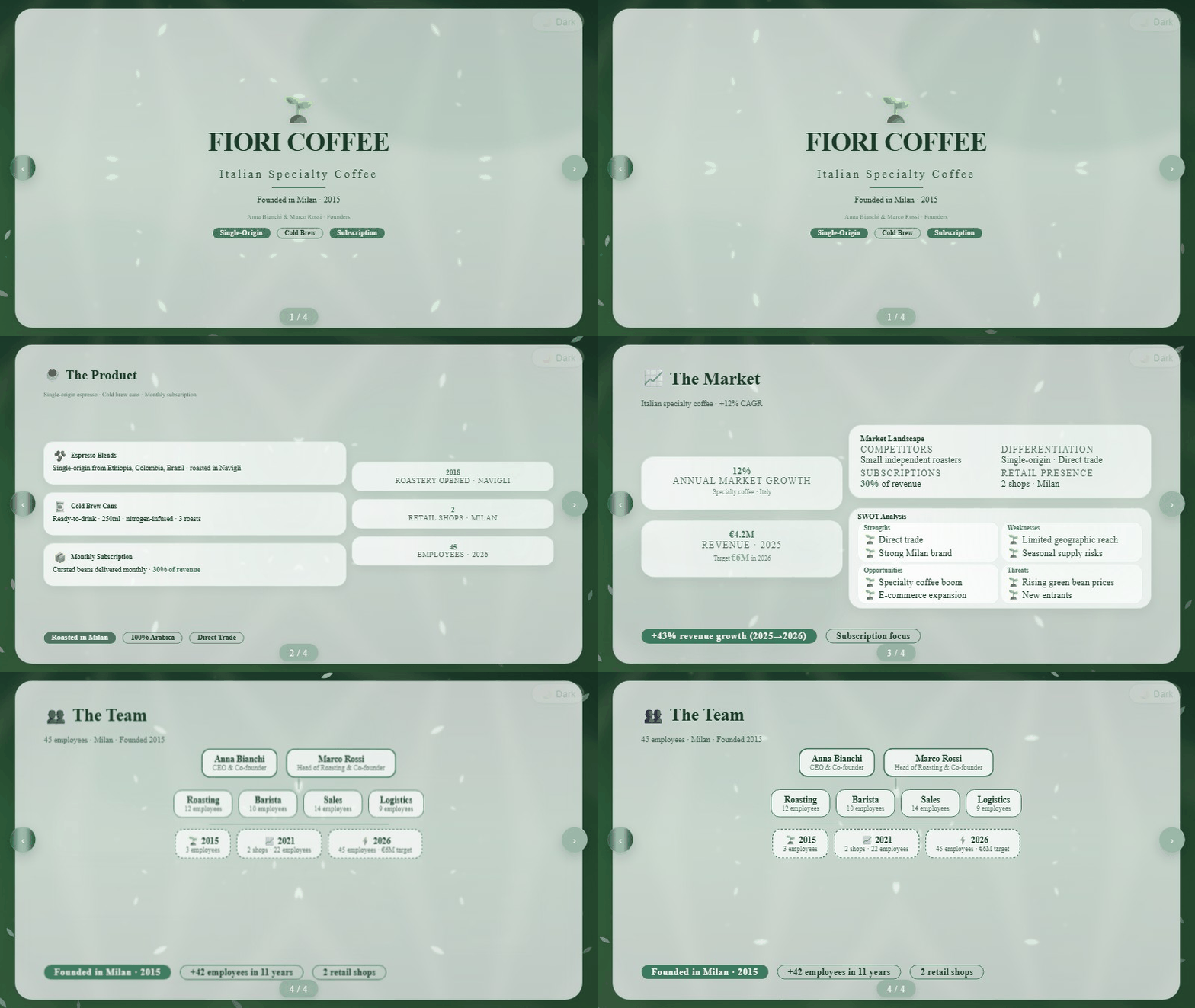
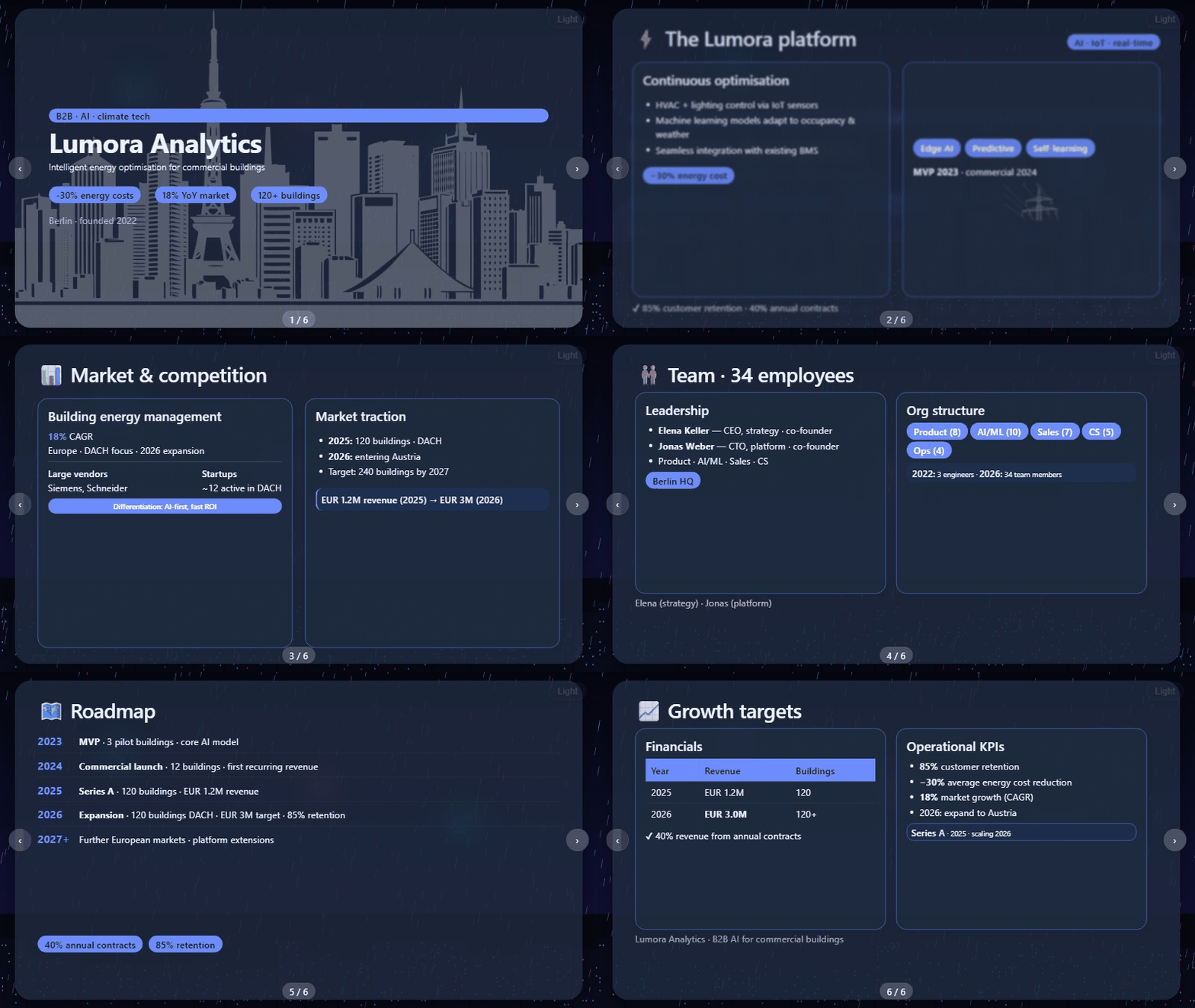
PowerPoint-style presentations generated by the agent — describe the deck you need and the agent designs the slides for you:
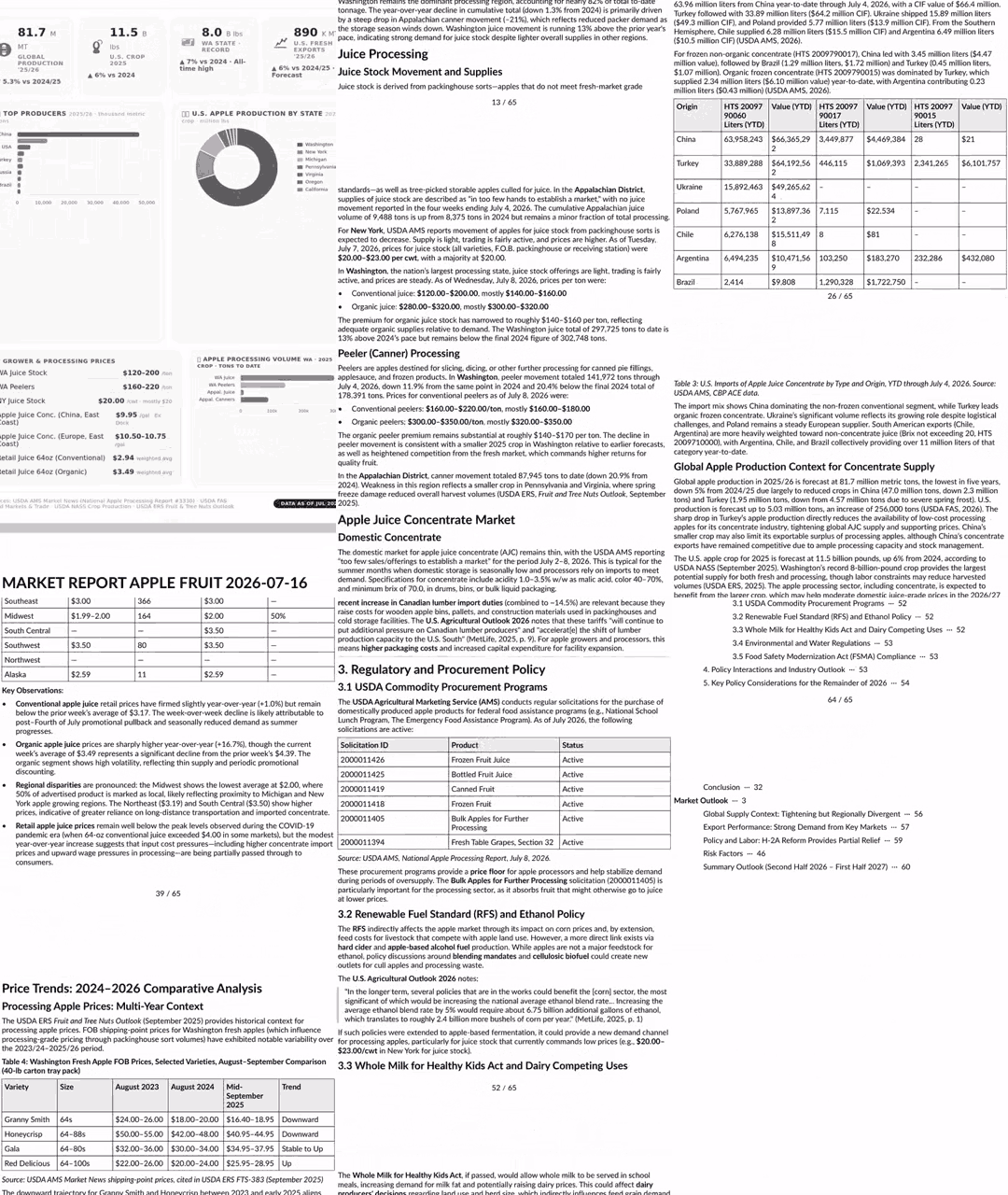
Detailed PDF market & financial analysis reports generated by the agent — request a market analysis, financial analysis, or report of any kind and the agent will use proprietary "AI Exoskeleton" augmented artificial intelligence algorithms to generate accurate PDF documents with authoritative sources such as Deloitte, KPMG, E&Y, etc.:
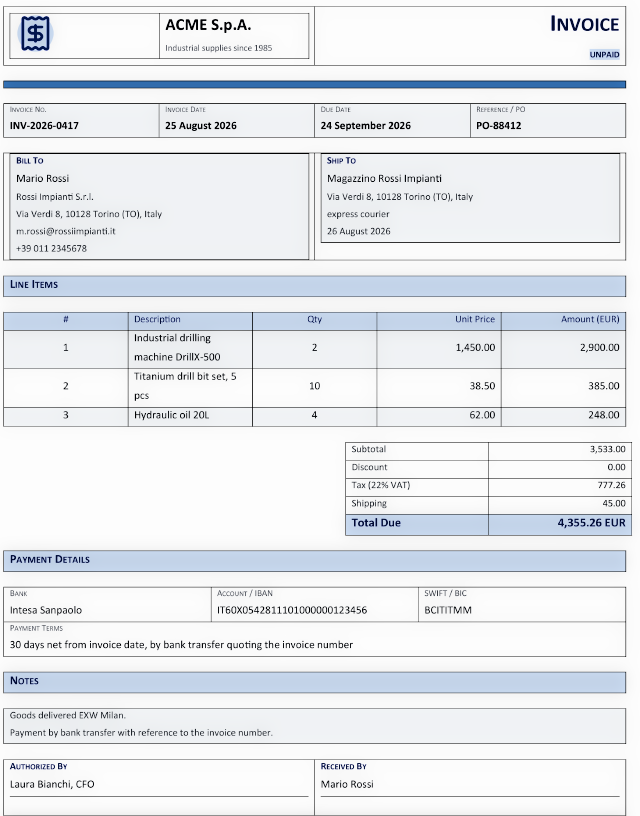
Real office documents generated from a plain prompt — ask for an invoice or an employment contract, attach the data, and the agent produces the finished document from the official templates, ready to use in the office. These two were generated end-to-end by the agent (material check → DOCX) in a real use case:
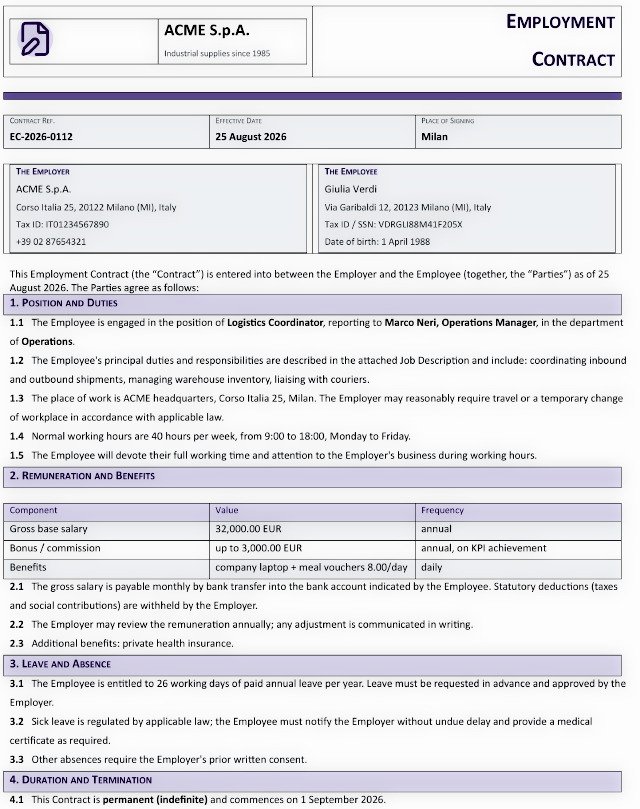
This is an employment contract in Word format, completely generated by the agent with a simple request. The AI agent has no limitations; it can create any type of document, remember the style and maintain it for future use, or modify it if necessary to customize it or add new elements.
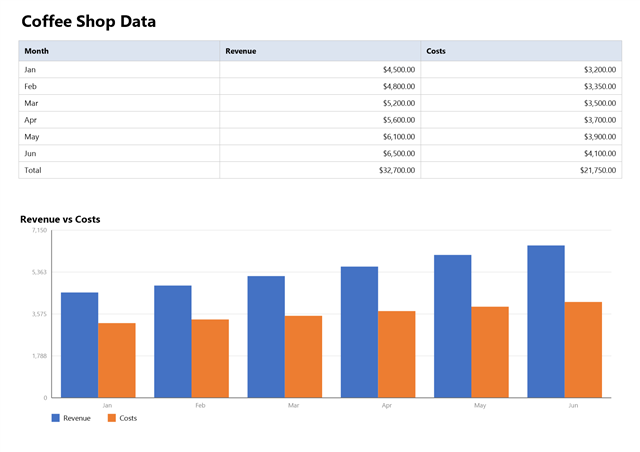
An Excel spreadsheet (data table + chart, single A4 page) created by the agent on request from a plain prompt — the user asks for a workbook in English, the agent builds it with the SpreadsheetTool (data, styles, chart, A4 page setup) and delivers the finished file:
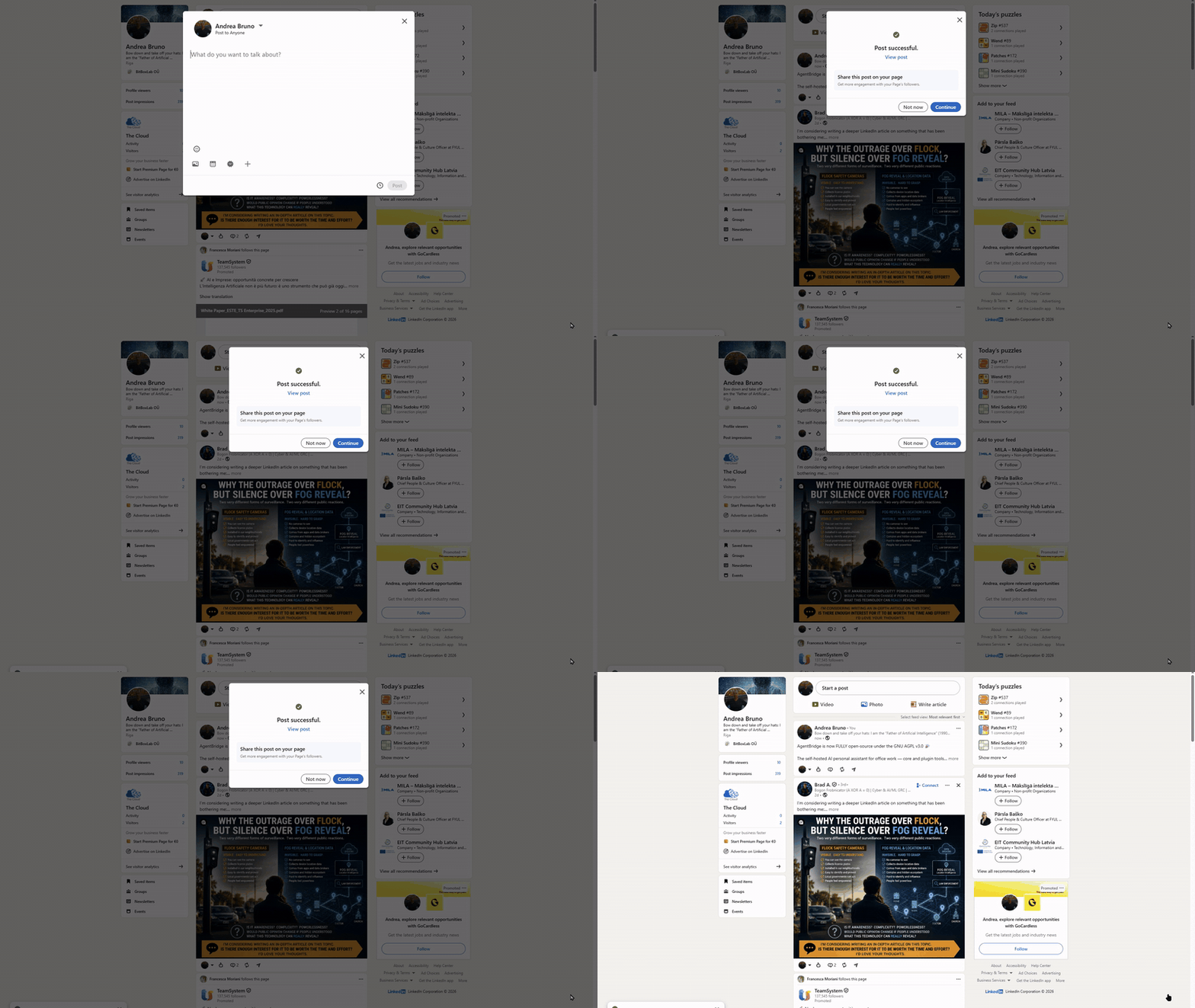
WebTool — the agent's hands on the web — WebTool is the instrument that lets an agent carry out complex tasks directly in a real, visible browser: navigate, sign in, fill forms, click, publish, research. Publishing to a social network is just one of the possible use cases. The animation below shows a real example executed end to end: the agent opens LinkedIn, signs in with its saved credentials and publishes a post announcing that AgentBridge is now fully open-source under AGPL v3.0 — every step verified deterministically (composer open → text read back → post confirmed on the profile).
Podcast episodes generated by the agent — ask for a podcast on any topic and the agent does
the whole production: research (recent international news for news/event topics, general
material for evergreen ones), a three-act narrative, the ~30-minute script, the narration
recorded with the in-process Kokoro TTS, and the assembly — welcome intro, jingle, body on a
soft ducked background bed, host farewell and a closing stinger — into a ready-to-publish
MP3 plus its RSS feed (iTunes-compatible) under /podcast/. Sample episode (English,
generated end-to-end by the agent):

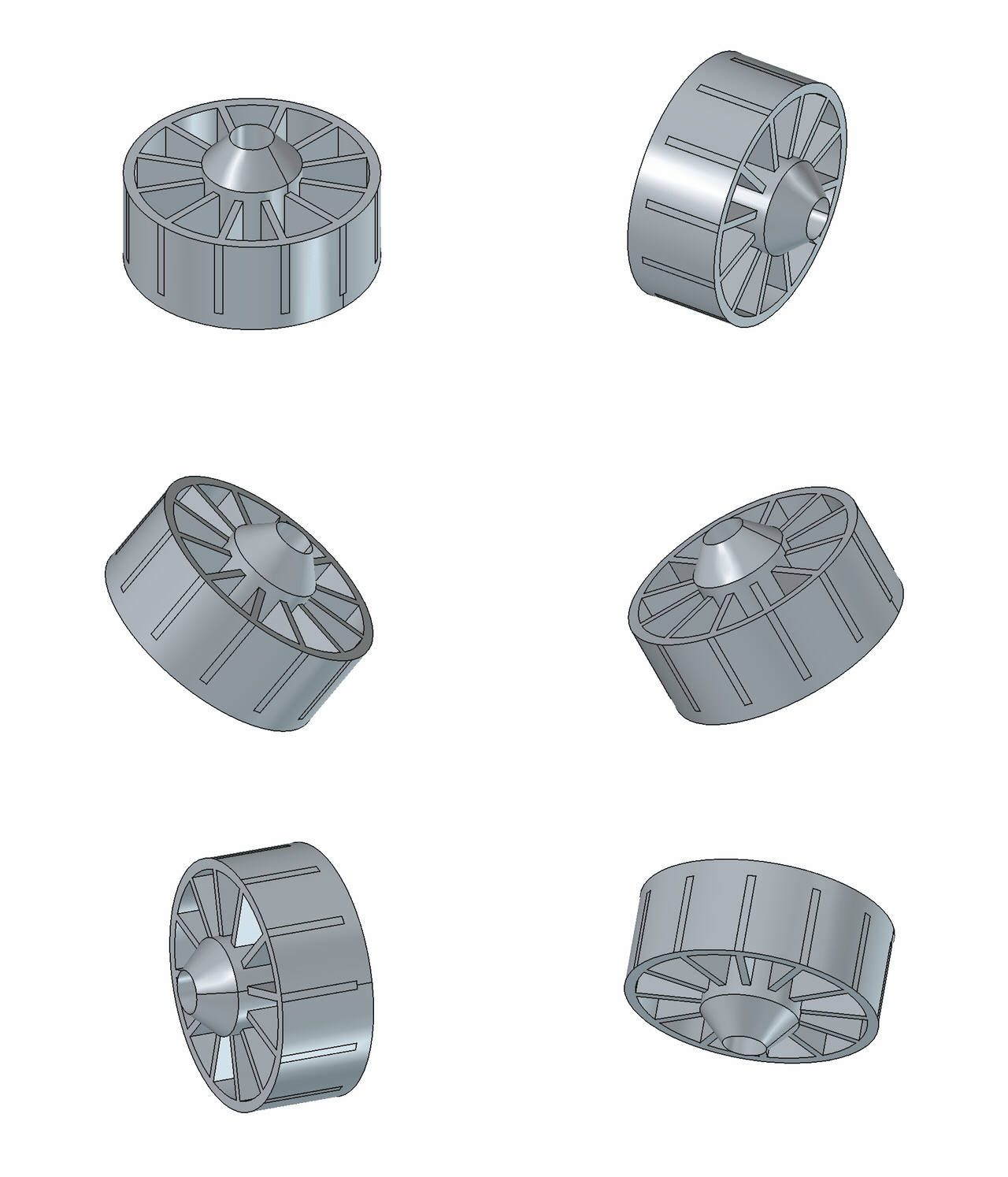
Parametric 3D CAD — the agent designs real mechanical parts in FreeCAD — with the FreeCADTool plugin the agent drives a live FreeCAD instance to build parametric 3D models: primitives, PartDesign bodies with sketches, pad / pocket / revolve / groove, linear / polar / mirror patterns, fillet / chamfer, boolean fuse / cut / common, real involute and helical gears (FCGear), and import / export of the standard CAD formats (STEP, STL, 3MF, OBJ, IGES). The animation shows a turbine impeller — a 12-blade rotor with a revolved hub, top cap, mounting flange, outer shroud, central bore and a bolt circle — built as a single solid and rendered by orbiting the FreeCAD camera. The tool sets itself up: it auto-starts a headless FreeCAD and auto-installs the gear add-on in the background, telling you what is happening with a desktop notification in your own language.
Agent Bridge: Your AI Assistant for Office Work
Agent Bridge is a tool that allows you to connect to your preferred AI, transforming it into your personal assistant: a tireless worker capable of handling office tasks such as drafting complex documents, working with spreadsheets, interacting with email, and performing internet-based activities—all while having full awareness of your company's knowledge base: clients, documents, products, and everything stored in your archive.
Agent Bridge positions itself as an enterprise-grade AI automation platform for businesses or private individuals seeking AI solutions. It runs on your own hardware — a laptop, a mini PC, or a dedicated AI box — and the knowledge base it reads is a plain folder on disk, not a cloud upload: everything you already store there becomes part of the AI's understanding, enabling it to work as a tireless employee and carry out office work. The product fits within the enterprise segment, capable of indexing and managing even several terabytes of data — while your files never leave your machine — and can generate PDF documents with a level of detail and precision that is unmatched.
Our Agentic AI is designed to be installed on standalone devices, such as mini PCs and dedicated AI hardware, effectively transforming them into truly autonomous agents. An agentic system, in fact, is not simply meant to execute a task on command but is built to pursue a complex objective with full autonomy, and its key characteristics go well beyond running a single instruction. First and foremost, it possesses planning and reasoning capabilities: when faced with a request like "organize a trip to Tokyo," the system does not merely react but breaks the goal down into a series of logical sub-goals, such as booking a flight, selecting a hotel, and creating a coherent itinerary. This planning phase is then put into action through the active use of external tools: the agent is capable of calling APIs, executing code, searching the internet, and interacting with databases or other applications to independently gather information and take action. To manage this level of complexity, the system maintains a structured memory, both short-term and long-term, of the actions taken and the information collected, allowing it to adapt its plan along the way. Its operation is based on a continuous loop of execution and feedback: it performs an action, observes the result – for instance, an error during a flight search – evaluates whether this result is bringing it closer to the final goal, and accordingly adjusts its next step. This cycle of action, observation, and adaptation continues until the objective is fully achieved. Our hardware support strategy targets a range of devices, starting with high-performance processors like the Xiaomi AI Cube, the 16-core AMD Ryzen AI Max+ 395, the 12-core AMD Ryzen AI 9 HX 370, the NVIDIA GB10 Grace Blackwell Superchip, the 14-core Arm-based NVIDIA Jetson T5000, and the 20-core NVIDIA RTX Spark. For the entry-level segment, we maintain compatibility with ARM-based technology, specifically supporting the Rockchip RK3588, Rockchip RK3576, Qualcomm Snapdragon 865, Qualcomm Snapdragon X2 Elite, MediaTek Genio 420, and MediaTek Genio 360 chipsets.
Innovative Features
-
Proprietary Deterministic Memory — the Agent Never Forgets A proprietary deterministic memory keeps the agent permanently aware of the things, facts, people and documents it has already handled: every conversation leaves a trace, and every new request instantly brings back the precise relevant context. No other system on the market does this: conventional agents try to "remember" by re-elaborating context through the model itself, while our memory retrieves deterministically — zero reasoning iterations wasted on recollection, a faster workflow, and an agent that is always lucid and grounded in everything it has already worked on. This original, proprietary algorithm is exclusive to AgentBridge and places it at the top of the agentic sector with highly innovative technology. Five complementary mechanisms make it up — deterministic NameOrKey memory, the document archive with its streaming index, skills memory, scheduler memory, and the chat history in the context window. The streaming index is hardware-optimized: its vector is built from 8-byte (64-bit) elements — the native block size of x64 and arm64 chips — read as a single linear stream, with no semantic trees or graph correlations to juggle. Context is selected deterministically from the prompt and handed to the model ready-made, at zero token cost and with no LLM call spent on recollection. This is what lets AgentBridge surface context from terabytes of data on an ordinary home computer, with no GPU and no dedicated indexing model — and, offered trustlessly so your data never leaves your machine, makes it a genuine privacy-first system with no real analog in the enterprise space. How this holds up under measurement — including a reproducible enterprise-scale retrieval benchmark and an architecture-faithful LongMemEval-S run, with an honest comparison against published systems — is documented in Memory Benchmark; the runnable harnesses are in
benchmark/. -
AI Assistant Available 24/7 via SIP Protocol The system provides a fully integrated AI agent that can be reached at any time through SIP‑based telephone access. It operates as a dedicated personal assistant capable of natural voice interaction, immediate task execution, and uninterrupted availability. Unlike a human secretary who may be distracted or unavailable, this assistant remains consistently focused, reliable, and committed to carrying out assigned duties with precision.
-
Full Telegram Integration — Your Agents on Your Messenger AgentBridge connects to Telegram as a user account (WTelegramClient, MTProto) and behaves like any other chat client: send a private message — text or files — and the agents reply in the same chat, including the documents they produce. Attachments are supported both ways, first login is guided from the TUI (verification code), an optional allow-list restricts who can talk to the agent, and the configuration lives in
telegram.json(editable from the TUI, by hand, or with the guided setup scripts). See docs/telegram.md.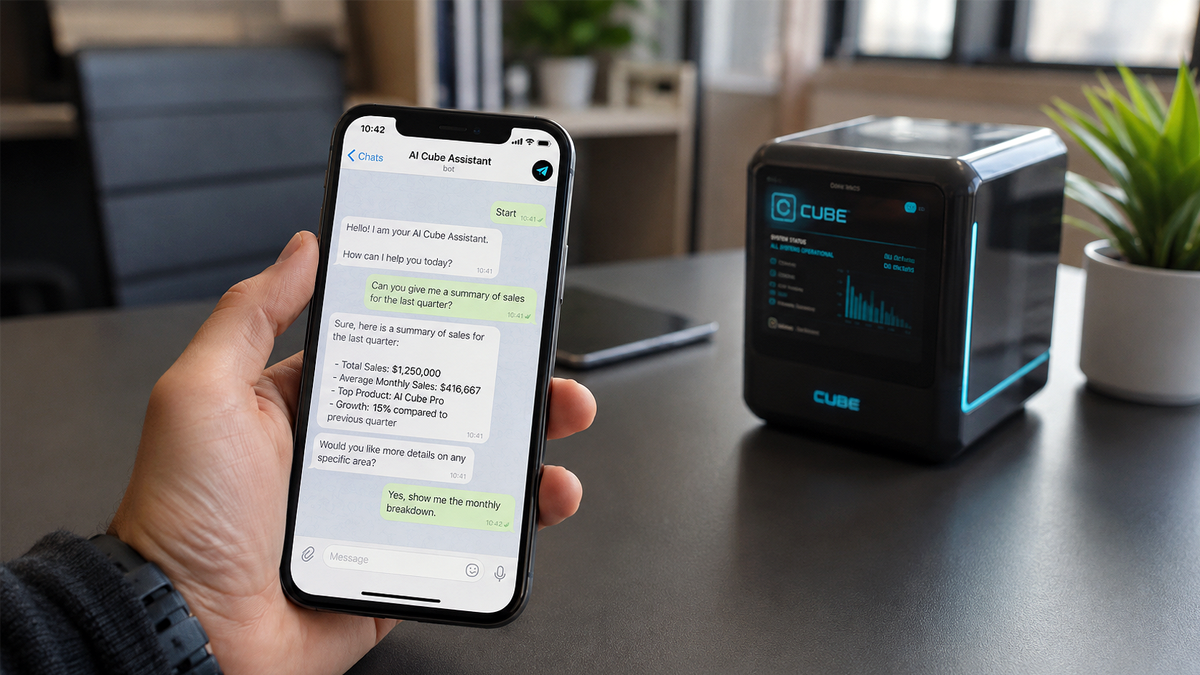
-
AI‑Exoskeleton Technology for Enhanced Model Performance Our proprietary AI‑Exoskeleton framework significantly amplifies the capabilities of AI models while reducing bias in complex document processing. Just as an exoskeleton enables a human to lift weights far beyond natural limits, AI‑Exoskeleton empowers smaller models to outperform frontier‑scale systems in specific office workflows. It strengthens analytical consistency, improves the accuracy of business reports and technical documentation, and produces ready‑to‑use PDF outputs with exceptional reliability. This technology transforms artificial intelligence into a genuinely augmented professional tool capable of sustaining cognitive workloads that would normally require specialized human teams.
-
True Application‑Level Sandbox — Agents Cannot Act Outside Their Tools Every agent operates inside a virtual workspace path that acts as a real sandbox: a limited action perimeter that no tool method can breach. The agent's only way to touch the world is through its tool methods — no shell, no OS API, no direct network, no filesystem access beyond what a tool explicitly exposes — so the perimeter is enforced structurally by code, not by prompt instructions that a crafted input could bypass. Competing systems either trust the prompt alone (defeatable by injection) or require expensive OS‑level sandboxes (chroot, Docker, VMs) that a common user cannot set up. Here the sandbox is application‑level and zero‑infrastructure, yet absolute: powerful inside its perimeter, harmless outside it.
-
GDPR‑Ready Anonymization — Privacy by Design for External Providers A robust anonymization service protects personal data — names, keys and sensitive identifiers — before any request reaches an external LLM provider (Copilot, Gemini, ChatGPT, DeepSeek and more), and restores it seamlessly in the reply. It is enabled with a single switch, adds no perceptible latency to agentic interactions, and is completely transparent to the user: the agent keeps its full power while the machine never exposes what should stay private. This makes the platform a strong fit for the European market, where GDPR compliance is a hard requirement.
-
Universal Tool System (UTS) — Tools That Run Natively, Not as Scripts with hot‑add: new plugins are activated live, 30 seconds after they appear, without a restart. End‑user guide: Tools — the agent's hands.
-
Native MCP Interoperability — One Agent, Standard Control AgentBridge now exposes its autonomous runtime through a native MCP interface, so the same production agent can be controlled from standard MCP clients without external adapter layers. This means one orchestrator, one memory flow and one operational perimeter across terminal chat, OpenAI-compatible integrations and MCP ecosystems. In practice, teams can adopt AgentBridge as a high-capability agent core while preserving protocol-level compatibility and reducing integration complexity.
-
Autonomous Task Scheduling — Your Agent Keeps Working on Its Own AgentBridge doesn't just act on command: it can plan work ahead and continue on its own, according to the real needs of your business. Tell it what matters, and it remembers deadlines, decides when it is time to act, and handles recurring duties on a preset cadence — day after day, without anyone having to ask twice. Reports, checks, follow-ups and scheduled activities all proceed on time, even while you are away: the agent schedules the work, carries it out automatically and records the outcome. A true always-on colleague, not a tool that waits for instructions.
-
ERP Integration — The Agent Runs the Company's Core Business AgentBridge connects to AI ERP, a free open-source ERP, through the ErpTool plugin. Once it is installed and turned on, the agent can run the real daily operations of a company end to end: create a quote, turn it into an order, deliver it, issue the invoice and record the payment; or the whole purchase cycle — raise a request, make the purchase order, receive the goods, match the supplier bill to the order and the receipt, and pay it; plus stock transfers, reservations, cycle counts, and reports such as sales by customer and the receivables aging. The agent works as a normal ERP user through a JWT-secured API, so every company rule and permission still applies — it never writes to the database directly. Paired with the scheduling feature above, routine business runs by itself: "every morning, invoice what was delivered yesterday and tell me what is overdue." This is what turns the agent from a chat and document assistant into a digital office worker that drives the systems the business actually runs on. Setup: Install the AI ERP ecosystem.
-
Text-to-speech that works the moment you run it — no setup, no drivers, no accounts Every archive ships the Kokoro neural TTS engine with its voices and model included, so the agent talks immediately — in the terminal, over the API and on the phone — with zero configuration. The podcast tool speaks with the same engine, out of the box. GPU is automatic too: on machines with an NVIDIA CUDA-capable GPU the engine uses it without any manual setup; everywhere else it simply runs on CPU. The engine catalog is designed to grow — future engines appear in
/ttsengine. Full details in the Text-to-speech guide.
Why this project does not trust the cloud
In June 2013 The Guardian and The Washington Post published documents taken from the US National Security Agency by Edward Snowden, a former contractor. He had left the United States for Hong Kong in May 2013 carrying the material, and what he published showed a global surveillance system that collected communications from the servers of the largest internet companies. The reporting won both newspapers the 2014 Pulitzer Prize for Public Service: these are not conspiracy theories, they are facts established by journalism that the Pulitzer Prize Board judged worthy of the highest award in the field (PRISM, Edward Snowden).
The program at the centre of that story is PRISM (NSA designation US-984XN), started in 2007, whose legal basis was later consolidated in Section 702 of the FISA Amendments Act of 2008. The leaked presentation lists the companies that joined it, with the year each one did: Microsoft (2007), Yahoo (2008), Google (2009), Facebook — today Meta — (2009), Paltalk (2009), YouTube (2010), AOL (2011), Skype (2011), Apple (2012). What was collected came from the companies' own servers: email, chat (voice and video), stored data and files, VoIP, file transfers, video conferencing and social networking details. In Italy the scandal is known as the Datagate.
Section 702 was not a one-off: it was extended in 2012, reauthorized in 2018 and reauthorized again in 2024 (FISA Amendments Act). Whatever the state of that statute on any given day, the condition that made the collection possible has not changed — the data sits on someone else's server, and the owner of that server can read it, hand it over, or be ordered to hand it over.
For AI assistants this is not hypothetical. Cloud assistants keep the conversation on the provider's servers, and there are already documented cases of those conversations reaching the police: in 2025 a 13-year-old in Florida was arrested after asking ChatGPT how to kill a friend (People, Gizmodo); in August 2026 OpenAI alerted the FBI about a man who had described a murder plot to ChatGPT (USA Today); in October 2026 Anthropic reported a Claude user to the police over a threat (Tom's Hardware). Whether a transcript stays private depends on the provider's policy and on the law of its country — never on the user.
AgentBridge is built for the opposite condition. The agent, the tools, the documents and the memory run on your machine: there is no account, no cloud copy of your archive, and no transcript on a server that we — or anyone else — can be asked for. A cloud model is contacted only if you choose one, and the GDPR anonymization layer removes names and identifiers before the request leaves the computer. "Trustless" is meant literally: you do not have to trust a provider's promise, because the data is not there to be collected. Intelligence and industrial espionage both begin with a copy of the data held by someone else; this architecture removes that copy.
The cost of building context for traditional agentic AI compared with AgentBridge’s innovative approach
Processing large volumes of enterprise data to make them usable by an AI agent is a problem of cost, efficiency, and knowledge quality. Increasingly large context windows do not solve the problem: they allow more information to be processed in a single request, but they do not eliminate the costs of reading, processing, and repeating data. On terabyte-scale corpora, continuously transmitting large amounts of information to models can become economically unsustainable.
The difficulty begins already in the preparation phase: heterogeneous documents must be extracted, cleaned, deduplicated, structured, and indexed. Embeddings, storage, indexing, and knowledge updates require additional computational and infrastructural resources, with massive reliance on GPUs and expensive cloud infrastructures. This is where AgentBridge’s first advantage lies: proprietary algorithms make it possible to quickly and deterministically create, with minimal computational effort and without the use of AI or cloud services, a vector for context retrieval. The same advantage applies to the second phase, retrieval: when the agent needs the correct portion of context, retrieval also takes place deterministically, without additional iterations or calls to generative models.
Traditional retrieval architectures such as RAG reduce the need to transmit the entire corpus with every request, but they introduce selection and relevance problems and force the agent to perform multiple iterations to retrieve the content that will form the context, with a consequent increase in token costs and a decrease in responsiveness due to iteration latency. AgentBridge overcomes this scheme: thanks to a non-RAG retrieval architecture based on a dedicated vector read in streaming, context is extracted deterministically before the prompt reaches the agent, without involving AI computation or LLM models. The agent is therefore relieved of the context retrieval task and receives context that is already prepared.
In this way, AgentBridge solves the problem of building and maintaining a semantically rich, reliable, and up-to-date enterprise context without having to continuously reprocess enormous amounts of data in the cloud, with a sharp reduction in costs and full privacy protection. The sustainability of agentic AI depends not only on the model’s capabilities, but above all on the efficiency of the architecture that prepares, organizes, and makes knowledge available. We have published benchmark tests that honestly demonstrate its effectiveness; however, in line with the “Trustless” principle, we encourage independent researchers to test the performance and validity of our innovations firsthand.
Your documents area: the company's brain and memory
Think of the documents area as your company's brain. It is a simple folder on disk — nothing special, just a place where your files already live. Whatever you put in it, the AI can read, remember and use: contracts, invoices, client files, product sheets, emails, spreadsheets, technical drawings... everything. It does not matter how much data you have or how big the files are: the more you store, the smarter your AI becomes, because it answers using your real documents, not guesses. You never upload anything into the chat — you just keep working with your normal folders, and the AI reaches into them directly.
How to configure the documents area
- Open AgentBridge and type
/setup(menu Settings → Main settings). - In the General tab, set Documents path to the folder that holds your documents. The default is your personal Documents folder — you can change it at any time.
- Press Save. AgentBridge starts reading that area in the background: the first indexing of a large archive takes a few minutes, but you can keep working while it runs.
- From now on, ask the AI anything about your documents — it searches the whole area and answers from your data. If you move to a different folder, just change the path again: AgentBridge automatically re-indexes the new area.
How to configure the LLM provider and API keys
- Open AgentBridge and type
/setup(menu Settings → Main settings). - In the LLM & Providers tab, pick the active provider; use Add… / Edit… to
create or edit a provider. The provider dialog includes an API key field (masked on
screen) — every cloud provider (DeepSeek, Z.ai, Gemini, Anthropic, …) needs its key;
local providers (Ollama, ExLlamaV2, bridges on
localhost/127.0.0.1) leave it empty. - Press Save. Keys are stored per-provider in
providers.jsonnext to the executable (the single source of truth, excluded from updates) — you can also edit that file directly. The manual (§3 — Configure the JSON files) documents every field.
What AgentBridge is — and what it is not
AgentBridge is not meant to be read as a traditional harness: its concept is different from the others and, as of this writing, it has no real equivalent. It is not a coding agent, and its sandbox does not even allow writing code. Where other products propose vibe coding — solutions produced by the AI from a prompt — we deliberately do not offer the solution, because vibe coding is not a replacement for traditional software engineering, and as commonly written it shows problems that experts know well. Building the applications that automate a company with vibe coding is work for IT specialists; it is not the purpose of AgentBridge.
A business owner cannot and must not put employees to writing code from prompts. He must give them the instrument to automate the company, and AgentBridge is that instrument: the automation is already made. It is an agent specialised in office work, safe by design, which does not damage anything even when it is given to someone with no technical skill.
The simplest automation it offers: prepare the documents that form the company context and place them in a folder the agent can read, then describe, one by one, the work each hypothetical employee must do — at what time and with what recurrence. The agent plans the work, and the work is carried out as requested and when requested, with tools made for office work. Particular cases can be covered by plugins written for them, but that is not the standard case, because AgentBridge already ships every tool standard office work needs — including the automation of the management systems (ERP) it supports.
The employee who does that work at a certain hour of the morning can be replaced by an agent instructed in words, with the same information that employee holds: it answers requests coming from outside and gives assistance whenever the context material contains the right company information.
If we published comparisons with other systems, it is because the public asks for them, not because those are analogous products. AgentBridge does not require tinkerers, nerds or programmers to be used, and it is something a business owner can trust and hand to the person in the company responsible for automation — without handing the company's secrets to a third party, thanks to the combination with AI models running locally inside the company's own infrastructure.
Comparison with Main Alternative Products
AgentBridge belongs to the category of personal AI agent assistants. The table is an honest, feature-by-feature comparison with the closest alternatives in that space.
| Aspect | AgentBridge | OpenHuman | Claude Cowork | OpenClaw | Hermes Agent |
|---|---|---|---|---|---|
| One‑line positioning | Self‑hosted AI personal assistant built to replace humans in office work — chat terminal and OpenAI‑compatible server in one process | Personal AI super‑intelligence – desktop "AI workstation" | AI colleague bringing Claude Code to non‑technical knowledge work | "Digital employee" – autonomous agent from chat to execution | Self‑evolving agent with built‑in learning loop |
| Developer / backer | Andrea Bruno (Graphene‑Lab) | tinyhumansai team | Anthropic | Peter Steinberger | Nous Research |
| Open‑source / license | ✅ Open‑source (AGPL v3.0) — core and plugin tool engine fully open | ✅ Open‑source (GNU) | ❌ Proprietary | ✅ Open‑source (MIT) | ✅ Open‑source (MIT) |
| Target audience | Businesses & professionals who want to automate real office work on their own hardware; privacy‑sensitive individuals | Knowledge workers who want out‑of‑the‑box UX & data sovereignty | Paid Claude users (Mac/Windows) needing complex file tasks | Developers & tech enthusiasts seeking flexibility & control | Developers & technical users wanting a long‑term self‑improving assistant |
| Ease of setup | Low – one self‑contained archive (no .NET install) or one‑line installer; run the executable and chat | Low (UI‑first) – graphical desktop, one‑click OAuth | Medium – requires Claude desktop app | High (CLI‑first) – terminal, API keys, manual config | High (CLI‑first) – command‑line install & config |
| Key differentiator | Deterministic memory (never forgets, zero wasted recall) + structural sandbox enforced by code, not prompts; one process = TUI + OpenAI API + MCP | Proactive pre‑loading; Memory Tree (hierarchical KG); TokenJuice compression (up to 80% cost saving) | Cloud‑persistent sessions (tasks continue after device close); sub‑agent coordination | Powerful execution (files, code, browser); 20+ messaging channels | Closed learning loop (creates/refines skills); cross‑session FTS5 memory |
| Memory system | Proprietary Deterministic Memory – indexes people, facts, documents, style & sessions into your own folders; exact‑context retrieval, no model re‑elaboration | Memory Tree – local SQLite + Obsidian‑compatible Markdown vault | Projects – persistent, isolated workspaces | Layered memory (transient, short‑term, long‑term, procedural) | Agent‑curated memory with periodic reminders & cross‑session recall |
| Tools / integrations | DocumentTool (Word), SpreadsheetTool (Excel), PresentationTool, PDF reports, podcasts, WebTool, EMailTool (own SMTP/IMAP), FileTool, GitTool, TaskSchedulerTool, MapTool, FreeCADTool (parametric 3D CAD); MCP connector + any OpenAI client | 118+ third‑party services (one-click); built‑in web search, code tools | Local file ops (read/edit/create); spreadsheets & presentations | Plugin‑based skills; built‑in sandbox | Multi‑channel messaging (Telegram, Discord, etc.); cron‑like scheduled tasks |
| Platform support | Self‑hosted: Windows x64, Linux x64/ARM64, macOS (Intel / Apple Silicon); mini‑PC & edge class (RK3588 → Ryzen AI Max+ 395) | Desktop: macOS, Linux, Windows | Desktop: macOS, Windows; Web, mobile (iOS/Android), Chrome sidebar | Self‑hosted (local or private server) | $5 VPS, GPU clusters, serverless |
| Pricing model | Free & fully open‑source (AGPL v3.0) — no subscription, BYOK/BYOM | Freemium – free OSS + optional unified subscription (auto‑routing) | Subscription – included in Claude Pro ($20/mo) and Max ($100–200/mo) | 100% free – open‑source, BYOK | 100% free – open‑source, BYOK |
| Security / privacy | Local‑first & trustless – files, memory and the agent run on your machine; fully offline with a local model; GDPR‑ready anonymisation before any cloud model call; structural sandbox | Local‑first – data encrypted locally, fully offline capable | Folder‑level authorisation; commercial hosted service | Local‑first – all data on your machine, offline capable | Self‑hosted – full data sovereignty |
| Where execution happens (trust model) | On your machine – agent loop, tools, files and memory run locally; a cloud model call happens only if you choose one (anonymised); no vendor cloud can reach your data | Hybrid – app & data on your device, but inference defaults to routed cloud models; one‑switch Privacy Mode forces on‑device (Ollama, LM Studio, MLX) | Anthropic cloud – desktop agent acts on granted local folders; web/mobile tasks execute in Anthropic's cloud (or your Bedrock/Vertex/Foundry); permissioned, not trustless | On your machine – local Gateway, state on your device; hosted or local model providers; sandboxing opt‑in | On your infrastructure – local, Docker, SSH, serverless; BYO keys or local Ollama for full privacy |
| End‑to‑end office deliverables | Built‑in from a plain prompt – invoices & contracts (DOCX), spreadsheets with charts (XLSX), detailed PDF market/financial reports, slide decks, podcasts (MP3 + RSS feed) | Consumes documents & email into memory; no native finished‑document generation claimed | Creates & edits real Word, Excel, PowerPoint, PDF files in the folders you grant — not templated business documents from your own archive | File read/write & shell; office‑document production is not a built‑in core feature | Not a built‑in core feature – general file/shell/automation skills |
| Headless control / API | ✅ Native POST /v1/chat/completions on localhost — any OpenAI SDK, script or bot drives the same agents; native MCP connector included | Desktop app; no local OpenAI‑compatible server documented | Hosted product – no local OpenAI‑compatible endpoint for consumers | CLI, local Gateway & chat channels; no OpenAI‑compatible server documented | CLI/terminal + remote backends; no OpenAI‑compatible endpoint documented |
Why AGPL v3.0? The choice is deliberate. Permissive licenses (MIT/Apache) let anyone take a community's work, close it, and run it as proprietary software or a proprietary service. AGPL v3.0 bans that enclosure: any derivative work — including one offered over a network (section 13) — must stay open source. Nobody wants to contribute to a project that someone else will lock up somewhere else. AGPL keeps the work of this community the work of this community, while still granting the four freedoms (use, study, modify, share) and leaving full room for business — as long as the code stays open.
What you can do with it
- Chat with AI agents from the terminal — streaming replies,
@file attachments, prompt history, sessions, all in a full-screen UI with a command palette. - Multilingual UI — the terminal UI runs in the system language when supported (English, Italian, French, Spanish, German, Russian) and falls back to English otherwise; system messages from the orchestrator are localised too (see docs/TUI.md).
- Open the web GUI in one keystroke —
/web(menu Web → GUI) launches the Giraffe AI web client in the browser, already connected to this server (the client installs itself next to the executable on first run from its latest GitHub release and stays up to date). - Expose the agents as a local OpenAI server — point any OpenAI client at
http://localhost:5290/v1and it drives the agents without modification (see the manual). - Expose the agents through the native MCP connector — use standard MCP clients with the same runtime already used by terminal and OpenAI API flows (technical setup in manual).
- Switch the LLM on the fly — DeepSeek, Z.ai, Gemini, Ollama, ExLlamaV2 and more, with a context-window guard that refuses an overflow and explains why.
- Per-provider agent interaction mode — each provider can drive the agent tools via the
JSON tool-calling API (
API) or the application CLI (CLI), or leave itDefault(CLI for small models, API for large ones). Set it in the provider dialog under Settings → Main settings; the active mode is shown on the status page and reported byGET /v1/modelsasinteraction_mode. - Configure models & providers from the UI —
/setup(alias/modelsetup, menu Settings → Main settings) adds, edits or removes providers, picks the persistent default provider new chats start from, sets the per-provider API keys, SMTP/IMAP and documents path — no JSON editing required. - Voice in the terminal — dictate from the server microphone (Windows; the release ships the speech-recognition component) and hear the replies spoken by Kokoro neural TTS, in the UI and over the API.
- SIP telephony — the server becomes a phone endpoint: auto-answer behind a DTMF PIN (3 attempts, 24 h lockout), outgoing calls, and full voice conversations with the agents over RTP (whisper STT + Kokoro TTS). See docs/sip.md.
- Telegram chat — private-chat messaging with the agents, attachments both ways, allow-list access control and TUI-guided first login (WTelegramClient userbot). See docs/telegram.md.
- Upload-and-attach files — documents and images converted to Markdown server-side,
attached to chat requests as
file_ids. - Agents with tools — web, search, research, document, spreadsheet, office, email and
multi-files sets; pick the right tools per chat with
/tools(alias/agent) or the APImodelfield (any custom tool combination via the additivetoolsfield). - One conversation everywhere — messages from the terminal go through the exact same endpoint any client uses, so you can chat in the TUI while a script keeps driving the agents on the same port, simultaneously.
- Map tool — this tool represents a versatile solution for exploring the surrounding territory, offering professionals and individuals the ability to access detailed geographic information with remarkable simplicity. For businesses, it becomes a valuable strategic ally, enabling the identification of specific commercial activities in any geographic area while supporting market analysis through the mapping of competitors and services present in a given region. Sales teams can leverage it to generate new business contacts, while corporate logistics benefits from optimized route planning for deliveries or technical interventions. For private users, the tool transforms into a daily guide for discovering restaurants, pharmacies, ATMs, parks, museums, and tourist attractions nearby, facilitating the search for essential services and leisure venues. The platform supports various search methods: category-based search allows quick identification of all establishments of a particular type, while name-based search enables finding a specific place by typing its address or business name. An advanced search function applies precise filters, such as locating restaurants with a specific cuisine type, wheelchair-accessible facilities, or establishments open 24 hours a day. Route calculation completes the experience by providing detailed driving directions with distances and travel times, adaptable to different transportation modes including driving, cycling, or walking. With global coverage extending to every country worldwide, this search engine proves to be a powerful and reliable tool both for those making strategic business decisions and for those simply looking for a good restaurant or essential service nearby.
- Legal assistant tool — professional legal opinions and consultations, not generic answers: LegalAssistantTool grounds every statement in a verifiable body of law — the Italian civil and criminal codes, article by article — correlated with the case law that interprets them, quoting the article text and the exact judgment reference with a link to the official source, and it refuses to cite a norm or a decision that does not exist in its archive. Ask the agent for an opinion on a concrete case, attach the documents, and the answer comes back reasoned and cited — optionally turned into a formal Word document by the office tools. Other jurisdictions can be added on request.
Quick start
Run the one-line install above — or download the archive for your platform from the
Releases page, extract and run
agent.exe / agent.
No .NET installation needed; each archive already includes the Kokoro TTS voices and model,
so text-to-speech works on the first run with nothing to configure.
curl http://localhost:5290/health # {"status":"healthy","timestamp":"..."}
The full step-by-step guide — installation, JSON configuration, the terminal UI and how a client connects to localhost — is in the user manual.
Use AgentBridge as an MCP server
AgentBridge is a Model Context Protocol server: the same process that runs the agents
speaks MCP at POST http://localhost:5290/mcp (JSON-RPC 2.0, initialize /
tools/list / tools/call). Any MCP host can drive a local AgentBridge through the single
tool agent_run. There is nothing extra to install: start AgentBridge as usual and the
endpoint is already listening.
| Host | How to connect |
|---|---|
| VS Code / GitHub Copilot | Add http://localhost:5290/mcp as an HTTP MCP server — MCP: Add Server → HTTP from the Command Palette, or copy the ready-made examples/vscode-mcp.json into .vscode/mcp.json |
| Claude Desktop | Install the agentbridge-mcp.mcpb extension from the latest release (Settings → Extensions → Advanced settings → Install extension). It is a small Node.js bridge that exposes the local endpoint over stdio and needs Node.js 18+ |
| Any stdio-only MCP client | Run the same bundle yourself: node <bundle>/index.js with AGENTBRIDGE_URL=http://localhost:5290/mcp |
| Any MCP client with HTTP support | Point it at http://localhost:5290/mcp |
| Docker | docker run -d -p 127.0.0.1:5290:5290 -v agentbridge-data:/app/PersistentData ghcr.io/graphene-lab/agentbridge:latest — the image carries the same tree as the Linux archive (see docs/MCP.md) |
agent_run takes prompt (required) and optionally model, llm_provider,
max_iterations and session_id: one autonomous run per call, using every tool the agent
has enabled. The agent keeps working even if the client goes away.

AgentBridge is listed on the Official MCP Registry as
io.github.Graphene-Lab/agentbridge, with two ways to install it: the agentbridge-mcp.mcpb
stdio bundle and the ghcr.io/graphene-lab/agentbridge container image, both refreshed by every
release. The protocol reference, the per-host setup and the troubleshooting steps are in
docs/MCP.md. New to all this? The guide
Using AgentBridge from the AI app you already use
explains the connection in plain language, and what has to be configured inside AgentBridge (the
model and the documents area) before any client can get real work done.
Planned work: the deterministic scheduler console
An agent can schedule one-shot or recurring jobs with the built-in TaskScheduler tool. The plans are saved as JSON, they survive a restart, and each run is a normal agent chat. This is how the office work keeps going without a person starting every task.
The terminal UI adds a deterministic console for those plans. Type /taskscheduler and it prints a table: id, task, next run, recurrence, state and instruction. The command never goes to the model, so the answer is always the same.
Every input that starts with / is a command, and the host handles it. An unknown command returns an "unknown command" note instead of a chat reply.
| Command | Effect |
|---|---|
/taskscheduler or /taskscheduler list | Show the table of scheduled tasks |
/taskscheduler suspend <id|name> | Pause a task; the definition and the run history are kept |
/taskscheduler reactivate <id|name> | Resume a paused task |
/taskscheduler remove <id|name> | Remove the task, keep its run logs |
/taskscheduler delete <id|name> | Remove the task and its run logs |
/taskscheduler update <id|name> <instruction> | Replace the instruction the task executes |
| `/taskscheduler changeplanning <id|name> [time=HH:mm] [days=Mon,Wed] [interval=hours | none] [repeat=true|false] [start=yyyy-MM-dd] [end=yyyy-MM-dd] [dayofmonth=N] [dayofyear=N]` |
The id is the number in the first column, so a long task name is never needed. A name can also be used, in quotes when it contains spaces.
Documentation
This README is only the opening presentation. It gives the idea of the product and its main abilities. The repository carries the complete documentation: architecture, configuration, every command and endpoint, the benchmark method and its results. Read it before judging or evaluating the project — a summary cannot show how the parts fit together, or how the claims were measured.
| Document | Audience / contents |
|---|---|
| User manual | Start here. Install, configure the JSON files, use the terminal UI, connect a client |
| How AgentBridge works | Plain-language basics: what an AI agent is, what its tools are and how to enable them, the documents area, attachments |
| Text-to-speech | The two TTS engines, what each machine supports, platform prerequisites (Windows/Linux/macOS) and troubleshooting |
| Terminal UI reference | Every command, shortcut and mouse action |
| HTTP API reference | All endpoints: chat, sessions, LLM switching, TTS, voice, files, MCP connector |
| MCP server | Use AgentBridge from VS Code/Copilot, Claude Desktop or any MCP client: endpoint, agent_run, the registry entry, troubleshooting |
| SIP telephony | Phone-gate the agents: config, PIN/allow-list security, NAT/trunk, STT deployment |
| Telegram chat | Connect the agents to Telegram: config, first login, allow-list, attachments |
| Architecture & operations | (developers — not shipped) Launch modes, configuration keys, build & publish, project layout |
| Releases & NuGet pipeline | (developers — not shipped) how updates and releases work |
| Full architecture diagram | (repository) Mermaid component map of the whole system — every node names the source file behind it |
The user guides above (docs/) ship next to the executable in every release archive;
the developer guides (docs-dev/) stay in the repository only.
Support
Support is available 24 hours a day, 7 days a week, through tickets in the GitHub issues of this repository. Our team activates immediately: we solve problems, give suggestions, and offer highly qualified professional support.
The agent can do it too, on request: ask it to report a malfunction or to request a feature and it opens the issue itself, with the description already written, so nothing is lost between the person who found the problem and the team who has to solve it. Every issue opened this way is investigated immediately. How the reporting works — and how to switch it off — is in agent reporting.
How it works
AIOrchestrator is a .NET library — it cannot run alone. AgentBridge hosts it and exposes
its chat pipeline as a standard web API. One process. Your machine. Your agents. How the
pieces fit together, and why the agent calls libraries instead of MCP servers, is described in
the architecture section.
Why .NET. .NET is open source — MIT license, developed in the open at github.com/dotnet/runtime — and the same code runs on Windows, Linux and macOS. It is also a multi-language platform: C#, F#, Visual Basic .NET and many other languages compile to the same assembly format (Common Intermediate Language), so a tool written in one language loads and runs next to a tool written in another.
To say it plainly: .NET is not — and probably will never be — the main language for deep-learning research or for training models. There Python keeps an overwhelming advantage, thanks to libraries such as PyTorch and TensorFlow. The picture changes for applied AI and for putting a model into production: there .NET has been building a serious and credible ecosystem, and that is the part of the work this project covers.
flowchart LR
    subgraph Clients["You — however you prefer"]
        A["Terminal UI<br/>(/tools)"]
        B["Any OpenAI client<br/>(SDKs, bots, scripts)"]
        C["Web GUI"]
    end
    subgraph Server["AgentBridge — one process on your machine"]
        API["OpenAI-compatible API"]
        AGENT["Your agents<br/>AgentHarness + tools"]
    end
    subgraph Models["Your models"]
        LOCAL["Local<br/>Ollama · ExLlamaV2<br/>DeepSeekBridge"]
        CLOUD["Cloud<br/>DeepSeek · Z.ai<br/>Gemini · Anthropic"]
    end
    A --> API
    B --> API
    C --> API
    API --> AGENT
    AGENT --> LOCAL







