Listed from the MCP registry; nobody on Odel publishes it.
Is this yours? Claim it
Green Screen Memes
2,000+ green screen meme clips to search, with an ffmpeg recipe to key each over video.
One address for any MCP client. No sign-in needed on this server.
What it does
7 read
Grouped by tool name. At most: only reads or looks up information.
What it costs
FreeOdel charges nothing per call. The publisher may charge for its own service.
Tools
7 · grouped by tool name · checked 19 Nov 2026Read · 7Look things up
- search_green_screens
- get_green_screen
- get_trending
- list_collections
- get_collection
- list_tags
- get_usage
Green Screen Memes API examples
Copy-paste examples for the Green Screen Memes API: about 2,100 green screen meme clips (trending reaction memes on solid green, blue or red backgrounds, most with their original sound), searchable by reaction, action or subject, over REST or MCP. New clips are added every day.
Each example finds a clip, downloads it and keys it over your own photo or video, ending with a 1080x1920 MP4 for Shorts, Reels or TikTok.
Make meme Shorts for your brand: Claude skill and n8n template
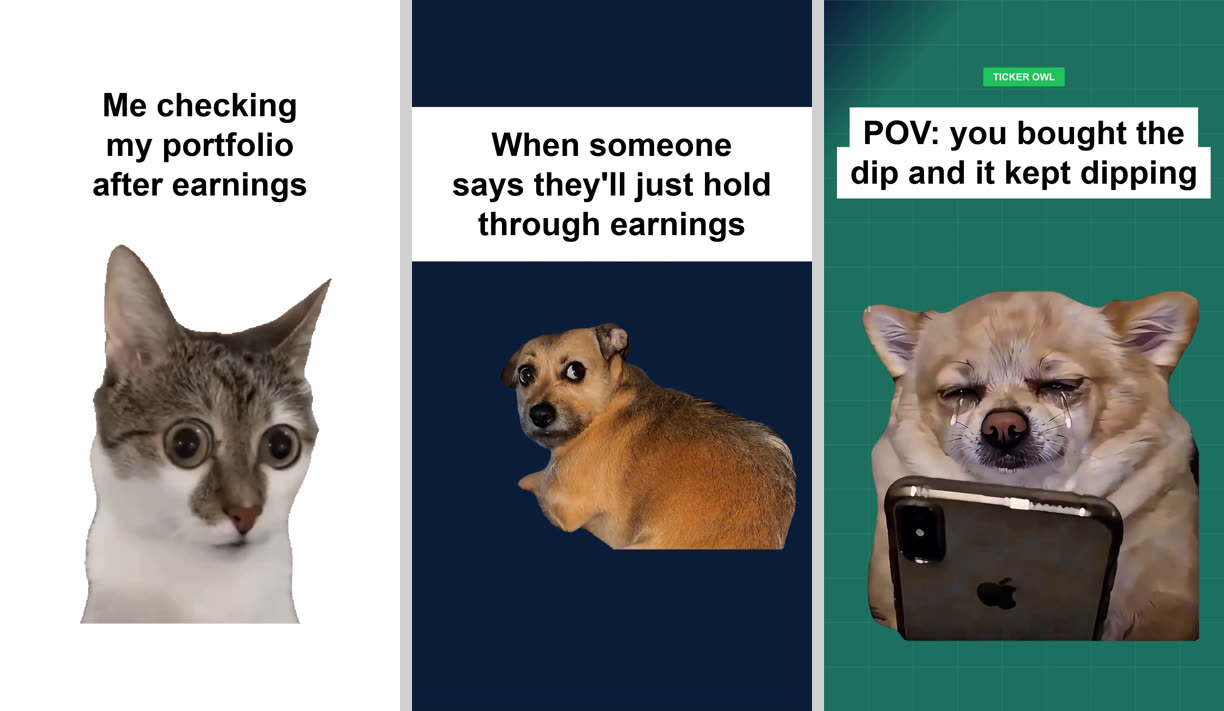
Two ready-made ways to turn a business description into a batch of vertical meme videos (1080x1920 MP4, H.264 + AAC, the clip's own sound), ready to post as Shorts, Reels or TikToks. Both brainstorm moments the audience recognises, search the library for the reaction, write a "When... / Me when... / POV:" caption, and render it with ffmpeg: the clip keyed over your brand color or photo, cropped to the subject, the caption wrapped in a big bold font on a solid box. No AI-generated video: library clips and captions only.
Step-by-step guide: https://api.greenscreenmemes.app/guides/meme-shorts · Free key: https://api.greenscreenmemes.app/dashboard
Claude skill (Claude Code, Claude.ai)
This repo is a Claude Code plugin marketplace. The plugin sets up the MCP server and adds
the make-memes skill with its render script
(render_meme.py,
Python standard library plus ffmpeg). Set GSM_API_KEY in the shell you start Claude Code
from, then run:
/plugin marketplace add green-screen-memes/green-screen-memes-api
/plugin install green-screen-memes@green-screen-memes
Then ask something like "Make 5 meme Shorts for my coffee shop, brand color #6F4E37".
-
Skill only, no plugin: copy the skill folder into your personal skills:
cp -R plugins/green-screen-memes/skills/make-memes ~/.claude/skills/. It finds clips over REST withscripts/search.py, so the MCP server is optional. -
Claude.ai: zip the folder (
cd plugins/green-screen-memes/skills && zip -r make-memes.zip make-memes) and upload it under Settings > Capabilities > Skills. Code execution has to be on, withapi.greenscreenmemes.appallowed for network access. Connect the Green Screen Memes connector (https://api.greenscreenmemes.app/mcp) for search. If the code environment has no ffmpeg, the skill falls back tomake_meme, which returns an editor link instead of a file. -
The render script works on its own too:
shpython3 plugins/green-screen-memes/skills/make-memes/scripts/render_meme.py \ --clip "Shocked cat with big eyes " --caption "Me checking my portfolio after earnings" \ --bg "#0B1F3A" --out out/01.mp4
Codex and other agents: see AGENTS.md for the same workflow and MCP setup.
n8n template (self-hosted n8n with ffmpeg)
n8n/meme-shorts-workflow.json runs the same pipeline
on a schedule: a brand brief, an LLM that writes the ideas, the API search, a clip per
idea, and an ffmpeg render with the same layout as the skill. It needs a self-hosted n8n
with ffmpeg installed (n8n Cloud can't run ffmpeg). Setup, the Dockerfile and the
settings to change: n8n/README.md.
Examples
| Example | What it shows | Run it |
|---|---|---|
claude-code/ | Connect the MCP server, then make a meme from one prompt | claude mcp add --transport http green-screen-memes https://api.greenscreenmemes.app/mcp --header "Authorization: Bearer $GSM_API_KEY" |
node/ | Search, download and composite from Node 18+, no dependencies | node examples/node/meme.mjs "shocked cat" background.jpg |
python/ | The same with the Python standard library | python3 examples/python/meme.py "shocked cat" background.jpg |
ffmpeg/ | curl + ffmpeg scripts: key over a photo, or over a video with mixed audio | examples/ffmpeg/key-over-image.sh background.jpg greenscreen.mp4 green |
remotion/ | A Remotion composition with a pre-keyed transparent clip | cd examples/remotion && npm install && npm run studio |
trending-to-short/ | Today's #1 trending clip as a vertical short | node examples/trending-to-short/trending-to-short.mjs background.jpg |
make-memes skill | Brand meme Shorts in batches: jokes, clip search, render with wrapped captions | python3 plugins/green-screen-memes/skills/make-memes/scripts/render_meme.py --help |
n8n/ | The same pipeline as a scheduled n8n workflow (self-hosted, with ffmpeg) | Import n8n/meme-shorts-workflow.json |
Everything except the MCP setup needs FFmpeg
(with ffprobe) on your PATH.
1. Get a free key
Sign in at https://api.greenscreenmemes.app/dashboard (Google or email link) and create a free Sandbox key: 50 video downloads in total and 30,000 calls a month, for building and testing. Then:
cp .env.example .env          # put your key in GSM_API_KEY
set -a; source .env; set +a   # or: export GSM_API_KEY=gsm_live_...
Keep the key on your machine or server. The API doesn't send CORS headers, so call it from a backend, not from a browser.
2. Use it from an AI agent (MCP)
claude mcp add --transport http green-screen-memes https://api.greenscreenmemes.app/mcp \
  --header "Authorization: Bearer $GSM_API_KEY"
Cursor and other MCP clients: url https://api.greenscreenmemes.app/mcp with the
same Authorization header. Ready-made configs are in
examples/claude-code. The server is also in the official MCP
Registry as app.greenscreenmemes.api/green-screen-memes.
Then ask, for example:
Make a meme for my coffee shop. Find a green screen of someone or something reacting with pure relief or joy, key it over ./shop.jpg as a vertical video and caption it "Monday, fixed."
Tools: search_green_screens, get_green_screen (video link and a ready ffmpeg
command), get_trending, list_collections, get_collection, list_tags,
get_usage.
3. Or call REST
curl -H "Authorization: Bearer $GSM_API_KEY" \
  "https://api.greenscreenmemes.app/v1/memes?q=side%20eye&limit=5"
| Endpoint | |
|---|---|
GET /v1/memes?q=&tag=&color=&updatedSince=&limit=&cursor= | Search or list green screens |
GET /v1/memes/{id} | One green screen (URL-encode the id) |
GET /v1/trending | What's trending in the Green Screen Memes app right now, with rank |
GET /v1/collections, GET /v1/collections/{id} | Curated collections |
GET /v1/tags | Most used tags |
GET /v1/usage | Your plan and this month's usage |
GET /v1/removed?since= | Clips taken down at a rights holder's request |
Lists return { data, total, nextCursor }; errors return { error: { code, message } }.
Each clip has id, name, description, tags, chromaKeyColor (green, blue,
red or none), durationSeconds, thumbnailUrl and videoUrl. Media links are
signed for your key and expire after about 6 hours, so download the file and don't
store the link.
Full reference: https://api.greenscreenmemes.app/docs · OpenAPI: https://api.greenscreenmemes.app/v1/openapi.json · For LLMs: https://api.greenscreenmemes.app/llms.txt
4. Key it with FFmpeg
Over a photo (vertical 1080x1920, clip at the bottom, keeps the clip's sound):
ffmpeg -loop 1 -i background.jpg -i greenscreen.mp4 -filter_complex \
 "[0:v]scale=1080:1920:force_original_aspect_ratio=increase,crop=1080:1920,setsar=1[bg];\
  [1:v]chromakey=0x00ff00:0.2:0.05,scale=1080:-2[fg];\
  [bg][fg]overlay=(W-w)/2:H-h:shortest=1,format=yuv420p[v]" \
 -map "[v]" -map "1:a?" -c:v libx264 -crf 20 -c:a aac meme.mp4
Key colors: green 0x00ff00, blue 0x0000ff, red 0xff0000. With none, the clip
is used as-is. If a green fringe stays, raise 0.2 a little; if parts of the subject turn see-through, lower it. Over a video with mixed
audio: see examples/ffmpeg.
Video meme API
If you're building a video tool, a short-form content pipeline or a meme app and need actual video memes rather than image templates, this is what the API is for: short MP4 clips on a solid key color, with sound, plus the metadata to search them and the ffmpeg command to composite them. It doesn't generate memes or remove backgrounds from your footage; it gives you a curated library of ready green screens.
Reaction clip API
Clips are tagged by what happens in them, so search works best with a feeling or an
action: shocked, slow clap, side eye, crying, happy dance, waiting.
GET /v1/tags shows what the library covers, and GET /v1/trending returns what
people are using most in the Green Screen Memes app right now. To keep a local copy
in sync, poll GET /v1/memes?updatedSince=<ISO date> and drop anything listed by
GET /v1/removed.
MCP server for memes
The MCP server at https://api.greenscreenmemes.app/mcp lets Claude Code, Cursor or
any agent with a shell find a clip, get its download link and run the composite
itself. get_green_screen returns the ffmpeg command for that clip's key color, so
the agent doesn't have to work out the filter graph. Same key, same limits as REST;
each tool call counts as one call.
What you can use the clips for
These are internet memes. Green Screen Memes makes the green screen versions, tags and curates them, and runs the search; the original footage isn't ours, and the API doesn't license it to you. How you use a clip is your responsibility.
- On paid plans, clips can go in apps and in videos you publish for yourself or clients. Sandbox keys are for building and testing.
- Organic posts on a business's own or its clients' accounts are fine, people included.
- Clips of identifiable people can't be used in paid ads, sponsored posts or endorsements. Animals, objects and cartoons are fine there.
- Don't use clips listed by
GET /v1/removedin new work, and drop them from anything you keep.
Full terms: https://api.greenscreenmemes.app/terms
License
The example code in this repo is MIT. That covers the code only: no clips are included here, and the clips, thumbnails and catalog data you get from the API are covered by the API terms, not by MIT.
Questions: info@greenscreenmemes.app · Green Screen Memes is made by Hedko Group LLC.