
atx-mcp
A deterministic (non-generative) asset transformation MCP server for general-purpose AI agents, written in Rust.
It executes editing intent — "level the horizon, crop to 16:9, brighten it up a touch" — as a declarative transform recipe, and tracks every result as an immutable revision. The original asset is never modified.
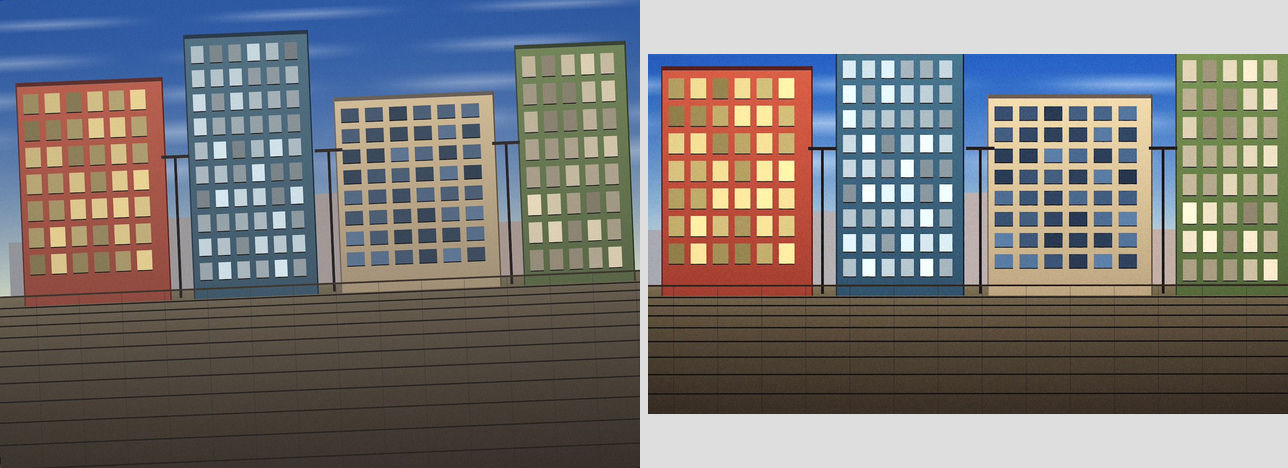 Tilt correction + auto levels + a look applied (a fully deterministic recipe) — left: input / right: output.
See docs/DESIGN.md for the full design.
Use cases
-
Eye-catch image for an article
"Straighten this photo and crop it to a 16:9, 1600px eye-catch. WebP."
import_asset→detect_tilt(the AI skips correction when it's already near-level) →apply_transform(rotate → crop → resize → encode) →export_asset. The original is never touched, and the same recipe reproduces the same result every time. -
Multiple sizes for social/CMS
"Generate the OGP, Instagram square, and thumbnail versions of this photo." One original fans out into OGP 1200×630, Instagram 1080 square, and a 400px thumbnail in parallel. The same-recipe-same-revision idempotency means re-running never double-creates output; a one-word preset name works too.
-
Safe to publish
"Strip the location data for sure, but don't touch the colors."
strip_metadata(exif) removes EXIF including GPS while keeping the ICC profile intact. The AI can also warn ahead of time by checkinghas_gpsfrominspect_image. -
Color and look adjustments
"Make just the sky bluer, leave everything else alone." Covers
curves/levels/hsl/white_balance, thefilm_softpreset, and importing your own.cubeLUT withimport_assetthen applying it withlut. -
Local (masked) adjustments
"Darken just the sky a bit, keep the ground as is."
generate_maskbuilds a mask (gradient, luminosity range, or hue range); after wiring it into the adjustment,render_previewwithoverlay:"mask"shows exactly where it will bite before you commit. -
Layer compositing
"Blur a copy of this photo and blend it in at 50% screen for a soft glow." The
layersstack combines 16 blend modes, opacity, and masks to build reproducible composites like soft focus. -
Watermarks, retouching, and perspective
"Stamp my logo in the corner, remove the power lines, and fix the converging verticals."
svg_overlayburns in a logo,clone/healremove blemishes or wires by compositing both texture and tone, andperspectivecorrects converging verticals. -
Verification and accountability
"Show me this image before and after the edits, side by side."
compare_revisionsplaces before/after side by side, or returns a difference heatmap with stats likemean_abs_diff. Every revision keeps its lineage, so the full edit history behind any image used in an article can be traced and reproduced — byte-identical on any machine.
What atx doesn't do — generative editing, RAW development, ML-based auto-cropping — is out of scope; see docs/DESIGN.md for the roadmap.
Install
No Rust toolchain required. Pick one of the following.
1. npx (easiest, recommended)
Node.js 18+ is all you need. The prebuilt native binary for your platform is
pulled in automatically via optionalDependencies.
# --scope user makes it available in every project (omit for current-project only)
claude mcp add --scope user asset-transform -- npx -y atx-mcp --workspace /path/to/asset-workspace
Or add it directly to your MCP client config:
{
  "mcpServers": {
    "asset-transform": {
      "command": "npx",
      "args": ["-y", "atx-mcp", "--workspace", "/path/to/asset-workspace"]
    }
  }
}
2. Prebuilt binary
Installer scripts (default install location is ~/.local/bin, or
%LOCALAPPDATA%\Programs\atx-mcp on Windows; the archive is verified against
SHA256SUMS before extraction):
# macOS / Linux
curl -fsSL https://raw.githubusercontent.com/gridhra/atx-mcp/main/scripts/install.sh | sh
# Windows
irm https://raw.githubusercontent.com/gridhra/atx-mcp/main/scripts/install.ps1 | iex
To download manually, grab atx-mcp-<version>-<target>.tar.gz (.zip on
Windows) from Releases.
Supported targets:
| Platform | Target triple |
|---|---|
| macOS (Apple Silicon) | aarch64-apple-darwin |
| macOS (Intel) | x86_64-apple-darwin |
| Linux x86_64 | x86_64-unknown-linux-musl (statically linked, no glibc required) |
| Linux arm64 | aarch64-unknown-linux-musl (statically linked, no glibc required) |
| Windows x86_64 | x86_64-pc-windows-msvc |
claude mcp add asset-transform -- ~/.local/bin/atx-mcp --workspace /path/to/asset-workspace
3. Build from source (any other platform)
All you need is a Rust toolchain and a C compiler (for building libwebp from its vendored source).
cargo build --release
# => target/release/atx-mcp
claude mcp add asset-transform -- "$PWD/target/release/atx-mcp" --workspace /path/to/asset-workspace
--workspace (env: ATX_WORKSPACE) is the directory used as the asset store.
It is created automatically if it doesn't exist.
Tools (11)
| Tool | Role |
|---|---|
list_operations | Compact catalog of the recipe vocabulary: every operation with a one-line description and terse parameter hints, plus the built-in preset names. Optional category:"geometry"|"color"|"filter"|"output" narrows it (read-only) |
explain_operation | Full reference for one operation: parameter table (type, range, required/default, semantics), ready-to-paste JSON examples and gotchas. A built-in preset name works too and returns its full operation list. An unknown name returns the valid operations and presets, grouped (read-only) |
import_asset | Import a local image into the workspace (sha256-idempotent). Takes path for one file or paths for a batch of up to 64 (a failing file does not abort the batch). Warns via already_derived_from when the bytes are already the output of a recipe in this workspace |
inspect_image | Inspect dimensions, EXIF, ICC profile, presence of GPS data, etc. (read-only) |
detect_tilt | Estimate tilt angle via Canny+Hough (coarse) plus a projection profile (sub-0.1° refinement). Also returns horizontal/vertical family estimates; the full score curve is opt-in via include_score_curve:true. Returns "do not correct" when confidence is low (read-only) |
generate_mask | Generate a deterministic grayscale mask (linear_gradient / radial_gradient / luminosity_range / color_range) as a PNG revision with the same dimensions as the reference image, to be referenced from an operation's mask field (idempotent) |
render_preview | Apply a recipe (or a preset) at low resolution (long edge ≤768) and return it as an inline image. overlay:"grid"|"thirds"|"horizon" overlays composition guide lines, and overlay:"mask" (with mask_revision_id) tints the coverage of a mask (drawn on the preview only; it has no effect on the actual transform) |
apply_transform | Apply a recipe (or a preset) at full resolution and produce a new revision (the same recipe always yields the same revision). Takes revision_id for one image or revision_ids to run the same recipe over a batch of up to 64 |
compare_revisions | Downscale two revisions to long edge ≤640 and return them composited into a single inline image, arranged via layout:"side_by_side"|"stacked" (for A/B and before/after visual comparison), or layout:"diff" for a single pixel-difference heatmap plus mean_abs_diff/max_abs_diff/changed_pixel_ratio stats (requires equal dimensions) |
list_assets | Read the revision ledger (read-only) |
export_asset | Write a revision out to a given path (an existing file is only overwritten when overwrite:true is explicitly set) |
Recipe example
{
  "operations": [
    { "op": "rotate", "angle_degrees": -1.8 },
    { "op": "crop", "aspect_ratio": "16:9" },
    { "op": "resize", "width": 1600 },
    { "op": "encode", "format": "webp", "quality": 82 }
  ]
}
Supported ops (27): auto_orient / rotate / perspective / crop (crop,
pad) / resize (cover, contain, fill) / adjust / color_matrix / curves /
levels / lut / white_balance / hsl / blur / median /
unsharp_mask / convolve / clone / heal / svg_overlay / flip /
vignette / grain / gradient_map / pixelate / auto_levels / encode
(jpeg, png, webp, avif) / strip_metadata.
The operation vocabulary is deliberately kept out of the tool schemas: call
list_operations for the up-to-date catalog and explain_operation for one
operation's full schema, examples and gotchas.
LUT (.cube)
A .cube 3D/1D LUT is an asset, not an image: import it first, then point a
recipe at the revision it produced.
import_assetthe.cubefile. It is stored as an immutable revision withmime_type: "application/x-cube"(inspect_imagerefuses it on purpose — it is not an image).- Reference the returned
revision_idfrom a recipe:
{ "op": "lut", "lut_revision_id": "rev_...", "strength": 0.8 }
strength (0..1, default 1.0) blends linearly with the original. Because
revisions are immutable, including the referenced id in the recipe_hash keeps
the transform fully deterministic — but it also means the recipe is only
reproducible inside a workspace that holds that LUT, so move the .cube
alongside the recipe when you move a look between machines. Referencing an
unknown id fails with a structured error before any pixel work happens.
SVG overlays (logos and watermarks)
An .svg is a vector asset, like a .cube LUT: import it first, then stamp
it onto a raster image from a recipe.
import_assetthe.svgfile. It is stored as an immutable revision withmime_type: "image/svg+xml", and the summary reports the SVG's intrinsic size (0x0means it has none — noviewBoxand no absolutewidth/heighton the root<svg>).inspect_imagerefuses it on purpose: it is a vector asset, not a raster image.- Reference the returned
revision_idfrom a recipe:
{ "op": "svg_overlay", "svg_revision_id": "rev_...",
  "x": 24, "y": 24, "width": 320, "opacity": 0.25, "blend_mode": "normal" }
x/y are the overlay's top-left corner in the coordinates of the image
at that point in the pipeline (so put the overlay after your resize/crop);
negative values are allowed and the overflow is clipped. Omit width and
height to rasterize at the SVG's intrinsic size, give one to scale while
preserving the aspect ratio, or give both to stretch to an exact box — an SVG
with no intrinsic size is a structured error unless you give both. Compositing
uses the same W3C formula and the same 16 blend_mode values as
layers.
Text is never rendered. atx loads no system fonts, because the installed fonts differ from machine to machine and would break byte-for-byte reproducibility. An SVG containing
<text>renders its shapes but not its glyphs and reports a warning — convert text to paths (outlines) in your vector editor before importing, and the result is identical on every machine.
Masks (local adjustments)
A mask is a grayscale image revision: its BT.709 luma is the weight, so white
means "apply this operation at full strength" and black means "leave the pixel
alone". Any of the 14 tone/filter ops (adjust, color_matrix, curves,
levels, hsl, lut, white_balance, blur, median, unsharp_mask,
convolve, grain, gradient_map, auto_levels) accepts one.
generate_maskbuilds one deterministically against a reference image, with exactly that image's dimensions:
kind | Parameters | What it selects |
|---|---|---|
linear_gradient | angle_degrees (0 = white at the top fading down, positive = clockwise), start, end (0..1 positions along the axis where the weight goes 1→0) | A graduated filter (skies, foregrounds) |
radial_gradient | center_x, center_y (0..1 relative), radius (0..1 of the half-diagonal), feather (0..1 extra falloff band) | A vignette or a subject spotlight |
luminosity_range | min, max (0..255), feather (luma units of soft shoulder outside the range) | Highlights, midtones or shadows |
color_range | hue_center (0..360), hue_width (1..180 half-width), feather (extra degrees) | One hue family (sky blue, foliage green) |
You can also import_asset your own grayscale image instead.
- Attach the returned
revision_idto an operation:
{ "op": "curves", "master": [[0,0],[128,168],[255,255]],
  "mask": { "revision_id": "rev_...", "invert": false, "feather_px": 8.0 } }
invert (default false) flips the weight to 1-w; feather_px (default
0.0) blurs the mask edge by that gaussian sigma in pixels of the current
image.
render_previewwithoverlay:"mask"andmask_revision_idtints the preview red where the weight exceeds 0.5 and dims it elsewhere, so the coverage can be checked before committing.
Masks are referenced by revision id exactly like LUTs, so the same caveat applies: the recipe hash includes the id, and the recipe only reproduces inside a workspace that holds that mask.
Layers
A recipe may carry a layers stack instead of (or in addition to) a flat
operations list. Layers composite bottom-to-top, each layer's ops run
against its own source before it is blended onto the running composite:
{
  "layers": [
    { "source": "base", "ops": [] },
    {
      "source": { "revision_id": "rev_..." },
      "ops": [{ "op": "blur", "sigma": 8 }],
      "blend_mode": "multiply",
      "opacity": 0.6
    }
  ],
  "operations": [
    { "op": "resize", "width": 1600 },
    { "op": "encode", "format": "webp", "quality": 82 }
  ]
}
sourceis either"base"(the input revision passed toapply_transform/render_preview) or{"revision_id": "rev_..."}(any other revision already in the workspace). Every layer's source must match the base image's dimensions exactly, or the recipe fails with a structured error before any pixel work happens.opsis a normal operations list, applied to that layer's source alone.mask,blend_mode(default"normal") andopacity(default1.0) control how the layer composites onto the layers below it.- Blend mode is one of 16 W3C modes: the 12 separable modes
normal,multiply,screen,overlay,darken,lighten,color_dodge,color_burn,hard_light,soft_light,difference,exclusion, plus the 4 non-separable modeshue,saturation,color,luminosity. - When
layersis present, the top-leveloperationsbecomes the finishing pass, applied once to the composited result — this is whereresizeand the finalencodebelong (encodemust still be last and appear at most once). - Call
explain_operation {"operation":"layers"}for the full reference.
Presets
apply_transform and render_preview take either recipe (the raw DSL) or
preset (a built-in named recipe from presets/) — exactly one of
the two:
| Set | Preset | What it does |
|---|---|---|
| basics | eyecatch_16_9 | Center-crop to 16:9, resize to 1600px wide, WebP q82 |
| basics | film_soft | Soft film look: gentle S-curve plus a 15% pull towards luma |
| basics | product_clean | Clean product shot: near-neutral white balance, levels lift, light sharpen |
| basics | thumbnail_square | Center-crop to 1:1, resize to 800x800, WebP q80 |
| basics | web_optimize | Fit inside 2000x2000 without upscaling, WebP q80 |
| basics | grayscale | Black and white via a BT.709 luma color_matrix |
| basics | sepia | Classic sepia tone via color_matrix |
| film | film_warm | Warm film stock: amber white balance, soft S-curve, light grain |
| film | film_cool | Cool film stock: blue-leaning white balance, soft S-curve, light grain |
| film | matte_fade | Faded matte: lifted blacks via curves, slight desaturation |
| film | film_grain_strong | Heavy, coarse grain over a gentle S-curve (pushed/high-ISO look) |
| film | cinema_teal_orange | Teal-and-orange cinematic grade via targeted hsl shifts |
| mono | bw_neutral | Neutral black and white via a BT.709 luma color_matrix |
| mono | bw_high_contrast | High-contrast black and white: luma conversion plus a strong S-curve |
| mono | bw_red_filter | B&W through a simulated red filter (classic sky darkener) |
| mono | bw_soft | Soft, low-contrast black and white (matte curve) |
| mono | duotone_navy_cream | Navy-to-cream duotone via gradient_map |
| editorial | product_white | Auto levels stretch, neutral white balance, final sharpen |
| editorial | food_vivid | Warm orange/yellow saturation boost plus a contrast lift |
| editorial | portrait_soft | Soft matte curve, light desaturation, subtle vignette |
| editorial | landscape_punch | Contrast + saturation lift plus a light vignette |
| editorial | architecture_clean | Auto levels, sharpen, slight desaturation (pair with a manual perspective op) |
| social | og_1200x630 | Open Graph share image: crop 1200:630, resize to 1200 wide, WebP q82 |
| social | x_wide_16_9 | X (Twitter) wide card: crop 16:9, resize to 1600 wide, WebP q82 |
| social | instagram_square_1080 | Instagram square post: crop 1:1, resize to 1080x1080, WebP q85 |
| social | instagram_portrait_4_5 | Instagram portrait post: crop 4:5, resize to 1080x1350, WebP q85 |
| social | youtube_thumb_1280x720 | YouTube thumbnail: crop 16:9, resize to 1280x720, WebP q85 |
| social | hero_2400 | Large hero/banner image: fit inside 2400px, WebP q85 |
| building block | soft_vignette | Subtle vignette on its own, for stacking after other looks |
| building block | grain_fine | Light, fine, deterministic grain on its own, for stacking |
A preset is pure sugar: it resolves to its recipe and flows through the normal
pipeline, and the recipe_hash (the idempotency key) is computed on the
resolved recipe — so a preset call and the equivalent raw recipe land on the
same revision.
Guarantees
- Deterministic: the same input + the same recipe always produces byte-identical output (regression-checked with golden tests)
- Idempotent: recipes are normalized (keys sorted,
f64values quantized to a 1e-6 grid) and hashed with sha256. If(input revision, recipe hash)matches an existing pair, the existing revision is returned instead of a new one - Originals are protected:
objects/is an append-only, content-addressed store — there is no delete or overwrite API
Development
cargo test --workspace     # unit + integration + property (proptest) tests
cargo clippy --workspace --all-targets -- -D warnings
Crate layout: atx-core (recipe/transform engine) / atx-geometry (tilt
detection) / atx-store (immutable asset store) / atx-mcp (rmcp stdio server).
See RELEASING.md for the release process.
Name
"atx" stands for Asset Transform; the trailing x follows the
familiar shorthand for "transform" (as in xform / tx). It was chosen as a
short, easy-to-type binary name and crate prefix (atx-core, etc.), and it
has no relation to the PC ATX form factor or Markdown ATX-style headings.
License
MIT. See LICENSE.
If atx-mcp saves you time, you can buy me a coffee ☕