
actual-budget-mcp


Talk to your budget. An MCP server that connects Actual Budget to Claude — ask where the money went, get real analysis back, and let it write without holding your breath.
Features
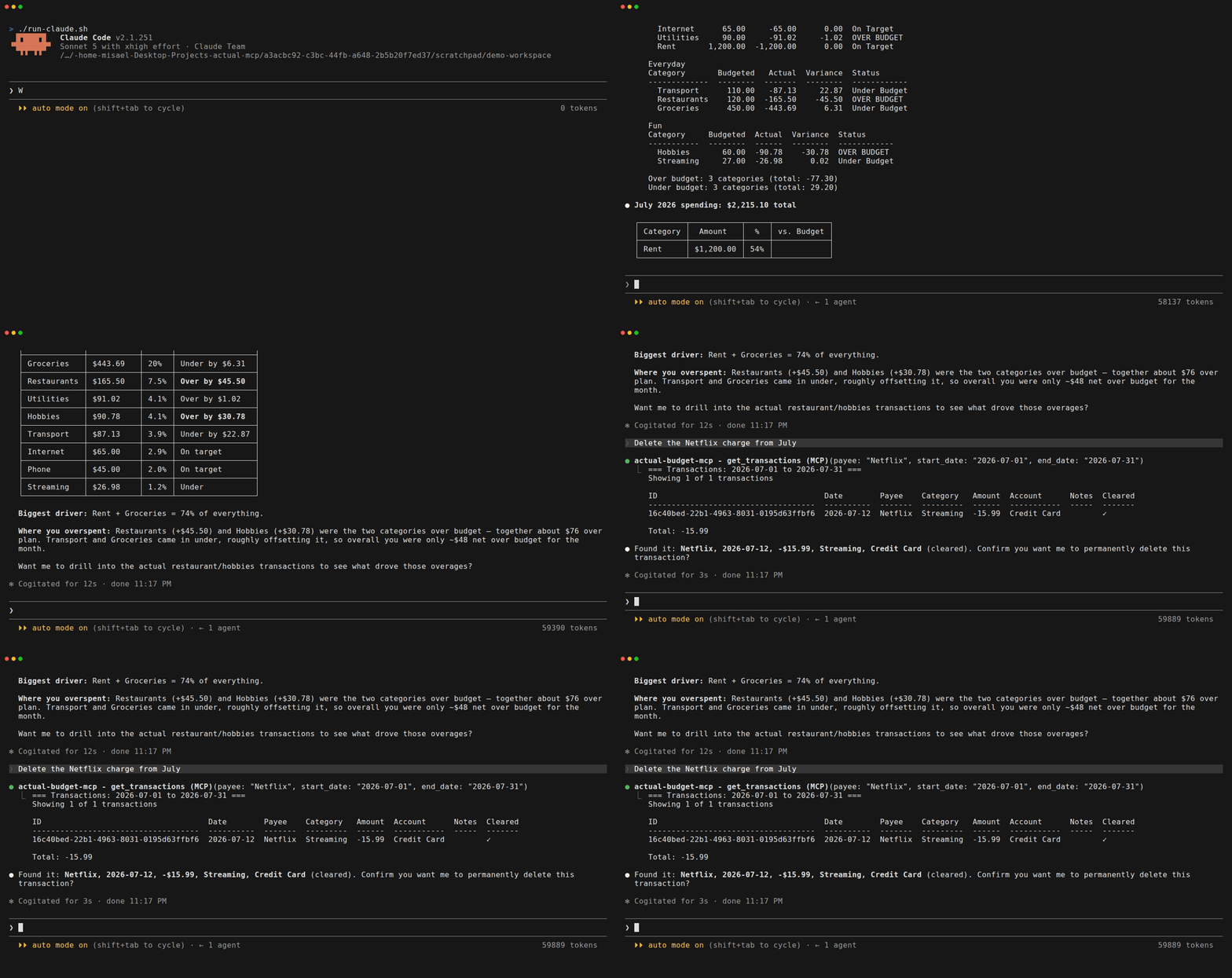
- Real analysis, not just lookups - Projections, category trends, budget vs actual, and month summaries
- Writes you can trust - Every delete previews what it will remove and waits for you to confirm;
ACTUAL_READ_ONLY=1hides the write tools from the model entirely (Safety) - Multi-currency that survives reality - Splits and residual reconciliation, not just a currency symbol
- Ask about your budget in plain language - "How much did I spend on food this month?" or "Am I over budget on anything?"
- Create and manage transactions - Add expenses, transfers, and edits without opening the app
- Manage categories, payees, and rules - Full CRUD without opening the app
- Use names, not IDs - Say "Cartera" instead of
a1b2c3d4-..., with helpful suggestions if ambiguous - Natural dates in English and Spanish - "last month", "este mes", "hace 3 meses", "yesterday"
- Clean formatted output - Aligned tables and clear summaries, not raw JSON
- Clear error messages - If something's wrong, you'll know exactly what to fix
Prerequisites
- Actual Budget server running (local or remote)
- Node.js 20 or higher (see Node.js requirement)
Quick Start
The fastest way to get started - copy this into Claude Code or Claude Desktop:
Install the actual-budget-mcp MCP server from npm (https://github.com/henfrydls/actual-budget-mcp).
Configure it with these credentials:
    - My Actual Budget server: http://localhost:5006
    - Password: YOUR_PASSWORD
    - Budget ID: YOUR_BUDGET_ID
Claude will configure everything for you.
Installation
Option 1: Claude Code (one command)
claude mcp add actual-budget-mcp -e ACTUAL_SERVER_URL=http://localhost:5006 -e ACTUAL_PASSWORD=your-password -e ACTUAL_BUDGET_ID=your-budget-id -- npx -y actual-budget-mcp
Option 2: Claude Desktop
Add this to your claude_desktop_config.json:
macOS: ~/Library/Application Support/Claude/claude_desktop_config.json
Windows: %APPDATA%\Claude\claude_desktop_config.json
{
  "mcpServers": {
    "actual-budget-mcp": {
      "command": "npx",
      "args": ["-y", "actual-budget-mcp"],
      "env": {
        "ACTUAL_SERVER_URL": "http://localhost:5006",
        "ACTUAL_PASSWORD": "your-password",
        "ACTUAL_BUDGET_ID": "your-budget-sync-id"
      }
    }
  }
}
Option 3: Cursor
Go to Cursor Settings > MCP > Add new MCP server and add:
{
  "mcpServers": {
    "actual-budget-mcp": {
      "command": "npx",
      "args": ["-y", "actual-budget-mcp"],
      "env": {
        "ACTUAL_SERVER_URL": "http://localhost:5006",
        "ACTUAL_PASSWORD": "your-password",
        "ACTUAL_BUDGET_ID": "your-budget-sync-id"
      }
    }
  }
}
Option 4: VS Code (GitHub Copilot)
Add this to your VS Code settings.json:
{
  "mcp": {
    "servers": {
      "actual-budget-mcp": {
        "command": "npx",
        "args": ["-y", "actual-budget-mcp"],
        "env": {
          "ACTUAL_SERVER_URL": "http://localhost:5006",
          "ACTUAL_PASSWORD": "your-password",
          "ACTUAL_BUDGET_ID": "your-budget-sync-id"
        }
      }
    }
  }
}
Option 5: Docker
The image speaks stdio like every other option, so your client starts the container and owns its lifetime:
{
  "mcpServers": {
    "actual-budget-mcp": {
      "command": "docker",
      "args": [
        "run", "-i", "--rm",
        "--add-host=host.docker.internal:host-gateway",
        "-v", "actual-budget-mcp-data:/data",
        "-e", "ACTUAL_SERVER_URL",
        "-e", "ACTUAL_PASSWORD",
        "-e", "ACTUAL_BUDGET_ID",
        "ghcr.io/henfrydls/actual-budget-mcp:latest"
      ],
      "env": {
        "ACTUAL_SERVER_URL": "http://host.docker.internal:5006",
        "ACTUAL_PASSWORD": "your-password",
        "ACTUAL_BUDGET_ID": "your-budget-sync-id"
      }
    }
  }
}
Two things that bite everyone once:
- Inside the container,
localhostis the container. Your Actual server is not there.host.docker.internal(with the--add-hostflag above, which is what makes it resolve on Linux) reaches the host instead. - Mount
/data. That is the budget cache. Without a volume, every start re-downloads your entire budget from the server.
Option 6: From source (for contributors)
git clone https://github.com/henfrydls/actual-budget-mcp.git
cd actual-budget-mcp
npm install
cp .env.example .env   # Edit with your credentials
npm run build
npm run test:connection # Verify it works
Verify your setup
After installing, you can verify the connection works:
npx -y actual-budget-mcp --verify
This will connect to your Actual Budget server and confirm everything is configured correctly.
Configuration
| Variable | Required | Description |
|---|---|---|
ACTUAL_SERVER_URL | Yes | Your Actual Budget server URL (e.g., http://localhost:5006) |
ACTUAL_PASSWORD | Yes | Server password (set in Actual Budget under Settings) |
ACTUAL_BUDGET_ID | Yes | Budget Sync ID (found in Settings > Show advanced settings) |
ACTUAL_ENCRYPTION_PASSWORD | No | Only if your budget file is encrypted |
ACTUAL_DATA_DIR | No | Cache directory (default: /tmp/actual-budget-mcp-data) |
ACTUAL_READ_ONLY | No | Set to 1/true/yes to run read-only. See Safety |
Finding your Budget ID
- Open Actual Budget
- Go to Settings (gear icon)
- Click Show advanced settings
- Copy the Sync ID
Safety
Two things protect your budget from an agent acting on a vague instruction.
Deletes preview before they delete
Every delete tool refuses to destroy anything on the first call. It reports what would be lost and stops there. Deleting takes a second, deliberate call:
delete_category(category: "Groceries")
  → preview: transactions affected, budget and rollover warning. Nothing deleted.

delete_category(category: "Groceries", confirm: true, confirm_name: "Groceries")
  → deleted
Tools that find their target by name — delete_account, delete_category,
delete_category_group, delete_payee — also require confirm_name with the
exact name. That is where deleting the wrong thing actually happens: asking for
"Adicionales" can resolve to "Ingresos Adicionales". Tools that take an exact id
— delete_transaction, delete_rule — need only confirm: true.
Read-only mode
Set ACTUAL_READ_ONLY=1 and the server exposes only the 15 read, analysis and
repair tools. The write tools are not registered at all, so they never
appear in tool discovery — an agent cannot be talked into calling something it
cannot see.
repair_sync stays available on purpose: it repairs sync state rather than
budget data, and hiding it would leave a desynced budget with no way to recover.
Writes are enabled by default. Read-only is opt-in.
Tools (37)
Read (9)
| Tool | Description | Example prompt |
|---|---|---|
list_accounts | All accounts with balances | "Show me all my accounts" |
get_budget_month | Budget for a specific month | "What does my March budget look like?" |
get_transactions | Transactions with filters | "Show me transactions from last week over 5000" |
get_category_balance | Category history across months | "How has my food spending changed?" |
get_budget_summary | Executive budget overview | "Give me a budget summary for February" |
get_categories | All category groups and categories | "What categories do I have?" |
get_payees | All payees in the budget | "List all my payees" |
get_rules | All transaction rules | "Show me my rules" |
balance_history | Account balance over time | "Show balance history for my checking account" |
Parameters
get_budget_month - month (optional): YYYY-MM or natural language ("this month", "last month", "enero 2025")
get_transactions - account (optional): account name | start_date / end_date (optional): YYYY-MM-DD or natural language | category (optional): category name | payee (optional): payee name | min_amount / max_amount (optional): filter by amount | limit (optional, default 50)
get_category_balance - category (required): category name or ID | months (optional, default 3): months to look back
get_budget_summary - month (optional): YYYY-MM or natural language
balance_history - account (required): account name or ID | start_date (optional, default 3 months ago) | end_date (optional, default today)
Analysis (5)
| Tool | Description | Example prompt |
|---|---|---|
budget_vs_actual | Budgeted vs spent per category | "Am I over budget on anything this month?" |
spending_projection | End-of-month spending forecast | "Will I stay within budget this month?" |
category_trends | Spending trends over time | "What are my spending trends for the last 6 months?" |
spending_by_category | Spending breakdown by category | "Show me spending by category for February" |
monthly_summary | Income vs expenses vs savings | "How have my finances been the last 3 months?" |
Parameters
budget_vs_actual - month (optional): YYYY-MM or natural language | group (optional): filter by category group
spending_projection - month (optional): YYYY-MM or natural language
category_trends - category (optional): specific category or top spending if omitted | months (optional, default 6)
spending_by_category - start_date / end_date (optional): date range | include_income (optional, default false) | limit (optional, default 20)
monthly_summary - months (optional, default 3): number of months to show
Write — Transactions (9)
| Tool | Description | Example prompt |
|---|---|---|
create_transaction | Add a new transaction | "I spent 500 on groceries from Cartera today" |
create_split_transaction | One charge across several categories | "Split that 3,000 charge: 2,000 groceries, 1,000 household" |
update_transaction | Edit an existing transaction | "Change the amount on that transaction to 600" |
delete_transaction | Remove a transaction (previews first, see Safety) | "Delete that test transaction" |
update_budget_amount | Change a budget amount | "Set my food budget to 15,000 for this month" |
recategorize_transaction | Move to another category | "Move that transaction to Entertainment" |
create_transfer | Transfer between accounts | "Transfer 10,000 from Checking to Savings" |
reconcile_currency_residual | Clear accumulated FX-rate residual | "Reconcile my USD card to 213.82 USD" |
run_bank_sync | Sync with linked banks | "Sync my bank transactions" |
Parameters
create_transaction - account (required): account name | amount (required): negative for expenses, positive for income | payee (optional) | category (optional) | date (optional) | notes (optional) | cleared (optional)
update_transaction - transaction_id (required) | amount, payee, category, date, notes, cleared (all optional)
delete_transaction - transaction_id (required)
update_budget_amount - category (required) | amount (required) | month (optional)
recategorize_transaction - transaction_id (required) | category (required)
create_transfer - from_account (required) | to_account (required) | amount (required) | date (optional) | notes (optional)
create_split_transaction - account (required) | amount (required): total, must equal the sum of the splits | splits (required): two or more {category, amount, notes} | payee, date, notes, cleared (all optional)
reconcile_currency_residual - account (required) | category (required): where to book the adjustment | target_balance (optional, defaults to 0) | payee, date, notes (all optional)
run_bank_sync - account (optional): sync specific account or all if omitted
Write — Categories (6)
| Tool | Description | Example prompt |
|---|---|---|
create_category | Create a new category | "Create a category called Gym in Gastos Variables" |
update_category | Rename or hide a category | "Rename Gym to Fitness" |
delete_category | Delete a category (previews first, see Safety) | "Delete the Fitness category" |
create_category_group | Create a new group | "Create a category group called Health" |
update_category_group | Rename or hide a group | "Rename the Health group to Wellness" |
delete_category_group | Delete a group (previews first, see Safety) | "Delete the Wellness group" |
Parameters
create_category - name (required) | group (required): group name or ID
update_category - category (required): name or ID | name (optional): new name | hidden (optional): true/false
delete_category - category (required) | transfer_to (optional): category to move transactions to | confirm + confirm_name (required to delete)
create_category_group - name (required)
update_category_group - group (required): name or ID | name (optional): new name | hidden (optional): true/false
delete_category_group - group (required) | transfer_to (required): category for orphaned transactions | confirm + confirm_name (required to delete)
Write — Payees & Rules (5)
| Tool | Description | Example prompt |
|---|---|---|
create_payee | Create a new payee | "Create a payee called Netflix" |
update_payee | Rename a payee | "Rename Netflix to Netflix Premium" |
delete_payee | Delete a payee (previews first, see Safety) | "Delete the Netflix Premium payee" |
create_rule | Create a transaction rule | "Create a rule: when payee contains Amazon, set category to Shopping" |
delete_rule | Delete a rule (previews first, see Safety) | "Delete that rule" |
Parameters
create_payee - name (required)
update_payee - payee (required): name or ID | name (required): new name
delete_payee - payee (required): name or ID | confirm + confirm_name (required to delete)
create_rule - condition_field (required): payee, category, amount, notes | condition_op (required): is, contains, oneOf, gt, lt, etc. | condition_value (required) | action_field (required): category, payee, notes | action_value (required) | stage (optional)
delete_rule - rule_id (required) | confirm (required to delete)
Write — Accounts (2)
| Tool | Description | Example prompt |
|---|---|---|
create_account | Create an on- or off-budget account | "Create an off-budget account called Family Investment with 10,000" |
delete_account | Delete an account and its history | "Delete the ZZ Test account" |
delete_accountneeds two keys. It destroys the account's entire transaction history, so a single call never deletes. The first call only previews what would be lost (name, balance, transaction count) and suggests closing the account instead — closing retires it while keeping its history. To actually delete, call again withconfirm: trueandconfirm_nameset to the account's exact name. While it declines, the tool reportsisError: true, so a confirmation prompt is never mistaken for a completed deletion.
Parameters
create_account - name (required) | offBudget (optional, default false) | initialBalance (optional): human amount, creates the "Starting Balance" transaction. (Actual models accounts as on/off-budget only, so there is no account type.)
delete_account - account (required): name or ID | confirm (required to delete): must be true | confirm_name (required to delete): the account's exact name
Maintenance (1)
| Tool | Description | Example prompt |
|---|---|---|
repair_sync | Repair an out-of-sync budget | "Repair the sync, everything is failing" |
If tools start failing with a sync error, the budget's sync state is inconsistent with the server.
repair_syncrebuilds that state without touching budget data. Note that deleting the localACTUAL_DATA_DIRdoes not fix this — the inconsistency is in the sync state, not the cache.
Parameters
repair_sync - no parameters
Prompts
Built-in prompt templates that guide Claude through multi-step financial analysis:
| Prompt | Description |
|---|---|
monthly-review | Complete budget review for any month — spending vs budget, overspending, suggestions |
spending-check | Quick check: are you on track this month? |
spending-patterns | Deep analysis of spending trends and patterns over multiple months |
Use them in Claude Desktop by clicking the prompt icon, or in Claude Code by asking Claude to use them.
Resources
Pre-loaded data that Claude can reference without calling tools:
| Resource | URI | Description |
|---|---|---|
| Accounts | actual://accounts | All accounts with balances |
| Categories | actual://categories | Category groups and categories with IDs |
| Payees | actual://payees | All payees sorted alphabetically |
Usage Examples
Here are real prompts you can use:
"How much did I spend in February?"

"Show me my top 5 spending categories this month"

"Am I over budget on anything?"

"I spent 1,200 on electricity from my BHD account yesterday"

"What's my savings rate this month?"

"Show me all transactions from Cartera in the last 30 days"

"Transfer 5,000 from Checking to Savings"

"What are my spending trends for food over the last 6 months?"

"Create a category called Gym in Gastos Variables"

"Rename the Gym category to Fitness"

"Create a rule: when payee is Netflix, set category to Suscripciones"

"How have my finances been the last 3 months?"
How is this different?
Compared to other Actual Budget MCP servers:
| Feature | actual-budget-mcp | Others |
|---|---|---|
| Natural language dates | "last month", "este mes", "hace 3 meses" | Only YYYY-MM-DD |
| Name resolution | Type "Cartera" instead of UUIDs | Requires exact IDs |
| Output format | Aligned tables, readable text | Raw JSON |
| Error messages | Clear instructions on how to fix | Generic errors |
| Analysis tools | Budget vs actual, projections, trends | Not available |
| MCP Prompts | 3 guided analysis workflows | Limited or none |
| MCP Resources | Accounts, categories, payees pre-loaded | Not available |
| Bilingual dates | English + Spanish | English only |
| API version | @actual-app/api 26.x (current) | Often outdated |
Security
- This server connects to your Actual Budget instance using the credentials you provide
- Credentials are passed as environment variables and never stored by the MCP server
- All communication with your Actual Budget server happens locally (or to your self-hosted server)
- The server only accesses budget data through the official
@actual-app/apilibrary - No data is sent to third parties
Troubleshooting
"Could not connect to Actual Budget server"
- Make sure Actual Budget is running (open the app or start the server)
- Check that
ACTUAL_SERVER_URLis correct - Run
npx -y actual-budget-mcp --verifyto test your connection
"Authentication failed"
- Your server requires a password. Set
ACTUAL_PASSWORDin your config - If you forgot the password, reset it in Actual Budget under Settings > Server
"Budget not found"
- Check your
ACTUAL_BUDGET_ID. Find it in Settings > Show advanced settings > Sync ID
"Budget file is encrypted"
- Set
ACTUAL_ENCRYPTION_PASSWORDwith your encryption password
"Ambiguous name: matches X, Y"
- Be more specific. Instead of "BHD", try "BHD Nomina" or "BHD Mi Pais"
Node.js Requirement
"ReferenceError: navigator is not defined"
@actual-app/apireferenced thenavigatorglobal through 26.6. That global only exists on Node.js 21+, so importing the library on Node.js 20 threw before the server could start. 26.8 dropped the reference, and this server has supported Node.js 20 since 0.8.1.- Solution: Upgrade to actual-budget-mcp 0.8.1 or later, or run Node.js 22.
Node Version Managers (fnm, nvm, volta)
MCP server shows "Server disconnected" in Claude Desktop
- Claude Desktop doesn't source your shell profile (
.bashrc,.zshrc), so version managers like fnm, nvm, and volta won't work with the defaultnpxcommand. - Solution: Use the absolute path to node in your config. Find it with:
readlink -f $(which node)
Then update your claude_desktop_config.json:
{
  "mcpServers": {
    "actual-budget-mcp": {
      "command": "/home/user/.local/share/fnm/node-versions/v22.22.1/installation/bin/node",
      "args": ["/path/to/actual-budget-mcp/dist/index.js"],
      "env": {
        "ACTUAL_SERVER_URL": "http://localhost:5006",
        "ACTUAL_PASSWORD": "your-password",
        "ACTUAL_BUDGET_ID": "your-budget-sync-id"
      }
    }
  }
}
Alternatively, create a wrapper script mcp-wrapper.sh:
#!/bin/bash
export PATH="$HOME/.local/share/fnm/node-versions/v22.22.1/installation/bin:$PATH"
exec npx -y actual-budget-mcp "$@"
Then use it in your config:
{
  "mcpServers": {
    "actual-budget-mcp": {
      "command": "/path/to/mcp-wrapper.sh"
    }
  }
}
Contributing
Contributions are welcome! Please open an issue or submit a pull request.
git clone https://github.com/henfrydls/actual-budget-mcp.git
cd actual-budget-mcp
npm install
npm run build
npm test               # Run unit tests
npm run test:connection # Needs .env configured
License
MIT - DLSLabs