
Clef
Local MCP server for the Cloudflare Clef-Flash decision model: structured decisions, fully offline
Runs on your machine from its package; the steps are below.
What it does
- Reads
- Writes
- High impact
At most: only reads or looks up information.
What it costs
FreeOdel charges nothing per call. The publisher may charge for its own service.
Runs locally over stdio
This server isn't hosted — your MCP client launches it from a package registry. Use one of the commands below, or drop the config into your client (e.g. Claude Desktop).
Run
npx -y clef-mcp
MCP client config
{
  "mcpServers": {
    "clef": {
      "command": "npx",
      "args": [
        "-y",
        "clef-mcp"
      ]
    }
  }
}
clef-mcp





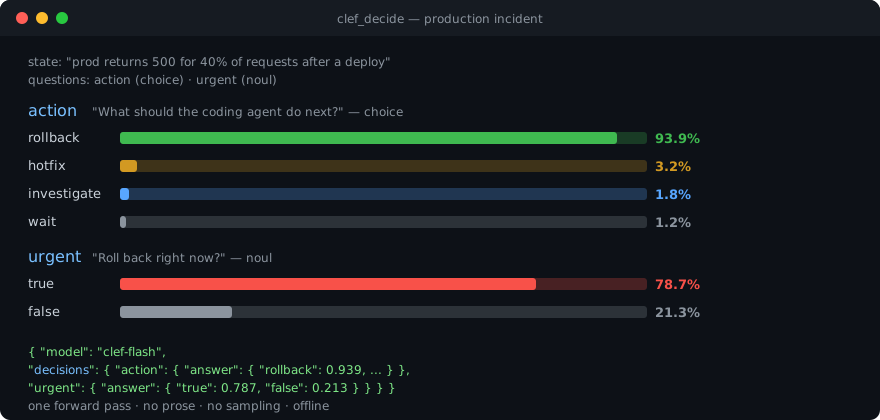
A "reflex" for AI coding agents: structured decisions with probabilities — not prose.
Local MCP server that gives agents (Claude Code, Codex, Cursor, ZCode, …) access to the Clef-Flash decision model (9B, Apache-2.0 by Cloudflare) through a single tool: clef_decide. Pass a state and typed questions, get a probability distribution over your options in one forward pass. Fully local, offline, no tokens burned.
Quick start
# 1. Detect hardware, download the model (~6 GB) + llama.cpp runtime, verify checksum + inference
npx clef-mcp install

# 2. Register the MCP server + agent skill in your clients (zcode, claude-code, codex, cursor)
npx clef-mcp setup

# 3. Run the MCP server (stdio)
npx clef-mcp
clef-mcp (step 3) never downloads anything. If the model is missing, tool calls return a structured MODEL_NOT_INSTALLED error with a hint. Steps 1 and 2 combine: npx clef-mcp install --setup.
Why not just ask the LLM?
| Chat LLM | clef_decide | |
|---|---|---|
| Output | prose, you parse it | strict JSON: probability per option |
| Determinism | varies per run | single forward pass, no sampling |
| Latency (1 decision) | seconds of generation | ~0.5 s local |
| Context cost | grows with every decision | fixed, small schema |
| Privacy | depends on provider | 100% on-device, works offline |
| Calibration | vibes | softmax over trained option scores |
Sweet spot: decision points inside agent loops — next action, routing, classification, severity, yes/no judgment — asked dozens of times per task.
The clef_decide tool
{
  "state": {
    "task": "Fix failing tests",
    "error": "TypeError: Cannot read properties of undefined"
  },
  "questions": {
    "next_action": {
      "type": "choice",
      "instructions": "What should the coding agent do next?",
      "criteria": {
        "inspect": "Inspect the code and gather more information",
        "modify": "Modify the code",
        "test": "Run additional tests",
        "ask_user": "Ask the user for clarification"
      }
    },
    "confidence": {
      "type": "score",
      "instructions": "How confident are you in this decision?",
      "criteria": ["very_low", "low", "medium", "high", "very_high"]
    },
    "is_outage": { "type": "noul", "instructions": "Is a service down?" }
  }
}
| Type | Criteria | Answer |
|---|---|---|
choice | map option id → description, or a plain list | probability per option |
score | ordered list (index = score) | probability per level |
noul | optional {"true": "...", "false": "..."} | {"true": p, "false": 1-p} |
Response — strictly structured, never prose. Each decision carries the model-reported confidence (when the runtime sends it), plus token usage for the call:
{
  "model": "clef-flash",
  "decisions": {
    "next_action": { "answer": { "inspect": 0.72, "modify": 0.12, "test": 0.14, "ask_user": 0.02 }, "confidence": 0.83 },
    "confidence":  { "answer": { "very_low": 0.01, "low": 0.04, "medium": 0.18, "high": 0.61, "very_high": 0.16 }, "confidence": 0.61 },
    "is_outage":   { "answer": { "true": 0.9, "false": 0.1 } }
  },
  "usage": { "input_tokens": 228, "output_tokens": 0, "latency_ms": 512 }
}
Act on the argmax only when the distribution is decisive — top p ≥ 0.8 and high confidence for destructive or security-adjacent calls.
Batch up to 64 questions per call — they are scored in one forward pass. state is treated strictly as data: never executed, never interpreted as instructions for the server.
Prompts & resources
The server ships four MCP prompts (canned, decision-shaped asks — your client lists them via prompts/list):
| Prompt | Purpose |
|---|---|
incident-triage | action + severity + user-impact questions for a production incident |
next-action | what the coding agent should do next + confidence |
ticket-routing | classify a message into a team + urgency |
security-review | vulnerability yes/no, risk scale, first mitigation |
And three resources (read-only, no model needed):
| URI | Contents |
|---|---|
clef-mcp://capabilities | live JSON: model, runtime, limits, error codes |
clef-mcp://evals/schema | how to write eval cases |
clef-mcp://evals/dataset | the bundled 30-case dataset |
Measured, not marketed
Apple M4 Pro, Clef-Flash Q4_K_M (6 GB), single request through the full MCP stdio path:
| Scenario | Latency |
|---|---|
| Cold start (incl. model load, once per session) | ~4.4 s |
| 1 question | ~0.5 s |
| 10 questions, one call | ~2.9 s |
| 64 questions, one call | ~18.6 s |
Quality gate: a 30-case evaluation dataset (coding / security / classification / routing / yes-no) — 86.7% pass on the live model. Run it yourself: clef-mcp evals.
Register with your MCP client
Claude Code
claude mcp add clef-mcp -- clef-mcp
# or, without a global install:
claude mcp add clef-mcp -- npx -y clef-mcp
Codex — ~/.codex/config.toml
[mcp_servers.clef-mcp]
command = "clef-mcp"
args = []
Cursor — .cursor/mcp.json
{
  "mcpServers": {
    "clef-mcp": { "command": "clef-mcp", "args": [] }
  }
}
ZCode — ~/.zcode/cli/config.json (user scope, auto-connect)
{
  "mcp": {
    "servers": {
      "clef-mcp": { "command": "clef-mcp", "args": [], "type": "stdio" }
    }
  }
}
Ready-made snippets: examples/.
Scripting & hooks
No MCP client required — hooks, CI jobs and shell scripts call the same model one-shot:
# Full document on stdin
echo '{"state": "checkout 500s after deploy", "questions": {"is_outage": {"type": "noul", "instructions": "Is a service down?"}}}' \
  | clef-mcp decide

# Or split across files
clef-mcp decide --questions questions.json --state state.json
stdout carries the strict JSON result (same shape as the MCP tool, including confidence and usage); errors go to stderr as structured JSON with exit codes: 2 invalid input, 3 model not installed, 4 runtime missing. decide never downloads anything.
Each plain decide invocation is a cold start (model load included, a few seconds) — fine for gates and triage. For repeated calls, start clef-mcp daemon once: it keeps the model warm on a permission-scoped unix socket in CLEF_HOME (no TCP port, unloads after CLEF_DAEMON_IDLE seconds, default 600), and clef-mcp decide --daemon answers in well under a second, falling back to a cold run when no daemon is running. See examples/hooks/ for a PreToolUse guard and a GitHub Action recipe.
The PreToolUse guard blocks a command when the model judges it destructive (p ≥ 0.9) and tells the agent to ask the user — a block is a pause plus escalation, not a wall; the gate is advisory by design and says so. First real firing on day one: caught a history-rewrite force push (p=0.94) and surfaced its own bypass vector, which is now fixed and documented in the recipe.
Teach your agent (skill)
The schema tells the client what clef_decide accepts; agents also need to know when to reach for it and how to frame decisions. The bundled clef-decisions skill covers decision patterns, batching, criteria writing, distribution interpretation and error recovery:
clef-mcp setup                                                    # automatic
cp -r skills/clef-decisions ~/.agents/skills/                     # manual, from repo
cp -r "$(npm root -g)/clef-mcp/skills/clef-decisions" ~/.agents/skills/  # from npm package
Architecture
flowchart LR
    subgraph clients [MCP clients]
        CC[Claude Code]
        CX[Codex]
        CU[Cursor]
        ZC[ZCode]
    end
    clients -- MCP stdio --> S[clef-mcp<br/>validation · limits · structured errors]
    S -- SystemOne adapter --> R[ClefRuntime<br/>llama.cpp subprocess<br/>127.0.0.1]
    R -- single forward pass --> M[("Clef-Flash<br/>9B · GGUF · local")]
    M -. probabilities .-> S -. strict JSON .-> clients
The ClefRuntime interface (load / decide / unload / health) isolates the engine: MLX or remote runtimes plug in without changing the MCP API. The wire format is POST /v1/systemone — the same contract across llama.cpp and other Clef runtimes.
CLI
clef-mcp              # run the MCP server on stdio (default command)
clef-mcp decide       # one-shot decision (no MCP session): JSON in, JSON out — for hooks, CI, scripts
clef-mcp daemon       # keep the model warm on a local unix socket; `decide --daemon` uses it
clef-mcp install      # detect hardware → download model + runtime → verify checksum → verify inference
clef-mcp setup        # register the MCP server + agent skill in zcode / claude-code / codex / cursor
clef-mcp models       # list models/quantizations and install status
clef-mcp status       # runtime, model, memory summary
clef-mcp doctor       # full diagnosis (platform, RAM, GPU, binary, model, checksum*, inference, MCP config)
clef-mcp uninstall    # remove the model (and optionally the managed runtime)
clef-mcp evals        # run the evaluation dataset against the installed model
Flags: install --quant Q8_0 --yes --skip-probe, install --setup, setup --clients zcode,cursor --no-skill, doctor --deep (re-hash the model file), uninstall --runtime --yes.
Runtimes: llama.cpp and MLX
Two local runtimes behind the same ClefRuntime interface:
llama-cpp (default) | mlx | |
|---|---|---|
| Platforms | macOS, Linux, Windows | macOS / Apple Silicon only |
| Model | GGUF from ggml-org/Clef-Flash-GGUF | MLX 4-bit from mlx-community/clef-flash-4bit |
| Extras | none | uv on PATH (managed Python env) |
| Install | clef-mcp install | clef-mcp install --runtime mlx |
Switch at runtime with CLEF_RUNTIME=mlx (must be set for the MCP server process — e.g. in the client's env block). Both speak the same POST /v1/systemone contract. The MLX snapshot is fetched into CLEF_HOME via a uv-managed huggingface_hub (no global Python state) at a pinned revision.
Configuration
| Variable | Default | Meaning |
|---|---|---|
CLEF_MODEL | clef-flash | Model id (per-call model also accepted) |
CLEF_HOME | ~/.cache/clef-mcp | Cache/model home |
CLEF_RUNTIME | llama-cpp | llama-cpp | mlx |
CLEF_LOG_LEVEL | error | error | warn | info | debug (stderr only) |
CLEF_LLAMA_BIN | – | Explicit llama-server binary path (llama-cpp runtime) |
CLEF_LLAMA_RELEASE_TAG | latest nightly | Pin the managed llama.cpp build |
CLEF_LLAMA_BATCH | 8192 | llama.cpp physical batch (multi-question requests) |
CLEF_MLX_UV | uv on PATH | Explicit uv binary (MLX runtime) |
CLEF_DAEMON_IDLE | 600 | Seconds of idle before the daemon unloads the model (0 = never) |
CLEF_MAX_QUESTIONS | 64 | Max questions per call |
CLEF_MAX_STATE_BYTES | 1048576 | Max serialized state size |
CLEF_MAX_INSTRUCTION_CHARS | 10000 | Max chars per question instructions |
Runtime resolution: CLEF_LLAMA_BIN → managed binary in CLEF_HOME/runtime → llama-server on PATH.
Storage: CLEF_HOME/models/<model>/<quant>/ (model + manifest.json with repo/revision/sha256/license) and CLEF_HOME/runtime/llama.cpp/.
The model is downloaded from the pinned official GGUF conversion (ggml-org/Clef-Flash-GGUF) and sha256-verified against Hugging Face's content hash. It is never repackaged by clef-mcp. Also listed in the official MCP Registry as io.github.HighlyLoadedEgo/clef-mcp.
Error handling
{
  "error": {
    "code": "MODEL_NOT_INSTALLED",
    "message": "Clef model \"clef-flash\" is not installed.",
    "hint": "Run `clef-mcp install`."
  }
}
Codes: MODEL_NOT_INSTALLED, MODEL_LOAD_FAILED, RUNTIME_NOT_FOUND, RUNTIME_INIT_FAILED, RUNTIME_NOT_SUPPORTED, INVALID_INPUT, CLEF_INFERENCE_FAILED, UNSUPPORTED_PLATFORM, OUT_OF_MEMORY, CHECKSUM_MISMATCH, DOWNLOAD_FAILED. Input exceeding the 16k-token model context is rejected with a hint to reduce the state.
Security & data handling
- No network servers, no telemetry, no accounts; everything runs locally.
- The model downloads only on an explicit
install, over HTTPS, checksum-verified. statecontent is passed to the model as data; the server never executes or instruction-interprets it.- Filesystem access is limited to
CLEF_HOME(plus reading standard MCP client config paths indoctor). - The managed runtime is the official llama.cpp build; pin it with
CLEF_LLAMA_RELEASE_TAG.
See SECURITY.md for the full policy.
Development
npm install
npm run build
npm test          # unit + integration (fake llama-server, no model needed)
npm run evals     # needs an installed model; exit code reflects pass rate
See CONTRIBUTING.md and tests/evals/dataset.jsonl.
License
- Code: Apache-2.0.
- Clef / Clef-Flash model: © Cloudflare, Apache-2.0 — see NOTICE.
- llama.cpp runtime: © its authors, MIT-licensed; downloaded as an official prebuilt binary.




