Listed from the MCP registry; nobody on Odel publishes it.
ChatAtlas Local
Search and read your saved ChatGPT and Claude chats, kept on your own computer.
Runs on your machine from its package; the steps are below.
What it does
- Reads
- Writes
- High impact
At most: only reads or looks up information.
What it costs
FreeOdel charges nothing per call. The publisher may charge for its own service.
Runs locally over stdio
This server isn't hosted — your MCP client launches it from a package registry. Use one of the commands below, or drop the config into your client (e.g. Claude Desktop).
Run
npx -y chatatlas-local
MCP client config
{
  "mcpServers": {
    "chatatlas-local": {
      "command": "npx",
      "args": [
        "-y",
        "chatatlas-local"
      ]
    }
  }
}
ChatAtlas Local
Your ChatGPT and Claude chats, searchable on your own computer.
Ask Claude about them. Nothing leaves your machine.




You've had hundreds of conversations with AI assistants. The good answers, the decisions, the half-finished plans are scattered across ChatGPT and Claude, and their own search barely helps.
ChatAtlas Local takes the data exports both of them already give you and keeps every chat in one file on your computer. Then you can:
- Search everything at once, from the terminal or in your browser.
- Ask Claude about it: "what did ChatGPT tell me about my sourdough starter?" or "find the chat where I planned the garden beds." Claude Desktop, Claude Code, Cursor, VS Code and others can read your archive through MCP.
- Keep it forever, as plain Markdown files or a backup, whatever happens to the apps.
No account, no server, no telemetry. It never connects to the internet.
Get started
You need Node.js 22.16 or newer (or 24). Then:
npm install -g chatatlas-local
Before the first npm release, install it straight from GitHub: npm install -g github:hnt504/chatatlas-local
1. Ask for your exports
- ChatGPT: Settings → Data controls → Export data. You get an email with a link to a .zip.
- Claude: Settings → Privacy → Export data. Same idea: an email, then a .zip.
2. Bring them in
chatatlas-local import ~/Downloads/<your ChatGPT export>.zip ~/Downloads/<your Claude export>.zip
✓ 6720ab…-2026-10-21.zip: ChatGPT, 1,284 chats (1,284 new)
✓ data-2026-10-21.zip: Claude, 412 chats (412 new)
Do it again whenever you like with a newer export: new chats come in, changed ones update, nothing doubles up. Or let it happen by itself (see Exports folder).
One Claude chat, every branch. On claude.ai, Retry or editing a message hides the old reply behind a small version switcher, and the next sync of most tools keeps only what is on screen. To save a chat with all of its branches, open it in Chrome, press F12, choose Console, and paste:
(async () => {
  const id = location.pathname.match(/\/chat\/([0-9a-f-]+)/)[1];
  const [org] = await fetch('/api/organizations').then((r) => r.json());
  const chat = await fetch(`/api/organizations/${org.uuid}/chat_conversations/${id}?tree=True&rendering_mode=messages&render_all_tools=true`).then((r) => r.json());
  const a = Object.assign(document.createElement('a'), { href: URL.createObjectURL(new Blob([JSON.stringify(chat)])), download: `claude-${id}.json` });
  a.click();
})();
Then chatatlas-local import claude-<id>.json. The branch on screen comes first; each hidden
branch follows it, opening with "Earlier version, hidden on claude.ai by a retry or an edit."
3. Look around
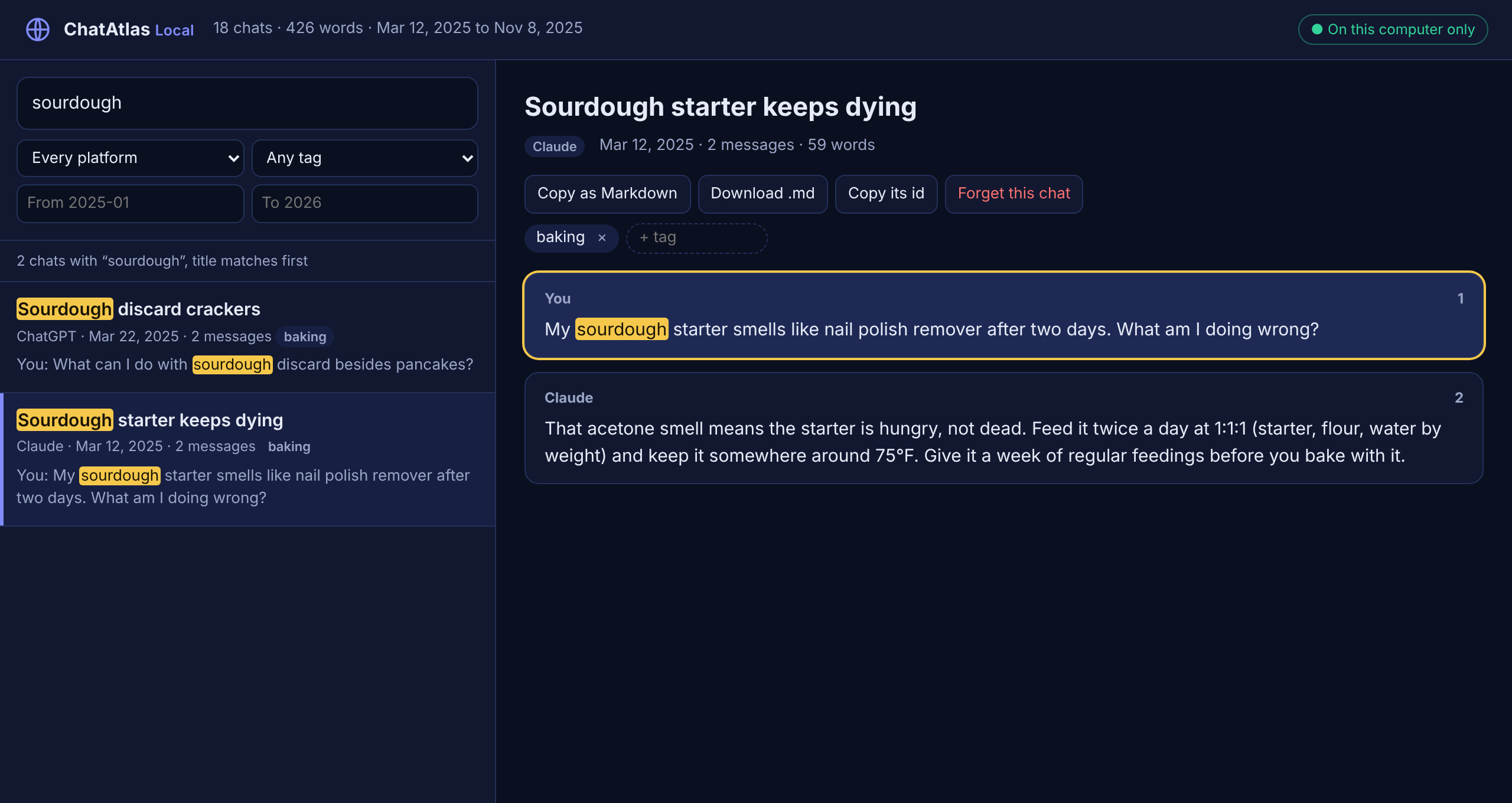
chatatlas-local search sourdough starter
chatatlas-local open            # the browser view in the screenshot above
Connect Claude (and friends)
Claude Desktop
Either download chatatlas-local-<version>.mcpb from the
latest release and open it with
Claude Desktop (it asks where your exports go; no terminal needed), or, with the command
installed:
chatatlas-local setup claude-desktop --write
Quit Claude Desktop completely and open it again. Then ask it something like "Search my old chats for the kitchen remodel estimate."
About the red warning. When you open the extension, Claude Desktop says installing it "will grant this extension access to everything on your computer." It says that for every extension installed from a file rather than from Anthropic's directory, because an extension is a program that runs as you. Here's what this one actually does: it reads your exports and its own archive file, never connects to the internet, and gives Claude read-only tools. The code is all here to check.
Claude Code
Install it as a plugin (the MCP tools and a skill that teaches Claude when to look here):
/plugin install chatatlas-local --marketplace hnt504/chatatlas-local
Or, with the command installed:
chatatlas-local setup claude-code --write   # the MCP tools, for every project
chatatlas-local skill                       # teaches Claude Code when to look here
Cursor, VS Code, Windsurf, Gemini CLI, Codex
chatatlas-local setup                 # shows each app's settings, and whether it's connected
chatatlas-local setup cursor --write  # or vscode, windsurf, gemini-cli, codex
--write keeps a copy of the app's old settings file next to it before changing anything.
Assistants in a browser page (llama.cpp, Open WebUI)
Some assistants run inside a web page and can't start a program the way Claude Desktop does. They
connect to an MCP address instead. mcp --http gives them one, on your computer only:
chatatlas-local mcp --http --allow-origin http://localhost:8081
Then add http://127.0.0.1:8770/mcp as an MCP server in the assistant's settings (in llama.cpp's
web UI, that's the MCP Servers page). Use the address its page opens at for --allow-origin. With
a local model, your chats never leave your computer.
It listens on 127.0.0.1 only, answers only requests addressed to it, and lets in only the pages
you name with --allow-origin (several are fine, separated by commas). Programs on your computer
that aren't browsers can use it too, as they could read the archive file anyway. Use --port for
another port, and --verbose to see each request (never your chats or search words). Stop it with
Ctrl+C.
Here the tools are named chatatlas_search_chats, chatatlas_read_chat and so on. Browser
assistants put every tool in one list, and some have a search_chats of their own (llama.cpp's
web UI does, for chats saved in the web UI), which would otherwise be used instead.
What about ChatGPT?
ChatGPT can't reach a file on your computer, so it can't read your archive here. You can still import your ChatGPT exports and search them from Claude, the terminal or the browser view.
What the assistant can do
Everything is read-only. An assistant can find and read your chats; it can't change, tag or delete anything.
| Tool | What it does |
|---|---|
search_chats | Chats holding every word you asked about, with the best-matching message quoted |
list_chats | Browse by platform, date, words in the title, or tag |
read_chat | Read a conversation message by message (long ones a page at a time) |
recent_topics | What you talked about over a stretch of days, week by week |
archive_overview | What the archive holds and how far back it goes |
An exports folder
Point ChatAtlas Local at a folder (your Downloads, say) and any ChatGPT or Claude export you save there comes in by itself. Other files are left alone, and each file is only read once.
chatatlas-local watch ~/Downloads                              # until you press Ctrl+C
chatatlas-local setup claude-desktop --inbox ~/Downloads --write  # whenever Claude Desktop is open
The Claude Desktop extension asks for this folder when you install it.
Commands
| Command | |
|---|---|
import <file...> | A ChatGPT or Claude export (the .zip, its conversations.json, or the unzipped folder), or a ChatAtlas backup |
search <words...> | Chats holding every word. Each word also finds longer words it starts ("plan" finds "planning"); accents don't matter |
list | Newest first |
show <id> | Read one chat. --md for Markdown, --json for the data. The start of an id is enough |
topics | What you talked about lately (--days 90) |
stats | Chats per platform, chats per month, your tags |
open | The browser view. --read-only, --port 8765, --no-browser |
tag <id> <tag...> | Tag a chat (--remove takes tags off) |
forget <id...> | Take chats out of the archive |
export <folder> | Every chat as a Markdown file, or --format chatatlas for one backup file |
watch <folder> | Bring in exports saved there, and keep watching |
setup [app] [--write] | Connect an assistant |
skill | Install the Claude Code skill |
doctor | Check Node, the archive, the search index and every connected app |
where | Where the archive file is |
Filters for search, list, export and topics: --platform chatgpt, --tag work,
--since 2025-03, --until 2026, --title garden, --limit 50, --offset 50, --json.
Privacy policy
ChatAtlas Local is a program that runs on your computer. It has no servers and no accounts.
- What it collects: nothing. It has no analytics, telemetry or crash reporting, and never makes a network connection.
- What it stores, and where: the chats from the exports you import, plus any tags you add, in
one SQLite file on your computer:
~/.chatatlas-local/chatatlas.db(chatatlas-local wheresays exactly where). Use another with--db <file>or theCHATATLAS_LOCAL_DBsetting. It reads your export files and doesn't change or delete them. - Sharing: ChatAtlas Local shares nothing with anyone, including its author. If you connect an AI assistant (Claude Desktop, Claude Code, Cursor and so on), that assistant can search and read your archive through read-only tools when you ask it to, and what it reads becomes part of your conversation with it, under that assistant's own privacy policy.
- The browser view listens on
127.0.0.1only, answers only requests addressed to it, and every request needs a random key that only the tab it opened knows. mcp --httplistens on127.0.0.1only, answers only requests addressed to it, and refuses any web page you didn't name with--allow-originbefore it reads anything.- How long it's kept: until you delete it.
chatatlas-local forget <id>removes a chat; removing the~/.chatatlas-localfolder removes everything. Your ChatGPT and Claude accounts are never touched. - Installing: npm (or GitHub, for the Claude Desktop extension) serves the download under its own terms; after that, nothing goes over the network.
- Contact: questions go to GitHub issues; anything that could expose someone's chats goes privately through security advisories.
ChatAtlas Local and ChatAtlas Pro
ChatAtlas Local is free and open source, and stays that way. ChatAtlas Pro is the hosted version, for people who want more:
| Local | Pro | |
|---|---|---|
| ChatGPT and Claude exports | ✓ | ✓ |
| Search by words | ✓ | ✓ |
| Claude Desktop, Claude Code, Cursor and more | ✓ | ✓ |
| Your data stays on your computer | ✓ | Kept in your account |
| Gemini, Grok, Perplexity, DeepSeek and more | Through a ChatAtlas backup | ✓ |
| Search by meaning | ✓ | |
| ChatGPT and claude.ai on the web | ✓ | |
| Folders, projects, any device | ✓ |
They speak the same backup format: chatatlas-local export <folder> --format chatatlas makes a
file ChatAtlas Pro imports, and a ChatAtlas backup comes into ChatAtlas Local the same way.
Questions
Which Node do I need? 22.16 or newer, or 24 and up (23 won't do), because ChatAtlas Local uses the SQLite database built
into Node. chatatlas-local doctor checks.
A chat I had yesterday isn't there. The archive holds what was in the exports you imported. Ask for a fresh export and import it (or drop it in your exports folder).
Can it read exports from Gemini or other apps? Not directly yet. ChatAtlas backups can carry chats from any platform, and support for more exports is welcome as a pull request.
How big does it get? About the size of the exports' text. A 60 MB export of 3,000 chats imports in about two seconds and searches in well under a tenth of a second.
Contributing
Bug reports and pull requests are welcome. See CONTRIBUTING.md.







