NavisCoord
Autodesk Navisworks coordination: clash triage, root causes, work plans and reports
Runs on your machine from its package; the steps are below.
What it does
- Reads
- Writes
- High impact
At most: creates or changes data: records, files, settings.
What it costs
FreeOdel charges nothing per call. The publisher may charge for its own service.
Runs locally over stdio
This server isn't hosted — your MCP client launches it from a package registry. Use one of the commands below, or drop the config into your client (e.g. Claude Desktop).
Distributed as an MCP bundle (`https://github.com/HorizunGroup/naviscoord-mcp/releases/download/v1.1.1/naviscoord-1.1.1-win-x64.mcpb`) — download it and import the bundle in your MCP client.
NavisCoord
Your next coordination meeting starts with a decision, not 10,000 clash rows.
Connect Autodesk Navisworks to ChatGPT Desktop Work, Claude Desktop, Claude Code and Codex. Ask what matters, inspect the evidence, and build a coordination plan.



Get started · Release evidence · Report a problem
1.1.1 is public: stable download · official MCP Registry entry.
“Analyze the open model. Show the most important coordination issues, explain their priority, and prepare the work plan. Show me the proposed changes before applying them.”
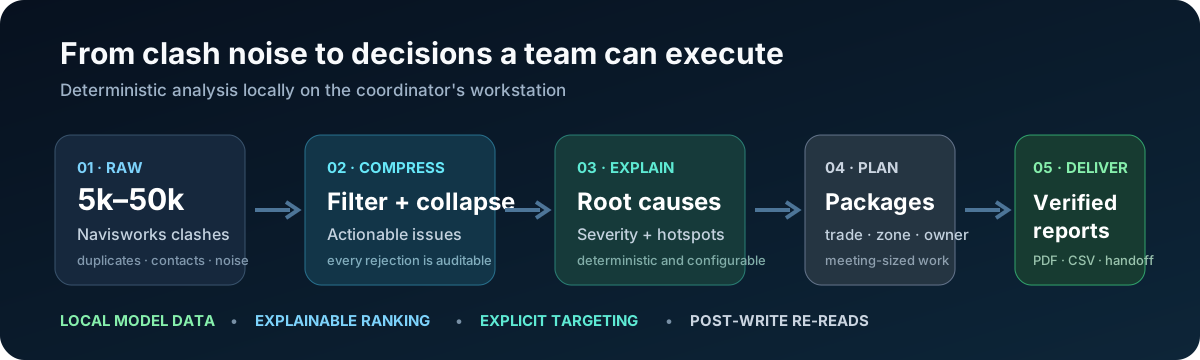
NavisCoord pairs a native Navisworks add-in with an open-source MCP server. The engine runs on your Windows workstation. The desktop runtime includes its Python dependencies: no Python installation, API key or build tools are needed for the packaged local server. Your chosen AI client and Autodesk licence remain separate products.
What you can do
| Ask for | Get back |
|---|---|
| “What needs attention first?” | Ranked issues with deterministic scores and the reasons behind them |
| “Are these really separate problems?” | Spatially bounded groups, duplicate collapse and traceable original clashes |
| “Could one change address several occurrences?” | Root-cause hypotheses, measured evidence and every affected occurrence |
| “What changed since the last delivery?” | Persistent issue identities, saved snapshots and a comparison of changes |
| “Prepare the coordination meeting.” | Work packages, trade ownership, narrative reports and PDF images |
| “Connect this to Revit and Power BI.” | Authoring element IDs, structured handoff files and tables for downstream tools |
| “Apply the reviewed plan.” | Targeted writes with document/revision checks and read-back verification |
53 tools. One server. Four clients. Explore the tool guide.
Choose your client
| Client | Install |
|---|---|
| ChatGPT Desktop — Work | Run the desktop-plugin installer, then open Plugins → Personal → NavisCoord → Install |
| Codex | Use the same personal plugin, or register the executable with codex mcp add |
| Claude Desktop | Install the release .mcpb, which includes the standalone server |
| Claude Code | Install naviscoord-mcp@horizun-navis, or register the executable with claude mcp add |
All four connect to the local workstation. ChatGPT Desktop uses a local plugin; OpenAI Platform, a tunnel and a runtime API key are not part of this installation. See OpenAI’s desktop-plugin documentation.
Install the two pieces
- Navisworks add-in: close Navisworks and run
Install-NavisCoord.ps1. It detects your installed version, verifies the release checksums and backs up managed files. - Your AI client: install the desktop package or
.mcpbfrom Releases. Follow the client-specific instructions. - Open Navisworks Manage, load your federation and ask: “Check NavisCoord, identify the active document and analyze its clashes.”
Windows and a licensed Autodesk Navisworks Manage 2024, 2025 or 2026 are required for live coordination. The standalone analysis engine can also process saved exports without Navisworks.
Built to make the evidence inspectable
- Conservative filtering: a category name alone does not prove that a door, sleeve or slab overlap is intentional. Hosting/contact rules require relationship evidence.
- Freshness checks: changes to geometry, properties, saved selections or clash results invalidate the analysis used for derived writes.
- Complete execution: a folded decision retains its individual occurrences in write-back and Revit handoffs.
- Measured proposals: movement alternatives use element bounds. They are proposals to check against surrounding geometry and design constraints.
- Honest delivery comparisons: an issue missing from a later analysis is not automatically labelled “resolved.” Coverage, exclusions and source changes remain visible.
- Reproducible installation: pinned dependencies, artifact checksums, a standalone runtime and rollback-aware installation.
The release verification record distinguishes automated checks, Navisworks acceptance tests and client verification. A directory listing or a passing test suite is not a promise that software can never fail. External marketplace review is recorded separately from our tests.
Works with your coordination standard
Load a company profile to control disciplines, category/file mappings, tolerances, priorities and coordination rules. Start with the example profile. A model with missing discipline or level data is identified explicitly so the team can map it before relying on the ranking.
NavisCoord produces evidence and proposed coordination actions. Engineering approval and edits in the authoring application remain with the project team. Handoff files carry the IDs needed to continue with tools such as Horizun Revit MCP and Horizun PBI MCP.
Privacy Policy
NavisCoord does not upload the complete model or send telemetry to a Horizun service. Requested tool outputs can include model names, element properties, coordinates and images; your AI client receives those outputs. Read the privacy policy and security model.
Build and contribute
python -m pytest server/tests -q
dotnet run --project addin/NavisCoord.Tests -c Release
See Testing, Releasing and Contributing. Please report reproducible cases with sensitive project information removed.
If NavisCoord helps your team, share a reproducible coordination example and star the repository so other BIM coordinators can find it.
MIT · Built by HorizunGroup · Independent of Autodesk, OpenAI and Anthropic.