Listed from the MCP registry; nobody on Odel publishes it.

sextant
Search your own PDFs, Markdown and text files from any assistant. Local, no key, cited passages.
Runs on your machine from its package; the steps are below.
What it does
- Reads
- Writes
- High impact
At most: creates or changes data: records, files, settings.
What it costs
FreeOdel charges nothing per call. The publisher may charge for its own service.
Runs locally over stdio
This server isn't hosted — your MCP client launches it from a package registry. Use one of the commands below, or drop the config into your client (e.g. Claude Desktop).
Run
uvx sextant-kb
MCP client config
{
  "mcpServers": {
    "sextant": {
      "command": "uvx",
      "args": [
        "sextant-kb"
      ]
    }
  }
}Search your own documents from any AI assistant — and see the numbers that say how well the search works.
sextant is a knowledge base that runs on your own machine as a standard Model Context Protocol server. Point it at a folder of PDF, Markdown or text files, plug it into Claude Desktop or any other MCP client, and ask. Answers come from your documents and name the file and the page.
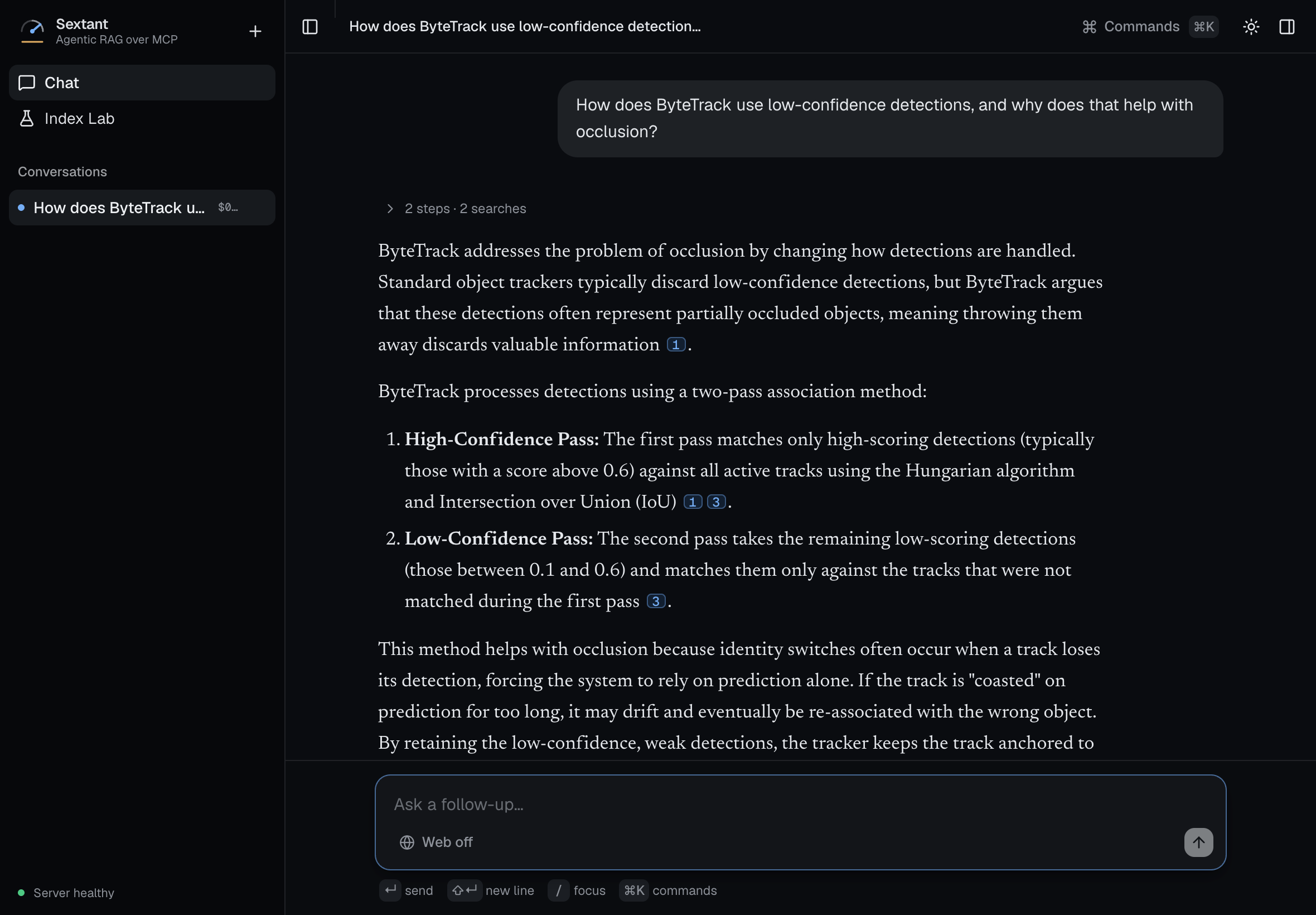
A real answer from the project's own web interface (2026-11-12). Each numbered marker opens the passage it came from.
Quickstart
Four steps. Most of the time is two downloads — about 170 MB of libraries, then about 180 MB of search models. No account and no key. It needs Python 3.11 to 3.14 — check first, because an older or newer one fails with a confusing "no matching distribution" message:
python3 --version
1. Install it into a folder of its own, so its location is known:
python3 -m venv ~/sextant
~/sextant/bin/pip install sextant-kb
2. Add your documents — any folder of PDF, Markdown or text files.
Scanned PDFs are read with text recognition, which downloads about 4 MB
the first time it meets one; for another language set
SEXTANT_OCR_LANG=eng+mar (English and Marathi) or eng+hin.
~/sextant/bin/sextant-ingest ~/Documents/notes -r
The first run downloads the search models, once; after that it works
offline. A note that it is storing text only is expected: an optional
model-written overview per document needs a Gemini key, and nothing else
does. Searching happens on your machine, over the folder you choose. Your
assistant reads only the passages that answer each question, as it would if it
opened those files itself, and sextant hides card numbers, CVVs, passwords,
PINs, keys and identity or bank account numbers in them first (What is
hidden, below). To add more documents later, quit the
assistant first: only one program may write the library at a time, and
sextant-ingest refuses, saying so, while an assistant has it open.
3. Plug it into your assistant. In Claude Desktop: Settings → Developer →
Edit Config, then add this and restart the app. The command must be a full
path; echo ~/sextant/bin/sextant-kb prints yours.
{
  "mcpServers": {
    "knowledge-base": {
      "command": "/Users/you/sextant/bin/sextant-kb"
    }
  }
}
4. Ask. For example: "Search my knowledge base — what do my notes say about onboarding?" The assistant calls the search tool and answers from your documents, with the source of each passage.
To see what is indexed, or take a document back out:
~/sextant/bin/sextant-forget --list
Any other MCP client works the same way: its server command is the full path
to sextant-kb. On Windows the config file is
%APPDATA%\Claude\claude_desktop_config.json and a virtual environment keeps
its commands in Scripts\ rather than bin/; this project has not been
tested on Windows.
Claude Desktop: one file
A sextant-<version>.mcpb file, from the
releases page, installs
it in the Claude desktop app with no terminal: double-click it, choose the folder to search, and wait while it
indexes. It needs Python 3.11 to 3.14 on the computer. Without one, the
app downloads Python (about 20 MB) from github.com during the install, which
is where two of the first three people to try it got stuck:
- "operation timed out" while downloading
cpython-…from github.com: the network blocked or slowed that site. Switch networks (a phone hotspot works), or install Python 3.12 from python.org, quit Claude fully, and install the file again. onnxruntimehas no wheel (or no matching distribution) for the computer: an older bundle picked a Python newer than 3.14. Use a bundle from 0.11.2 or later, which asks for a supported one.
On a Mac with Apple silicon there is a second file,
sextant-<version>-macos-arm64.mcpb (about 330 MB), which carries its own
Python, libraries and search models: from 0.12.6 it downloads nothing, at
install or on its first start, so neither error above can happen and it
works with no internet connection. Reading scans in a language other than
English downloads a few MB once. The other file downloads the search models
(about 180 MB) on its first start.
One line instead: Claude Code, VS Code, Cursor
With uv installed, one pasted line replaces the
four steps: it installs sextant, tells the assistant about it, and points it
at a folder. Change ~/Documents to the folder you want searched. Each line
runs --version first, so the first install (a few hundred MB) finishes in
the terminal rather than timing out inside the assistant. When the assistant
starts it, the folder is indexed in the background and kb_stats shows the
progress and any file it could not read. While it runs, files added, changed
or deleted in the folder show up in search within about a minute; only files
it indexed from the folder are ever removed, and a folder that goes missing
(an unplugged drive) removes nothing. --python keeps uv off a Python
newer than sextant's libraries support.
Claude Code (the terminal program; for the Claude desktop app, use the
.mcpb bundle instead):
uvx --python '>=3.11,<3.15' --from 'sextant-kb>=0.11.1' sextant-kb --version && claude mcp add sextant --scope user --env SEXTANT_FOLDER=~/Documents -- uvx --python '>=3.11,<3.15' --from 'sextant-kb>=0.11.1' sextant-kb
VS Code (needs the code command: in VS Code run Shell Command: Install
'code' command in PATH once):
uvx --python '>=3.11,<3.15' --from 'sextant-kb>=0.11.1' sextant-kb --version && code --add-mcp '{"name":"sextant","command":"uvx","args":["--python",">=3.11,<3.15","--from","sextant-kb>=0.11.1","sextant-kb"],"env":{"SEXTANT_FOLDER":"~/Documents"}}'
Cursor: add this to ~/.cursor/mcp.json. It has not been tried in
Cursor yet.
{"mcpServers": {"sextant": {"command": "uvx", "args": ["--python", ">=3.11,<3.15", "--from", "sextant-kb>=0.11.1", "sextant-kb"], "env": {"SEXTANT_FOLDER": "~/Documents"}}}}
What your assistant gets
| Tool | Does |
|---|---|
kb_search | Finds the passages that answer a question, ranked, with source and page |
kb_list | Lists every document with its title, size and what it is about |
kb_ingest | Adds documents; re-using an id replaces the old version |
kb_stats | Library size, search model, where it is stored |
kb_ann_benchmark, kb_ann_compare | Compare index types on your own library |
kb_selftest_sample, kb_selftest_grade | A self-test: your assistant writes a question for a sample of passages and sextant checks whether search finds each one. Ask "how well does search work on my documents?". It answers with a short report: one score with how far chance could move it, the questions it missed, the files search cannot use (scanned, empty or copies), and at most one thing to fix first, backed by a number. A rough guide: on public test sets it followed true quality only roughly |
What is hidden
Every tool result passes through one filter before your assistant sees it.
Card numbers (checked with the card checksum), CVVs, passwords, PINs,
one-time codes, API keys and tokens, private keys, and Aadhaar, PAN,
passport, voter ID, driving licence and bank account numbers become
[hidden: CVV] and so on, and the result says what was hidden. No tool
argument turns it off, so asking for the value does not show it: the assistant
points you to the file and page instead. Your files and the index are not
changed. Names, addresses, dates of birth, phone numbers and e-mail addresses
are left readable, since most questions about your own documents are about
them. The filter matches patterns and labels ("Password: …"), so a secret
written in a plain sentence with no label can still get through: keep
documents you would never show anyone out of the folder.
Your library is stored in your user-data folder (set SEXTANT_CHROMA_DIR to
move it), never inside the install, so reinstalling does not lose it.
How good is the search
Measured, on a committed test set, and re-checked on every change:
| Search stage | Right passage first |
|---|---|
| Meaning search only | 87% |
| Keyword search only | 78% |
| Both, fused | 91% |
| Both, fused, then re-read (the shipped pipeline) | 93% |
65 test questions over 21 documents. Asked 10 questions those documents cannot answer, it declines 8.
On three public test sets (BEIR) the full search beats the published BM25 + re-reading baseline on all three sets; where a stage loses to a plain baseline is the first thing on the results page.
The full comparison, the nine ideas that were measured and rejected, and what
a question costs are on one page: docs/RESULTS.md. Every
figure there is generated from the measurement files.
The full app (optional)
The package above is the reusable part. This repository also holds what is built on it: an agent that decides for itself what to look up, a web interface with clickable citations, and the evaluation tools. That part needs a Gemini API key, which is the only key the project reads.
git clone https://github.com/hulagerushikesh/sextant && cd sextant
python3 -m venv .venv && ./.venv/bin/pip install -e ".[dev]" && (cd frontend && npm install)
cp .env.example .env
Add your key to .env, then:
./start_all_services.sh
The interface opens on http://localhost:3000. Or run both halves in
containers with docker compose up --build. Details, every setting and the
HTTP routes are in docs/running.md.
Honest status
Last checked 2026-11-12.
| What | State |
|---|---|
| Search over your own documents: PDF, Markdown, text; add, replace, remove | Working |
Standard MCP server, published as sextant-kb | Working — on the public package index and in the official MCP registry as io.github.hulagerushikesh/sextant; the quickstart installs the latest release |
| Measured search quality with a check on every change | Working |
| Agent, web interface, citations, cost per question, daily spend cap | Working |
| Each person's uploads kept apart on a shared deployment | Working — proven on a hosted box 2026-11-04 |
| Hosted demo | None. The hosted box was removed 2026-11-13; deploy/ is the recipe to build one |
| Used by anyone outside the project | Not yet — see planning/PLAN.md |
Known limits, stated plainly, are in docs/known-issues.md.
The two that matter most to a new user: a scanned PDF is read by text
recognition, in English unless you name other languages, so a poor scan gives
wrong words; and the test questions were written alongside the test
documents, so the numbers grade the search pipeline, not your library.
Read more
| Page | What is in it |
|---|---|
docs/RESULTS.md | The numbers, and what was rejected |
docs/how-it-works.md | The agent loop, the search stages and why each exists, the model port |
docs/running.md | Setup, settings, routes, repository layout |
docs/interface.md | What the web interface does and why |
docs/known-issues.md | Limits and deliberate trade-offs |
docs/history.md | The roadmap as it was built, phase by phase |
learning/ | A study path, plus the note behind every measurement |
planning/ | The plan, progress and cost |
License
MIT licensed — see LICENSE.
PDF reading uses PyMuPDF, which is AGPL-licensed.







