Listed from the MCP registry; nobody on Odel publishes it.

Choreo Labs Docs
RAG search over Choreo Labs (formerly WSO2) docs: APIM, IS, MI, Choreo, Ballerina, via pgvector.
Runs on your machine from its package; the steps are below.
What it does
- Reads
- Writes
- High impact
At most: only reads or looks up information.
What it costs
FreeOdel charges nothing per call. The publisher may charge for its own service.
Runs locally over stdio
This server isn't hosted — your MCP client launches it from a package registry. Use one of the commands below, or drop the config into your client (e.g. Claude Desktop).
Run
npx -y choreo-labs-docs-mcp-server
MCP client config
{
  "mcpServers": {
    "choreo-labs-docs": {
      "command": "npx",
      "args": [
        "-y",
        "choreo-labs-docs-mcp-server"
      ]
    }
  }
}Choreo Labs Docs MCP Server



"This is an unofficial community project. Not affiliated with or endorsed by Choreo Labs (formerly WSO2)."
Renamed from
wso2-docs-mcp-server. WSO2 is now Choreo Labs, so this package is nowchoreo-labs-docs-mcp-serverand its tools are*_choreo_*. Upgrading fromwso2-docs-mcp-server? See Migrating from wso2-docs-mcp-server.
A production-ready Model Context Protocol (MCP) server that provides AI assistants (Claude Desktop, Claude Code, Cursor, VS Code) with semantic search over Choreo Labs (formerly WSO2) documentation via Retrieval-Augmented Generation (RAG).
Under the hood, it uses a blazing-fast dual-ingestion engine:
- GitHub Native: Fetches raw Markdown directly from Choreo Labs' public GitHub repositories (the
wso2org) via the Git Trees API (avoids web-scraping noise and rate limits) - Web Crawl Fallback: For products without dedicated GitHub docs repos (like the Choreo Labs Library)
Architecture
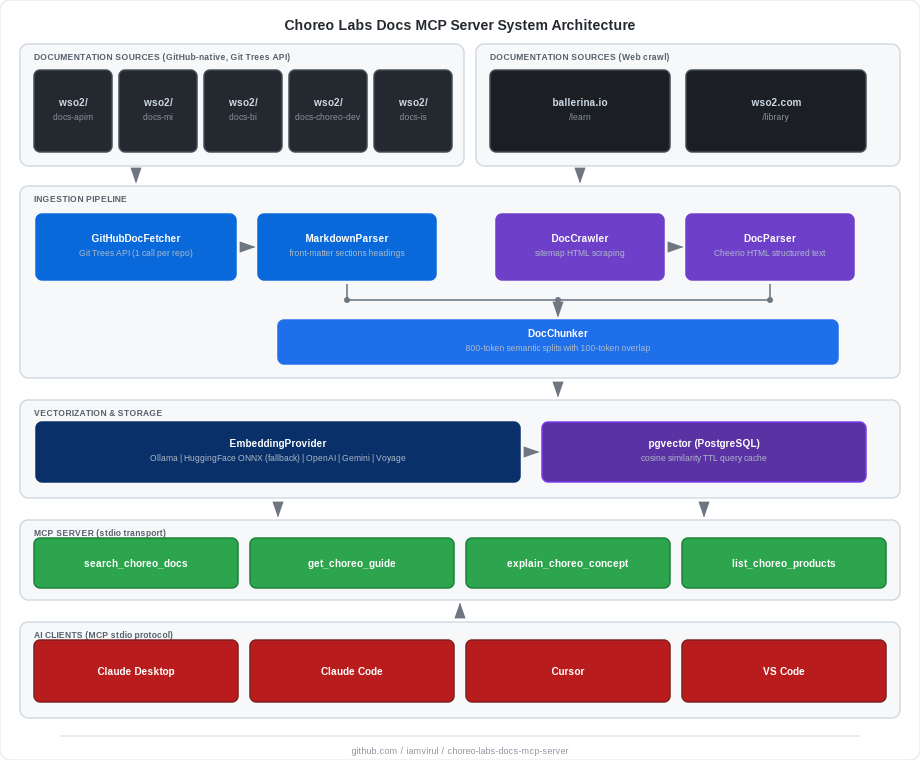
Documentation Sources
| Product | ID | URL |
|---|---|---|
| API Manager | apim | https://apim.docs.wso2.com |
| Micro Integrator | mi | https://mi.docs.wso2.com/en/4.4.0 |
| Ballerina Integrator | bi | https://bi.docs.wso2.com |
| Choreo | choreo | https://wso2.com/choreo/docs |
| Identity Server | is | https://is.docs.wso2.com/en/latest |
| Ballerina | ballerina | https://ballerina.io/learn |
| Choreo Labs Library | library | https://wso2.com/library |
Prerequisites
- Node.js ≥ 20
- Docker (for pgvector)
- Embeddings - no API key required by default:
- Ollama (recommended) - runs locally, model auto-downloaded on first run
- If Ollama is not running, the server automatically falls back to HuggingFace ONNX (in-process, also downloads automatically)
- Cloud providers are also supported: OpenAI, Google Gemini, Voyage AI
Quick Start
Choose the setup path that fits your use case:
- Install from npm - simplest, no cloning required
- Clone and build - for development or contributions
Install from npm
Install the package globally to get the choreo-labs-docs-mcp-server, choreo-labs-docs-crawl, and choreo-labs-docs-migrate commands available system-wide:
npm install -g choreo-labs-docs-mcp-server
Prefer no global install? You can use
npx choreo-labs-docs-mcp-server,npx choreo-labs-docs-crawl, andnpx choreo-labs-docs-migratein every step below - just replace the bare command with itsnpxequivalent.
1. Start pgvector
Download the docker-compose.yml and start the database:
curl -O https://raw.githubusercontent.com/iamvirul/choreo-labs-docs-mcp-server/main/docker-compose.yml
docker compose up -d
2. Start Ollama (optional but recommended)
Install Ollama and pull the default embedding model:
ollama pull nomic-embed-text
ollama serve
No Ollama? Skip this step. The server automatically falls back to HuggingFace ONNX - model downloads on first use with no extra setup.
3. Run database migration
DATABASE_URL="postgresql://choreomcp:choreomcp@localhost:5432/choreodocs" \
  choreo-labs-docs-migrate
Run migration again whenever you change
EMBEDDING_DIMENSIONS(i.e. switch embedding provider). The script detects and handles dimension changes automatically.
4. Index Choreo Labs documentation
# Index all products (first run downloads the embedding model automatically)
DATABASE_URL="postgresql://choreomcp:choreomcp@localhost:5432/choreodocs" \
  choreo-labs-docs-crawl

# Index a single product (faster, great for testing)
DATABASE_URL="postgresql://choreomcp:choreomcp@localhost:5432/choreodocs" \
  choreo-labs-docs-crawl --product ballerina --limit 20

# Force re-index even unchanged pages
DATABASE_URL="postgresql://choreomcp:choreomcp@localhost:5432/choreodocs" \
  choreo-labs-docs-crawl --force
Available product IDs: apim, mi, bi, choreo, is, ballerina, library
5. Configure your AI client
The MCP server is launched on demand by your AI client - no background process needed.
Claude Desktop - edit ~/Library/Application Support/Claude/claude_desktop_config.json:
{
  "mcpServers": {
    "choreo-labs-docs": {
      "command": "choreo-labs-docs-mcp-server",
      "env": {
        "DATABASE_URL": "postgresql://choreomcp:choreomcp@localhost:5432/choreodocs",
        "EMBEDDING_PROVIDER": "ollama"
      }
    }
  }
}
Claude Code - run once in your terminal:
claude mcp add choreo-labs-docs \
  --transport stdio \
  -e DATABASE_URL="postgresql://choreomcp:choreomcp@localhost:5432/choreodocs" \
  -e EMBEDDING_PROVIDER="ollama" \
  -- choreo-labs-docs-mcp-server

# Verify
claude mcp list
Cursor - create .cursor/mcp.json in your project root:
{
  "mcpServers": {
    "choreo-labs-docs": {
      "command": "choreo-labs-docs-mcp-server",
      "env": {
        "DATABASE_URL": "postgresql://choreomcp:choreomcp@localhost:5432/choreodocs",
        "EMBEDDING_PROVIDER": "ollama"
      }
    }
  }
}
VS Code - create .vscode/mcp.json:
{
  "servers": {
    "choreo-labs-docs": {
      "type": "stdio",
      "command": "choreo-labs-docs-mcp-server",
      "env": {
        "DATABASE_URL": "postgresql://choreomcp:choreomcp@localhost:5432/choreodocs",
        "EMBEDDING_PROVIDER": "ollama"
      }
    }
  }
}
Using
npxinstead of global install? Replace"command": "choreo-labs-docs-mcp-server"with"command": "npx"and add"args": ["-y", "choreo-labs-docs-mcp-server"].
Cloud embedding provider? Add the key to
env, e.g."EMBEDDING_PROVIDER": "openai", "OPENAI_API_KEY": "sk-...".
Clone and build
1. Clone and install
git clone https://github.com/iamvirul/choreo-labs-docs-mcp-server.git
cd choreo-labs-docs-mcp-server
npm install
2. Start Ollama (optional but recommended)
Install Ollama and start it:
ollama serve
No Ollama? Skip this step. The server detects Ollama is not running and automatically falls back to HuggingFace ONNX inference - the model downloads on first use with no extra setup.
3. Configure environment
cp .env.example .env
# Defaults work out of the box with Ollama.
# Only edit if using a cloud provider (OpenAI / Gemini / Voyage).
4. Start pgvector
docker compose up -d
# pgAdmin available at http://localhost:5050 (admin@choreomcp.local / admin)
5. Run database migration
npm run db:migrate
Note: Run migration again whenever you change
EMBEDDING_DIMENSIONS(i.e. switch embedding provider). The script detects and handles dimension changes automatically.
6. Index documentation
# Index all products
# On first run the embedding model is downloaded automatically (Ollama or HuggingFace)
npm run crawl

# Index a single product (faster, great for testing)
npm run crawl -- --product ballerina --limit 20

# Force re-index even unchanged pages
npm run crawl -- --force
7. Build and start the MCP server
npm run build
npm start
For development (no build step):
npm run dev
8. Configure your AI client
Replace
/ABSOLUTE/PATH/TO/choreo-labs-docs-mcp-serverwith your actual clone path.
Claude Desktop - edit ~/Library/Application Support/Claude/claude_desktop_config.json:
{
  "mcpServers": {
    "choreo-labs-docs": {
      "command": "node",
      "args": ["/ABSOLUTE/PATH/TO/choreo-labs-docs-mcp-server/dist/src/index.js"],
      "env": {
        "DATABASE_URL": "postgresql://choreomcp:choreomcp@localhost:5432/choreodocs",
        "EMBEDDING_PROVIDER": "ollama"
      }
    }
  }
}
Claude Code:
claude mcp add choreo-labs-docs \
  --transport stdio \
  -e DATABASE_URL="postgresql://choreomcp:choreomcp@localhost:5432/choreodocs" \
  -e EMBEDDING_PROVIDER="ollama" \
  -- node "/ABSOLUTE/PATH/TO/choreo-labs-docs-mcp-server/dist/src/index.js"

# Verify
claude mcp list
See config-examples/claude_code.sh for a convenience script.
Cursor - create .cursor/mcp.json - see config-examples/cursor_mcp.json.
VS Code - create .vscode/mcp.json - see config-examples/vscode_mcp.json.
MCP Tools
| Tool | Description |
|---|---|
search_choreo_docs | Semantic search across all products. Optional product and limit filters. |
get_choreo_guide | Search within a specific product (apim, mi, bi, choreo, is, ballerina, library). |
explain_choreo_concept | Broad concept search across all products, returns 8 top results. |
list_choreo_products | Returns all supported products with IDs and base URLs. |
Example response
[
  {
    "title": "Deploying WSO2 API Manager",
    "snippet": "WSO2 API Manager can be deployed in various topologies…",
    "source_url": "https://apim.docs.wso2.com/en/latest/install-and-setup/...",
    "product": "apim",
    "section": "Deployment Patterns",
    "score": 0.8712
  }
]
Migrating from wso2-docs-mcp-server
WSO2 is now Choreo Labs. Version 2.0.0 renames this package to match. Upstream docs URLs, product IDs (apim, mi, bi, choreo, is, ballerina, library) and product names are unchanged. The one exception is the library source, which is now named "Choreo Labs Library" (formerly "WSO2 Library").
| What | Before (≤ 1.x) | After (≥ 2.0) |
|---|---|---|
| npm package | wso2-docs-mcp-server | choreo-labs-docs-mcp-server |
| CLI commands | wso2-docs-mcp-server, wso2-docs-crawl, wso2-docs-migrate | choreo-labs-docs-mcp-server, choreo-labs-docs-crawl, choreo-labs-docs-migrate |
| MCP tools | search_wso2_docs, get_wso2_guide, explain_wso2_concept, list_wso2_products | search_choreo_docs, get_choreo_guide, explain_choreo_concept, list_choreo_products |
| MCP Registry name | io.github.iamvirul/wso2-docs-mcp-server | io.github.iamvirul/choreo-labs-docs-mcp-server |
Default MCP_SERVER_NAME | wso2-docs-mcp | choreo-labs-docs-mcp |
| docker-compose DB user / db | wso2mcp / wso2docs | choreomcp / choreodocs |
Steps
- Swap the package:
npm uninstall -g wso2-docs-mcp-server && npm install -g choreo-labs-docs-mcp-server(or changenpx -y wso2-docs-mcp-servertonpx -y choreo-labs-docs-mcp-server). - In your MCP client config, update
command/argsto the new binary names. You can also rename the server key (e.g."wso2-docs"→"choreo-labs-docs"). - Update any prompts, agent instructions or tool allowlists that reference the old tool names.
- Database — pick one:
- Keep your existing index (no re-crawl): Compose names the data volume
<project>_pgvector_data, and the project name defaults to the directory you rundocker composefrom. Renaming or re-cloning the repo (the new default clone directory ischoreo-labs-docs-mcp-server) therefore points Compose at a new, empty volume. Find your existing volume withdocker volume ls | grep pgvector_data, then either keep running Compose from the original directory or pin the old project name, e.g.COMPOSE_PROJECT_NAME=wso2-docs-mcp-server docker compose up -d(use the prefix shown before_pgvector_data). Leave your currentDATABASE_URL(postgresql://wso2mcp:wso2mcp@localhost:5432/wso2docs) as is: Postgres ignores the newPOSTGRES_*values indocker-compose.ymlbecause that volume is already initialised, so the old credentials keep working. - Start fresh with the new defaults:
docker compose down -v, download the newdocker-compose.yml,docker compose up -d, then runchoreo-labs-docs-migrateandchoreo-labs-docs-crawlwithpostgresql://choreomcp:choreomcp@localhost:5432/choreodocs.
- Keep your existing index (no re-crawl): Compose names the data volume
The schema is unchanged, so you don't need a data migration.
Local Embeddings
The default EMBEDDING_PROVIDER=ollama runs entirely on your machine with no API key. The startup sequence is:
Is Ollama running?
├── Yes → Is model present?
│         ├── Yes → Ready (instant)
│         └── No  → Pull via Ollama (streamed, runs once)
└── No  → Download ONNX model from HuggingFace Hub (~250 MB, cached after first run)
           and run inference in-process via @huggingface/transformers
Both paths use nomic-embed-text / Xenova/nomic-embed-text-v1 by default and produce identical 768-dim vectors, so you can switch between them without re-indexing.
Hardware acceleration (HuggingFace ONNX fallback)
When Ollama is not available, the server auto-detects the best compute backend:
| Machine | Detection | ONNX dtype | Batch size | Throughput |
|---|---|---|---|---|
| Apple Silicon (M1/M2/M3/M4) | process.arch === 'arm64' | q8 INT8 | 32 | ~9 ms/chunk |
| NVIDIA GPU | nvidia-smi probe | fp32 | 64 | GPU-dependent |
| All others | fallback | q8 INT8 | 16 | ~10 ms/chunk |
Why q8 on Apple Silicon instead of CoreML/Metal?
CoreML compiles Metal shaders on first use (~20 min cold-start). For the typical chunk sizes produced by this server (6–20 chunks per page), the CPU↔GPU transfer overhead eliminates any inference gain. INT8 quantized inference on ARM NEON SIMD is consistently ~100× faster than fp32 CPU with zero cold-start cost.
Benchmark (Apple M-chip, Xenova/nomic-embed-text-v1):
fp32 CPU (before): ~1,000 ms/chunk   (68 chunks ≈ 68 s of embedding)
q8  ARM NEON:          ~9 ms/chunk   (68 chunks ≈  0.6 s of embedding)  ← ~100× speedup
Note: For small crawls (≤ 10 pages) total wall-clock time is dominated by network I/O (HTTPS fetches to docs sites), so the end-to-end improvement is modest. The embedding speedup becomes significant at scale - crawling 500+ pages where embedding previously accounted for hours of runtime. For best crawl performance, run Ollama (
ollama serve) which parallelises inference natively and has no per-chunk overhead.
Environment Variables
Core
| Variable | Default | Description |
|---|---|---|
DATABASE_URL | - | PostgreSQL connection string (required) |
EMBEDDING_PROVIDER | ollama | ollama | openai | gemini | voyage |
EMBEDDING_DIMENSIONS | 768 | Must match model output dimensions |
CRAWL_CONCURRENCY | 5 | Concurrent HTTP requests during crawl |
CHUNK_SIZE | 800 | Approximate tokens per chunk |
CHUNK_OVERLAP | 100 | Overlap tokens between chunks |
CACHE_TTL_SECONDS | 3600 | In-memory query cache TTL |
TOP_K_RESULTS | 10 | Default search result count |
Ollama (default)
| Variable | Default | Description |
|---|---|---|
OLLAMA_BASE_URL | http://localhost:11434 | Ollama server URL |
OLLAMA_EMBEDDING_MODEL | nomic-embed-text | Model pulled and used via Ollama |
HUGGINGFACE_EMBEDDING_MODEL | Xenova/nomic-embed-text-v1 | ONNX fallback when Ollama is not running |
Cloud providers
| Variable | Default | Description |
|---|---|---|
OPENAI_API_KEY | - | Required if EMBEDDING_PROVIDER=openai |
OPENAI_EMBEDDING_MODEL | text-embedding-3-small | OpenAI model |
GEMINI_API_KEY | - | Required if EMBEDDING_PROVIDER=gemini |
GEMINI_EMBEDDING_MODEL | text-embedding-004 | Gemini model |
VOYAGE_API_KEY | - | Required if EMBEDDING_PROVIDER=voyage |
VOYAGE_EMBEDDING_MODEL | voyage-3 | Voyage model |
Embedding dimension reference
| Provider | Model | Dimensions |
|---|---|---|
| Ollama / HuggingFace | nomic-embed-text / Xenova/nomic-embed-text-v1 | 768 (default) |
| Ollama / HuggingFace | mxbai-embed-large / Xenova/mxbai-embed-large-v1 | 1024 |
| Ollama / HuggingFace | all-minilm / Xenova/all-MiniLM-L6-v2 | 384 |
| OpenAI | text-embedding-3-small | 1536 |
| OpenAI | text-embedding-3-large | 3072 |
| Gemini | text-embedding-004 | 768 |
| Voyage | voyage-3 | 1024 |
| Voyage | voyage-3-lite | 512 |
Scheduled Re-indexing
# Run a one-off re-index (checks hashes, skips unchanged pages)
npm run reindex

# Or from the project directory using node-cron (runs daily at 2 AM)
DATABASE_URL=... node -e "
  const { ReindexJob } = require('./dist/jobs/reindexDocs');
  const job = new ReindexJob();
  job.initialize().then(() => job.scheduleDaily());
"
Project Structure
src/
  config/          env.ts · constants.ts
  vectorstore/     pgvector.ts · schema.sql
  ingestion/       crawler.ts · parser.ts · githubFetcher.ts · markdownParser.ts · chunker.ts · embedder.ts
  server/          mcpServer.ts · toolRegistry.ts
  jobs/            reindexDocs.ts
  index.ts
scripts/
  crawl.ts         CLI ingestion pipeline
  migrate.ts       Dynamic schema migration
config-examples/   claude_desktop.json · claude_code.sh · cursor_mcp.json · vscode_mcp.json
docker-compose.yml
.env.example
Development
# Type-check
npx tsc --noEmit

# Run crawl with tsx (no build needed)
npm run crawl -- --product ballerina --limit 5

# Run server in dev mode
npm run dev







