Listed from the MCP registry; nobody on Odel publishes it.

AICortex
Self-hosted brain for any LLM: memory, skills, encrypted vault, devices and scheduled jobs.
Runs on your machine from its package; the steps are below.
What it does
- Reads
- Writes
- High impact
At most: moves money, runs code or commands, deletes data, or sends messages for you.
What it costs
FreeOdel charges nothing per call. The publisher may charge for its own service.
Runs locally over stdio
This server isn't hosted — your MCP client launches it from a package registry. Use one of the commands below, or drop the config into your client (e.g. Claude Desktop).
Run
docker run -i --rm ghcr.io/ikarusmk/aicortex:v2.8.0
MCP client config
{
  "mcpServers": {
    "aicortex": {
      "command": "docker",
      "args": [
        "run",
        "-i",
        "--rm",
        "ghcr.io/ikarusmk/aicortex:v2.8.0"
      ]
    }
  }
}
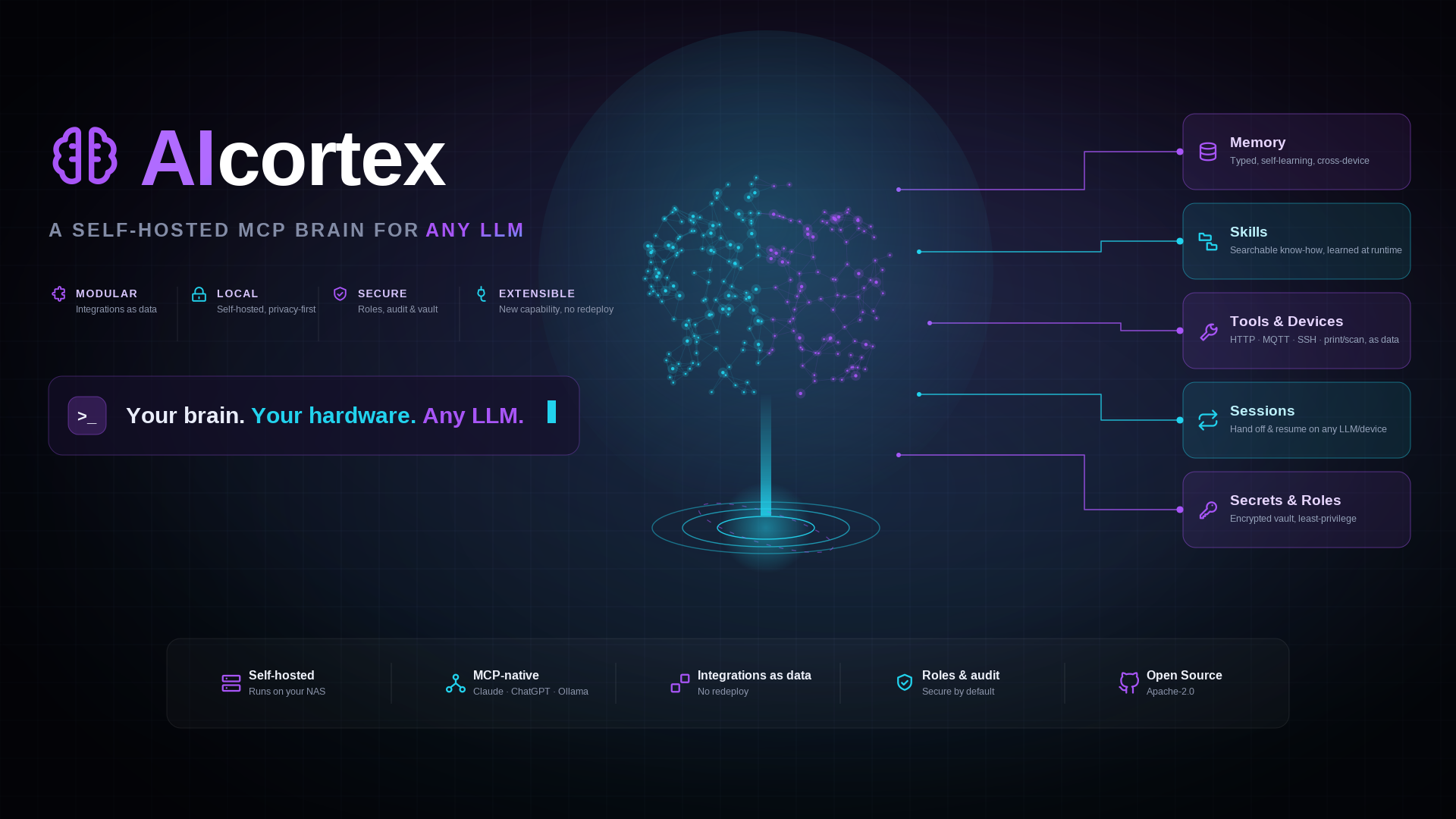





A private, self-hosted brain for your LLM — on your own NAS.
In 30 seconds: AICortex is one container on your own hardware that every AI you use connects to.
- It remembers who you are, how you work and what you're building — and hands that to Claude, ChatGPT or a local model at the start of every chat, on desktop and phone.
- It reaches your stuff — services, devices, mail, calendars, files — with the secrets in an encrypted vault the model never sees.
- It keeps your schedule: tell your AI "tomorrow at 8: summarise yesterday's notes". AICortex stores the job and at 8 wakes your Claude (or asks ChatGPT, an API key or a local Ollama) to do it.
Try it in 5 minutes · Run it on your NAS · More screenshots · Connect your AI
AICortex is a self-hosted MCP server that turns your NAS into a personal LLM connector: a persistent "brain" your assistant loads at the start of every session. Any MCP-capable LLM — Claude, ChatGPT, or a fully local model — gains a durable identity and real reach into your own services and devices, while running inside your network. Non-MCP tools (n8n, LangChain, your own scripts) reach the same brain through a native REST API with scoped per-user keys — and humans get a built-in admin WebUI at /ui for the vault, skills, users and audit log.
The model stays in its provider's cloud (or runs locally). Your memory, skills and secrets stay on your NAS. The assistant talks to AICortex over an HTTPS connector; the server uses your local credentials internally and never hands them to the model. New capabilities are added as data — a skill, a service config, a secret — with no redeploy.
Highlights
🧠 A brain that travels with you
- One short
cortex_startcall — who you are, how you work, and the current project's notes, open tasks and last session (a few hundred characters;cortex_cataloghas the full list) - Self-learning, typed memory with a review queue, so it grows without polluting itself
- A skill router — search your skills, load only what's needed, author new ones at runtime
- Playbooks — multi-stage work where a person approves each stage's artifact (e.g. Anthropic's AI-native SDLC:
intent.md→spec.md→plan.md…), bundled as a template — see docs/playbooks.md - The same brain across models, desktop and mobile — one account, one state
🔌 Real reach — every integration is just data
- Email (SMTP send + IMAP read), calendars (CalDAV), HTTP services, MQTT & FTP/FTPS devices, WebDAV cloud, SSH/SFTP
- IPP printing & eSCL scanning (straight into Paperless-ngx) on LAN multifunction devices
- Event-driven: inbound webhooks (
POST /hooks/<name>, secret/HMAC-verified) turn external events into inbox items; outbound webhooks notify - Push to your phone: job reports and webhook events are forwarded through ntfy, Gotify or any HTTP push API you register — each forwarding rule approved by you in the WebUI (Inbox tab)
- An MCP gateway to use other MCP servers' tools — register any integration with one call, no code, no redeploy
🌐 Beyond MCP — drive it over plain HTTP
- A native REST API: every tool as
POST /api/v1/tools/<name>with an auto-generated OpenAPI 3.1 spec — plug AICortex into n8n, LangChain, an OpenAI-compatible client or a shell script, no MCP client required - Per-user API keys: scoped (default-deny), hashed at rest, rate-limited, optional expiry — and a key runs the same per-user areas as an OIDC session, never admin by default
🖥 Built-in admin WebUI — no terminal needed
- Every signed-in person manages their own notes, scheduled jobs and playbook runs (and approves playbook stages) at
/ui; admins also get the vault (secret names only — values are write-only), skills, users & roles, services & devices editing and the audit log — language-switchable DE/EN - Same SSO as the connector (OIDC + PKCE against your IdP, e.g. Pocket ID), CSRF-guarded, fully self-contained (strict CSP, no CDNs, no build step) — served by the same container, no extra service
- Every page takes the same policy path as the MCP tools, so the browser never gets more than the person's AI
- See it in screenshots
👥 Team, autonomy & continuity
- A presence-aware multi-agent board: live presence, capability-routed task pull, context-preserving handoff
- Cross-LLM session handoff — resume exactly where another model or device left off
- Cron-as-data scheduling with per-user act-as: a scheduled job runs confined to its owner's area, via a short-lived per-job token — never a standing god-token
- Runners carry the jobs out — AICortex wakes your Claude (a Claude Code cloud task on your plan) with the due job, or asks your ChatGPT plan, an API key or a local Ollama; each person sets up their own in the WebUI and gives each job its runner, no extra container (how)
🔒 Secure & multi-tenant
- Your own OIDC login and roles (admin / user / viewer), always enforced; only the operators you name are admin, everyone else signs in as user
- Per-user isolation and capability areas: private memory + vault per person, plus default-deny service/skill allow-lists an admin assigns — so not everyone may use every tool
- An encrypted secret vault whose tokens only go to the hosts they're bound to, an SSRF egress guard that pins every hop to a checked address, and capability checks that fail closed — end-to-end on your hardware, including a local model (Ollama)
- OAuth with a redirect allow-list and consent page, rate limits on sign-in, token and webhook endpoints, HSTS, and an image that is scanned before it ships
How it works
LLM app — any MCP client (desktop / mobile)  ·  one or many agents
        │  custom connector / MCP server (HTTPS, from the model's cloud)
        ▼
Reverse proxy (Zoraxy / Caddy / nginx / Traefik …)
        │
        ▼
AICortex  (this container, on your NAS)
        │  uses local files & secrets
        ▼
Memory · Skills · HTTP services · MQTT & FTP devices · WebDAV cloud · Workspace files
   · SSH/SFTP · SMTP + IMAP email · IPP printing · eSCL scanning · MCP gateway · Inbox/Tasks
   · Sessions · Cron · Secret vault   (every outbound call passes the SSRF egress guard)
How AICortex differs
The "LLM brain" space has some great projects — AICortex deliberately sits in a different spot:
- GBrain is a memory engine — markdown-first, Postgres/PGLite-backed, with a self-wiring knowledge graph and hybrid/vector search. Deep retrieval, one concern.
- CortexPrism is a full agent operating system — its own runtime, ~30 LLM providers, a plugin marketplace, sandboxed code execution and multi-user teams. Batteries included, heavyweight.
- AICortex is a single, lightweight MCP connector: one container that gives any client a persistent brain — memory and skills, devices, sessions, secrets and scheduling — where new integrations are added as data, no redeploy. And unlike most brain projects it isn't MCP-only: the same tools are exposed over a native REST API with an auto-generated OpenAPI spec, so non-MCP clients (n8n, LangChain, a script) plug in too. No database, no graph, no marketplace; you bring your own client.
Rule of thumb: want a dedicated memory/graph engine → GBrain; want a batteries-included agent OS → CortexPrism; want a minimal self-hosted connector that plugs your existing LLM app into your own stuff → AICortex.
Try it in 5 minutes
Just want to look around? Run it on your own computer — no NAS, domain or login needed, only Docker:
echo "STORAGE_ENCRYPTION_KEY=$(openssl rand -base64 32 | tr '+/' '-_')" > aicortex.env
docker run -d --name aicortex -p 127.0.0.1:8787:8787 --env-file aicortex.env \
  -e ALLOW_INSECURE=1 -v aicortex-data:/data ghcr.io/ikarusmk/aicortex:latest
- Open http://localhost:8787/ui — the WebUI, already signed in as admin.
- Connect an AI that runs on the same computer. Claude Code:
claude mcp add --transport http aicortex http://localhost:8787/mcp, then ask it to callcortex_start. Other local clients: docs/clients.md. The Claude and ChatGPT apps connect from their provider's cloud, so they need the real setup. - Tell it something about you, or "tomorrow at 8: summarise yesterday's notes" — it shows up under Notes and Scheduled jobs. A job runs once you add a runner with an API key (OpenRouter's free models work); waking Claude needs your own login, so that, too, is the real setup.
⚠️ No login in this mode.
ALLOW_INSECURE=1switches authentication off: whoever reaches the port is admin. Keep the port on127.0.0.1as above, keep real secrets out, and never run it like this on a server. For everyday use, follow the Quick start with your own login.
Done looking? docker rm -f aicortex && docker volume rm aicortex-data && rm aicortex.env
removes it with all its data.
Requirements
- A NAS or server running Docker (Compose v2).
- A reverse proxy serving the container over public HTTPS (cloud-hosted LLM clients connect from their provider's cloud, so the endpoint must be reachable from the internet; a purely local client can reach it on the LAN).
- A domain/subdomain pointing at your proxy.
- An MCP-capable client that supports custom connectors / MCP servers (Claude, ChatGPT, or any MCP client).
Quick start
🤖 Installing with an AI coding agent? Point it at INSTALL_FOR_AGENTS.md — it walks the agent through the whole install and verification, handing the human-only steps (DNS, proxy, OIDC) back to you.
git clone git@github.com:IkarusMK/AICortex.git
cd AICortex
cp .env.example .env        # adjust PUID / PGID / HOST_PORT / TZ
docker compose up -d --build
The MCP endpoint is served at http://<host>:8787/mcp.
Prebuilt image (no local build): a multi-arch image is published to GHCR by CI. In
docker-compose.yml, comment outbuild: ., uncommentimage: ghcr.io/ikarusmk/aicortex:latest, thendocker compose pull && docker compose up -d.
Updating from 1.x: pull the new image and restart with the same
data/folder and.env— there is no migration step. Connected apps stay signed in; memory, skills, vault, services, tasks, sessions and API keys carry over. What changes is listed in CHANGELOG.md.
🔐 Updating to 2.6 or 2.7? Pull and restart as usual — your data stays. Read Upgrading to 2.7.1, Upgrading to 2.7.0 and Upgrading to 2.6.0 first: one setting may need a change, everyone signs in once more, each app asks for consent once, and upstream sign-ins start locked until you allow your app.
Expose it & add the connector:
- Point a subdomain (e.g.
agent.example.com) at your reverse proxy. - Proxy that host to
http://<nas-ip>:8787over HTTPS — the upstream is plain HTTP, so do not enable "TLS to upstream". If your proxy geo-blocks, allow your LLM provider's egress region. The published port binds to127.0.0.1by default (only this host's proxy reaches it, not the LAN); a host-network proxy useshttp://127.0.0.1:8787, a bridge-network proxy needsBIND_ADDR=0.0.0.0(or a shared Docker network). - In your MCP client: add a custom connector / MCP server → URL
https://agent.example.com/mcp. Agents and CLIs that can only send a header (Claude Code, Codex, Hermes, OpenClaw, LM Studio, …) use a per-agent key instead — setup for every client: docs/clients.md. - Test: ask the assistant to call
cortex_start. The briefing starts withAICortex v<version>; on a fresh install it is short because the memory is still empty. (pingworks too, but it is not among the eleven tools clients see up front.)
Authentication & authorization
AICortex separates authentication (who may connect) from authorization (what they may do). Set up the login once, then pick your mode with a single line in .env.
1. Authenticate with your own OIDC provider
Exposing the connector publicly requires OAuth. AICortex uses your own identity provider as the login backend — Pocket ID, Authentik, Keycloak, Auth0, anything with standard OIDC discovery. FastMCP's OIDC proxy handles the MCP-side OAuth 2.1 flow (Dynamic Client Registration + PKCE); your provider does the actual login.
| Variable | Example |
|---|---|
OIDC_CONFIG_URL | https://id.example.com/.well-known/openid-configuration |
OIDC_CLIENT_ID / OIDC_CLIENT_SECRET | from a client you register in your provider |
BASE_URL | https://agent.example.com (this server's public URL) |
JWT_SIGNING_KEY | openssl rand -hex 32 |
Register the OAuth client in your provider with redirect URI <BASE_URL>/auth/callback, then (re-)add the connector in your client to be sent through the login.
🟣 Using Pocket ID? Follow the click-by-click Pocket ID setup guide — creating the OIDC client, the exact
.env, and optional groups → roles.
ℹ️ Don't put reverse-proxy SSO / forward-auth in front of
/mcp— an MCP connector is a machine client and can't follow an interactive login redirect. Authentication belongs at the MCP layer, which is exactly what this does. When the OIDC variables are unset,/mcpaccepts bearer tokens only (per-agent keys andRUNNER_TOKEN);ALLOW_INSECURE=1turns all auth off for local testing.
2. Pick your mode — one line in .env
There is one mode, and it is the secure one (since 2.7.1 it can't be switched off):
roles (admin / user / viewer), per-user isolation and per-user capability areas are
always on. Alone, you are the operator and have every tool. With several people, each
non-admin is confined to their own memory scope and private vault namespace — two
people never read or overwrite each other's data — and reaches only the services &
skills an admin assigns (default-deny); an admin provisions per-user secrets
(secret_set owner=…) and areas (tenancy_set services=… skills=…) or uses the WebUI.
Roles can come from your IdP's groups:
OIDC_SCOPE=openid profile email groups  # request the groups claim
AUTH_ROLE_CLAIM=groups                  # map IdP groups → roles (data/auth/policy.json)
Who is admin: only the operators you name (OPERATORS=<your IdP sub>, or the first person who signs in after a fresh start — see below); everyone else who signs in is user. With sign-in configured, a caller whose identity can't be resolved, or a policy check that fails, is refused (fail closed). Full guides: docs/authorization.md · docs/per-user-areas.md.
Upgrading to 2.8.0 — your messages as a push
Nothing to change: pull ghcr.io/ikarusmk/aicortex:v2.8.0 and redeploy. New is the
WebUI tab Inbox — the reports of your scheduled jobs and webhook events, which
until now only went to an inbox file nobody saw. To get them on your phone as a push:
- Run a push service — e.g. ntfy or Gotify,
self-hosted or not — and register it once with
service_add(its token in the vault, bound to its host). - Ask your AI to set up forwarding — it calls
inbox_forward_setwith a small JSON template (ntfy and Gotify examples in docs/scheduling.md). - Approve the rule in the WebUI under Inbox (an AI can't switch it on by
itself), then send a test with
inbox_forward_test.
Upgrading to 2.7.1 — a short .env
Since 2.7.1 the configuration is short: six required settings, a handful of optional
ones (see .env.example). Everything else is built in and can't be
switched off any more — roles are always enforced, the vault is always encrypted.
- Update as usual:
docker compose pull && docker compose up -d --force-recreate. - Read the startup log once. A line
settings no longer used (fixed since 2.7.1), you can delete them: …lists what you can remove from your.env. - Compose file: the data-folder lines (
MEMORY_DIR: /data/memory…),SECRETS_DIRand the./secrets:/secrets:romount can go — they are built in or were unused. A folder you set to a different path keeps working, so no data moves. - Moved into the WebUI: the mail recipient allow-list, the default tool profile and
auto-memory are under Overview → Settings now. Your old
.envvalues were taken over at the first start (settings: took over … into the WebUI settings).
Upgrading to 2.7.0 — what's new for you
Forms open in dialogs
Every "New" and "Edit" in the WebUI opens a compact dialog over the page — no more scrolling to the bottom. Esc or × closes it; if you typed something, it asks first.
Admin after the update
If you lost admin rights with 2.6.x: 2.7.0 restores everyone who signed in to the WebUI
as admin before, automatically, at the first start. Still not admin? Sign in to the
WebUI — it shows your identity and the exact line to put into your .env:
OPERATORS=<your identity>, then restart.
Upstream servers with a browser sign-in
Some upstream MCP servers want a browser sign-in (often with 2FA). Register them in
Services & devices → New → kind mcp with auth = oauth, save, then Sign in.
- Providers that only accept approved apps: if the provider refuses AICortex's web
address, AICortex signs in like a desktop app. The sign-in opens in a new tab; after
signing in, the browser shows an error page whose address starts with
http://127.0.0.1:8765/callback— that is expected. Copy the whole address from the address bar into the AICortex dialog and press Finish. - Who may use your sign-in: under Access next to the server you tick which of your apps (e.g. Claude), runners and agent keys may use it. Nothing is ticked at first — after the update, allow your app once. You yourself in the WebUI always may. An assistant can narrow this, never widen it.
- Approvals: calls that change something (any tool the provider doesn't mark as
read-only) wait under Approvals with the exact tool and values. Approve runs
it once, Reject drops it, and after ten minutes it expires. The assistant gets the
result with
mcp_call(..., approval_id=...). You can switch approvals off per server in Access — keep them on unless you have a good reason.
Upgrading to 2.6.0 — what you need to do
2.6.0 closes the findings of a full security review, among them a way into the
WebUI without signing in (present since 1.12.0). If your WebUI is reachable from
the internet, update now. Nothing in data/ has to be migrated by hand.
Checklist
- Check one setting first. If your
.envor compose file setsFORWARDED_ALLOW_IPS=*, change it to your reverse proxy's source address. For a proxy on the same host:FORWARDED_ALLOW_IPS=127.0.0.1,172.16.0.0/12. With*a client can fake its IP address and get around the new login rate limits. - Update:
docker compose pull && docker compose up -d --force-recreate. - Read the startup log once (
docker compose logs aicortex). You should see:auth: kept N existing admin(s) as operators— the people who were admin before stay admin (oroperators from OPERATORS: …if you set that).OAuth store: migrated N entries …— your connected apps stay signed in.vault: bound N secret(s) of existing integrations to their hosts— your services keep working.- No
WARNINGaboutFORWARDED_ALLOW_IPS. - If you see
WARNING: nobody is operator (admin) yet, sign in to the WebUI within 30 minutes — the first person to sign in becomes the operator. Or setOPERATORS=<your sub>and restart (see Who is admin).
- Sign in to the WebUI again (
https://<your-host>/ui). Old WebUI cookies are no longer valid. Under Users, you should be marked operator. - Reconnect your apps when they ask. Claude, ChatGPT and others show an AICortex consent page once per app ("… wants to access AICortex"). Allow it. If that page ever pops up out of the blue from a link, deny it — that is exactly the attack it exists to stop.
- Recommended: in your identity provider, allow only your own group to use the AICortex client (Pocket ID: OIDC client → Allowed User Groups).
- Was the hole used? If your WebUI was public before the update, look through
WebUI → Logs (the audit log) for entries without a person (empty identity), especially
memory_write,memory_deleteandcron, and check your scheduled jobs.
How it works now
Who is admin
- Operators are admin when they sign in to the WebUI or connect an app. Name them
with
OPERATORS=<sub>[,<sub>…](your IdP'ssub, shown on the WebUI's Users page), or keep the ones the upgrade recorded indata/auth/policy.json→"operators". - Everyone else who signs in is
user: their own notes and vault area, no registration or secret tools. Give someone more in WebUI → Users. - Fresh install without
OPERATORS: the first person to sign in within 30 minutes after a start becomes the operator. Sign in right after setting up. Missed it? Restart and sign in again, or setOPERATORS. - The last operator can't be removed or demoted, so you can't lock yourself out.
- Agent keys and scheduled jobs never become admin through this; they use the
role set for them explicitly, else
user. - There is no switch back to "everyone your IdP lets in is admin" (since 2.7.1).
Connecting apps
- Built-in callbacks: Claude (claude.ai / claude.com), ChatGPT, and loopback addresses
on any port (Claude Code, desktop and CLI clients). Other apps answer
"invalid redirect uri"; allow them with an https pattern, e.g.
MCP_REDIRECT_URIS=https://app.example.com/oauth/*. Custom schemes such asvscode://can't be matched. - Each app shows the consent page once. Allow it for apps you connected yourself.
- Never set
MCP_REDIRECT_URIS=*: then anyone can register an app that sends your login to their own server.
Secrets and where they may go
- Every vault secret is bound to the hosts it may be sent to. A request to any other host is refused, so a manipulated assistant can't send your tokens elsewhere.
- Existing integrations were bound automatically at the upgrade.
- New integration, set up by an assistant: store the secret together with its
host —
secret_set("MY_TOKEN", "<value>", hosts="api.example.com")— then add the service. Without the host, the assistant gets a refusal that says exactly this. - New integration in the WebUI: just save it; saving binds the secret.
- Moving a service to a new host or sending a secret with
webhook_send: add the host in WebUI → Vault → allowed hosts for that secret. - Settings of the server itself (
FORWARDED_*,MCP_*,OPERATOR*,UI_*,API_*, …) are never read from the environment as a secret. A token you kept in such an environment variable must move into the vault.
Behind a reverse proxy
-
FORWARDED_ALLOW_IPSnames who may tell AICortex the real client IP. The default indocker-compose.ymlis loopback plus private networks. Never*. -
Rate limits per client IP (built in since 2.7.1):
Covers Limit /authorize,/token,/consent,/revoke,/auth/callback30/min WebUI sign-in 30/min app registration ( /register)10/hour inbound webhooks 60/min WebUI API 300/min rejected credentials on /mcpand/api/v120/min, then 429for 5 minutes -
HSTS is sent automatically when
BASE_URLstarts withhttps://(this host only, built in).
Webhook senders
- Existing senders keep working unchanged.
- A delivery that is repeated byte for byte within 10 minutes is answered with
{"ok": true, "duplicate": true}and not delivered again. - Optional replay protection: send
X-Webhook-Timestamp: <unix seconds>. It must be within ±5 minutes, and HMAC hooks then sign"<timestamp>." + body.
REST API
- Errors no longer contain the exception text; they carry an
error_idthat you find again in the server log and the audit log.
Capabilities
| Group | Tools | What it does |
|---|---|---|
| Onboarding | cortex_start · cortex_catalog · bootstrap | Start here — a short briefing for the project at hand; the full catalog on request; bootstrap = alias of cortex_start |
| Router | integration_search · integration_call | Find and run any tool beyond the eleven listed by default (profile core); same permissions as a direct call. Profile full lists every tool. |
| Health | ping | Connectivity check |
| Memory | memory_write (typed) · memory_read/list/search/delete · memory_note · memory_candidates · memory_promote/memory_reject | Self-learning, typed facts with dedup + a candidate review queue |
| Skills | skill_search · skill_list · skill_load · skill_resource · skill_write | Searchable know-how; learn new skills at runtime |
| Services (HTTP) | service_add · service_list · call_service | Register & call any HTTP API as data |
| Devices (MQTT) | mqtt_add · mqtt_list · mqtt_publish · mqtt_get | Talk to MQTT devices (e.g. a LAN printer or sensor) as data |
| Files (FTP/FTPS) | ftp_add · ftp_list_endpoints · ftp_list · ftp_upload | Up/list files over FTP/FTPS |
| Cloud (WebDAV) | webdav_add · webdav_list · webdav_upload · webdav_download · webdav_mkdir · webdav_delete | Move large files NAS↔cloud (Nextcloud/ownCloud), app-password auth |
| Calendar (CalDAV) | caldav_add · caldav_list_calendars · caldav_list_events · caldav_add_event · caldav_delete_event | Read/create/delete calendar events (Nextcloud/Radicale), app-password auth |
| Workspace files | fs_list · fs_read · fs_write · fs_move · fs_delete · fs_info | See & tidy the /data/work file hub (sandboxed) |
| SSH / SFTP | ssh_add · ssh_run · ssh_upload · ssh_download · ssh_list_dir | Run remote commands & transfer files (hosts as data, vault creds) |
| Email (SMTP) | mail_add · mail_list · mail_send | Send mail/notifications with optional attachment |
| Email (IMAP) | imap_add · imap_list · imap_search · imap_fetch | Read incoming mail (read-only, PEEK); pull attachments → /data/work |
| Printing (IPP) | print_add · print_list · print_delete · print_document | Print PDFs/images to a LAN printer via IPP/AirPrint |
| Scanning (eSCL) | scan_add · scan_list · scan_delete · scan_document | Scan on a LAN device → /data/work, optionally into Paperless; picks glass or document feeder by itself (any eSCL device), two-sided where the feeder can |
| MCP gateway | mcp_add · mcp_list · mcp_tools · mcp_call | Use other MCP servers' tools as data — with a vault token, or auth="oauth" for servers that want a browser sign-in (each person signs in once in the WebUI); read_only allows only tools the server marks read-only |
| Webhooks | webhook_add · webhook_list · webhook_delete · webhook_send | Inbound POST /hooks/<name> (secret/HMAC) → inbox (event-driven); outbound POST notify |
| Inbox forwarding | inbox_forward_set · inbox_forward_list · inbox_forward_test · inbox_forward_delete | New inbox messages (job reports, webhook events) as a push through a registered service — ntfy, Gotify or any HTTP push API — with a JSON template; each rule approved by the person in the WebUI |
| Multi-agent | agent_register/list · task_add/list/claim/update · task_next · task_handoff · inbox_* | Presence-aware team: capability-routed pull & context-preserving handoff |
| Sessions | session_save · session_list · session_load · session_delete · session_prune | Cross-LLM handoff log; auto-expires |
| Scheduling | cron_add · cron_list · cron_delete · runner_list · cron_due · cron_mark_run | Cron jobs as data; each job goes to a runner set up in the WebUI |
| Secrets | secret_set · secret_list · secret_delete | Encrypted vault; values never returned |
| Tenancy (admin) | tenancy_set · tenancy_show · tenancy_list · tenancy_unset · tenancy_status | Configure per-user data areas — the multi-user control plane, as data |
| Guide | guide | Self-description (also sent as server instructions on connect) |
Every register has a matching delete (skill_delete, service_delete, mqtt_delete, memory_delete, secret_delete, …), so anything you register you can also remove via the connector.
Memory, skills & the skill router
This is the heart of the project — making the assistant itself portable, not just the chat.
- Memory lives as plain files under
data/memory; thememory_*tools let the LLM recall and update what it knows about you, the same on every device. The catalog groups it by tier — 🧭 Core (identity & preferences) → 📂 Projects → 🛠 Working style → 🔗 References, derived from each memory'stype, with short-term/current state in the sessions layer — so a fresh LLM sees who you are before the ephemera. - Skills live as folders under
data/skills(<skill>/SKILL.md+ resources). The router (skill_search/skill_load/skill_resource) finds the right skill and pulls in only what it needs (progressive disclosure). - Categories keep it cheap — and are mandatory.
skill_writerefuses an uncategorized skill and snaps near-duplicate spellings onto the existing category, so a 300-skill library stays a dozen lines incortex_catalog, not a token dump. Starter skills live inexamples/skills/and ship with the image — Skills → Add starter skills in the WebUI adds them. cortex_startfirst. The server instructions ask every model to call it at the start of a conversation (with the project name). The briefing names every general working rule (afeedbackmemory without a project) — tag a rulepinnedto put it first with its text — while rules that belong to a project only come along for that project. For clients that don't pass the instructions on, add a short block to your client's project/system prompt — seedocs/client-project-instructions.md.
Auto-memory — a brain that learns by itself
Most assistants forget the moment a chat ends. AICortex closes that loop — and stays tidy while doing it.
- Typed & tiered. Every memory is
user,feedback,projectorreference;memory_writerefuses an untyped memory, andcortex_cataloggroups them into tiers (Core → Projects → Working style → References) so the catalog reads long-term → ephemeral — the brain stays sorted by intent. - Learns in-session, at zero extra cost. The model already talking to you distills the durable facts and writes them back — no second model, no background loop.
- Dedup-first. A write flags overlapping entries so related facts merge into one file instead of multiplying.
- A review queue. Anything captured automatically (or staged with
memory_note) lands as a candidate, not live memory — youmemory_promotethe keepers andmemory_rejectthe rest. Set Overview → Settings (auto-memory off) to turn auto-capture off.
Tools & integrations (as data)
New integrations don't need new code. A service is a small config you register at runtime with service_add (stored under data/services); call_service then reaches it — only registered services are allowed, and the auth token is injected server-side from the vault (token_env), never stored in service data or returned to the model. Every service takes a category (like skills — service_add refuses without one), so the catalog stays grouped and findable. Pair a service with a skill_write skill that explains how to use it, and a new capability is live without a redeploy.
Multi-agent — one brain, many agents
Run your assistants as a team: Claude on the desktop, a local model on the NAS, your phone — sharing one brain and one task board.
- Live presence.
agent_registerdoubles as a heartbeat;agent_listshows who's online / idle / away, andcortex_catalogsurfaces the team. - Pull work, don't hunt for it.
task_next(owner)recommends the best open task (assigned-to-you → capability match → unassigned);task_claimtakes it. - Hand off with full context.
task_handoff(id, to)reassigns a task, notifies the recipient, and attaches the work session — theysession_loadand pick up exactly where the other stopped. - Namespaced memory. Shared knowledge in
shared, private notes inagents/<name>.
Sub-agent spawning stays client-side; the connector is the shared coordination layer they meet on. See docs/ARCHITECTURE.md.
Autonomy & scheduling
New here? → Scheduled jobs and runners, step by step.
Schedules live on the NAS as data — cron_add(name, schedule, prompt[, runner, once]) from any device, or Scheduled jobs in the WebUI (presets, a preview of the next runs, on/off, the job's runner). Runners carry them out — set up in the WebUI, tab Runners, by every person for their own jobs; no extra container, nothing to install:
- Once a minute, on the minute, AICortex checks for due jobs — without any model, so an idle minute costs nothing. A minute it missed (slow run, restart) is caught up for five minutes.
- Only when a job is due does it wake or ask the job's runner. A job that names none goes to its person's own default runner (their first one, or the one they chose), else to the standard runner (one of an admin's). A one-off job (
once) switches itself off after its run. - The job runs through this connector and reports to the connector inbox — the Inbox tab in the WebUI, and as a push on your phone with inbox forwarding (ntfy, Gotify, …);
cron_mark_runrecords the result.
Kinds of runner:
| Runner | What AICortex does | You need |
|---|---|---|
| Claude (cloud task) | Wakes a Claude Code cloud task of yours through its API trigger and sends the due job along. Claude runs it in Anthropic's cloud on your own plan and reaches AICortex through your claude.ai connector — even while your computer is off. | A Claude plan with Claude Code on the web; a cloud task with an API trigger, the AICortex connector on, and as its prompt the one fixed sentence the WebUI shows (once — it covers every job); its API address and token in the runner form |
| ChatGPT plan | Asks a model on the plan AICortex signed in with (below) | ChatGPT Plus or Pro; one per AICortex, set up by an admin |
| API key | Asks the model: Anthropic (Messages API), OpenAI, OpenRouter or Gemini | The key — typed in, or picked from your vault entries |
| OpenAI-compatible (admins) | Asks any OpenAI-compatible server, e.g. Ollama in your LAN (http://<host>:11434/v1) | Its address (allowed in INTERNAL_ALLOW_CIDRS for a LAN host); a key only if it wants one |
A key typed in is stored encrypted as the runner's own vault entry (RUNNER_KEY_<id>, an internal name no service can use) and never shown again; picking an existing entry (e.g. OPENROUTER_API_KEY) needs no second copy — a person may pick only their own entries, an admin shared ones too. Where AICortex asks the model itself, each job is a conversation of its own: AICortex confines it to the job owner's area (act-as) before the model sees it, ends that afterwards and records the run — the model never sees a token or the runner plumbing; its tool calls go through /mcp, so roles and audit apply as for any caller. A job gets five minutes; runners work side by side, so a slow one holds up nobody else. Test on a runner asks its model one tiny question, or wakes the cloud task with a harmless check and shows the link to the Claude session. Limits: 10 runners per person (admins: no limit), keys up to 1,024 characters, job prompts up to 20,000.
A Claude runner acts as you. The cloud task runs with your full rights in AICortex and all your claude.ai connectors, so a Claude runner only carries out jobs you wrote yourself — their prompt, name and recipient — and never ones written with an agent key. Anthropic marks the wake-up text as untrusted data that can't grant approval — like every runner, a job does only what is read-only or explicitly allowed in its prompt. Limits: 30 wake-ups an hour per task (AICortex keeps two minutes between them), no automatic retry (a retried wake-up would start a second session). Why not
claude setup-token? Anthropic refuses a subscription token outside Claude Code (HTTP 429 "Error"), so 2.3.0 dropped that way; a 2.2 setup using it becomes a switched-off Claude runner.
The ChatGPT plan (Plus or Pro) uses OpenAI's Sign in with ChatGPT for open-source apps: choose ChatGPT plan, click Sign in with ChatGPT, open the sign-in and allow AICortex to use the plan. OpenAI then sends the browser to http://127.0.0.1:1455/… — the computer you sit at, not the NAS — so the page shows an error; paste that whole address into the field below and finish. AICortex checks the ID token, keeps the tokens encrypted in the vault, refreshes them itself (the sign-in stays valid as long as AICortex renews it within 30 days, which it does on its own) and runs jobs through OpenAI's Responses API. Leave the model empty for your account's first model, or pick one of the suggestions. On Plus, all apps share the plan's five-hour limit; Sign out revokes the sign-in at OpenAI.
An own runner outside AICortex that calls cron_due with the static RUNNER_TOKEN from the connector's .env keeps working: it gets the jobs assigned to external, and the unassigned ones while no standard runner is on. A job is handed out once per scheduled minute, so two runners never run it twice.
What the runner may do. It is a least-privilege
user: it can't register integrations or set secrets, and reaches only the services/skills an admin assigned. For scheduled work on a person's behalf, give the job an owner so it runs act-as in that user's area (short-lived per-job token, no standing authority). See docs/authorization.md.Plan or API key? A Claude cloud task and the ChatGPT sign-in are the providers' own ways for this and count against your plan's limits; an API key bills per use. Because a runner is only woken when a job is due, the usage stays small either way.
Run it with a local model (Ollama)
AICortex is model-agnostic — including fully local models. LibreChat is a self-hosted chat UI with first-class MCP support, Ollama runs the model locally, AICortex is the brain/tools — nothing leaves your network. LibreChat connects to your existing AICortex over MCP with per-person OAuth (the same OAuth 2.1 + dynamic-registration flow Claude.ai uses) — no connector changes needed.
Browser ─▶ LibreChat (chat UI + MCP client)  ──MCP, per-person OAuth──▶  AICortex  ──▶  memory · skills · tools
                 ▼
              Ollama (local model)
In short: make Ollama reachable on your LAN (OLLAMA_HOST=0.0.0.0), bring up the LibreChat stack (its own compose — never merged into AICortex's), add AICortex as an MCP server (type: streamable-http, requiresOAuth: true), authenticate once through your IdP, and drive it through a curated Agent so a mid-size local model isn't overwhelmed by 100+ tools.
Pick a tool-capable model (recent Qwen/Llama-class; small <7B models struggle with multi-step tools). Full step-by-step guide — compose,
.env, the OAuth connect, troubleshooting, and optional cloud models (OpenRouter, Ollama Cloud): docs/local-llm-librechat.md.
FAQ
Why a separate "brain" when Claude and ChatGPT already have memory? Because processing your data isn't the same as owning it. Built-in memory lives inside one vendor, one app, one model. AICortex is yours: model- and client-agnostic (the same brain on Claude, ChatGPT, a local Ollama model, desktop or phone — no lock-in), it reaches your own devices and files, and it keeps secrets in a vault on your NAS. Its action tools reduce what you paste into a cloud chat rather than add exposure — the sensitive value stays server-side and is referenced by name.
Why keyword search instead of semantic / vector search?
Deliberate. Memory is a curated, typed catalog — the handful of facts you (or the assistant) chose to keep — not an embedding pile you hope to retrieve from. A typed, human-readable catalog stays debuggable, portable and free of a vector database. (If the skill library ever grows large enough that paraphrase-matching hurts, opt-in local embeddings for skill_search only is the escape hatch — not a memory-wide graph.)
Why no built-in code sandbox / executor?
A code executor would be the single biggest attack surface and it breaks the no code, no redeploy principle. The sandbox pattern already exists as data: ssh_add a disposable, LAN-isolated jail host and ssh_run there. It's a documented pattern, not something baked into the connector.
Why no built-in Telegram / Slack / ntfy / … integrations?
Those are just HTTP APIs — so they're service_add + a skill, not new code. That's the whole point: a new capability is data + a skill, never a redeploy. To get your inbox (job reports, webhook events) as a push, inbox forwarding sends it through any such registered service with a JSON template — ntfy and Gotify examples are in docs/scheduling.md.
Do I need OIDC and a reverse proxy? For a public/cloud LLM client, yes — the endpoint must be reachable over HTTPS and authenticated (see Authentication & authorization). Running a purely local client? You can keep it on the LAN. Homelab mode keeps auth simple; enterprise mode adds roles + per-user isolation with one switch — see docs/authorization.md.
Security
- Auth fails closed. Without OIDC,
/mcpaccepts only bearer tokens (RUNNER_TOKENor a per-agent key);ALLOW_INSECURE=1runs it open for local development only. Enable OIDC before exposing the proxy for Claude or ChatGPT. - Sign-in hardened (2.6.0). WebUI cookies are typed and bound to a person, a role and a CSRF token; sessions follow role changes at once and can be revoked for everyone (Sign out everywhere). App sign-in only returns to known callbacks and shows a consent page per app. Only operators are admin. Sign-in, token, registration, webhook and WebUI endpoints are rate-limited per client IP.
- DNS rebinding blocked. Browser requests (and the WebUI) must come from an IP address, localhost, a name without a dot, a private-use name or the
BASE_URLhost; native clients are unaffected.MCP_ALLOWED_HOSTSmakes the host check strict. - SSRF guard.
service_add/mqtt_add/ftp_addare model-callable, so the registered-target list isn't a trust boundary by itself. Every outbound host is resolved and private / loopback / link-local / cloud-metadata addresses are blocked unless they fall insideINTERNAL_ALLOW_CIDRS(operator-only). Set it to the LAN/VPN ranges you actually use. Every request and every redirect hop is resolved once and connected to the checked address, so DNS tricks can't swap the target in between. - Encrypted vault, enforced. Secrets go in the vault via
secret_set(encrypted at rest, referenced by name, never returned).secret_setrefuses plaintext unlessSTORAGE_ENCRYPTION_KEYis set..envis only for bootstrap config. - Secrets only go where they belong. Each secret is bound to its hosts; only a person (WebUI, or
secret_setwith the value) can add a host. See Secrets and where they may go. - Inbound webhooks authenticate themselves.
POST /hooks/<name>is served alongside/mcp/but not behind the MCP OAuth (external senders can't do OAuth) — instead each hook validates a shared secret token (theX-Webhook-Tokenheader only — never a URL query, so it can't leak into logs) and/or an HMAC signature (constant-time). Unknown hooks and bad/unsigned requests both return a uniform401(no hook-name enumeration), the body size is capped while reading, repeated deliveries are dropped, and it only ever deposits into the inbox — it never reaches the tool surface. Expose only/hooks/*past your reverse proxy's auth, never/mcp. Don't want any public receiver? Leave webhooks unregistered (opt-in) or keep the/hookspath LAN-only. - TLS verified by default for FTP / MQTT / WebDAV / scanning; self-signed LAN devices opt out per-endpoint via the admin-only registration tools (
tls_insecure/ca_bundle). - HSTS, no server banner, and a container image that is scanned with Trivy before it is published (dependency audits block the build).
.envanddata/contents are git-ignored — never commit secrets.
AICortex has been through external security review (fail-closed vault, SSH host-key pinning, connect-time DNS-rebinding protection, resource limits, the authorization layer and per-user isolation). Full status & reporting: SECURITY.md.
🔐 How your secrets stay secret — encrypted at rest, never returned to the model, never in chat/repo, and how to set them safely (
secret_setor.env): docs/secrets.md.
REST API (for non-MCP clients)
Not every client speaks MCP. The native REST layer exposes the same tools over plain HTTP, so n8n, LangChain, an OpenAI-compatible client or a shell script can drive AICortex directly — through the same authorization and per-user areas as an OIDC session.
Three routes, served next to /mcp but authenticated by a per-user API key instead of OAuth:
| Route | Purpose |
|---|---|
GET /api/v1/tools | The tools this key may call, with JSON schemas |
POST /api/v1/tools/<name> | Invoke a tool — request body is the JSON arguments |
GET /api/v1/openapi.json | An OpenAPI 3.1 spec of this key's tools — load AICortex into any function-calling framework |
An admin mints keys (they run through the same policy, never admin by default):
apikey_create(identity="alice", scopes="memory, fs_read", ttl_days=90)
# → ak_ab12cd34ef56_XXXXXXXX…   (shown ONCE — store it now)
apikey_list        # keyid prefixes, scopes, expiry — never the secret
apikey_revoke("ab12cd34ef56")
Call it with the key as a bearer token:
curl -X POST https://agent.example.com/api/v1/tools/memory_search \
  -H "Authorization: Bearer ak_ab12cd34ef56_XXXXXXXX…" \
  -H "Content-Type: application/json" \
  -d '{"query": "printer settings"}'
Security, by design: keys are hashed at rest (constant-time compare) and default-deny — a key reaches only the tools in its scopes allow-list, further narrowed by the identity's role and device areas. Secret-, key- and tenancy-management tools are never reachable via a key. Each key is rate-limited; pass ?stream=1 (or Accept: text/event-stream) for SSE on long-running tools. Full detail: docs/rest-api.md.
Proxy: expose
/api/*(and/hooks/*) past the reverse proxy without OIDC — the API authenticates itself by key. Never expose/mcpthat way.
Admin WebUI
Not everyone wants to manage secrets from a terminal or chat. /ui is a built-in,
self-contained admin panel (no extra container, no build step, no CDNs — strict CSP),
language-switchable DE/EN:
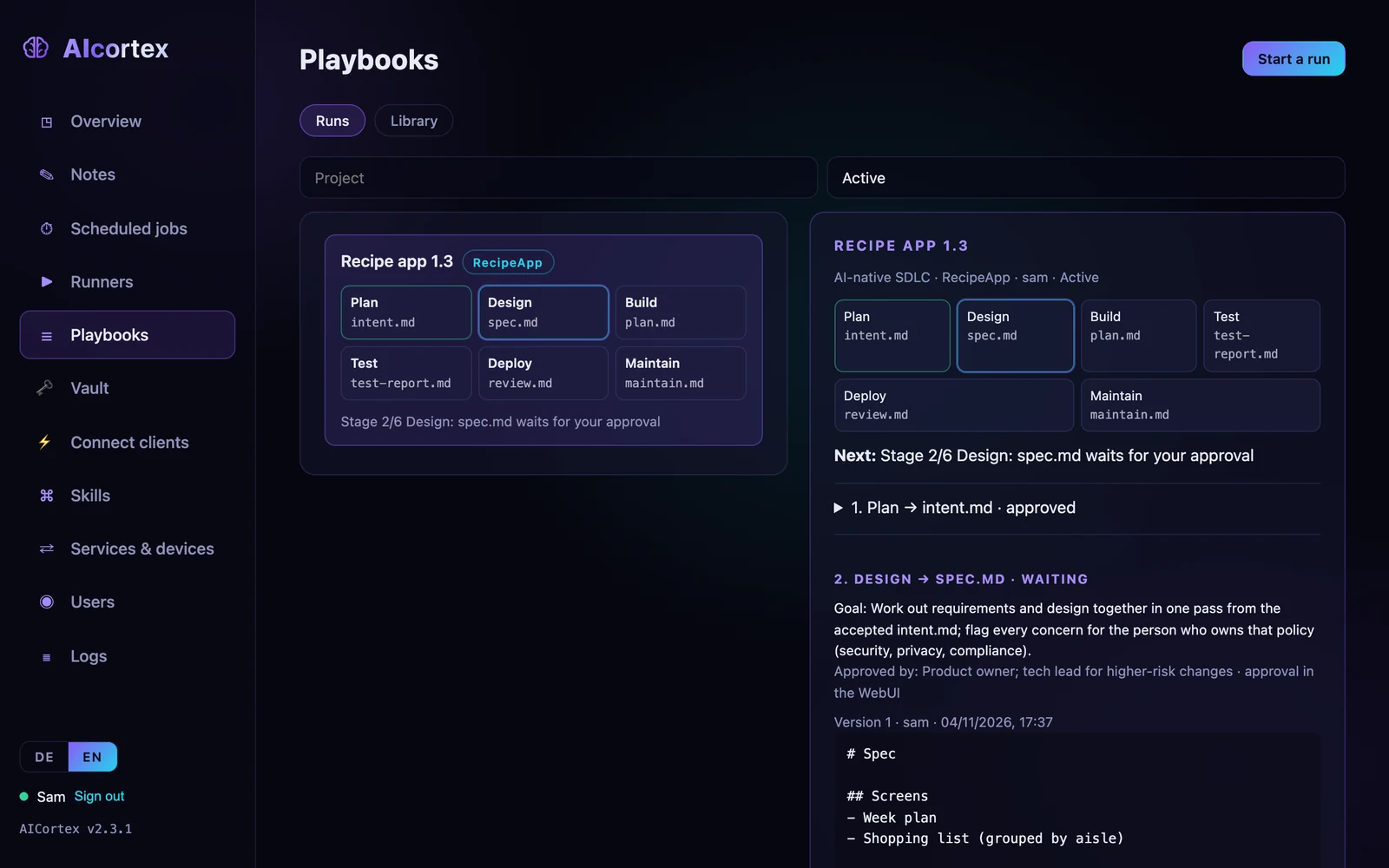
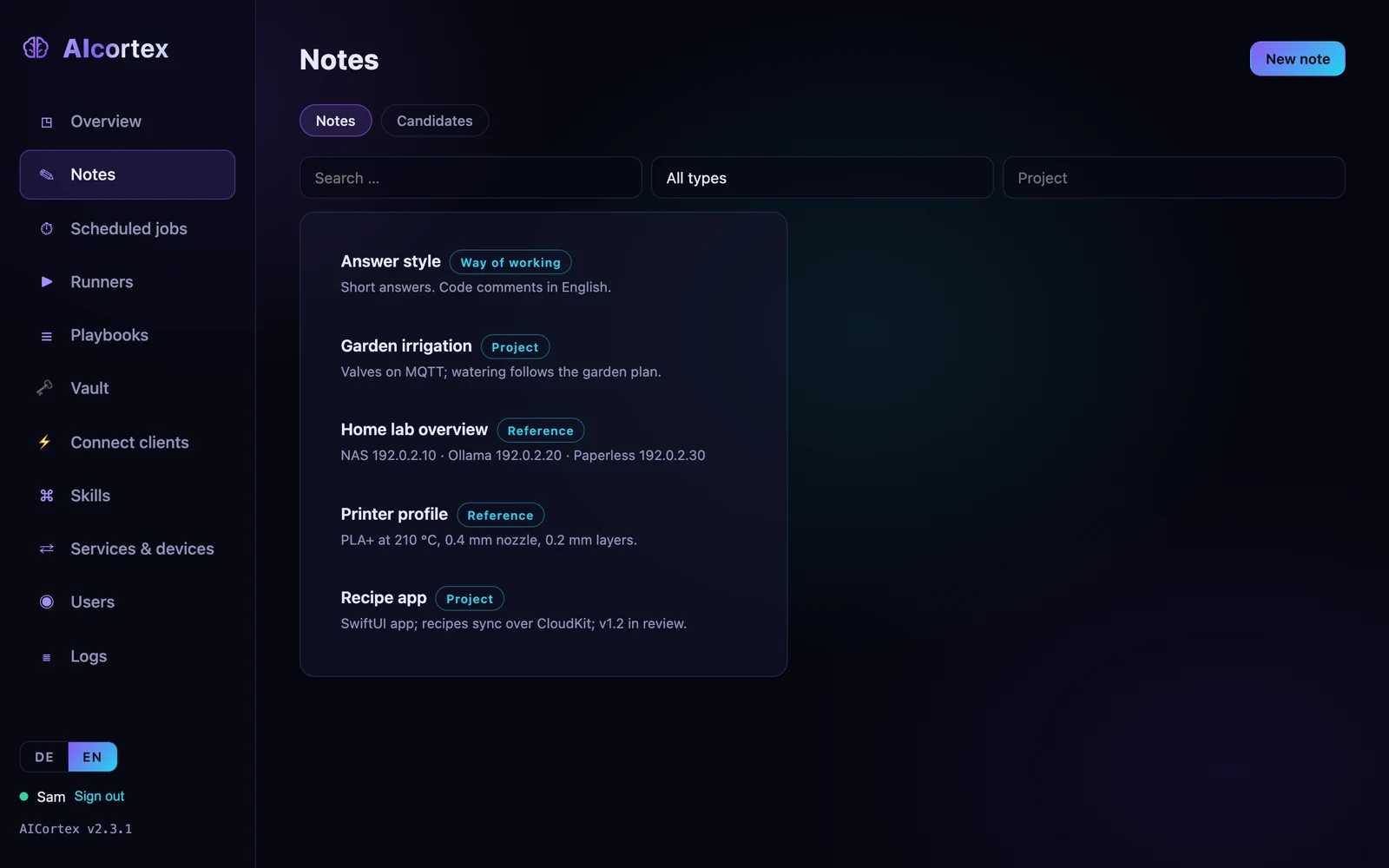 | 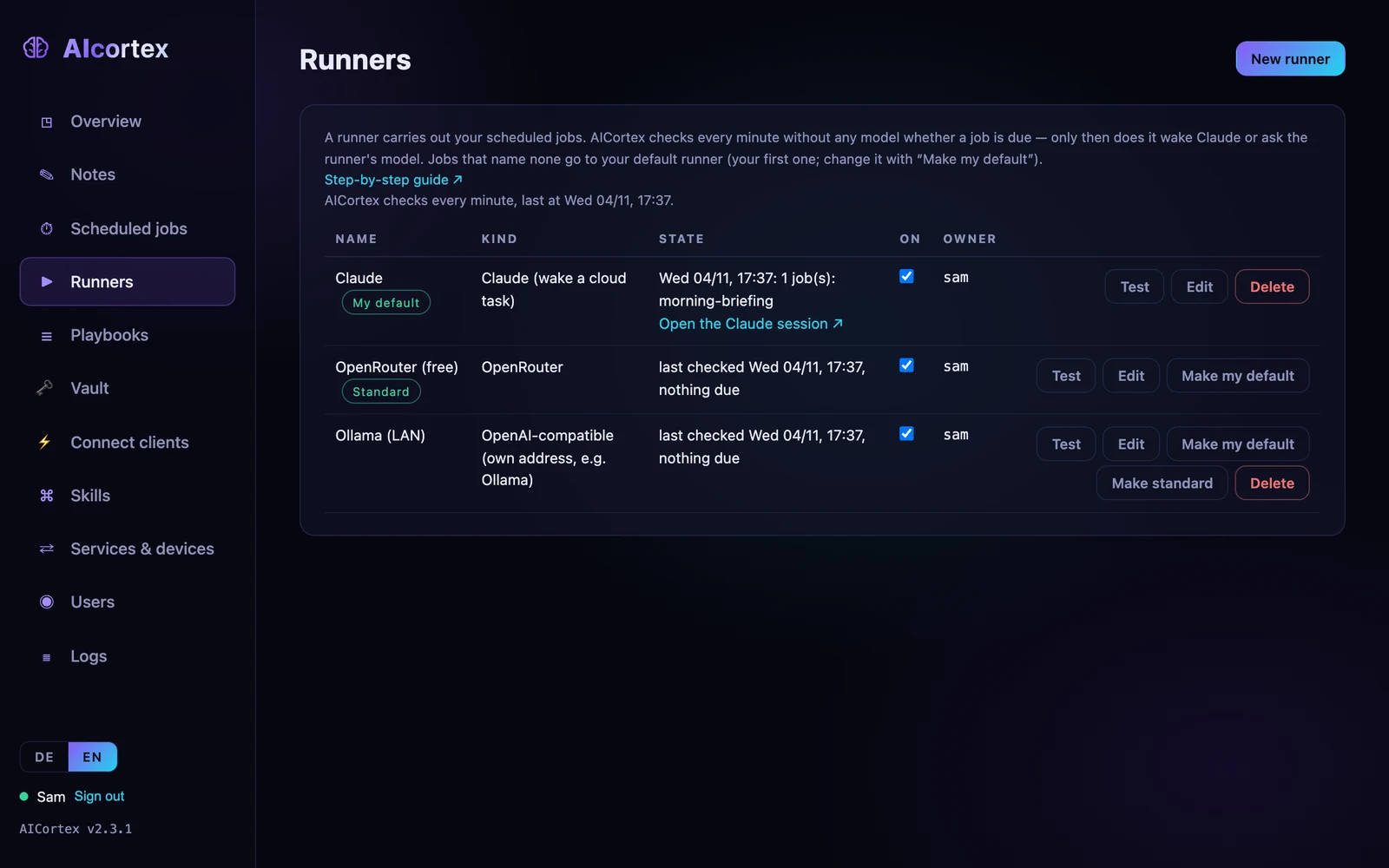 |
| Notes — your memories, typed and searchable | Runners — who carries out your jobs: Claude, an API key, a local model |
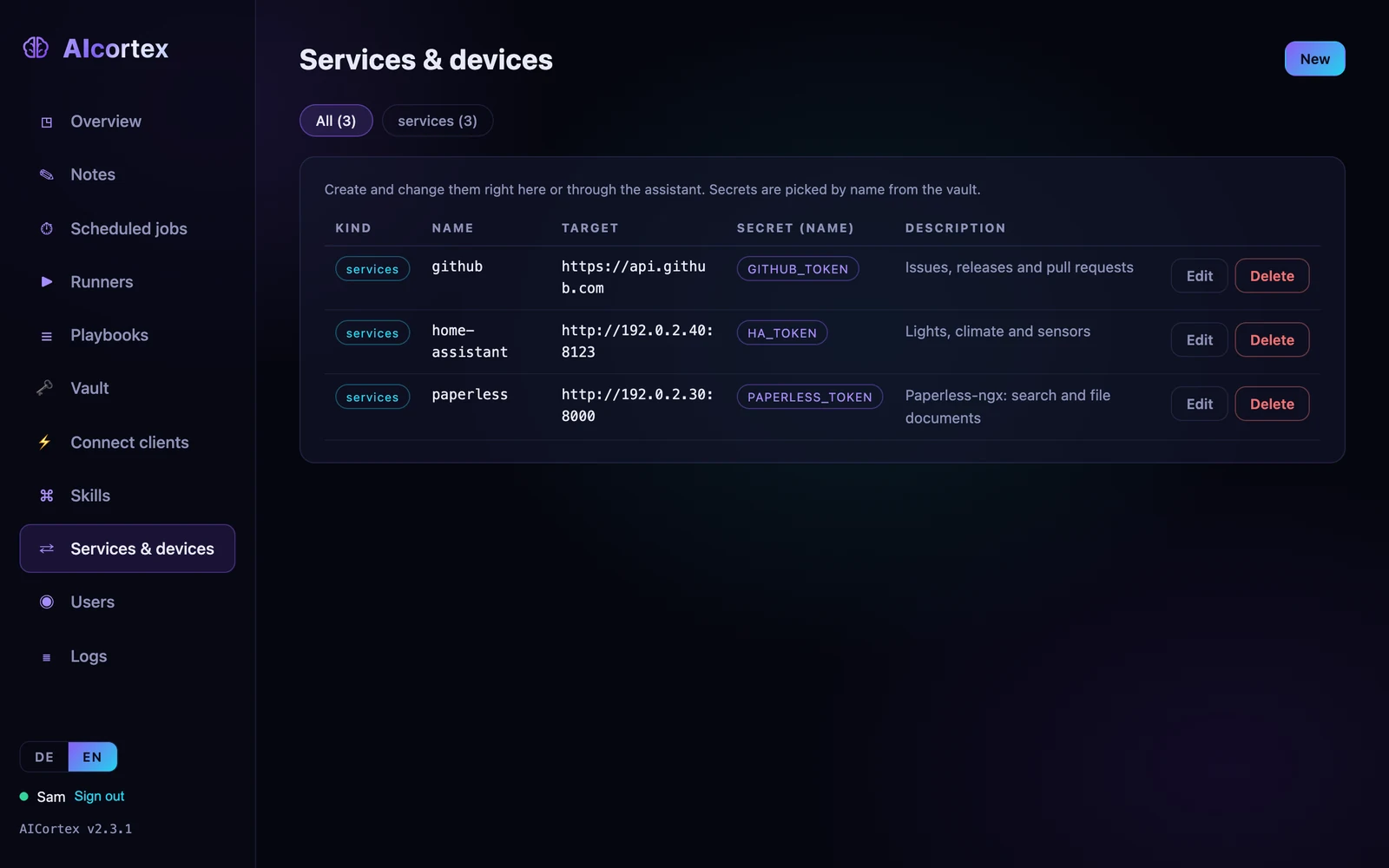 | 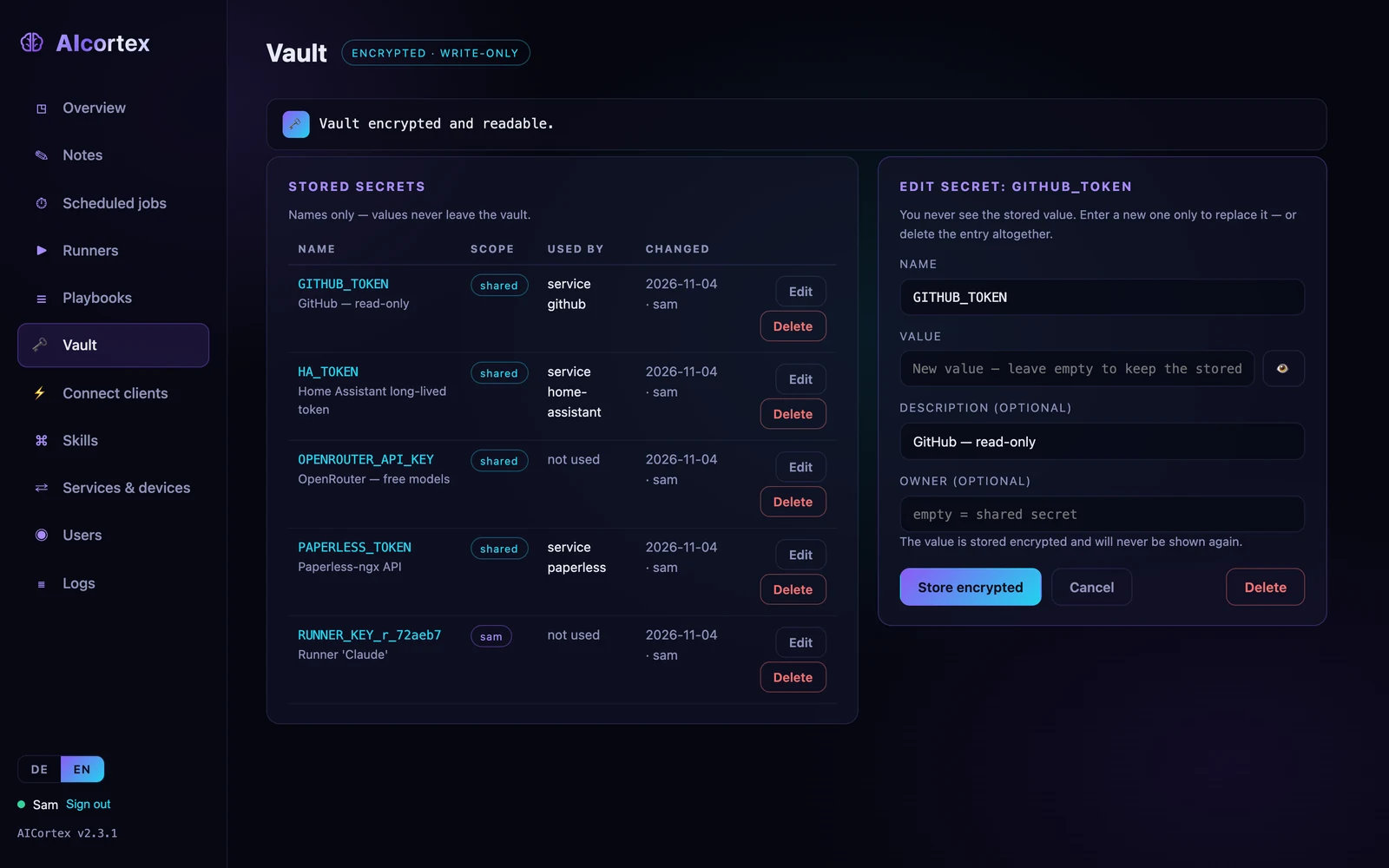 |
| Services & devices — every registry, secrets by name | Vault — names only, values never leave it |
Screenshots use made-up demo data.
| Page | What you can do |
|---|---|
| Overview | Version, enforce status, live counts (skills, secrets, services, devices, users) |
| Notes (everyone) | Your memories: search, filter by type/project, edit with conflict detection; admins also review auto-captured candidates |
| Inbox (everyone) | Your messages — job reports, webhook events, notes from your agents — newest first; mark read; whether they are forwarded as a push, how the last delivery went, and approving a forwarding rule your AI set up |
| Scheduled jobs (everyone) | Your cron jobs: plain-language schedule, next/last run, on/off, the job's runner, presets with a preview of the next runs |
| Runners (everyone) | Your runners: a Claude cloud task, an API key (typed or picked from the vault), an OpenAI-compatible address; state, link to the last Claude session, Test. Admins see all, choose the standard runner and sign in with ChatGPT |
| Playbooks (everyone) | Library (adopt the AI-native SDLC template, edit stages) and your runs: progress, artifact versions, approve or reject each stage |
| Vault | See secret names; add, edit and delete tokens/API keys/passwords (shared or per-user). Values are write-only — editing sets a new one without showing the old, and none ever leaves the vault |
| Skills | Browse by category, view, create/edit/delete skills (same house rules as skill_write) |
| Users | Roles (admin/user/viewer) + per-user areas (memory, vault, services, skills, device grants) in policy.json |
| Connect clients | One key per agent or CLI (Claude Code, Codex, Hermes, LM Studio, …): person, tools profile, allowed tools, expiry; the key is shown once, with the setup snippet for the chosen client |
| Services & devices | Every registry (services, MQTT, FTP, printers, scanners, WebDAV, CalDAV, SSH, mail, IMAP, MCP, webhooks): create, edit, delete — forms built from each *_add tool, secrets picked by name |
| Logs | The authz audit log — who called which tool, allowed/denied and why; filterable, newest first |
Login rides on your existing IdP (authorization code + PKCE): register one extra
redirect URI in the OIDC client — <BASE_URL>/ui/callback — and open <BASE_URL>/ui.
Everyone works in their own area; the management pages are for the admin role. Sessions
are signed HttpOnly cookies, mutations are CSRF-guarded, every action lands in the audit log
(names only, never values). Each page runs the same policy path as the MCP tools, so the
browser gets exactly the rights of the person's AI.
Without OIDC (local testing) the UI is open on the localhost-only bind — the same trust
model as the MCP endpoint itself. There is no separate username/password login: remote
access always goes through your IdP.
First steps after the install — sign in, set up people, create keys and connect Claude, ChatGPT, Claude Code and other agents: docs/clients.md → Step by step.
Configuration
All config lives in .env (copy from .env.example):
| Variable | Default | Description |
|---|---|---|
HOST_PORT | 8787 | Host port the server is published on (the container always listens on 8787 internally) |
BIND_ADDR | 127.0.0.1 | Address the published port binds to. Loopback = only this host's reverse proxy reaches it, not the LAN. Set 0.0.0.0 if your proxy is a separate bridge-network container |
PUID / PGID | 1000 | User/group ID the process runs as (file ownership) |
TZ | UTC | Container timezone |
Sign-in, keys and the few optional settings are in .env.example (50
lines). Since 2.7.1 everything else is built in — data folders under /data, rate
limits, HSTS, the audit log, size limits, and the protections. The mail recipient
allow-list, the default tool profile and auto-memory are set in the WebUI
(Overview → Settings).
Deploying on a VPS or over a VPN
The connector is just an HTTPS MCP endpoint, so it runs anywhere Docker does. The SSRF guard keeps that safe:
- VPS, public APIs only: same reverse proxy + OIDC, set
BASE_URLto its public URL, leaveINTERNAL_ALLOW_CIDRSempty. - Reach home devices from a VPS: link the VPS and your LAN with a VPN (WireGuard, Tailscale, …) and add the VPN/remote subnet to
INTERNAL_ALLOW_CIDRS(e.g.100.64.0.0/10for Tailscale). - Multi-site: scope
FORWARDED_ALLOW_IPSto the proxy, list only trusted subnets inINTERNAL_ALLOW_CIDRS, and use a dedicated OIDC client.
Project structure
AICortex/
├── app/                # Server code (FastMCP) — one module per tool group
│   ├── server.py       #   entrypoint — wires auth + registers tool modules
│   ├── memory.py · skills.py · services.py · mqtt_tools.py · ftp_tools.py
│   ├── webdav_tools.py · fs_tools.py · ssh_tools.py · mail_tools.py
│   ├── print_tools.py · scan_tools.py · mcp_gateway.py · coordination.py
│   ├── cron.py · sessions.py · secrets_store.py · bootstrap.py · guide.py
│   ├── runners.py · runner_builtin.py · runner_cloud.py · chatgpt_signin.py   #   runners for scheduled jobs
│   ├── authz.py · tenancy.py · pocketid_proxy.py · netguard.py · learn.py
│   ├── webui.py            #   admin WebUI (/ui) — OIDC+PKCE browser login
│   ├── webui_static/       #   its self-contained frontend (no build step)
│   └── requirements.txt
├── data/               # Persistent, human-readable state (git-ignored content)
│   ├── memory/ · skills/ · services/ · mqtt/ · ftp/ · webdav/ · ssh/ · mail/
│   ├── coordination/ · cron/ · sessions/ · printers/ · scanners/
│   ├── vault/          #   encrypted secrets
│   ├── auth/           #   OAuth client registrations + policy.json
│   └── work/           #   workspace file hub (scans, downloads, fs_*)
├── docs/               # Architecture, authorization, local-LLM & client guides
├── Dockerfile · entrypoint.sh · docker-compose.yml · .env.example
Dependencies are baked into the image at build time — no install-on-start volume.
data/,logs/andsecrets/keep their structure via.gitkeep; their contents are git-ignored.
Troubleshooting
See what's wrong first
A handful of read-only commands surface almost everything. Replace the placeholders (<compose-dir>, <device-ip>) with your own values.
# 1) Container logs — startup banner + live errors
docker logs --tail 50 aicortex

# 2) Verbose auth logging (then re-read the logs)
#    docker-compose.yml → environment:   FASTMCP_LOG_LEVEL: "DEBUG"

# 3) Which version / feature is actually running in the container?
docker exec aicortex python -c "import netguard; print('has tls_verify:', hasattr(netguard,'tls_verify'))"

# 4) Authorization decisions — who called what, allow/deny (per-person 'sub')
tail -n 20 <compose-dir>/data/auth/audit.log

# 5) Can the container actually reach a device? (verify off = ignore self-signed)
docker exec aicortex python -c "import httpx; print(httpx.get('https://<device-ip>/', verify=False, timeout=5).status_code)"
After pulling a new image, restart your LLM client session — don't just "refresh tools". MCP clients freeze the tool list at connect, so new tools/parameters only appear on a fresh session. If a new parameter still doesn't show after
docker compose pull && up -d --force-recreate, confirm the container is really on the new image with command #3 above.
Common issues & fixes
| Symptom | Cause & fix |
|---|---|
Login succeeds, client says "returned an error when connecting"; logs show Token missing required scopes | The proxy-issued token doesn't carry upstream scopes as claims. Don't set required_scopes — a successful login is enough (already handled in server.py). |
Issued new FastMCP tokens then Bearer token rejected (401) | Behind a TLS-terminating proxy, uvicorn ignored X-Forwarded-Proto. Set FORWARDED_ALLOW_IPS to your proxy's source (the default in docker-compose.yml already trusts loopback and private networks). Avoid "*": it lets a client forge its IP. |
disk client_storage unavailable (Fernet key must be 32 url-safe base64-encoded bytes) | STORAGE_ENCRYPTION_KEY isn't a valid Fernet key (it's not JWT_SIGNING_KEY). Generate: python -c "from cryptography.fernet import Fernet;print(Fernet.generate_key().decode())". |
Bearer token rejected for an old client id after recreating the container | The OAuth client store was ephemeral. Persistent data/auth fixes it; to clear a stuck client, remove the connector, fully quit & reopen the app, re-add. |
| Connector won't connect; proxy returns a login web page | Reverse-proxy SSO / forward-auth in front of /mcp. A machine client can't do interactive login — remove it; auth belongs at the MCP layer. |
After setting BIND_ADDR=127.0.0.1 the connector goes unreachable / the client says "registration with the sign-in service failed" (OAuth) | The published port now listens on loopback only, but your reverse proxy still forwards to the host's LAN IP (<nas-ip>:8787), so it can't reach the container. Point the proxy's upstream/origin at 127.0.0.1:8787 (plain HTTP — a host-network proxy shares the host loopback and reaches it fine). Order matters to avoid downtime: change the upstream to loopback first (still works while the port is bound to 0.0.0.0, which covers loopback), verify /mcp → 401, then flip BIND_ADDR. If your proxy is a separate bridge-network container it can't reach the host loopback at all — keep BIND_ADDR=0.0.0.0 (OIDC still gates /mcp) or put both on a shared Docker network. |
REST call POST /api/v1/tools/<name> returns 401 with a valid-looking key | The key is disabled/expired, or /api/* isn't reaching the app. Check apikey_list (status/expiry); confirm the proxy forwards /api/* to the container without OIDC (like /hooks/*). A 403 instead means the tool is outside the key's scopes or the identity's role — re-mint with wider scopes or grant the device area with tenancy_set. |
App sign-in fails with invalid redirect uri (since 2.6.0) | The app's callback isn't in the built-in list. Add an https pattern for it to MCP_REDIRECT_URIS and restart. Custom schemes (vscode://, cursor://) can't be matched. |
A tool call is refused with secret '…' may only be sent to … or … is not bound to any host yet | The secret may only go to the hosts it is bound to. Add the new host in WebUI → Vault → allowed hosts, or store the secret again with secret_set(name, value, hosts="host"). |
429 Too Many Requests on sign-in, /mcp or /api/v1 | A rate limit per client IP. Wait for Retry-After. If everyone behind your proxy is affected at once, FORWARDED_ALLOW_IPS doesn't trust your proxy — set it to the proxy's source. |
| Not admin after updating to 2.6.x | Update to 2.7.0: it restores earlier WebUI admins automatically. Otherwise sign in to the WebUI — it shows your identity; set OPERATORS=<your identity> and restart. |
| Upstream sign-in: "The provider refused the client registration … approved … allowlist" | Fixed in 2.7.0: AICortex then signs in like a desktop app and asks you to paste the final address (see Upstream servers with a browser sign-in). |
mcp_call / mcp_tools refused: not allowed for an app, runner or key | Upstream sign-ins are locked per person. Tick the app/runner/key under Services & devices → Access next to the server. |
mcp_call answers that it waits for approval | The call changes something. Approve or reject it under Services & devices → Approvals; the assistant then fetches the result with approval_id. |
Log: WARNING: nobody is operator (admin) yet, WebUI shows no admin pages | Nobody is operator. Sign in within 30 minutes of a start, or set OPERATORS=<your sub> and restart. |
Log: WARNING: FORWARDED_ALLOW_IPS="*" or … is not set | Set FORWARDED_ALLOW_IPS to your proxy's source, e.g. 127.0.0.1,172.16.0.0/12 for a proxy on the Docker host. |
IdP consent button spins forever; browser console shows null is not an object (… scope.includes) | The upstream /authorize carried no scope (some IdP UIs crash on scope=null). Already sent via extra_authorize_params; override with OIDC_SCOPE. |
call_service / mqtt / ftp to a local device returns "Blocked by network policy" | The SSRF guard blocks private IPs by default. Add the device's range to INTERNAL_ALLOW_CIDRS and restart. |
| Scan / WebDAV fails or falls back to plain HTTP (e.g. "did not start a job … 404") | The LAN device serves HTTPS with a self-signed certificate, which is verified by default. Confirm with curl -k https://<device-ip>/... → if that returns 200, register it self-signed: scan_add/webdav_add with tls_insecure=true (or point ca_bundle at its cert). |
| A new tool or parameter from an update doesn't appear | Your LLM client cached the old tool schema. Fully restart the client session (re-adding the connector is often not enough). |
| Pulled a new image but old behaviour persists | The container didn't recreate (or latest wasn't rebuilt yet). Run docker compose pull && docker compose up -d --force-recreate, then verify with diagnostic #3 above. |
The assistant says the AICortex tools "aren't loaded" / it can't call cortex_start | A client-side setting — the connector's tools aren't enabled for that conversation. In the chat's tools/connectors menu, toggle AICortex on as a tool source (web/mobile); if it won't stick, remove the connec |







