
secret-safe-env




A Model Context Protocol server that lets an AI agent put a secret (API key, token, password, connection string) into a project's .env file without the agent ever seeing the value.
The agent calls a tool with only the variable name. A native, masked Windows dialog opens locally; you type the value; a local PowerShell helper writes it straight to .env. The agent receives only a status token (OK / CANCEL / ERR:<CODE>) — never the secret.
繁體中文說明見 README.zh-TW.md.
Demo
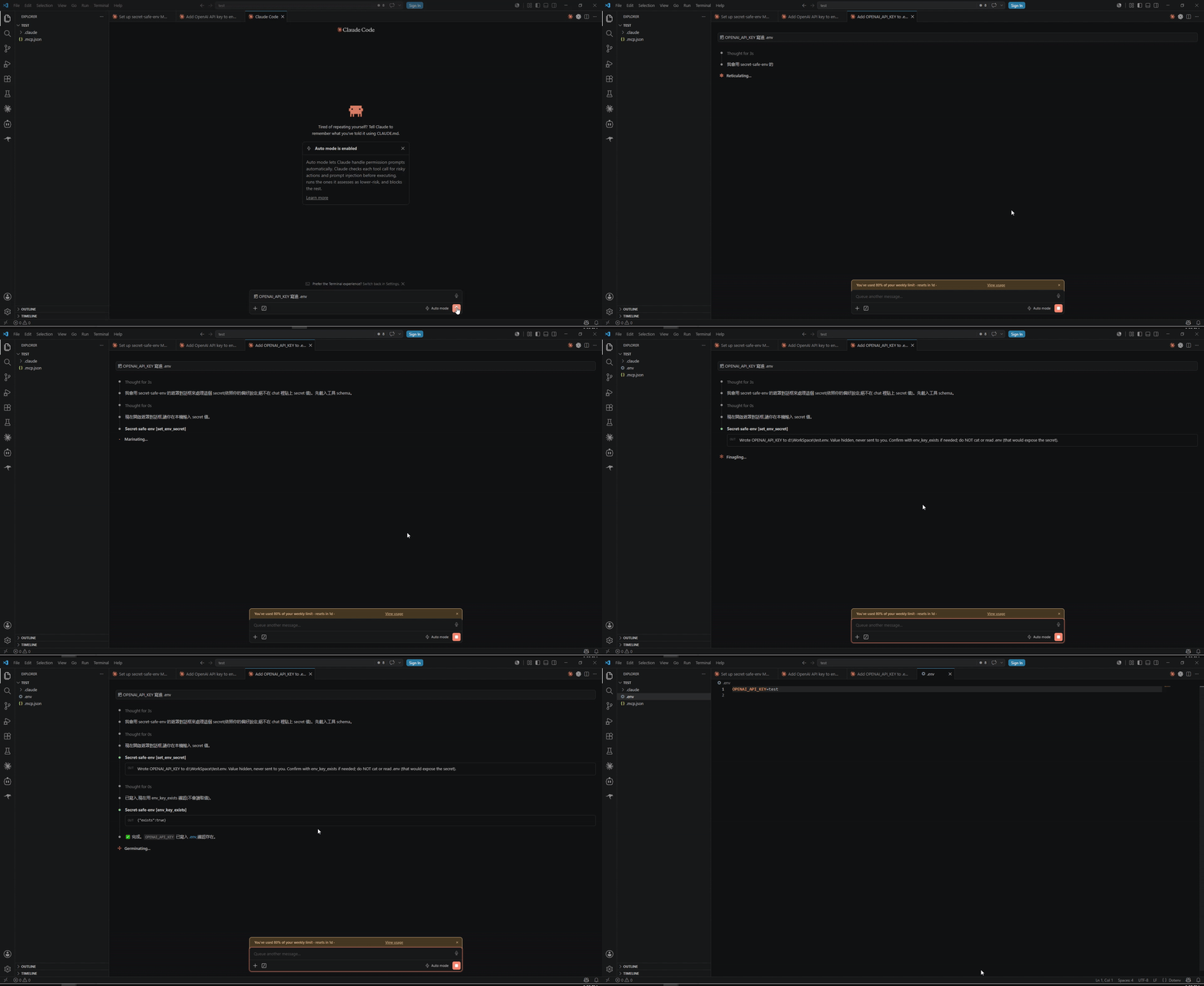
▶︎ Full-quality video (with audio)
Why
When you ask an agent to "add my OpenAI key to .env", the usual paths all leak the secret: pasting it into the chat puts it in the model's context and transcripts; letting the agent write the value means the agent handled it; cat .env to "verify" exposes it again. secret-safe-env removes the secret from every one of those channels — the value travels user → masked dialog → PowerShell → .env and never enters the agent/model context.
agent: set_env_secret({ key: "OPENAI_API_KEY" })
          │  (name only — no value)
          ▼
   ┌──────────────────────────┐     you type the value here
   │  native masked dialog     │ ◄── (never shown to the agent)
   └──────────────────────────┘
          │  $script:SecretValue (never a parameter, never stdout)
          ▼
   PowerShell writes .env via [System.IO.File]
          │
          ▼
agent receives:  "OK"   ← status token only
"Can't I just edit .env myself?"
Yes — and this doesn't replace that. It removes the repetitive leave the chat → open the file → paste step so the agent handles it inline, with you only typing the value once. It also guards a different surface than .gitignore: keeping .env out of git doesn't help if the value already leaked into the chat / transcript / logs the moment you handed it over. Scope is deliberately just getting the value safely into .env — production secret management (vaults, runtime injection) is out of scope.
Platform support
This tool is Windows-only by design — the trust anchor is a native WinForms masked dialog driven by Windows PowerShell.
| Requirement | Supported | Notes |
|---|---|---|
| Windows 10 / 11 | ✅ Required | The only supported OS. |
| Linux / macOS | ❌ Not supported | The tools return UNSUPPORTED_PLATFORM and refuse; the agent is told the machine is unsupported. (The npm package still installs on any OS, it just won't run there.) |
| Windows PowerShell 5.1 | ✅ Required | Launched from the pinned path %SystemRoot%\System32\WindowsPowerShell\v1.0\powershell.exe. |
PowerShell 7+ (pwsh) | ❌ Not used | Deliberately never PATH-resolved, so a pwsh on PATH can't change the execution/logging surface. |
| Node.js | ✅ 18+ | Runs the MCP server (spawns PowerShell; never touches the value). |
Install
Claude Code
claude mcp add secret-safe-env -- npx -y secret-safe-env
For the most stable setup (no npx cache surprises), install the global bin and point at it:
npm i -g secret-safe-env
claude mcp add secret-safe-env -- secret-safe-env
Updating:
npm i -g secret-safe-env@latest. With unpinnednpx, clear the cache (npx clear-npx-cache) or pin a version (npx -y secret-safe-env@<version>) to avoid running a stale cached copy.
Other MCP clients (.mcp.json)
{
  "mcpServers": {
    "secret-safe-env": { "command": "secret-safe-env" }        // requires `npm i -g secret-safe-env`
    // zero-install alternative (pin a version):
    // "secret-safe-env": { "command": "npx", "args": ["-y", "secret-safe-env@<version>"] }
  }
}
Reload the client so it picks up the server. If an npx-launched stdio server appears in the list but never connects on Windows, wrap the command as cmd /c npx -y secret-safe-env.
Tools
set_env_secret({ key, env_path? }) → status text
Opens the masked dialog for key; the user types the value; the helper writes key=value to .env. Returns human/agent-readable text plus an error flag — never the value. key must be UPPER_SNAKE_CASE (^[A-Z_][A-Z0-9_]*$). Values are single-line (for multi-line PEM/JSON, ask the user to edit .env manually). destructiveHint: true (it upserts a key in place).
env_key_exists({ key, env_path? }) → { exists: boolean }
Returns only whether key is present in .env — never the value. Use it to confirm a write instead of reading/cat-ing .env. readOnlyHint: true.
env_pathis the absolute path to the project.env. Always pass it explicitly — a runner-launched MCP server's working directory is the runner sandbox, not your workspace. If omitted it defaults to<CLAUDE_PROJECT_DIR or cwd>/.env.
For AI agents
Use set_env_secret whenever a task needs a secret/API key/token/password/credential in a project .env (e.g. "add my OpenAI key", "set DATABASE_URL", "configure my .env"). Rules:
- ✅ Pass only the variable name; the user supplies the value in the local dialog.
- ✅ Confirm a write with
env_key_exists(returnstrue/false, never the value). - ❌ Never ask the user to paste the secret into the chat.
- ❌ Never write the value or a placeholder yourself.
- ❌ Never
cat/read.envto verify — that re-exposes the secret.
These rules are also delivered to the agent via the server's instructions and each tool's description, so a cold agent with zero prior context can use it correctly.
Security scope
In scope — from the moment you type the value until it lands in .env, no audited Windows/agent channel records it: PSReadLine history, 4688/Sysmon process command lines, 4103 Module Logging, 4104 Script Block Logging, PowerShell Transcription, AMSI, the MCP/agent context, OTEL traces, and mcp-debug logs. The value never crosses a PowerShell parameter boundary and is written only via [System.IO.File], never a cmdlet. A static AST lint (npm run lint:ps) and Pester transcript tests enforce this.
Out of scope (your responsibility, once the value is in .env) — cloud sync / OneDrive, VSS / backup snapshots, antivirus scanning, file ACLs, and the agent reading .env afterward.
See docs/SPEC.md for the full threat model and guarantees.
Development
npm install
npm run build       # tsc -> dist/
npm test            # Node unit tests (vitest)
npm run test:ps     # PowerShell upsert + no-leak tests (Pester 5)
npm run lint:ps     # static value-path AST lint
PowerShell tests need Pester 5: Install-Module Pester -MinimumVersion 5.0 -Scope CurrentUser.
Releases are automated: push a vX.Y.Z tag and GitHub Actions publishes to npm (Trusted Publishing / OIDC) and the MCP Registry — no tokens. See docs/DECISIONS.md.
Documentation
- docs/SPEC.md — purpose, guarantees, threat model, scope & non-goals.
- docs/ARCHITECTURE.md — modules and data flow.
- docs/DECISIONS.md — design decisions and rationale.
Contributing
Contributions welcome — see CONTRIBUTING.md. The one rule: keep the no-leak guarantee intact and tested.
License
Disclaimer
secret-safe-env is provided "as is", without warranty of any kind (see LICENSE). It reduces secret exposure within the documented security scope on a best-effort basis; it does not guarantee absolute secrecy. You are responsible for confirming it fits your threat model, and for whatever happens to a value after it is written to .env — cloud sync, backups, antivirus, file permissions, and any tool (including the agent) that later reads .env. For production secrets, prefer a dedicated secrets manager.
This is an independent open-source project. It is not affiliated with, endorsed by, or sponsored by Anthropic, "Claude", or the Model Context Protocol project; those names belong to their respective owners and are used only to describe compatibility.