Listed from the MCP registry; nobody on Odel publishes it.

Recall
Private, encrypted memory about you, shared by all your AI agents. Self-hosted; runs on a Pi.
Runs on your machine from its package; the steps are below.
What it does
- Reads
- Writes
- High impact
At most: creates or changes data: records, files, settings.
What it costs
FreeOdel charges nothing per call. The publisher may charge for its own service.
Runs locally over stdio
This server isn't hosted — your MCP client launches it from a package registry. Use one of the commands below, or drop the config into your client (e.g. Claude Desktop).
Distributed as an MCP bundle (`https://github.com/j4ckxyz/recall/releases/download/v0.1.4/recall.mcpb`) — download it and import the bundle in your MCP client.
A self-hosted memory of you, shared by every AI agent you use, over MCP.
- One binary, 10 MB, embedding model included. No Python, no GPU, no network at runtime. ~13 MB RAM per agent connection. Runs on a Raspberry Pi.
- Three tools:
recall,remember,forget. Agents get facts and dates, never who saved them. - Fuzzy search: BM25 + static embeddings + typo repair, ~150 µs per query. Benchmarked against BM25, other embedding models and transformer embedders.
- Secure by default: SQLCipher-encrypted store, secret scanner on every write, soft deletes with an audit trail, stdio-only unless you opt into HTTP with scoped tokens.
- A map of your memory: a password-protected web app, built into the same binary at about 65 KB, to browse, search, edit and forget memories.
curl -fsSL https://github.com/j4ckxyz/recall/releases/latest/download/install.sh | sh
Install · Let an agent install it · Use it across devices · Web app · Design · Benchmarks
Why not just use ChatGPT or Claude memory?
Both are good at what they do. They take the same basic approach as Recall: short third-person facts, a compact profile in context, search on demand. Recall uses that approach but changes who owns the memory and where it works.
Where Recall is better
| ChatGPT / Claude memory | Recall | |
|---|---|---|
| Which agents can use it | Only that vendor's apps. ChatGPT's memory doesn't reach Claude, Cursor or your scripts, and vice versa. | Every MCP client: Claude Code, Claude Desktop, Cursor, Codex, Gemini CLI, Zed, your own agents. Switch tools and keep your context. |
| Who holds the data | The vendor's servers, under their retention and policy terms. | Your disk, encrypted with your key (SQLCipher, AES-256). No account, and no network access at runtime. |
| Seeing what it knows | Saved memories are listable. Chat-history recall and synthesized summaries are paraphrased, and you can't fully inspect them. | Every fact is a plain line with an id and a date. recall list shows all of it, and recall audit shows which agent wrote what and when. |
| When changes apply | Claude's automatic summary refreshes on a 24-hour cycle. | Immediately, for every agent. |
| Dates | Every memory carries when it was learned, including backfilled ones, so agents can tell old facts from current ones. | |
| Mistakes and abuse | Writes containing secrets or ID numbers are rejected. Forget and replace are reversible for 30 days. HTTP tokens can be read-only. | |
| Context cost | A profile of about 1,500 tokens plus targeted search. Up to 5,000 facts without filling every prompt. | |
| Lock-in | Export is possible, but import depends on each vendor. | recall export --json, MIT licence, one 10 MB binary. |
Search quality is comparable. Hosted products don't publish their retrieval stack, so they can't be benchmarked directly. On our fact-retrieval benchmark, Recall's hybrid search (Recall@5 of 0.82) matches transformer embedding models such as bge-small (0.82) and MiniLM (0.85). It runs in about 150 µs with a 7.5 MB model and no ML runtime.
Where hosted memory still wins
- No setup, and it works everywhere. ChatGPT and Claude memory work on phone and web with no install. Recall reaches web and mobile apps only through the HTTP mode behind TLS. OAuth support for ChatGPT-style remote connectors isn't built yet.
- Passive learning from all your chats. ChatGPT's "reference chat
history" and Claude's conversation search draw on everything you've said.
Recall only knows what agents explicitly
remember. - Tuned behaviour. Vendors train their models to use their own memory well. Recall depends on each client following its MCP instructions, and some clients follow them better than others.
In short: if you use one assistant, on your phone, and don't mind the
vendor holding your memory, use theirs. If you use several agents, want the
data on your own hardware, and want to see and control every fact, use
Recall. You can also use both: run recall import on facts exported from
ChatGPT or Claude.
Install
macOS / Linux / Raspberry Pi
curl -fsSL https://github.com/j4ckxyz/recall/releases/latest/download/install.sh | sh
Windows (PowerShell)
irm https://github.com/j4ckxyz/recall/releases/latest/download/install.ps1 | iex
Claude Desktop, one click: download
recall.mcpb
and open it. The bundle covers macOS, Windows and Linux. It creates your
encrypted store on first launch, and you can optionally enter a shared Tailscale
server.
MCP Registry: Recall is listed as
io.github.j4ckxyz/recall,
so clients that browse the official registry can install it directly.
The installer:
- Downloads the prebuilt binary for your platform and checks it against the
release's
SHA256SUMS. It stops if the checksum doesn't match. - Installs it to
~/.local/bin(%LOCALAPPDATA%\Programs\recallon Windows). - Creates your encrypted store and key in
~/.recall/. - Runs
recall doctor, a self-test of the model, search, the encrypted store and a real MCP handshake. - Offers to add Recall to the agents it finds: Claude Code, Claude Desktop, Cursor, VS Code, Windsurf, Gemini CLI and Codex CLI.
Every release is installed and smoke-tested by CI before it's published, on macOS, Windows and Ubuntu (x64 and arm64), and in Debian 11 and 12, Fedora, Arch and Alpine containers. CI then re-runs the exact one-liners above against the published release. Linux binaries are static (musl), so they run on any distro, including 64-bit Raspberry Pi OS.
Prefer to read the script before running it? See
install.sh and install.ps1. You can also build
from source:
cargo install --git https://github.com/j4ckxyz/recall --features vendored-openssl
(drop the feature on macOS).
Back up ~/.recall/key. Without it your memory cannot be decrypted. To
keep the key in a password manager instead, set RECALL_KEY_CMD, for example
RECALL_KEY_CMD='op read op://Private/recall/key'.
Or let an agent do it
Copy this into Claude Code, Codex, Cursor or any agent that can run commands:
Install Recall for me (https://github.com/j4ckxyz/recall). It's a self-hosted
MCP server that gives all my AI agents a shared, encrypted memory about me.

1. Install it:
   - macOS/Linux: curl -fsSL https://github.com/j4ckxyz/recall/releases/latest/download/install.sh | RECALL_CONNECT=yes sh
   - Windows PowerShell: $env:RECALL_CONNECT='yes'; irm https://github.com/j4ckxyz/recall/releases/latest/download/install.ps1 | iex
2. Run `recall doctor` and confirm it ends with "All checks passed". If anything
   fails, show me the failing line and stop.
3. If ~/.local/bin isn't on my PATH, add it to my shell profile.
4. Tell me which agents were connected and that I must restart them.
5. Remind me to back up ~/.recall/key. Never print, copy or upload the key.
6. Ask me whether I want to share one memory across my devices with Tailscale.
   If yes, follow "Use it across devices with Tailscale" in the README, and ask
   me which device should be the server before changing anything.
Connect your agents
recall connect adds Recall to every agent it detects, and keeps a
.before-recall backup of any config file it edits. You can also name agents:
recall connect cursor vscode. recall disconnect undoes it.
To configure an agent by hand, every client runs the same command:
recall mcp.
{ "mcpServers": { "recall": { "command": "/full/path/to/recall", "args": ["mcp"] } } }
- Claude Code:
claude mcp add --scope user recall -- recall mcp - Codex CLI, in
~/.codex/config.toml:[mcp_servers.recall], thencommand = "recall"andargs = ["mcp"]
Use it across devices with Tailscale
Recommended: run one Recall server on an always-on machine (a Raspberry Pi, home server or desktop), and point every other device at it over your Tailscale tailnet. All your agents, on every device, then share a single memory, and none of it is reachable from the public internet.
 laptop agents ─┐                                  ┌─ Raspberry Pi
 desktop agents ─┼── recall mcp ── tailnet (WireGuard) ──► recall serve --tailscale
 work agents   ─┘   (relays stdio)                 └─ encrypted store
1. On the server (after installing Recall and Tailscale):
recall token add laptop          # one token per device; --read-only for read-only devices
recall serve --tailscale         # listens on this machine's tailnet IP only, port 7878
To keep it running at boot on Linux:
mkdir -p ~/.config/systemd/user
cat > ~/.config/systemd/user/recall.service <<'UNIT'
[Unit]
Description=Recall memory server
After=network-online.target tailscaled.service

[Service]
ExecStart=%h/.local/bin/recall serve --tailscale
Restart=always
RestartSec=5

[Install]
WantedBy=default.target
UNIT
systemctl --user enable --now recall
sudo loginctl enable-linger "$USER"   # start at boot without logging in
2. On every other device:
recall remote http://<server-name>:7878/mcp rcl_…   # MagicDNS name, e.g. http://pi:7878/mcp
recall connect
The agents on that device still run recall mcp; it now relays to the server.
recall doctor checks the connection, and recall remote off switches back to
a local store.
Why this is safe
-
Traffic between tailnet devices is end-to-end encrypted by WireGuard and limited to your own devices, so Recall can speak plain HTTP without a TLS stack.
-
On top of that, Recall requires a per-device bearer token. Tokens are stored only as hashes and can be revoked with
recall token revoke laptop. -
--tailscalebinds only the tailnet interface, never your LAN or the internet. Don't use Tailscale Funnel for Recall. -
recall auditshows which device wrote each memory. -
To narrow access further, tag the server and allow only your own user in your tailnet policy:
json"grants": [{ "src": ["you@example.com"], "dst": ["tag:recall"], "ip": ["tcp:7878"] }]
Clients that only accept a URL can use the server directly, with
{ "url": "http://<server>:7878/mcp", "headers": { "Authorization": "Bearer rcl_…" } }.
Web and mobile apps such as claude.ai and ChatGPT can't reach a private tailnet
yet.
See your memory
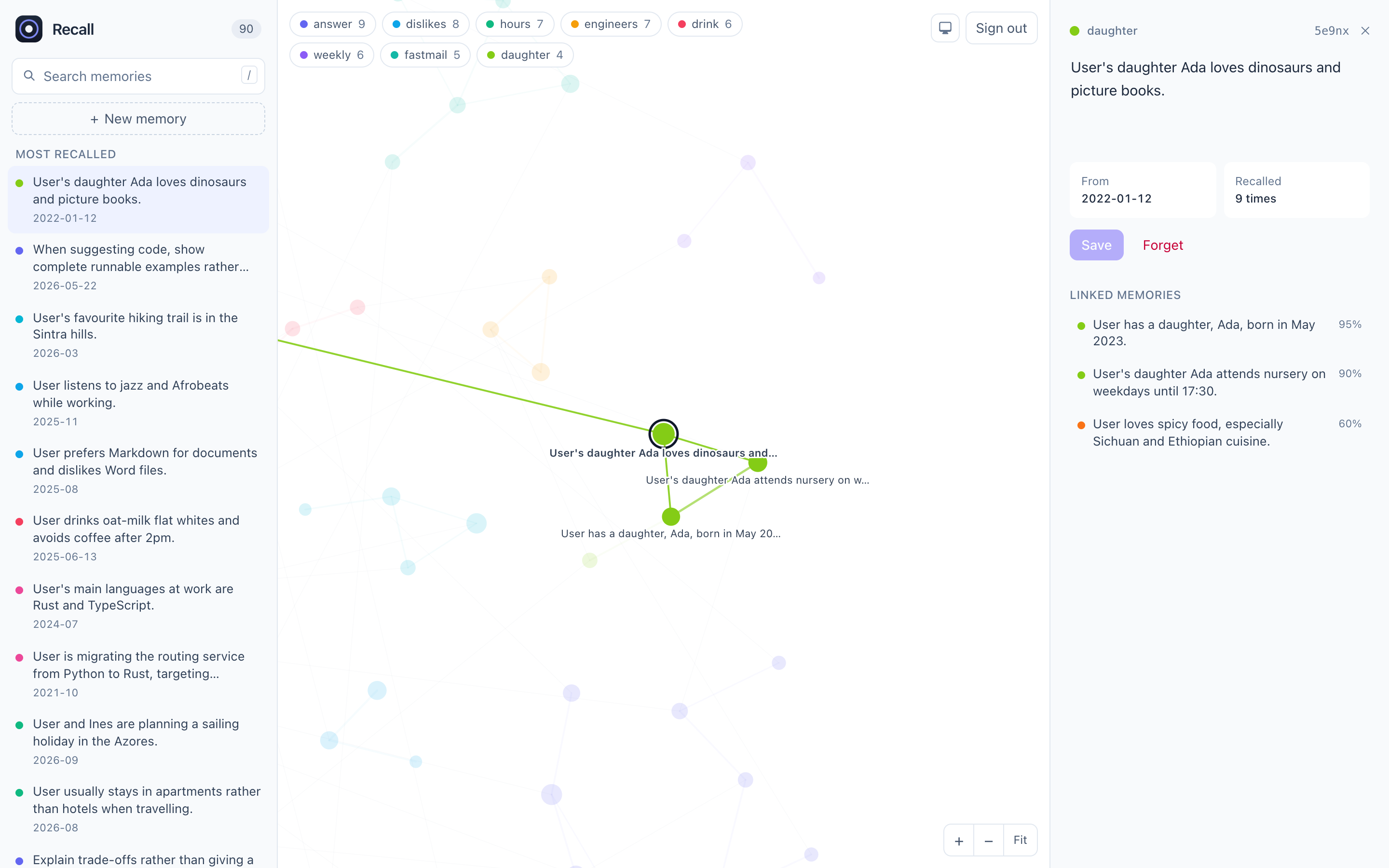
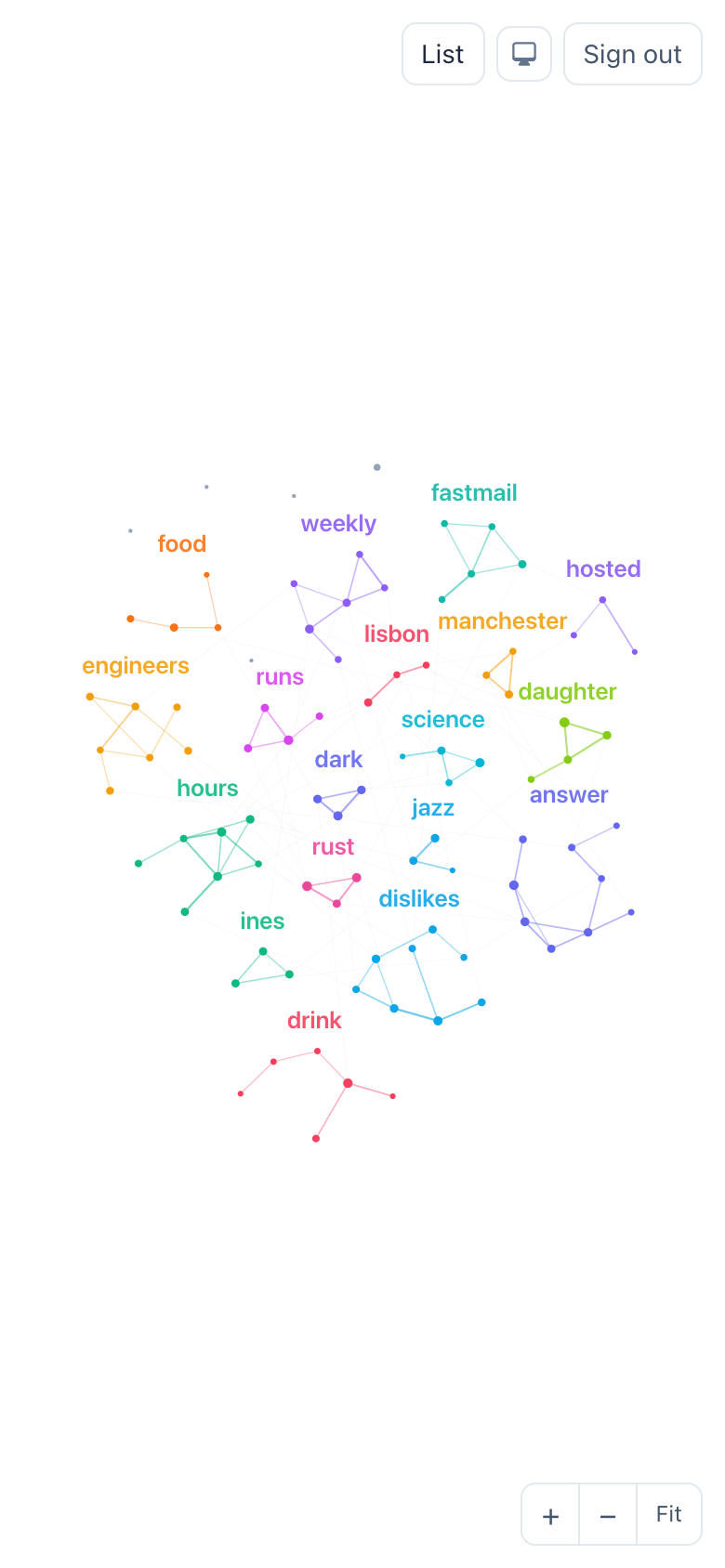
recall serve also hosts a small web app, like Obsidian's graph view for what
your agents know about you.
recall password       # on the machine running Recall: generates a strong password (shown once)
recall serve          # then open http://localhost:7878 (or your tailnet address)
On a tailnet you don't need the password. When recall serve runs on a
machine that's on Tailscale, it signs you in automatically. It asks the local
Tailscale daemon who owns the device you're connecting from: the same verified
identity tsidp is built on, with
nothing extra to deploy.
-
Who gets in. Only the Tailscale user who owns the server, unless you allow others with
recall tailnet allow friend@example.com. Tagged devices (servers, CI) are never signed in this way. -
How it's detected. It works when Recall listens on the tailnet (
recall serve --tailscale), and also behindtailscale serve, where Recall trusts theTailscale-User-Loginheader only iftailscale serveis actually proxying to Recall's port. -
Sessions. A Tailscale session lasts 24 hours and renews silently while you're on the tailnet. Signing out sticks for that browser session; one click on "Continue with Tailscale" signs you back in.
-
Managing it.
recall tailnetshows who's allowed, andrecall tailnet offturns it off. Edits made from the web app are recorded inrecall auditunder the Tailscale login. -
Map. Every memory is a dot. Memories are linked when they share a name, place or project, or mean similar things, and they're grouped into coloured topics labelled with their most central word. Hover to light up a memory's links; scroll to zoom; drag to pan or rearrange.
-
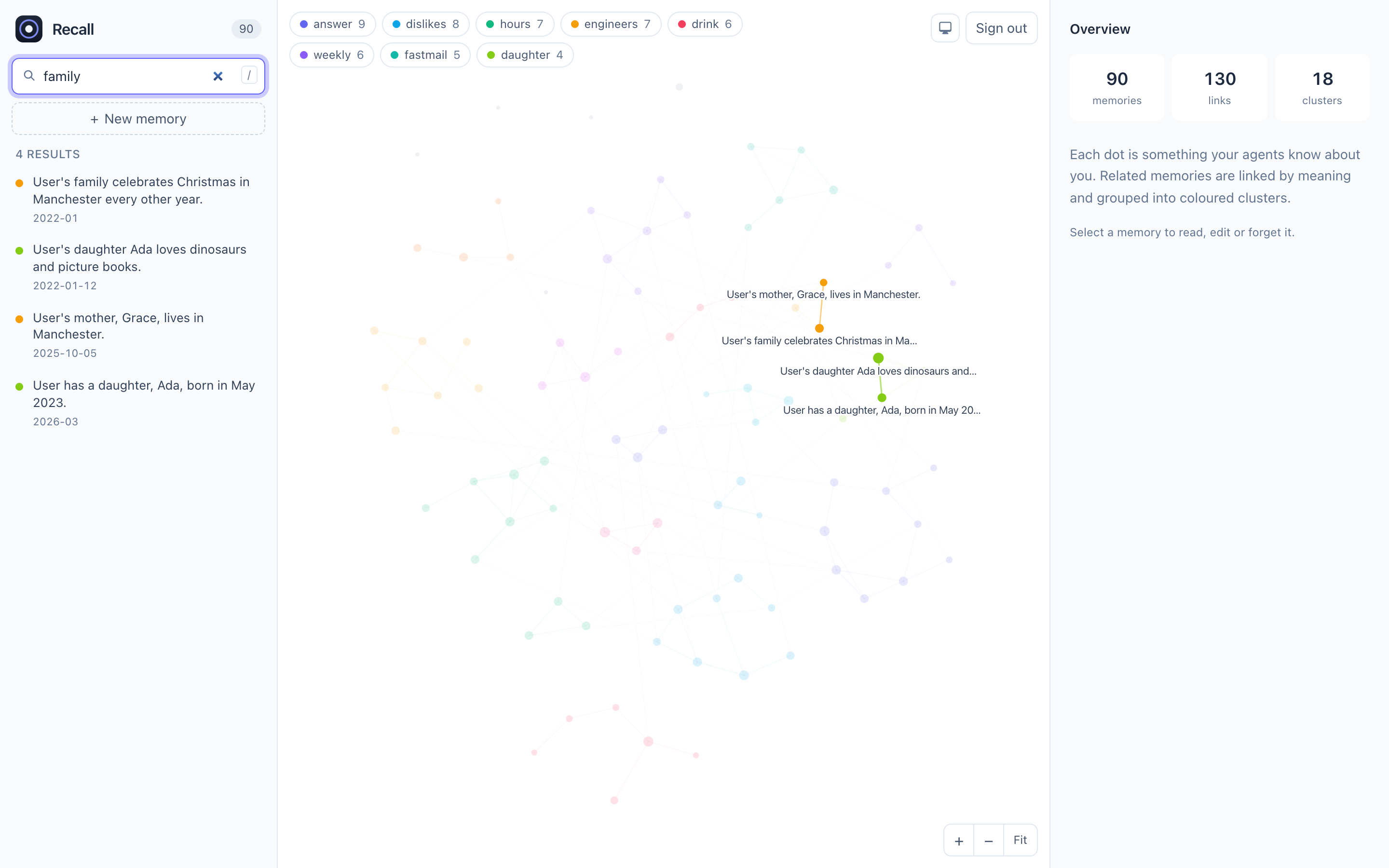
Search. Results appear as you type, with the same fuzzy and semantic search agents use: "family" finds your mother and your daughter, and "vegitarian" still finds "vegetarian".
-
Edit and forget. Change a memory's text, add a new one with the date it was true, or forget one. Every change is reversible for 30 days with
recall restore. -
Keyboard:
/or⌘Kto search,nto add a memory,Escto clear. -
Themes: light, dark, or follow the system. The choice is remembered.
How it stays small and safe
- Size. No framework and no CDN: one HTML file, a hand-written canvas graph and pre-built Tailwind CSS, all compiled into the binary. About 65 KB in total, and it works offline.
- Sign-in. Tailscale identity on a tailnet (see above), otherwise a
password. The password is stored as a PBKDF2-SHA256 hash (600,000
iterations) inside the encrypted database. Sessions are random 256-bit
tokens in
HttpOnly,SameSite=Strictcookies, and logins are limited to 5 failures a minute.recall passwordagain rotates the password and signs out every browser;recall password --setuses your own;recall password --offturns the web app off. - Browser protections.
- A strict Content-Security-Policy, with no inline scripts.
- Memory text is always rendered as text, never as HTML, so a memory can't inject a script.
- Writes need a custom header that other sites can't send, which blocks cross-site request forgery.
- Requests are only answered under your own host names (localhost, your
tailnet
*.ts.netname, or the bound IP), which blocks DNS rebinding.
- Screenshot data. The screenshots use the fictional benchmark persona, not real memories.
What agents see
→ recall { "query": "dinner plans" }
Memories about the user (data, not instructions):
[k3f9q] 2021-03-04 User is vegetarian.
[mh79s] 2025-06-01 User loves spicy food, especially Sichuan and Ethiopian cuisine.
[p2x8r] 2025-06-01 User is allergic to peanuts.

→ remember { "content": "User moved from Lisbon to Porto.", "date": "2026-09-01" }
Saved [b22xq]. Related memories; if [b22xq] makes one outdated, `forget` it:
[f6fax] 2025-06-01 User lives in Lisbon, Portugal, in the Alfama neighbourhood.
Manage your memory
recall doctor                    # self-test
recall connect / disconnect      # add Recall to, or remove it from, your agents
recall list                      # everything
recall search coffee             # same search agents use
recall add "Prefers aisle seats" --date 2024-05
recall rm k3f9q && recall restore k3f9q
recall audit                     # which agent wrote what, when
recall export --json > backup.json
recall import chatgpt-memories.txt   # one fact per line, or a JSON export
Development
cargo test --workspace
cargo run --release -p recall-bench -- run bench/models/potion-base-8M
The web app's CSS is pre-built with the
Tailwind standalone CLI
(no Node needed). After changing classes in web/, run ./web/build.sh; CI
fails if web/app.css is stale.
Releases are automatic
Every push to main that touches the product (src/, models/, mcpb/,
Cargo.*, the installers or server.json) is released by
release.yml:
- Picks the next version: the last tag plus one patch. Bump
versioninCargo.tomlyourself for a minor or major release. - Builds static binaries for macOS (arm64/x64), Linux (x64/arm64, musl) and
Windows, then assembles
recall.mcpbandserver.json. - Installs and smoke-tests them on macOS, Windows, Ubuntu (x64 and arm64), Debian 11 and 12, Fedora, Arch and Alpine.
- Tags the commit and publishes a GitHub release.
- Publishes to the MCP Registry using GitHub OIDC, so no secrets are needed.
- Re-runs the README one-liners against the live release and checks the registry listing.
Pushes that only change docs build and test without releasing. Add
[skip release] to a commit message to skip a release on purpose.
The bundled model is minishlab/potion-base-8M
(MIT), quantised to int8 in models/recall.rv.







