Listed from the MCP registry; nobody on Odel publishes it.

Conductor
Local task scheduler and worker manager with MCP integration for Claude Desktop.
Runs on your machine from its package; the steps are below.
What it does
- Reads
- Writes
- High impact
At most: moves money, runs code or commands, deletes data, or sends messages for you.
What it costs
FreeOdel charges nothing per call. The publisher may charge for its own service.
Runs locally over stdio
This server isn't hosted — your MCP client launches it from a package registry. Use one of the commands below, or drop the config into your client (e.g. Claude Desktop).
Run
uvx conductor-mcpserver
MCP client config
{
  "mcpServers": {
    "conductor": {
      "command": "uvx",
      "args": [
        "conductor-mcpserver"
      ]
    }
  }
}

Conductor
Claude's hands for local automation — with a web dashboard for the humans who watch it.
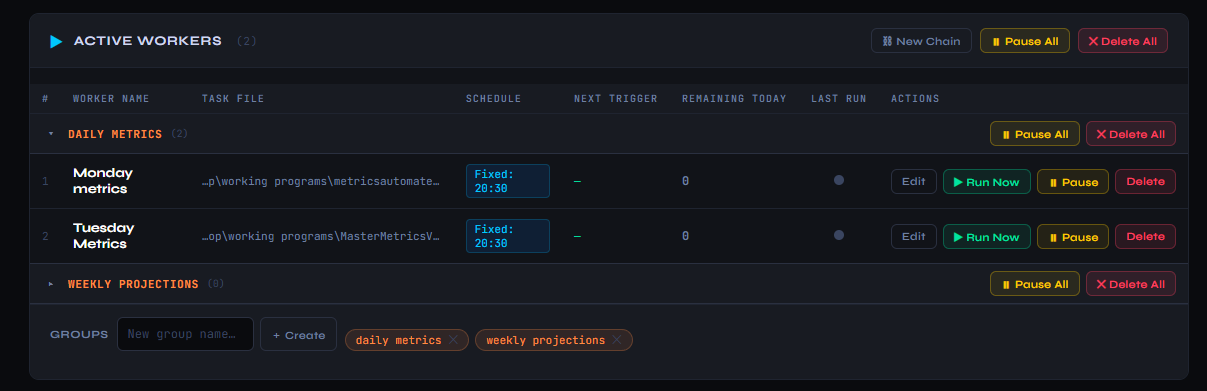
Conductor gives Claude direct, persistent control of a local task runner. Tell Claude what you want automated; it creates the scheduled workers, builds multi-step pipelines, wires up email reports, fires test runs, and reads back the logs when something fails — all through conversation. A web dashboard at 127.0.0.1:5000 runs alongside it for humans who want to peek at status, click pause, or hand-edit a worker.
Originally built to automate warehouse reporting workflows (the daily ShipExec metrics pull) and now general-purpose: any Python / batch / shell script, any schedule, any chain.
The MCP server lives in this repo (
server.py) — the thin layer that exposes Conductor's REST API as Claude tools. It's bundled and auto-registered on install, so most users won't need to touch it directly. The separate conductor-mcp repo is deprecated — it holds an older copy without the auto-launch race protection.
Claude Integration
Conductor registers itself as an MCP server in Claude Desktop on first launch. After restarting Claude Desktop once, Claude has 21 tools for full control:
Example conversation:
You: Run my metrics script every night at 8:30 PM and email me the report
Claude: I'll set that up using the Run + Email template. (creates the worker, configures the schedule, wires up Gmail, fires it to test) Done — worker "Daily Metrics Report" is live. Check your email for the test run.
You: That uptime check keeps failing. What's going on?
Claude: (pulls the last 10 runs, reads the error logs) The site returned a 503 three times in the last hour. The SSL certificate expired yesterday. Here's the full error from the last run...
You: Chain my backup script and cleanup script together. Run backup first, then cleanup after it finishes. Every day at 2 AM.
Claude: *(creates a chain with stage 0 = backup, stage 1 = cleanup, cron schedule "0 2 * * ") Chain "Nightly Maintenance" created with 2 steps. Backup runs first, cleanup runs after it succeeds.
How it works:
- Install Conductor (Windows installer or from source)
- Conductor writes its MCP entry to Claude Desktop's config on first launch
- Restart Claude Desktop once
- Claude now controls Conductor through natural language — create workers, build chains, fire tasks, check logs, send emails
Features
- Claude-Controlled — 21 MCP tools let Claude create workers, chains, groups, templates, and more. Non-technical users can automate anything through conversation.
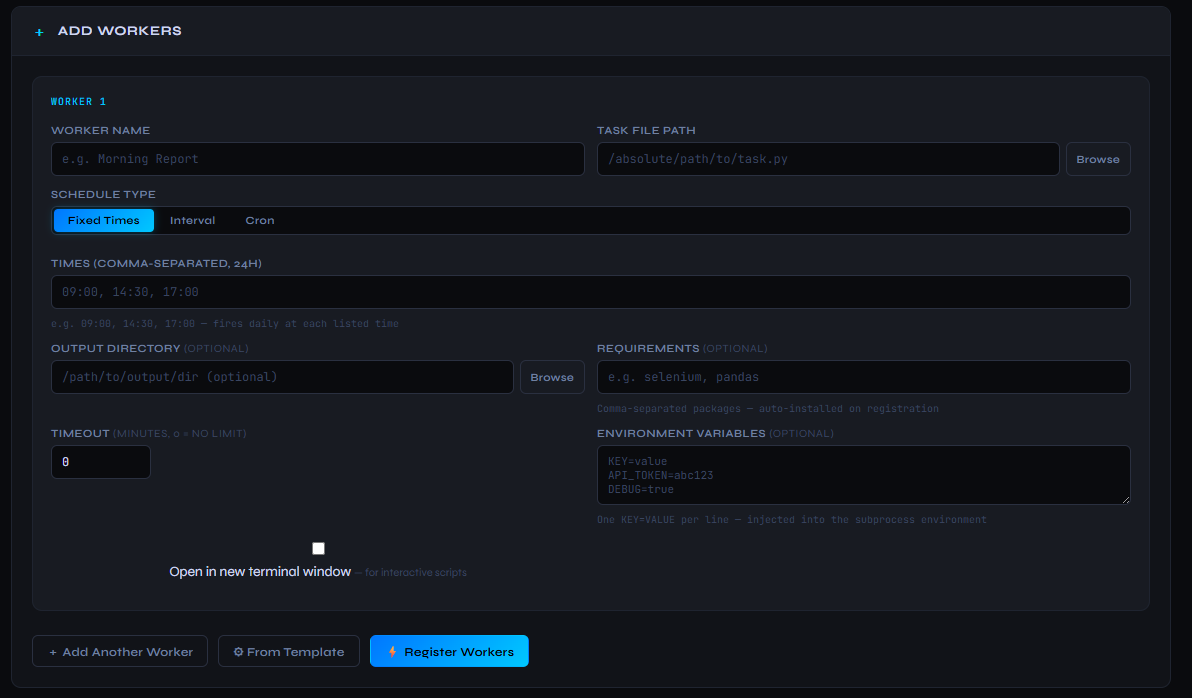
- Flexible Scheduling — Fixed times (
09:00, 14:30), intervals (2h 30m), or cron expressions (0 9 * * 1-5with plain-English preview). - Task Support — Python (
.py), batch (.bat,.cmd), and shell (.sh) scripts. Selenium and GUI scripts run in a visible terminal window vianew_console. - Built-in Email — configure Gmail once, then any template or worker can send emails. Run + Email template for automated reports. Folder Watcher emails files on arrival. Uptime Check sends DOWN alerts. Worker notifications on success/failure.
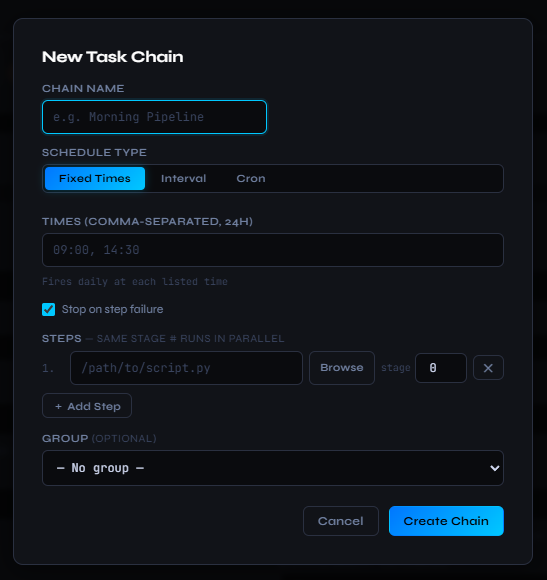
- Task Chains — multi-step pipelines with parallel execution. Same stage number = run in parallel. Stop-on-failure toggle.
- Worker Groups — collapsible named groups for organization. Bulk pause/delete per group.
- Run History — per-worker/chain history with status, duration, and error details. Colored dots show last run status at a glance.
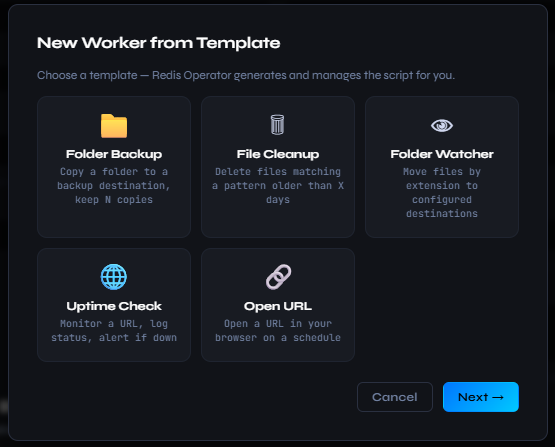
- Built-in Templates — Folder Backup, File Cleanup, Folder Watcher, Uptime Check, Open URL, Run + Email. Generated scripts are stdlib-only and self-contained.
- Per-worker Environment Variables — inject
KEY=VALUEpairs into subprocess environments. - Worker Timeout — kill and log workers that run over a set number of minutes.
- Email Notifications — per-worker/chain email alerts: Always, On Failure, or On Success.
- Import / Export — portable JSON snapshot of all workers, chains, and groups.
- Saved Profiles — save and load named worker configurations.
- Auto-start on Login — one-click Registry Run key install. No admin required.
- Auto-update Check — modal dialog when a newer release is available.
- System Tray Icon — right-click for Open Dashboard or Stop.
- AI Error Analysis — send error logs to Claude for diagnosis directly in the dashboard.
- Persistent State — SQLite database. Workers and chains restore on restart.
Add Workers Form
Built-in Templates
Task Chains
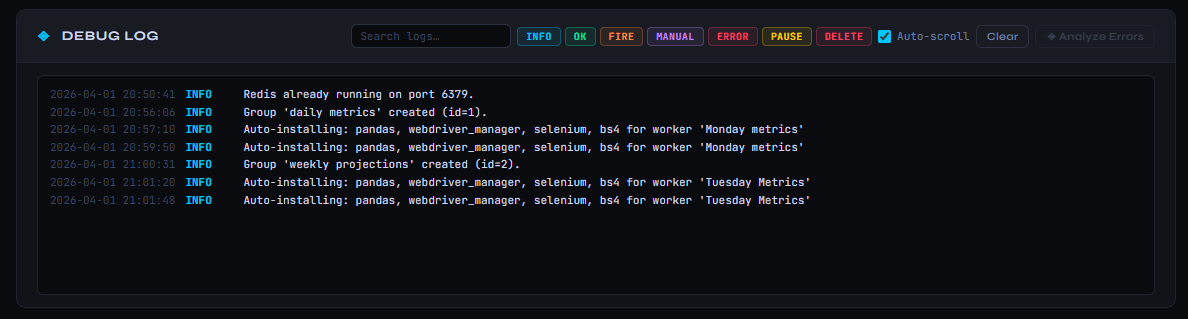
Debug Log
Installation (Windows)
Download and run Conductor_Setup.exe from the latest release.
- Requires Python 3 on the machine (see note below) — Conductor runs your
.pyworkers with it - Installs to
%AppData%\Conductor— no admin/UAC required - Adds Start Menu shortcut and optional desktop shortcut
- Optional auto-start at login
- Uninstaller included
Python is required for Python workers. Conductor itself ships as a self-contained executable, but it runs your
.pyscripts with a real interpreter found on your system (thepylauncher,PATH, or the Windows registry). If none is found, workers fail loudly with instructions — they are never reported as successful. SetCONDUCTOR_PYTHONto a full path to pin a specific interpreter..bat/.cmd/.shworkers do not need Python.
Setup from Source
Requirements
- Python 3.10+
git clone https://github.com/jarmstrong158/conductor.git
cd conductor
pip install -r requirements.txt
python launch.py
The dashboard opens at http://127.0.0.1:5000. Press Ctrl+C to stop.
Building the Installer
.\build.bat
Forces a full rebuild:
.\build.bat --rebuild
Output: Output\Conductor_Setup.exe. Requires Inno Setup.
Task File Format
Python (.py)
Scripts run as subprocesses:
if __name__ == "__main__":
    print("Task executed!")
Batch / Shell (.bat, .sh, .cmd)
Executed as subprocesses. The worker's output directory (if set) is used as the working directory.
Schedule Formats
| Type | Format | Example |
|---|---|---|
| Fixed | HH:MM or HH:MM,HH:MM | 09:00, 14:30, 17:00 |
| Interval | Xh Ym | 2h 30m, 1h, 45m |
| Cron | 5-field crontab | 0 9 * * 1-5 (weekdays at 9am) |
Task Chains
Chains run multiple scripts in sequence. Each step has a stage number — steps with the same stage run in parallel, stages execute in order. Stop on failure halts the chain when any step fails.
Stage 0: backup.py  ──┐
Stage 0: cleanup.py ──┤  (both run at once)
                      ↓
Stage 1: report.py    (runs after both finish)
Templates
| Template | What it does | Email capability |
|---|---|---|
| Folder Backup | Copy folder, keep N backups | Summary email |
| File Cleanup | Delete old files by pattern | Summary email |
| Folder Watcher | Move/email files by extension | Per-rule: move, email, or both |
| Uptime Check | Monitor URL, log status | Alert email on DOWN |
| Open URL | Open URL in browser | — |
| Run + Email | Run script, email output file | Sends output as attachment |
All generated scripts use Python stdlib only.
Architecture
conductor/
├── launch.py          # Entry point — Flask, browser, tray, MCP registration
├── app.py             # Flask backend + APScheduler + SQLite
├── server.py          # MCP server for Claude Desktop
├── CLAUDE.md          # Context file for Claude Code / Desktop
├── static/
│   └── index.html     # Frontend — HTML + CSS + JS (no frameworks)
├── tasks/
│   └── example_task.py
├── templates/
│   └── generated/     # Auto-generated template scripts
├── build.bat          # One-click installer build
├── build_icon.py      # Generates conductor.ico
├── conductor.spec     # PyInstaller spec
├── installer.iss      # Inno Setup script
└── conductor.db       # SQLite database (auto-created)
| Layer | Technology |
|---|---|
| Backend | Python 3, Flask |
| Scheduling | APScheduler (BackgroundScheduler + MemoryJobStore) |
| Persistence | SQLite (WAL mode) |
| Frontend | Vanilla JS, single HTML file |
| AI Integration | Claude via MCP (21 tools) + Anthropic API (error analysis) |
AI Error Analysis
The debug log includes an Analyze Errors button. When ERROR entries are present, click it to send them to Claude for diagnosis. Requires an Anthropic API key in .env:
ANTHROPIC_API_KEY=sk-ant-...
Example — before / after:
Raw error in the debug log:
[ERROR] worker "Daily Metrics Report" exit code 1
Traceback (most recent call last):
  File "C:\scripts\metrics.py", line 142, in <module>
    driver.find_element(By.ID, "report-table").click()
  File ".../selenium/.../webdriver.py", line 830, in find_element
    raise NoSuchElementException(message)
selenium.common.exceptions.NoSuchElementException: Message: no such element:
Unable to locate element: {"method":"css selector","selector":"[id="report-table"]"}
Claude's diagnosis (one click later):
The script is failing on a
find_elementcall before the page has finished loading — Selenium is racing the DOM. The element#report-tableis rendered after an XHR completes. Two fixes, in order of preference:
- Wrap the lookup in a
WebDriverWait(driver, 10).until(EC.presence_of_element_located((By.ID, "report-table")))so it polls until the element exists.- If you don't want to import the wait helpers, a
time.sleep(2)before the click will work but is brittle. The traceback shows this happened on the first run after a ShipExec UI change yesterday — they may have also renamed the element. Verify the ID is stillreport-tablein DevTools before adding the wait.
Email Setup
Click 📧 Email in the header to configure Gmail credentials. Requires a Gmail App Password (2-Step Verification must be enabled first). Credentials are stored locally in .env and never transmitted except to Gmail's SMTP server.
Once configured, all templates and worker notifications can send email.
API
| Method | Path | Purpose |
|---|---|---|
GET | /api/workers | List all workers |
POST | /api/workers | Register worker(s) |
PUT | /api/workers/<id> | Update worker |
POST | /api/workers/<id>/pause | Toggle pause/resume |
POST | /api/workers/<id>/run-now | Fire immediately |
GET | /api/workers/<id>/history | Run history |
POST | /api/workers/<id>/assign-group | Assign to group |
DELETE | /api/workers/<id> | Delete worker |
POST | /api/workers/pause-all | Pause all workers |
DELETE | /api/workers/all | Delete all workers |
GET | /api/chains | List all chains |
POST | /api/chains | Create chain |
PUT | /api/chains/<id> | Update chain |
POST | /api/chains/<id>/pause | Toggle pause/resume |
POST | /api/chains/<id>/run-now | Fire immediately |
GET | /api/chains/<id>/history | Run history |
DELETE | /api/chains/<id> | Delete chain |
GET | /api/groups | List groups |
POST | /api/groups | Create group |
DELETE | /api/groups/<id> | Delete group |
GET | /api/profiles | List profiles |
POST | /api/profiles | Save profile |
GET | /api/profiles/<id> | Load profile |
DELETE | /api/profiles/<id> | Delete profile |
POST | /api/templates | Create from template |
GET | /api/export | Export all as JSON |
POST | /api/import | Import from JSON |
GET/POST | /api/email-settings | Email configuration |
GET | /api/service/status | Auto-start status |
POST | /api/service/install | Install auto-start |
POST | /api/service/uninstall | Remove auto-start |
GET | /api/update-check | Check for updates |
GET | /api/logs?since=N | Log entries |
GET | /api/status | Scheduler + database status |
GET | /api/browse?mode=file|dir | Native file picker |
License
MIT






